





 Shopify
 Stripe
 Slack
Slack Notion
 Google Workspace
 Confluence

What Is a Macha AI Agent? The Four Parts: Instructions, Tools, Triggers and Knowledge


Everything in Macha is built around the agent, so understanding how one is put together explains the rest of the platform. An agent has four parts, and once you see how they fit you can build most support workflows.
Key takeaways
- A Macha AI agent is built from four parts: plain-text instructions, tools from connected apps, triggers that start it automatically, and knowledge sources it can search.
- A Macha agent in interactive chat asks for confirmation before any write action, while an autonomous agent running from a trigger executes writes immediately.
- Adding a Ticket Created trigger moves a Macha agent from Chat mode to Autonomous mode, so it runs on every new ticket without anyone chatting with it.
- The worked WISMO agent combines order-status instructions, a Shopify get order tool, the Zendesk public reply tool, shipping-policy articles and a Ticket Created trigger.
- One Macha agent can hand work to specialist sub-agents nested up to 3 levels deep, so a team can run focused triage, WISMO and summarizer agents side by side.
A Macha AI agent is a configured AI worker built from four parts: plain-text instructions, tools from your connected apps, triggers that start it automatically, and knowledge sources it can search. With no trigger it runs only when you chat with it (chat mode); attach one trigger, such as Ticket Created, and it runs on its own (autonomous mode).
| Part | What it does | Example |
|---|---|---|
| Instructions | Tell the agent what to do, in plain language | "Summarize each new ticket and set three fields" |
| Tools | Actions it may take in connected apps | Get ticket, add public reply, Shopify get order |
| Triggers | Events that start it without you | Ticket Created, Slack mention, a schedule |
| Knowledge | Content it searches before answering | Zendesk Help Center, a crawled website, uploaded PDFs, Notion |
What does a Macha agent look like in 90 seconds?
What are the four parts of a Macha agent?
Think of an agent as a teammate you configure. You tell it what to do (instructions), give it the abilities to do it (tools and triggers), and the information to do it well (knowledge). That's the whole model.
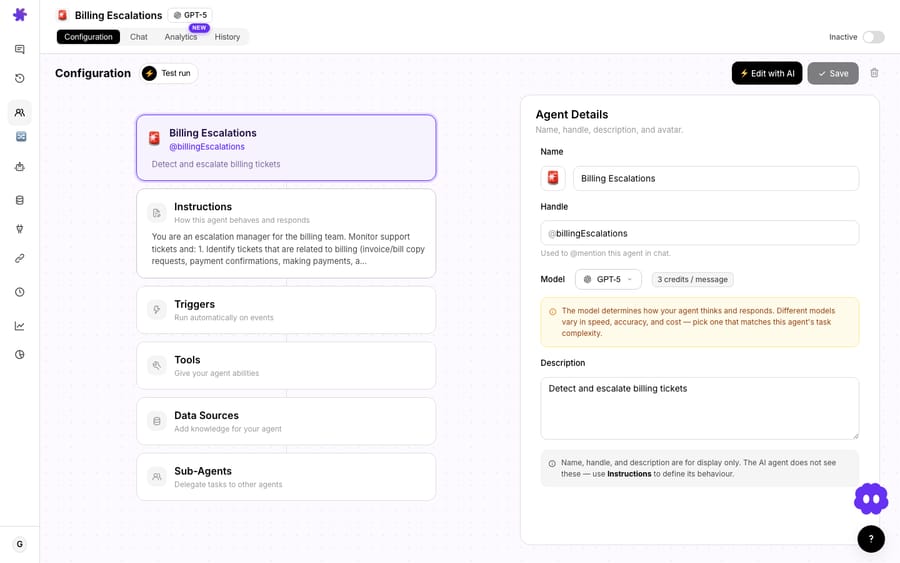
The configuration screen mirrors this exactly: the left panel shows the agent's full setup — Instructions, Triggers, Tools, Data Sources, Sub-Agents — and the right panel shows the details of whatever you select. Here are the four parts one at a time.
1. Instructions: what you want it to do
This is plain text. You write, in normal language, what the agent should do — for example, "Read each incoming ticket, write a short summary, and update these three fields." No code, no flowchart. The instructions are the single most important part of an agent, because they're what the AI actually reads to decide how to behave. Clear, specific instructions make a good agent; vague ones make a flaky one.
2. Tools: the actions it can take
Tools are the things an agent is allowed to do. Get a ticket, update its fields, set tags, post a reply, look up an order in Shopify, issue a refund in Stripe. You give each agent exactly the tools it needs from your connected apps — and only those. The available tools come from your connectors, plus any custom tools you've built. Tools are what turn a chatbot that talks into an agent that acts.
3. Triggers: when it runs on its own
Triggers are events from your connected apps. When one fires — a ticket is created, a comment is added, a status changes — the agent starts working automatically. Triggers are what make an agent autonomous: instead of you asking it to do something, the event does. An agent with no triggers only runs when you chat with it; add a "Ticket Created" trigger and it runs on every new ticket without you. Triggers can also be a Slack mention, a scheduled cron or a custom webhook, and the Agents list tags each agent as Chat mode (blue) or Autonomous mode (orange) so you can see which is which.
4. Knowledge: what it can read
You can point an agent at data sources: your Zendesk Help Center, a crawled website or single web page, uploaded files (PDFs, Word docs, spreadsheets, CSVs), or live sources such as Google Workspace, Notion and Confluence that the agent reads fresh every time. The agent can search the entire source, or you can pin it to specific documents if you know exactly what it should use. Knowledge is what lets the agent answer accurately from your content instead of guessing.
How does an agent decide what to do?
Here's the part that makes "agent" more than a buzzword. When an agent gets a request, it doesn't follow a fixed script — it reasons:
- It reads the request (a chat message, or a triggered ticket).
- It looks at the tools and knowledge it has.
- It decides the next step on its own — maybe search knowledge, maybe call a tool.
- It acts, looks at the result, and decides what to do next, until the job's done.
So a ticket-summarizer agent, asked to help with a ticket, will pick the get ticket tool itself, retrieve the ticket, write the summary, and then move to update the fields — all without you spelling out the sequence.
When does an agent ask for confirmation before acting?
There's one important safety distinction in how agents act:
- In chat (interactive), any write action — editing, updating, deleting — pops a confirmation first. The agent says "I'm about to update these fields, okay?" and waits for you to click Confirm or Cancel. Read-only steps like fetching or searching run without asking.
- In autonomous mode (the agent running from a trigger), there's no human in the loop, and write actions execute immediately. That's the point of autonomy, which is why you scope an autonomous agent's tools carefully and test it in chat before you attach the trigger.
(More on this in autonomous mode vs. interactive chat.)
What workflows can you build from the four parts?
Because the four parts are independent, you can compose almost any workflow:
- A triage agent: instructions to classify + tools to tag and assign + a "ticket created" trigger.
- A WISMO agent: instructions to answer order-status + a Shopify lookup tool + your Help Center knowledge.
- A summarizer: instructions to summarize + an internal-note tool + a "ticket created" trigger.
Same four building blocks, different combinations. And you can run many agents side by side, each focused on one job — even have one agent hand off to specialist sub-agents, nested up to 3 levels deep.
What does a real agent look like end to end?
To make the four parts concrete, here's a "where's my order?" (WISMO) agent:
- Instructions: "When a customer asks where their order is, find the order number in the ticket and look it up. Reply with the current status and tracking link. If there's no order number, ask for it. If the order looks lost or badly delayed, escalate to a human."
- Tools: a Shopify get order tool (to look it up) and the Zendesk public reply tool (to respond).
- Knowledge: your shipping-policy help-center articles, so it explains timelines accurately.
- Trigger: Ticket Created — so it runs on every new ticket; per its instructions, it only acts on the order-status ones.
Four parts, one job, fully automated. Swap the instructions and tools and the exact same structure becomes a refund handler, a triage agent, or a billing assistant — which is why "agent" is the only concept you really need to learn.
Frequently asked questions
What is a Macha AI agent? A configurable AI worker built from four parts: instructions (what to do), tools (actions it can take), triggers (events that start it), and knowledge (what it can read).
How is it different from a chatbot? A chatbot follows a script and mostly talks. An agent reasons over your tools and knowledge and takes real actions — and can run autonomously on triggers.
Do I need to code to build one? No. Instructions are plain text, and tools, triggers and knowledge are toggles and connections. Build with AI can also write the first version for you.
Will an agent change things without asking? In chat, no — write actions ask for confirmation. In autonomous mode (triggered), yes — it acts on its own, so you scope its tools deliberately.
Can one agent do everything? It can, but focused agents (one job each) are easier to tune and trust — and they can delegate to sub-agents.
How do you build your first agent?
A Macha agent is just four parts working together: instructions tell it what to do, tools let it act, triggers decide when it runs, and knowledge keeps it accurate. Get those right and the agent reasons through the rest — The fastest start is Build with AI: describe the job in plain language and Macha sets the name, instructions, tools, triggers and sub-agents from your connected apps. You can also start from a template or build one by hand.
Build your first agent: describe what you want and Macha sets it up. $50 of free usage, no credit card required. Start free.






