





 Shopify
 Stripe
 Slack
Slack Notion
 Google Workspace
 Confluence

What Is a Trigger on Macha? How AI Agents Start Themselves


A trigger is an event in a connected app that automatically starts one of your Macha agents. It is the piece that turns an agent you chat with into one that works on its own.
Key takeaways
- A trigger on Macha is an event in a connected app, such as a new Zendesk ticket, a Slack mention or a webhook, that starts an agent with no confirmation step.
- Without a trigger a Macha agent only runs when someone chats with it; adding a trigger makes the agent run autonomously whenever the event fires.
- Macha's Zendesk trigger events include New Ticket, Customer Reply, Status Changed, Priority Changed, Ticket Assigned, Ticket Closed and Messaging.
- A Macha custom webhook trigger generates a unique URL and a signing secret, so a system without a built-in connector can still start an agent.
- Scheduled triggers start a Macha agent on a cron schedule that fires at most once an hour and are included on paid plans, not the $50 free trial.

A trigger on Macha is an event in a connected app, such as a new Zendesk ticket, a Slack mention or an incoming webhook, that automatically starts one of your agents with no one asking it to. Without a trigger an agent only runs when someone chats with it; with one, it works in the background the moment the event fires.
What does a trigger look like in 30 seconds?
How does a trigger work?
An event happens somewhere, and your agent starts. When you add a trigger to an agent, you're saying "when this happens, run." The agent receives the event's data as context and acts on its instructions.
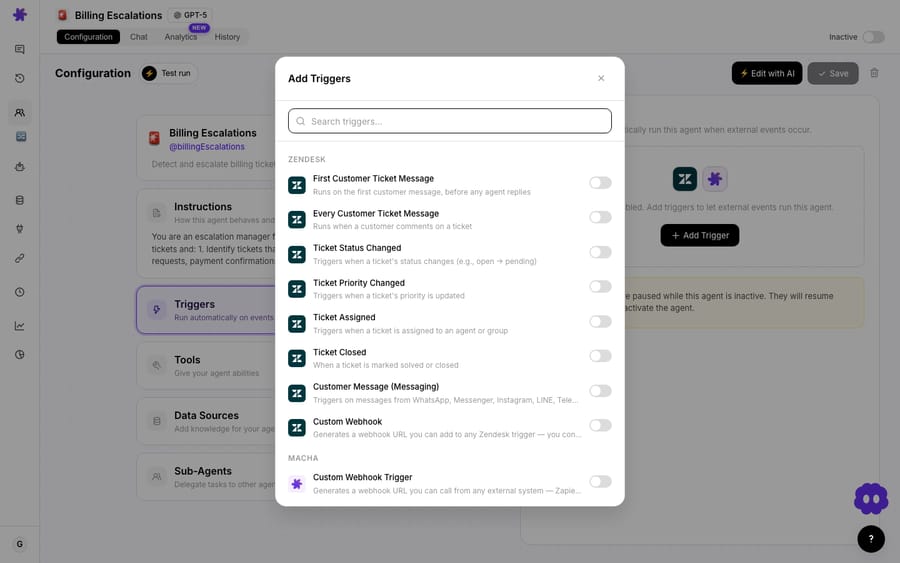
The triggers available come from your connected apps. The main types:
| Trigger type | Examples | Fires when |
|---|---|---|
| Help-desk event | Zendesk New Ticket, Customer Reply, Status Changed, Priority Changed, Ticket Assigned, Ticket Closed, Messaging | Something changes on a ticket or conversation |
| Chat event | Slack App Mention, Direct Message | Someone mentions or messages the Macha bot |
| Custom webhook | Any system that sends outgoing webhooks | That system calls the unique URL Macha generates |
| Scheduled | A daily summary or periodic check | Its cron schedule comes due (at most once an hour) |
- A new Zendesk ticket. When a ticket is created, the agent reads it and processes it automatically. This is the core of support automation, and the same kind of event exists on the other help desks Macha runs on: Zendesk, Freshdesk, Gorgias, Front, HubSpot or Intercom.
- A Slack mention. When someone mentions your agent in Slack, or sends it a direct message, that starts it.
- A custom webhook. For a system that isn't a built-in connector, Macha generates a URL and a signing secret, and any external event sent to that URL reaches your agent.
What changes when an agent has a trigger?
An agent without a trigger only runs when you chat with it. Add a trigger and it runs on its own when the event fires. That's the whole difference between an agent you operate by hand and one that works in the background:
- No trigger → interactive: you start it (chat).
- Trigger → autonomous: the event starts it.
(For the full comparison, see autonomous mode vs. interactive chat.)
Why do triggers matter for support automation?
Instructions tell an agent what to do and tools let it act, but a trigger decides when. "When a new ticket arrives, automatically" is the reason to put an AI agent on your help desk. Without a trigger you have a capable assistant you have to summon; with one you have a teammate that picks up work as it lands. A debounce window batches bursts of events so the agent runs once.
Frequently asked questions
What is a trigger in Macha? An event in a connected app (a new ticket, a Slack mention, a webhook) that automatically starts one of your agents.
Do I need a trigger to use an agent? No. Without one, the agent runs when you chat with it. A trigger makes it run automatically.
What can trigger an agent? Events from your connected apps, such as Zendesk ticket events and Slack mentions, custom webhooks for anything else, and schedules for time-based runs.
Can one agent have more than one trigger? Yes. You can send several different events to the same agent.
What happens when a trigger fires? The agent runs autonomously: it reads the event's data and acts according to its instructions, with no confirmation step.
Are scheduled triggers on the free trial? No. Event triggers work during the $50 trial; scheduled triggers are included on every paid plan.
Next: how to set one up.
Make an agent autonomous: add a trigger and let it run on every new ticket. $50 of free usage, no credit card required. Start free.






