





 Shopify
 Stripe
 Slack
Slack Notion
 Google Workspace
 Confluence

How Do You Set Up a Trigger on a Macha AI Agent?


A trigger makes a Macha agent run on its own when an event happens in a connected app, and setting one up takes about a minute. The step people skip is testing that it fires, which means firing the event once and checking the agent's History.
Key takeaways
- To set up a Macha trigger, open the agent's configuration screen, click Add Triggers in the Triggers section, and pick an event from your connected apps.
- To confirm a Ticket Status Changed trigger works, solve a ticket in Zendesk, then open the agent's History in Macha and look for a run logged for that event.
- Because a trigger makes an agent autonomous, write actions should stay on internal notes or confirmation for the first runs, then widen once the runs look right.
- An agent that updates the same ticket its trigger watches should add a unique tag and exclude that tag from the trigger's conditions to avoid loops.

To set up a trigger in Macha, open the agent's configuration screen, click Add Triggers in the Triggers section, pick an event such as Ticket Status Changed, then fire that event once and check the agent's History for a logged run.
| Step | Where | Result |
|---|---|---|
| 1. Add the trigger | Agent config, Triggers | Events from connected apps |
| 2. Pick the event | Add Triggers picker | The event on the agent |
| 3. Fire the event | Your help desk | A matching ticket |
| 4. Confirm the run | Agent History in Macha | A run logged for that event |
What does setting up a trigger look like?
How do I add a trigger to an agent?
On the agent's configuration screen, find the Triggers section and click Add Triggers. You'll see the events available from your connected apps. Pick the one that should start this agent. Events come from whichever help desk you've connected (Zendesk, Freshdesk, Gorgias, Front, HubSpot or Intercom) and from other connected apps.
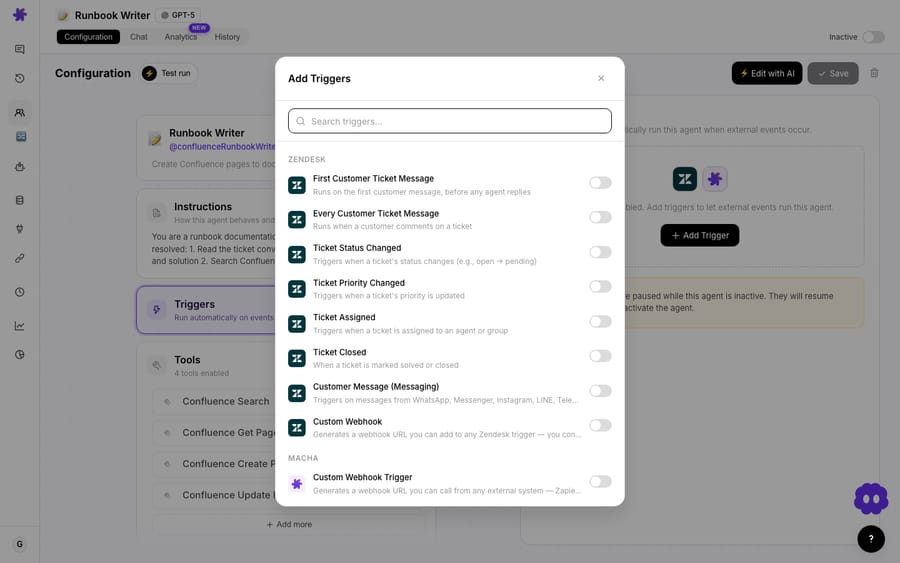
For example, choose Ticket Status Changed on Zendesk: from then on, whenever a ticket's status changes, the agent runs. Other common picks are Ticket Created, Comment Added and Priority Changed. Which one to use is its own decision, covered in choosing the right trigger.
How do I test that the trigger fires?
Don't assume it works. Verify it with two steps:
- Fire the event. For a Ticket Status Changed trigger, go to Zendesk and solve a ticket (that changes its status).
- Check the agent's History. Back in Macha, open the agent and go to History. If the trigger worked, you'll see a run logged for that event.
That run confirms the status change fired the agent; click in to see what it did.
What should I do before letting a triggered agent run on its own?
A trigger makes the agent autonomous, so add a few safeguards:
- Start safe. If the agent takes write actions, keep them on internal notes or confirmation for the first runs, then widen once you trust it.
- Watch the first real runs in History (and Agent Analytics) to make sure it's behaving.
- Pick the most specific trigger for your workflow so it doesn't fire more than it should (more in trigger best practices).
- Stop loops with a tag. If the agent updates the same ticket its trigger watches, have it add a unique tag and exclude that tag from the trigger's conditions.
Frequently asked questions
Where do I add a trigger? On the agent's configuration screen, in the Triggers section. Click Add Triggers and pick an event.
How do I know the trigger is working? Fire the event (for example, change a ticket's status) and check the agent's History for a logged run.
Can an agent have multiple triggers? Yes. You can send several events to the same agent.
Will the agent act automatically once a trigger is set? Yes. On a trigger it runs autonomously, so test it first and start write actions safely.
Set your first trigger: add a "Ticket Created" trigger and watch your agent run on the next ticket. $50 of free usage, no credit card required. Start free.






