





 Shopify
 Stripe
 Slack
Slack Notion
 Google Workspace
 Confluence

What Do Zendesk Deletion Schedules Delete? Scope, Limits and Setup (2026)


Zendesk deletion schedules only delete archived tickets, closed for more than 120 days, and without the ADPP add-on you get one active schedule per data type. We built one through the API and found that a 201 response doesn't prove every condition you sent was saved.
Key takeaways
- Zendesk ticket deletion schedules only delete archived tickets, defined as tickets closed for more than 120 days, whatever conditions you add to the schedule.
- In a Zendesk API test on 28 August 2026, a status condition sent alongside a valid duration returned 201 but was silently dropped from the stored deletion schedule.
- Zendesk deletion schedule durations use ISO 8601 format, so two years is P2Y and thirty days is P30D; a plain number like 730 returns an invalid duration error.
- Zendesk deletion schedules start removing eligible tickets within 72 hours of meeting the criteria and delete up to 200,000 tickets per account per day.
- Without the Advanced Data Privacy and Protection add-on, Zendesk allows one active deletion schedule per data type; with ADPP, up to 10 ticket deletion schedules can be active.

A Zendesk ticket deletion schedule only ever deletes archived tickets, meaning tickets closed for more than 120 days, and without the Advanced Data Privacy and Protection (ADPP) add-on you get one active schedule per data type. We built one on our own instance and found a second thing worth passing on: the rule Zendesk stores isn't always the rule you sent.
| Question | Answer (Zendesk docs, checked 24 Sept 2026) |
|---|---|
| Which tickets can a schedule delete? | Archived only: closed for more than 120 days |
| How fast does it start? | Within 72 hours of a ticket meeting the criteria |
| How many per day? | Up to 200,000 tickets per account |
| Active schedules | 1 per data type; up to 10 with the ADPP add-on |
| Condition logic | "All" only; "Any" and unlimited conditions need ADPP |
| Plans | All Suite plans (Team to Enterprise Plus); Support Team, Professional and Enterprise |
| Undo | None: deleted archived tickets can't be restored |
Neither finding is a disaster. Both change how you should check your work.
What happened when we created a deletion schedule through the API?
We created a ticket deletion schedule on our developer instance through the API, deliberately inactive, with two conditions: the ticket is closed, and it hasn't been updated in two years. Zendesk returned 201 Created. Then we read the record back.
The stored schedule had one condition. The status test was gone.
conditions stored: {
 "all": [
  {
   "field": "duration_since_last_update",
   "operator": "greater_than",
   "value": "P2Y"
  }
 ],
 "any": []
}
No error, no warning, no field in the response saying anything had been ignored.
Our first reading of that was wrong, and the correction is the most useful thing here. We assumed the saved rule now meant "any ticket older than two years", which would be alarming. It doesn't, because a ticket deletion schedule never had that reach. Zendesk's guide to creating ticket deletion schedules is explicit: "Deletion schedules delete only archived tickets, which are tickets that have been closed for more than 120 days."
So the status condition we sent was redundant. The schedule was already scoped to closed-and-archived tickets before we added it, and Status isn't among the condition fields Zendesk lists for this object. The schedule we created does what its description says and nothing wider.
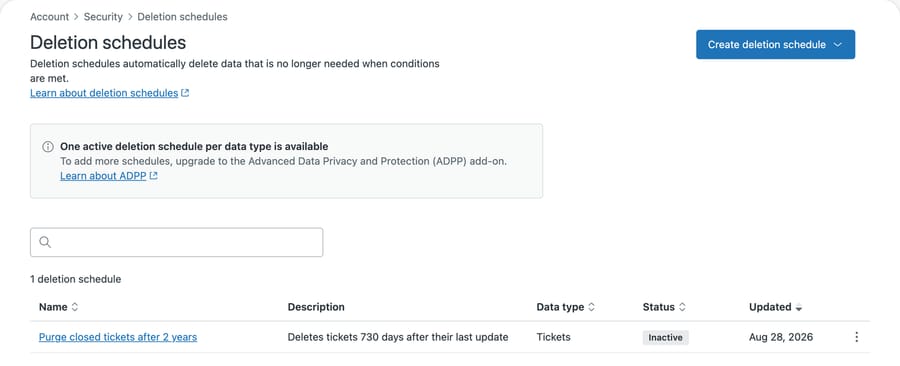
The name we gave it and the description Zendesk generated agree, as it turns out, because the scope was closed tickets all along. What the list page doesn't show is that we asked for a second condition and didn't get it. Nothing on this screen would tell you.
Does the Zendesk API reject bad deletion conditions or drop them?
Both, depending on the field. It'd be easy to conclude Zendesk quietly discards anything it doesn't like, and the distinction matters if you want to trust anything you build here. We ran three probes against the same endpoint.
Sending a tags condition alongside the duration returned an error and created nothing:
{"error":"RecordInvalid","details":{"base":[{"description":"Invalid rule target: tags"}]}}Sending status on its own, with no duration, also returned an error, naming exactly what was missing:
Invalid condition - duration_since_last_update / greater_than / value ,
duration_since_created_at / greater_than / value is required.
Sending status together with a valid duration returned 201 and stored the schedule without the status.
Three inputs, three different behaviors, and the interesting one is tags.
Tags is on Zendesk's documented list of conditions for a ticket deletion schedule. Sent to the API as a rule target named tags, it came back rejected. We haven't established why: the API may expect a different field name than the UI label suggests, or the two surfaces may simply diverge here. What we can say is that a condition the documentation offers didn't work under the name we tried, and the error gave no alternative.
status behaved differently again. It isn't on the documented list. The API neither rejected it nor kept it: the request succeeded and the schedule was stored without it.
That's the finding worth carrying away, and it's about validation, not danger. A documented field errored, an undocumented field was silently discarded, and both requests looked successful enough to move on from. If you build schedules programmatically, a 201 doesn't tell you your conditions survived.
Conditions are also entitlement-limited. Without ADPP, ticket schedules use "All" logic only; with it, Zendesk says you can mix All and Any and "there is no limit to the number of conditions you can add." For end-user deletion schedules the guide is stricter: without the add-on you can add one condition beyond the required duration. Worth knowing when you plan a policy, though it doesn't explain what we saw, since we sent exactly one additional condition.
That's an instance observation, reproduced three times on 28 August 2026. We're not claiming Zendesk documents this behavior or that it holds on every account. We're claiming that if you build a deletion schedule and assume your conditions were saved, you should check, because on our account one of them wasn't.
How do you confirm what a deletion schedule actually stored?
Read it back, every time. The Admin Center makes this visible if you open the schedule, which is what the read-back looks like without an API client:
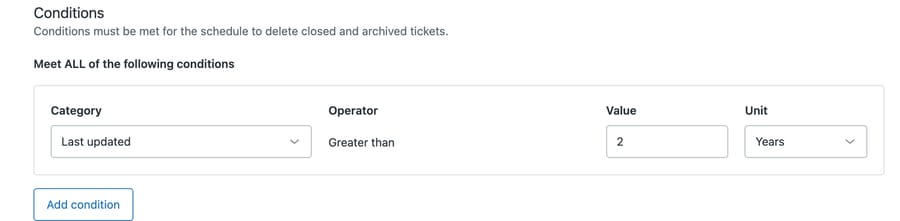
One condition row where we sent two. The line above it is the scope statement worth reading twice: conditions must be met "for the schedule to delete closed and archived tickets". That sentence tells you the whole feature only ever touches tickets that are already closed.
The practical rule is short. After you create or edit a deletion schedule, fetch it again and compare the conditions to what you sent. In the API that's a single GET on the schedule id. In the Admin Center it means reopening the schedule and reading the conditions rather than trusting the confirmation toast.
This is ordinary defensive practice with any API, and it costs one request. What it catches is a schedule that's wider than you designed. That's the direction that matters: the archived-only envelope is fixed, but inside it a lost Brand or Form condition means the rule sweeps every brand's archived tickets instead of one brand's. Our own dropped condition happened to be redundant. A dropped restricting condition wouldn't be.
The same logic argues for creating every schedule inactive, as we did, and activating it only after you've read back what was stored and confirmed the record matches your intent. Zendesk lets you save an inactive schedule, which is the whole point of the flag.
Which conditions and durations does a ticket deletion schedule accept?
The duration isn't a number of days. It's an ISO 8601 duration, so two years is P2Y and thirty days is P30D. We established that from the API's own responses rather than from the reference: passing 730 returns "The provided time duration is invalid", which is accurate and unhelpful, and P2Y was accepted.
There are two duration fields. duration_since_last_update measures from the last activity on the ticket. duration_since_created_at measures from when it was opened. A long-running ticket that people are still replying to is old by the second measure and young by the first. For retention you almost always want the first. A ticket somebody touched last week is current, whenever it started.
Zendesk's guide to creating ticket deletion schedules lists what the condition builder offers: Last updated, Created at, Custom fields, Attachment, Brand, Support type, Form, Group, Type, Requester, Organization, and Tags. Status isn't on that list, which fits a scope that's already fixed to archived tickets.
Two operational numbers from the same page are worth knowing before you activate anything. Schedules "start to delete eligible tickets within 72 hours of meeting the defined criteria", so nothing happens the moment you save. And "up to 200,000 tickets per account per day will be deleted", which is the ceiling on how fast a large cleanup drains.
The object types are enumerated in an error message if you omit the object field, which is the fastest way to discover them:
deletion_schedule.object must be one of these: zen:ticket, zen:user,
zen:bot_only_conversation, zen:attachment, zen:custom_object:product_registration
Note the last entry. Custom objects appear in that list by name, so the set is account-specific. If you've built custom objects, they get their own deletion schedules, and if you haven't, that entry looks different on your instance.
What does the ADPP add-on change, and why is it gated?
The page sits under Account then Security in the Admin Center, which isn't where most people look for retention. Above the list, our instance shows a notice:
"One active deletion schedule per data type is available. To add more schedules, upgrade to the Advanced Data Privacy and Protection (ADPP) add-on."
With ADPP, Zendesk's docs say you can activate up to 10 ticket deletion schedules (and up to 10 end-user schedules). Zendesk documents the mechanics in Managing deletion schedules and the ticket-specific setup in Creating ticket deletion schedules.
One active schedule per data type is enough for a simple retention policy: delete tickets after N years, delete attachments after M. It stops being enough the moment your policy has exceptions, and real policies are mostly exceptions. Different retention for different brands. Shorter windows for a region with stricter rules. Keeping billing disputes longer than password resets.
Every one of those needs a second schedule for the same data type, and the second one is the paid one.
The incentive is legible. Complex retention requirements correlate closely with the accounts that have compliance obligations, and those accounts have budget. Zendesk prices the feature where the willingness to pay is. That's normal.
The practical consequence is what matters to you: if your retention policy has any exception in it, price the add-on before you design the policy, not after. Designing a multi-rule policy and then discovering you can run one rule is a worse sequence than knowing the constraint up front.
What does deleting a ticket actually do?
Two distinctions catch people out.
Deleting a ticket isn't the same as closing it. Closed is a terminal status; the ticket's still there, still searchable, still counted in storage. Deletion removes it. If your goal is to stop agents seeing stale tickets, views and status do that job. Deletion is for holding less data.
There's no undo. Zendesk states it plainly: "Deleted archived tickets can't be restored. Exercise caution when activating deletion schedules." This isn't the soft-delete you get elsewhere in the product. When a schedule removes an archived ticket, it's gone.
So get the scope right before you activate. A scheduled deletion runs unattended by design, and nothing prompts anyone to check it afterwards.
In what order should you set up a deletion schedule?
Build the query before you build the schedule. Search for the tickets your conditions describe and look at what comes back. If your rule is "not updated in two years", run that search first and check the result set is the one you meant to remove.
Then create the schedule inactive, read it back, and compare. Then activate.
That sequence takes a few extra minutes and it's the difference between a retention policy and an accident. It also gives you something to show an auditor, which is usually why the policy exists in the first place.
Related reading: our Zendesk security checklist for admins covers the settings that sit beside this one, and the Zendesk API guide covers the request patterns if you're scripting the check. If you want somewhere safe to try a schedule end to end, a sandbox is the right place, though it won't carry your production ticket volume unless you ask it to.
Common questions
Can I undo a deletion schedule after it has run? No. Zendesk's documentation says "Deleted archived tickets can't be restored." Treat activation as the irreversible step and check the schedule's scope before you flip it on.
Why did my condition disappear? On our instance, a status condition sent alongside a valid duration was accepted with a 201 and stored without the status. Status isn't one of the condition fields Zendesk lists for ticket deletion schedules, which is likely why. Read the schedule back after saving and compare, and if a condition is missing, rebuild the rule using the documented fields.
Do deletion schedules delete open tickets? No. Zendesk documents that they act only on archived tickets, meaning tickets closed for more than 120 days. A schedule that looks like it would sweep your whole instance can't reach anything still in play.
How many deletion schedules can I have? One active schedule per data type without add-ons. Zendesk's docs say the Advanced Data Privacy and Protection add-on raises that to up to 10 active ticket deletion schedules. Check what your own Deletion schedules page shows, since add-on entitlements vary by account.
Which Zendesk plans include deletion schedules? Zendesk lists them on every Suite plan from Team to Enterprise Plus, and on Support Team, Professional and Enterprise.
What format does the duration take? ISO 8601. P2Y for two years, P6M for six months, P30D for thirty days. A plain integer is rejected as an invalid duration.
Does a deletion schedule remove attachments too? Attachments have their own object type, zen:attachment, and therefore their own schedule. If your storage problem is file storage rather than ticket count, that's the schedule you want.
How does a retention window affect an AI agent?
Retention and automation pull in opposite directions. An AI agent answering from your ticket history works better with more history. A retention policy exists to hold less of it.
That tension doesn't have a clever resolution. What it has is a design decision: decide what the agent needs to learn from, and make sure your retention window is longer than that. If your agent's useful context is the last eighteen months of resolved tickets, a two-year window is fine and a six-month window quietly degrades it.
Macha sits on top of your existing Zendesk, so your retention policy stays where it is and keeps applying. How much that's worth to you depends almost entirely on how deep your archive is. Two years of resolved tickets is a corpus. Six months, after an aggressive retention policy, isn't, and no agent recovers what a schedule already removed. If you already run a long window and a maintained help center, you're in the good case here; if you're about to shorten one to save space, make that decision deliberately. Set the window from your compliance requirement first, then check what's left to work with, because finding out in the other order means finding out too late.
Worth knowing what your history can still answer before you set the window that removes it: start a free trial.






