





 Shopify
 Stripe
 Slack
Slack Notion
 Google Workspace
 Confluence

How Do You Use a Zendesk Sandbox for Testing? (2026)


A Zendesk sandbox is a copy of your account where you can test changes before they reach customers, but webhooks arrive switched off, emails are rewritten and changes do not copy back on their own. We created two on a Suite Enterprise instance in August 2026 to see exactly what comes across.
Key takeaways
- A Zendesk sandbox is created under Admin Center > Account > Sandbox, copies up to 10,000 tickets if asked, and arrives with webhooks and targets set to inactive.
- Support Enterprise includes one Zendesk sandbox and Suite Enterprise and Enterprise Plus include two, while Support Professional and Suite Growth and above can buy them as an add-on.
- A test sandbox created on 24 August 2026 with zero tickets copied reached Active in under two minutes, though Zendesk says a 100,000-ticket copy can take a week or more.
- Every Zendesk sandbox automatically gets two AI agents, one for messaging and one for email, and rewrites user email addresses to the @example.com domain.
- Zendesk caps sandbox replications at 10 a month, copies only the first 100 comments per ticket, and requires API tokens to be recreated in the sandbox.

To use a Zendesk sandbox, go to Admin Center > Account > Sandbox, create one with a name and up to 10,000 copied tickets, then switch its webhooks back on before you test anything that calls out, because Zendesk copies them inactive. Support Enterprise includes one sandbox and Suite Enterprise and Enterprise Plus include two; Support Professional and Suite Growth and above can buy them.
| Plan | Sandboxes included | Can buy more? |
|---|---|---|
| Suite Team, Support Team | 0 | No |
| Suite Growth, Suite Professional, Support Professional | 0 | Yes, as an add-on |
| Support Enterprise | 1 | Yes |
| Suite Enterprise, Enterprise Plus | 2 | Yes |
The more useful question is what a sandbox copies, because a test environment that quietly differs from production in three places will let you sign off a change that then behaves differently when it matters. So we made one and watched.
What happens when you create a Zendesk sandbox?
We created a sandbox named "Blog demo sandbox" on a Zendesk Suite Enterprise demo instance on 24 August 2026, took the copy-tickets option at zero, and recorded the screens as it went. It provisioned to Active in under two minutes, though that was with zero tickets copied. Zendesk's own range is wider: a simple copy takes "from a few minutes to a few days", and a copy with 100,000 tickets "can take up to a week or more to complete".
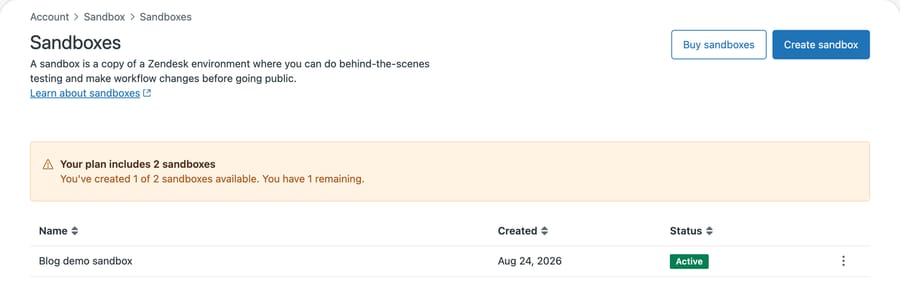
Two things happened on the way that are worth knowing before you try it.
Why does the sandbox counter look wrong while it provisions?
Immediately after submitting, the sandbox appeared in the list with a status of In progress, while the banner above it still read "You've created 0 of 2 sandboxes available. You have 2 remaining."
We wanted to know whether that was a one-off, so we did it again four days later with a second sandbox. Same disagreement, one row further down:
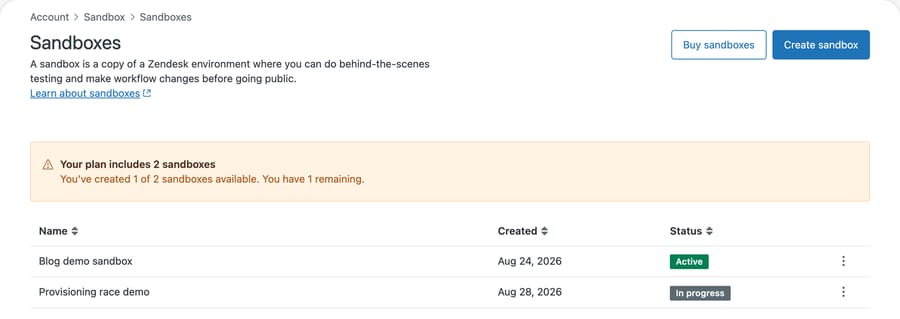
The banner counts one sandbox. The table underneath it lists two, the new one sitting at In progress. The counter is reporting completed provisioning, not rows created, and the gap between those two things is however long the copy takes.
If you submit, see a count that hasn't moved, and assume the request failed, you can burn a slot creating a duplicate. On a plan that includes two, that is the whole allowance gone in one sitting. Give it a minute before you retry.
Where is the sandbox page in Admin Center?
The feature has three names depending on where you are standing. The sidebar calls the section Sandbox. The breadcrumb reads Account › Sandbox › Sandboxes. Zendesk's documentation gives the location as Admin Center > Account > Sandbox > Environments.
The docs do not agree with each other either. The Creating article gives the location as Sandbox > Environments; Using and managing sandboxes gives it as Sandbox > Sandboxes. On our instance the Inspection screen sat under a different breadcrumb again, Account > Configuration management > Inspection. Guessing a path from a nav label is how you land on Zendesk's "Nothing to see here" page, which is what happened to us. Click through from the sidebar rather than typing a URL you inferred.
One more thing worth knowing if you script against this. GET /api/v2/account/settings.json returns a sandbox boolean in active_features, and it is easy to read as "is this account allowed sandboxes". It is not. The reference defines it as "Account has a sandbox", and we watched it behave exactly that way: false on an account entitled to two but with none created, then true the moment the first one finished provisioning. If you want the entitlement, read the Admin Center page. If you want to know whether one exists right now, the flag is fine.
What does the create sandbox form ask for?
Very little, which is part of the point.
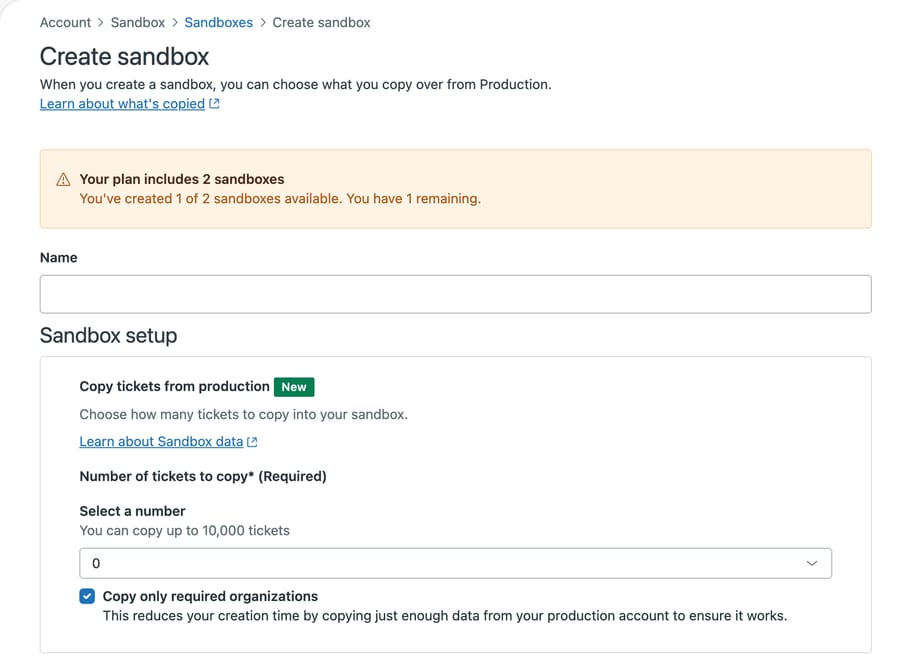
A name, and two decisions: how many tickets to copy, up to 10,000, and whether to copy only the organizations those tickets need. Zendesk labels the ticket-copying option New, so if you last made a sandbox some time ago it didn't exist then and you were getting configuration only.
Everything else about what comes across is fixed, and it is the part worth reading before you rely on the result.
What does a Zendesk sandbox copy, and what does it not?
Zendesk documents the replication list in full. The parts that change how you test:
Copied: groups, custom roles, shared views, shared macros, triggers and trigger categories, automations, agents, group memberships, support addresses, webhooks, and custom objects.
Arrives switched off: more than you would expect. Two entries carry the note "set to inactive in the sandbox by default": webhooks, and targets, the legacy mechanism deprecated in December 2024. Zendesk's About sandbox environments page adds two more: "Apps and EAP functionality in production are deactivated within the sandbox upon creation but can be manually enabled" and "Side conversations are deactivated within the sandbox upon creation but can be manually enabled". Side conversations arriving off is the quiet one, because a workflow that depends on them simply does nothing and looks like a bug in your test.
That default is sensible rather than a bug: a webhook that fired on creation would be pointing a test environment at your real downstream systems, which is worth reading next to our Zendesk setup notes on triggers and webhooks. But it means a test of "does my trigger fire the webhook" needs you to switch the webhook on first, and it is easy to conclude the trigger is broken when the webhook is simply inactive.
Copied but hollow: custom objects come across, and Zendesk is explicit that this "doesn't include custom object records, lookup fields related to custom objects, or legacy custom objects". So you get the schema and none of the rows, and the field that connects a ticket to a record doesn't come with it. If you are testing anything that reads a custom object from a ticket, you are rebuilding that link by hand.
Rewritten: support addresses, and brands. Brand names have to be unique across every Zendesk instance, so the About sandbox environments page states they "will be modified to contain a unique string" rather than copied exactly. Support addresses get the same treatment. Internal ones get the sandbox's subdomain. External ones are converted, so [email protected] becomes [email protected]. And if your default was an external address, the sandbox reverts to the original internal default instead. Email routing in a sandbox therefore isn't the email routing you have in production, which matters if the thing you are testing is email routing.
Mostly absent: apps. Only free Marketplace apps that need no authentication or setup are replicated. Anything paid, and anything that authenticates, is not there.
Not synced afterwards. A sandbox is a snapshot, not a mirror. Zendesk states that "no other replicated data can be updated after a sandbox is created" beyond subscriptions and the Configuration Management flow, and separately that "sandbox changes are not copied to the production instance". Work does not flow back on its own.
Can you move sandbox changes back to production?
This is the part people expect to be automatic and isn't.
Alongside Sandboxes, Admin Center carries a Configuration management area with Inspection, Snapshots, Compare snapshots and Deployments. The Inspection article now places it at Admin Center > Account > Sandbox > Inspection and lists it on Suite Growth, Professional, Enterprise and Enterprise Plus, and on Support Professional and Enterprise.
Zendesk's own pages disagree about which way it runs, and the disagreement is worth knowing before you plan around it. The Configuration management article says the feature "makes it easier for admins to manage the account and deploy changes from sandboxes to production accounts". The sandbox overview says the opposite: "However, is it possible to deploy configurations from production to your sandbox" [sic]. One thing is unambiguous in both, and it is the sentence that tells you the direction matters at all: sandbox trials "aren't counted as regular sandboxes and you can't deploy changes from sandbox trials to production", which only means anything if a regular sandbox can.
So: production to sandbox is the direction documented plainly. Sandbox back to production is documented in one place and contradicted in another, so don't bank on it. Worth noting that the Creating and Using-and-managing articles still call this the Configuration Management EAP (the Using article describes it deploying production changes to a sandbox), while the Inspection article no longer mentions early access, which is a fair part of why the documentation disagrees with itself. Confirm it on your own account before you make it the plan.
Without that, the honest workflow is: build it in the sandbox, prove it, then rebuild it in production from your own notes. That's fine, and it's what most teams do, as long as nobody's expecting a promote button.
What are the Zendesk sandbox limitations?
Zendesk publishes a limitations list that is more consequential than the copied list, because each one is a way your test quietly differs from production:
- Every user email is invalidated. Addresses are rewritten to the
@example.comdomain, so nothing you test can email a real person. That's safe by default, and the same page notes an administrator can reverse it by editing the addresses if you genuinely need to test delivery. - Only the first 100 comments per ticket come across. A long escalation arrives truncated.
- API tokens must be recreated. APIs are enabled, but your existing tokens don't travel.
- 10 replications a month. If you're refreshing a sandbox to track production, that's the ceiling.
- Two AI agents are created for you. Zendesk states that "when a sandbox is provisioned, two AI agents are automatically created for you, one for messaging and one for email". Worth knowing before you conclude an agent you didn't build is answering your test tickets.
That last one is the one people trip over, because it looks like something you set up.
Which Zendesk plans include a sandbox?
Sandboxes are Enterprise-shaped. Zendesk's availability note is precise: "Support Enterprise includes one sandbox. Suite Enterprise and Enterprise Plus include two sandboxes." Below that, "Support Professional and above and Suite Growth and above can purchase sandbox environments" as an add-on.
Spend the allowance and the page says so in red, with the Create sandbox button greyed out:
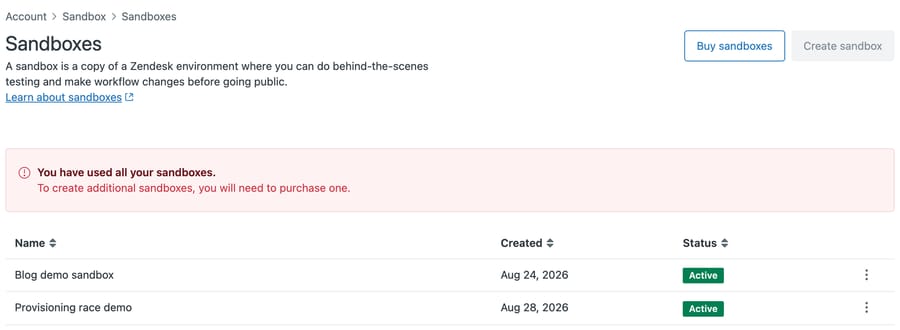
That is the same banner slot in a third state. Amber while the allowance has room, whether or not the count has caught up, and red once it is spent.
There is also a trial route worth knowing, because it is not obvious: on Suite Growth and Support Enterprise and above you can ask Zendesk Support for "a sandbox trial of a different plan or add-on with your existing account configurations". Those do not count against your allowance, and you can't deploy from them to production.
The incentive here is straightforward and worth seeing plainly. A safe place to test is most valuable to the accounts with the most configuration to break, and those are the accounts already paying most. Zendesk prices it accordingly. That is ordinary, and it has a practical consequence: on the tiers where an admin is most likely to be changing things without a safety net, there is no safety net unless somebody buys one.
When is a sandbox the wrong tool?
If what you are testing is a single trigger with no downstream effect, a deactivated trigger in production tells you more, faster, and against real data.
If what you are testing touches email routing, paid apps, or custom object records, the sandbox differs from production in exactly those places, and a green result there is not evidence.
The sandbox earns its keep on the changes that are hard to reverse and easy to get wrong: a routing overhaul, a permissions change, a bulk edit, or training somebody new who should be allowed to break things.
Common questions
Which plans include a Zendesk sandbox? Support Enterprise includes one. Suite Enterprise and Enterprise Plus include two. Support Professional and above, and Suite Growth and above, can buy them as an add-on.
Does a Zendesk sandbox copy tickets? Only if you ask it to, and up to 10,000. The option sits on the create form and is labeled New, so older sandboxes were configuration only.
Are my webhooks live in the sandbox? No. Webhooks are replicated but set to inactive by default, which stops a test environment calling your real systems. Turn them on deliberately. The same note applies to targets, the deprecated predecessor.
Do custom objects come across? The objects do; the records do not, and neither do lookup relationship fields pointing at them.
Can I push changes from the sandbox back to production? Not on its own. Zendesk states that sandbox changes are not copied to production. The Configuration management area, with Snapshots and Deployments, is the mechanism people reach for, but Zendesk's own pages disagree on whether it runs sandbox to production or only the other way, and two of them still label it an Early Access feature. Confirm it on your account before you plan a release around it.
How do I delete a sandbox? Admin Center → Account → Sandbox → Sandboxes. Zendesk notes that deleting removes all apps and any sharing agreements, and that on a standalone Support plan without sandbox access you will not be able to create a replacement.
Can you test an AI agent in a Zendesk sandbox?
A sandbox is a place to be wrong safely, which is a decent reason to point new automation at one first.
Macha runs on top of the Zendesk you already have. It reads the ticket, including custom field values and attachments, and can classify it, add an internal note, or post a public reply, using your existing triggers and webhooks as the entry point. Worth knowing given the above: because webhooks arrive inactive in a sandbox, an agent wired through them needs those switched on before a sandbox test means anything. It suits teams already committed to Zendesk who want to try an agent against their own configuration before it touches a live queue. Setup runs through the Zendesk integration, and billing is per ticket, so one thread with one person is one charge however many replies it takes.
Start your free trial and connect your Zendesk in a few minutes.






