Shopify
 Stripe
 Slack
Slack Notion
 Google Workspace
 Confluence

Zendesk vs. Help Scout (2026): Which Help Desk Should You Pick?


Zendesk is the deep, configurable desk built to scale to enterprise, while Help Scout is the simple, email-first desk a small team can run this week. The choice comes down to depth and scale versus simplicity and speed, and the AI pricing gap between them is wider than the seat prices suggest.
Key takeaways
- Help Scout suits small-to-mid teams at $25, $45 or $75 per user a month, while Zendesk Suite costs $55 or $115 per agent for automation, voice and scale.
- Help Scout moved to contacts-based pricing around November 2024, then brought per-user pricing back as the default with unlimited contacts on paid plans.
- Help Scout's AI Answers bot charges $0.75 per resolution, half the $1.50 committed rate that Zendesk's pricing page lists for Zendesk AI agents.
- Help Scout offers a free plan for up to 5 users, and puts unlimited AI Drafts and AI Summarize on its Plus and Pro plans only.
- On Capterra, Help Scout rates 4.6 out of 5 from 226 reviews against Zendesk's 4.4 from 4,081 reviews.
Pick Help Scout if you're a small-to-mid team that wants a fast, friendly, low-overhead desk: it costs $25, $45 or $75 per user a month and its AI Answers bot charges $0.75 per resolution. Pick Zendesk if you need automation, omnichannel, native voice and scale: $55 or $115 per agent a month for the Suite, with AI agents billed per automated resolution.
Which should you pick, Zendesk or Help Scout?
| If you are… | Pick |
|---|---|
| A small-to-mid team that wants to be live this week | Help Scout |
| Doing mostly email + chat with a personal tone | Help Scout |
| A SaaS/startup/SMB without a dedicated admin | Help Scout |
| Running high-volume support with complex routing/SLAs | Zendesk |
| Needing native voice / contact center | Zendesk |
| Scaling to enterprise, multi-brand, deep analytics | Zendesk |
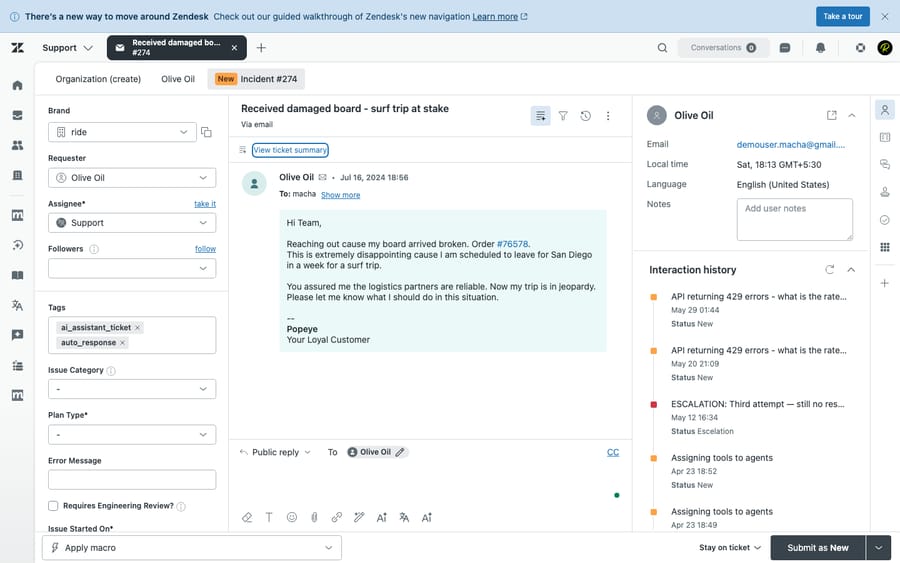
How we compared: pricing is checked against each vendor's official page (re-checked 24 September 2026), including Help Scout's return to per-user pricing. Features are checked against the products, and we ran Zendesk hands-on in a live test account (screenshot below). User sentiment comes from real G2, Capterra, and TrustRadius reviews. Macha is our own product, and we flag that wherever it comes up.
How much do Zendesk and Help Scout cost?
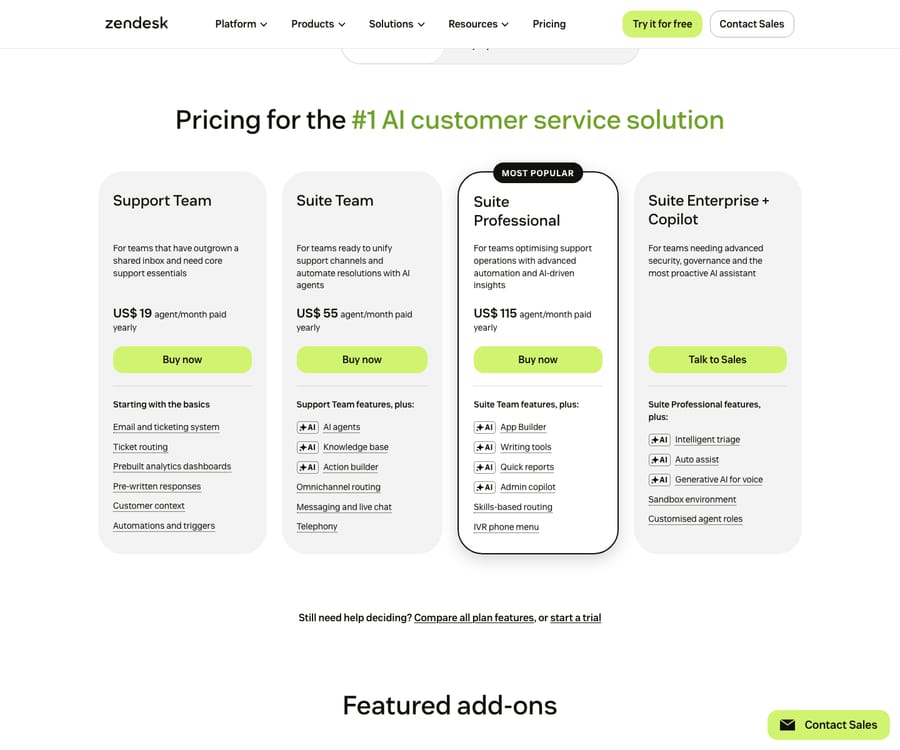
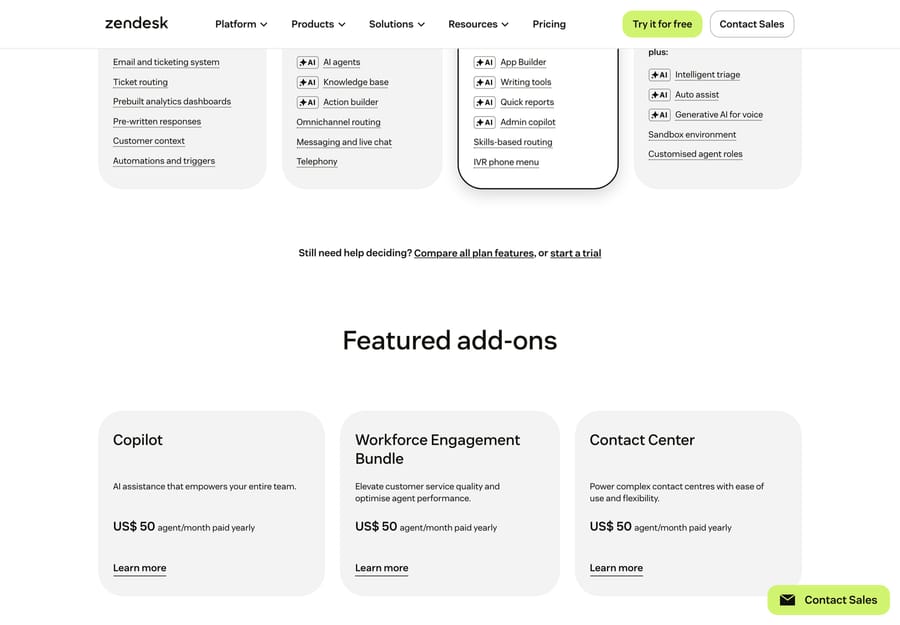
Zendesk Suite (per agent/month, annual): Support Team $19, Suite Team $55, Suite Professional $115, Enterprise contact sales. Copilot is a $50/agent add-on on Suite Professional and above, and Contact Center is $83/agent. Zendesk's pricing page says AI agents are included and billed per automated (verified) resolution, and lists the rate: $1.50 committed or $2.00 pay-as-you-go. Its plan table includes 5 automated resolutions per agent a month on Support Team and Suite Team and 10 on Suite Professional; Zendesk's help center describes that allowance as a monthly dollar amount of $2, $5 or $10 per seat depending on plan since 18 May 2026, capped at $5,000 a year. Source: Zendesk pricing.
Beyond the per-seat plans, Zendesk sells its AI and CX capabilities as separate add-ons, each priced per agent on top of your base plan:
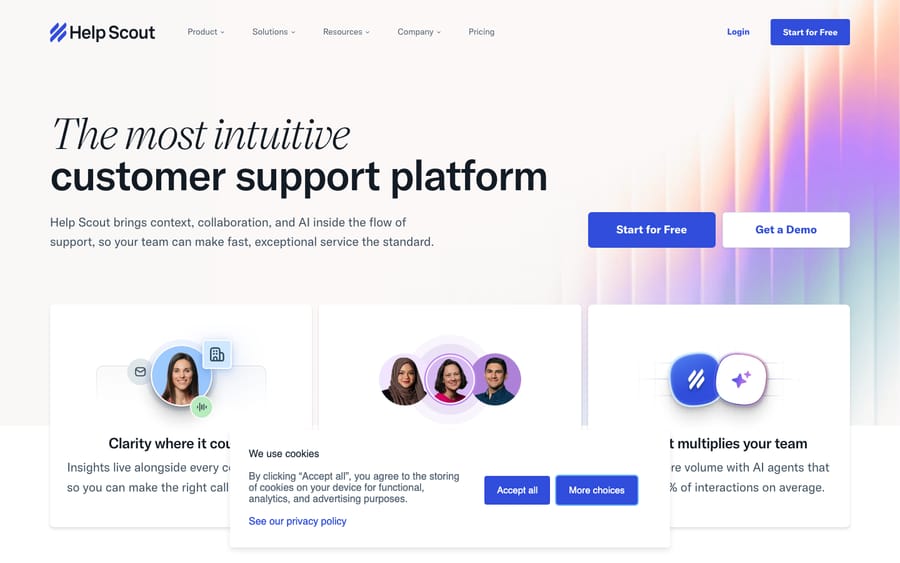
Help Scout (per user/month): Free (up to 5 users), Standard $25, Plus $45, Pro $75 (Pro has a 10-user minimum), about 16% less billed annually, with unlimited contacts on paid plans. Source: Help Scout pricing.
There's a story worth knowing here: around November 2024 Help Scout switched to a contacts-based model (pay by how many people you help, unlimited seats), got significant customer pushback, and brought per-user pricing back as the default. Some existing accounts still pay by contacts. Several comparison articles still quote contacts-based tiers as the only model; for a new customer, that's out of date.
The AI pricing is where Help Scout wins on cost, and the incentive behind each model is worth naming:
- Help Scout includes AI Assist on every paid plan and unlimited AI Drafts and AI Summarize on Plus and Pro. Its autonomous bot, AI Answers, costs $0.75 per resolution, with a 3-month free trial for new accounts.
- Zendesk charges $50/agent for Copilot (agent assist) and bills autonomous AI per verified resolution. At Zendesk's $1.50 committed rate, that's double Help Scout's $0.75, with the seat add-on on top.
Per-resolution pricing on both sides means each vendor earns more the more its bot closes, so both are motivated to count a resolution generously. At comparable seats Help Scout is cheaper, and its AI economics are friendlier, though, as below, Help Scout's AI is also lighter.
Which is better feature by feature?
| Capability | Winner | Why |
|---|---|---|
| Shared inbox & agent workspace | Help Scout | Email-style inbox, zero ticket jargon: faster for agents and friendlier for customers |
| Ease of use & setup | Help Scout | Live in hours, not weeks; no admin rabbit holes (its single biggest selling point) |
| Omnichannel (email/chat/voice/social) | Zendesk | True omnichannel incl. native voice/IVR; Help Scout is email-first (chat via Beacon, no native voice) |
| Automation / workflows | Zendesk | Triggers, automations, macros, skills-based routing, SLAs: far deeper |
| Native AI | Zendesk (depth) / Help Scout (value) | Zendesk's AI is more autonomous; Help Scout's is cheaper but lighter |
| Knowledge base & self-service | Tie (Help Scout for SMB) | Help Scout Docs is clean and quick; Zendesk Guide is more capable and multi-brand but heavier |
| Reporting / analytics | Zendesk | Explore + custom dashboards go deeper |
| Integrations | Zendesk | ~1,500+ marketplace apps vs Help Scout's ~100+ |
| Live chat widget | Zendesk (power) / Help Scout Beacon (simplicity) | Beacon blends chat + help articles elegantly; Zendesk messaging is richer |
| Scalability | Zendesk | Built for enterprise volume, multi-brand, governance |
| Collaboration | Help Scout | @mentions, private notes, collision detection, designed for tight teams |
The pattern: Help Scout optimizes for a small team's speed and a personal customer experience; Zendesk optimizes for depth, automation, and scale.
What are the strengths and weaknesses of each?
Help Scout strengths: fastest time-to-value; intuitive email-style UI; personal, human customer experience (no ticket numbers); transparent, lower pricing with AI Assist included and a cheap bot ($0.75/resolution); clean Docs + Beacon combo. Help Scout weaknesses: no native voice/phone; lighter automation, routing, and SLAs; shallower reporting; fewer integrations (~100); AI is more assistive than autonomous, and AI Drafts and Summarize need Plus or Pro.
Zendesk strengths: deep automations, routing, SLAs, multi-brand; true omnichannel incl. voice; 1,500+ integrations; the most advanced native AI of the two; enterprise-grade scale, security, governance, analytics. Zendesk weaknesses: steeper setup and learning curve; expensive once add-ons stack (Copilot, Contact Center, QA, WFM, per-resolution AI); can feel impersonal and heavy for a small team that just wants email.
What do real users say about Zendesk and Help Scout?
Both products rate well, but the base and the recurring complaints differ, and they map almost perfectly onto the depth-vs-simplicity story. (Ratings recorded June 2026; Help Scout's Capterra figure re-checked September 2026.)
| G2 | Capterra | Other | |
|---|---|---|---|
| Help Scout | 4.4 / 5 (~430) | 4.6 / 5 (226) | TrustRadius: small base (~5 reviews)* |
| Zendesk | 4.3 / 5 (~6,000+) | 4.4 / 5 (4,081) | TrustRadius 8.7/10 |
*Help Scout's TrustRadius base is tiny, so treat that platform's score as anecdotal, not representative. Its Capterra rating (4.6) edges Zendesk's (4.4), and Zendesk's far larger review base reflects a much bigger install footprint.
- Help Scout is praised for exactly what it sells: simplicity and a low learning curve. "Clear and intuitive design is what I like most. While beginners don't need instructions to get started, they are readily available" (Zofia M., Customer Success Lead, Capterra, Mar 2025). The recurring knocks are the limits of that simplicity, thinner interface depth and fewer templates as you scale: "The platform's interface, especially the inbox UI, has a lot of room for improvement, and there is currently just one knowledgebase template available" (Lillian G., Human Resources Generalist, Capterra, Aug 2023). Reviewers elsewhere echo lighter reporting and automation once volume grows.
- Zendesk is praised for feature breadth and value across channels: "Zendesk Suite offers strong value for money considering the wide range of features included — ticketing, automation, analytics, and omnichannel support" (Ifra S., Zendesk Developer, Capterra, Dec 2025). The two dominant criticisms are pricing/add-on creep and Zendesk's own support quality: "Their support is some of the worst I've ever experienced and keeps getting worse" (Katie Y., Head of Customer Success, Capterra, Mar 2025).
Help Scout users love the simplicity and bump into its ceilings; Zendesk users get the depth but complain about what it costs and how it's supported.
Who is each help desk for?
- Help Scout: small-to-mid teams (roughly 2 to 50 agents) that value simplicity over configurability: SaaS startups, SMBs, agencies, B2B teams doing mostly email + chat support where a personal tone matters and there's no admin to babysit the tool. Ideal when you want to be live this week.
- Zendesk: mid-market to enterprise support orgs needing scale, depth, and automation: high ticket volume, true omnichannel (incl. voice), complex routing/SLAs, multi-brand, heavy reporting, and large-scale autonomous AI, with the resources to configure and maintain it.
Is native AI enough, or do you need an AI agent layer?
Help Scout's AI is mostly assistive (rewrite, summarize, draft, plus a knowledge-base-grounded bot at $0.75/resolution), while Zendesk's is more autonomous but pricier and harder to forecast, because the bill rises with every verified resolution. Both share the same ceiling: their AI is anchored to their own help-desk data and resolves mostly FAQ-style tickets. Neither natively excels at resolution that requires pulling from order systems, multiple knowledge sources, or taking actions across tools.
That's the case for an independent AI agent layer on top of the desk. A layer like Macha runs on Zendesk, Freshdesk, Gorgias, Front, HubSpot or Intercom, so on the Zendesk side of this comparison it adds resolution depth (order lookups, account actions, multi-step issues) without the Copilot + per-resolution stack, and escalates cleanly into the same inbox. Macha doesn't connect to Help Scout, so a Help Scout team can't add it without moving desks. It's priced per ticket, from $299 a month for up to 750 tickets, one conversation charged once however many messages it takes, with setup and monitoring by the Macha team included. The caveat: a layer is another vendor and integration to manage, and it only resolves as well as the knowledge you connect. (More: native AI vs. an AI layer.)
What should you know before switching between them?
- Help Scout → Zendesk (scaling up): expect a model shift from "conversations/mailboxes" to "tickets/triggers/automations." Conversations, customers, tags, saved replies (→ macros) and Docs (→ Guide) migrate with standard tools, but you'll re-architect workflows and routing and budget setup time.
- Zendesk → Help Scout (simplifying): map tickets → conversations, macros → saved replies, Guide → Docs. Simpler target, but you'll lose deep automation/routing and native voice, so re-scope processes.
- Either direction: automations don't port 1:1, and you'll want to preserve CSAT history and customer IDs where you can. Run a pilot inbox before full cutover.
Frequently asked questions
Is Help Scout cheaper than Zendesk? Generally yes: $25/$45/$75 per user vs Zendesk Suite's $55/$115, AI Assist included on paid plans, and a bot at $0.75/resolution, half the $1.50 committed rate on Zendesk's pricing page. Compare total cost including AI at your volume.
Did Help Scout change its pricing? Yes. Around November 2024 it moved to a contacts-based model, then brought per-user pricing back as the default, with unlimited contacts on paid plans. Some existing accounts still pay by contacts.
Is Zendesk better than Help Scout? For automation, omnichannel, native voice, analytics, and scale, yes. For simplicity, speed to launch, and a personal customer experience, Help Scout. It depends on whether your constraint is depth or simplicity.
Does Help Scout have AI? Yes. AI Assist is on every paid plan, unlimited AI Drafts and AI Summarize come with Plus and Pro, and the AI Answers bot costs $0.75/resolution with a 3-month free trial for new accounts. It's cheaper than Zendesk's AI but lighter on autonomy.
Can I get stronger autonomous AI without switching? On Zendesk, yes: an AI agent layer like Macha adds knowledge-grounded resolution and actions on top, priced per ticket. Macha runs on Zendesk, Freshdesk, Gorgias, Front, HubSpot or Intercom, and it doesn't connect to Help Scout.
How does Zendesk charge for AI agents? Zendesk's pricing page says AI agents are included and billed per automated (verified) resolution, and lists the rate: $1.50 committed or $2.00 pay-as-you-go. Each seat also earns a monthly allowance of $2, $5 or $10 by plan.
Which should you choose?
Choose Help Scout if you want a fast, friendly, low-overhead desk for a small-to-mid team that values a personal customer experience and friendlier AI economics. Choose Zendesk if you need depth, automation, omnichannel, native voice, and enterprise scale, and can invest in configuring it. Keep the AI decision separate: on Zendesk, an AI layer on top can add autonomous resolution without the per-resolution meter.
Running Zendesk and want autonomous resolution without per-resolution billing? See how Macha layers AI agents over your help desk, priced per ticket. $50 of free usage, no credit card required. Start Trial.