Shopify
 Stripe
 Slack
Slack Notion
 Google Workspace
 Confluence

Zendesk vs. HubSpot Service Hub (2026): Which Should You Choose?


Zendesk is a support-first help desk built for ticket volume, routing and voice, while HubSpot Service Hub puts customer service inside the HubSpot CRM so tickets share a record with marketing and sales. Pick HubSpot if it already runs your CRM and Zendesk if support depth matters more than one unified database.
Key takeaways
- HubSpot Service Hub suits teams already on the HubSpot CRM, while Zendesk suits support-led teams that need routing depth, SLAs, native voice and high-volume scale.
- Full support capability on HubSpot Service Hub starts at Professional, $90 a seat a month plus a required $1,500 onboarding fee, against $115 a seat for Zendesk Suite Professional.
- HubSpot's Customer Agent costs 50 credits, or $0.50, per resolved conversation since 14 April 2026, while Zendesk bills its AI agents at $1.50 committed or $2.00 pay-as-you-go per automated resolution.
- Zendesk's Copilot add-on costs $50 an agent a month on Professional and above, and its Contact Center add-on now costs $83 an agent a month.
- HubSpot's Customer Agent accepts Guidelines for tone, scripted responses and topics to avoid, but it still cannot take free-form custom instructions.

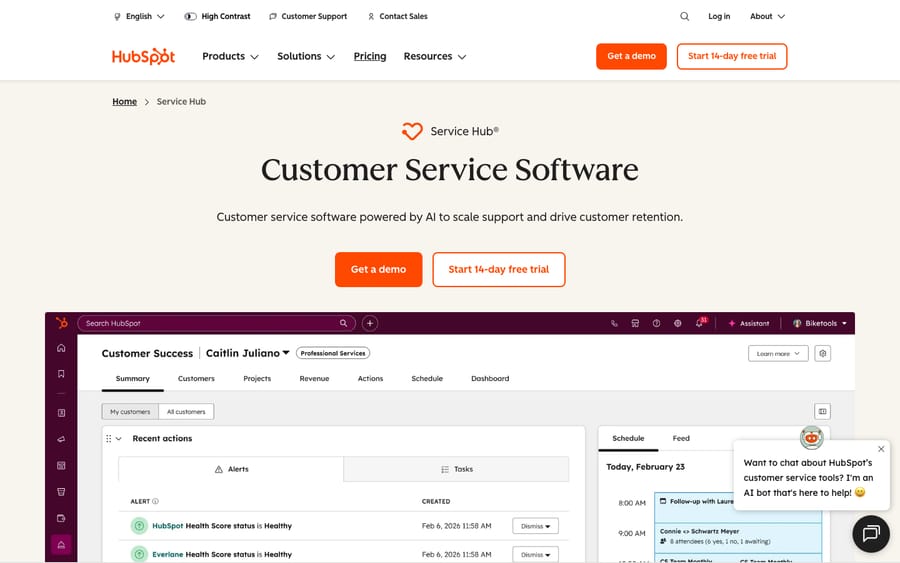
Pick HubSpot Service Hub if HubSpot is already your CRM and you want marketing, sales and service on one customer record; pick Zendesk if support is your core operation and you need routing depth, voice and scale. On price, serious support on HubSpot means Professional at $90 a seat plus a $1,500 onboarding fee, against $115 a seat for Zendesk Suite Professional with no onboarding fee (both annual, checked 24 September 2026).
Which should you pick in 30 seconds?
| If you are… | Pick |
|---|---|
| Already running HubSpot (Marketing/Sales Hub) | HubSpot Service Hub |
| An SMB/mid-market wanting one CRM for all teams | HubSpot Service Hub |
| Running high-volume or complex multi-channel support | Zendesk |
| A dedicated CX org needing routing, SLAs, QA, voice | Zendesk |
| Tying support directly to revenue/retention reporting | HubSpot Service Hub |
| Wanting the deepest, most scalable help desk | Zendesk |
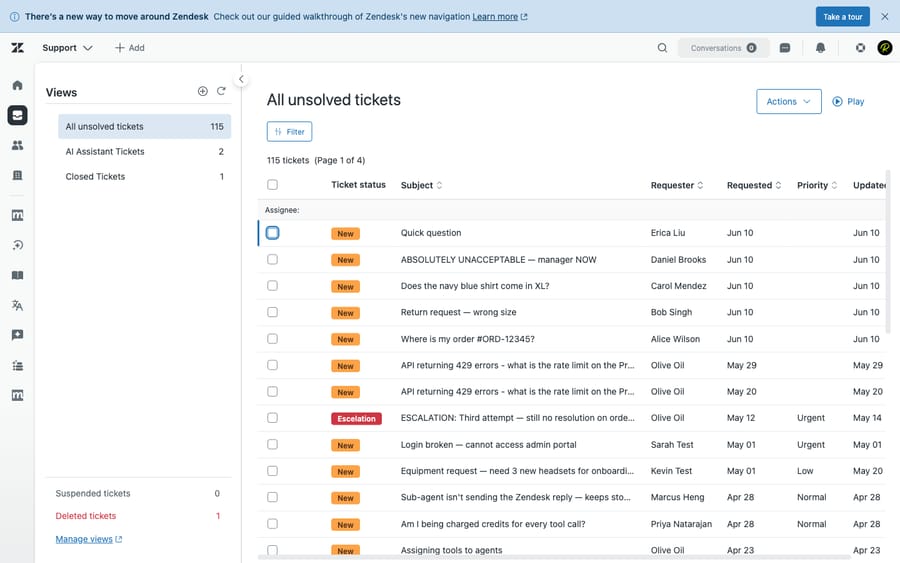
How we compared: prices for both products were checked against their official pricing pages on 24 September 2026. Features were checked against the products, and we ran Zendesk hands-on in a live test account (screenshot below). User sentiment comes from G2, Capterra and TrustRadius reviews read in June 2026. Macha is our own product, and we flag that wherever it comes up.
How much do Zendesk and HubSpot Service Hub cost?
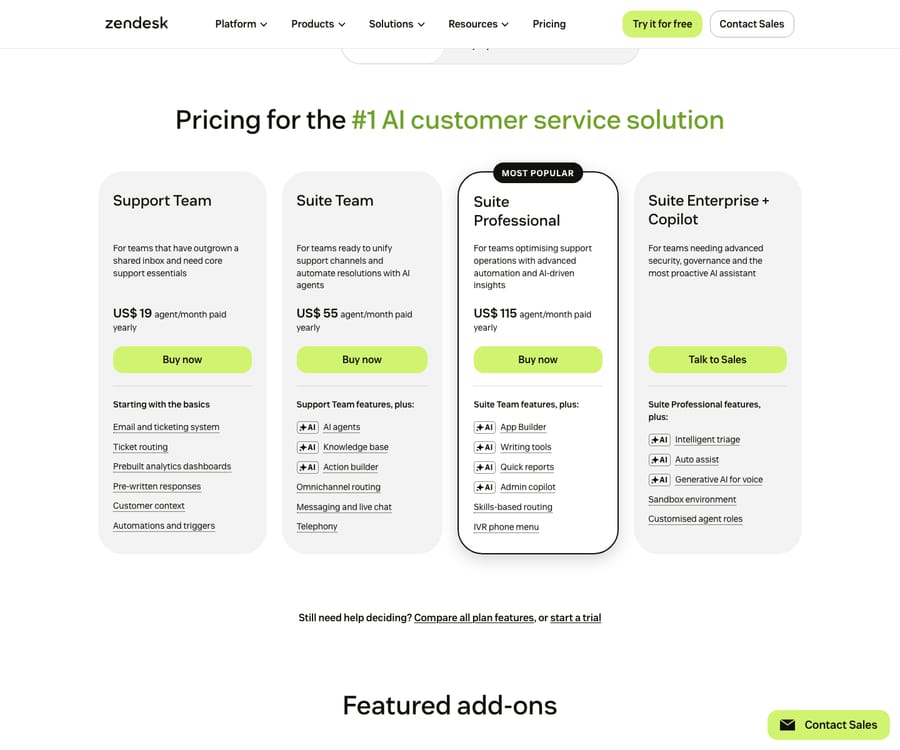
Zendesk (per agent/month, annual): Support Team $19, Suite Team $55, Suite Professional $115, Enterprise contact sales. Copilot is a $50/agent add-on on Professional and above. AI agents are included in every plan but billed per automated resolution, $1.50 committed or $2.00 pay-as-you-go, after a small monthly allowance. No onboarding fee, and a 14-day Suite Professional trial. Source: Zendesk pricing.
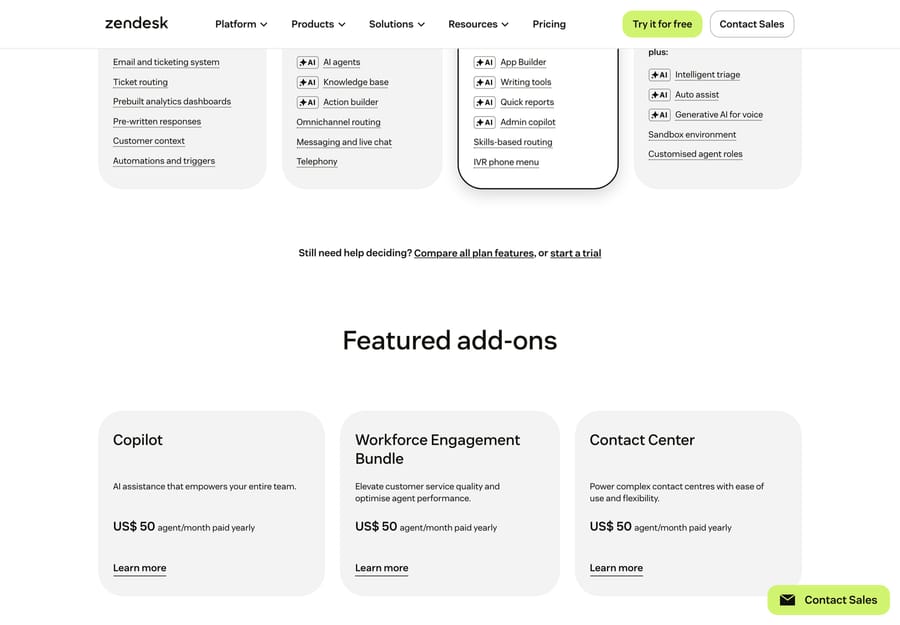
Beyond the seat plans, Zendesk sells its AI and CX capabilities as per-agent add-ons on top of your base plan:
HubSpot Service Hub (per seat/month):
| Plan | Per seat (annual) | One-time onboarding | Included credits |
|---|---|---|---|
| Free | $0 (up to 2 users) | none | none |
| Starter | $7 ($20 monthly) | none | 500 |
| Professional | $90 ($100 monthly) | $1,500 (required) | 3,000 |
| Enterprise | $150 | $3,500 (required) | 5,000 |
Source: HubSpot Service Hub pricing, 24 September 2026. Confirm seat minimums at purchase.
Two costs the headline price hides:
- The Professional jump plus mandatory onboarding. Starter now includes basic ticketing and a knowledge base, but skill-based routing, advanced reporting and the customer-facing AI agent live at Professional ($90/seat) plus a $1,500 one-time onboarding fee (Enterprise: $3,500). That's a thirteenfold jump in seat price from Starter on annual billing, and it puts "serious support HubSpot" close to Zendesk Suite Professional ($115).
- The Breeze Customer Agent is credit-metered. HubSpot's customer-facing Customer Agent (Professional and Enterprise only) costs 50 credits per resolved conversation, which HubSpot prices at $0.50 since it moved to outcome-based billing on 14 April 2026 (it was $1.00 per conversation before) (HubSpot). Professional's 3,000 included credits cover about 60 resolutions a month; extra credits cost $9 per 1,000 on annual billing.
The incentive on each side is worth naming. HubSpot makes Service Hub cheap to start because every support seat deepens your commitment to its CRM; Zendesk has no free tier and no onboarding fee but earns on per-agent add-ons and per-resolution AI. HubSpot is far cheaper to start and hard to beat if you already pay for HubSpot; Zendesk costs more per seat and more again once you stack AI. Model both at your real seat count and AI volume. At 10 agents on annual billing, HubSpot Professional is $10,800 a year plus $1,500 onboarding; Zendesk Suite Professional is $13,800, before AI on either side.
Which wins feature by feature?
| Capability | Winner | Why |
|---|---|---|
| Ticketing & agent workspace | Zendesk | Mature, purpose-built; advanced macros, triggers, SLAs; HubSpot's help desk is newer and full only at Professional+ |
| CRM unification | HubSpot (decisive) | Tickets sit on the same record as marketing emails, page views and deals: one database across teams |
| Omnichannel | Zendesk | Deeper native channels; on HubSpot, SMS and many messaging apps arrive through third-party custom channels (Professional+) |
| Automation / workflows | Tie | Zendesk wins support-specific routing/SLA; HubSpot wins cross-funnel (service, marketing, sales) in one builder |
| Native AI | Zendesk (depth) | Support-specific AI agents, QA and triage; HubSpot Breeze is unified but shallower on CX autonomy |
| Knowledge base & self-service | Zendesk (slight) | More mature multi-brand help center; HubSpot allows up to 100 knowledge bases on Professional |
| Reporting/analytics | Zendesk support metrics / HubSpot cross-funnel | Explore is support-depth; HubSpot reports across the whole lifecycle |
| Integrations | Zendesk support stack / HubSpot marketing-sales stack | Pick by which ecosystem you live in |
| Ease of setup | HubSpot | Free tier live in an afternoon; Zendesk takes more configuration |
| Voice / call center | Zendesk | Native contact center; HubSpot calling is more limited |
| High-volume scalability | Zendesk | Built for large, complex, high-ticket operations |
What are the strengths and weaknesses of each?
Zendesk strengths: best-in-class ticketing and agent workspace; deep omnichannel plus native voice; mature AI (Copilot, autonomous agents, QA); a strong support marketplace; scales to enterprise; no onboarding fee. Zendesk weaknesses: no free tier; per-agent add-ons stack up ($50 each for Copilot and workforce engagement, $83 for Contact Center) on top of per-resolution AI; a steeper admin curve; weak native marketing and sales.
HubSpot Service Hub strengths: true CRM unification (one record across marketing, sales and service); a free tier and a $7 Starter; fast setup; and a direct line between support and revenue reporting. HubSpot Service Hub weaknesses: support depth trails Zendesk; channel gaps (SMS through third-party apps, limited voice); real support gated behind Professional ($90) plus $1,500 onboarding; credit-based AI billing adds a second meter; and the Customer Agent takes Guidelines (tone, scripted responses, topics to avoid) but not free-form custom instructions.
What do real users say?
Both products rate well; the difference is in the review base and the recurring complaints. (Observed June 2026; not re-checked since.)
| G2 | Capterra | TrustRadius | |
|---|---|---|---|
| Zendesk | 4.3 / 5 (~7,100+) | 4.4 / 5 (4,081) | 8.7 / 10 |
| HubSpot Service Hub | 4.4 / 5 (~2,850) | 4.4 / 5 (190)* | listed (~56 ratings)* |
*HubSpot Service Hub's Capterra base (190) and TrustRadius base (~56) are far smaller than Zendesk's, so treat those averages as directional and weight the larger G2 samples more heavily.
- Zendesk is praised for breadth relative to price: "Zendesk Suite offers strong value for money considering the wide range of features included — ticketing, automation, analytics, and omnichannel support" (Ifra S., Zendesk Developer, Capterra, Dec 2025). The recurring knock is Zendesk's own support: "Their support is some of the worst I've ever experienced and keeps getting worse" (Katie Y., Head of Customer Success, Capterra, Mar 2025). People buy it for depth, then grumble about cost creep and slow vendor support.
- HubSpot Service Hub is praised for fitting the wider HubSpot stack: "Fits in incredibly well with the rest of the HubSpot tech stack… lots of customizability to fit our business' support requirements" (Nabil B., Director, Marketing & Advertising, Capterra, Dec 2024). The main criticism is complexity plus cost at the higher tiers: "It's complicated, sometimes clunky (need to check for errors), and the advanced plans are expensive for a small business" (Sean C., Marketer, Capterra, Nov 2025).
The split mirrors the pricing: Zendesk users complain about what they pay for depth; HubSpot users like the unified record but feel the jump in price and complexity once they outgrow the cheap tiers.
Who is each one for?
- Zendesk: dedicated CX and support orgs, SMB to enterprise, with high or complex ticket volume that need routing depth, SLAs, QA, native voice and scale, and that will integrate a CRM separately.
- HubSpot Service Hub: teams already on HubSpot, and SMB or mid-market companies that want marketing, sales and service on one customer record, with light-to-moderate support volume and a premium on setup speed and entry cost.
The deciding question is usually: is HubSpot already your CRM? If yes, Service Hub's unified record is a real advantage. If not, Zendesk gives you a deeper, more scalable support operation.
How do their AI agents compare?
Zendesk's AI is the more mature, support-specific stack: autonomous agents billed per verified automated resolution, with Copilot for human agents at $50 a seat. HubSpot's Breeze is easier to start with: the Customer Agent runs at Professional and above for 50 credits ($0.50) per resolved conversation, and since June 2026 it accepts Guidelines for tone, scripts and topics to avoid. Both share the same ceiling for a team that owns them: AI quality is bounded by your knowledge base and scoped to one platform's data, and HubSpot's agent still can't take free-form instructions such as "ask for the order number before answering."
That's the gap an independent AI agent layer fills: it sits on top of either help desk, pulls knowledge from several sources (help center, Notion, Drive, past tickets) instead of one platform's KB, runs with the custom instructions and guardrails you write, and bills per ticket: one conversation, charged once however many messages it takes. Macha is one such layer (our product) and runs on Zendesk, Freshdesk, Gorgias, Front, HubSpot or Intercom, so you keep HubSpot's CRM unification or Zendesk's depth and add controllable autonomous AI on top. It's one plan priced by volume, from $299 a month for up to 750 tickets, with setup and monitoring by the Macha team included. The caveat: a layer is another vendor to manage, it resolves only as well as the knowledge you connect, and per-ticket pricing adds to your stack rather than replacing a line. (More: native AI vs. an AI layer and the best AI help desk software.)
What carries over if you switch between them?
Zendesk's ticket-centric schema (tickets, organizations, custom fields, macros, triggers, SLAs, multi-brand help centers) doesn't map one to one onto HubSpot's CRM objects (contacts, companies, tickets, pipelines). Migration tools move tickets, contacts, KB articles and attachments in either direction, but:
- Macros, triggers, automations and reports don't migrate; you rebuild them.
- HubSpot's onboarding fees ($1,500 Pro, $3,500 Enterprise) effectively pay for guided setup; Zendesk has no fee, but complex configurations take admin time.
- Re-author the KB, because the Customer Agent's answers depend on it.
Plan a parallel run, a historical-ticket cutover and agent retraining either way.
Frequently asked questions
Is HubSpot Service Hub cheaper than Zendesk? To start, yes: a free tier for up to 2 users and Starter at $7 a seat annually ($20 monthly). But full support capability sits at Professional ($90 a seat) plus a $1,500 onboarding fee, which lands close to Zendesk Suite Professional ($115). Compare total cost including AI.
Should I use HubSpot Service Hub if I already use HubSpot? Usually yes; that's its strongest case. Support on the same record as marketing and sales is a real advantage if you're already invested in HubSpot.
Which has better AI? Zendesk's support-specific AI is deeper and more configurable. HubSpot's Customer Agent is cheaper per resolution ($0.50 against Zendesk's $1.50 to $2.00) and takes Guidelines, but not free-form custom instructions. Both are bounded by your KB.
Which is better for high-volume support? Zendesk. It's built for scale, with deeper routing, SLAs, QA and native voice.
Can I add autonomous AI without switching? Yes. An AI agent layer like Macha adds controllable autonomous AI on top of Zendesk or HubSpot, billed per ticket (one conversation, charged once), from $299 a month for 750 tickets.
Which should you choose?
Choose HubSpot Service Hub if you're already on HubSpot or want marketing, sales and service on one record, and your support volume is light to moderate. Choose Zendesk if support is your core operation and you need depth, scale, native voice and the most mature CX AI. Keep the AI decision separate: both vendors' agents are bounded by their own KB and platform, so a layer on top can add controllable autonomous resolution without a migration.
Want controllable autonomous AI on top of HubSpot or Zendesk? See how Macha layers AI agents over your help desk, billed per ticket. $50 of free usage, no credit card required. Start Trial.