Shopify
 Stripe
 Slack
Slack Notion
 Google Workspace
 Confluence

Zendesk vs Jira Service Management (2026): Which Fits CX and Which Fits IT?


Zendesk is built for external customer support, while Jira Service Management (JSM) from Atlassian is built for internal IT and engineering service, wired into Jira Software and Confluence. They both handle tickets, but the buyer, the workflows and the pricing model differ.
Key takeaways
- Zendesk fits external customer support teams, starting at $19 per agent a month, while Jira Service Management fits internal IT desks and is free for up to 3 agents.
- Jira Service Management bills only agents, so customers and employees who submit requests are free, which makes an internal desk with thousands of requesters far cheaper than on Zendesk.
- Jira Service Management lists Standard at $20 and Premium at $51.42 per agent a month with monthly billing, and says annual billing saves up to 17%.
- Jira Service Management includes Rovo AI with 250, 700 or 1,500 credits per user a month, while Zendesk charges a $50 per agent Copilot add-on plus per-resolution fees.
- Jira Service Management has no native phone or social channels, while Zendesk offers native voice, SMS and social in one omnichannel workspace.

Pick Zendesk for external customer support (Suite Team is $55 per agent a month, billed annually) and Jira Service Management for internal IT and engineering service (free for up to 3 agents, then $20 per agent a month on Standard). Plenty of companies run both, because they integrate natively.
| Zendesk | Jira Service Management | |
|---|---|---|
| Built for | External customer support (CX) | Internal IT, DevOps and ITSM |
| Free plan | No | Yes, up to 3 agents |
| Entry paid price | $19/agent/month (Support Team, annual) | $20/agent/month (Standard) |
| Mid tier | $115/agent/month (Suite Professional, annual) | $51.42/agent/month (Premium) |
| Who is billed | Every agent | Agents only; customers and request submitters are free |
| AI | Copilot add-on at $50/agent plus per-resolution fees for AI agents | Rovo included, with 250 / 700 / 1,500 credits per user a month |
| Native voice and social | Yes | No |
Prices checked on each vendor's pricing page on 24 September 2026. Atlassian lists JSM at $20 and $51.42 with monthly billing and says annual billing saves up to 17%.
Which should you pick for your team?
| If you are… | Pick |
|---|---|
| A customer support / CX team (email, chat, social, voice) | Zendesk |
| An IT, DevOps, or internal service desk | Jira Service Management |
| Already living in Jira Software / Confluence | Jira Service Management |
| Needing ITIL incident/problem/change + asset/CMDB | Jira Service Management |
| Running high-volume external support at scale | Zendesk |
| Both a customer support team and an internal IT desk | Often both (they integrate natively) |
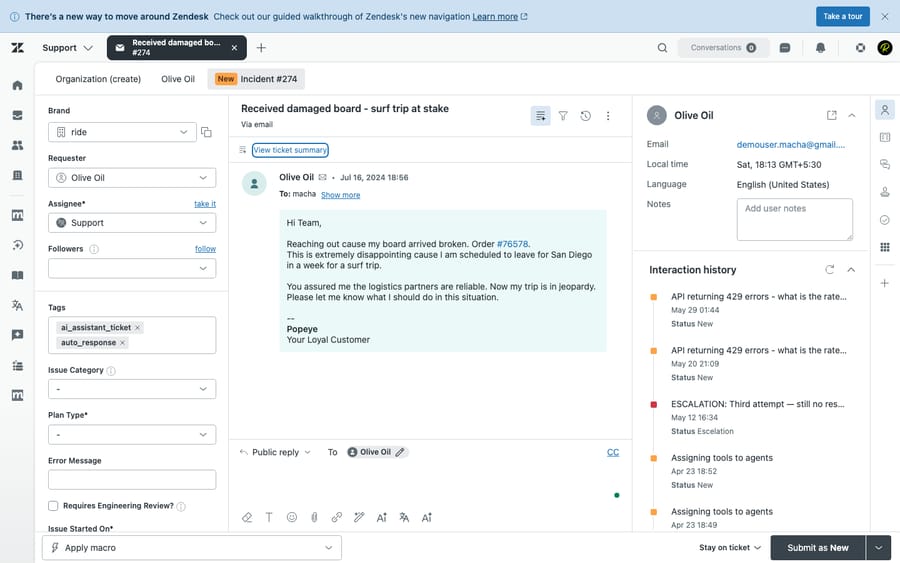
How we compared: pricing is checked against each vendor's official page (last on 24 September 2026). Features are checked against the products, and we ran Zendesk hands-on in a live test account (screenshots below). User sentiment comes from G2, Capterra and Gartner reviews. One caveat shapes the whole comparison: a large share of JSM reviews describe internal IT/ITSM use (incidents, change, CMDB for employees), not external customer support, so we weight that context rather than comparing the two as if they did the same job. Macha is our own product, and we flag that wherever it comes up.
How much do Zendesk and Jira Service Management cost?
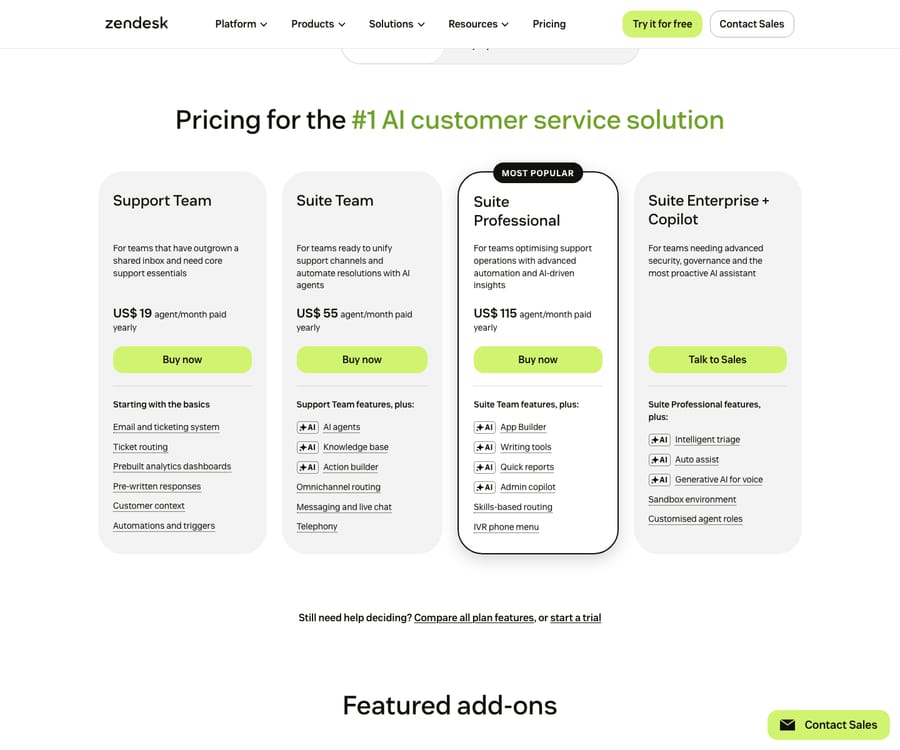
Zendesk Suite (per agent/month, annual): Support Team $19, Suite Team $55, Suite Professional $115, Enterprise contact sales. Copilot is an add-on at $50/agent. AI agents are included in every plan but billed per automated resolution; Zendesk's pricing page lists $1.50 per committed resolution and $2.00 pay-as-you-go. Source: Zendesk pricing. Confirm the per-resolution rate in your quote.
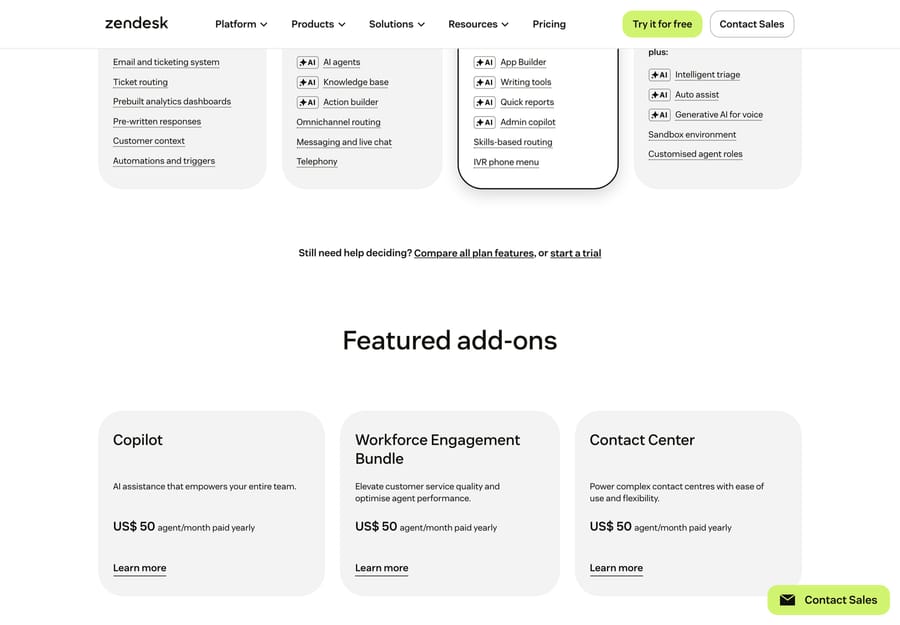
Beyond the per-seat plans, Zendesk sells its AI and CX capabilities as separate add-ons, each priced per agent on top of your base plan. As of 24 September 2026 Copilot and the Workforce Engagement Bundle are $50 per agent a month and Contact Center is $83 (the screenshot below was captured earlier, when all three were $50):
Jira Service Management (per agent/month): Free (up to 3 agents), Standard $20, Premium $51.42, Enterprise contact sales (annual billing only). Atlassian now sells JSM inside its "Service Collection" bundle, which adds Customer Service Management, Assets and Rovo. Source: Atlassian JSM pricing. Two things make JSM's model different, and cheaper for the right buyer:
- Only agents are billed. Atlassian's page says up to 100,000 agents can work on requests from unlimited customers, who are unlicensed and free. Employees raising IT tickets, approvers and stakeholders cost nothing. For an internal IT desk serving thousands of employees with a few dozen agents, Zendesk's per-agent model has no equivalent.
- Volume and billing discounts. Annual billing saves up to 17%, and annual subscriptions are billed by user tier, so the effective per-agent price varies with headcount. Check Atlassian's calculator for your exact number.
The AI difference is the bigger one. JSM includes its AI: Rovo (agents, search and chat) comes with paid plans, with monthly allowances of 250, 700 and 1,500 Rovo credits per user on Standard, Premium and Enterprise. The Virtual Service Agent is Premium and Enterprise only, with 1,000 assisted conversations a month included and extra ones from $0.30 each. Zendesk charges for AI three ways: the base plan, the $50/agent Copilot add-on, and per-resolution fees. At scale, Zendesk's AI is the bigger and less predictable bill; JSM's is mostly included, with a metered tail on the Virtual Service Agent.
Which tool wins on each feature?
| Capability | Winner | Why |
|---|---|---|
| Customer-support ticketing & agent workspace | Zendesk | Conversational, omnichannel agent workspace purpose-built for CX |
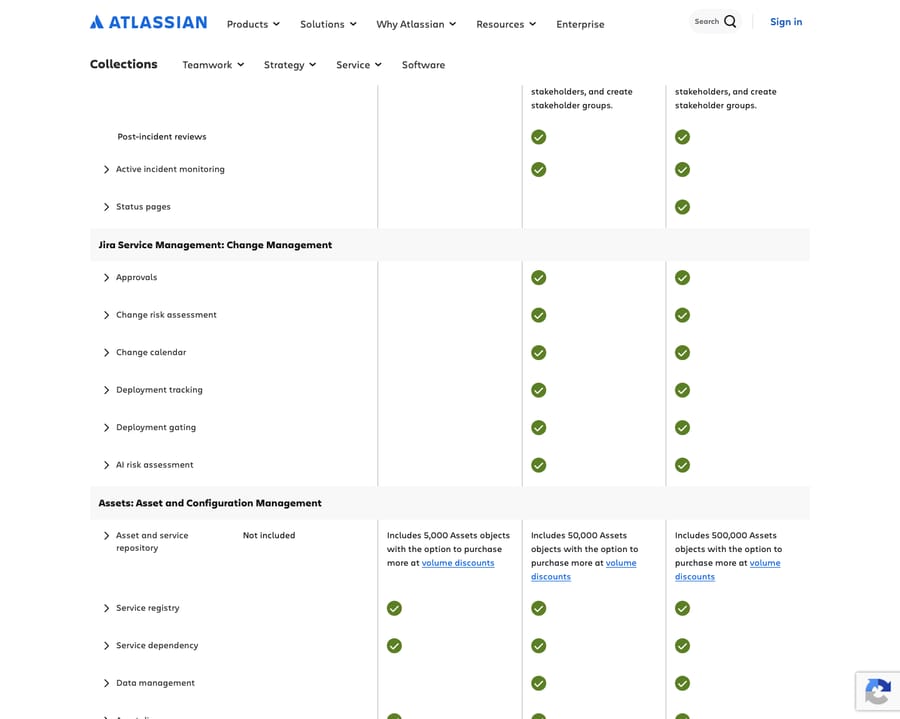
| ITSM (incident/problem/change/CMDB/assets) | JSM (decisive) | ITIL-aligned out of the box, with native Assets/CMDB |
| Omnichannel customer support (email/chat/voice/social) | Zendesk | Native voice, SMS, social; JSM has no native phone/social |
| Automation | Split | Zendesk wins customer-facing bot/dialogue automation; JSM wins backend ITSM/DevOps rules |
| Native AI | Split | Zendesk AI = stronger external autonomous resolution; Rovo = stronger internal IT ops, and included |
| Knowledge base / self-service | Zendesk | Built-in help center; JSM splits KB into Confluence (extra dependency) |
| Reporting | Zendesk | Real-time multichannel analytics no-code; JSM often needs Atlassian Analytics |
| Dev integration (Jira Software) | JSM (decisive) | Native, tight link to Jira Software + Confluence, the reason engineering orgs choose it |
| Ease of setup | Zendesk | Faster onboarding for support; JSM's ITSM depth has a steeper curve for non-IT users |
| Voice | Zendesk | Native contact center; JSM has no native telephony |
The pattern: Zendesk is the better customer-support tool; JSM is the better internal IT and dev service desk, especially if your engineers already live in Jira.
What are the strengths and weaknesses of each?
Zendesk strengths: strong omnichannel CX; intuitive agent workspace; fast setup; native KB and real-time reporting; mature customer-facing AI agents. Zendesk weaknesses: no free tier; expensive at scale (base + Copilot + per-resolution stack); weaker ITSM/root-cause depth; lighter backend automation.
JSM strengths: deep ITIL/ITSM (incident/problem/change/Assets/CMDB); per-agent pricing with free request submitters; tight Jira/Confluence/dev integration; Rovo included (no per-agent AI add-on); Data Center/on-prem option. JSM weaknesses: steep learning curve for non-IT/CX users; weak external channels (no native voice/social); KB depends on Confluence; can feel overwhelming for simple customer support; the Virtual Service Agent is Premium and up.
What do real users say about Zendesk and JSM?
Both rate well (4.3 to 4.5 across G2 and Capterra), but read the reviews with one filter on: much of JSM's praise and criticism comes from internal IT users, not customer-support teams. (Ratings observed June 2026.)
| G2 | Capterra | Gartner | |
|---|---|---|---|
| Zendesk | 4.3 / 5 (~6,000+) | 4.4 / 5 (4,081) | listed (~918 reviews) |
| Jira Service Management | 4.3 / 5 (~962) | 4.5 / 5 (770) | 4.5 / 5 (~1,119)* |
*G2 and Gartner block automated reads, so JSM's Gartner count comes from search snippets and is directional. JSM's overall review base (~770 to 1,100) is much smaller than Zendesk's (4,000+ on Capterra alone).
- Zendesk is praised as an easy, omnichannel CX platform: "a very good tool to provide customer support in an omnichannel way, it's easy to use" (Pablo T., CX Consultant, Capterra, Dec 2025). The recurring knock is price at scale: "packed full of features… [but] for organizations with a tighter budget, it might be hard to justify the price" (Alexandra V., People Business Partner, Capterra, Mar 2026).
- Jira Service Management is praised for ecosystem depth and tailorable workflows: "integrates seamlessly with other tools in the Atlassian ecosystem and allows teams to build highly tailored workflows" (Benjamin T., IT Systems Administrator, Capterra, May 2026). The dominant criticism is complexity: "the main drawback for me was the complexity that comes with its flexibility… they can make the system feel clunky" (Adam P., Managing Consultant, Capterra, Jun 2026). Notice how IT-centric the praise is. That tells you who JSM is really built for.
Who is each tool built for?
- Zendesk → external customer support / CX teams, SMB through enterprise; high-volume omnichannel support, e-commerce/retail, non-technical support orgs that want fast deployment and a polished customer-facing experience.
- Jira Service Management → internal IT, DevOps, HR, and facilities service desks; engineering orgs already on Jira/Atlassian; enterprises needing ITIL-aligned incident/change/asset management; and orgs with many request submitters but fewer agents (the pricing model rewards exactly that shape).
When should you run both?
Because Zendesk and JSM integrate natively, a lot of companies don't choose. They run Zendesk for external customer support and JSM for internal IT/dev. A customer ticket that needs engineering work syncs from Zendesk into Jira, with status and closure flowing back. Migrating between them is uncommon; the usual pattern is adding the second tool for the job it's best at. Consolidate onto one only when your customer-service and IT processes are genuinely the same workflow, which for most companies they aren't.
Where does an AI agent layer fit?
Both vendors have real AI, with different shapes. Zendesk's autonomous resolution is strong for customers but monetized aggressively (add-on plus per-resolution, so cost scales with volume). JSM's Rovo is included but internally oriented and credit-capped: good for IT ops, less so for external multichannel customer resolution. For a team that wants deep, cost-predictable autonomous resolution across whichever backend it runs, neither native AI is a perfect fit.
That's the case for an independent AI agent layer on top of the help desk. A layer like Macha runs on Zendesk, Freshdesk, Gorgias, Front, HubSpot or Intercom. It adds autonomous resolution on top of Zendesk, reads knowledge across sources rather than one platform's KB, and prices per ticket (one conversation, charged once however many messages it takes) instead of per vendor-defined resolution. Plans start at $299 a month for up to 750 tickets. It's not a help-desk replacement; it's the AI layer you add. The honest caveat: a layer is another vendor and integration to maintain, it only resolves as well as the knowledge you connect, and per-ticket pricing still costs money at volume. (More: native AI vs. an AI layer.)
Frequently asked questions
Is Jira Service Management a Zendesk competitor? Only partly. JSM competes with Zendesk on ticketing, but it's built for internal IT/dev service (ITSM), while Zendesk is built for external customer support. Many companies use both.
Which is cheaper, Zendesk or JSM? For internal IT desks, JSM is usually cheaper. Only agents are billed (request submitters are free), there's a free plan for up to 3 agents, and Rovo AI is included. Zendesk's per-agent price plus the AI add-on plus per-resolution fees costs more at scale.
Can JSM handle customer support? It can, but it's not its strength: no native voice/social and a Confluence-dependent KB. For customer-facing CX, Zendesk is the better fit.
Do they work together? Yes. Zendesk and Jira integrate natively, which is why running Zendesk for CX and JSM for IT is so common.
How many Rovo credits does JSM include? Atlassian's pricing page lists 250 Rovo credits per user a month on Standard, 700 on Premium and 1,500 on Enterprise.
Can I get autonomous AI on either without the per-resolution cost? Yes. An AI agent layer like Macha adds autonomous AI on top of your help desk, priced per ticket rather than per resolution, with no migration.
So which one should you buy?
Choose Zendesk if your job is customer support: it's stronger on omnichannel, self-service and customer-facing AI. Choose Jira Service Management if your job is internal IT or dev service: it's deeper on ITSM, cheaper for high-submitter, low-agent teams, includes Rovo, and fits naturally if you're already on Atlassian. If you have both jobs, running both is the sensible answer. Keep the AI decision separate: a layer on top can add autonomous resolution without per-resolution pricing.
Run Zendesk and want autonomous AI on top, priced per ticket rather than per resolution? See how Macha layers AI agents over your help desk. $50 of free usage, no credit card required. Start Trial.