Intercom
 Shopify
 Stripe
 Slack
Slack Notion
 Google Workspace
 Confluence

Zendesk Webhook Not Working? How to Find the Cause in the Activity Log


A Zendesk webhook that is not working shows the reason on its Activity tab, under Admin Center > Apps and integrations > Webhooks > View details. The key split is between a webhook that failed and one that was never called, because they need completely different fixes.
Key takeaways
- A broken Zendesk webhook shows its cause on the Activity tab: an empty log means no trigger called it, while a 4xx or 5xx status came from the receiving service.
- A Zendesk webhook's response timeout is fixed at 12 seconds and is not adjustable, so a status of Failed: 504 Gateway Timeout means the receiving service answered too slowly.
- Zendesk does not deactivate a webhook because of repeated failures; a webhook found in a Deactivated state was turned off by an admin, an API call or an app.
- Zendesk's circuit breaker engages when 70% of a webhook's requests error within a five-minute window, or when it receives more than 1,000 error responses in five minutes.
- Zendesk retries a 409 response up to three times, a 429 or 503 only when it carries a retry-after header under 60 seconds, and a timed-out request up to five times.

When a Zendesk webhook is not working, its Activity tab tells you which of seven causes you have: an empty log means no trigger or automation ever called it, a 4xx or 5xx status came from the receiving service, and a 504 means the receiver missed Zendesk's fixed 12-second timeout. Open it from Admin Center > Apps and integrations > Webhooks, then View details on the webhook's row.
| What the Activity tab shows | Likely cause | Where to fix it |
|---|---|---|
| No rows at all | Nothing invoked the webhook | The trigger or automation that should call it |
| Terminated with a 4xx or 5xx | The receiving service rejected the call | The endpoint's owner, using the Response body |
| Failed: 504 Gateway Timeout | The receiver took longer than 12 seconds | The receiver: return 200 first, work later |
| Rows look fine, duplicates downstream | At-least-once delivery plus retries | Make the downstream action idempotent |
| Status reads Deactivated | An admin, API call or app turned it off | The audit log |
| Settings keep reverting | An installed app owns the webhook | The app's developer |
One myth to clear up before the causes, because it sends people down the wrong path: Zendesk does not deactivate a webhook because it keeps failing.
Where do you find a Zendesk webhook's activity log?
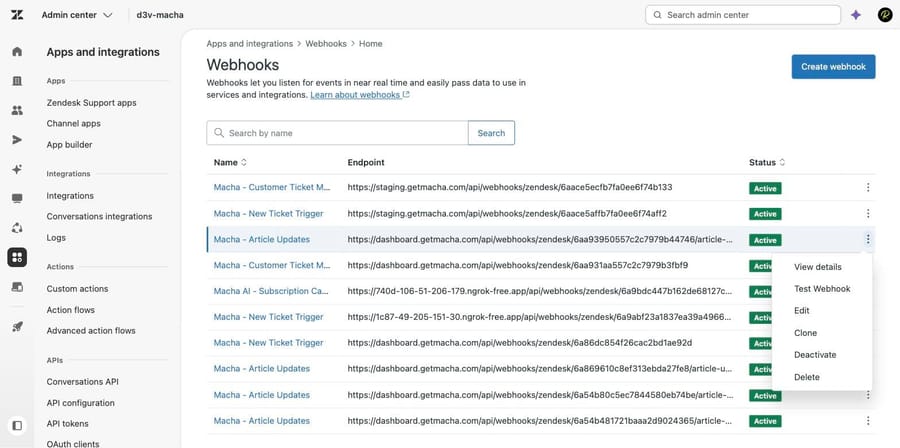
- In Admin Center, click Apps and integrations in the sidebar, then select Webhooks > Webhooks.
- Find the webhook, click the options menu on its row, and click View details.
- Click the Activity tab.
- Click Filter to narrow by start date, start time, end date, end time or status, then Apply filters.
- Click an Invocation ID to open the request and response for that single call.
The log also shows the number of requests in the last seven days, which is the quickest sanity check on whether the volume matches what you expected.
Why is the webhook activity log empty?
This is the most common one and the easiest to misread, because a webhook that was never called looks identical to a webhook that is broken.
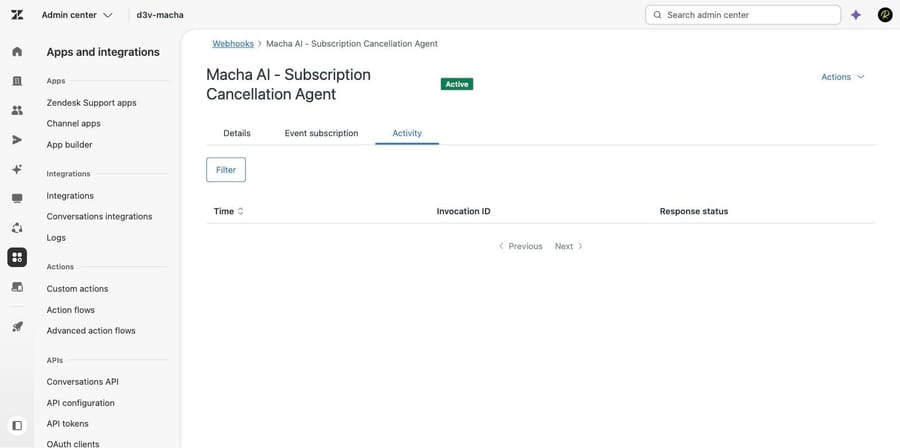
Check: the Activity tab is empty, or has nothing in the window when the problem happened.
What it means: nothing invoked the webhook. A webhook is passive. Something else, usually a trigger or an automation, has to call it, and the webhook itself has no opinion about whether that ever happens.
Fix: go and look at the thing that should have called it. The webhook's options menu carries Manage triggers and Manage automations links straight to the business rules that reference it, which beats scrolling the trigger list. Then work through the usual suspects on that rule: is it active, do its conditions actually match the ticket, is it below another trigger that already changed the ticket, and is it firing on an event the ticket produced. An automation runs hourly and only on tickets it hasn't already actioned, which catches people who expect it within a minute.
What does a 4xx or 5xx response in the log mean?
Check: the Activity tab shows rows, and their Response status is a 4xx or 5xx.
What it means: almost always exactly what it says. Zendesk's own documentation is direct about this: in most cases the response comes from the third-party service receiving the request, and you typically need to work with that service to fix it.
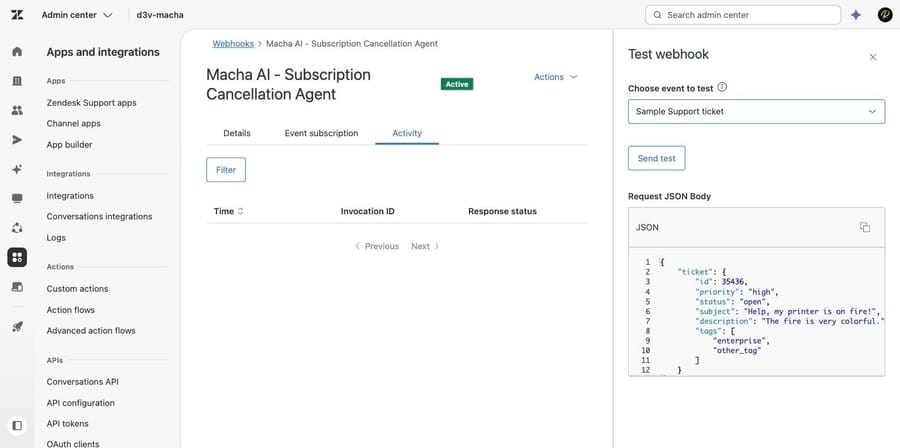
We made this concrete. Running Actions > Test Webhook on a webhook in our sandbox whose endpoint no longer exists returned a 404, and the body was written by the endpoint's host, not by Zendesk.
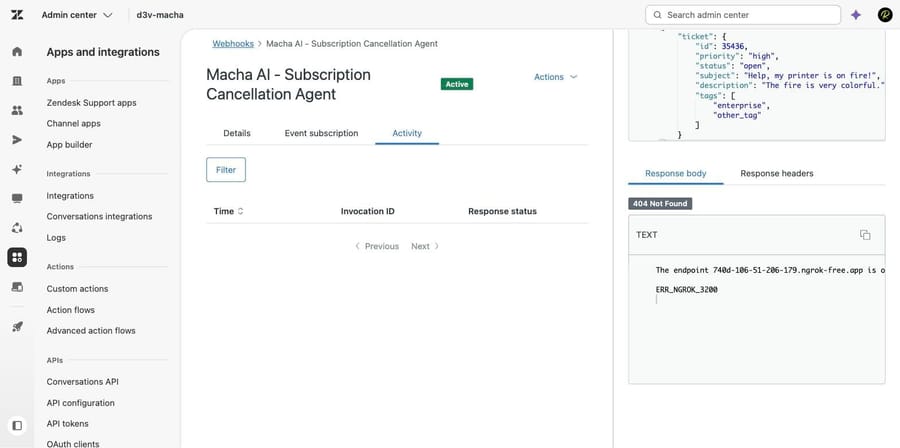
Fix: open the invocation, read the Response body tab, and take that message to whoever owns the endpoint. The status codes are standard HTTP, so a 401 or 403 is credentials, a 404 is a wrong path or a dead host, and a 422 is a payload the receiver rejected. Our post on Zendesk API errors 401, 422 and 429 covers what those mean in the other direction, when you are the one calling Zendesk.
What does "Terminated" mean, and does Zendesk deactivate failing webhooks?
Zendesk labels a failed invocation Terminated, followed by the status. It reads like Zendesk stopped something on purpose, and it doesn't mean that.
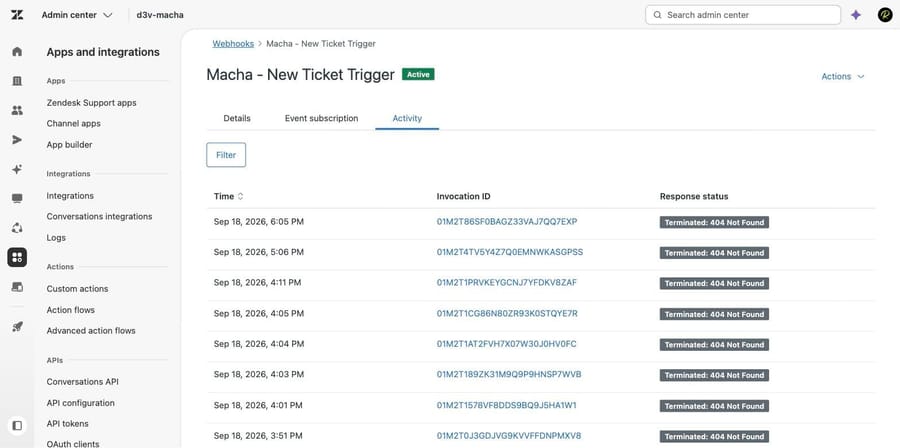
Look at the badge next to the webhook's name in that screenshot. Eight consecutive failures and the webhook is still Active. That is the documented behavior: Zendesk's developer documentation states plainly that consecutive failed requests won't deactivate the webhook. Only the circuit breaker engages, and it is temporary.
So if you find a webhook sitting in a Deactivated state, something deactivated it. An admin, an API call, or an app. It was not attrition.
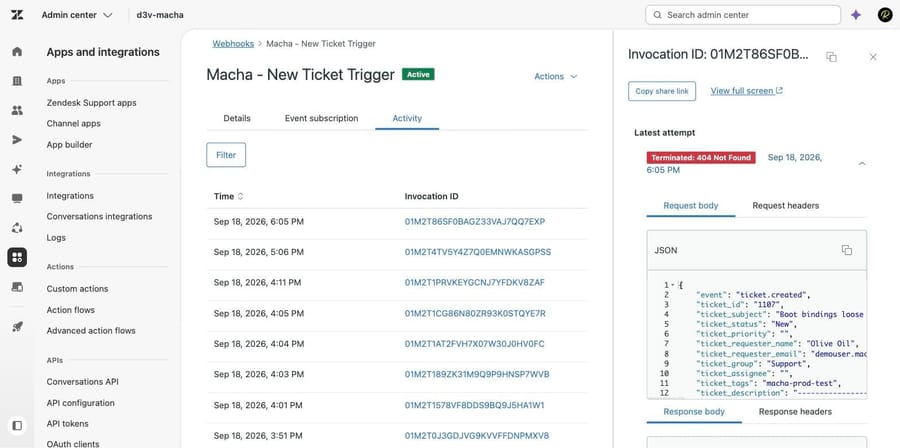
Fix: click into an invocation. The panel opens on Latest attempt and gives you Request body, Request headers, Response body and Response headers for that one call. Compare the request body against what the receiving service expects. A payload that changed shape, usually because a placeholder now resolves to nothing, is a common cause of a receiver returning 4xx on every call.
What causes a 504 Gateway Timeout on a Zendesk webhook?
Check: the response status is "Failed: 504 Gateway Timeout".
What it means: the service did not respond within Zendesk's 12-second webhook timeout. That period is not adjustable, and no amount of configuration on the Zendesk side will change it.
Fix: make the receiver answer immediately and do the work afterwards. Accept the request, return a 200, queue the job. If you are calling a Zapier or Make step that does five things before responding, put a queue in front of it.
When does the circuit breaker trip, and why does it cause duplicates?
Zendesk uses a circuit breaker so a broken endpoint doesn't get hammered. Per its developer documentation, it engages when either 70% of a webhook's requests in a five-minute window result in errors, or the webhook receives more than 1,000 error responses within five minutes. It will not trigger below 100 requests in that window, so low-volume webhooks never see it.
When it engages the webhook can't send for five seconds. After that one request goes through; if it errors, another five seconds; if it succeeds, the breaker resets.
The consequence worth planning for is at the other end. Zendesk makes a best effort to deliver each action once and does not guarantee it, so an action can be delivered more than once, and with the circuit breaker open some actions may not be delivered at all. Retries add to the same problem: a 409 is retried up to three times, a 429 or 503 is retried only when it carries a retry-after header under 60 seconds, and a timed-out request is retried up to five times.
Fix: make the receiving action idempotent, and use webhook signatures to detect a duplicate rather than trusting arrival order. If a webhook creates records downstream, key them on something from the payload so a second delivery updates rather than duplicates.
Why can't you see or change a webhook's credentials?
Two behaviors here trip people up when editing an existing webhook.
You can't read a credential back. Once a webhook is created or updated, the key, token or password can't be viewed. If you inherited a webhook and want to confirm the secret, you cannot. You can only overwrite it.
You can't change the connection method. After a webhook is created, its connection method is fixed. Moving from an API key to basic auth means creating a new webhook and repointing every trigger at it.
Fix: when auth is the suspect, re-enter the credential rather than trying to verify it, and use Test Webhook to confirm before you let real traffic through. The test panel sends a sample payload of your choosing and shows you the response immediately.
Why do webhooks change or disappear on their own?
There is a recurring thread pattern about webhooks appearing to delete themselves, and related reports of webhook failures arriving in bursts. We could not establish a cause for the disappearances and we are not going to guess at one.
What is documented, and worth checking first, is that webhooks created by app requirements behave differently from ones you made. They can be edited but not cloned or deleted, and the app's developer can update them, overriding changes an account admin made. If a webhook's configuration keeps reverting, find out whether an installed app owns it before you assume a platform bug.
Start your own investigation in the audit log rather than the webhook. A deletion is an account change, and the audit log is where account changes are recorded.
What is the fastest way to triage a broken webhook?
- Activity tab empty? The problem is the trigger or automation, not the webhook. Use Manage triggers.
- Rows with 4xx or 5xx? Read the Response body. The message is from the receiving service.
- 504? Their endpoint is slower than 12 seconds. Make it return first and work later.
- Rows look fine but the downstream system has duplicates? Delivery is at-least-once. Make the action idempotent.
- Status is Deactivated? Somebody or something deactivated it. Check the audit log; failures alone don't do this.
- Configuration keeps reverting? Check whether an app owns the webhook.
For the concepts underneath all of this, our guide to Zendesk webhooks covers what they are, how they attach to triggers and how to build one.
Does Test Webhook write a row to the activity log?
One thing surprised us. After running Test Webhook and getting a 404 back in the panel, we reloaded the webhook's Activity tab and it was still empty. On our instance, a manual test does not write a row to the activity log. If you are testing a webhook and wondering why the log stays blank, that appears to be why, and it means the log is a record of real invocations rather than of everything you tried.
Where does an AI agent layer fit?
None of the above is an AI problem. A webhook either reaches its endpoint or it doesn't, and that is plumbing.
Where it becomes relevant is why so many of these webhooks exist. A large share of them are there to push a ticket into another system so a human somewhere can classify it, look something up, and come back with an answer. Macha on Zendesk does that work inside the ticket instead: it reads the request, calls the systems it needs through its own tools, answers what it can and escalates the rest with the context attached. Fewer hops means fewer places for a 504 to happen. It suits teams already running Zendesk who have built a web of webhooks to compensate for agents not having information at hand, and it's the wrong fit if your webhooks are genuine system-to-system data sync, which is exactly what they're for.
The incentive is worth stating because it shapes the billing unit: a vendor charging per automated resolution earns more the more tickets arrive. Macha bills per ticket, one thread with one person as one charge however many replies it takes, from $299 a month for 750 tickets on published pricing, with setup and monitoring by our team included and $50 of free usage to start.
How we researched this
We tested this on our own instance. On September 21, 2026 we read every webhook in d3v-macha, our Zendesk sandbox on Support Enterprise, through the API, found one whose recent invocations had all failed, and worked through its Activity tab, an individual invocation, and a manual Test Webhook against a dead endpoint. Five of the six screenshots come from that session and show real invocations. The retry counts, the circuit breaker thresholds, the 12-second timeout and the statement that consecutive failures won't deactivate a webhook are quoted from Zendesk's "Managing webhooks" help center article (edited May 1, 2026) and its developer documentation on creating and monitoring webhooks, both read the same day. We did not reproduce a circuit breaker trip, a 504 or a 409 retry sequence, so those numbers are Zendesk's rather than ours, and we did not establish what caused the self-deleting webhooks reported in November 2025.
Frequently asked questions
Why is my Zendesk webhook activity log empty? Because nothing invoked the webhook. Webhooks are passive and need a trigger or an automation to call them, so an empty log points you at the business rule rather than the webhook. Use the Manage triggers link in the webhook's options menu to go straight to the rules that reference it.
What does Terminated mean in the Zendesk webhook activity log? It's how Zendesk labels a failed invocation, followed by the HTTP status the endpoint returned. It doesn't mean Zendesk stopped the webhook. In our sandbox a webhook with eight consecutive Terminated invocations still showed a status of Active.
Does Zendesk deactivate a webhook after repeated failures? No. Zendesk's developer documentation states that consecutive failed requests won't deactivate the webhook; only the circuit breaker engages, and it clears as soon as one request succeeds. A webhook you find in a Deactivated state was deactivated by a person, an API call or an app.
What is the Zendesk webhook timeout? 12 seconds, and it isn't adjustable. A response status of "Failed: 504 Gateway Timeout" means the service didn't answer inside that window. The fix is on the receiving end: return a 200 immediately and do the work asynchronously.
When does the Zendesk webhook circuit breaker trigger? When 70% of a webhook's requests in a five-minute window return errors, or when it receives more than 1,000 error responses in five minutes. It never triggers below 100 requests in that window. It then blocks sending for five seconds at a time until one request succeeds.
Why is my webhook firing twice? Zendesk makes a best effort at single delivery but doesn't guarantee it, and retries add more. Make the downstream action idempotent, and use webhook signatures to spot a duplicate. A 409 is retried up to three times, a 429 or 503 only with a retry-after under 60 seconds, and a timeout up to five times.
Can I see the API key on an existing webhook? No. Once a webhook has been created or updated, the key, token or password can't be viewed. You can overwrite it, then use Test Webhook to confirm the new value works before real traffic depends on it.
Can I change a webhook from API key to basic authentication? Not on the existing webhook. The connection method is fixed once the webhook is created, so you create a new webhook with the method you want and repoint the triggers and automations at it.
Does Test Webhook show up in the activity log? Not on our instance. We sent a test that returned 404, reloaded the page, and the Activity tab was still empty, which suggests the log records real invocations rather than manual tests.
Sources: Managing webhooks · Creating webhooks to interact with third-party systems · Creating and monitoring webhooks (developer docs) · Viewing the audit log for changes to your account
Add AI agents to your Zendesk
Macha reads the ticket, drafts the reply and takes the action, inside the Zendesk you already run.