





 Shopify
 Stripe
 Slack
Slack Notion
 Google Workspace
 Confluence

How Do You Answer Customer Policy Questions From a Notion Wiki With AI?


Most support teams already have their policies written down in a Notion wiki, but a human still has to read the ticket, search Notion and paraphrase the answer. An AI agent connected to Notion can do that lookup on every ticket and reply from the live page.
Key takeaways
- Macha answers policy questions from a Notion wiki by connecting over OAuth, running Search Pages to find the policy and Get Page to read it, then replying on the ticket.
- The Notion-to-Zendesk workflow chains Notion Search Pages and Get Page with the Zendesk Ticket Created trigger and the Get Ticket, Add Comment and Update Ticket actions.
- Macha bills per ticket rather than per resolution, so a policy-lookup conversation costs about $0.40 however many search and read steps the agent takes.
- Notion's built-in AI answers questions inside Notion for your team, and full access requires the Business plan at $20 per member a month or Enterprise.
- Macha pricing starts at $299 a month for 750 tickets, including setup by the Macha team and a dedicated success manager, and a free trial includes $50 of usage with no credit card required.

To answer policy questions from a Notion wiki with AI, connect Notion to an AI agent over OAuth and let it run two actions on each ticket: Search Pages to find the policy page, then Get Page to read it before replying. Macha does this as an AI agent layer on top of the helpdesk you already use, Zendesk, Freshdesk, Gorgias, Front, HubSpot or Intercom, not a replacement for it. When a policy question comes in, the agent searches the wiki, pulls the relevant page, and answers on the ticket, at about $0.40 a ticket. Your documentation stays in Notion. Your tickets stay in your helpdesk. The lookup-and-paraphrase work just stops being manual.
| Question | Answer (checked 24 September 2026) |
|---|---|
| How Notion connects | OAuth, once per workspace, via the Notion integration |
| Notion actions the agent can call | Search Pages, Get Page, Search Databases, Get Database Entry, Sync to Knowledge; plus Create Page and Update Page for writing |
| Freshness | Synced pages are a live source; edits show up without re-uploading |
| Where the answer lands | On the ticket in your existing helpdesk |
| Cost | Per ticket, from $299 a month for 750 tickets, setup and a dedicated success manager included |
The rest covers how it's wired, a worked example, how it compares with Notion's own AI, and the cases where you shouldn't reach for it.
Why not answer tickets straight from Notion?
Notion earned its place as the internal wiki for a reason. It's fast to edit, easy to structure, and the people who actually know the policies are comfortable keeping it current. That's the half teams get right.
The half they get wrong is treating the wiki as something agents have to leave the helpdesk to use. The moment answering a ticket requires a human to open a second tab, three things go sideways:
- Latency. A 30-second lookup, repeated across a few hundred tickets a week, is real hours, and it's the boring kind of work that burns people out fastest.
- Drift. Macros and saved replies are snapshots. The wiki moves on; the macro doesn't. Now your "source of truth" and your actual answers disagree.
- Inconsistency. Two agents, two searches, two slightly different paraphrases of the same return policy. The customer experience depends on who picked up the ticket.
The fix isn't to move the policies somewhere else. It's to let an AI agent read the live wiki at the moment the question is asked, so the answer is always grounded in what the page says today.
What are the three ways to use Notion for customer support?
Before wiring anything, it's worth being clear about what "use Notion for support" actually means, because there are three distinct routes and people conflate them constantly. Picking the right one saves a migration you didn't need.
- Notion as a public help center. Tools like HelpKit AI and Notiondesk render a Notion database into a hosted, SEO-friendly help-center site customers browse and search themselves. This is front-door, self-serve deflection: great for "where customers find answers before they ever open a ticket." It does not touch your helpdesk.
- Notion as an internal answer engine. Notion AI lets your team ask the workspace questions inside Notion. Useful for agents who are already in Notion, but it doesn't read or reply to a Zendesk ticket, and full access comes only with the Business and Enterprise plans (more on that below).
- Notion as a live knowledge source behind your support agent. This is the route this post is about: your Notion wiki stays exactly where it is, and an AI agent reads it at the moment a ticket arrives and answers inside the helpdesk your team already uses. No re-hosting, no public site, no migration.
Most teams want route 3: they already have a tended wiki and a helpdesk; what's missing is the bridge between them. That's the pattern Macha turns into a one-time setup. (For the mechanics of attaching any Notion, Slack, or Zendesk source to an agent, see how to connect your knowledge sources to an AI support agent.)
How does Macha connect to Notion?
The connection is OAuth: you authorize Macha against your Notion workspace once, and from then on the agent can use Notion's tools. Macha exposes Notion as both a set of actions the agent can call mid-conversation and as a live knowledge source it can search semantically. (If you want the click-by-click version, our walkthrough on how to connect Notion with Zendesk covers the OAuth flow and source setup step by step.)

The Notion actions available to an agent are:
| Action | What it does |
|---|---|
| Search Pages | Find pages across the workspace by title or content keyword. |
| Get Page | Pull the full content of a page, including nested blocks. |
| Search Databases | Query a Notion database with filters on properties (status, date, tags). |
| Get Database Entry | Retrieve one database row with all its properties. |
| Sync to Knowledge | Index Notion pages as a live knowledge source for AI-powered answers. |
That last one matters more than it looks. When you sync Notion as a knowledge source, Macha indexes the pages and (critically) keeps them current. Per Macha's own changelog, connected Notion (and Google Docs) pages are live data sources: agents read the latest content in real time, with no re-uploading when a document changes. Edit your warranty page in Notion this morning, and the agent answers from the new version this afternoon. There's no separate "publish to the bot" step to forget.

What does the policy-answer workflow look like step by step?
Here's the specific automation, the way it's defined in Macha's use-case library. The trigger is a new ticket; the agent decides whether it's a policy question; if it is, it searches the wiki, reads the right page, drafts a grounded answer, and updates the ticket. Concretely:
- Trigger: Zendesk: Ticket Created. Condition: the customer is asking about policies or procedures. (Triage is the agent's job: it reads the ticket and decides, rather than relying on brittle keyword rules.)
- Zendesk: Get Ticket: pull the full context: subject, body, customer, history.
- Notion: Search Pages: find the page that actually covers the question.
- Notion: Get Page: read the full content of the matched page so the answer is grounded in the real text, not a guess.
- Zendesk: Add Comment: draft the answer on the ticket, in your voice.
- Zendesk: Update Ticket: set the status to reflect what happens next (e.g. Pending, awaiting the customer).
The point of separating Search from Get is that the agent doesn't answer from a snippet. It finds the right page, then reads the whole thing, then answers, which is the difference between "I think our warranty is a year" and a reply that actually walks the customer through the claim steps the page lays out.
You attach the Notion source to the agent in its Knowledge tab, and the Notion actions in its Tools. The agent's instruction can be as plain as the one in Macha's integration spec: "When a customer asks about our return policy, search the wiki and reply with the relevant steps."
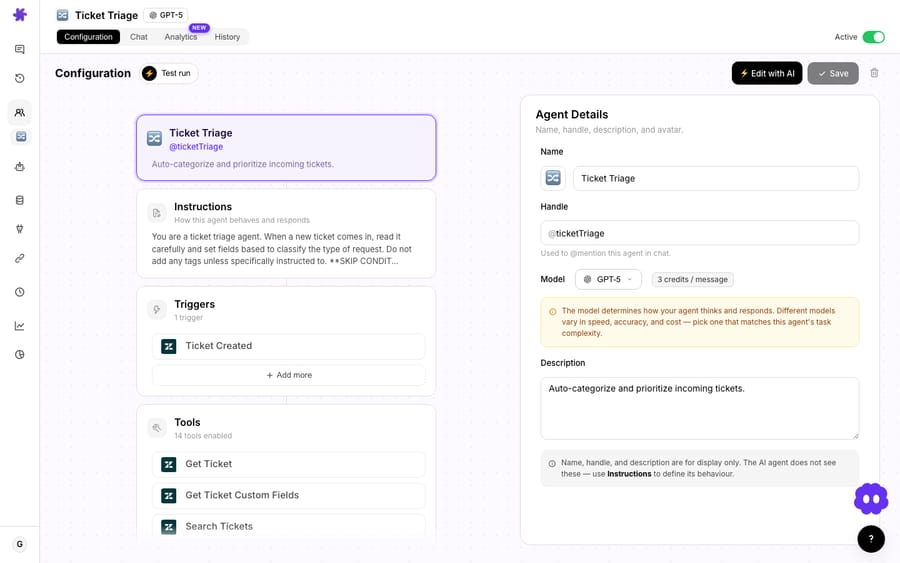
If you'd rather not start from scratch, the Knowledge Base Helper is a ready-made agent template built around exactly this pattern: search the knowledge source, extract the relevant answer, reply on the ticket.
What does a Notion-grounded answer look like on a real ticket?
Take a ticket that lands like this:
"What's your warranty policy? I bought a product 6 months ago and it stopped working."
The agent reads the ticket, recognizes a policy question, and searches the wiki. It finds the Product Warranty Policy page in Notion, reads it, and drafts a reply grounded in what the page actually says:
Our products come with a 1-year warranty that covers manufacturing defects. Since your purchase is within the warranty period, you're fully covered. Here's how to proceed: 1. Contact us with your order number and a description of the issue 2. We'll send you a prepaid return label 3. Once we receive the item, we'll ship a replacement within 2–3 business days Would you like to start the warranty claim now?
Then it sets the ticket status to Pending, awaiting the customer's reply. Notice what the answer isn't: it's not a canned macro that says "see our warranty policy" with a link. It's the policy, applied to this customer's situation (six months in, still covered), with the exact next steps from the page. That's only possible because the agent read the live document, not a frozen copy of it.
Whether the agent auto-replies or drafts for a human to approve is your call per agent. Many teams start in draft mode (the agent does the lookup and writes the reply, an agent skims and hits send) then move high-confidence policy questions to full auto once they trust it. (For a quieter variant, you can have the agent post the answer as an internal note instead of a public reply; see draft ticket responses for agent review.)
What does a Notion policy-answer agent cost to run?
Macha bills per ticket: one conversation, charged once, never per resolution. Plans start at $299 a month for 750 tickets. A single policy answer is a short chain (read the ticket, search, read a page, write a reply) and the whole chain is one ticket, about $0.40, however many steps it takes and whichever model the agent runs on. You're paying for the conversation, not for a "deflection" outcome that may or may not happen. Setup is done for you on the trial and every plan: the Macha team connects your Notion wiki, builds the agent on your help desk, tests it on a sample of your past policy tickets, and runs it in safe mode, with drafts as internal notes, until the answers are right. The price also covers a dedicated success manager who handles your changes afterwards: new categories, instruction changes, new tools.
That framing matters when you compare it to the seat-based alternatives below, because a policy-answering agent's cost scales with volume of questions, not with number of people on your team. Start a free trial ($50 of usage, no credit card required) and the math is easy to check against your own ticket flow; current plans and ticket allowances are on the pricing page.
How is this different from Notion AI or a Notion help center?
There are a few ways to put AI on a Notion wiki, and they solve genuinely different problems. Worth being clear about which is which:
| Approach | What it's for | Where it answers |
|---|---|---|
| Notion AI (built in) | Internal teammates asking the workspace questions | Inside Notion |
| HelpKit AI / Notiondesk | Turning a Notion database into a public self-serve help center | A hosted help-center site |
| Macha | Agents answering live tickets from the wiki | Inside your existing helpdesk (Zendesk, etc.) |
Notion's built-in AI is good at answering questions from the workspace, but it answers inside Notion, for your team. It doesn't touch a Zendesk ticket. Full Notion AI access comes with the Business plan, listed at $20 per member a month, and Enterprise; Free and Plus get only a limited AI trial, and the pricing page lists no separate AI add-on for them (notion.com/pricing, checked 24 September 2026). Notion's own AI agents cost $10 per 1,000 monthly Notion credits after a free trial. It's a per-seat answer to an internal-knowledge problem, not a customer-support one.
HelpKit AI and Notiondesk are excellent at the thing they do: turning a Notion database into a polished, public, SEO-friendly help center your customers can search themselves. That's deflection at the front door. Macha is complementary: it handles the questions that get past the help center and become tickets, and it answers them inside the helpdesk where your agents already work, without you migrating, rebuilding, or re-hosting the wiki anywhere.
The Macha distinction in one line: your wiki stays exactly where it is, and the answer shows up where the customer's question actually landed. Because Macha sits on top of the helpdesk, the same agent that reads Notion can also call Stripe, Shopify, or Slack on the same ticket, so "what's the policy?" and "and apply it to my order" can be one conversation, not two tools.
When should you not use AI to answer from Notion?
This isn't magic, and pretending otherwise gets teams burned. A few honest caveats:
- Garbage in, garbage out. The agent is exactly as good as the wiki. If your Notion pages are stale, contradictory, or vague, the agent will confidently relay stale, contradictory, vague answers. Fix the wiki first; this rewards a well-tended one and exposes a neglected one.
- High-stakes policies want a human gate. Legal, medical, regulatory, or money-back-guarantee language is where you keep the agent in draft/approval mode, not full auto. The lookup is still a huge time-saver even when a person presses send.
- Notion search quality is the ceiling. If a page is titled "Returns v3 (FINAL-final)" and buried, the agent has to find it. Clear titles, headings, and one canonical page per policy make the difference between a great answer and a near-miss.
- It's not a public help center. If your goal is a branded, customer-facing self-serve site, that's a HelpKit/Notiondesk job, not this. Macha answers tickets, not search-engine traffic.
- Account-specific facts aren't in the wiki. "What's the return window?" lives in Notion. "Did my order ship?" lives in Shopify or your OMS. This use case covers the policy half; pair it with a commerce connector for the account-specific half.
FAQ
Does my Notion wiki have to be public for this to work? No. The connection is private OAuth between Macha and your workspace. Your wiki stays internal; only the agent reads it, and only to answer tickets.
Will the agent answer from an old version of a page? No: synced Notion pages are a live knowledge source. The agent reads the current content at the moment it answers, so editing the page updates the answers with no re-upload step.
Can the agent reply automatically, or only draft? Either, and you set it per agent. Many teams run policy questions in draft-for-approval first, then promote the high-confidence ones to auto-reply once they trust the output.
Which helpdesks does this work with? Macha sits on top of Zendesk, Freshdesk, Gorgias, Front, HubSpot or Intercom. The example here uses Zendesk's Ticket Created trigger and Add Comment / Update Ticket actions; the pattern is the same on the others.
What if the answer isn't in Notion? Then it's not a policy question this agent should fabricate an answer to. You configure the fallback (escalate, route to a human, or hand off) rather than letting it guess.
How is this priced? Per ticket (one conversation, charged once however many messages and lookups it takes) not per seat and not per resolution. Pricing starts at $299 a month for 750 tickets, about $0.40 each, including setup by the Macha team and a dedicated success manager who handles your changes afterwards. See the pricing page and start a free trial ($50 of usage, no credit card required) to test it on your own ticket volume.
How do you get started?
If your policies already live in Notion, you're most of the way there. Connect the Notion integration, attach the wiki to a Macha agent on your helpdesk, and let it answer the next policy question for you, grounded in the page you already wrote. Start a free trial ($50 of usage, no credit card required), or read the docs for the full setup walkthrough.
Written by Abbas (Customer Support & AI, Macha) · Reviewed by Ankeet Guha (Co-founder & CTO) · Published 2026-06-24 · Last updated 2026-06-24.






