





 Shopify
 Stripe
 Slack
Slack Notion
 Google Workspace
 Confluence

How Do You Attach Files to an AI Chat in Macha? Documents, Images and Audio


Macha's chat takes up to 3 files per message: documents up to 10 MB are text-extracted, images up to 5 MB are read by a vision model, and audio up to 25 MB is transcribed. Attaching a file adds no charge, because Macha bills per ticket.
Key takeaways
- Macha's chat accepts up to 3 dragged or picked files per message, with documents capped at 10 MB, images at 5 MB and audio at 25 MB.
- PDF, DOCX, CSV, XLSX and TXT files have their text extracted into the conversation, while images go to a vision-capable model that reads screenshots and receipts.
- Audio transcription runs through the ElevenLabs connector's Transcribe Audio tool, which needs an ElevenLabs API key connected before any agent can transcribe a file.
- Attaching files adds no Macha surcharge, since Macha bills per ticket from $299 a month for up to 750 tickets however many files a conversation carries, with setup by the Macha team and a dedicated success manager included.
- Content an agent needs in every conversation, such as a return policy or manual, belongs in a knowledge source rather than a repeated chat attachment.
To attach a file to a Macha chat, drag and drop it onto the chat input (or use the file picker) and send it with your next message: up to 3 files per message, with documents up to 10 MB, images up to 5 MB and audio up to 25 MB, per the Macha chat docs. The agent extracts text from documents, looks at images with a vision model, and transcribes audio into words it can reason over. The feature shipped on March 1, 2026, and it lets you hand the agent the actual file instead of describing it.
The one decision that matters most is when not to use a one-off chat upload and to set up a permanent knowledge source instead. That's covered after the file types and costs below.
Macha is an AI agent layer that sits on top of your help desk (Zendesk, Freshdesk, Gorgias, Front, HubSpot or Intercom), not a help desk itself. Chat is where you build, test and talk to those agents, and attachments are the fastest way to give an agent context it doesn't already have.
How do you attach a file to a Macha chat?
There are two ways to attach a file to a message: drag and drop it onto the input, or click the file picker and browse for it. Either way, the file rides along with your next message, and the agent processes it as part of that turn. You can attach up to 3 files to one message.
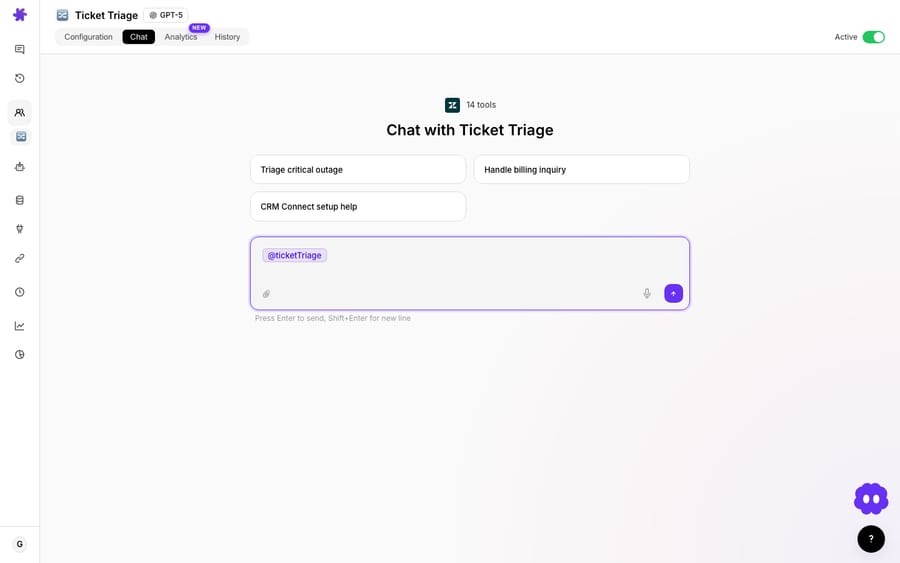
Three categories are supported, and each is handled differently under the hood:
| File type | Examples | Size limit | What the agent does |
|---|---|---|---|
| Documents | PDF, DOCX, CSV, XLSX, TXT | 10 MB | Extracts the text and adds it to the conversation context |
| Images | PNG, JPG and similar | 5 MB | Sends the image to a vision-capable model for visual analysis |
| Audio | Voice memos, call recordings | 25 MB | Stores the file; the ElevenLabs connector transcribes speech to text |
The distinction matters because it changes what the model actually receives. A document becomes text. An image becomes pixels the model can see. Audio becomes a transcript. Let's take them one at a time.
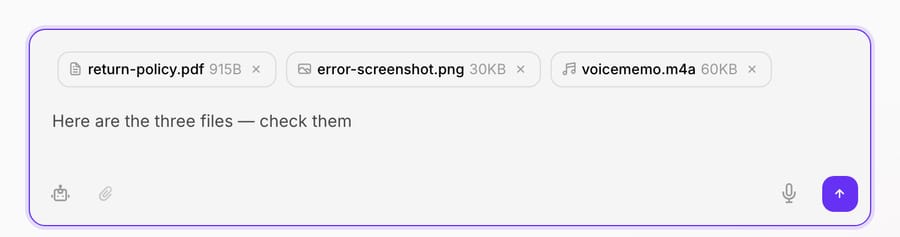
Each attached file shows up as a chip with its type icon, name and size, plus an × to drop it before you send, so you can stage up to 3 files in one message and prune anything you grabbed by mistake.
How do Macha's limits compare to ChatGPT and Claude?
If you've used a general-purpose AI chat, attaching files will feel familiar. Where tools differ is in limits and in what happens next. The consumer tools allow much bigger files (vendors change these numbers often):
| Tool | Per-file size | Files per message/chat | Notable cap |
|---|---|---|---|
| ChatGPT | 512 MB (images 20 MB, spreadsheets about 50 MB) | Capped by plan, per 3-hour window | 2M-token limit on text docs (OpenAI) |
| Claude.ai | 500 MB per file in chat (30 MB in Projects) | Up to 20 per chat | PDFs up to 1,000 pages; charts and images read only up to 100 pages (Anthropic) |
| Macha | Documents 10 MB, images 5 MB, audio 25 MB | 3 per message | Bounded in practice by the model's context window (Macha docs) |
Every one of these tools eventually runs into the model's context window, whatever the byte cap says. The difference with Macha is the destination. In a consumer chat, the file's content informs an answer and stops there. In Macha, the extracted text, the vision read or the transcript becomes context an agent can act on: drafting a Zendesk reply, posting to Slack, or generating a file back out. That support-ops loop is the point, and it's covered more below. You also don't have to build those agents yourself: on the trial and every plan, the Macha team sets up your first agents on your existing help desk, and about $0.40 a ticket covers that setup and a dedicated success manager who handles your changes afterwards.
Is there a file-size limit?
Yes. Macha's chat docs cap documents at 10 MB, images at 5 MB and audio at 25 MB, with at most 3 files per message. Real support files (a contract PDF, a screenshot, a few minutes of audio) sit well under those caps. The tighter constraint is usually the model's context window. For documents, the extracted text has to fit alongside your message, the agent's system prompt, its knowledge and the rest of the conversation. A short PDF is nothing; an 80-page contract can crowd everything else out and degrade the answer, even though it's under 10 MB.
So the practical limit is a budget as well as a ceiling:
- Documents are bounded by tokens more than megabytes. Attach the relevant pages, not the whole binder. A long document is a signal it should be a knowledge source (chunked and searched on demand) rather than pasted into one turn.
- Images are read as vision content, so a normal screenshot or photo under 5 MB is fine; large images cost more tokens and add latency.
- Audio length drives transcription time. A voice memo transcribes fast; a long recording may not fit in 25 MB at all.
If you need to work with something large repeatedly, that's the knowledge-source path, not a chat attachment. See the watch-outs.
What happens when you attach a document?
When you attach a PDF, DOCX, CSV, XLSX or TXT file up to 10 MB, Macha automatically extracts the text and injects it into the conversation context. You don't paste anything; the words from the file simply become available to the agent for that conversation, alongside your message.
That makes the obvious questions trivial:
- "Summarize the key terms in this contract." (attach the PDF)
- "Which of these 300 orders are flagged for review?" (attach the spreadsheet)
- "Draft a reply to this customer based on the policy in this doc." (attach the policy)
Because the content lands in context as text, the agent can quote it, reason over it, cross-reference it against a connected tool, or use it to draft a response. A CSV of orders becomes something the agent can filter and count; a DOCX policy becomes something it can apply to a specific ticket.
Two practical limits worth knowing. First, extraction pulls text, so a scanned PDF that's really just images of pages won't yield much, for that you want the image path (below) or proper OCR upstream. Second, very large documents consume context: a single 80-page PDF can crowd out the rest of the conversation. If a document is something you'll reference repeatedly, it belongs in a knowledge source, not pasted into every chat, more on that in the watch-outs section.
Can the agent actually read images?
Attached images (up to 5 MB each) don't get flattened into a text blob and discarded. They're sent to the model as vision content, so a vision-capable model genuinely sees the picture. That's the same capability Macha agents use when they encounter an image attachment on a Zendesk ticket: the agent downloads the image, encodes it, and passes it to the model for visual analysis.
In practice the agent can:
- Describe a screenshot a customer sent of an error or a broken UI state
- Read text inside an image: a label, an error dialog, a handwritten note
- Identify a product from a photo
- Parse a receipt or invoice into structured fields
Vision is only as good as the model behind it. As of the April 2026 vision release, the vision-capable models include GPT-5.4 Mini, GPT-5 Mini, GPT-4o Mini, Claude Sonnet 4.5, and Claude Sonnet 4. If your agent is set to a model without vision (some Groq models, for instance), it will gracefully tell you image reading isn't supported rather than silently ignore the picture, so if an agent "can't see" your screenshot, check the model selector first.
This is the same engine behind reading image attachments on tickets; we go deeper on what the model can and can't reliably pull from a picture in How AI vision reads screenshots, receipts & product photos.
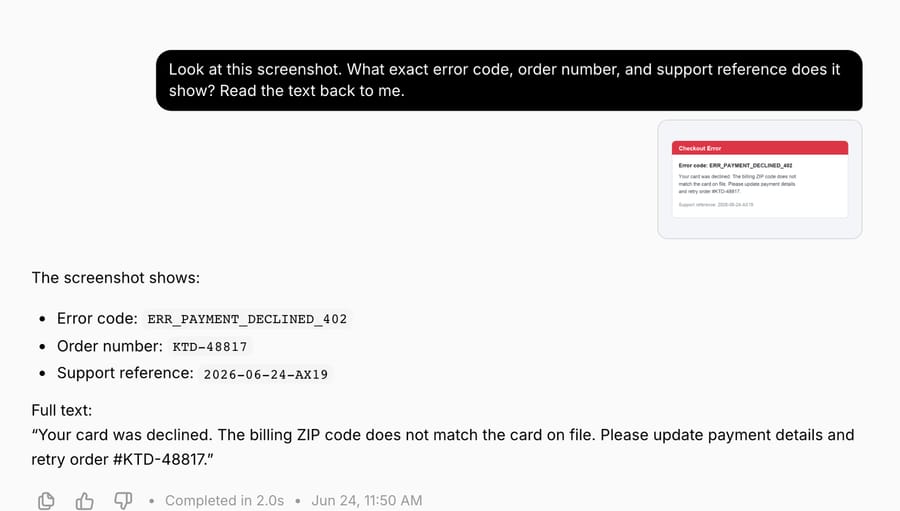
Here the agent didn't just acknowledge a file, it pulled ERR_PAYMENT_DECLINED_402, order KTD-48817, and the support reference straight out of the pixels, then quoted the full error text. That's vision doing OCR-grade reading on a screenshot a customer might paste into a ticket.
How does audio transcription work in chat?
Audio is the one that surprises people, and it works differently from documents and images. Speech isn't handled by the base model: it runs through the ElevenLabs connector's Transcribe Audio tool, an AI-powered Speech-to-Text action. In chat, an audio file up to 25 MB is stored with your message and handed to that tool. The tool takes an audio or video file (it accepts MP3, WAV, M4A, MP4, WebM and other common formats), returns the full transcript as text, and that transcript becomes context the agent can summarize, mine for action items, or reply to.
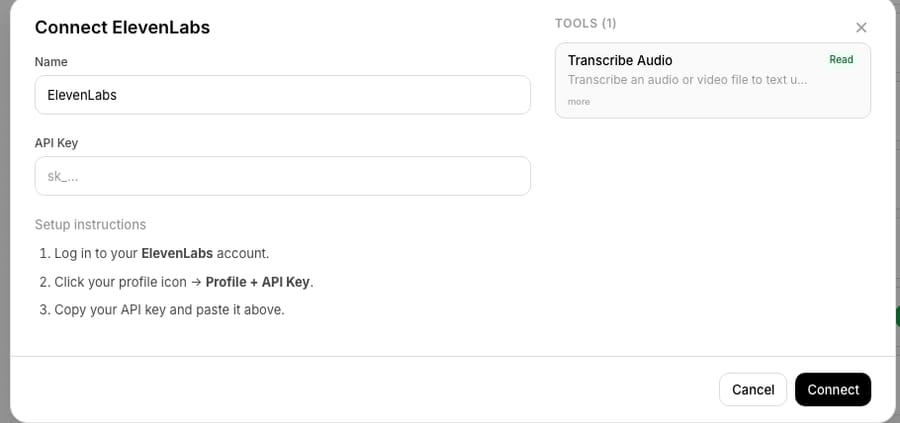
Two things follow from how this is built. First, it's a tool, not a built-in: the ElevenLabs connector has to be connected (you paste an ElevenLabs API key once, as shown above) before an agent can transcribe anything. Documents and images work out of the box; audio depends on this connector. If you ask an agent to transcribe before it's connected, it will tell you it doesn't have that capability rather than guess, so the connector is step one.
Second, because transcription runs as a tool call, it surfaces live the way every Macha tool call does: the chat shows a real-time status while the tool executes ("Using Transcribe Audio"), then the transcript lands in the conversation as plain text. From there you can immediately follow up: "pull out the three commitments we made" or "draft a recap email." The tool is designed to take a file by URL (for example, an audio attachment already sitting on a Zendesk ticket), which is exactly the support-ops case: a customer leaves a voicemail, it lands on a ticket, and the agent transcribes and acts on it without anyone hitting play.
That's the difference between a generic chat that accepts an audio file and a support agent that can act on it: the transcript doesn't dead-end, it flows into the next step: a Zendesk reply, a Slack message, a row in a spreadsheet the agent generates. See the integrations directory for the ElevenLabs connector.
Do file attachments cost extra?
Macha bills per ticket: one conversation, charged once however many messages, tool calls and lookups it takes, not per file, not per action and not per "resolution." Attaching a file isn't itself a charge; it's part of the conversation you're already paying for.
- Documents add extracted text to context, so they're handled as part of the normal message response, no separate charge.
- Image vision is processed by the same response, on a vision-capable model.
- Audio transcription is a separate tool action (Transcribe Audio), but it doesn't bill separately; the tool call and the response that uses the transcript sit inside the same Macha ticket. Because the connector runs on your own ElevenLabs API key, any transcription usage ElevenLabs meters is billed to your ElevenLabs account, not by Macha.
The honest takeaway: attachments carry no surcharge, and a long document doesn't cost more than a short one; the conversation is billed once either way. What big files do eat is context, so attach the relevant pages rather than the whole binder. Pricing starts at $299 a month for 750 tickets, about $0.40 each, and that includes setup by the Macha team and a dedicated success manager; the full tiers are on the pricing page, and you can try all of this on the free trial ($50 of usage, no credit card required).
Should you use a chat attachment or a knowledge source?
This is the most important decision, and it's easy to get wrong. Chat attachments are per-conversation: the file is context for this chat, and Macha cleans it up. When we last checked the product, conversations auto-deleted after 45 days of inactivity and chat attachments expired with them. That's exactly what you want for a one-time question. It's exactly what you don't want for a document the agent should always know about.
If you find yourself attaching the same return policy, the same pricing sheet, or the same troubleshooting guide over and over, stop. That content belongs in a knowledge source, where the agent searches it on every relevant conversation without you re-uploading anything.

Macha's knowledge layer handles size intelligently: small files are injected directly into the prompt, while larger files are chunked, embedded, and searched on demand, so a 200-page manual stays usable without flooding context. You can also connect Google Docs and Notion pages as live sources, so when the underlying document changes, the agent reads the latest version automatically, no re-uploading. For the full picture of uploads, crawls, and live sources, see Giving agents knowledge: uploads, website crawl & live sources.
A simple rule of thumb:
| Use a chat attachment when… | Use a knowledge source when… |
|---|---|
| It's a one-time question about this file | The agent needs this content on every relevant chat |
| The file is unique to this conversation | The file is a standing reference (policy, FAQ, manual) |
| You want the answer now, no setup | The content updates over time (live Google Doc / Notion) |
For the full setup, see the Macha docs.
Can the agent send files back?
Attachments are the input side. It's worth knowing the output side exists too, because a lot of real workflows need both. Macha's File Tools connector lets agents generate files on the fly: XLSX spreadsheets, CSVs, PDFs, and DOCX documents, with no setup required. So a complete workflow can look like: attach a messy spreadsheet → the agent cleans and analyzes it → the agent hands back a tidy CSV or a formatted PDF report. Files in, files out, no leaving the chat.
Watch-outs and when not to use it
A few honest limits so this doesn't bite you:
- Scanned documents are images, not text. A "PDF" that's really photos of pages won't text-extract well. Treat it as an image (vision) or run OCR before uploading.
- Don't paste a knowledge base into every chat. Re-attaching the same big document is slow, expensive, and forgetful. Make it a knowledge source once.
- Audio needs the ElevenLabs connector. Documents and images work immediately; transcription doesn't until that connector is enabled.
- Vision needs a vision-capable model. Check your agent's model if it "can't see" an image; a non-vision model will say so rather than guess.
- Very large files eat context. Attach the pages that matter, not the entire archive. Billing is per ticket either way, but a bloated context makes the answer worse.
- Attachments are ephemeral by design. They expire with the conversation. If you need a permanent record, the source of truth should live in your helpdesk or a knowledge source, not in a chat attachment.
FAQ
What file types can I attach to a Macha chat? Documents (PDF, DOCX, CSV, XLSX, TXT) up to 10 MB, images (PNG, JPG and similar) up to 5 MB, and audio files up to 25 MB, with up to 3 files per message. Documents are text-extracted into context, images are sent to a vision model, and audio is transcribed.
Does the AI actually read images, or just file names? It reads the image. Uploaded images are sent as vision content to a vision-capable model (GPT-5.4 Mini, GPT-5 Mini, GPT-4o Mini, Claude Sonnet 4.5, or Claude Sonnet 4), so the agent can describe screenshots, read text in the image, identify products, or parse a receipt.
How do I attach a file? Drag and drop it onto the chat input, or use the file picker. The file is processed with your next message, and one message can carry up to 3 files.
How does audio transcription work? Audio is transcribed by the ElevenLabs connector's Transcribe Audio tool. You'll see a "Using Transcribe Audio" status while it runs, then the transcript becomes text the agent can summarize or act on. The connector must be enabled in your workspace.
Do attachments cost extra? No. Macha bills per ticket, from $299 a month for up to 750 tickets, and one conversation is charged once, so attaching a file isn't a separate fee. Document extraction, image vision and audio transcription all happen inside the conversation you're already paying for. See pricing for the tiers.
What happens to my files after the chat? They're ephemeral. When we last checked, conversations auto-deleted after 45 days of inactivity and chat attachments expired with them. For content the agent should always know, use a knowledge source instead.
When should I use a knowledge source instead of an attachment? Whenever the same document needs to be available across many conversations: a policy, FAQ, or manual. Knowledge sources are searched automatically and support live Google Docs and Notion pages that stay up to date.
Ready to hand your agents real files instead of describing them? Start a free trial ($50 of usage, no credit card required) and try documents, images, and audio in chat, or read the chat documentation.






