







 Shopify
 Stripe
 Slack
 Notion
 Google Workspace
 Confluence


How to Auto-Reply When a Customer Replies to a Closed HubSpot Ticket (2026)


HubSpot has no single "reply to closed ticket" auto-responder, but you can build one from two parts. First, the help desk's ticket reopening setting decides what a reply to a closed ticket does: reopen it always, reopen it only within 3, 7 or 30 days or a custom window, or never reopen and create a new linked ticket. Second, a ticket-based workflow on Service Hub Professional or Enterprise sends the automatic email, triggered by the reopen (the Ticket reopen date property changes) or by the new ticket. This guide walks through both, the plan gates, the replies HubSpot ignores, and what to do when "thanks!" keeps reopening tickets.
Key takeaways
- HubSpot's ticket reopening setting, under Settings, Inbox and Help Desk, Help Desk, offers Always reopen, Set a time frame and Never reopen, and requires Service Hub Professional or Enterprise.
- HubSpot's reopen time frame options are 3 days, 7 days, 30 days or a custom window, counted from the last message in the conversation rather than the date the ticket closed.
- A reopened HubSpot ticket moves to the first Open status in its pipeline, such as New, and HubSpot updates the Ticket reopen date property.
- HubSpot logs replies it identifies as automated, such as out-of-office messages, without reopening the ticket or creating a new one.
- HubSpot's workflow Send email action is limited to Marketing Hub and Service Hub Professional and Enterprise, so the automatic reply itself needs one of those tiers.

| What you want | Reopen setting | What sends the auto-reply | Plan |
|---|---|---|---|
| Every reply reopens the same ticket, customer gets "we've reopened this" | Always reopen | Ticket workflow enrolling on Ticket reopen date | Service Hub Pro or Enterprise |
| Recent replies reopen, old ones start fresh | Set a time frame (3, 7, 30 days or custom) | Reopen workflow, plus your normal new-ticket email for late replies | Service Hub Pro or Enterprise |
| Closed means closed, every reply is a new ticket | Never reopen | Your normal new-ticket confirmation, optionally reworded | Service Hub Pro or Enterprise |
| The reply is read and answered, not just acknowledged | Any | An AI agent triggered on the reopen | Any paid tier with API access |
What does HubSpot do when a customer replies to a closed ticket?
It depends on the channel and on one setting. For email, the help desk's Ticket reopening setting applies. HubSpot's knowledge base (updated November 9, 2026) describes three options:
- Always reopen: email replies reopen the original ticket, whenever they arrive.
- Set a time frame: replies within the window reopen the original ticket; later replies create a new conversation and a new ticket, linked to the original.
- Never reopen: every email reply starts a new conversation and a new linked ticket.
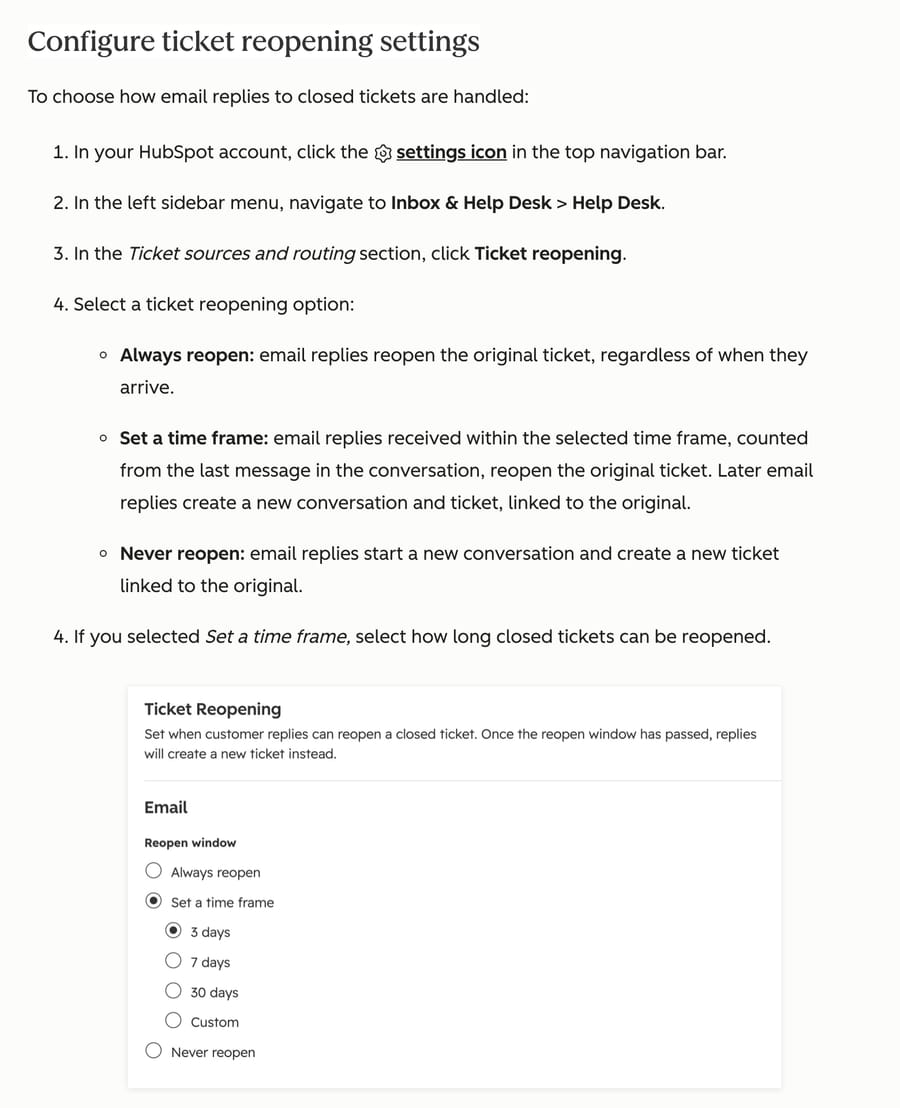
The time frame counts from the last message in the conversation, not from the date the ticket closed. A ticket closed today after a two-week back-and-forth still reopens on a reply tomorrow, and a ticket where the last message was 31 days ago won't reopen under a 30-day window even if it closed yesterday.
When a ticket reopens, its status goes to the first Open status in its pipeline (New in the default Support Pipeline) and the Ticket reopen date property updates. That property is the hook for everything below.
Two exceptions matter for auto-replies:
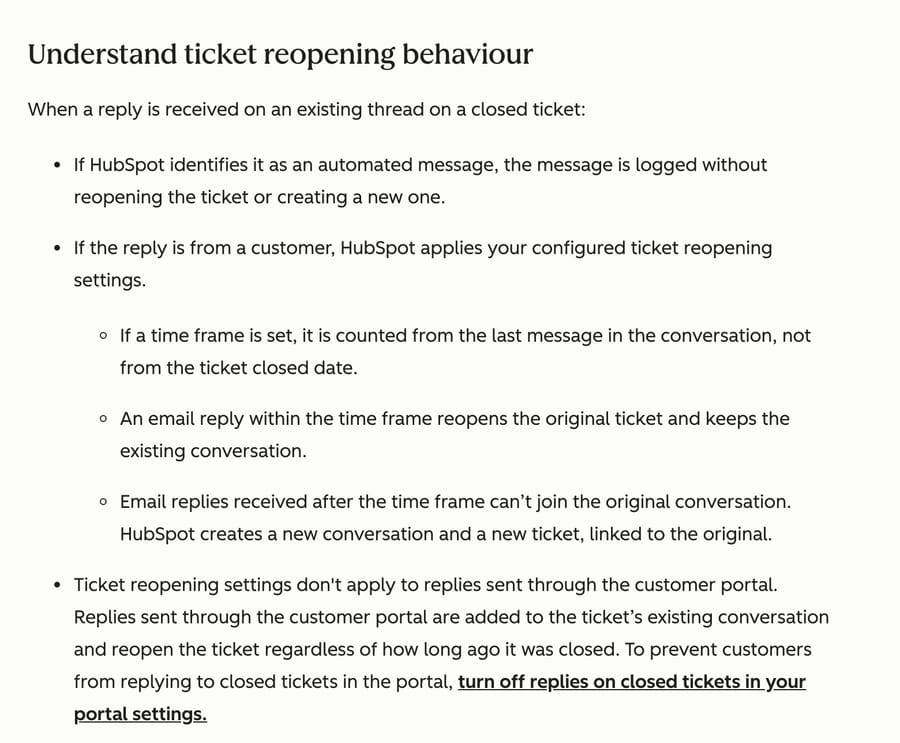
- Automated replies are ignored. If HubSpot identifies the reply as automated, such as an out-of-office message, it logs it without reopening the ticket or creating a new one. That protects you from the classic loop where your auto-reply triggers their auto-reply, which triggers yours.
- Customer portal replies always reopen. The reopening setting doesn't apply to replies through the portal. They join the existing conversation and reopen the ticket however long ago it closed. If you don't want that, turn off replies on closed tickets in your portal settings.
Which reopen setting should you pick before building the auto-reply?
Pick the setting first, because it decides which event your auto-reply listens for.
Always reopen suits low-volume B2B support where one customer, one issue and one long thread is normal. The cost is that a "thanks, all good" reply sends a solved ticket back to New and onto someone's queue, and reopened tickets can recalculate ticket dates in help desk reporting.
A time frame is the default most teams should start with. Seven days catches "that didn't work" replies to a fix you just sent. Anything later is usually a new problem that happens to share a thread, and it gets a fresh ticket with a link back.
Never reopen keeps your resolution metrics clean and makes every reply a new ticket. It's the right call when tickets are short transactional questions, but customers lose the sense of a continuous conversation unless your new-ticket email acknowledges the history.
The poster in a May 2026 r/hubspot thread (thread) was on Service Hub Pro with the customer portal and already had a "ticket closed" email. They wanted a separate email to fire only when a contact replied to a ticket already in the Done status. With the setting above, that becomes "send an email when the ticket reopens", which is buildable.
How do you send an automatic reply when a closed ticket reopens?
This needs a ticket-based workflow, so Service Hub Professional or Enterprise. HubSpot's workflow actions article (updated October 26, 2026) labels Send email "Marketing Hub and Service Hub Professional and Enterprise only."
- Go to Automation > Workflows and click Create workflow, from scratch, ticket-based.
- Set the enrollment trigger to the Ticket reopen date property with the filter "is known". HubSpot re-enrolls a record on an "is known" filter when the property gains a value or is updated from one value to another, which is what happens on each reopen.
- Click the enrollment trigger box, open the Settings tab in the left panel and turn on Re-enroll, then select the trigger to re-enroll on. HubSpot's default is to enroll a record only the first time it meets the trigger, which means your auto-reply would fire on the first reopen and never again.
- Add a filter so the workflow skips tickets you don't want to message, such as a specific pipeline or a Category of Spam. If you already route on categories, our HubSpot ticket routing guide shows how those properties get set.
- Add Send email with an email written for this case: "We've reopened your request and someone will reply within one business day."
- Optionally add Edit record to raise priority, and a Create task or internal notification for the owner.
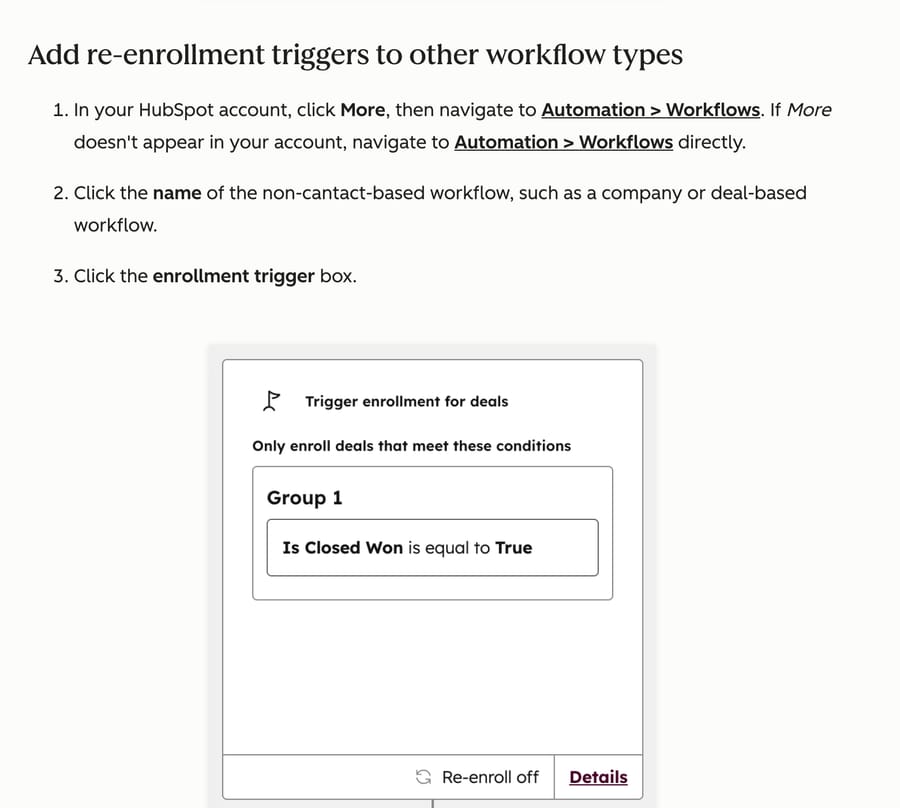
Steps 2 and 3 are where most of these workflows fail. Without re-enrollment, a ticket that reopens twice gets one auto-reply. And a record that's still enrolled can't re-enroll until it finishes the workflow, so keep delays short.
There's a detail HubSpot community threads raise repeatedly, including the "Associate a Reply to a Ticket Workflow Email with Ticket" idea: an email sent by a workflow is a new outbound email, so it may not appear inside the help desk conversation the agent is reading, and a customer's reply to it can land outside the ticket. If your team needs it on the record, add a step that logs a note on the ticket saying the auto-reply went out.
If you chose Never reopen or a time frame, late replies create a new ticket. Your existing new-ticket confirmation handles those, so reword it so it makes sense to someone replying to an old thread ("If you're following up on an earlier request, we've linked it").
What about Service Hub Starter?
Starter gets part of the way. Ticket status automation in the pipeline's Automate tab is available on Service Hub Starter, and its "A customer replies to an email" trigger can set a status when a contact replies on the ticket's thread. HubSpot's pipeline automation article also says Starter is eligible for ticket automation to send an email or an internal notification, but its workflow actions article says Starter's Send email action only sends automated emails when a ticket is received or closed. A reopen isn't either of those. A status change plus an internal notification to the owner ("Customer replied to a closed ticket") is the realistic Starter build. The reopening setting and full ticket-based workflows with Send email are Professional features. Our Service Hub pricing breakdown has the seat prices if you're weighing the upgrade.
How do you stop "thanks" replies from reopening tickets?
HubSpot doesn't offer a native filter on reply content, and HubSpot community threads have asked for one for years. The incentive cuts the other way for HubSpot: reopening on every reply is the safe default for a vendor, because a missed follow-up is a complaint about the product, while a reopened "thanks" only costs your team a click. Your options:
- Use a short time frame. It doesn't stop "thanks" within the window, but it caps the damage.
- Close with a sign-off that asks for no reply. "No need to reply. If anything else comes up, reply here within 7 days and we'll reopen it." It cuts the volume.
- Add a workflow branch on the ticket's latest message. Teams build branches on short replies or keywords, but a workflow can't reliably tell "thanks, that worked" from "thanks, but it still doesn't work."
- Have something read the reply. That's the job an AI agent does well.
Where Macha fits
The workflow above acknowledges a reopen. It can't answer one. A customer who replies "the refund still hasn't arrived" to a closed ticket gets the same canned email as one who replies "thank you!", and both tickets land back in New.
Macha is an AI agent layer that runs inside the HubSpot account you already use, set up and monitored by the Macha team. Its HubSpot connector has a Ticket Updated trigger that fires when a ticket property changes and accepts a property filter, so you can scope it to the status or Ticket reopen date and nothing the agent itself writes. There's also a New Ticket Created trigger for the late replies that HubSpot turns into new linked tickets.
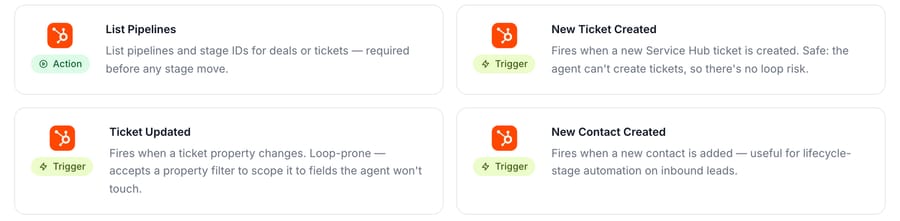
When the trigger fires, the agent reads the ticket and its conversation, checks the contact and their deals, and then does what a good agent would:
- "Thanks, all sorted": sets the status back to Closed with Update Ticket and logs a note. Nobody's queue grows.
- A real follow-up: replies to the customer with an answer from your knowledge base, or logs a draft as a note for review, and sets priority and owner so the right person sees it first.
- Something that needs a person: hands it over with a note summarizing the original issue and the new reply.
In safe mode the agent drafts as notes until your team is happy with the drafts, then moves to public replies for that category. The Macha HubSpot integration page lists every action and trigger, and Macha on HubSpot shows the full flow. If you're comparing approaches more broadly, our HubSpot AI implementation guide covers Breeze and third-party options.
Macha fits teams on Zendesk, Freshdesk, Gorgias, Front, Gladly, Crisp, HubSpot or Intercom whose reopened tickets are mostly the same few follow-ups ("refund not received", "still broken", "thanks"), where reading the reply decides the next step. The Macha team analyzes your past tickets, builds and tests the agent, and runs it in safe mode, included on the trial and every plan at about $0.40 per ticket, with a dedicated success manager who handles your changes. See pricing and the done-for-you setup.
How we researched this
We checked these HubSpot knowledge base pages on November 21, 2026 and captured the screenshots the same day: Manage reopened tickets in help desk (updated November 9, 2026), Set up pipeline automations for objects (updated September 2, 2026), Create workflows (updated November 12, 2026), Add re-enrollment triggers to a workflow (updated November 13, 2026) and Choose your workflow actions (updated October 26, 2026). The workflow steps follow those articles; we didn't build the workflow in a live HubSpot account for this post, and the enrollment trigger wording may differ slightly in your editor. The Reddit question is paraphrased from the thread linked above. The note about workflow emails not threading comes from the HubSpot community thread linked above, not HubSpot's documentation. The Macha trigger descriptions come from our HubSpot integration page and connector data.
Common questions
Does HubSpot automatically reopen closed tickets when the customer replies?
On Service Hub Professional or Enterprise it depends on the ticket reopening setting: always, within a time frame, or never. Portal replies always reopen unless you turn off replies on closed tickets in portal settings.
Can I send an email automatically when a HubSpot ticket is reopened?
Yes, with a ticket-based workflow that enrolls when the Ticket reopen date property changes, has re-enrollment turned on, and uses the Send email action. That needs Service Hub (or Marketing Hub) Professional or Enterprise.
Why didn't my reopen workflow fire the second time?
Re-enrollment is off by default. HubSpot enrolls a record only the first time it meets the trigger unless you turn on Re-enroll in the workflow's Settings tab, and a ticket still in the workflow can't re-enroll until it completes.
Do out-of-office replies reopen HubSpot tickets?
No, if HubSpot identifies them as automated. It logs them on the ticket without reopening it or creating a new one.
What status does a reopened HubSpot ticket go to?
The first Open status in its pipeline, such as New in the default Support Pipeline. Ticket status automation can then move it on, for example to Waiting on us.
Can a reply to a closed ticket create a new ticket instead?
Yes. Choose Never reopen, or a time frame; replies after the window create a new conversation and a new ticket linked to the original.