







 Shopify
 Stripe
 Slack
 Notion
 Google Workspace
 Confluence


HubSpot vs Intercom (2026): Service Hub or Intercom for Your Support Team?


HubSpot Service Hub is a help desk built on top of a CRM, so every ticket sits next to the contact's deals, emails and marketing history. Intercom is a messaging-first support platform built around its Messenger and the Fin AI agent. On list prices read on November 21, 2026, HubSpot runs from free for two users to $150 a seat, with its Customer Agent billed at $0.50 per resolved conversation, while Intercom runs $29 to $132 a seat with Fin at $0.99 per outcome. Below: who each one suits, the arithmetic at 10 seats and 1,000 AI resolutions a month, the features that separate them, and how to run both together.
Key takeaways
- HubSpot Service Hub suits teams whose sales and marketing already run on HubSpot's CRM and has a free plan for 2 users, while Intercom suits product-led companies supporting customers through an in-app Messenger.
- HubSpot Service Hub lists Starter at $7, Professional at $90 and Enterprise at $150 per seat a month on annual billing, plus one-time onboarding of $1,500 on Professional and $3,500 on Enterprise.
- Intercom lists Essential at $29 ($19 for new customers), Advanced at $85 and Expert at $132 per seat a month on annual billing, and charges $0.99 for every Fin outcome on top.
- HubSpot's Customer Agent costs 50 credits, or $0.50, per resolved conversation and needs a Professional or Enterprise seat, while Fin is included on every Intercom plan.
- At 10 seats and 1,000 AI resolutions a month, HubSpot Professional comes to about $1,370 a month and Intercom Advanced to about $1,840, before Intercom's Copilot add-on.

| If you are... | Pick | Why |
|---|---|---|
| A B2B team whose reps already work in HubSpot CRM | HubSpot Service Hub | Tickets, contacts and deals share one database, so support sees renewal and deal context without a sync |
| A SaaS product with users signed in to your app | Intercom | The Messenger, in-app messages and Fin are the core of the product, not add-ons |
| Two people doing support on a budget of zero | HubSpot Free | Free for up to 2 users; Intercom has a 14-day trial, not a free plan |
| A team that wants an AI agent from day one on a lower plan | Intercom | Fin runs on Essential; HubSpot's Customer Agent needs Professional or Enterprise |
| A team with heavy phone or WhatsApp volume | HubSpot Service Hub | Professional includes 3,000 calling minutes and up to 1,000 WhatsApp messages a month; Intercom bills those channels as you go |
| Already on one of them and unhappy with its AI agent | Keep the desk, change the AI | An agent layer such as Macha runs inside either desk (see Where Macha fits, below) |
How does HubSpot Service Hub pricing compare with Intercom pricing?
Both vendors charge per seat and then charge again for AI. The seat prices below are the annual-billing rates each vendor shows by default.
| Plan level | HubSpot Service Hub (per seat a month) | Intercom (per seat a month) |
|---|---|---|
| Free | $0, up to 2 users | No free plan; 14-day trial, no card |
| Entry | Starter: $7 annual, $10 monthly (against a $20 list price; new customers only) | Essential: $29 ($19 for new customers, a 35% discount) |
| Mid | Professional: $90 annual, $100 monthly, plus $1,500 onboarding | Advanced: $85, with 20 free Lite seats |
| Top | Enterprise: $150, plus $3,500 onboarding | Expert: $132, with 50 free Lite seats |
| AI agent | Customer Agent: 50 credits ($0.50) per resolved conversation, Professional and Enterprise only | Fin: $0.99 per outcome, every plan |
| Included AI allowance | 500 / 3,000 / 5,000 HubSpot Credits a month on Starter / Professional / Enterprise | None for Fin; 10 Copilot conversations per agent a month |
| Agent copilot | Breeze features draw on the same credits | Copilot: $29 per agent a month annual, $35 monthly |
| Seat minimum | Not stated on the pricing page | 1 full seat |
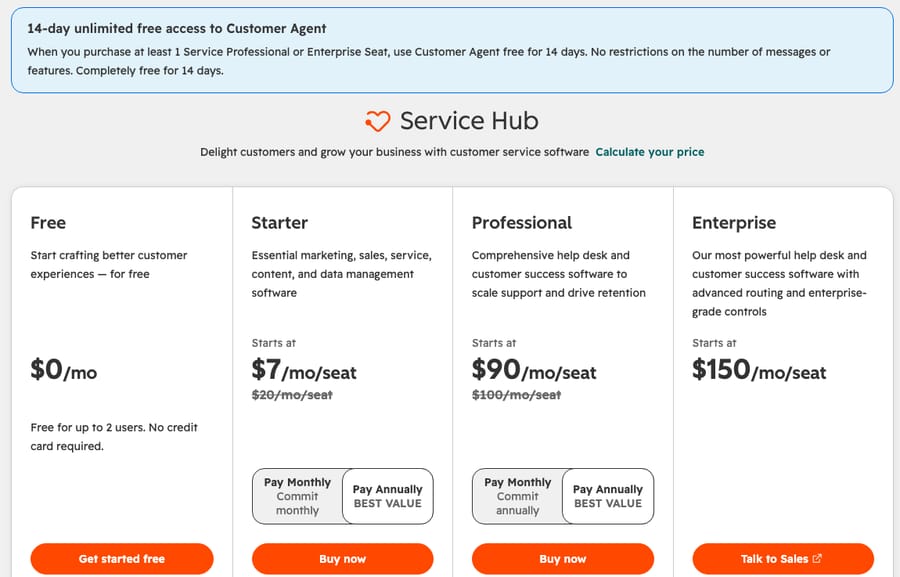
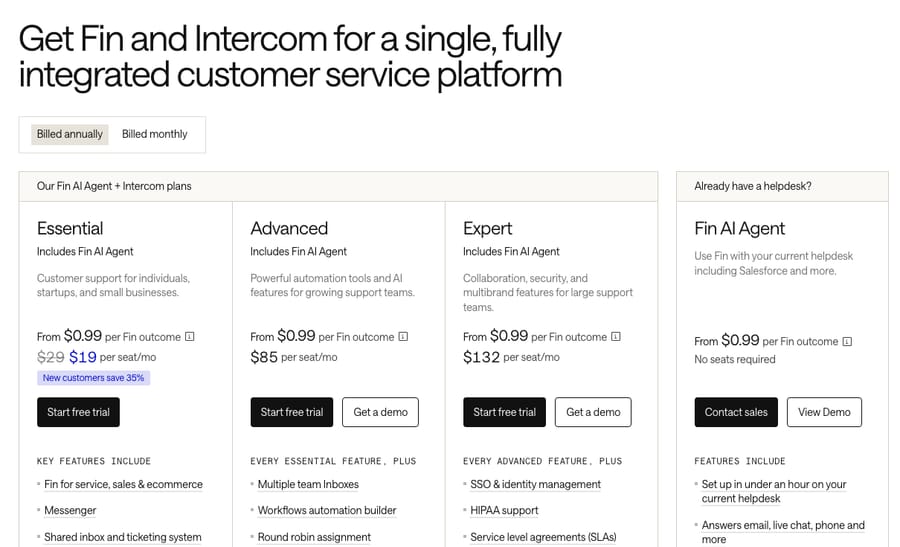
On annual billing, HubSpot is far cheaper at the entry level ($7 against $29), slightly dearer in the middle ($90 against $85) and dearer at the top ($150 against $132). It also front-loads two costs Intercom doesn't have. The $1,500 and $3,500 onboarding fees are one-time charges on Professional and Enterprise, and the jump from Starter at $7 to Professional at $90 is where most support features live: the knowledge base (one per account, up to 2,000 articles), WhatsApp, and the Customer Agent. HubSpot also gives away view-only seats, which matters if half the company wants to read tickets without working them.
Intercom's entry price looks high until you notice that Fin and the Messenger come with it. The catch sits in the feature list: Essential has the shared inbox and Fin, but Workflows, round-robin assignment and multiple team inboxes start on Advanced at $85. Most teams of more than a handful of agents end up there.
For the full line-item breakdown of each, see our HubSpot Service Hub pricing guide and our Intercom pricing guide.
What does a 10-seat team with 1,000 AI resolutions a month pay?
Here is the arithmetic at one stated volume: 10 support seats on annual billing, and an AI agent that resolves 1,000 conversations a month. We picked HubSpot Professional and Intercom Advanced because they're the cheapest plans on each side with the routing and automation a 10-person team needs, and the cheapest HubSpot plan where the Customer Agent runs at all.
| Line item | HubSpot Service Hub Professional | Intercom Advanced |
|---|---|---|
| Seats | 10 × $90 = $900 | 10 × $85 = $850 |
| AI agent | 1,000 × 50 credits = 50,000 credits, minus 3,000 included = 47,000 × $0.01 = $470 | 1,000 × $0.99 = $990 |
| Monthly total | $1,370 | $1,840 |
| Year one | $16,440 + $1,500 onboarding = $17,940 | $22,080 |
| Optional agent copilot | Breeze features draw from the same credit pool | Copilot for all 10: +$290 a month |
On these numbers HubSpot is about $4,140 cheaper in year one, and the gap widens with AI volume because HubSpot's resolution costs about half of Intercom's outcome. Three assumptions move the result:
- Credits are shared. HubSpot's 3,000 included credits cover every Breeze feature, not only the Customer Agent. If your marketing team runs enrichment from the same pool, the AI line grows. Credits reset monthly and don't roll over.
- The two vendors count different things. HubSpot bills a resolved conversation. Intercom bills an outcome, which its pricing FAQ says happens when a customer confirms the issue is resolved, when they don't ask for more help after Fin responds, or when Fin completes a workflow (a Procedure), including handoffs. A conversation Fin hands to a person through a Procedure can still count. So 1,000 Intercom outcomes and 1,000 HubSpot resolutions aren't the same 1,000 conversations.
- Essential is cheaper if it's enough. On Intercom Essential at the $19 new-customer rate, the same month is $190 in seats plus $990 for Fin, or $1,180, but without Workflows or round-robin assignment.
Our Intercom Fin vs HubSpot Breeze pricing comparison runs the AI side alone at more volumes.
How do Breeze Customer Agent and Fin charge for AI?
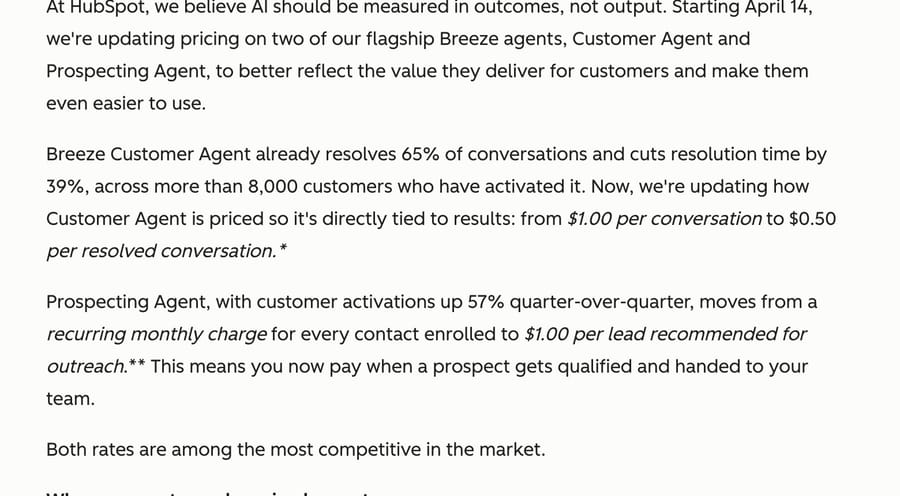
Both now bill for results rather than activity, and both changed to get there. HubSpot moved its Customer Agent from $1.00 per conversation to $0.50 per resolved conversation on April 14, 2026, paid as 50 HubSpot Credits per resolution. Its own announcement says the agent resolves 65% of conversations across more than 8,000 customers who have activated it.
The incentives differ in a way that matters for your bill. HubSpot sells seats across its Marketing, Sales, Service and other hubs, and uses AI credits to pull customers onto Professional, the tier where the Customer Agent unlocks; the cheap resolution price is a reason to buy a $90 seat. Intercom's business is increasingly Fin itself: it sells Fin standalone to teams on Salesforce and other help desks at the same $0.99 with a minimum monthly commitment (its example is 50 outcomes). A per-outcome vendor earns more when its definition of an outcome is broad, which is why Intercom's "didn't ask for more help" clause deserves a look before you sign.
The setup work is different too. HubSpot's Customer Agent learns from your existing HubSpot content, starting with your website URL, and hands off to a person when the visitor asks for one or hits a handoff rule you set. Fin reads your Intercom help center and other content sources and runs across email, chat, phone and more, according to Intercom's pricing page. On either side, your team writes the guidance, tests it and tunes it. For the longer version, see our Breeze Customer Agent guide and Fin AI explained.
Which platform wins on features?
| Capability | Winner | Why |
|---|---|---|
| CRM context on tickets | HubSpot | Tickets are CRM records linked to contacts, companies and deals in the same database |
| In-app and real-time messaging | Intercom | The Messenger, in-app chats, banners and tooltips are free and unlimited on every plan |
| AI agent on entry plans | Intercom | Fin runs on Essential; HubSpot's agent needs Professional |
| Free plan | HubSpot | Free for up to 2 users; Intercom offers a 14-day trial |
| Phone | HubSpot | Calling minutes included: 500 on Starter, 3,000 on Professional, 12,000 on Enterprise; Intercom phone is pay as you go |
| HubSpot | Up to 1,000 messages a month on Professional and Enterprise; Intercom charges per message | |
| Knowledge base | Tie | HubSpot: 1 knowledge base with 2,000 articles on Professional, 25 with 10,000 on Enterprise. Intercom: public help center on Essential, private and multilingual on Advanced |
| Routing and assignment | Depends on tier | Intercom lists round robin and Workflows on Advanced; HubSpot's product page puts skill-based routing on Enterprise |
| SLAs | Check the tier | HubSpot's product page lists SLA management in its help desk without naming a tier; Intercom lists SLAs on Expert, its top plan |
| Light users | Intercom | 20 free Lite seats on Advanced, 50 on Expert; HubSpot's pricing page says view-only seats are free, and they can't reply |
| Proactive messaging | Intercom | Product tours, surveys and checklists via Proactive Support Plus at $99 a month for 500 messages |
HubSpot wins wherever the CRM or bundled channel minutes do the work. Intercom wins wherever the customer is inside your product and expects an answer in the same session.
Can you run Intercom and HubSpot together?
Many teams do: Intercom for support conversations, HubSpot as the CRM for sales and marketing. Intercom's own HubSpot app connects them, with limits. Its help article (dated September 2026) says the app syncs new leads and their owners to HubSpot, creates them as contacts with the lifecycle stage set to Lead, and logs Intercom conversations on the HubSpot activity timeline. It only sends data one way, from Intercom to HubSpot. For two-way sync, Intercom points you to HubSpot's separate Data Sync app.
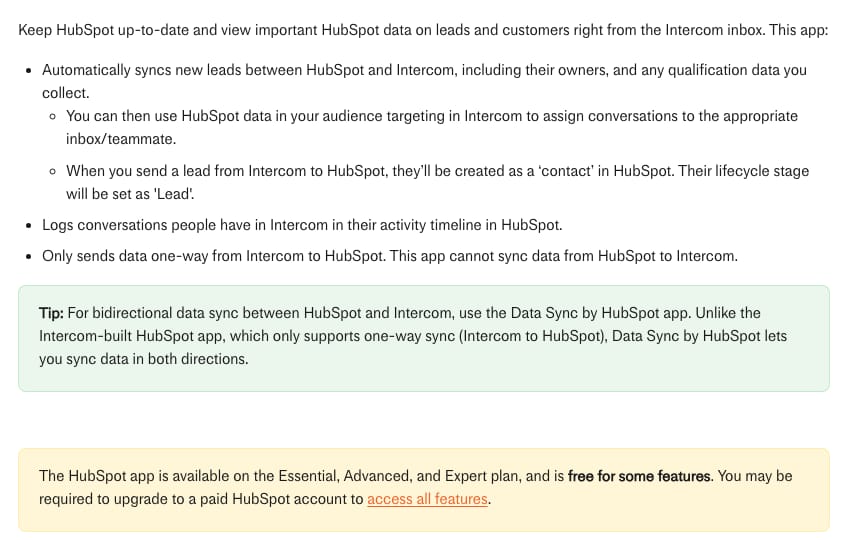
That one-way flow is fine for giving sales reps a support history. It's weaker for support: customer replies sync in real time, but teammates' replies only sync once the conversation closes, so a rep looking at an open account in HubSpot sees half the thread. Our HubSpot and Intercom integration guide covers the three ways to connect them, including giving an AI agent live read and write access to HubSpot from inside an Intercom conversation.
Running both costs two sets of seats. If support is the only team in Intercom, the question is whether the Messenger and Fin are worth a second bill on top of the HubSpot CRM you already pay for.
What do users complain about on each?
We read threads from r/hubspot and r/CustomerSuccess in our Reddit archive sweep. We paraphrase and don't name posters.
- Breeze quality. In an October 2026 r/hubspot thread, a user who'd spent a lot of time refining prompts, guardrails and tests said the results were still consistently disappointing (thread).
- Breeze setup. A March 2026 thread found it confusing that a customer-facing agent needs its own knowledge base, built separately from the content used by internal agents (thread).
- Credits. A June 2025 post warned that HubSpot's credit system lets you run past what you've paid for, after a manual enrichment of a large contact list burned through credits; the poster put the cost at about $11k for the year (thread). That was Breeze Intelligence, not the Customer Agent, but it's the same credit pool.
- Fin accuracy. In a February 2026 r/CustomerSuccess thread, a team with more than 100,000 past conversations and hundreds of pages of docs loaded into Fin said they were struggling to make it useful (thread).
Both complaints are about the AI agent, which is the part you can swap without migrating.
Where does Macha fit if you use HubSpot or Intercom?
Macha isn't a help desk and doesn't replace either one. It's an AI agent layer that runs inside the desk you already use, and both HubSpot and Intercom are live Macha integrations. The Macha team sets up, tests and monitors your agents for you. Macha suits teams on Zendesk, Freshdesk, Gorgias, Front, Gladly, Crisp, HubSpot or Intercom who want the agent to read the HubSpot deal or the Intercom conversation and act in the ticket, without staffing its upkeep.
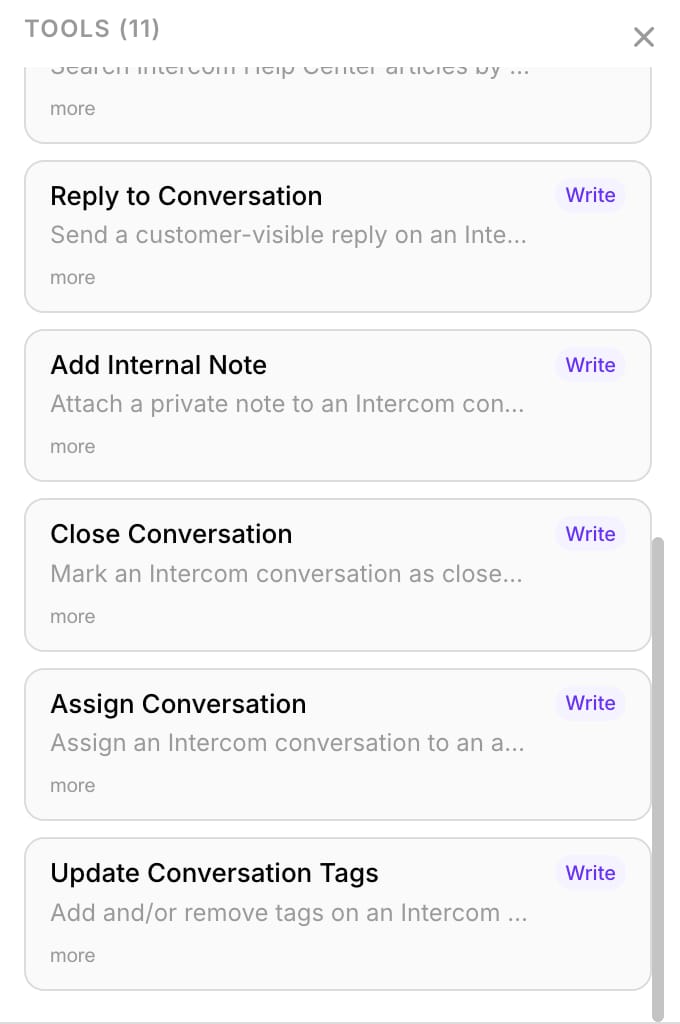
On Intercom, Macha's connector has 11 tools. It reads conversations, contacts, admins and Help Center articles, and its write tools reply to a conversation, add an internal note, close, assign and tag. Runs start on the first customer message, every customer message, an assignment or a close.
On HubSpot, Macha's connector also has 11 tools: search and read contacts, deals and tickets, update a contact or a ticket's status, owner and priority, move a deal stage, list pipelines and add a note to the ticket's timeline. It starts on a new ticket, a ticket property change (filtered to fields the agent won't touch, so it can't loop) or a new contact. That makes the HubSpot-shaped work possible: look up the contact's open deals and renewal date before answering a billing question, then route the ticket to the account owner. Our use case for looking up HubSpot context on every ticket shows the flow, and on Intercom the triage use case does the same for new conversations.
Macha is the done-for-you option. The Macha team analyzes your past tickets, builds the knowledge base and the agent on your existing desk, and runs it in safe mode, drafting replies as internal notes until your team approves them, at about $0.40 per ticket. That price includes setup and a dedicated success manager who handles your changes, on the trial and every plan. The tiers are $299 a month for 750 tickets, $599 for 1,500, $1,199 for 3,000, $1,999 for 5,000, $2,999 for 7,500 and $3,999 for 10,000, with custom pricing above that. Macha charges for each ticket it handles, while HubSpot charges only for resolved conversations, so compare on your own resolution rate. The difference against Breeze or Fin is who does the work: with them your team writes and tunes the agent; with Macha, we do. See Macha on HubSpot, Macha on Intercom and how done-for-you setup works.
How we researched this
We read HubSpot's Service Hub pricing page on November 21, 2026. From our location the live page shows India pricing, so we checked the prices against, and captured, a US copy in the Wayback Machine taken the same day at 14:29 UTC, cross-checked against a fetch from a US server. Switching the pricing page's billing toggle to Pay Monthly shows Starter at $10 a seat against the $20 list price, which matches the "$10, from $20" on HubSpot's Service Hub product page; $7 is the Pay Annually rate. Customer Agent pricing comes from HubSpot's April 2026 announcement and its setup details from HubSpot's Customer Agent setup article (updated October 26, 2026). Intercom's plans, Fin outcome definition, add-ons, trial and seat minimum come from its pricing page, read on November 21, 2026 and checked against a Wayback copy from November 19. The integration details come from Intercom's HubSpot app article, read November 21. All prices are list prices on annual billing unless stated; sales discounts aren't included.
We checked each figure in the worked example against those list prices; the arithmetic is ours, with stated assumptions: 10 seats, 1,000 AI resolutions a month, and no other HubSpot credit use. We didn't run either vendor's AI agent on live traffic. Reddit threads come from our archive sweep, because reddit.com blocks our fetcher; we paraphrase them. The Macha connector details come from Macha's integration listings and a capture of the Intercom connector in our demo workspace; we didn't capture the HubSpot connector for this page.
Common questions
Is HubSpot cheaper than Intercom?
At the entry level, by a lot: $7 a seat on Starter against $29 on Essential, and HubSpot has a free plan for 2 users. In the middle and at the top, Intercom's seats are cheaper ($85 against $90, $132 against $150). On AI, HubSpot's $0.50 per resolved conversation is about half of Intercom's $0.99 per outcome. But HubSpot adds $1,500 or $3,500 in one-time onboarding on Professional and Enterprise, and its agent needs a Professional seat.
Does Intercom have a free plan?
No. Intercom offers a 14-day free trial with no credit card, which includes every feature, Fin and the add-ons. HubSpot Service Hub has a free plan for up to 2 users.
Can I use Fin with HubSpot Service Hub?
Intercom sells Fin on its own for teams on another help desk, at $0.99 per outcome with a minimum monthly commitment and no seat cost. Its pricing page names Salesforce as an example; check with Intercom whether your HubSpot setup is supported before planning around it.
Is HubSpot Service Hub good for SaaS support?
It works well when your customers are accounts with deals and renewals, because support sees that context on the ticket. For in-app support where users expect a chat inside your product, Intercom's Messenger is the stronger fit.
Does the Intercom HubSpot integration sync both ways?
No. Intercom's own HubSpot app only sends data from Intercom to HubSpot, and teammates' replies sync once a conversation closes. For two-way sync, Intercom recommends HubSpot's Data Sync app.
Can I add a different AI agent without switching help desks?
Yes. Macha runs inside both HubSpot and Intercom, and the Macha team sets the agent up for you. Start a trial with $50 of free usage (about 125 tickets), no credit card, no time limit, and the first category goes live in safe mode while your team reviews the drafts.