





 Shopify
 Stripe
 Slack
Slack Notion
 Google Workspace
 Confluence

How to Create Stripe Customer Accounts From Zendesk Support Requests


Some sign-ups arrive in the support queue: someone emails "I'd like to sign up for your Pro plan" to your support address, and the request waits for a person to copy the email into Stripe and reply with a way to pay. A Macha agent can do that on the first message, without creating duplicate customers.
Key takeaways
- A Macha agent creates a Stripe customer from a new Zendesk ticket with six tools: five built-in Zendesk and Stripe tools plus one custom API tool that calls POST /v1/customers.
- Macha's built-in Stripe connector has no create-customer tool, so the agent checks the requester with Get Customer by email and only then calls the custom create tool.
- Zapier's "Create Stripe customers from new Zendesk users" template runs on every new Zendesk user and goes straight to Create Customer with no Stripe search step.
- A six-tool onboarding run, from reading the ticket to logging the new Stripe customer ID, costs about $0.40 as one ticket on Macha's $299-a-month plan.
- Macha's Zendesk New Ticket trigger fires on a customer's first message before any agent replies, giving the account-creation agent first look at the request.

A Macha agent can create a customer account straight from a support request: a Zendesk New Ticket trigger starts it, it looks the requester's email up in Stripe with the built-in Get Customer tool, creates the customer only when no match comes back, replies with a payment link, and logs the new cus_ ID on the ticket as an internal note, before a human has read the first line. The run uses six tools: five built-in Zendesk and Stripe tools, plus one custom API tool that calls Stripe's POST /v1/customers, because Macha's built-in Stripe connector reads customers but doesn't create them. It's billed as one ticket, about $0.40 on Macha's $299-a-month plan.
This small, unglamorous job happens dozens of times a week, and it fits an AI agent that lives on top of your existing help desk. Macha isn't a help desk and it isn't a CRM. It's the agent layer that reads your Zendesk tickets and takes real actions in the tools you already pay for. Here's how the flow works, where it earns its keep, and when to keep a human in the loop.
What does the account-creation workflow look like?
The use case maps to six tools, five built-in and one custom, wired to a single trigger:
| Step | Connector | Action |
|---|---|---|
| 1. Read the request | Zendesk | Get Ticket |
| 2. Check for an existing record | Stripe (built-in) | Get Customer, by email |
| 3. Create the profile (only if new) | Stripe (custom API tool) | Create Stripe customer: POST /v1/customers |
| 4. Build the way to pay | Stripe (built-in) | Create Payment Link |
| 5. Reply + log the ID | Zendesk | Add Public Reply · Add Internal Note |
The trigger is Macha's Zendesk New Ticket event, scoped to the condition that matters: a new customer who doesn't yet have a billing profile. New Ticket fires on the customer's first message, before any agent replies, so the Macha agent gets first look. (Stripe's Customer object is the central record that invoices, subscriptions and payment methods hang off, which is why you want it created cleanly and exactly once.)
How do you connect Zendesk and Stripe to Macha?
Both are built-in Macha connectors, so the lookups need no glue code. Zendesk authenticates with OAuth or an API key; Stripe uses an API key. Once they're connected, their actions become tools your agents can call.
The built-in Stripe connector has 10 tools: Get Customer (by ID or email), Get Payment, List Payments, Get Charge, Get Subscription, List Subscriptions, List Invoices, Cancel Subscription, Create Refund and Create Payment Link. Two of them matter here. Get Customer answers "does this email already have a billing profile?", and Create Payment Link gives the reply something to click. There's no create-customer tool in that list, and that's a sensible default: the connector leans toward reading billing data and taking a few reversible actions, and creating records is where a careless agent does lasting damage.
So the create step is a custom API tool that Macha's team sets up during onboarding. For Stripe it's a single call to Stripe's Create a customer endpoint, POST /v1/customers, with email, name and a metadata field for the Zendesk ticket ID, authenticated with your secret key as a Bearer token the way Stripe's authentication docs describe. If "account" means a login in your own product rather than a Stripe record, the custom tool points at your app's own account API instead, with whatever auth that API documents. And if you'd rather no agent ever creates accounts, skip the custom tool: the agent does the lookup, then hands the ticket to a person with the check already done.
Shopify stores work the same way. The built-in Shopify connector's Lookup Customer tool does the "already a customer?" check, and creating a customer goes through a custom tool against Shopify's Admin API or a handoff, since none of the connector's 8 tools creates a customer.
Which tools and instructions does the agent need?
In Macha, an agent is a configured worker: a model, an instruction, and a set of tools it's allowed to call. For this job you build (or clone) a support agent and grant it six tools: Zendesk Get Ticket, Add Public Reply and Add Internal Note, Stripe Get Customer and Create Payment Link, and the custom Create Stripe customer tool. Nothing more. Tight tool scopes keep the agent's behavior predictable and your audit trail clean.
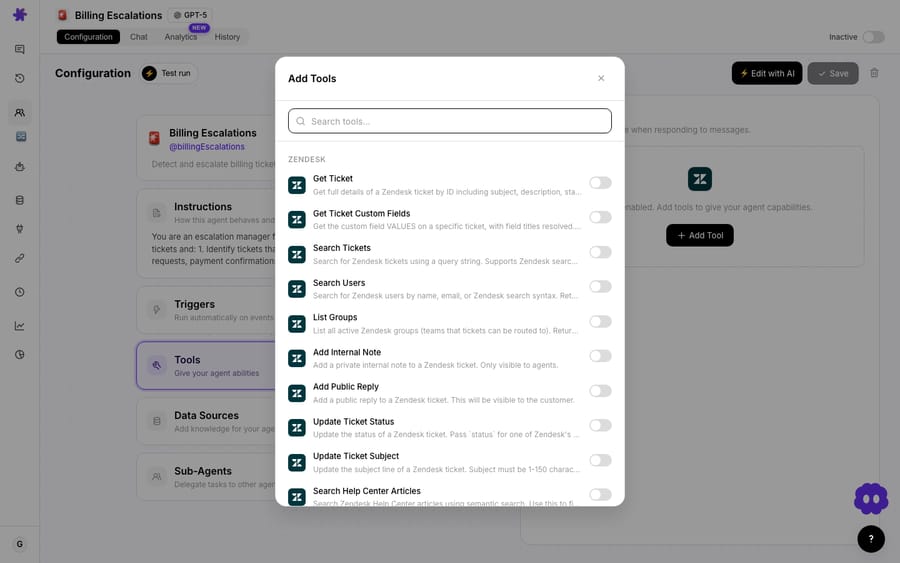
The instruction is where the judgement lives. The important rule is search before you create: tell the agent to look the requester up with Get Customer by email first, and only call the custom create tool when no match comes back. That one instruction is the difference between clean onboarding and a Stripe dashboard slowly filling with duplicate cus_ records, and it's the de-duplication step that simple field-mapped automations skip.
How does the agent run on every new ticket?
A trigger is what makes the agent autonomous instead of something you invoke by hand. Point it at Zendesk's New Ticket event and add a condition so it only wakes up for the right tickets: new requesters, sign-up intent, no existing billing profile. Everything else flows past untouched. On trigger runs, write tools run directly when the instructions say to use them. Don't count on a confirmation card in chat either: when we tested custom tools on 28 September, a custom write tool ran with no card, while built-in Zendesk writes showed one. The safety lives in the instructions, so test the agent in chat on a few real tickets before you attach the trigger.
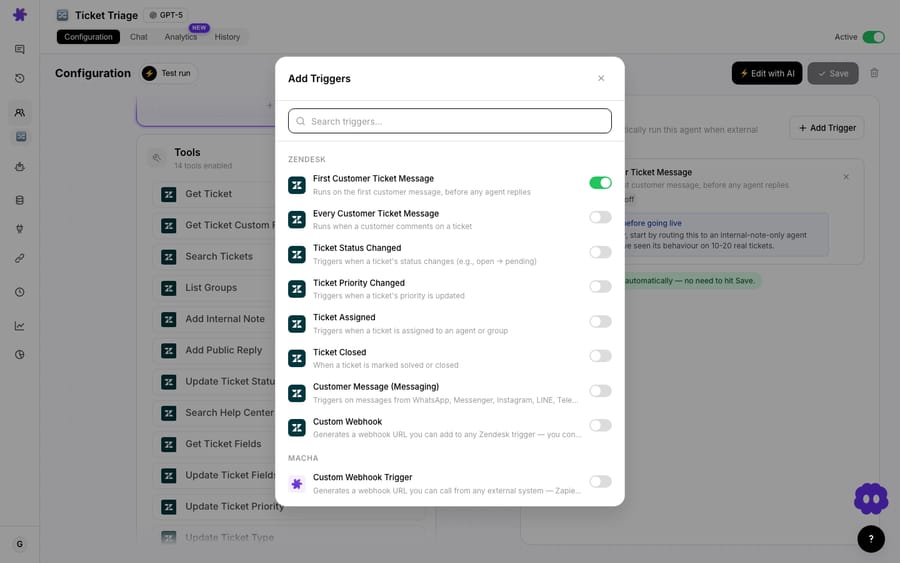
When a qualifying ticket lands, the agent runs the sequence end to end:
- Reads the ticket. The customer writes: "Hi, I'd like to sign up for your Pro plan. My email is [email protected]."
- Checks Stripe. It calls Get Customer with
[email protected]and gets no match, confirming this is a new customer, not a returning one. - Creates the customer. It calls the custom Create Stripe customer tool with the email (and name, if the ticket carried one), and Stripe returns a fresh
cus_ID. - Builds the payment link. It calls Create Payment Link for the Pro plan's price, which the instructions name.
- Replies with a path to pay. Public reply: "Welcome! I've set up your account. To get started with the Pro plan, you can complete your subscription here: [payment link]. Let me know if you need any help!"
- Logs the ID. An internal note records the new Stripe customer ID so the next human to touch the ticket has the billing context attached.
The whole thing is a handful of tool calls. Because Macha bills per ticket, the run is charged once, about $0.40, however many tool calls it takes, so this six-tool onboarding run costs no more than a one-line reply. See pricing for the full picture; you can prove the flow out on a free trial ($50 of usage, no credit card required) before it touches a real customer.
Why use an agent instead of a Zapier or Pipedream recipe?
Zendesk-to-Stripe "create a customer" automations already exist. Zapier publishes a ready-made Zap, and Pipedream offers a Zendesk New Ticket (Instant) trigger and a Stripe Create a Customer action you can wire together. They're fine for the literal mechanical step. Zapier bills by task, so a template is optimized for firing on every event and leaves the question of whether it should fire to you. The difference is judgement:
- They fire blindly; an agent decides. Zapier's "Create Stripe customers from new Zendesk users" Zap runs on every new Zendesk user, and a Pipedream trigger-to-action pair runs on every new ticket, mapping fields across. Neither can read "I'd like to sign up" and tell it apart from "my order is late." The Macha agent reads the request and only acts when it's an onboarding ask.
- They create duplicates; an agent de-dupes. Zapier's template goes straight from the New User trigger to Create Customer with no search step (checked 24 September 2026), and a two-step Pipedream workflow has none unless you build one. A returning customer, or a reopened ticket, spawns a second billing profile. The agent's Get-Customer-first step is the guard those field-mapped flows skip, and duplicates are the most common way these integrations quietly corrupt Stripe data.
- They stop at the record; an agent closes the loop. The agent creates the profile, writes a tailored reply with a payment link and leaves an internal note for the team, all on the same ticket. One trigger, full resolution.
That's the point of an agent layer on top of your help desk: it brings reading comprehension and conditional logic to a job that "if-this-then-that" wiring has to brute-force.
When should a human stay in the loop?
This flow touches money and identity, so don't over-automate it.
- Identity verification. Creating a billing profile from an inbound email is low-risk; charging it is not. Keep this agent to create-and-invite: the built-in Stripe connector has no charge tool, and the payment link leaves the customer in control of paying. For account changes on existing records (email, address), add a verification step that matches the ticket's requester email against the Stripe record before anything is written.
- Spoofed or throwaway emails. An agent will faithfully create a customer for any address a ticket contains, including spam. Scope the trigger tightly and consider a light qualification check so you're not minting Stripe records for bots.
- Duplicate edge cases. Email search catches the obvious duplicates, but a person who signed up with a personal Gmail and now writes from a work address is two records to Stripe. If clean customer identity matters, reconcile periodically or route ambiguous matches to a human.
- Region and tax fields. A bare customer record skips address and
tax_exemptdata that some billing setups need. If yours does, have the agent collect it (or hand off) rather than create a half-populated profile.
The honest framing: let the agent do the fast, repetitive, low-risk part (spotting the request, de-duping, creating the shell record, replying) and reserve charging, identity-sensitive changes and ambiguous matches for a person.
What else can the same agent do once Stripe is connected?
Account creation is rarely a flow on its own. Once Stripe and Zendesk are connected, the same agent (or a sibling) can handle account-update requests, look up a customer's payment history, or process refunds automatically against the records it created, all from the ticket, without anyone switching tabs. For the full picture, see the Macha × Stripe integration guide. Start with the one job that's clearly worth automating, prove it on a trial, and grow the agent's tools from there.
FAQ
Does this replace my helpdesk or CRM? No. Macha sits on top of Zendesk, Freshdesk, Gorgias, Front, HubSpot or Intercom and acts in Stripe through its built-in connector and custom API tools. Your help desk stays the system of record; the agent does the reading and the actions.
How does it avoid creating duplicate Stripe customers? The agent is instructed to run Get Customer on the requester's email before creating anything, and to call the custom create tool only when no match is found. That lookup-first step is the de-duplication guard.
Can it actually charge the customer? No. The built-in Stripe connector has no charge tool. This flow creates the customer and sends a link from Create Payment Link, so the customer pays on Stripe's page.
What does a run cost? Macha bills per ticket: one conversation, charged once, however many steps the agent takes in it. Pricing starts at $299 a month for 750 tickets, about $0.40 each, so this six-tool onboarding run is about $0.40 whichever model it runs on. See the pricing page.
Which tools do I need connected? Zendesk and Stripe, both built-in Macha connectors (Zendesk with OAuth or an API key, Stripe with an API key), plus the one custom create tool Macha's team sets up during onboarding, since the built-in Stripe connector can look customers up but has no create-customer tool.
How do I try it?
This setup fits teams already running Zendesk, Freshdesk, Gorgias, Front, HubSpot or Intercom with Stripe billing, where some sign-ups still arrive as support email. If every account is created through a sign-up form, you don't need it. If sign-up requests keep landing in your support queue, point a Macha agent at them. Connect Zendesk and Stripe, have Macha's team add the create-customer tool, give the agent six tools and one look-up-before-create instruction, and trigger it on new tickets. Start a free trial ($50 of usage, no credit card required), or read the docs for the full agent and trigger setup.
Written by Abbas (Customer Support & AI, Macha) · Reviewed by Ankeet Guha (Co-founder & CTO) · Published 2026-06-24 · Last updated 2026-09-28.






