





 Shopify
 Stripe
 Slack
Slack Notion
 Google Workspace
 Confluence

How Do You Detect Failed Payments Before They Become Churn?


A failed payment is silent: a card expires or a charge declines, and nobody hears about it unless someone is watching Stripe. The fix is an agent that catches the Stripe event and puts a triaged alert in front of a named person in Slack within minutes.
Key takeaways
- Macha detects failed payments by receiving Stripe's invoice.payment_failed or charge.failed event and posting a Slack alert with the amount, decline reason, and customer history.
- Dodo Payments puts involuntary churn at 20 to 40% of all churn, and Baremetrics says subscription businesses lose around 9% of monthly recurring revenue to failed payments.
- The Macha billing agent can be triggered by a Stripe webhook for near-real-time alerts or by an hourly Scheduled Run that sweeps Stripe with List Payments.
- Macha alerts the team but does not run retries, so Stripe Smart Retries or a dunning tool should still handle the retry cadence and emails.
- Macha bills per ticket, starting at $299 a month for 750 tickets, and money-moving Stripe actions like Create Refund should stay human-approved.
To catch a failed payment before it turns into churn, send Stripe's invoice.payment_failed or charge.failed event to an agent that looks up the customer and posts an alert in Slack within minutes, with the amount, the decline reason and a suggested next step. Macha does this with two connectors (Stripe and Slack) and one agent, and no code.
The loss you're trying to stop has a name: involuntary churn. It's the slice of lost revenue that has nothing to do with whether customers like your product. Stripe's own Involuntary churn 101 guidance traces it to "expired credit cards, declined transactions and bank errors," the mundane payment mechanics that fail without anyone deciding to leave. Dodo Payments puts involuntary churn at 20–40% of all churn for subscription businesses (Dodo Payments). Baremetrics says subscription businesses lose "around 9% of monthly recurring revenue to failed payments," with failure rates that "hover between 5% and 15% across the industry" (Baremetrics).
| Question | Short answer |
|---|---|
| What triggers the agent? | A Stripe webhook (invoice.payment_failed or charge.failed) or an hourly Scheduled Run |
| What does it read? | Stripe Get Customer and Get Payment: who, how much, tenure, prior failures |
| Where does the alert go? | Slack Send Message, to a channel or a DM to the account owner |
| Does it retry the card? | No. Stripe's Smart Retries or a dunning tool does that; Macha flags the ones a person should chase |
| What does it cost? | Macha bills per ticket: $299 a month for 750 tickets |
The whole game is speed. A failed payment surfaced within minutes is a quick "hey, can you update your card?" A failed payment discovered three weeks later is often a lost account. The recovery numbers vary a lot by vendor and by who's counting: Slicker reports that effective dunning recovers 30–50% of failures, and that soft declines clear with well-timed retries in 30–50% of cases (Slicker). One founder quoted by Freemius says a structured process lifted his recovery rate from 15–18% to 58–62%. Dodo's suggested retry schedule starts 1 to 3 days after the failure, which is why a real-time alert, and not a weekly Stripe export, is the part most teams are missing.
This is a textbook job for an AI agent that sits on top of your stack. Macha watches Stripe, and the moment a payment fails it pulls the customer's context and posts a failed payment alert straight into Slack, with the amount, the failure reason, the history and a suggested next step, so the right person can act while the card is still fixable.
Where Macha fits: Macha isn't a billing platform or a dunning tool, and it doesn't replace Stripe. It's an AI agent layer on top of the tools you already run (Stripe, Slack and your helpdesk) that connects a payment event to a human who can fix it. Stripe handles the money; Macha handles the noticing.
What does a failed-payment agent actually do?
The shape of this use case is small and reliable, which is why it works. One trigger, a couple of lookups, one message:
- Trigger: a payment fails in Stripe. A charge declines, an invoice can't be collected, a subscription renewal bounces.
- Get context. The agent calls Stripe's Get Customer and Get Payment tools to pull who the customer is, what they pay, how long they've been around, and whether this has happened before.
- Flag it. The agent composes a clean, human-readable alert and posts it to Slack with Send Message, to a dedicated channel or a DM to the account owner.
Here's the alert a teammate would see, built from the real fields the agent collects:
⚠️ Payment Failed • Customer: Maria Chen ([email protected]) • Amount: $99.00 — Pro Monthly • Reason: Card declined (insufficient funds) • Previous failures: 2 in the last 30 days This is a high-value customer (8 months active). Consider reaching out directly.
That last line is the difference between a raw webhook dump and an agent. Anyone can pipe a Stripe event into Slack. The point here is that the message arrives already triaged (amount, reason, customer tenure, repeat-failure pattern and a recommendation), so the person reading it doesn't have to open three tabs to decide whether it matters.
How do you set it up in Macha?
Two connectors and one agent. Nothing here requires code.
1. Connect Stripe and Slack
Under Connectors, you add Stripe (API key) and Slack (OAuth). Once they're live, the agent can read payments and customers from Stripe and post to any channel it has access to in Slack.
Stripe brings the read tools this use case needs (Get Customer, List Payments, Get Payment, Get Charge) plus write tools like Create Refund and Create Payment Link if you later want the agent to act rather than just alert. Slack brings Send Message, Reply in Thread, List Channels and a few more. You can see the full tool list on the Stripe integration page and the Slack integration page.
2. Build the billing agent
Create an agent whose whole job is watching billing. In the example below it's called Billing Escalations; its instructions tell it to monitor billing-related events, identify payment problems, and escalate the ones that matter.
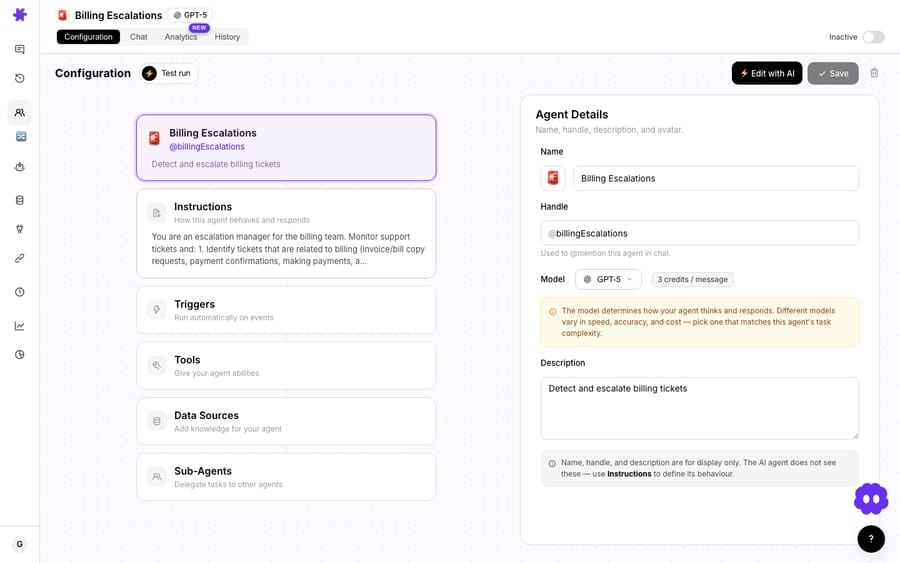
The model badge in the corner (here GPT-5) sets which model the agent reasons with. It doesn't change what you pay, because Macha bills per ticket: one conversation, charged once however many steps it takes. For a short, structured alert like this you almost never need a heavyweight model; a small fast model formats the card well and comes back quicker. See pricing for the tiers.
3. Choose how the failure reaches the agent
This is the one decision worth thinking about. Stripe sends payment events, but there are two clean ways to get them into Macha, and the right one depends on how real-time you need to be.
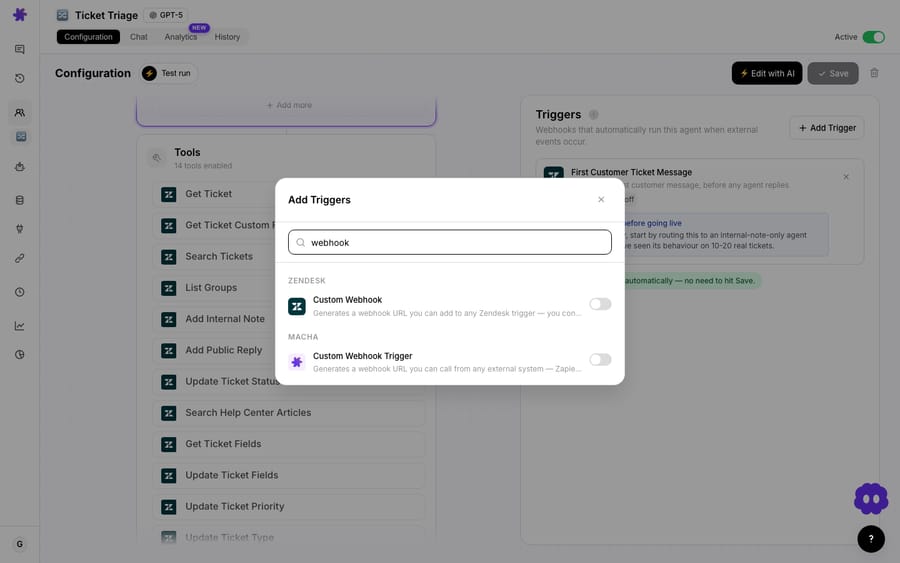
Option A: event-driven (Custom Webhook Trigger). Add a Custom Webhook Trigger to the agent and Macha generates a URL you can call from any external system. Point a Stripe webhook for invoice.payment_failed (or charge.failed) at that URL, and the agent fires as soon as Stripe reports the failure. This is the lowest-latency option and the one to use when minutes matter.
Option B: polling (Scheduled Run). If you'd rather not stand up a webhook, add a Scheduled Run trigger and have the agent sweep Stripe on a recurring schedule, say hourly, using List Payments to find anything that failed since the last sweep, then alert on each. Slightly higher latency, zero external setup.
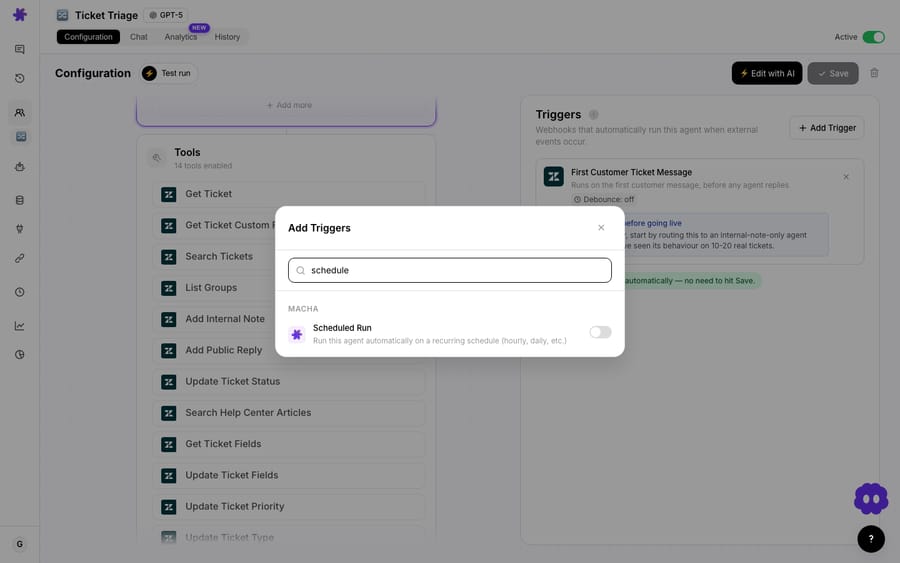
For most teams the webhook is the better default. It's the difference between "we knew in 90 seconds" and "we knew at the top of the hour." If your billing volume is low and a one-hour delay is fine, the scheduled run is simpler to maintain.
Can the agent do more than send an alert?
The base use case stops at flagging, and for a lot of teams that's the whole point: surface it to a human, let the human decide. But because Macha agents can take actions, not just notify, you can extend the same agent as far as your process allows:
- Triage before alerting. Only ping the channel for failures above a dollar threshold, or for customers past a certain tenure, so high-value accounts (like Maria, 8 months in) get a louder signal than a $9 trial that lapsed.
- Open a ticket. If you run Zendesk, Freshdesk, Gorgias, Front, HubSpot or Intercom through Macha, the agent can create or annotate a ticket so the failure is tracked in your support queue, not just a Slack scroll-back. This pairs naturally with the same agent fielding inbound billing questions; see handling subscription billing questions.
- Refund or re-run on confirmation. When a duplicate or erroneous charge is the cause, the same Stripe tools can resolve it, covered in processing refund requests automatically and resolving duplicate charges and failed payments with AI.
- Reply in thread on follow-up. Use Reply in Thread so a customer's repeated failures collapse into one conversation instead of spamming the channel.
- Draft the outreach. Have the agent draft the "your card on file was declined" message for a human to review and send.
You can also drive any of this conversationally. The Billing Escalations agent has a chat tab where you can ask it to handle a payment notice or look up a customer's billing history on demand.
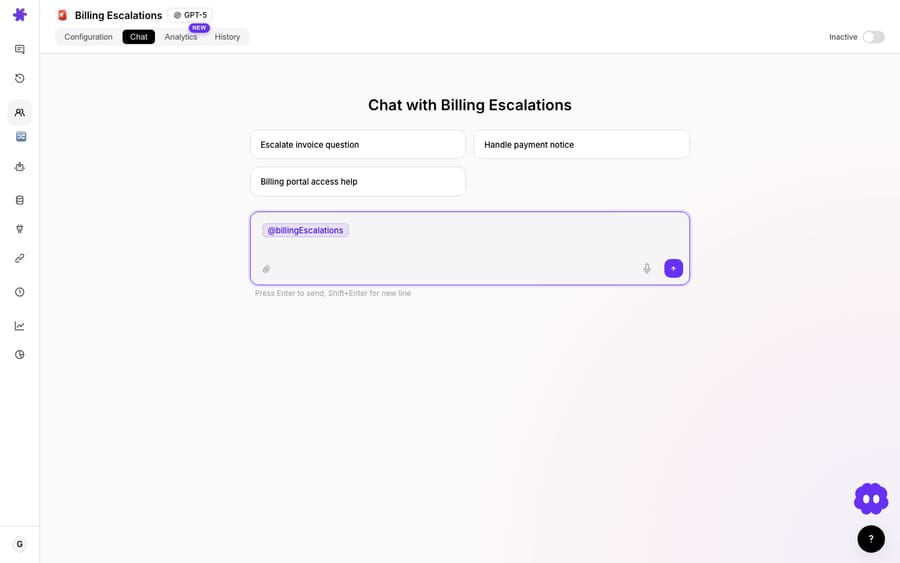
A word of caution worth stating plainly: keep the money-moving actions human-approved. Reading payments and posting alerts is safe to automate end to end. Creating charges or issuing refunds is not. Those should stay behind a human click, or at minimum behind a strict, narrowly scoped instruction. The agent is there to make the failure impossible to miss, not to silently retry money on its own.
When is a Slack alert the wrong tool?
A Slack alert is not a dunning system, and you shouldn't pretend it is.
- If you need automated retries and a dunning email sequence, that lives in Stripe Billing's Smart Retries or a dedicated recovery tool. Macha alerts the team; it doesn't run the retry cadence. The two are complementary: let Stripe retry automatically, and let Macha flag the failures a human should personally chase.
- If your failed-payment volume is in the hundreds per day, a Slack channel becomes noise. At that scale you want aggregation and a dashboard, with Macha alerting only on the high-value exceptions you've defined.
- If nobody owns the alert, it won't help. An alert that lands in a channel no one watches is the same as no alert. Route it to a named owner via DM, or into your ticketing queue where it has an SLA.
Used for what it's good at, making a small, time-sensitive event visible to the right human in near-real-time, this is one of the cheapest agents to stand up and one of the quickest to pay back.
FAQ
Does Macha replace Stripe's billing or dunning? No. Macha sits on top of Stripe. Stripe still processes payments and can still run Smart Retries; Macha's job is to detect a failure, enrich it with customer context, and put it in front of a human in Slack (or your helpdesk) fast.
How does Macha know a payment failed? Two ways. Either Stripe pushes the event to a Custom Webhook Trigger URL Macha generates (event-driven, lowest latency), or a Scheduled Run agent polls Stripe's payments on a recurring schedule and alerts on new failures.
What goes into the Slack alert? Whatever the agent reads from Stripe, typically customer name and email, amount and plan, the decline reason and prior failure count, plus a recommendation the agent writes based on your instructions (for example, flagging long-tenure or high-value accounts).
Can the agent retry or refund the payment automatically? It can't retry a charge, since the Stripe connector has no charge tool, but it can call Create Refund or send a fresh Create Payment Link, and we strongly recommend keeping money-moving actions human-approved. Use the agent to detect and recommend; let a person pull the trigger.
What does it cost to run? Macha bills per ticket (one conversation, charged once however many steps the agent takes), not per lookup and not per outcome. Pricing starts at $299 a month for 750 tickets, about $0.40 each, whichever model the agent runs on, and setup and monitoring by the Macha team are included. See the pricing page for details.
How much churn comes from failed payments? Estimates vary by source. Dodo Payments puts involuntary churn at 20–40% of all churn for subscription businesses, and Baremetrics puts failed-payment losses at around 9% of monthly recurring revenue.
How do you get started?
If failed payments are leaking out of your business without anyone noticing, this is the agent to build first: small surface area, fast payback. Start a free trial ($50 of usage, no credit card required), connect Stripe and Slack, point a webhook at your billing agent, and the next declined charge will land in your team's channel with a name on it. Browse more use cases for billing and beyond, or read the docs for the full trigger-and-tools walkthrough.
Written by Abbas (Customer Support & AI, Macha) · Reviewed by Ankeet Guha (Co-founder & CTO) · Published 2026-06-24 · Last updated 2026-09-24.






