





 Shopify
 Stripe
 Slack
Slack Notion
 Google Workspace
 Confluence

How Do You Handle Subscription and Billing Questions with an AI Agent?


Billing tickets need live data and written policy, so an AI agent only helps once it can read your billing system and your plan rules. Let it automate the lookup and the draft, hold every refund or charge for a human to confirm, and leave disputes to a person.
Key takeaways
- An AI billing agent looks up the customer's plan and charges in Stripe, checks the proration or refund rule in Notion, and drafts a reply for a human to approve.
- Fini's guide, updated 27 March 2026, says refunds and disputes typically account for 30-40% of total ticket load, and cites Ada reporting 70-84% automated resolution.
- In Macha's worked example, a customer on Pro Monthly at $29/mo learns from Stripe and Notion data that annual Pro at $290/yr saves $58.
- Macha holds Stripe writes such as Refund and Cancel subscription behind a confirmation card, so a person approves before any money moves, and chargebacks stay with a human.
- Macha bills about $0.40 a ticket from $299 a month for 750 tickets, with setup by the Macha team and a dedicated success manager included, while Intercom Fin charges $0.99 per outcome and Fini $0.49 to $0.89 per resolved ticket.

An AI agent handles subscription and billing questions by doing three things in order: it looks up the customer's plan and charges in the billing system (for example Stripe's Get customer and List payments), checks the written policy for plan changes, proration and refunds, and drafts a reply a human approves, with refunds and charges held behind a confirmation step. The rule that keeps it safe: automate the lookup, gate the write, escalate the dispute.
| Billing question | What the agent does | Human step |
|---|---|---|
| "When does my plan renew?" | Reads the subscription in Stripe, answers | Review the draft |
| "Can I switch to annual?" | Reads plan in Stripe, proration rule in Notion, drafts | Review the draft |
| "Why was I charged twice?" | Lists payments, drafts, proposes a refund | Confirm the refund |
| Chargeback or dispute | Gathers context only | A person decides |
Macha is an AI agent layer that sits on top of the help desk you already use (Zendesk, Freshdesk, Gorgias, Front, HubSpot or Intercom) and connects it to the systems where the real answers live. For billing, that means an agent that reads the incoming ticket, pulls the customer's record and payments from Stripe, looks up the plan policy in Notion, and hands your human a complete, drafted reply to review. No tab-switching, no copy-paste, no guessing at the proration math.
Below is how to build that agent from the pre-built "Handle subscription billing questions" use case, and where to keep a human firmly in the loop.
Why are billing tickets harder to automate than other tickets?
Most support automation advice treats every ticket the same. Billing is different in three ways that matter:
- The answer is data, not a doc. "What's my renewal date?" can't be answered from a help-center article. It's a live lookup against the customer's actual subscription. A bot that can only search your knowledge base is a smarter FAQ, nothing more.
- Mistakes cost money and trust. Quote the wrong proration, promise a refund that doesn't apply, or confirm a plan change that doesn't match policy, and you've created a billing dispute, which is a fast way to lose a paying customer.
- The work spans systems. The question arrives in Zendesk, the data lives in Stripe, and the policy lives in a Notion or Confluence wiki. No single tool has all three.
The volume is real. Fini's guide on AI platforms for refunds, returns and billing disputes (updated 27 March 2026) says refunds and disputes typically account for 30-40% of total ticket load. The same guide cites Ada reporting 70-84% automated resolution across enterprise customers, and Fini claims 99% accuracy on policy decisions across 3M+ monthly resolutions. Those are vendor-reported figures, and Fini sells the product the guide recommends, so treat them as directional. The mechanism behind them is the useful part: the gains come from agents that can read the billing system directly. An agent that can't fetch an invoice status or a customer's plan won't get near those numbers.
What does a billing agent do, step by step?
Here's the workflow from the use case, step by step:
- Trigger: a Zendesk ticket is created (or a customer message arrives) and the agent detects it's about subscription or billing.
- Look up the customer: Macha calls Stripe's Get Customer and List Payments to find the exact account, current plan, and recent charges.
- Find the policy: Macha runs Search Pages against your Notion workspace to pull the relevant rule: plan-switching, proration, refund eligibility, renewal timing.
- Draft the reply: Macha composes a summary that combines the live billing data with the policy, and presents it to the human agent: "Want me to draft a reply with these details?"
A real example from the use case: a customer asks if they can switch from monthly to annual. The agent finds them on Pro Monthly at $29/mo, active since Jan 2025 (Stripe), finds that annual Pro is $290/yr, a $58 saving (Notion pricing page), and confirms that per policy, the change takes effect at the next billing date with pro-rated credit applied automatically. That's a complete, accurate answer assembled from two systems in the time it takes the human to read it.
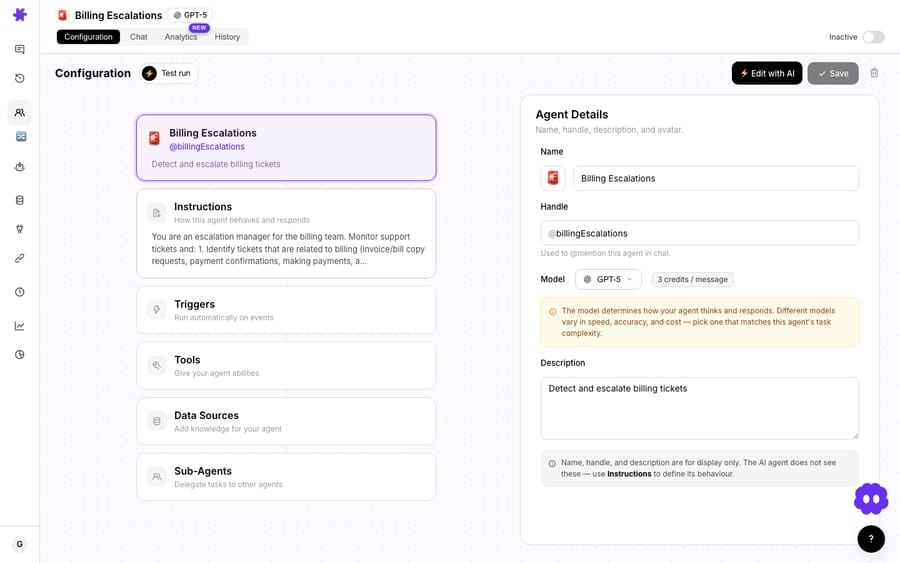
The screenshot above is the agent I actually built for this: a "Billing Escalations" agent whose entire job is to detect and escalate billing tickets. Its instructions read: "You are an escalation manager for the billing team. Monitor support tickets and: 1. Identify tickets related to billing (invoice/bill copy requests, payment confirmations, making payments…)." Everything an agent does is defined in five blocks: Instructions, Triggers, Tools, Data Sources, Sub-Agents, and you'll notice the model selector sitting alongside them. Macha bills per ticket (one conversation, charged once however many steps the agent takes), and the model you pick doesn't change that, so you can run a fast model for triage and reserve a stronger one for the gnarly disputes.
Which connectors does the billing agent need?
The agent is only as good as what it can reach. Two connectors do the heavy lifting:
Stripe (connected with an API key) gives the agent natural-language access to your billing data: Get customer and List payments, and, when you allow it, Refund and Cancel subscription. That's the difference between an agent that describes your refund policy and one that can actually check whether a specific $29 charge is eligible for one.
Notion (connected via OAuth) lets the agent Search Pages and Get Page across your workspace, so your plan rules, proration logic, and refund windows are pulled live. Because Notion can also Sync to Knowledge, those docs stay current without anyone re-uploading PDFs.
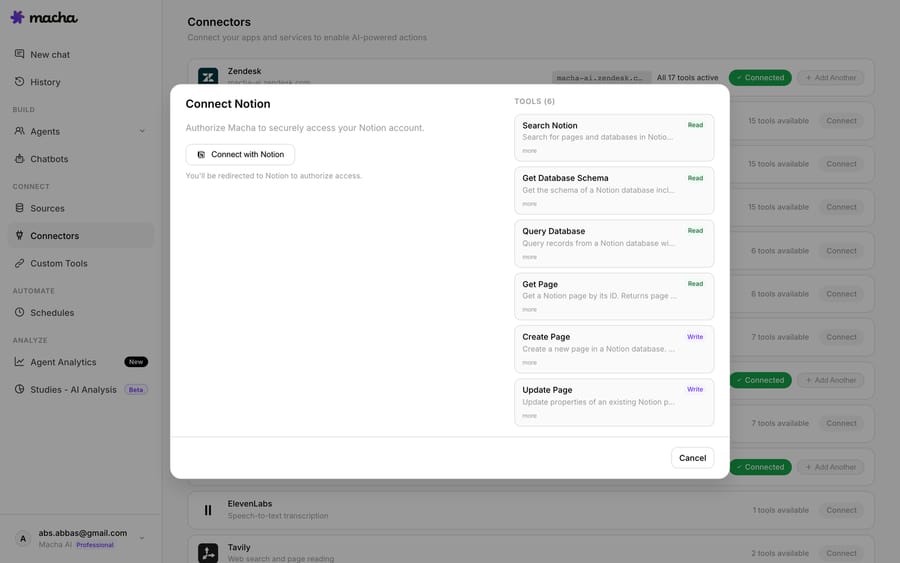
If your policies live in Confluence, Google Workspace, or a Help Center instead, the pattern is identical: swap the knowledge connector. The Zendesk connector itself syncs your Help Center as a live knowledge source, so for many teams the "policy" half of this is already wired in.
Where should a human stay in the loop?
Here's the honest part, and the part most "automate everything" pitches skip. Billing is precisely where you should not hand the keys over blindly.
The default for this use case is read, then draft: Macha gathers everything and proposes a reply, but a human approves it. For read-only actions (looking up a customer, listing payments, searching policy) that's pure speed with no risk. For write actions (issuing a refund, changing a plan, creating a charge) Macha supports an explicit confirmation step before anything touches the customer's money.
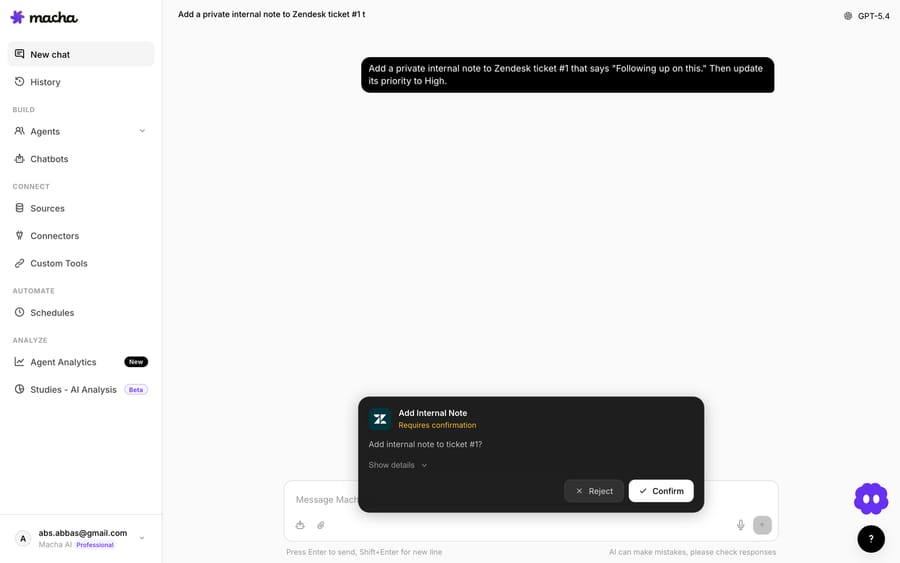
That confirmation card is the guardrail. The agent has decided what to do and assembled the parameters, but it pauses and waits for a human Confirm before executing. For a refund or a plan change, that's exactly the gate you want: the speed of automation on the lookup, a deliberate human decision on the money.
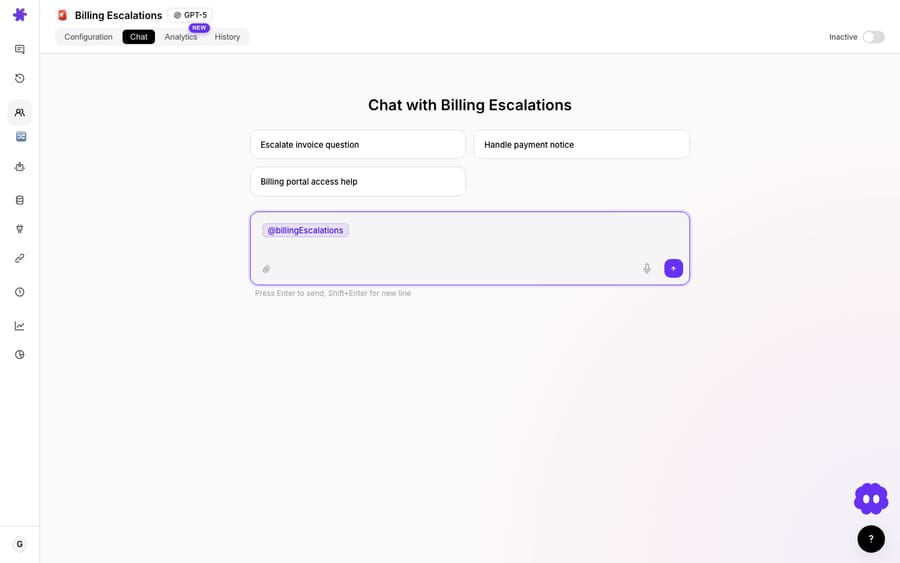
You can also run the agent purely as a drafting agent inside the chat tab: point it at a ticket and get the composed reply, with suggested next actions, without it ever posting autonomously.
When NOT to fully automate billing:
- Dunning, chargebacks, and disputes: anything heading toward a payment processor's dispute system needs a human. Let the agent gather context; let a person decide.
- Refunds above a threshold: set a credit/dollar ceiling under which the agent can act with confirmation, and above which it must escalate.
- Cancellation "save" flows: retention is judgment-heavy and brand-sensitive; use the agent to surface the account context, not to negotiate.
- Anything that changes recurring revenue: plan upgrades/downgrades that alter MRR should at minimum pass through the confirmation card, and often through a named owner.
The rule of thumb: automate the lookup, gate the write, escalate the dispute. That keeps you on the high-value side of those benchmark numbers without betting your billing reputation on a model's judgment.
How does an AI agent compare to Zendesk marketplace billing apps?
If you've shopped for this before, you've seen the Zendesk-marketplace options, and it's worth being clear about the difference.
| Approach | What it does | The ceiling |
|---|---|---|
| Sidebar apps (e.g. Stripe by Zenplates, $4.95/agent; ChargeDesk) | Display Stripe customer, subscription and payment data inside the Zendesk sidebar; some support manual charge/cancel buttons | The human still reads the data, cross-checks policy, and writes the reply themselves |
| Automation platforms (Zapier, Integrately) | Create or update Zendesk tickets when Stripe events fire; trigger Stripe actions from ticket tags | Rule-based plumbing: no reading the question, no drafting an answer, no policy reasoning |
| Macha | An AI agent reads the ticket, pulls Stripe data and Notion policy, reasons over both, and drafts the reply, with a confirmation gate on writes | Costs one ticket per conversation; needs your policies to actually exist somewhere it can read |
(Zenplates lists its Stripe app at $4.95 per agent on zenplates.co/apps, checked 24 September 2026.) Sidebar apps put the data next to the agent; automation tools move records around. Macha is the only one of the three that does the reading, reasoning, and drafting, which is the part that actually costs your team time. It's also an additive layer. Keep your sidebar app if you like it, and let Macha do the synthesis.
How does Macha compare to Intercom Fin and Fini for billing?
Marketplace apps aren't the only thing you'll be weighed against. If billing automation is the goal, the standalone AI-agent vendors (Intercom Fin, Fini) and the billing-native automations in Stripe and Chargebee are the real shortlist. Here's the honest read.
| Vendor | Billing approach | Pricing (checked 24 Sept 2026) | The trade-off |
|---|---|---|---|
| Intercom Fin | AI agent that resolves conversations and can run "procedures" against connected systems; owned by Salesforce since 10 September 2026 | $0.99 per outcome; a 50-outcome monthly minimum applies only when Fin runs on a help desk other than Intercom; on Intercom, seats start at $29 a seat billed annually for Essential (fin.ai/pricing) | Best if you're already on Intercom; per-outcome billing grows with every resolved billing ticket, so cost tracks volume rather than a fixed plan |
| Fini | Reasoning-first AI ("Sophie") that connects to Stripe/Zendesk to process refunds, cancel subscriptions and verify accounts | Per resolved ticket: Growth $0.89, Scale $0.69, Enterprise $0.49; no usage minimums; 90-day free pilot on Enterprise (usefini.com/pricing) | Strong vendor-reported accuracy; you pay per resolution; implementation is included on every plan, customer success is shared on Growth, and the Scale and Enterprise tiers (white-glove onboarding, dedicated engineers) are aimed at mid-market and enterprise volumes |
| Stripe + Chargebee automations | Native dunning, retries, and self-serve portals inside the billing tool itself | Bundled into your billing-platform subscription | Great at billing operations, but it doesn't read the Zendesk ticket or write the support reply. It's the system of record, not the agent answering the customer |
| Macha | Agent layer on top of Zendesk, Freshdesk, Gorgias, Front, HubSpot, Intercom that reads the ticket, pulls Stripe + Notion, and drafts the reply with a write-confirmation gate | Per ticket (from $299/mo for 750 tickets, about $0.40 each), setup done for you by the Macha team, with a dedicated success manager, included, $50 of free usage, no credit card required, full plans on the pricing page | You keep your helpdesk and your billing tool; Macha is the reasoning layer between them, not a rip-and-replace |
The pattern is the same one that runs through our Intercom Fin AI agent guide and our Fini AI complete guide: the standalone agents are capable, but they bill per outcome, which means the vendor earns more as more billing tickets close through its AI, and Fin's best economics assume you run Intercom. Macha takes the opposite stance: it sits on the help desk and billing tools you've already standardized on, and charges per ticket, one conversation charged once however many lookups and drafts it takes. It's also the done-for-you option: the Macha team analyzes your past tickets, builds the knowledge base and the billing agent on your existing help desk, and runs it in safe mode, with drafts as internal notes, until the drafts are right. That's included on the trial and every plan at about $0.40 a ticket, along with a dedicated success manager who handles your changes, such as a new refund rule or a new tool. Fini includes implementation on every plan too, but on Growth ($0.89 per resolved ticket) customer success is shared, a dedicated AI engineer starts at Scale, and Fini quotes about 14 days to go live; Macha goes live in under a week (Fini pricing page and homepage, checked 8 October 2026). For deflection-vs-resolution-vs-automation framing, our piece on automated resolution vs deflection is the deeper read.
What should you check before shipping a billing agent?
- Your policy has to be written down. The agent can only quote a proration rule that exists in Notion (or your Help Center). If your refund policy lives in three people's heads, fix that first. The agent will faithfully surface whatever it finds, including stale pages.
- Scope the Stripe key. Use a key with only the permissions the agent needs, and gate every write behind confirmation until you trust it on read.
- Match the model to the job. A fast model is fine for triage and lookups; bump to a stronger model for ambiguous disputes. You control this per agent, and it doesn't change what you pay: billing is per ticket either way (see the pricing page).
- Identity matters. Make sure the agent matches the requester to the right Stripe customer (Zendesk Get Custom Fields can carry the customer ID). Never resolve by name alone on a shared-inbox ticket.
FAQ
Does Macha replace my helpdesk? No. Macha is an AI agent layer on top of Zendesk, Freshdesk, Gorgias, Front, HubSpot or Intercom. It reads and replies to tickets in your existing help desk; it doesn't replace it. See Macha on Zendesk.
Can the agent actually issue a refund, or just look one up? Both. Stripe's Create Refund and Cancel Subscription are available as tools, but write actions sit behind an explicit confirmation card so a human approves before any money moves. Most teams start read-only and enable confirmed writes once they trust the agent.
Where does the agent get plan and policy answers? From your knowledge: Notion pages (live sync), your Zendesk Help Center, Confluence, or Google Workspace docs. It searches them at answer time, so it quotes your current policy, not a snapshot.
How much does it cost to run? Macha bills per ticket: one conversation, charged once, however many steps the agent takes to finish it, and the model you choose doesn't change the price. Pricing starts at $299 a month for 750 tickets, about $0.40 each. There are no per-resolution fees, and the price includes setup by the Macha team and a dedicated success manager who handles your changes. Start with a free trial ($50 of usage, no credit card required); full plans are on the pricing page.
What if my billing isn't on Stripe? The pattern is connector-agnostic: the agent reads whatever billing or commerce system you connect and pairs it with your policy docs. Stripe and Shopify are live today; check integrations for the current list.
Where should you start?
If billing tickets are eating your team's afternoons, this is the use case to start with. The data is structured, the policies are knowable, and the confirmation gate keeps the risky part safe. Spin up a free trial ($50 of usage, no credit card required), connect Zendesk and Stripe, point the agent at your Notion policy pages, and let it draft the next "can I switch to annual?" reply for you to approve. Read the Stripe integration details or browse the full use-case library to see what else you can wire up.
Written by Abbas (Customer Support & AI, Macha) · Reviewed by Ankeet Guha (Co-founder & CTO) · Published 2026-06-24 · Last updated 2026-09-24.






