





 Shopify
 Stripe
 Slack
Slack Notion
 Google Workspace
 Confluence

How Do You Draft Freshdesk Replies with AI from Your Knowledge Base? (2026)


Freshdesk's Freddy Reply Suggester drafts a reply from your knowledge base and cites up to three articles, but only for the first customer reply on Email or Portal tickets. Later turns and replies that need live order or account data need an AI agent layer on top.
Key takeaways
- Freshdesk's Freddy Reply Suggester drafts KB-grounded replies as ghost text only for the first customer reply on Email or Portal tickets, and requires Freshdesk Pro or Enterprise.
- Freddy's Reply Suggester cites up to three solution articles it used, so agents can check the source before pressing Tab or Enter to accept the draft.
- Freddy AI Copilot costs $29 per agent per month billed annually, and the Freddy AI Agent includes 500 sessions once per account, then $49 per 100 sessions.
- Macha runs as an AI agent layer on top of Freshdesk, drafts replies on any turn of a thread, and costs about $0.40 a ticket from $299 a month, with setup by the Macha team and a dedicated success manager included.
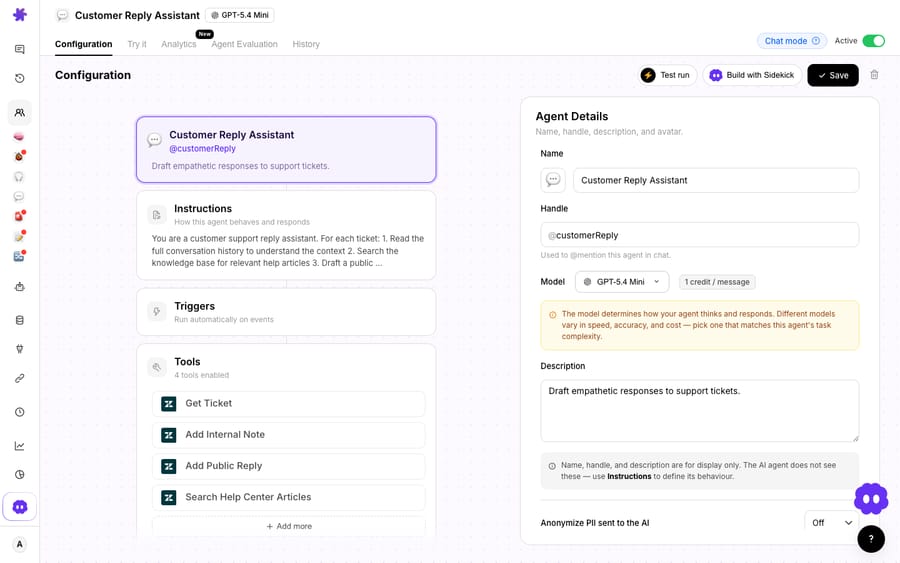
- Macha's Customer Reply Assistant uses Get Ticket, Search Help Center Articles, Add Internal Note and Add Public Reply to draft grounded, tone-controlled replies.
Freshdesk drafts replies from your knowledge base with Freddy AI's Reply Suggester, which writes ghost text in the reply box and cites up to three solution articles, but only on Pro and Enterprise plans and only for the first customer reply on Email or Portal tickets. For later replies in a thread, or replies that need live order or account data, you need an AI agent layer such as Macha on top of Freshdesk.
| Option | What it drafts | Plan / cost |
|---|---|---|
| Freddy Reply Suggester | First customer reply, Email/Portal tickets, from KB articles | Freshdesk Pro ($55/agent/month) or Enterprise ($89), billed annually |
| Freddy AI Copilot (Writing Assistant, Canned Response Suggester) | Rephrase, tone, canned-response suggestions | $29/agent/month billed annually, Pro and Enterprise |
| Freddy AI Agent | Autonomous answers to customers | 500 sessions included once per account, then $49 per 100 sessions |
| Macha agent layer | Any turn, KB plus live lookups via custom tools | From $299/month for 750 tickets (about $0.40 a ticket), setup and a dedicated success manager included |
What does a good AI reply draft have to get right?
Before touching any settings, it helps to name what "a good draft" means, because the tooling maps onto these directly.
- Grounding. The reply has to come from your knowledge base and your past resolutions, not a model's general guess. An ungrounded answer that sounds confident and is subtly wrong is worse than no answer.
- Reuse. If your team already has an approved canned response for this situation, the AI should surface that rather than reinventing a fresh paragraph every time and drifting off-message.
- Tone. The draft has to read like your brand: the empathy, the formality, the sign-off. A technically correct reply in the wrong register still gets rewritten by the agent, which erases the time you were trying to save.
Freshdesk's native Freddy tools cover the first two well and give you a manual handle on the third. Here's how to actually use them.
How does Freddy's Reply Suggester draft a reply?
Freshdesk's native answer to reply drafting is Freddy AI's Reply Suggester, and credit where it's due: for the common case it's fast and well-integrated. Per Freshworks' Reply Suggester documentation, here's the flow an agent sees:
- Open an eligible ticket. When a suggestion is ready, a red dot appears on the Reply button, or the agent can click Suggest reply under the Freddy icon in the toolbar.
- Freddy generates a response that appears as ghost text (grayed out) directly in the reply field.
- The agent presses Tab or Enter to accept, or edits the draft before sending.
- A banner cites up to three solution articles that were used to generate the answer, so the agent can validate the source before hitting send.
The grounding is the important part. Reply Suggester sources content from your knowledge base (public, private, and bot articles) rather than free-associating, and the citation banner keeps a human in the loop. Alongside it, Freddy Copilot's Writing Assistant can expand, rephrase, enhance tone, and draft text as email, and a separate Canned Response Suggester recommends your pre-written responses in the reply editor, which is exactly the "respect what we already wrote" behaviour a busy team wants.
For a fuller tour of the native suite, we broke it down in Freshdesk Freddy AI explained.
Where do Freddy's native reply suggestions stop?
Now the caveats, because they matter for deciding whether Freddy alone is enough.
It only fires in narrow conditions. The Reply Suggester works only for tickets created via the Email channel or through Portals, and it suggests a response only for the first customer reply in a ticket. That's a real constraint: the second, third, and fourth back-and-forth replies, often the hard ones, get no draft. If your volume is in multi-turn troubleshooting threads, the native suggester goes quiet exactly when you need it most.
It's gated by plan. Freddy AI for ticketing lives on Freshdesk Pro and Enterprise ($55 and $89 per agent per month billed annually; Growth is $19), so teams on lower tiers don't get reply drafting at all without upgrading the base seat first.
It suggests; it doesn't act. Reply Suggester writes a draft. It doesn't look up the order status the customer is actually asking about, check the subscription state in your billing system, or take the follow-up action the reply promises. When the answer is "your refund for order #4471 was processed on Tuesday," that fact isn't in a KB article. It's in a system Freddy's suggester doesn't reach.
Pricing gets complicated at scale. Freddy is billed as several products at once. Freddy AI Copilot costs $29 per agent per month billed annually, on Pro and Enterprise. The autonomous AI Agent is billed per session: each account gets 500 sessions once, not every month, and after that sessions cost $49 per 100 (Freshdesk pricing, checked 24 September 2026; eesel's pricing breakdown is a useful third-party tally). None of that is wrong, but it does mean modelling cost takes real effort.
So the honest read: native Freddy is a strong drafting assistant for first-reply, email/portal, KB-answerable questions on Pro+. The gaps are multi-turn threads, non-KB facts, and any reply that needs the AI to do something, not just say something.
When do you need an AI agent layer on top of Freshdesk?
This is the seam where an AI agent layer earns its place: not by replacing Freshdesk, but by extending what a draft can be. The broader category of AI agents for customer service exists to do the reasoning-and-action work a reply suggester can't, and there's a growing playbook for adding an AI agent to Freshdesk beyond Freddy.
Macha is one such layer. It runs on top of the Freshdesk you already use as a native connector. It is not a help desk replacement, and it doesn't touch your existing SLA policies, canned responses, or knowledge base structure. You connect it with your Freshdesk subdomain and API key, and it reads and writes the same tickets your agents already work. You also don't build it yourself: on the trial and every plan, the Macha team analyzes your past tickets, builds the knowledge base and the reply agent on your Freshdesk, and runs it in safe mode, with drafts as internal notes, until the drafts are right. It costs about $0.40 a ticket from $299 a month for 750 tickets, and that includes a dedicated success manager who handles your changes after go-live.
The screenshot below is a real Macha agent, a Customer Reply Assistant, configured in the Macha demo org. Notice its tools: it can Get Ticket, Search Help Center Articles (the grounding step), and then Add Internal Note or Add Public Reply. The instructions tell it to draft empathetic responses, which is how you pin tone at the agent level rather than nudging it per-reply.
What that unlocks over first-reply suggestions:
- Every turn, not just the first. An agent-based draft can be produced on the fifth reply in a thread as readily as the first, which closes the multi-turn gap native suggestions leave open.
- KB grounding plus live lookups. "Search Help Center Articles" grounds the answer in your KB; a custom tool turns your order, billing, or account REST API into something the agent can call, so the draft cites the actual status, not a generic article.
- Draft or send, your call. Add Internal Note keeps a human in the loop (agent reviews, then sends); Add Public Reply lets vetted, high-confidence intents go out automatically. You choose per agent where on the spectrum from deflection (suggest and let the human decide) to full automation (the agent handles the whole reply) each workflow sits.
A word on the difference the caveat asks us to be clear about, because it's easy to blur. Deflection means the customer self-serves before a ticket is ever created. Resolution means the issue gets fully closed out. Automation means an AI action runs without a human, which can contribute to either, but isn't the same as either. Macha's pricing sidesteps the argument: you're billed per ticket (one conversation, charged once however many drafts, searches and replies it takes), not per resolution or per deflection. Outcomes vary by workflow, so pricing the conversation rather than the outcome is the predictable way to do it. (And to be precise about scope: Macha's connector is for Freshdesk specifically, not Freshchat, Freshservice, or Freshcaller.)
How does native Freddy compare with an agent layer?
Neither column is "the answer"; most teams end up using both. But it's worth seeing the split cleanly.
| Capability | Freddy Reply Suggester (native) | Macha AI agent layer (on top) |
|---|---|---|
| Grounds reply in your KB | Yes: public/private/bot articles, cites up to 3 | Yes: Search Help Center Articles tool |
| Respects canned responses | Yes: Canned Response Suggester | Yes: instruct the agent to prefer approved responses |
| Tone control | Per-reply rephrase / enhance tone | Set once in agent instructions (e.g. "empathetic") |
| Works on later replies (not just first) | No: first customer reply only | Yes: any turn |
| Channels | Email / Portal tickets | Any Freshdesk ticket the connector reads |
| Looks up live order/account facts | No | Yes: via custom tools |
| Can send, not just draft | Draft only (agent accepts) | Draft or auto-reply, per agent |
| Plan / cost model | Pro & Enterprise; $29/agent Copilot + $49 per 100 AI Agent sessions after 500 | Per ticket, from $299/mo for 750 (about $0.40 a ticket), setup and a dedicated success manager included; see pricing |
The clean division of labour: let native Freddy handle the fast, first-reply, KB-answerable drafts it does well, and reach for an agent layer when the reply needs to span a thread, cite a live fact, or take an action. If drafting is your entry point, the natural next step is broader Freshdesk automation with AI (triage, routing, and follow-ups), which is where the compounding time savings actually live.
FAQ
Does Freshdesk have built-in AI to draft replies? Yes. Freddy AI's Reply Suggester generates a reply as ghost text in the editor, grounded in your knowledge base (public, private, and bot articles), and cites up to three solution articles it used. Agents accept with Tab or Enter, or edit before sending. It's available on Freshdesk Pro and Enterprise.
Does the AI draft respect our canned responses and tone? Freddy's Canned Response Suggester surfaces your pre-written responses in the reply editor, and its Writing Assistant can rephrase and enhance tone on demand. With an agent layer like Macha, you set tone once in the agent's instructions (for example, "draft empathetic responses") and can instruct it to prefer approved canned responses.
Why doesn't the native suggester help on follow-up replies? By design, Freddy's Reply Suggester only suggests a response for the first customer reply in a ticket, and only on Email or Portal channels. Multi-turn threads get no native draft, which is one reason teams add an AI agent layer that can draft on any turn.
What's the difference between deflection, resolution, and automation? Deflection means the customer self-serves before a ticket is created; resolution means the issue is fully closed; automation means an AI action runs without a human. They overlap but aren't the same. Macha charges per ticket (one conversation, charged once however many steps it takes), not per resolution or deflection, because outcomes vary by workflow.
How much does Freddy AI cost for reply drafting? Reply Suggester needs Freshdesk Pro ($55 per agent per month billed annually) or Enterprise ($89). Freddy AI Copilot adds $29 per agent per month billed annually. The Freddy AI Agent includes 500 sessions once per account, then costs $49 per 100 sessions.
Can I add AI reply drafting to Freshdesk without replacing it? Yes. Macha connects to Freshdesk as a native connector using your subdomain and API key, and runs on top of your existing help desk, knowledge base, and canned responses. It drafts KB-grounded replies and can look up live order or account facts through custom tools, and Freshdesk stays your system of record. The Macha team sets it up for you, included on the trial and every plan at about $0.40 a ticket.
Ready to draft replies that are grounded in your KB and your live data? Start a free trial of Macha and connect your Freshdesk in about 15 minutes; and the Macha team builds the first agent for you.






