





 Shopify
 Stripe
 Slack
Slack Notion
 Google Workspace
 Confluence

Does Freshdesk Have Approval Workflows? Native Limits vs AI Orchestration (2026)


Freshdesk's native approval workflow approves knowledge base articles, with one reviewer per submission, and only on the Enterprise plan; tickets such as refunds and exceptions have no native approval step. An AI agent layer on top of Freshdesk can run those multi-step, ticket-side approvals while Freshdesk stays the system of record.
Key takeaways
- Freshdesk's native approval workflow only governs knowledge base article publishing, with a single reviewer per submission and no multi-level ladder for ticket approvals like refunds or exceptions.
- Freshdesk's approval workflow is available only on the Enterprise plan, which costs $89 per agent a month billed annually on Freshdesk and $119 on Freshdesk Omni.
- Freddy AI Agent includes 500 sessions as a one-time allowance per account, then charges $49 per 100 sessions on both Freshdesk and Freshdesk Omni.
- Macha bills per ticket rather than per resolution or step, starting at $299 a month for up to 750 tickets, so a three-step or fifteen-step approval chain costs the same.
- Macha's Escalation Manager agent chains Get Ticket, Search Tickets, Add Internal Note, Update Priority and Assign Ticket to route approvals conditionally on top of Freshdesk.

Freshdesk's native approval workflow only approves knowledge base articles, runs one reviewer per submission, and is available only on the Enterprise plan ($89 per agent a month billed annually on Freshdesk, $119 on Freshdesk Omni); there is no native approval step for tickets such as refunds or exceptions.
| Question | Freshdesk native answer |
|---|---|
| What can be approved? | Knowledge base articles only |
| How many approval levels? | One reviewer per submission |
| Which plan? | Enterprise (Freshdesk and Freshdesk Omni); Forest and Enterprise on classic Omnichannel |
| Ticket approvals (refunds, exceptions)? | Not a native feature |
What does Freshdesk's native approval workflow actually do?
Freshdesk's built-in approval workflow is a knowledge base feature. Per Freshworks' own approval workflow documentation, it exists so that article content passes a review before it goes public: a writer drafts an article and clicks Send for review, a reviewer with approval access reads it and clicks Approve, and an agent with publish rights publishes it. The article moves from draft to In review to Approved to published. There are three separate roles (writer, reviewer, publisher), and each transition sends a notification so nobody has to chase status by hand. Writers can send articles for review in bulk, reviewers can bulk approve, and publishers can bulk publish.
For content governance, this is good. It's deterministic, auditable, and it keeps half-finished articles out of your customer-facing help center. If your only approval need is "an editor signs off before an article publishes," the native feature covers it and you should use it.
Where does the native approval gate stop?
Now the limits, because they matter before you plan anything more ambitious.
It's single-level. The documented workflow has one reviewer per submission cycle. There's no built-in ladder: no "manager approves, then finance approves, then it publishes." One approver, one decision.
It's knowledge base only. This is the big one. The native approval workflow governs articles, not tickets. If you want a support agent to request approval before issuing a refund, granting a warranty exception, or escalating a VIP account, Freshdesk has no native ticket-approval object to hang that on. Long-running community threads asking for ticket approvals (hardware purchases, principal sign-off, spend thresholds) reflect a gap that Freshdesk has not closed on the customer-support side, unlike its sibling Freshservice, which does have approvals via the Workflow Automator.
It's Enterprise-gated. The approval workflow is available only on the Enterprise plan for both Freshdesk and Freshdesk Omni (plus Forest and Enterprise on classic Omnichannel). On Growth and Pro, even the knowledge-base version isn't there.
So the native picture is: a solid single-level content gate, on the top plan, with nothing for the ticket-side, multi-step approvals that real support operations run into.
Doesn't Freddy AI Agent cover approvals?
Partly, and it's worth being precise. Freshworks' Freddy AI Agent does more than answer questions; per the Freddy AI Agent overview, it can take actions against backend systems such as processing refunds, updating orders, changing subscription plans and verifying details. That's meaningful automation, and its escalation hands a conversation to a human with full context when it hits its limit.
But notice two things. First, Freddy's actions are framed as autonomous execution, not as a formal, human-in-the-loop approval gate. There's no documented native construct where the agent pauses, routes a decision to a named approver, waits for a yes/no, and only then proceeds through a chain. Escalation transfers the conversation; it doesn't orchestrate a conditional approval sequence. Second, Freddy AI Agent is priced by session. Per the Freshdesk pricing page, every plan includes 500 sessions as a one-time allowance per account, then additional sessions cost $49 per 100 sessions, on both classic Freshdesk and Freshdesk Omni. That's a fine model for deflection-style Q&A. It's a less natural fit for internal, multi-step approval orchestration, where the valuable work is a sequence of conditional actions, not a customer-facing conversation.
So Freddy is strong at conversational resolution, and the native approval workflow is strong at single-level content sign-off. Neither is built to orchestrate a multi-step, conditional, ticket-side approval, and that's what an AI agent layer can add.
Is an approval chain deflection, resolution or automation?
Before you reach for any AI, name the job, because the three common ones are priced and reasoned about very differently.
- Deflection answers the customer so a ticket never reaches an agent. Session-priced conversational bots (Freddy included) live here.
- Resolution closes an existing ticket end to end. Some tickets resolve in one reply; many need lookups and actions.
- Automation / orchestration runs a sequence of conditional steps: check a value, route for approval, wait, then act or escalate. Approvals are squarely automation, not a single Q&A turn.
That framing matters for cost too. An AI layer shouldn't bill on the outcome of an orchestration, because the outcome varies by ticket and the definition of "resolved" isn't yours to set. Macha bills per ticket: one conversation, charged once however many steps the chain takes, not per resolution or per deflection. The plan starts at $299 a month for up to 750 tickets, with setup and monitoring by the Macha team included; see the pricing page for the other tiers. An approval chain might run to three steps or fifteen, and the price doesn't move either way.
How can an AI layer run multi-step approvals on top of Freshdesk?
Keep Freshdesk as the system of record for tickets, agents, and its own knowledge-base approvals, and add an agent on top that runs the conditional, multi-step logic the native feature can't. Macha is one such layer: an AI agent layer that runs on top of the Freshdesk you already use, connected as a native connector via your subdomain and API key. It is not a help desk replacement, and it reads and writes the same tickets your team already works.
The screenshot below is a real Macha agent, an Escalation Manager, configured to do this kind of orchestration.
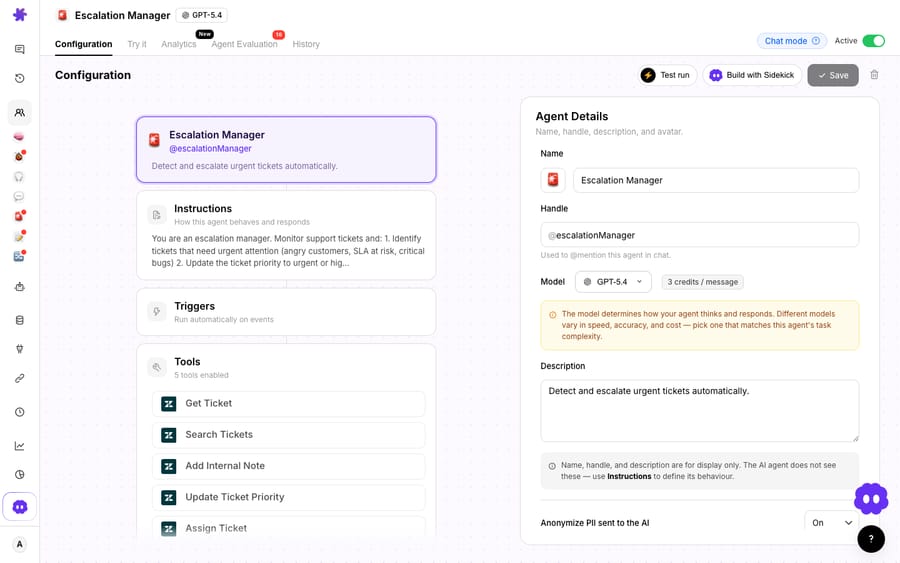
What makes this an orchestration rather than a single suggestion is the chain. A trigger fires on a new or updated ticket; the agent gets the ticket, searches related tickets for context, decides against your instructions whether the situation needs sign-off, adds an internal note documenting the reasoning, updates priority, and assigns the ticket to the right approver, in sequence and conditionally. Because Macha can call a custom tool that wraps any REST API, the same chain can check a refund amount against a threshold in your billing system before routing, so the "approval" is grounded in real data, not a guess.
Here's how the native gate and an AI orchestration layer line up:
| Capability | Freshdesk native approval workflow | AI agent layer (Macha) |
|---|---|---|
| What it approves | Knowledge base articles | Tickets, actions, exceptions |
| Levels | Single level (one reviewer) | Multi-step, conditional chains |
| Plan requirement | Enterprise tier | Runs on your existing Freshdesk plan |
| Ticket-side approvals | Not supported natively | Core use case |
| Data-driven routing | Manual reviewer choice | Checks values via custom tools, then routes |
| Audit trail | Article status changes | Internal notes + action log per step |
| Relationship | Built into Freshdesk | Layer on top of Freshdesk |
A couple of caveats. Macha's Freshworks connector is for Freshdesk specifically, not Freshchat, Freshservice, or Freshcaller. Across help desks, Macha runs on Zendesk, Freshdesk, Gorgias, Front, HubSpot or Intercom. And an AI-orchestrated approval is only as trustworthy as the instructions and tools you give it, which is a real build-versus-buy consideration: a platform gets you the trigger-action-tool plumbing without wiring it yourself, but you still own the policy. Freshdesk's deterministic native gate will always be more rigid and predictable by design; an AI layer trades some of that rigidity for the ability to reason across steps and data. Pick the one that matches the job.
Which approvals should stay native, and which go to an AI layer?
Keep Freshdesk's knowledge-base approval workflow for content sign-off; it's built for it and it's dependable. For the ticket-side, multi-step approvals the native feature doesn't cover, add an AI agent layer on top. Let the agent do the reading, the threshold checks, the routing, and the documentation, while Freshdesk stays the system of record. The broader category of AI agents for customer service exists to do this reasoning-and-action work that a static, single-level gate cannot, and you don't have to swap help desks to get it.
FAQ
Does Freshdesk have a native ticket approval workflow? Not for tickets. Freshdesk's native approval workflow is a knowledge base feature: a writer sends an article for review, a reviewer approves, and a publisher publishes it. Multi-step ticket approvals (refund sign-off, exception approvals) aren't a native Freshdesk construct; that gap is what an AI orchestration layer fills.
Is the Freshdesk approval workflow single-level or multi-level? Single-level. The documented workflow has one reviewer per submission cycle, with no built-in ladder of approvers. Multi-step, conditional chains require either a workaround or an AI agent layer on top.
What plan do I need for the native approval workflow? The Enterprise plan, on both Freshdesk ($89 per agent a month billed annually) and Freshdesk Omni ($119). On classic Omnichannel it's on Forest and Enterprise Omnichannel.
Can't Freddy AI Agent handle approvals? Freddy AI Agent takes autonomous actions (refunds, order updates, plan changes) and escalates with context, and it's priced per session: 500 sessions once per account, then $49 per 100. But it doesn't document a formal human-in-the-loop approval gate that pauses, routes a decision to a named approver, and orchestrates a conditional chain. That multi-step orchestration is a distinct job.
How does Macha add approval orchestration without replacing Freshdesk? Macha connects to Freshdesk as a native connector and runs on top of it. An agent like the Escalation Manager monitors tickets, checks values (including via custom tools against your own systems), routes for sign-off, documents the reasoning in internal notes, and assigns or escalates, all in a conditional sequence. Freshdesk stays the system of record, and the whole chain is billed as one ticket, charged once, not per resolution.
Ready to orchestrate approvals your native gate can't reach? Start a free trial of Macha and connect it to your Freshdesk in minutes.






