





 Shopify
 Stripe
 Slack
Slack Notion
 Google Workspace
 Confluence

Which Freshdesk Metrics Should You Track in 2026?


Five Freshdesk metrics drive most support decisions: first response time, resolution time, CSAT, SLA compliance and deflection with FCR. Freshdesk Analytics documents the formula behind each one, and a few of the ways to view them depend on your plan.
Key takeaways
- The five Freshdesk metrics worth tracking are first response time, resolution time, CSAT, SLA compliance (First Response SLA% and Resolution SLA%), and deflection with First Contact Resolution.
- Freshdesk groups its metrics into six families under Reporting and Analytics: General, Time-based, SLA-based, Agent Productivity, Satisfaction Survey, and Timesheet.
- Freshdesk calculates Resolution SLA% as tickets resolved within the SLA divided by all tickets resolved in the selected period, with report filters applied.
- Freshdesk custom real-time dashboards start on the Pro plan at $55 per agent per month billed annually, while Growth gets standard reports and dashboards.
- The Freshworks Customer Service Benchmark Report 2026 draws on 1.2 billion support tickets from 33,889 accounts and finds 61% of teams have embedded AI into core workflows.

The five Freshdesk metrics that change decisions are first response time, resolution time (ticket age), CSAT, SLA compliance (First Response SLA% and Resolution SLA%) and deflection with First Contact Resolution (FCR%). All five live under Reporting and Analytics, and Freshdesk documents the exact formula behind each one, so you can check a number instead of trusting it.
| Metric | What Freshdesk measures | Why it matters |
|---|---|---|
| First response time | Total time to first response ÷ tickets first-responded in the period | The wait customers feel first |
| Resolution time (ticket age) | Days from ticket creation to resolution | Shows backlog and handling drag |
| CSAT | Satisfaction survey ratings | Checks answer quality, not just speed |
| First Response / Resolution SLA% | Tickets inside SLA ÷ tickets responded to or resolved | Whether you keep your promises |
| FCR% and deflection | Tickets resolved after first contact ÷ tickets resolved | Whether the team scales with volume |
Where do these metrics live in Freshdesk?
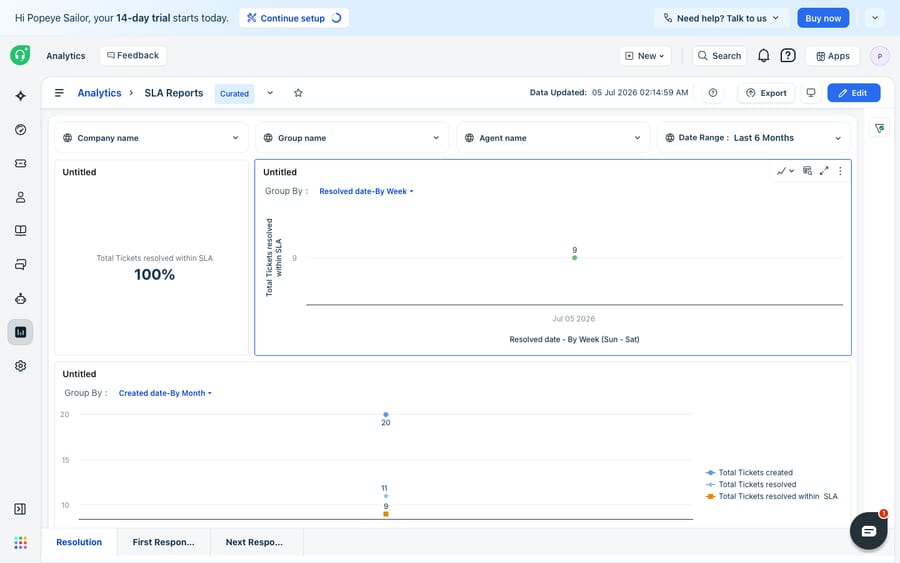
Almost everything worth tracking sits under Reporting and Analytics in the left navigation, where Freshdesk ships curated reports (Helpdesk Performance, Agent Performance, Group Performance, SLA reports) plus the ability to build your own. Per Freshworks' Support metrics in Freshdesk Analytics documentation, the platform groups its metrics into six families: General (volume and age), Time-based (response and handle times), SLA-based (violations and compliance), Agent Productivity (replies, notes, interactions), Satisfaction Survey (CSAT ratings), and Timesheet (billable and non-billable hours).
A caveat that saves confusion later: the metrics themselves appear on every Freshdesk plan, but the ways of viewing them do not. The Freshdesk pricing page puts out-of-the-box analytics, standard reports, real-time dashboards and a monthly Benchmark Insights scorecard on all three paid plans: Growth ($19 per agent per month, billed annually), Pro ($55) and Enterprise ($89). Custom real-time dashboards and the agent availability dashboard start at Pro, and custom object analysis is Enterprise only. So if a view below isn't showing up, check your plan before your configuration.
Which five metrics actually change decisions?
1. First Response Time (FRT). How long a customer waits before an agent's first reply. Freshdesk defines Average 1st response time as the total time taken to send the first response during the selected time period divided by the number of tickets whose first responses were sent in that period (Freshdesk docs). It's the metric customers feel first, which is why it's the one to watch most closely.
2. Resolution Time (ticket age). How long the whole ticket takes from creation to resolved. Freshdesk records ticket age as the time in days from a ticket's creation until it was resolved. Watch it as a distribution, not just an average: one 40-hour outlier can drag a mean that looks fine while hiding a systemic backlog.
3. CSAT (Customer Satisfaction). The post-resolution rating customers give you, found under Satisfaction Survey metrics. CSAT is the honesty check on the other four: you can hit every time target and still lose CSAT if the answers are wrong or cold.
4. SLA compliance (First Response SLA% and Resolution SLA%). The percentage of tickets where you kept your promise. First Response SLA% is tickets whose first responses were sent within the SLA divided by the total tickets first-responded in the period, and Resolution SLA% is tickets resolved within SLA divided by total tickets resolved (Freshdesk docs). Both follow whatever report filters you apply. These only mean something if your SLA policies are configured correctly, so it's worth setting up SLA policies in Freshdesk properly before you trust the percentage. Multiple SLA policies start on the Pro plan.
5. Deflection (and FCR%). The tickets that never needed a human, plus the ones solved on the first touch. Freshdesk calculates FCR% as tickets resolved after the first contact made by the customer divided by total tickets resolved; its metrics glossary describes these as tickets resolved or closed without any further customer replies. Deflection (self-service or AI answers that close a query before it becomes an agent ticket) decides whether your team scales with volume or falls behind it.
What benchmarks should you aim for?
Benchmarks are a compass, not a target. The Freshworks Customer Service Benchmark Report 2026 is built on 1.2 billion support tickets from 33,889 accounts across five industries, and it reports that 61% of teams have embedded AI into core infrastructure and key workflows. The full per-metric figures sit behind the report's download form, so compare your own numbers against your industry and company-size segment in the report rather than a single headline figure.
Read any benchmark as directional, not as a bar you've failed to clear. A rough, honest set of starting targets (our working ranges, not Freshworks figures):
| Metric | Good starting target | Notes |
|---|---|---|
| First response time (email) | Under 4 hours | Live chat and messaging expect minutes, not hours |
| Resolution time | Track the distribution | A stable median beats a flattering mean |
| CSAT | 90%+ | Below ~85% usually points at answer quality, not just speed |
| Resolution SLA% | 90%+ | Only meaningful with well-scoped SLA policies |
| FCR / deflection | Rising quarter over quarter | The trend line matters more than the absolute |
The discipline that matters: pick three or four of these, put them on one screen, and ignore the rest until those move. A Freshdesk dashboard is the right home for that curated view, and it keeps you from drowning in six metric families when only a few drive action.
What can't Freshdesk Analytics do?
Freshdesk's native analytics are solid. The definitions are documented, the curated reports cover the essentials out of the box, and the SLA math is deterministic: you always know how a percentage was derived. For most teams, it's enough to run the business.
The edges are worth knowing:
- It measures; it doesn't move. Analytics will tell you FRT crept up last week. It won't write the faster reply that brings it back down. Every improvement still routes through human hours.
- Some views are plan-gated. Custom real-time dashboards need Pro or Enterprise, and custom object analysis needs Enterprise. On Growth you get standard reports and dashboards but not per-team custom dashboards, so confirm what your plan includes before building a metrics program around a view you can't access.
- A single number misleads. A great-looking Resolution SLA% can hide a mislabelled-priority problem, and a healthy FCR% can coexist with a CSAT slide. The value is in reading them together.
- Cross-channel is fiddly. Freshdesk's connector apps and the wider Freshworks marketplace can extend reporting, but stitching a unified view across sources still takes work.
None of that is a knock on Freshdesk. It's the difference between a measurement tool and an action tool: the reports are the scoreboard, and something else has to score the points.
How can an AI layer move these numbers?
This is the seam an AI agent layer fits into, and it's worth understanding the broader category of AI agents for customer service before reaching for one. The reports tell you first response time is too slow or deflection too low; an agent layer is what changes those readings by doing the reasoning-and-writing work a report can't.
Macha is one such layer. It runs on top of the Freshdesk you already use as a native connector and does not replace your help desk or your analytics. You connect Macha to Freshdesk with your subdomain and API key, and it reads and writes the same tickets your reports measure: drafting or sending grounded first replies (so FRT drops because a real answer went out fast), answering repeat questions without an agent (so deflection and FCR climb), and looking up order or account status through a custom tool that turns a REST API into something an agent can call, which keeps quality high enough that CSAT holds as speed improves. For the mechanics, how to automate Freshdesk with AI walks through it.
Two boundaries: Macha's connector is for Freshdesk specifically, not Freshchat, Freshservice or Freshcaller. And Macha bills per ticket (one conversation, charged once however many messages it takes), never per resolution, starting at $299 a month for up to 750 tickets, so the cost tracks the volume you handle rather than an outcome nobody can guarantee. The pricing page has the full breakdown. Let Freshdesk Analytics stay the source of truth for what's happening, and layer an agent on top for the part the report can't do: changing what happens next.
FAQ
What are the most important metrics to track in Freshdesk? First response time, resolution time (ticket age), CSAT, SLA compliance (First Response SLA% and Resolution SLA%), and deflection/FCR. Those five cover speed, quality, promise-keeping and scale; most other numbers are supporting detail.
Where do I find these metrics in Freshdesk? Under Reporting and Analytics in the left navigation, which houses curated reports (Helpdesk Performance, Agent Performance, SLA reports) plus custom report building. Freshdesk groups metrics into six families: General, Time-based, SLA-based, Agent Productivity, Satisfaction Survey, and Timesheet.
How does Freshdesk calculate First Response SLA% and Resolution SLA%? First Response SLA% is the number of tickets whose first responses were sent within the SLA divided by the total tickets first-responded in the period. Resolution SLA% is the number of tickets resolved within the SLA divided by total tickets resolved. Both apply your active report filters.
Are all Freshdesk metrics available on every plan? The metrics are, but not every view. Growth, Pro and Enterprise all get out-of-the-box analytics, standard reports, real-time dashboards and Benchmark Insights. Custom real-time dashboards start at Pro ($55 per agent per month, billed annually), and custom object analysis is Enterprise only.
What does the Freshworks benchmark report say? The Customer Service Benchmark Report 2026 draws on 1.2 billion tickets from 33,889 accounts and finds 61% of teams have embedded AI into core workflows. Detailed per-metric benchmarks by industry and company size are in the downloadable report.
Can AI improve these metrics without replacing Freshdesk? Yes. An AI agent layer like Macha connects to Freshdesk as a native connector and runs on top of your existing help desk and analytics. It moves FRT, deflection and FCR by drafting grounded replies and answering repeat questions, while Freshdesk stays the system of record for the numbers themselves.
Want your metrics to move because your agents got faster, not because the goalposts shifted? Start a free trial of Macha and connect it to your Freshdesk in minutes.






