





 Shopify
 Stripe
 Slack
Slack Notion
 Google Workspace
 Confluence

Why Are My Freshdesk Reports Showing Wrong or No Data?


Wrong or empty Freshdesk reports almost always come from timezone and business-hours settings, filters, the 30-minute data refresh, or a feature your plan lacks. Here is how to tell which one you have and where to fix it in Freshdesk.
Key takeaways
- Wrong or missing Freshdesk report data usually comes from one of four causes: timezone or business-hours skew, filter scope, refresh lag, or a plan-gated feature.
- Freshworks' October 2024 Analytics article says Freshdesk refreshes report data every 30 minutes on all plans, replacing an older article that listed up to 24 hours.
- Freshdesk business-hours calendars carry their own timezone and attach to specific agent groups, so a misconfigured calendar skews first response and resolution time metrics.
- Freshdesk custom reports, added widgets, widget-level filters, export and three-level drill-down are available only on the Pro and Enterprise plans.
- A Freshdesk report-level filter constrains every widget on a report while a widget-level filter constrains one, and the builder sits under Reports, Analytics, New Report.

When a Freshdesk report shows wrong or missing data, the cause is almost always one of four settings problems, not a broken account: a timezone or business-hours calendar that doesn't match your team, a report or widget filter scoping tickets out, refresh lag on the last 30 minutes of activity, or a feature your plan doesn't include (custom reports, widgets and drill-down are Pro and Enterprise only). Check them in that order.
Which of the four causes is it?
| Symptom | Likely cause | Where to fix it |
|---|---|---|
| Totals present but a day looks light, or durations and SLA figures look wildly off | Timezone or business-hours skew | Admin → Account → Helpdesk Settings, agent profiles, Business Hours |
| Whole report or one widget says "No data" | Filter scope | Report-level filter first, then the widget filter and date range |
| The last half hour of tickets is missing, older data is fine | Refresh lag | Wait for the next 30-minute refresh |
| The option to build a report, add a widget or drill down isn't there | Plan gating | Check your tier: these are Pro and Enterprise features |
- Timezone / business-hours skew: the totals are there but shifted. A day's tickets look light because the report is counting a different 24-hour window than you are, or an SLA/response-time metric looks off because it's measuring against the wrong working calendar.
- Filter scope: a report-level or widget-level filter is silently excluding the tickets you're looking for, so a group, product, or date range shows "No data" that really means "no matching data."
- Refresh lag: the newest tickets are missing because Freshdesk hasn't processed them yet. It self-heals.
- Plan gating: the metric, custom report, or drill-down you want doesn't exist on your tier, so the option is missing rather than wrong.
The first is the most common and the most misleading, so it's worth understanding properly.
How do timezones and business hours skew Freshdesk reports?
This is the big one, and it has two separate layers that people conflate.
The account and agent timezone. Your helpdesk has one timezone, set under Admin → Account → Helpdesk Settings, per Freshworks' timezone documentation. But every agent also carries their own profile timezone, set separately in their agent profile. If the two disagree, the "created today" boundary an agent sees in their view can differ from what a report rolls up. A ticket created at 11pm in one zone falls into a different reporting day in another. When a daily count is off by a handful of tickets at the edges, this mismatch is usually why.
The business-hours calendar. This is the subtler one. A business-hours calendar in Freshdesk carries its own timezone and is associated with specific agent groups, so it's group-dependent, not account-wide. Any metric calculated against business hours (first response time, resolution time, and the SLA-linked figures in your reports) is measured against that calendar's clock. If a group's tickets are timed against a calendar set to the wrong timezone, every duration in the report inherits the skew, even though the raw ticket counts look fine.
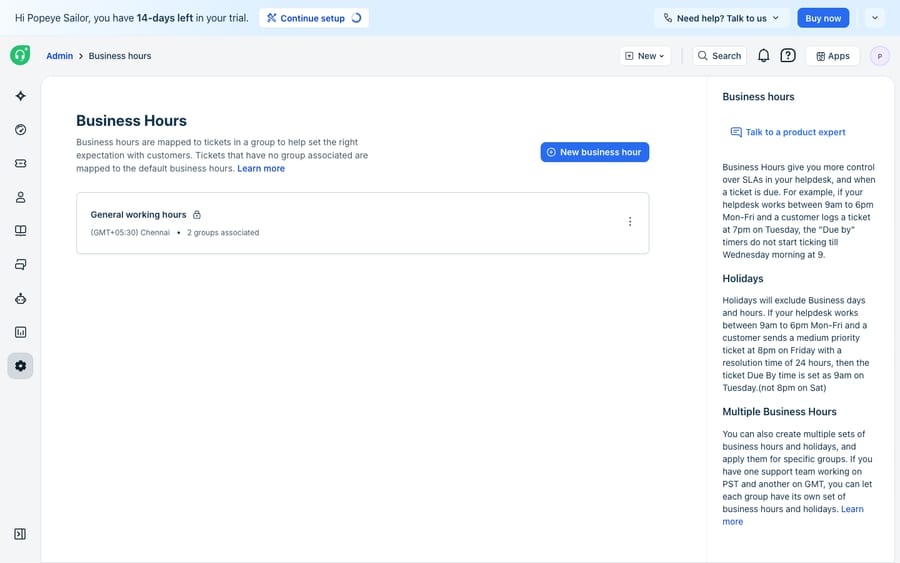
The fix is to reconcile all three: the helpdesk timezone, each agent's profile timezone, and every business-hours calendar's timezone should match the team the report describes. Because business hours also drive SLA math, a misconfigured calendar shows up as broken report durations and broken SLA clocks at the same time. We untangle that pairing in why your Freshdesk SLA isn't calculating correctly and go deeper on the calendar itself in Freshdesk business hours explained.
Why does my Freshdesk report say "No data"?
"No data" usually means "no data matching your current filters." Per the Custom Reporting basics documentation, a report-level filter constrains every widget on the report, while a widget-level filter constrains just one. Report-level filters exist on every plan; widget-level filters are a Pro and Enterprise feature, according to Freshworks' introduction to Analytics. A report-level date range or group filter left over from a previous investigation will quietly zero out widgets that would otherwise be full.
To fix it:
- Open the report and check the report-level filter first. It affects all widgets, so it's the one most likely to blank the whole page.
- Then check the individual widget's filter if only one widget is empty while its neighbors have data.
- Confirm the date range covers a period that actually contains tickets. An accidental "yesterday" on a quiet day reads as "No data."
- Remember that the start of the week is configurable, so a "this week" widget may begin on a different day than you assume, shifting which tickets fall inside the window.
Why are today's tickets missing from my Freshdesk reports?
If the newest tickets are missing while older data looks fine, you're looking at refresh lag, not a bug. Freshworks' introduction to Analytics (updated October 2024) says: "The refresh time is 30 minutes, which is standard for all subscription plans."
You may still find an older Freshworks note on report data freshness, last edited in April 2023, that lists a plan-dependent cadence: half an hour on Enterprise, an hour on Pro, four hours on Growth and 24 hours on Free. It uses the retired Sprout, Blossom, Garden, Estate and Forest plan names, and the newer Analytics article supersedes it. If your account shows a gap much longer than 30 minutes, treat it as a support ticket for Freshworks, not a setting.
| What you see | What it means | What to do |
|---|---|---|
| Tickets from the last half hour missing | Normal refresh lag | Read the current half hour as directional |
| Hours of recent tickets missing | Not the documented 30-minute cycle | Check filters, then raise it with Freshworks support |
Which Freshdesk reports are gated by plan?
Sometimes the data isn't wrong or delayed: the thing you're trying to build just isn't on your plan. Freshdesk splits reporting into curated reports (pre-built, available on every plan) and custom reporting. Per the Custom Reporting basics documentation, custom reports are available on Pro and Enterprise only. Freshworks' Analytics feature table adds that adding widgets, widget filters, underlying data, export, sharing, scheduling and three-level drill-down are all Pro and Enterprise too. Growth can save, clone and present reports but not export them.
That means a metric you saw in someone else's screenshot, or a drill-down you expected on a curated widget, can simply be absent. You reach the report builder via Reports → Analytics → New Report (the button sits near the search bar). If the option to create or customize a report isn't there, check your plan tier before you file a bug. Freshworks reserves the heavier analytics engine for Pro ($55 per agent a month billed annually) and Enterprise ($89), and it's an easy gate to mistake for a data problem.
What can't Freshdesk reports fix, and where does an AI layer fit?
Freshdesk's analytics are capable once the configuration is sound: the curated reports are sensible, custom reporting on Pro and above is flexible, and the refresh cadence is predictable. Most "wrong data" turns out to be a settings mismatch rather than a real defect.
But reports are a rear-view mirror. They tell you first response times slipped last Tuesday; they don't shorten the next one. They count how many tickets breached; they don't answer the ticket that's about to. And they can only report on the categories your intake actually captured. If tickets are mistagged or misrouted at the source, the report faithfully summarizes the wrong picture, and no amount of filter-tuning fixes that.
This is the seam where an AI agent layer fits, and it's worth being clear about the category of AI agents for customer service before reaching for one. Macha runs on top of the Freshdesk you already use as a native connector (it also runs on Zendesk, Freshdesk, Gorgias, Front, HubSpot or Intercom); it doesn't replace Freshdesk, its analytics, or your reports. You connect Macha to Freshdesk with your subdomain and API key, and it works the same tickets your reports measure: drafting or posting grounded replies so response-time metrics improve because the work got faster, triaging by intent so tickets are tagged and routed correctly before they hit a report, and looking up order or account status through a custom tool so an agent can answer instead of escalating. For the mechanics, how to automate Freshdesk with AI walks through the setup.
Keep Freshdesk's reporting as the source of truth for what happened and what's overdue, and put an agent on top for the part a chart can't do: resolving tickets fast enough to change the next report. Macha's connector is for Freshdesk specifically, not Freshchat, Freshservice, or Freshcaller. Macha bills per ticket, one conversation charged once however many messages it takes, from $299 a month for up to 750 tickets, with setup and monitoring by the Macha team included.
FAQ
Why do my Freshdesk reports show "No data"? Most often a filter is excluding your tickets. Check the report-level filter first (it constrains every widget), then the individual widget filter and the date range. "No data" usually means "no data matching your current filters," not an empty account. Plan gating and refresh lag are the other two common reasons a widget looks empty.
Why doesn't today's data appear in my reports? Freshdesk refreshes analytics every 30 minutes, and Freshworks says that interval is standard on all plans. Tickets from the last half hour won't appear until the next cycle. An older 2023 help article lists up to 24 hours on some plans, but the October 2024 Analytics article supersedes it.
Why are my response and resolution times wrong in reports? Duration metrics are calculated against a business-hours calendar that carries its own timezone and is tied to specific agent groups. If that calendar's timezone doesn't match the team, every duration inherits the skew. Reconcile the helpdesk timezone, each agent's profile timezone, and every business-hours calendar so they all describe the same reality.
Why can't I build a custom report in Freshdesk? Custom reporting, widgets and drill-down are available on the Pro and Enterprise plans only; Growth gets the curated reports. If the option to create or customize a report is missing, it's a plan gate rather than a bug, so confirm your tier before assuming something is broken.
Can AI fix my Freshdesk reporting? Not the reporting itself. An AI agent layer like Macha connects to Freshdesk as a native connector and improves the inputs your reports measure: faster grounded replies, correct intent-based tagging and routing, and account lookups that keep tickets from being escalated. Freshdesk stays the system of record; the agent changes the numbers by changing the work.
Want your next report to look better because the work got faster, not because you re-filtered it? Start a free trial of Macha with $50 of usage and no credit card, and connect it to your Freshdesk.






