





 Shopify
 Stripe
 Slack
Slack Notion
 Google Workspace
 Confluence

How Do You Automate Freshdesk Workflows with AI? 7 Playbooks (2026)


Freshdesk's automation rules move and label tickets, while Freddy AI or an AI agent layer handles the steps that need reading a question and fetching data. These seven playbooks show which parts of an order-status, reset, refund, bug, triage, how-to or SLA-risk ticket belong to each.
Key takeaways
- Freshdesk workflow automation with AI works best when rules route and tag tickets, and AI handles the steps that need reading intent, fetching order data or drafting replies.
- Freshdesk's pricing page lists automation rules on all three paid plans: Growth at $19, Pro at $55 and Enterprise at $89 per agent a month, billed annually.
- Freddy AI Copilot costs $29 per agent a month on Pro and Enterprise only, according to Freshworks' pricing page checked on 24 September 2026.
- Freddy AI Agent comes with 500 sessions as a one-time allowance per account, then costs $49 per 100 sessions, and Freshworks markets it as resolving up to 80% of queries.
- Macha bills per ticket rather than per session, about $0.40 a ticket from $299 a month for 750 tickets, with setup by the Macha team and a dedicated success manager included.

You automate Freshdesk workflows with AI by keeping the rule engine under Admin → Workflows → Automations for routing and tagging, then adding AI (Freddy AI Agent at $49 per 100 sessions after a one-time 500, or an AI agent layer billed per ticket) for the steps that need reading and reasoning. The seven playbooks below map that split to real ticket types: order status, password resets, refunds, bug reports, triage, how-to questions and SLA-risk tickets.
| Layer | What it does | Cost (checked 24 Sept 2026) |
|---|---|---|
| Automation rules | Route, tag, set priority, notify, fire webhooks | Included on Growth ($19), Pro ($55) and Enterprise ($89) per agent a month, billed annually |
| Freddy AI Copilot | Reply suggestions and summaries for agents | $29 per agent a month, Pro and Enterprise only |
| Freddy AI Agent | Autonomous answers on chat, messaging and email | 500 sessions once per account, then $49 per 100 sessions |
| AI agent layer (Macha) | Reads tickets, calls your APIs, drafts or posts replies | From $299 a month for 750 tickets (about $0.40 a ticket), setup and a dedicated success manager included |
What are the three layers of Freshdesk automation?
"Automation" in Freshdesk means three different things, and each one fits a different part of a ticket's life.
The deterministic rule engine lives under Admin → Workflows → Automations and comes in three flavours. Per Freshworks' automation documentation and eesel's 2026 rules guide, these are Ticket Creation rules (formerly Dispatch'r, which run the instant a ticket lands), Ticket Updates rules (formerly Observer, which fire in real time on events like a status change or a customer reply), and Hourly Triggers (formerly Time Triggers, which scan every open ticket once an hour, so thresholds must be at least an hour). Freshdesk's pricing page lists automations on all three paid plans: Growth, Pro and Enterprise. There is no longer a Free plan on that page. These rules are pure if-this-then-that logic: they assign, tag, set priority, send notifications, and fire webhooks. They're fast and predictable. What they cannot do, in eesel's blunt phrasing, is "read a question and write the real reply."
The Freddy AI layer is where reading and resolving happen. It splits into three products: Freddy AI Agent (autonomous resolution across email and chat), Freddy AI Copilot (real-time reply suggestions and summaries inside the agent's workspace), and Freddy AI Insights (leadership analytics). Freshworks markets the AI Agent as resolving up to 80% of queries with pre-built agentic workflows.
The AI agent layer is the third option: a dedicated platform like Macha that runs on top of Freshdesk, reads and writes the same tickets, and runs multi-step actions across your own systems. It doesn't replace Freshdesk or its automation rules. It fills the gaps they leave.
Which ticket types need rules, and which need AI?
Each playbook pairs a common ticket type with the automation approach that fits. The last column matters most, because it's where reasoning, not rule-matching, decides the outcome.
| # | Ticket type | Native rules handle | Where AI earns its place |
|---|---|---|---|
| 1 | Order status ("where is my order?") | Tag, route to fulfilment group | Look up the order via API and write the actual status back |
| 2 | Password / account reset | Route, set priority | Read intent, send grounded steps, or trigger the reset flow |
| 3 | Refund / return request | Route to billing, set type | Check eligibility against policy + order data, then draft the decision |
| 4 | Bug report | Tag, escalate to Tier 2 | Extract repro steps, dedupe against known issues, summarise for engineering |
| 5 | Triage & prioritisation | Priority by keyword match | Set priority by intent, not keyword; catch the mislabelled urgent case |
| 6 | Knowledge / how-to question | Prefill a canned response | Answer from the knowledge base, grounded and cited |
| 7 | Aging / SLA-risk tickets | Hourly trigger nudges an agent | Draft the next reply so the human just approves and sends |
The pattern across all seven: rules are excellent at moving and labelling tickets, and AI is what's needed the moment a step requires reading the ticket, reasoning over data, and producing a reply or an action.
How do you automate order status, password reset and refund tickets?
Playbook 1: Order status. A Ticket Creation rule can spot "order," "shipment," or "tracking" in the subject and route the ticket to your fulfilment group. That's genuinely useful. But the rule can't fetch order #4471 from your commerce backend and tell the customer it shipped yesterday; it only moves the ticket to a human who then goes and looks. This is the classic case for an AI agent with a custom tool that turns your order API into something the agent can call, so the lookup and the reply happen in one step.
Playbook 2: Password and account resets. Rules route these cleanly and can even prefill a canned response with the reset link. Freddy AI Copilot goes further, suggesting a tailored reply. Where an AI layer adds value is closing the loop: reading whether the customer is locked out versus just confused, sending the grounded steps, and (with the right tool wired up) triggering the reset itself rather than telling the customer to click a link.
Playbook 3: Refunds and returns. A rule routes the ticket to billing and sets the type. But eligibility is a judgment: is this order within the return window, was it a final-sale item, does the customer's plan allow a refund? That requires reading policy against order data, reasoning a deterministic rule can't do. An AI agent can gather both, apply the policy, and draft the decision for a human to approve. Note the honest boundary here too: you'll almost always want approval on money-moving actions, which is exactly why an agent that drafts beats one that silently acts.
How can AI triage bug reports and set priority?
Playbook 4: Bug reports. Rules can tag anything mentioning "error" or "crash" and escalate it to Tier 2. What they can't do is read a rambling bug report, extract the reproduction steps, check whether it duplicates a known issue, and write a clean summary for engineering. That extraction-and-dedupe work is squarely AI's job, and it's the difference between an engineer spending ten minutes decoding a ticket and thirty seconds reading a structured summary.
Playbook 5: Triage and prioritisation. This is where the deterministic model shows its sharpest edge. A rule sets priority by keyword, but a customer writing "the checkout is completely broken and we're losing sales right now" without using the word "urgent" gets the wrong, laxer priority. AI triages by intent, catching the mislabelled urgent case before the SLA clock starts against the wrong target. If you want to go deep on just this piece, our guide on how to automate Freshdesk with AI walks through the intent-first approach in detail.
How do you automate how-to questions and SLA-risk tickets?
Playbook 6: Knowledge and how-to questions. Native rules can prefill a canned response, and Freddy AI Copilot can suggest an answer from your solution articles. This is real, useful ground: for high-volume, well-documented questions, the native layer earns its keep. An AI agent layer extends it by answering from any connected knowledge source with citations, and by grounding the reply in the specific ticket rather than a generic template.
Playbook 7: Aging and SLA-risk tickets. An Hourly Trigger is perfect for catching tickets that have gone quiet and nudging an agent. But the nudge still lands on a human who has to do the reading and writing. The AI-layer version drafts the next reply so the agent just reviews and sends, turning a "you're about to breach" alert into a near-finished answer.
Where does native Freshdesk automation stop?
It's worth being fair to what Freshdesk ships. The rule engine is deterministic, transparent, and reliable: you always know exactly why a ticket got routed the way it did, and it costs nothing extra on most plans. Freddy AI Copilot is a genuinely good agent-assist tool for teams that live inside Freshdesk. And Freddy AI Agent can resolve a real share of simple, well-documented queries.
But there are two seams worth naming honestly. First, rules can't reason. They match conditions you scripted in advance, so anything that needs reading intent or fetching live data falls through to a human. Second, the AI pieces are gated and metered in ways that surprise teams. Per eesel's Freddy pricing breakdown and myaskai's 2026 guide, Freddy AI Copilot is a paid add-on, and Freddy AI Agent runs on a session model. Freshworks' pricing page (checked 24 September 2026) lists Copilot at $29 per agent a month, billed annually, on Pro and Enterprise only. The 500 Freddy AI Agent sessions are a one-time allowance per account, not a monthly one, and extra sessions cost $49 per 100. None of that is disqualifying. It means the "up to 80%" headline has per-session economics underneath it that you should model before you commit.
Where does an AI agent layer fit, and how is it priced?
This is the seam a dedicated AI agent for customer service is built for, and it's worth weighing the build-versus-buy tradeoff before you reach for one. Macha is one such layer: it runs on top of the Freshdesk you already use as a native connector. It does not replace your help desk, your automation rules, or Freddy. You connect Macha to Freshdesk with your subdomain and API key, and its agents read and write the same tickets your rules already route: looking up order and account data through custom tools, triaging by intent, and drafting or posting grounded replies. For a fuller comparison of what a dedicated layer adds beyond the native tools, see adding an AI agent to Freshdesk beyond Freddy. (The Macha connector is for Freshdesk specifically, not Freshchat, Freshservice, or Freshcaller.)
The pricing model is deliberately different from a per-session count. Macha bills per ticket (one thread with one person, charged once however many tool calls, reasoning steps and replies it takes), not per resolution or per deflection. That distinction matters because automation outcomes vary: a single conversation might involve a lookup, a triage step and a drafted reply, and it costs the same as one answered in a single line, whether or not the customer's problem ends up "resolved." Plans start at $299 a month for 750 tickets, about $0.40 a ticket, and that includes setup: the Macha team analyzes your past tickets, builds the knowledge base and the agent on your Freshdesk, and runs it in safe mode, with drafts as internal notes, until the drafts are right. After go-live a dedicated success manager handles your changes, such as new ticket categories, instruction edits and new tools. You pay once for the conversation, which keeps the model honest whether a ticket is deflected (never reaches a human), resolved (fully closed by the agent), or simply automated (the agent does the reasoning and hands a human the finished draft). The full breakdown lives on the pricing page.
You can see the shape of that work in Macha's own analytics.
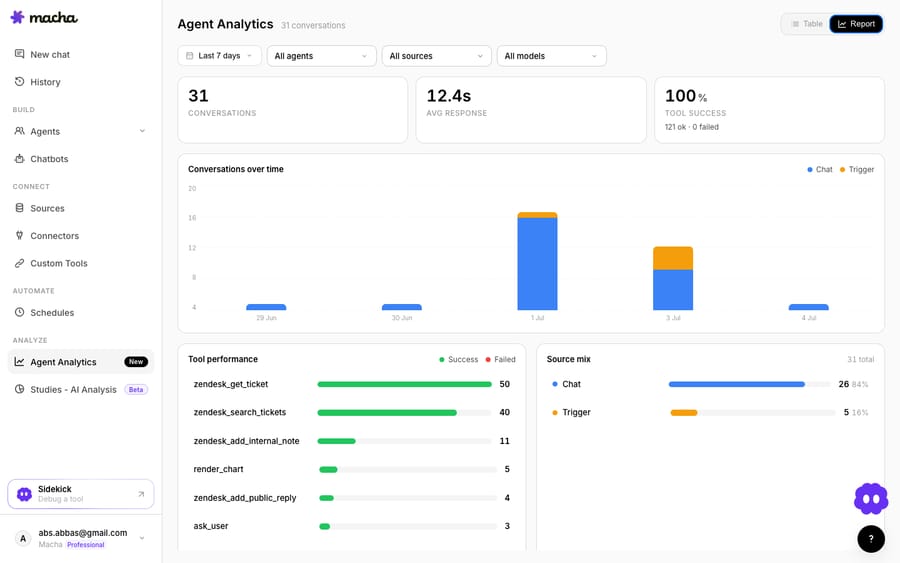
The clean division of labour across all seven playbooks: keep Freshdesk's automation rules as the deterministic backbone for moving and labelling tickets, lean on Freddy Copilot where it helps agents inside the desk, and layer AI agents on top for the reasoning-heavy work (reading intent, fetching data, and producing the reply) that neither rules nor a copilot fully close on their own.
FAQ
What is Freshdesk workflow automation? It's the set of tools Freshdesk uses to act on tickets without manual work. That includes deterministic rules (Ticket Creation, Ticket Updates, and Hourly Triggers under Admin → Workflows → Automations) that route, tag, and prioritise, plus the Freddy AI layer that can read and resolve some tickets, and, if you add one, a third-party AI agent layer that reasons over your data and drafts replies.
Can Freshdesk automation rules answer tickets on their own? No. Automation rules are if-this-then-that logic: they assign, tag, set priority, notify, and fire webhooks based on conditions you script in advance. They can prefill a canned response, but they cannot read a customer's actual question and write the real reply. That requires AI.
How is Freddy AI Agent priced? On a session model. Freshworks' pricing page lists 500 sessions as a one-time allowance per account, then $49 per 100 additional sessions. Freddy AI Copilot is a separate add-on at $29 per agent a month on Pro and Enterprise. Confirm the figures against your own Freshworks plan.
Which Freshdesk plans include automation rules? Freshdesk's pricing page lists automations on all three paid plans: Growth ($19), Pro ($55) and Enterprise ($89) per agent a month, billed annually. The page no longer shows a Free plan.
How does Macha's pricing differ from Freddy's sessions? Macha bills per ticket (one thread with one person, charged once however many tool calls, reasoning steps or replies it takes) rather than per session, per resolution, or per deflection. It's about $0.40 a ticket from $299 a month for 750 tickets, and that includes setup by the Macha team and a dedicated success manager who handles your changes. See the pricing page for the breakdown.
Do I have to replace Freshdesk to add an AI agent layer? No. Macha connects to Freshdesk as a native connector and runs on top of your existing help desk, automation rules, and Freddy. It reads and writes the same tickets. It doesn't replace anything.
Ready to automate the reasoning your rules can't do? Start a free trial of Macha and connect your Freshdesk in about 15 minutes; and the Macha team builds the first agent for you.






