





 Shopify
 Stripe
 Slack
Slack Notion
 Google Workspace
 Confluence

How Does Front Calendar Work? Scheduling from the Inbox (2026)


Front Calendar syncs a Google or Office 365 calendar into Front so you can share availability and book meetings from inside a conversation, on every Front plan. It has hard limits: no Exchange On-Premise, no Office 365 group calendars, and no guests added to events created in Office 365.
Key takeaways
- Front Calendar syncs a connected Google or Office 365 calendar into Front on all plans, so users can share availability and book meetings without leaving a conversation.
- Front Calendar needs an inbox connected with two-way Google or Office 365 sync; SMTP email forwarding does not qualify and Exchange On-Premise cannot sync.
- Front scheduling links let recipients book up to 2 months ahead, hide slots that clash with existing events, and attach Zoom, Google Meet or Microsoft Teams links.
- Front syncs calendar events about 12 months either side of today for Google and about 9 months for Office 365.
- Office 365 group calendars do not sync to Front Calendar, and guests cannot be added from Front to events originally created in Office 365.

Front Calendar is a calendar built into Front that syncs with a connected Google or Office 365 calendar, so you can check availability, create events and share a scheduling link that people can book up to 2 months ahead, all without leaving the conversation. It is available on all Front plans, and it does not work with Exchange On-Premise.
| Question | Answer (Front help center, checked 24 Sept 2026) |
|---|---|
| Which calendars connect? | Google Calendar or Office 365, through an inbox with two-way sync |
| What does not connect? | Exchange On-Premise, SMTP-forwarded inboxes, Office 365 group calendars |
| Which plans include it? | All plans; on Starter, email must be the company's channel type |
| How far ahead can people book? | Up to 2 months from today |
| Which video tools attach to a link? | Zoom, Google Meet, Microsoft Teams, Skype Meetings |
| How much history syncs? | About 12 months either side of today for Google, 9 months for Office 365 |
What is Front Calendar?
Front Calendar is a calendar view that lives inside Front and mirrors your connected work calendar. It doesn't replace Google Calendar or Outlook. It is a window onto them, plus a set of scheduling tools wired into the composer.
Once connected, you get the familiar month, week, and day views in Front's left navigation, you can create events by clicking or dragging on the grid, and you can invite guests, set video conferencing, and manage RSVPs (Yes / Maybe / No) without switching apps. Per Front's getting-started guide for Front Calendar, the calendar is available on all plans — though on the Starter plan email has to be your company's channel type for a Google or Office 365 calendar to sync. Events sync roughly 12 months either side of today for Google and 9 months for Office 365.
The real payoff is context. When a customer emails "can we find 20 minutes this week?", you don't leave the thread. You open the calendar panel, or better, you insert your live availability straight into the reply.
How do you connect Google or Office 365 to Front Calendar?
Front Calendar connects to exactly two providers, and the connection has one hard requirement that trips people up.
You connect an individual inbox linked as either a Gmail (Google) or Office 365 account with two-way sync. Per Front's documentation on scheduling links, SMTP email forwarding does not qualify — the account has to be a proper two-way Google or Office 365 connection. And Exchange On-Premise is not supported at all. If your work calendar is anything other than Google Workspace or Microsoft 365 cloud, Front Calendar can't see it.
That's exactly the state the trial account below is in — no work calendar has been connected yet, so Front prompts you to add one before it can show any availability.
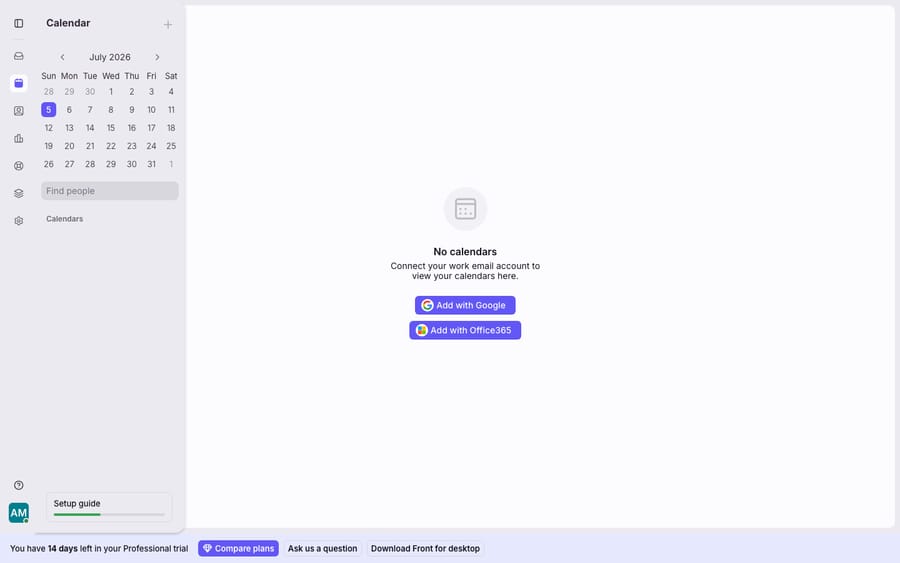
Until you click Add with Google or Add with Office365 and authorise, the main pane stays empty — there are no events to show and the new-event composer can't fully open. Once you connect, the calendar populates and the scheduling tools light up.
How do availability and scheduling links work?
The feature people actually adopt Front Calendar for is scheduling links — a personal booking URL you can share so someone picks a slot without the back-and-forth.
You define availability two ways. Front supports recurring availability (the same window week to week — say, every Tuesday 9am–4pm) and standard availability (specific non-recurring dates, like July 20th 2pm–4pm). Participants who open your link can book up to two months into the future from the current date.
Double-booking is prevented automatically. Front hides any slot that overlaps an existing event, and you can choose which calendars it checks for conflicts — including pinned or subscribed calendars and teammates' calendars inside Front. That last part is what makes it useful for a team: an account exec can share a link that respects the whole pod's calendar, not just their own.
Video conferencing is attached for you. On a scheduling link, Front supports Zoom, Google Meet, Microsoft Teams, and Skype Meetings, so the confirmed invite already carries a join link. Front's docs still list Skype Meetings even though Microsoft shut down consumer Skype in May 2025, so treat Teams as the Microsoft option. (Inside the calendar composer itself, the default conferencing options are Zoom or Google Meet, set at Settings → Personal → Preferences → Default video conference.)
Rescheduling is self-service. If a booker needs to move the meeting, they get an instant rescheduling link right in the calendar invite — no email thread required.
You can also skip the standalone link entirely and insert your availability directly into an email from the composer, letting the recipient book with a single tap inside your reply. For teams that need round-robin or panel-style booking, Front also offers group scheduling links.
Where does Front Calendar fall short?
For the common case (connect Google, share a link, book a call from a thread) Front Calendar works well. But it's a lightweight scheduling layer, not a full calendaring product, and there are real gaps worth naming before you standardise on it.
Office 365 group calendars don't sync. Front's own docs are explicit: Office 365 group calendars and calendar groups do not sync to Front when you import your calendar. If your team runs a shared "Support" or "Sales" group calendar in Microsoft 365, Front simply won't show it — you're limited to individual calendars.
You can't add guests to events created in Office 365. If an event originated in your Office 365 calendar rather than in Front, you cannot add guests to it from Front. Front recommends making those changes directly in the host calendar service, which means tabbing out — the exact thing the feature is supposed to save you from.
Invite forwarding isn't supported. Front does not support Office 365's invite forwarding. If you rely on forwarding invites to loop people in, you have to do it from the Office 365 web app instead.
History is capped. Front syncs events about 12 months either side of today for Google and about 9 months for Office 365, so older meetings will not appear in Front's view even though they still exist in the host calendar.
None of these are dealbreakers for the everyday "book a call from a reply" use case. But they explain why serious calendaring often still happens in Google Calendar or Outlook, with Front used as the front door — the place you share availability from — rather than the system of record.
What can an AI agent handle that a scheduling link can't?
Notice what the calendar solves and what it doesn't. It gets a meeting onto the calendar quickly — but a huge share of inbound email never needed a meeting at all. "Where's my order?", "how do I reset my password?", "what's your refund window?" don't want a 20-minute call; they want an answer, now.
That's the seam where an AI agent layer fits — not to replace Front or its calendar, but to handle the reasoning-heavy conversations a scheduling link can't. The broader category of AI agents for customer service exists precisely for the work a booking widget doesn't touch. Macha is one such layer: it runs on top of the Front you already use through the live Macha–Front connector — it does not replace Front, your shared inboxes, your rules, or your calendar. You keep Front doing what it's good at, including scheduling from the inbox. Then Macha's agent reads an incoming conversation, understands intent, and drafts or sends a grounded reply — pulling a real order or account status through a custom tool that turns your REST API into something the agent can call. A scheduling link books a call; an agent resolves the question so a call was never needed. If you want the mechanics, connecting Front to Macha to route conversations to AI walks through it, and Macha bills per ticket on one plan starting at $299 a month for 750 tickets: one conversation is charged once however many messages it takes, never per resolution, and setup and monitoring by the Macha team are included.
The clean division of labour: let Front Calendar be the fast way to schedule from a thread, and layer an agent on top for the conversations that want an answer instead of a meeting. For how the surrounding pieces fit together, see the wider Front shared inbox model and Front's pricing tiers.
FAQ
How do I connect a calendar to Front? Front Calendar connects an individual inbox linked as either a Gmail (Google) or Office 365 account with two-way sync. Open the Calendar in Front's left nav and choose Add with Google or Add with Office365. SMTP email forwarding doesn't qualify, and Exchange On-Premise isn't supported.
Is Front Calendar available on every plan? Yes, Front Calendar is available on all plans. On the Starter plan, email has to be your company's channel type for a Google or Office 365 calendar to sync.
How far in advance can people book with my Front scheduling link? Participants can select a date and time up to two months into the future from the current date. You can offer recurring weekly availability or specific one-off (standard) slots, and Front hides any slot that conflicts with your existing events.
What video conferencing does Front Calendar support? Scheduling links support Zoom, Google Meet, Microsoft Teams, and Skype Meetings. Inside the calendar composer, the default conferencing options are Zoom or Google Meet, set at Settings → Personal → Preferences → Default video conference.
Why doesn't my Office 365 group calendar show up in Front? Office 365 group calendars and calendar groups don't sync to Front — only individual calendars are imported. Front Calendar also can't add guests to events that were originally created in Office 365, and it doesn't support Office 365 invite forwarding; those changes have to be made in the host calendar service.
Does Front Calendar work with Exchange On-Premise? No. Front states that it is not possible to sync Front Calendar with Exchange On-Premise; it needs a cloud Google or Office 365 account.
Ready to turn "let's book a call" into "already answered"? Start a free trial of Macha ($50 of usage, no credit card) and connect it to your Front.






