





 Shopify
 Stripe
 Slack
Slack Notion
 Google Workspace
 Confluence

What Are Gorgias Automate and Convert, and What Do They Cost in 2026?


Gorgias now sells Automate as AI Agent, included on every plan and billed $0.85 to $1.00 per automated interaction, while Convert is a separate click-billed add-on for on-site sales campaigns. Both need a connected Shopify store for their full feature set.
Key takeaways
- Gorgias AI Agent, formerly sold as Automate, is on every Gorgias plan and bills $1.00 per automated interaction on Starter, $0.90 on Basic and Pro, and $0.85 on Advanced.
- Every conversation Gorgias AI Agent resolves on its own also counts as a helpdesk ticket, and interactions past the plan's allowance cost $1.50 each.
- Gorgias Convert is a separate click-billed add-on with six tiers, from $30 a month for 50 clicks to $2,000 a month for 4,000 clicks.
- Gorgias gives one AI Agent per connected Shopify store, and Convert campaigns also require a connected Shopify store.
- Gorgias counts an AI Agent interaction as automated only if the customer does not need a human agent within 72 hours.

Gorgias Automate is now sold simply as AI Agent: it comes with every Gorgias plan and bills per automated interaction ($1.00 on Starter, $0.90 on Basic and Pro, $0.85 on Advanced), and each automated interaction also counts as a helpdesk ticket. Gorgias Convert is a separate add-on for on-site sales campaigns, billed by clicks in six tiers from $30 a month for 50 clicks to $2,000 a month for 4,000 clicks. Both depend on a connected Shopify store for their full feature set.
| AI Agent (formerly Automate) | Convert | |
|---|---|---|
| Job to be done | Resolve support conversations and help shoppers buy | Turn browsers into buyers with on-site campaigns |
| Where it acts | Email, chat, SMS, Instagram DMs, Facebook Messenger, WhatsApp | Gorgias chat widget on your store |
| Billing meter | Per automated interaction ($0.85 to $1.00 by plan; $1.50 past the plan's allowance) | Per click, up to 3 clicks per browser session |
| Entry price | Starter: 30 automated interactions for $30 a month | $30 a month for 50 clicks |
| Extra charge? | Yes: each automated interaction also counts as a helpdesk ticket | No ticket charge; its own subscription |
| Shopify required? | Yes: one AI Agent per connected Shopify store | Yes: Convert campaigns need a connected Shopify store |
| Depends on | Help center, website, documents and Shopify data | Gorgias Chat widget installed |
What are Gorgias Automate and Convert?
Gorgias splits its product into a core help desk and paid extras. The help desk (tickets, macros, rules, unlimited seats priced by ticket volume) is what most people mean when they say "Gorgias," and we cover it in what is Gorgias. The AI side and the sales-campaign side sit alongside it.
Automate was Gorgias' name for the self-service and AI side. Gorgias' current pricing page no longer uses the word: it sells "Helpdesk + AI Agent," with "AI Agent on every plan, pay only when it resolves a conversation." AI Agent reads incoming conversations and resolves them without a human, answering WISMO ("where is my order") questions, handling returns and order changes, and, in its shopping-assistant role, helping new shoppers find products. Convert works on the other end of the customer lifecycle. Instead of resolving support tickets, it runs proactive on-site campaigns (product recommendations, email-capture forms, promotional messages) that appear in the storefront to turn a browsing shopper into a buyer.
In short: AI Agent handles the customer who has a problem; Convert works on the customer who hasn't bought yet. Both cost money beyond the base help desk, and both lean on Shopify in ways worth understanding before you commit.
What does Gorgias AI Agent (Automate) do, and how is it billed?
Per the AI Agent explained docs, you get a dedicated AI Agent for each Shopify store you connect. It draws on your help center articles, website content, documents, guidance and Shopify data, and handles conversations over email, chat, SMS, and social channels including Instagram DMs, Facebook Messenger and WhatsApp. "Actions" let it do things in your connected tools, such as cancel an order, process a return, or update a shipping address, and each action is opt-in. We go deeper on its mechanics in Gorgias AI Agent explained.
Billing is outcome-based. Per Gorgias' how you're billed documentation, you pay an automation fee only when the AI resolves a conversation without handing it to a human. Gorgias defines that precisely: an interaction "is considered automated if the customer does not require the involvement of a human agent within 72 hours." The current Gorgias pricing page sets the rate by plan:
| Gorgias plan | Per automated interaction | Automated interactions in the plan | Past the allowance |
|---|---|---|---|
| Starter | $1.00 | 30 | $1.50 each |
| Basic | $0.90 | 30 | $1.50 each |
| Pro | $0.90 | 190 | $1.50 each |
| Advanced | $0.85 | 530 | $1.50 each |
Gorgias' pricing FAQ puts the same thing another way: $0.90 per interaction on annual plans, $1.00 on monthly. The Gorgias AI Agent pricing blog lays out the pay-per-resolution logic.
Here's the detail that catches people. When AI Agent fully resolves a conversation, you're charged twice: once for the helpdesk ticket (against your plan's ticket allowance) and once for the automated interaction. The pricing FAQ says it plainly: "Each AI Agent interaction also counts as a helpdesk ticket and is billed accordingly." If the AI hands off to a human, you pay only the ticket. So an automated conversation uses the same ticket allowance your human-handled tickets do, plus the interaction fee. Model that against your real volume; the full plan structure is in Gorgias pricing explained.
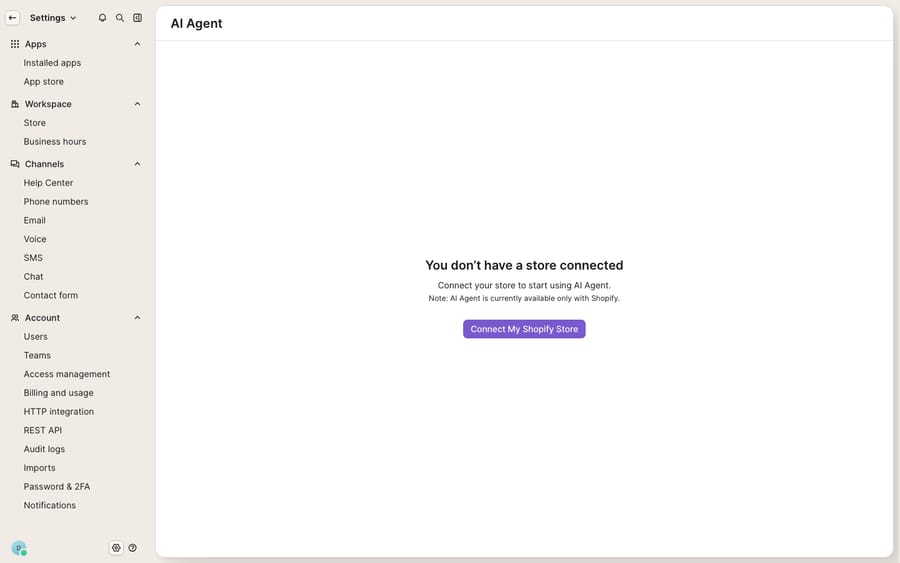
As the screen above shows, AI Agent on a fresh trial won't switch on until a store is connected, and the notice is blunt: "AI Agent is currently available only with Shopify." The current docs say the same thing in a friendlier way (one AI Agent per connected Shopify store). If your storefront runs on BigCommerce, WooCommerce, or a headless setup, that's a hard stop for AI Agent today. Check it against your own account before you plan around it.
What does Gorgias Convert do, and how is it billed?
Convert is Gorgias' answer to the pre-purchase side of the funnel. Per the Convert overview, it's an add-on that lets ecommerce brands "launch onsite campaigns to increase website conversion rates," shown inside the Gorgias chat widget on your storefront. In practice that means:
- Product recommendations for upsell and cross-sell.
- Email-capture forms to grow your marketing list.
- Promotional messages with unique Shopify discount codes you generate in Gorgias.
- A/B split tests on campaign copy, plus frequency management so a shopper isn't hit by five pop-ups at once.
Because Convert lives inside the chat widget, it depends on Gorgias Chat being installed (the same widget covered in Gorgias Chat explained). It also needs a connected Shopify store: Gorgias' campaign docs say Convert campaigns "require a Convert subscription and a connected Shopify store," which unlocks targeting on cart activity and Shopify customer history. You subscribe under Settings → Account → Billing & Usage, in the Convert section.
Convert's meter is entirely different from AI Agent's. It's a separate subscription billed by clicks: "every time your customer interacts with a Convert campaign, we'll count it as one click," up to a maximum of 3 clicks per browser session. Per Gorgias' Convert pricing docs, there are six tiers:
| Tier | Clicks / month | Monthly | Per click |
|---|---|---|---|
| 1 | 50 | $30 | $0.60 |
| 2 | 500 | $300 | $0.60 |
| 3 | 1,000 | $575 | $0.57 |
| 4 | 2,000 | $1,100 | $0.55 |
| 5 | 3,000 | $1,575 | $0.52 |
| 6 | 4,000 | $2,000 | $0.50 |
If your help desk is on an annual subscription, only yearly Convert options are offered (the yearly budget is 12 times the monthly figure, $360 to $24,000).
One behavior to flag: auto-upgrade is on by default when you first subscribe. If you hit your click ceiling mid-cycle, Convert moves you up one tier, charges the pro-rated difference, and emails your admins. The toggle then switches itself off to stop a cascade, and you stay on the higher tier in later billing periods until you change it.
Convert is also distinct from Gorgias' free Light campaigns, and the line between them is Shopify. Light campaigns are available to any help desk whose chat integration isn't connected to a Shopify store, with two triggers (current URL and time on page). Once your chat is connected to Shopify, you need Convert for any campaign at all.
Where do AI Agent and Convert fall short?
Both do what they're built for. AI Agent's per-resolution billing is fair in one sense: you don't pay the automation fee for automation that didn't work, and a deflected WISMO ticket is real value. Convert's click-based model is transparent, and in-widget campaigns reuse a tool you've already installed for support.
The edges are real, though. The Shopify gate is the big one: AI Agent comes per connected Shopify store, which leaves out a large slice of ecommerce. The double billing (a helpdesk ticket and an automation fee on every AI-resolved conversation) means the real cost per deflection is higher than the headline $0.90. Past your plan's allowance, each automated interaction costs $1.50. And the 72-hour definition means a customer who comes back and needs a human within that window changes whether an interaction counted. On the Convert side, everything hinges on the chat widget and a Shopify connection, and auto-upgrade can move you up a pricing tier, and keep you there, if a campaign takes off.
There's also a question AI Agent doesn't fully answer: what happens when the "resolution" isn't a canned answer or a Shopify action but a multi-step job against your own systems, like checking a 3PL's shipping API, applying store credit in an ERP, or updating a subscription in a billing tool? That's where a dedicated AI agent layer earns its place. It's worth understanding the build-versus-buy tradeoff and the broader field of AI agents for customer service before assuming one add-on covers it.
Where does Macha fit alongside Gorgias AI Agent?
Macha runs on top of the Gorgias you already use, never as a replacement. The Macha–Gorgias connector is live: Macha reads and writes the same Gorgias tickets your agents and AI Agent already touch, drafting or posting grounded replies and calling your own back-end systems through a custom tool that turns a REST API into an action the agent can take. Two contrasts matter. Macha doesn't tie the AI to one storefront platform, and it bills per ticket, not per resolution: one conversation, charged once however many messages it takes. The tiers are on the pricing page, from $299 a month for up to 750 tickets, with setup and monitoring by the Macha team included. A clean split: let Gorgias AI Agent and Convert do what they do well, and add Macha for the reasoning-and-action work that sits in your own systems.
FAQ
What's the difference between Gorgias Automate and Convert? Automate was the AI and self-service side, now sold as AI Agent, which resolves support conversations across email, chat, SMS and social channels. Convert is a separate add-on that runs proactive on-site campaigns (product recommendations, email capture, promotional messages) inside the chat widget to lift storefront conversion. Different jobs, different meters, both paid.
Is Gorgias Automate still a separate add-on? Not on the current pricing page, which doesn't use the name Automate. It sells "Helpdesk + AI Agent" with AI Agent on every plan, billed per automated interaction with an allowance built into each plan (30 on Starter and Basic, 190 on Pro, 530 on Advanced).
How much does Gorgias Convert cost? Convert is a separate subscription billed by clicks, capped at 3 clicks per browser session. Per Gorgias' docs there are six tiers from $30/month for 50 clicks up to $2,000/month for 4,000 clicks ($0.60 down to $0.50 per click). Auto-upgrade is on by default and moves you up one tier if you run out mid-cycle.
How is Gorgias AI Agent (Automate) billed? Per automated interaction: $1.00 on Starter, $0.90 on Basic and Pro, $0.85 on Advanced, and $1.50 each past the plan's allowance. A fully automated conversation also counts as a helpdesk ticket, so you're charged for both. An interaction counts as automated if no human is involved within 72 hours.
Does Gorgias Automate require Shopify? Yes. Gorgias gives you one AI Agent per connected Shopify store, and a fresh trial's enablement screen states "AI Agent is currently available only with Shopify." Convert campaigns also require a connected Shopify store; without one, you only get free Light campaigns.
Can I add AI to Gorgias without paying per resolution? Yes. Macha runs as an AI agent layer on top of Gorgias through a live connector and doesn't replace your help desk or its add-ons. It drafts grounded replies and calls your own APIs through custom tools, and it bills per ticket (one conversation, charged once) rather than per resolution.
Want AI on your Gorgias tickets without a per-resolution meter or a Shopify gate? Start a free trial of Macha and connect it to your Gorgias.






