





 Shopify
 Stripe
 Slack
Slack Notion
 Google Workspace
 Confluence

Front vs Missive (2026): Which Shared Inbox Should Your Team Pick?


Missive costs $14 to $36 per user a month and Front costs $25 to $105 per seat, so Missive is the cheaper shared inbox by a wide margin. Front charges for breadth (ticketing, a knowledge base, voice and paid AI add-ons), while Missive stays a focused email-native tool with real-time shared drafting.
Key takeaways
- Missive costs $14 to $36 per user a month billed yearly, while Front costs $25 to $105 per seat a month billed annually.
- A 15-person team on Front Professional pays about $975 a month, compared with about $360 a month on Missive's Productive plan.
- Front caps automation at 10 rules on Starter and 20 on Professional, with unlimited rules only on Enterprise, while Missive allows up to 1,000 rules on every plan.
- Front's Office 365 sync is two-way only for new inbox messages, sent mail and spam marking, while Missive advertises full two-way sync including archive and read status.
- On Capterra, Front holds 4.5 stars from 289 reviews while Missive holds 4.9 stars from 184 reviews.

Missive is the cheaper shared inbox: $14 to $36 per user a month against Front's $25 to $105 per seat, both billed annually, so a 15-person mid-tier team pays about $360 a month on Missive versus about $975 on Front. Front earns the higher price with ticketing, a knowledge base, voice and paid AI add-ons; Missive stays a focused, email-native collaboration tool with real-time shared drafting.
How do Front and Missive compare at a glance?
| Front | Missive | |
|---|---|---|
| Best for | Multi-channel support and ops teams that want ticketing + AI in one platform | Email-heavy teams that want deep collaboration without enterprise pricing |
| Pricing entry | $25/seat/mo (Starter, annual) | $14/user/mo (Starter, annual) |
| Collaboration depth | Internal comments, @mentions, shared drafts, assignments — polished | Internal threads inside the message, collaborative real-time drafting, comments |
| Automation | Rules engine (10 / 20 / unlimited by plan) + macros | Up to 1,000 rules on every plan, auto-assign, auto-follow-ups |
| Channels | Email, SMS, social, WhatsApp, chat, voice (Starter is single-channel) | Email, SMS, WhatsApp, Messenger, live chat |
| Standout strength | Breadth: ticketing, knowledge base, voice, native AI | Price + real-time collaborative drafting; full two-way Gmail/Outlook sync |
All prices below are per seat or per user, billed annually, and were checked on each vendor's pricing page on 24 September 2026.
How much do Front and Missive cost?
This is the headline difference, and it is stark. Per Front's pricing page, Front runs Starter $25, Professional $65, and Enterprise $105 per seat/month billed annually. The Starter tier is deliberately narrow: it covers a single channel type, caps you at 10 automation rules and tops out at 10 seats. To get omnichannel and macros you are on Professional at $65, which goes up to 50 seats. Front's AI is sold on top: Copilot and Smart QA are $20 a seat each, Smart CSAT is $10, and Autopilot starts at $0.05 per conversation, with the seat-based add-ons included on Enterprise.
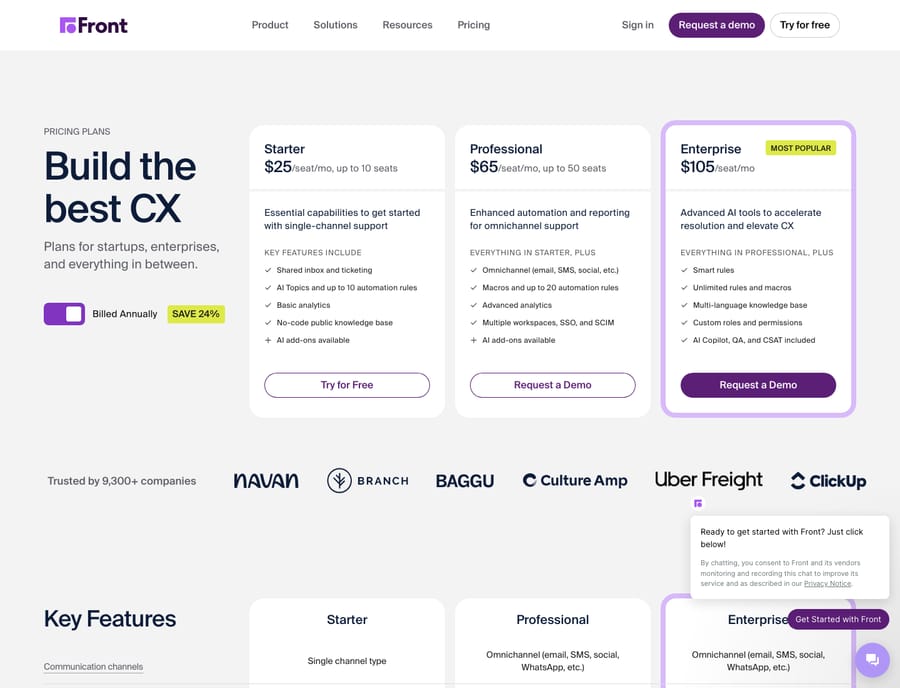
Per Missive's pricing page, Missive runs Starter $14 (up to 5 users), Productive $24 (up to 50 users), and Business $36 per user/month billed yearly (20% off). Crucially, Missive's Starter already bundles email, SMS, and social accounts rather than restricting you to one channel, and comments and collaborative drafting are present on every tier.
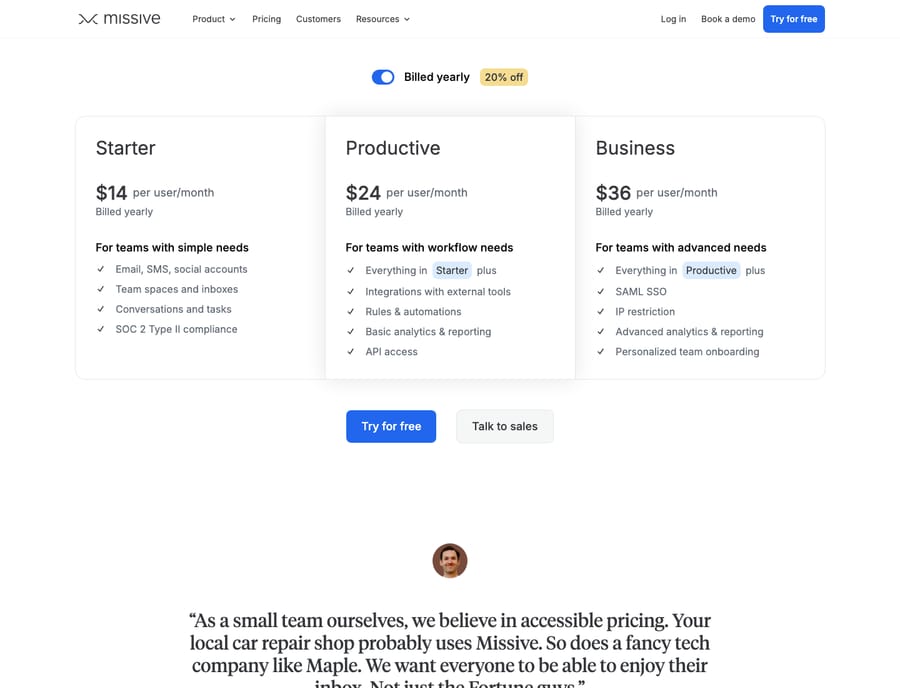
Do the math on a real team and the gap compounds. A 15-person team on Front Professional is roughly $975/month; the comparable Missive Productive plan is about $360/month. That's 37% of the Front bill, so in the common mid-tier comparison Missive costs well under half. Missive's own Front comparison makes the same point: for a 15-person team the gap "runs into thousands of dollars a year." If budget is the deciding lever, Missive wins this round cleanly. Front's counter is that its price buys categories Missive does not sell at all: native ticketing, a knowledge base, voice, and a paid AI suite. Whether that breadth is worth roughly 2 to 3 times the per-seat cost is the real question, not the sticker price itself. For a deeper tier-by-tier breakdown of Front specifically, see Front pricing explained.
Which one handles team collaboration better?
Both tools nail the core promise — one address, many hands, no forwarding — but they express collaboration differently.
Front treats the inbox like a polished team workspace. You @mention teammates in an internal comment that sits beside the customer thread (the customer never sees it), assign conversations to owners, draft together, and see presence and read state across the team. Reviewers consistently praise Front's interface and its internal commenting and @mention flow as among the most intuitive in the category. The experience is deliberately refined, and for teams that live in the inbox all day, that polish matters.
Missive puts collaboration inside the message. Its signature feature is real-time collaborative drafting — two people editing the same reply simultaneously, Google-Docs style — alongside internal comment threads attached to each conversation. Missive's comparison page says "two people can type in the same draft at the same time," while Front shows a gray banner naming who is editing. Independent reviews on G2 and Capterra single out the same thing: shared inbox collaboration and real-time drafting are Missive's most-cited strengths. For teams that co-write replies — sales, agencies, partner desks — Missive's simultaneous editing is a genuinely differentiated capability Front does not match one-for-one.
Sync depth is the other real difference if half your team wants to keep working from native Outlook. Front's Office 365 sync is two-way only for new inbox messages, sent mail and spam marking; read/unread status, archiving, folder changes, trash and snooze do not sync back. Missive advertises full two-way sync with Gmail and Outlook, covering labels, archive, snooze and read/unread, and two-way sync over IMAP for other providers, so actions taken in Missive show up in the original mailbox. If mixed-client working is a hard requirement, test it on both trials before you commit.
How do Front and Missive automation rules compare?
Automation is where Front's platform depth starts to show — with caveats.
Front's rules engine is deterministic and mature: a When (trigger) → If (condition) → Then (action) model that routes, tags, assigns, and auto-replies. The catch is the plan cap: 10 rules on Starter, 20 on Professional, and unlimited only on Enterprise, with macros (saved multi-step actions) unlocking at Professional. Busy teams on lower tiers can hit that ceiling faster than expected. Front also layers sequences and Autopilot, its AI that acts on conversations (from $0.05 per conversation), higher up the stack. See Front rules explained for how the engine behaves in practice.
Missive takes a more generous, flatter approach: up to 1,000 rules on every tier, Starter included, plus auto-assignment and automated follow-ups on every plan. For pure rule volume at a given price, Missive is more permissive. Where Front pulls ahead is sophistication — load balancing, dynamic variables, webhooks, and its AI actions are more built-out than Missive's automation, which is squarely aimed at inbox triage and follow-up rather than full workflow orchestration.
The honest summary: Missive gives you more automation headroom for less money; Front gives you deeper, more enterprise-grade automation once you pay for Professional or Enterprise. Neither native engine reads a customer's actual intent — both match on rules and keywords, not meaning, which is where an AI agent layer becomes relevant.
Which channels do Front and Missive support?
Front is the broader multi-channel platform: email, SMS, social, WhatsApp, live chat, and voice integrations all land in one inbox — but note the Starter plan restricts you to a single channel type, so true omnichannel starts at Professional ($65). Front also bundles ticketing and a native knowledge base, which pushes it toward being a lightweight help desk rather than "just" a shared inbox.
Missive covers email, SMS, WhatsApp, Messenger, and live chat, and — importantly — includes multiple channel types even on its Starter tier. What it deliberately does not try to be is a full help desk: there is no native ticketing system or knowledge base. If your workflow is fundamentally email-and-messaging collaboration, that focus is a feature; if you need CSAT, a portal, or voice, Front is the one built for it.
Which is easier to set up and learn?
Both tools are widely rated as easy to adopt. Missive leans into simplicity — teams describe getting productive quickly, and its email-native model feels familiar to anyone coming from Gmail or Outlook. Front is also praised for its interface, but its breadth means more surface area to configure (workspaces, rule scopes, permissions), so setup is a bit heavier — which is expected of a platform doing more. On review sites the pattern is consistent: Capterra shows Front at 4.5 from 289 reviews and Missive at 4.9 from 184 reviews, and Missive also scores higher there on ease of use (4.8 against 4.5). In short: Missive is faster to stand up; Front rewards the extra configuration with more capability.
What are the pros and cons of Front and Missive?
Front — pros
- Genuinely all-in-one: shared inbox plus ticketing, knowledge base, voice, and a native AI suite (sold as add-ons below Enterprise)
- Polished, well-liked UX; excellent internal comments and @mentions
- Deeper, enterprise-grade automation (load balancing, webhooks, dynamic variables) at higher tiers
Front — cons
- Expensive: roughly 2 to 3 times Missive per seat; Starter is single-channel, rule-capped and limited to 10 seats
- Omnichannel and macros gated behind Professional
- Office 365 sync is partial: read status, archive and folder changes don't sync back to Outlook
Missive — pros
- Roughly half the price; multi-channel and comments included from the entry tier
- Standout real-time collaborative drafting and strong "Team Collaboration" reviews
- Full two-way sync with Gmail/Outlook/IMAP; up to 1,000 rules on every plan
Missive — cons
- No native ticketing, knowledge base, or voice — it is a shared inbox, not a help desk
- AI and automation are less built-out than Front's higher tiers; AI on Starter needs your own API key
- Fewer enterprise governance features until the Business tier
Which should you choose?
- Pick Missive if you are an email- and messaging-heavy team — support, sales, agencies, ops — that wants deep collaboration and clean shared inboxes without paying enterprise prices. If co-writing replies, full two-way email sync, and budget matter more than ticketing, Missive is the better fit.
- Pick Front if you need one platform that is also a lightweight help desk: multi-channel (including voice), native ticketing and knowledge base, CSAT, and a bundled AI suite — and you can justify the higher per-seat cost. Front suits larger or more support-centric teams that value breadth and polish.
If you are still weighing the wider field, best Front alternatives and our full Front app review put both tools in context, and what is Front covers the platform from scratch.
Can you add an AI agent on top of Front or Missive?
Here is the part neither Front nor Missive fully solves on its own: both route, tag, and organize conversations, but their native automation still matches on rules and keywords, not on what the customer actually means. That is a different job — reading a conversation, understanding intent, checking a real order or account, and drafting or sending a grounded reply. Whichever shared inbox you choose, that reasoning layer can sit on top of it.
Macha runs on top of the inbox you already have — via the Macha–Front connector if you land on Front — and turns a routed, tagged conversation into an answered one. It reaches your systems through a custom tool that makes your REST API callable by the agent, and it bills per ticket, starting at $299 a month for up to 750 tickets: one conversation, charged once however many messages it takes, never per resolution. The inbox stays yours; the agent just does the reasoning-heavy part on top.
FAQ
Is Missive really half the price of Front? Roughly, yes — and often less than half in the mid-tier. As of 24 September 2026, Missive is Starter $14, Productive $24, and Business $36 per user/month, versus Front's Starter $25, Professional $65, and Enterprise $105 per seat/month (both billed annually). On a 15-seat team the mid-tier gap is about $360/mo (Missive) versus roughly $975/mo (Front). Always check current prices on each vendor's page.
What does Missive do better than Front? Price, and real-time collaborative drafting (two people editing one reply simultaneously). Missive also includes multiple channels and comments on its entry tier and advertises full two-way sync with Gmail, Outlook, and IMAP, and it allows up to 1,000 rules on every plan.
What does Front do better than Missive? Breadth. Front offers native ticketing, a knowledge base, voice, CSAT, and an AI suite (Copilot, Smart QA, Autopilot) that Missive does not sell — making Front closer to a lightweight help desk than a pure shared inbox. Its automation is also more enterprise-grade at higher tiers.
How do Front and Missive compare on comments, rules, and sequences? Comments: both offer internal comments/@mentions; Missive adds simultaneous collaborative drafting. Rules: Front caps rules by plan (10/20/unlimited) with macros at Professional+; Missive allows up to 1,000 rules on every tier. Sequences/follow-ups: Front layers sequences and Autopilot higher up; Missive includes auto-follow-ups on every tier.
Does Front still sync two ways with Outlook? Partly. Front's Office 365 sync is two-way for new inbox messages, sent mail and spam marking, but read/unread, archive, folder, trash and snooze changes do not sync back. Missive advertises full two-way sync for those actions.
Can I add AI to Front or Missive without switching tools? Yes. An AI agent layer like Macha connects on top of the shared inbox or help desk you already use — it does not replace it. Your inbox keeps routing and collaborating; the agent reads the conversation, understands intent, and drafts or sends a grounded reply.
Ready to turn a routed conversation into an answered one, on whichever inbox you pick? Start a free trial of Macha and connect it in minutes.






