





 Shopify
 Stripe
 Slack
Slack Notion
 Google Workspace
 Confluence

Front vs a Shared Gmail Inbox (2026): When Do You Outgrow Google Collaborative Inbox?


Google Collaborative Inbox is free with any Workspace plan but has no collision detection, no automation and no reporting. Front charges $25 to $105 a seat a month for those three things, so the switch makes sense once double-replies, manual triage or unmeasured response times start costing more than a seat.
Key takeaways
- Google Collaborative Inbox costs nothing beyond Workspace seats, while Front Starter costs $125 a month for a five-person team at $25 a seat billed annually.
- Google Workspace Business plans cost $7, $14 and $22 per user a month on an annual plan, and the Collaborative Inbox in Google Groups adds no extra charge.
- Front's plans are Starter $25, Professional $65 and Enterprise $105 per seat a month billed annually, with omnichannel SMS, social, WhatsApp and chat starting on Professional.
- Front includes AI Copilot, Smart QA and Smart CSAT only on Enterprise; on lower plans Copilot and Smart QA cost $20 a seat and Smart CSAT $10.
- Front caps automation rules at up to 10 on Starter and 20 on Professional, with unlimited rules on Enterprise, while Google Collaborative Inbox has no automation at all.

Google Collaborative Inbox costs nothing beyond your Google Workspace seats (from $7 per user a month on an annual plan), while Front costs $25, $65 or $105 per seat a month billed annually. That money buys the three things shared Gmail lacks: collision detection, a rules engine for automation, and reporting. A small, email-only team with no double-replies can stay on Collaborative Inbox; once teammates answer the same email twice or nobody can say what the response time is, Front is the step up.
How do Google Collaborative Inbox and Front compare at a glance?
| Google Collaborative Inbox (shared Gmail) | Front | |
|---|---|---|
| Best for | Small teams that want a free shared queue inside Google Workspace | Growing teams that need automation, visibility and multiple channels |
| Pricing entry | Free with any Workspace plan (Business Starter $7/user/mo annual, $8.40 flexible) | Starter $25/seat/mo billed annually |
| Shared-inbox depth | Assign, take, mark resolved (complete / no action / duplicate), labels | Shared inboxes, internal comments, @mentions, shared drafts, assignment |
| Automation | None; everything is manual | Rules engine (When / If / Then): up to 10 rules on Starter, 20 on Professional, unlimited on Enterprise |
| Channels | Email only (via a Google Group) | One channel type on Starter; omnichannel (SMS, social, WhatsApp, chat) on Professional and up |
| Reporting | None: no response-time, SLA or workload metrics | Analytics, SLA tracking, team performance dashboards |
| Standout strength | It is free and already in your stack | Collision detection, automation and reporting in one app |
How much does each option cost?
Google Collaborative Inbox is free, and Front is paid per seat. "Free" deserves an asterisk, so here are the exact numbers.
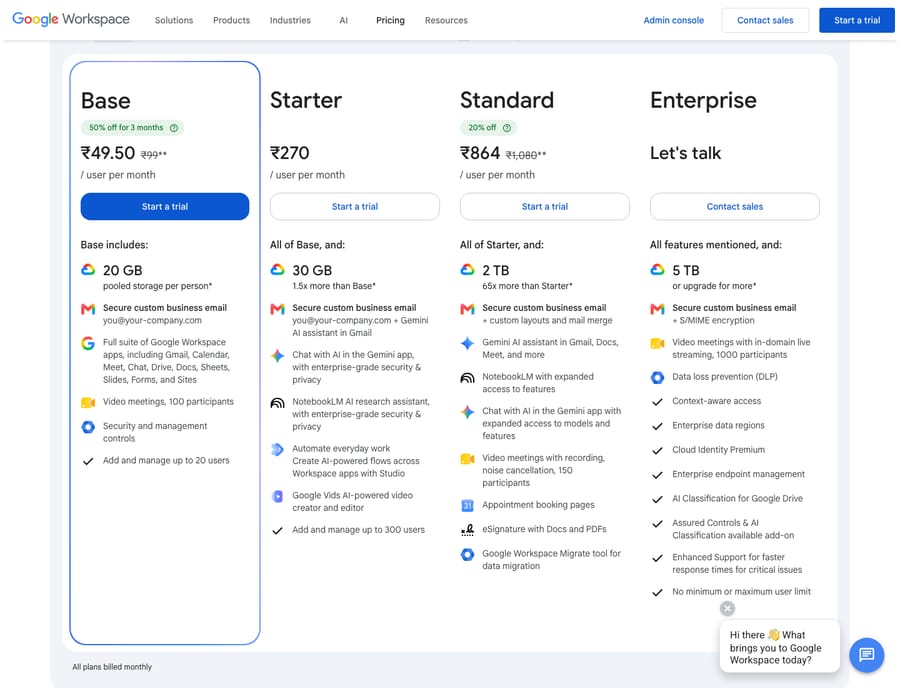
Collaborative Inbox is not a standalone product. It is a feature of Google Groups, which comes with Google Workspace at no extra charge; Google's Collaborative Inbox documentation covers the feature set, and there is no separate line item (an admin does have to turn on Groups for Business). What you pay for is Workspace itself. Google's Business editions page (updated 18 September 2026) lists Business Starter, Business Standard and Business Plus at $7, $14 and $22 per user a month on an annual plan, or $8.40, $16.80 and $26.40 on the Flexible plan. The Workspace pricing page localizes by country; the capture below was served in India, in rupees, with different plan names. If you already run on Workspace, the Collaborative Inbox adds nothing to the bill.
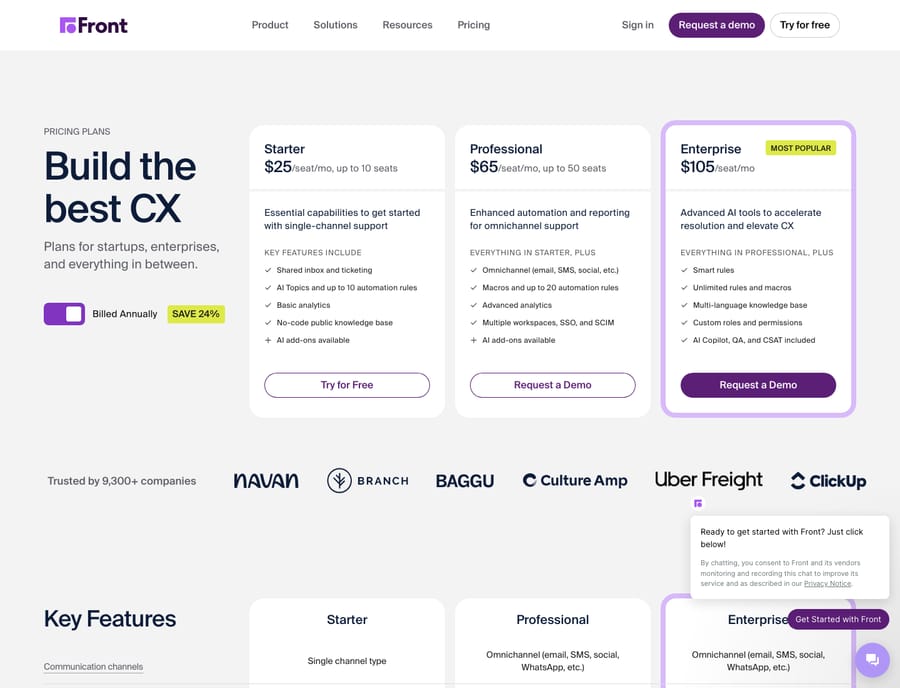
Front is a dedicated shared-inbox and communication platform, priced on top of whatever email you use. Front's pricing page lists Starter $25 (up to 10 seats), Professional $65 (up to 50 seats) and Enterprise $105 per seat a month billed annually, with 24% off for annual billing and a 14-day trial with Professional features and no card. Starter covers a single channel type, Professional adds omnichannel (SMS, social, WhatsApp, chat), and Enterprise includes Front's AI Copilot, Smart QA and Smart CSAT. On Starter and Professional those are add-ons: Copilot $20, Smart QA $20 and Smart CSAT $10 per seat a month. Our Front pricing explained breakdown walks through what unlocks where.
The math for a five-person team: Collaborative Inbox costs $0 beyond the Workspace seats you already buy, while Front Starter runs $125 a month (or $325 on Professional). That gap is the decision. You are paying Front for automation, collision detection and reporting that Google's free option does not include, so the question is whether those three things are worth $25 a seat to you yet.
How deep does each shared inbox go?
Both tools let a team share one address, but they collaborate very differently.
Google Collaborative Inbox lives inside Google Groups, a separate interface from your regular Gmail. Per Google's docs, a member with the right permission can assign a conversation to themselves or another group member, mark it resolved as complete, no action needed or duplicate, and apply labels. That is a real, workable shared queue. The catches, documented across independent reviews, are structural: there is no collision detection, so two teammates can reply to the same email without knowing (Missive's teardown and Emailmeter's guide both flag this as the main weakness), no internal comments on threads, and replies often go out from personal addresses rather than the shared one.
Front is built for this problem. It gives you shared inboxes with internal comments and @mentions alongside the customer thread, shared drafts teammates can co-write, clear assignment and collision detection, so people can see when a colleague is already typing. If your bottleneck is "we keep double-replying" or "nobody knows who owns this," that is the gap Front closes. Our Front shared inbox explained piece covers the model in depth.
Can you automate triage in shared Gmail or Front?
Not in shared Gmail, and this is the cleanest dividing line between the two.
Google Collaborative Inbox has no automation. Every triage step (assigning, labeling, prioritizing) is manual. For a low-volume queue that is fine; for a busy one, a human touches every message just to sort it. Independent guides are blunt: you can't create rules to route or triage email automatically in Collaborative Inbox.
Front runs a rules engine built on a When / If / Then model: when a message arrives, if it matches a condition (subject, sender, inbox, tag), then Front acts, routing it, tagging it, auto-assigning with round-robin or firing a template reply. That is the feature most teams cite as their reason to leave a free shared inbox. The limit is the rule count: Front's pricing page caps automation rules at up to 10 on Starter and up to 20 on Professional, with unlimited rules on Enterprise, so heavy automators tend to land on Professional.
Which channels does each one handle?
If you only handle email, this section may not matter, but most growing teams add channels eventually.
Google Collaborative Inbox is email only. It is a Google Group, so SMS, social DMs, WhatsApp and live chat are outside it entirely; you would bolt on separate tools for each.
Front is omnichannel from Professional up: Starter covers a single channel type, while Professional and Enterprise bring email, SMS, social, WhatsApp and chat into one shared workspace. If you already juggle Instagram DMs and a support email in different places, that alone can justify the move.
Which is easier to set up?
Google Collaborative Inbox wins on setup speed and familiarity. If your team already uses Gmail, a Collaborative Inbox is a few clicks in the admin console and Google Groups, with nothing new to learn beyond the take, assign and resolve buttons. The friction is the ongoing switch between your normal Gmail and the separate Groups interface, a small tax that adds up daily.
Front is a new application with its own interface, so there is a real onboarding curve: connecting inboxes, building rules and training the team. Reviewers on G2 and Capterra generally rate Front highly for its polished, unified UI but note that setup and cost are steps up from a free shared inbox. It is more tool to learn, because it does more.
What are the pros and cons of each?
Google Collaborative Inbox pros: free with Workspace; no extra procurement; familiar Gmail-adjacent workflow; a functional assign/resolve/label queue; fine for small, low-volume teams. Google Collaborative Inbox cons: no collision detection; no automation; no reporting or SLA tracking; email only; separate Google Groups interface; replies can come from personal addresses.
Front pros: collision detection; a real rules engine; analytics and SLA reporting; omnichannel on Professional and up; internal comments, shared drafts and @mentions built in; polished unified UI. Front cons: paid per seat ($25 to $105 a seat a month); real onboarding curve; rule caps and AI features gated to higher tiers or add-ons; overkill for a tiny, email-only team.
Which should you choose?
Stay on Google Collaborative Inbox if you are a small team (a handful of people), your volume is low, you handle email only, and nobody is complaining about double-replies or missed messages. It is free, it is already in your stack, and paying for more would be premature. Our best Front alternatives roundup lists other lightweight options too.
Move to Front if any of these are true: teammates keep answering the same email (you need collision detection), triage is eating hours that automation could reclaim, you cannot answer "what's our average response time?" (you need reporting), or you are adding channels beyond email. Those four pains are the "when do we outgrow shared Gmail" signals, and they map onto what Front adds. For the fuller picture, see our Front app review and what is Front.
The rule of thumb: Collaborative Inbox is a free shared queue; Front is a shared-inbox operating system. Use the queue while it is enough, and switch when its three missing pieces (automation, collision detection and reporting) start costing you more than a seat.
Where does an AI agent fit?
Whether you stay on shared Gmail or move to Front, both are about getting a message to the right person to answer by hand. Neither reads the conversation and resolves it for you. That is where an AI agent for customer service fits, as a layer on top of the inbox or help desk you already run. Macha works this way on Zendesk, Freshdesk, Gorgias, Front, HubSpot or Intercom: on Front it connects through the Macha–Front integration, reads each conversation, works out intent rather than matching keywords, and drafts or sends a grounded reply. It doesn't run on a Google Group, so a team on Collaborative Inbox would need one of those desks first. It bills per ticket, from $299 a month for 750 tickets: one conversation, charged once however many messages it takes. It is not a compared tool here; it is the thing you add once you have picked your inbox.
FAQ
Is Google Collaborative Inbox really free? Yes. It is a feature of Google Groups that comes with Google Workspace at no extra charge. You pay only for Workspace itself: $7, $14 or $22 per user a month on an annual Business plan, or $8.40 to $26.40 on the Flexible plan. There is no separate Collaborative Inbox subscription.
When should a team move from shared Gmail to Front? When you feel the three gaps Collaborative Inbox has: no collision detection (teammates double-reply), no automation (manual triage eats time) and no reporting (you can't measure response times or SLAs). Adding channels beyond email is a fourth strong signal.
Does Google Collaborative Inbox have collision detection? No. Collaborative Inbox has no way to warn you that a colleague is already replying to the same thread, which is why double-replies are its most-cited weakness. Front includes collision detection.
How much does Front cost compared to shared Gmail? Front is Starter $25, Professional $65 and Enterprise $105 per seat a month billed annually, on top of your email. Google Collaborative Inbox adds $0 beyond the Workspace seats you already buy. You are paying Front for automation, collision detection, reporting and omnichannel.
Can I add AI to either option? To Front, yes: Front sells its own Copilot at $20 a seat a month (included on Enterprise), and an AI agent layer like Macha connects to Front and drafts or sends grounded replies. Collaborative Inbox has no AI agent option of its own, and Macha doesn't run on a Google Group.
Does Front offer a free trial? Yes. Front's pricing page offers a 14-day trial with Professional features and no credit card; Enterprise is sold through a demo.
Ready to turn a sorted inbox into an answered one? Start a Macha trial with $50 of free usage, no credit card and no time limit, and layer an AI agent on top of Front or the help desk you already run.






