





 Shopify
 Stripe
 Slack
Slack Notion
 Google Workspace
 Confluence

What channels does Gorgias support, and how does each become a ticket?


Gorgias turns every email, chat, social message, WhatsApp text, SMS and phone call into a ticket and merges them into one thread per customer. Each channel connects in a different place, follows its own reopen window, and SMS and Voice are paid add-ons that the Starter plan can't use.
Key takeaways
- Gorgias connects Email, Chat, Contact form and Help Center under Settings → Channels, while Facebook, Instagram, WhatsApp, SMS and Voice connect through the App Store.
- Gorgias email tickets stay open to new replies for 10 days of inactivity, while chat, SMS, Voice and WhatsApp start a new ticket after 3 days.
- Human agents in Gorgias have 7 days from a customer's last message to reply on Messenger or Instagram DMs, and Gorgias's AI Agent gets 24 hours.
- A Gorgias ticket becomes billable once the helpdesk sends at least one reply, whether a human agent, an AI Agent or an automatic Rule sends it.
- Gorgias Voice and SMS add-ons are priced in volume tiers not published on the pricing page, and the $10 Starter plan can't add them.

Gorgias connects eight channel types: Email, Chat, Contact form and Help Center connect under Settings → Channels, while Facebook/Messenger/Instagram, WhatsApp, SMS and Voice connect through Settings → Apps → App Store. Every inbound message on any of them becomes a ticket, and a ticket becomes billable once your helpdesk sends at least one reply. SMS and Voice are paid add-ons that the Starter plan can't use.
| Channel | Where you connect it | Becomes a ticket when | New ticket after | Add-on? |
|---|---|---|---|---|
| Settings → Channels | Inbound email arrives | 10 days inactive | No | |
| Chat | Settings → Channels | Visitor starts a chat | 3 days inactive | No |
| Contact form | Settings → Channels | Form submitted | Not stated | No |
| Facebook / Instagram | App Store | Post, comment, DM, mention, ad comment | 3 days inactive (DMs) | No |
| App Store | Inbound WhatsApp message | 3 days inactive | Metered | |
| SMS | App Store | 1+ outbound SMS sent | 3 days inactive | Yes |
| Voice | App Store | 1+ call takes place | 3 days inactive | Yes |
Where do you connect each Gorgias channel?
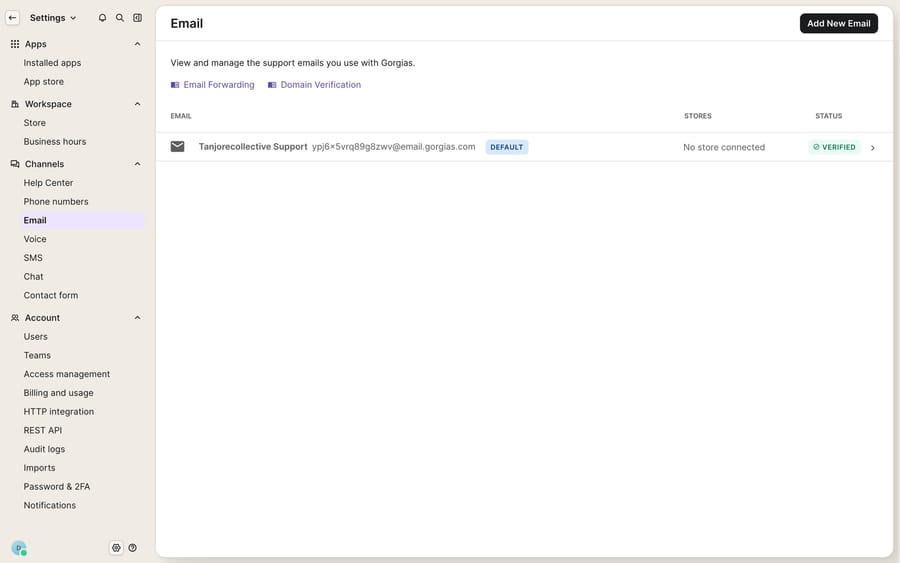
Gorgias splits its channels into two groups, and the split decides where you go to connect each one. The core conversational channels live under Settings → Channels. Social platforms and the metered add-ons connect through the App Store.
Under Settings → Channels you'll find:
- Email: the workhorse. Connect via a Gmail integration, an Outlook integration, or automatic forwarding from an existing support address.
- Chat: the on-site widget for your storefront, covered in depth in Gorgias chat explained.
- Contact form: a fallback form that files a ticket when nobody's live.
- Help Center: your self-serve knowledge base, which deflects before a ticket is ever created.
Through the App Store you connect:
- Social: Facebook, Messenger and Instagram as one linked integration.
- WhatsApp: a metered messaging channel.
- SMS: a paid add-on for text-message support.
- Voice: a paid add-on that turns phone calls into tickets.
The unifying rule across all of them: every inbound message becomes a ticket, and Gorgias stitches messages from the same customer into a single thread regardless of which channel they arrived on. A shopper can email on Monday, chat on Tuesday and call on Friday, and the agent sees one history. That's the foundation the rest of the platform (Rules, the customer sidebar, views, macros) is built on. If you're new to the platform entirely, start with what is Gorgias for the bigger picture.
How does an email become a Gorgias ticket?
Email is where most ecommerce support still lives, and Gorgias treats it as first-class. You connect it under Settings → Channels → Email → Add new email in one of three ways: a native Gmail integration, a native Outlook integration, or automatic forwarding from whatever address you already publish ([email protected]). Forwarding is the universal option and works no matter what mail host you're on, but the native OAuth integrations give cleaner threading and fewer deliverability surprises.
The moment a message hits that address, Gorgias creates a ticket. No shared Gmail inbox where two agents reply to the same customer and nobody knows; each email is a trackable, assignable record. Replies from the customer append to the existing thread until the conversation goes quiet. For email that window is 10 days of inactivity before a fresh message spins up a new ticket, per the Gorgias billing documentation.
How do Chat and the Contact form work together?
Chat is the widget you embed on your Shopify (or other) storefront so a shopper mid-checkout can ask "does this ship to Canada?" without leaving the page. Each conversation becomes a ticket the same way email does, and because the visitor is on your site, Gorgias can attach page context and order data to the sidebar. Setup lives at Settings → Channels → Chat → Add chat. Chat uses a shorter window than email: after 3 days of inactivity, a new message opens a new ticket.
The Contact form is chat's after-hours counterpart. When no agent is available, the widget can present a form that files a standard ticket for reply later, so an out-of-hours question doesn't evaporate. Both feed the same unified inbox, so an agent never has to switch tools.
What are the limits on Facebook, Messenger and Instagram?
Social is where the quirks start. You connect Facebook, Messenger and Instagram as one linked integration: click the Settings icon, open Apps → App Store, search for Facebook, Messenger & Instagram and choose Login with Facebook. Per the Gorgias Facebook and Instagram setup guide, only the account owner and admins can connect it, and you need full access to the relevant Meta Business portfolio. Each interaction type is optional and set per page:
- Facebook wall posts and post comments
- Messenger direct messages
- Instagram DMs, comments, mentions and ads
- Ad comment replies
That breadth is useful (an angry ad comment becomes a ticket you can actually resolve), but three limits are worth committing to memory:
- The 7-day DM window. Human agents have 7 days from the customer's most recent message to reply on Messenger or Instagram DMs. Gorgias's own AI Agent gets 24 hours. After that, Meta's API closes the door.
- Top comments only. You can reply to top-level Facebook and Instagram comments, but not to replies-on-comments.
- One DM until they answer. You can send only one DM in a conversation until the customer replies, a Meta rule meant to stop spam. Messenger replies cap at 2,000 characters and Instagram replies at 1,000.
Reactions are limited too: you can only Like or Unlike, and only on Facebook comments. History is thin at connection time: Gorgias can import 30 days of Facebook data as closed tickets, and none from Instagram.
How are SMS and Voice billed in Gorgias?
SMS and Voice are paid add-ons, and they bill differently from your core channels. Per the Gorgias billing docs:
- An SMS ticket is counted when at least one outbound SMS is sent from your helpdesk.
- A Voice interaction is billable when at least one phone call takes place between a customer and your helpdesk.
The Voice add-on lets agents make and receive calls that are tracked as tickets alongside every other channel, so a call sits in the same thread as the customer's earlier email. SMS and Voice both start a new ticket after 3 days of inactivity, versus email's 10. WhatsApp follows the same 3-day rule, and Meta's 24-hour customer service window can limit when you're able to reply.
The Gorgias pricing page says Voice and SMS can be added to any plan and priced in tiers that scale with call and text volume, but it doesn't publish the per-ticket rates, and its plan comparison marks the add-ons as unavailable on Starter ($10 a month for 50 tickets). Basic, Pro and Advanced can add them. Ask Gorgias for the current rate at your volume before you budget.
How does billing tie the channels together?
One rule governs cost across the whole map: a ticket becomes billable when at least one message in it is sent from your helpdesk, whether that message comes from a human agent, an AI Agent, or an automatic reply from a Rule. An inbound message you never answer doesn't cost you a billable ticket. Beyond the included volume, the pricing page lists overage at $40 per 100 tickets on Basic and $36 per 100 on Pro and Advanced.
That's a fair model, but notice the incentive it creates: because any outbound reply, including an automated one, converts a ticket to billable, your automation strategy and your bill are directly linked. A Rule that auto-acknowledges every inbound message turns every inbound message into a billable ticket. Spammy auto-replies don't just annoy customers; they cost money.
What can't the channel layer do, and where does an AI agent fit?
Gorgias's channel handling is strong: the unified thread is the real value, and the fact that a Facebook ad comment and a phone call land in the same inbox as an email is what makes it a help desk and not five disconnected tools.
But notice what the channel layer does and doesn't do. It routes and records messages. It doesn't answer them. Every ticket, on every channel, still lands on a human who has to read it, look up the order and write the reply. And each channel carries constraints the platform can't wish away: the 7-day DM window, top-comments-only replies, add-on metering on SMS and Voice. A shopper asking "where's order #4471?" over chat gets the same blank-slate treatment as over email. The channel delivers the question; it doesn't fetch the answer.
This is the seam an AI agent layer fills, and the broader category of AI agents for customer service exists to do the reasoning-heavy work the channel layer can't. Macha is one such layer: it connects to the Gorgias you already use as a native connector and runs on top of it, without replacing Gorgias or its channels. Once connected, Macha reads and writes the same unified tickets your channels already create: drafting or sending grounded replies across email, chat and your connected social channels; triaging by intent; and looking up live order or account status through a custom tool that turns your store's REST API into something the agent can call, the kind of thing you'd otherwise wire by hand against the Gorgias API. Macha bills per ticket: one conversation, charged once however many messages it takes, never per resolution (see the pricing breakdown). Gorgias stays the system of record for which channels exist and what's been said, and the agent handles the part the channel can't: answering.
FAQ
Where do I manage channels in Gorgias? Core conversational channels (Email, Chat, Contact form and Help Center) are under Settings → Channels. Social platforms (Facebook, Messenger, Instagram), WhatsApp, SMS and Voice connect through the App Store under Settings → Apps.
Which channels are add-ons versus included? Email, Chat, Contact form, Help Center and the Facebook/Instagram social integration are core. SMS and Voice are paid add-ons priced in volume tiers, not available on the Starter plan, and WhatsApp is metered. Gorgias doesn't publish the add-on rates on its pricing page.
How does a message become a ticket? Every inbound message across every channel creates a ticket, and Gorgias merges messages from the same customer into one chronological thread. A ticket only becomes billable once at least one reply is sent from your helpdesk, by a human, an AI Agent or a Rule.
What are the biggest social-channel gotchas? Human agents have 7 days from the customer's last message to reply on Messenger or Instagram DMs (the AI Agent gets 24 hours); you can reply to top-level comments but not to replies-on-comments; and you can send only one DM until the customer replies. Only the account owner and admins can connect the integration.
Can I add AI across my Gorgias channels without replacing Gorgias? Yes. An AI agent layer like Macha connects to Gorgias as a native connector and works on top of your existing channels and tickets. It helps answer faster across email, chat and connected social channels while Gorgias stays the system of record.
Ready to answer across every channel instead of just routing to one? Start a free trial of Macha and connect it to your Gorgias in minutes.






