





 Shopify
 Stripe
 Slack
Slack Notion
 Google Workspace
 Confluence

Does Gorgias Have Side Conversations? Internal Notes, @Mentions and Forwarding Explained


Gorgias covers what other help desks call side conversations with two tools: internal notes with @mentions for your own team, and ticket forwarding for vendors, suppliers and 3PLs who have no Gorgias login. Here is how each works, what Gorgias leaves out of a forward, and where the native tools stop.
Key takeaways
- Gorgias has no feature named side conversations; internal notes with @mentions cover your own team, and ticket forwarding covers vendors, suppliers and 3PLs without a Gorgias seat.
- An internal note in Gorgias can't be deleted once it has been sent, so every note becomes part of the permanent ticket record.
- Mentioning a teammate with @ in a Gorgias internal note sends an in-app and email notification, and an email reply posts back to the ticket as an internal note.
- Gorgias internal notes don't count toward the tickets replied, messages sent or one-touch tickets metrics in Analytics.
- When a Gorgias ticket is forwarded to an outside email address, internal notes are left out and agents can remove specific messages through the three-dots menu before sending.

Gorgias has no feature called "side conversations"; it covers the same job with two tools: internal notes with @mentions for your own team, and ticket forwarding for outside parties such as vendors and 3PLs. An internal note stays inside the ticket, can't be deleted once sent, and is left out when you forward the ticket to an external email address (per Gorgias' Internal notes article, checked 24 September 2026). A forward sends the conversation to any email address without giving that person a Gorgias seat, and the customer keeps replying to the original ticket as normal.
| Tool | Who sees it | How you start it | What to know |
|---|---|---|---|
| Internal note | Your team only | Channel icon in the composer, then Internal note | Can't be deleted once sent; not counted in reply metrics |
| @mention | The mentioned teammate | Type @ inside an internal note | In-app and email notification; an email reply posts back as an internal note |
| Forward | Any external email address | Channel selector, then Forward | Internal notes are left out; you can remove messages before sending |
| Macro or rule note | Your team only | "Add Internal Note" action | Stamps the same note on every matching ticket |
How do you add an internal note in Gorgias?
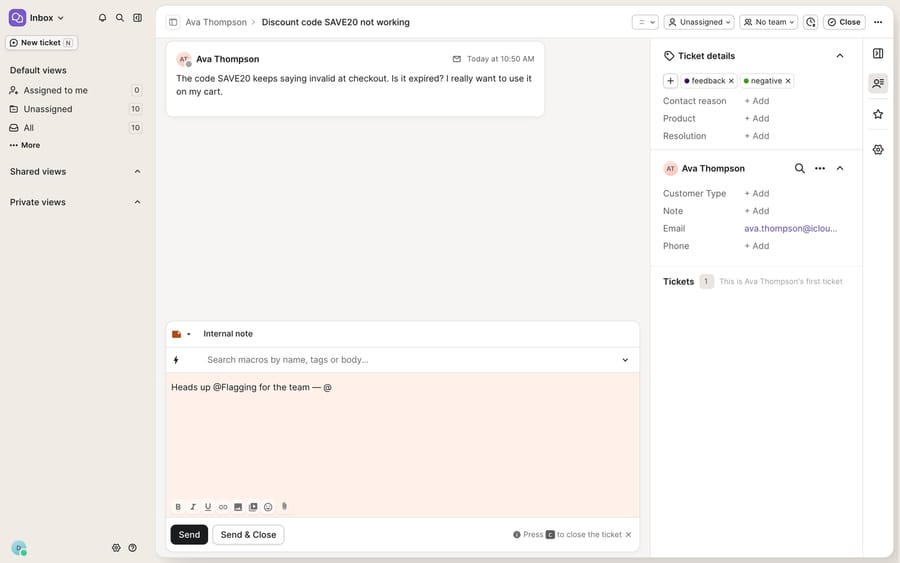
An internal note is a message inside a Gorgias ticket that only your team can see. It sits in the same thread as customer replies but renders on a cream/yellow surface so nobody mistakes it for an outbound message. Agents use notes to leave a record of what they've tried, to hand a ticket off with context, or to ask a colleague a quick question without leaving the ticket.
The steps, per the Gorgias Internal notes documentation:
- Click the channel icon in the top-left corner of the message composer.
- Select Internal note. The composer background changes color to show you're in note mode, not reply mode.
- Type your note (or apply a macro), then click Send.
That color change is the whole safety mechanism. A reply goes to the customer and a note stays in-house, and the visual cue is what stops an agent from telling a shopper "just refund them, they're being difficult." The constraint to remember: you can't delete an internal note once it's been sent. Gorgias states it plainly, so write every note as part of the permanent ticket record.
How do @mentions notify a teammate in Gorgias?
A note nobody reads is a diary entry. Collaborating inside a ticket means getting a specific person's attention, and @mentions do that. Inside an internal note, type @ followed by a teammate's name and pick them from the dropdown.
The mentioned teammate gets a notification inside Gorgias and an email notification, and the email carries a preview of the note and a link to the ticket. They see what you asked and jump straight to the right place.
The useful part is the reply loop: if the mentioned user replies to the notification email, Gorgias adds the reply to the ticket as an internal note. A teammate can answer from their inbox or phone, and the answer lands back in the ticket. For an ecommerce team where the person who knows the answer (a fulfillment lead, a senior agent) isn't always logged in to the help desk, that's the difference between a quick handoff and a stalled ticket.
Do internal notes count toward Gorgias reply metrics?
No. Per Gorgias, internal notes don't contribute to the "tickets replied," "messages sent," or "one-touch tickets" metrics in Analytics. Collaboration overhead doesn't inflate an agent's reply stats, which keeps throughput numbers honest. It's worth knowing if you judge agents with Gorgias stats and reporting: an agent who spends the morning coordinating with the warehouse will look quieter than they were.
How do you loop in a vendor, supplier or 3PL from a Gorgias ticket?
Notes cover your own people. Ecommerce support also needs facts only an outside party has: did the supplier ship the restock, will the 3PL honor a reship, what's the real ETA from the manufacturer. Gorgias handles that with ticket forwarding.
Per Gorgias' handling incoming tickets guide:
- In the channel selector dropdown at the top of the reply area, select Forward.
- In the To field that appears, enter the email address you want to forward to.
- Write your message, then click Send.
Two details make forwarding safe with external partners. First, internal notes are left out of the forward, so your team's candid back-and-forth doesn't reach the vendor. Second, you can click the three dots in the message composer to edit or remove any message replies that shouldn't be forwarded, so a supplier who needs one order number doesn't get the customer's whole history. The customer can keep replying to the original ticket the whole time; the forward runs alongside the main thread rather than replacing it.
This is Gorgias' version of what Zendesk and other help desks call side conversations: a parallel outside thread that stays tied to the customer's ticket and order.
Can Gorgias add internal notes automatically?
Yes. Two features generate notes without anyone typing them:
- Macros can include an "Add Internal Note" action, and you can apply a macro as an internal note to run its actions without replying to the customer. One click can reply to the shopper and drop a standard note for the team ("Escalated per refund policy, see order in sidebar"). The Gorgias macros explained primer covers the basics.
- Rules support an "Add Internal Note" action that stamps a note on a ticket in reaction to an event, such as routing instructions or a flag the moment a ticket arrives. It pairs with the automation patterns in Gorgias rules explained.
Used this way, every escalated ticket gets the same note and every high-value order gets the same flag, with no extra manual work.
Where do Gorgias notes and forwarding stop, and where does an AI agent fit?
Gorgias' collaboration tools do what they claim. Notes are auditable, @mentions reach the right person, and forwarding loops in outsiders cleanly. But all of it is a faster way for one human to ask another human for information. The tooling moves the question around; it doesn't answer it.
Three seams show up for an ecommerce team:
- The answer usually lives in another system. "Where's this order?" needs Shopify or your 3PL; "did we already refund this?" needs your payments data. Gorgias routes the question to a teammate, who then looks it up by hand. The richest native context (order details, revenue, order actions) sits in the customer sidebar and depends on your Shopify integration and plan.
- @mentions cost two people's time. One agent stops to ask and another stops to answer. That's right for a judgment call, but many mentions are lookups that don't need a second human.
- Forwarding waits on a reply. A ticket forwarded to a supplier is blocked on someone else's inbox, and Gorgias won't chase it for you.
That's where an AI agent layer fits, and it helps to understand the wider category of AI agents for customer service first. Macha is one such layer. It runs on top of the Gorgias you already use through a live native connector and doesn't replace Gorgias, your inbox, or your notes and forwarding. Once connected, Macha reads and writes the same tickets your team works: it can look up order, tracking and account status through a custom tool that turns a REST API into something the agent can call, then post a grounded internal note or a drafted reply. An agent then @mentions a teammate to confirm a judgment call, not to fetch a tracking number. The Macha–Gorgias integration post shows the wiring end to end. Macha charges per ticket rather than per resolution (one conversation is charged once, however many messages it takes), so the pricing tracks the volume you handle rather than rewarding tickets the vendor fails to prevent.
The division of labor: keep Gorgias' notes, @mentions and forwarding as the human record of who decided what, and let an AI agent handle the lookups and drafts that today eat an @mention or a forward.
FAQ
What's the difference between an internal note and a reply in Gorgias? A reply goes to the customer; an internal note is visible only to your team. Gorgias shows internal notes on a cream/yellow surface, and switching the composer to Internal note mode (via the channel icon) changes its color so you don't send team chatter to a shopper by mistake.
How do @mentions work in Gorgias internal notes? Type @ and the teammate's name, then pick them from the dropdown. They receive an in-app notification and an email with a preview of the note and a link to the ticket. If they reply to that email, their response is posted back to the ticket as an internal note.
Can I delete an internal note after sending it? No. Gorgias states you can't delete an internal note once it's been sent, so notes are a permanent part of the ticket record.
How do I loop in a vendor or 3PL who doesn't use Gorgias? Use Forward: in the channel selector at the top of the reply area choose Forward, enter the external email, and send. Internal notes are left out of the forward, you can edit or remove specific messages via the three-dots menu, and the customer can keep replying to the original ticket normally.
Does Gorgias have side conversations like Zendesk? Not under that name. Forwarding is the closest equivalent: it sends the ticket to an outside email address while the customer thread carries on, and internal notes are left out of what the outside party sees.
Can AI collaborate inside my Gorgias tickets without replacing Gorgias? Yes. An AI agent layer like Macha connects to Gorgias as a native connector and works inside your existing tickets, drafting grounded replies and posting internal notes with order or account context, while Gorgias stays the system of record.
Ready to spend less time chasing answers and more time deciding? Start a free trial of Macha and connect it to your Gorgias in minutes.






