





 Shopify
 Stripe
 Slack
Slack Notion
 Google Workspace
 Confluence

How Much Does Front Cost in 2026? Per-Seat Prices, AI Add-Ons and Contract Terms


Front charges $25, $65 or $105 per seat per month billed annually, but the Starter plan's 10-seat cap, a prepaid contract you can't shrink mid-term and AI sold as add-ons push the real bill higher. Here are the numbers and the arithmetic for a small team.
Key takeaways
- Front costs $25 per seat per month on Starter, $65 on Professional and $105 on Enterprise, billed annually, with a 24% saving over monthly billing.
- Front Starter is capped at 10 seats and one channel type, so an eleventh hire or a second channel moves every seat to Professional at $65, a 160% per-seat increase.
- Front's SaaS agreement bars reducing seats or downgrading during a subscription term, and its help center says prepaid fees are nonrefundable even on early termination.
- Front charges $20 per seat for Copilot, $20 for Smart QA and $10 for Smart CSAT on Starter and Professional, and Autopilot starts at $0.05 per conversation.
- A 7-seat Front Professional team pays $455 a month in seats and $770 with Copilot plus the QA and CSAT bundle, before any Autopilot usage.

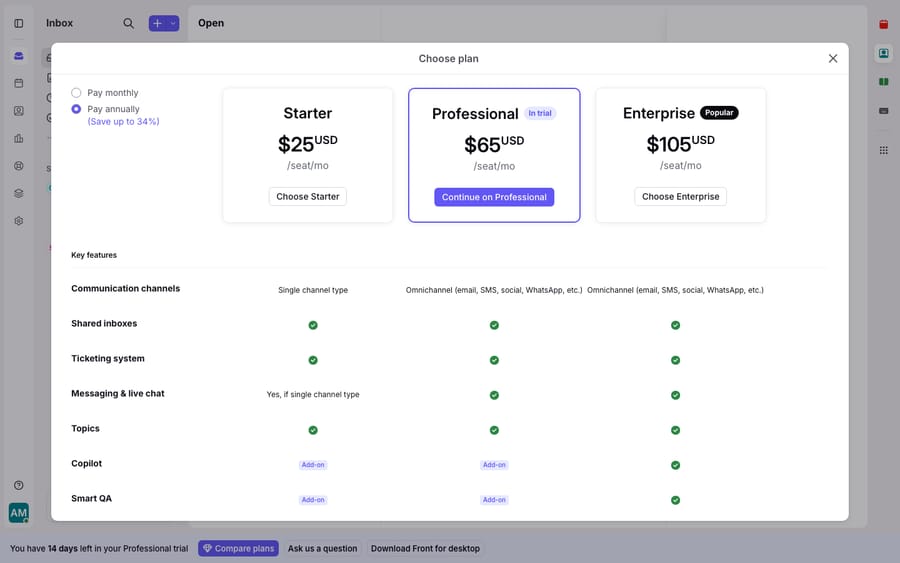
Front costs $25 per seat per month on Starter, $65 on Professional and $105 on Enterprise, billed annually (front.com/pricing, checked 24 September 2026), but the real bill is set by three things the sticker hides: a 10-seat cap on Starter, a contract you can't shrink or refund mid-term, and AI features sold as add-ons. The table has the numbers; the sections below do the arithmetic.
| Cost item | Amount | What it means for your bill |
|---|---|---|
| Starter | $25/seat/mo, up to 10 seats | One channel type; the 11th seat forces Professional |
| Professional | $65/seat/mo, up to 50 seats | Omnichannel; AI is extra |
| Enterprise | $105/seat/mo | Copilot, Smart QA and Smart CSAT included |
| Copilot / Smart QA / Smart CSAT | $20 / $20 / $10 per seat/mo | Add-ons on Starter and Professional |
| Autopilot | From $0.05 per conversation | Usage-based on every plan |
| Contract terms | Prepaid, non-refundable, no mid-term seat cuts | You pay for the full term even if the team shrinks |
What are Front's per-seat prices?
Front bills per seat, per month, and the advertised rates assume annual billing. Here is the ladder as of September 2026:
| Plan | Price (per seat/mo, annual) | Seat range | Channels | AI |
|---|---|---|---|---|
| Starter | $25 | Up to 10 seats | Single channel type (email or chat or SMS) | Add-on only |
| Professional | $65 | Up to 50 seats | Omnichannel | Add-on only |
| Enterprise | $105 | Unlimited | Omnichannel | Copilot, Smart QA & Smart CSAT included (Autopilot extra) |
Those figures match Front's pricing page and the independent tally in Featurebase's guide, which notes Starter is "limited to a single channel" while Professional and Enterprise unlock omnichannel. Front advertises that annual billing saves 24% versus monthly, so annual is effectively the default if you want the price you see. The 14-day trial runs on Professional features and needs no credit card.
What happens when you outgrow Front Starter?
You can't stay on Starter for long. It's capped at 10 seats and a single channel type. The moment you hire an eleventh person, or need email and chat, you don't move up a little. The whole team jumps to Professional at $65 per seat, a 160% increase per head.
That's the design: the affordable tier is deliberately narrow. A 10-person team on Starter pays $3,000 a year. Add a chat channel and the same 10 people move to Professional at $7,800 a year. Hire an eleventh and it's $8,580. Every existing seat re-prices, not just the new one. Reviewers feel this. On Capterra, one summed it up plainly: "The price is a real problem because it's charged per user, which tends to be quite expensive for a company with a large workforce" (see the Front reviews on Capterra). A co-founder in the same review corpus put it as "fairly expensive if you don't use it for a large number of folks." Front's economics reward big teams and punish the in-between.
What do Front's contract terms add to the cost?
Three contract terms turn Front's per-seat math into a stickier commitment than the sticker suggests.
A low minimum, but no shrinking mid-term. Front's help center says there's a one-license minimum on Starter and Professional (Front: plans and pricing), so small teams can start small. The catch is the other direction. Front's SaaS agreement says a customer "may not downgrade its Subscription Plan or reduce the number of End User subscriptions during any Subscription Term," and reductions need 30 days' notice before the term ends (Front SaaS Services Agreement, effective May 8, 2026). Buy eight Professional seats on an annual plan and you pay $6,240 for the year even if three people leave in month two.
Annual prepay, billed in advance. The agreement states subscription charges "are billed in advance and are nonrefundable." There's no discounted month-to-month option; monthly billing costs more.
Non-refundable, mid-term. This is the one that stings. Front's help center says the payment you've made "is nonrefundable and will not be issued as a credit to your account for future use," and your team "will remain liable for the entire upfront fee" even on early termination. If you downsize or restructure in month three, you don't get the remaining nine months back. One Capterra reviewer described exactly this: "Front does not offer pro-rated refunds, which is costing my client a lot of money," framing it as a trust problem, not just an inconvenience.
Put together, the "starting at $25" headline becomes: pay a year in advance, commit to your seat count for that year, and accept that the money is gone if your needs change.
Is Front's AI included in the price?
Not on Starter or Professional. There, AI is layered on top of the seat price. Front's pricing page lists Copilot at $20 per seat per month, Smart QA at $20 and Smart CSAT at $10, with a QA+CSAT bundle at $25, and Autopilot starting at $0.05 per conversation on usage. Enterprise includes Copilot, Smart QA and Smart CSAT; Autopilot still bills separately.
The arithmetic for a 7-seat Professional team: $455 a month in seats, $595 with Copilot, and $770 with Copilot plus the QA+CSAT bundle, before any Autopilot usage. That's 69% above the 7 × $65 sticker. For what those features do, see Front AI explained; for cost purposes, "AI" is a second bill, not a checkbox. At the top end, Front says it requires an onboarding package to be purchased for contracts over $25k, a one-time cost whose price the public pricing page doesn't show.
What is Front good at, and where does the cost bite?
None of this makes Front a bad product. It's one of the best collaborative shared inboxes on the market: the assignment model, internal comments, and the way it turns a team email address into real teamwork are why people love it. Our Front app review covers those strengths in depth, and the shared inbox model is well built.
The cost caveats, drawn from real reviewer sentiment:
- Per-seat scaling. Good value at 30 seats, punishing at 11, because the 10-seat Starter cap forces the jump early.
- Price increases over time. A Capterra reviewer noted "significant price increases over the last few years… the pricing is just not feasible for us at this point," pairing the hikes with a UI redesign they didn't ask for.
- No pro-rated refunds. The non-refundable, prepaid annual model is the most-cited fairness complaint.
- AI costs stack. The tier price is a floor, not a ceiling, once Copilot, QA and Autopilot are added.
If any of that gives you pause, compare the field. Our best Front alternatives piece lines up the shared-inbox options, and what Front is helps you decide if the collaborative model fits your team.
Can an AI layer on Front cost less than Front's add-ons?
Front prices its AI the way it does because it meters AI against seats and conversations inside its own model: every new hire adds Copilot revenue. A different approach is to keep Front as it is and add an AI agent layer on top. That's what Macha does. It runs on the Front you already use through the Macha–Front connector (and on Zendesk, Freshdesk, Gorgias, Front, HubSpot or Intercom), and it doesn't replace Front, your shared inboxes, or your seats. The broader category of AI agents for customer service exists for the reasoning work a per-seat inbox charges extra to bolt on.
Front's add-ons bill per seat (Copilot, QA) or per conversation (Autopilot). Macha bills per ticket: one conversation, charged once however many messages it takes. Plans start at $299 a month for up to 750 tickets, about $0.40 a ticket, with setup and monitoring by the Macha team included. An agent that reads a ticket, pulls a live order status through a custom tool, and drafts a grounded reply is one ticket, not another name on an annual contract you can't shrink.
FAQ
How much does Front cost per user? List pricing (billed annually) is $25 per seat per month for Starter, $65 for Professional, and $105 for Enterprise. Starter is capped at 10 seats and a single channel type; Professional adds omnichannel and scales to 50 seats; Enterprise includes Copilot, Smart QA and Smart CSAT.
Does Front have a minimum number of seats? Front's help center says there's a one-license minimum on Starter and Professional. The bigger constraint is that you can't reduce seats or downgrade during a subscription term, so the count you buy is the count you pay for all year.
Can I get a refund if I cancel Front early? Generally no. Front says payments are nonrefundable and aren't issued as credit for future use, and your team stays liable for the full upfront fee on early termination.
Is Front's AI included in the price? Not on Starter or Professional. Copilot and Smart QA are $20 per seat per month each, Smart CSAT is $10, and Autopilot starts at $0.05 per conversation. Enterprise includes Copilot, Smart QA and Smart CSAT; Autopilot is still usage-based.
Why does the price jump so much from Starter to Professional? Starter is capped at 10 seats and one channel type. As soon as you exceed either limit you move to Professional at $65 per seat, a 160% per-seat increase that re-prices every existing seat, not just the new one.
Want AI support that bills for work done, not seats on a contract? Start a Macha trial with $50 of free usage, no credit card, and connect it to your Front.






