





 Shopify
 Stripe
 Slack
Slack Notion
 Google Workspace
 Confluence

How Much Does Front AI Cost in 2026? Autopilot, Copilot, Smart QA and Smart CSAT Explained


Front AI is the AI built into the Front shared inbox: Autopilot from $0.05 a conversation, Copilot and Smart QA at $20 a seat a month each, and Smart CSAT at $10. Only Autopilot replies to customers on its own, and it's the one piece the Enterprise plan doesn't include. Below: what each piece does, and the best AI options for Front beyond its own.
Key takeaways
- Front AI's Autopilot agent starts at $0.05 per conversation, while Copilot and Smart QA cost $20 per seat a month each and Smart CSAT costs $10.
- Every Front AI feature except Autopilot is included in the latest Enterprise plan at $105 a seat, so Autopilot is always a separate purchase.
- Front Autopilot sends replies directly to customers without teammate review on Topics with auto-replies enabled, marks them Generated by AI, and works only in shared inboxes.
- Front Autopilot syncs roughly 3,000 pages per knowledge source, sends no reply when a message matches more than one Topic, and officially supports only English.
- Beyond Front's own AI, eesel AI sells monthly batches from $299 for 500 credits, while Macha's built-in Front connector has 15 tools and starts at $299 for 750 tickets, with setup by the Macha team and a dedicated success manager included.

Front AI is the AI built into the Front shared inbox: one AI agent, Autopilot, from $0.05 per conversation, and three per-seat add-ons, Copilot and Smart QA at $20 a seat a month each and Smart CSAT at $10, per Front's pricing page on 24 September 2026. Everything except Autopilot is included in the latest Enterprise plan at $105 a seat, and Autopilot is the only piece that replies to customers without a human.
What Autopilot is, when it replies without a teammate and its limits are covered in Can Front Autopilot reply to customers without an agent?
How much does Front AI cost in 2026?
Front publishes the add-on prices on its pricing page, in a block below the plan cards. Here's what it says, captured on September 20, 2026 and re-checked on September 24.
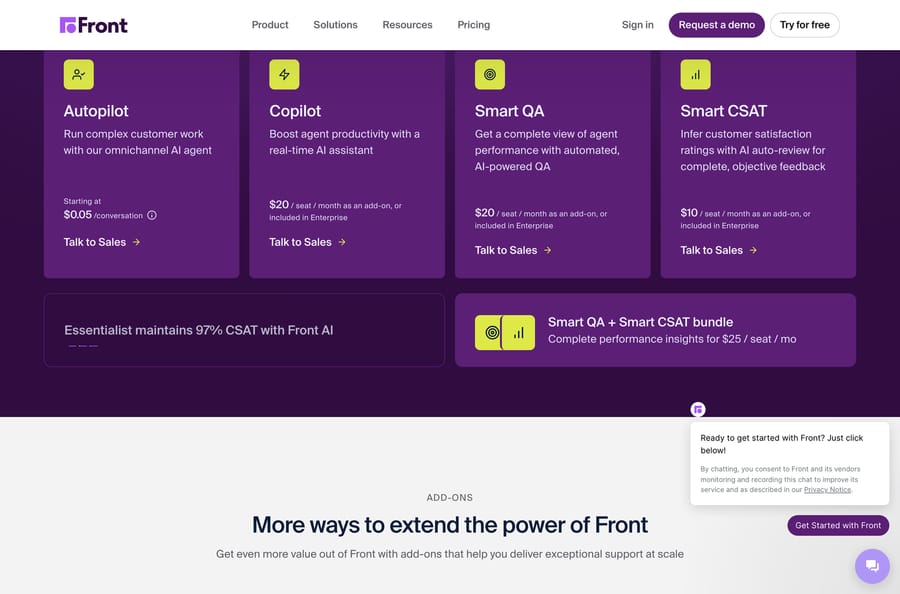
| Front AI add-on | Price | Included in Enterprise? |
|---|---|---|
| Autopilot | Starting at $0.05 per conversation | No |
| Copilot | $20 per seat per month | Yes |
| Smart QA | $20 per seat per month | Yes |
| Smart CSAT | $10 per seat per month | Yes |
| Smart QA + Smart CSAT bundle | $25 per seat per month | Yes |
Front's AI product page states the rule plainly: "For new customers, all Front AI features except for Autopilot are included in the latest version of the Enterprise plan. Otherwise, add-ons for Autopilot, Copilot, Smart QA, and Smart CSAT are available to purchase."
Two things are worth doing the arithmetic on. Billed annually, Front's base plans are Starter at $25 a seat (up to 10 seats), Professional at $65 (up to 50 seats) and Enterprise at $105; monthly billing costs more. A 20-seat team on Professional at $65 a seat pays $1,300 a month on annual billing before AI; adding Copilot and the QA bundle takes that to $2,200, which is 69% more. And moving that same team to Enterprise at $105 a seat is $2,100 a month with Copilot, Smart QA and Smart CSAT included, so the add-on route only wins while you buy fewer than all of them. Run that comparison before you buy piecemeal.
Autopilot sits outside that logic because it is metered rather than per seat. Front publishes a floor and routes you to sales for the rate, so treat $0.05 as the best case and your contract as the actual price. The incentive in a per-conversation meter is worth naming: the vendor earns on every conversation the agent touches, whether or not it ends well. Macha's per-ticket bill has the same shape; the difference is that Macha's rate is published and Front's is set in a sales call.
A note on sourcing: the add-on prices live in a block on Front's pricing page that some scripted fetches don't return, so third-party guides still quote a per-resolution figure (eesel lists $0.89 per resolution, counted after 24 to 72 hours without a customer reply). Front's own page now says per conversation, so treat the $0.89 as unconfirmed. The Front AI settings screenshot below was taken first-hand in a live Front account.
What are the parts of Front AI?
Front organizes its native AI into three buckets, and the grouping predicts which features are passive and which cost money. Per Front's overview of AI features, the three categories are Analyze, Assist and Automate.
Analyze reads your conversations in the background. It covers Topics, which auto-classify conversations so you can see what people write in about, Smart QA, which scores conversation quality for coaching, and Smart CSAT, which infers a satisfaction score from the language of an interaction rather than only from survey responses. None of this replies to anyone. It labels and measures.
Assist sits next to an agent while they work. This is Copilot: suggested replies, Summarize, Compose, asking your knowledge base, and translation. A human is always in the loop.
Automate is the one bucket that acts without a human. That is Autopilot, Front's AI agent, and it is the piece priced per conversation.
What does Front Copilot do?
Most of the day-to-day value teams get from Front AI lives in Copilot, the in-conversation assistant. Per Front's Copilot documentation, it offers suggested replies drawn from past similar conversations and, optionally, your Front knowledge base and external knowledge sources, so an agent starts from a draft instead of a blank box.
Compose is the rewrite tool inside that experience. One click makes a message more professional or friendlier, fixes typos, or changes its length. There are two flavors, Compose for email and Compose for knowledge base, the second for drafting help center content. Translate detects and translates language, currently on email channels only.
Copilot and Compose assist a human and never send anything on their own. That is why they are priced per seat rather than per conversation.
How does Front Summarize work?
Summarize writes one shared summary per conversation. Per Front's Summarize guide, the AI summary appears at the top of a conversation and auto-updates: "the AI-provided summary automatically updates with every new message or new comment after the initial summary is generated." Because it lives on the conversation, every teammate opens the same summary, which is the whole point of a collaborative inbox.
The citable limits: automatic summaries start once an inbox is enabled and a conversation reaches four messages, and only for conversations created after the feature was turned on. Manual summaries, triggered from the three-dot menu in the conversation header, are capped at 200 per user per day. Summarize rides on the Copilot or Autopilot add-on, so it is not present on a base plan.
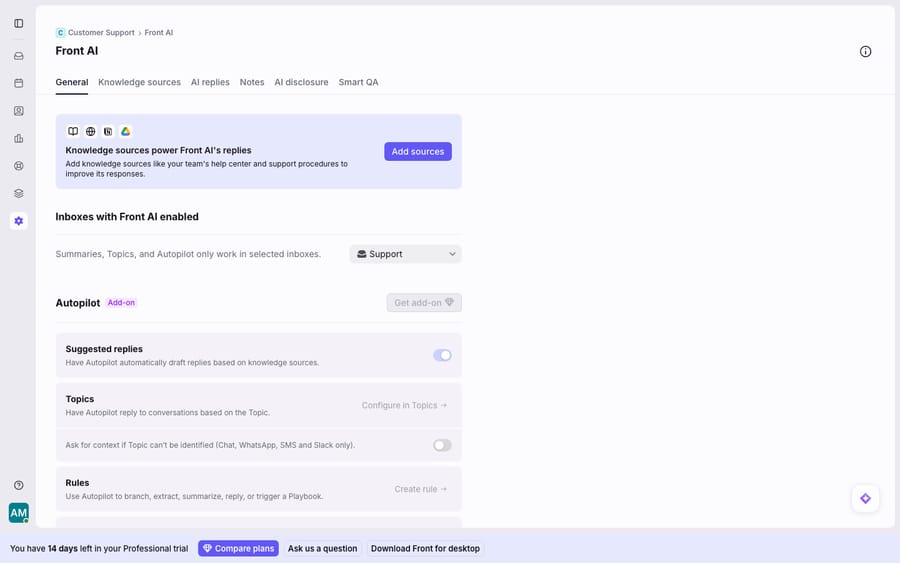
Base Front AI, meaning suggested replies, Topics, Smart QA, AI disclosure and knowledge sources, is present and toggleable. Autopilot is marked "Add-on" with a "Get add-on" button, so the agent is absent from your account until somebody acquires it.
What is Front Autopilot and how do you set it up?
Autopilot launched on September 9, 2025, announced in Front's community under the title "Meet Autopilot: The AI agent built for control, not chaos". Front's AI page says its agents resolve up to 70% of requests, a vendor figure, and the Autopilot product page describes it as "the AI agent for handling more than FAQs. From quote requests, to service scheduling, to feature debugging, Autopilot seamlessly automates processes across systems and teams."
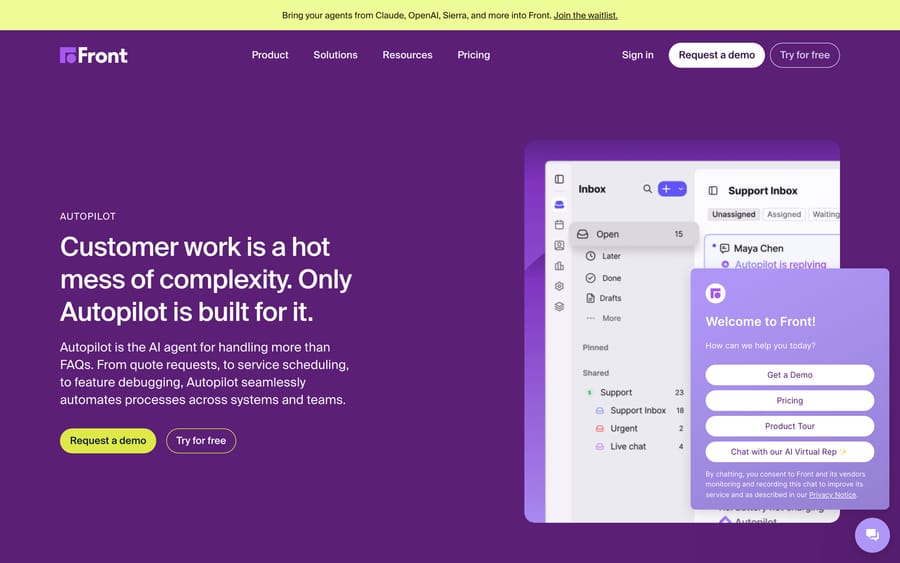
Two named components sit under it. Autopilot Playbooks let you define a workflow once and have Autopilot run it across systems and teams. Autopilot Resolve is the self-serve customer channel, which is where the old chat-deflection job went.
Setup is Topic-driven. Per Front's article "Use Autopilot to automatically reply to conversations based on Topics", you open workspace settings, go to Topics, pick a Topic, and toggle Enable auto-replies. Front then auto-generates a rule titled "Auto-reply with Autopilot" in your rule list, which you can customize like any other rule, because Autopilot lives inside the same rules engine that routes everything else. Our Front rules setup guide covers that builder.
Requirements, from the same article: Front company admin or workspace admin permissions, Topics set up, and the Autopilot add-on enabled for your company. Knowledge sources are optional but recommended, and there are limits worth knowing: "a maximum of roughly 3,000 pages" per source, and English is the only officially supported content language. The article now says English is "recommended" and that other languages may work, which is weaker than the earlier rule that every connected source must be in English.
Can Front Autopilot reply to customers without an agent?
Yes, on the Topics you switch it on for. Front's help article "Use Autopilot to automatically reply to conversations based on Topics" (read September 28, 2026) says Autopilot sends its replies straight to the customer, with no teammate reviewing them first, and marks each one "Generated by AI" at the bottom of the message. When it can't produce a reply, it leaves a handoff comment and passes the conversation to a teammate. The conditions are what decide how much of your inbox that covers:
| Question | What Front's docs say | Source |
|---|---|---|
| Does it send without a human? | Yes. Replies go out directly and carry a "Generated by AI" line | Front help center |
| Which conversations? | Only conversations tagged with a Topic that has "Enable auto-replies" turned on, and only in shared inboxes, not individual ones | Front help center |
| Messages with more than one Topic? | No reply. "Autopilot will not send a reply when a message contains multiple Topics"; the conversation stays open for a teammate | Front help center |
| Which channels? | Email, Autopilot Resolve, Portal, Slack, SMS, WhatsApp (native and Twilio), Yalo WhatsApp | Front help center |
| Which languages? | Only English is officially supported; other languages may work, with "unexpected results" possible | Front help center |
| What does it answer from? | Knowledge sources (optional, recommended), roughly 3,000 pages per source (Front's wording) | Front help center |
| Can a teammate take over? | Yes. A teammate can click "Step in" to take over, and Autopilot then stops replying to all future messages in that conversation; when Autopilot can't reply, the handoff shows as a comment | Front help center |
| What if it can't answer? | Handoff comment in the thread; a teammate takes over. Playbooks "create tickets for handoffs with full context" | Front help center; Autopilot product page |
| Can it tag or route? | Yes, through the "Auto-reply with Autopilot" rule Front creates when you enable a Topic, and "Branch with Autopilot" in rules | Front help center; Front community |
| Can it act in other systems? | Playbooks "execute across systems exactly as defined" through "centralized connectors"; the page doesn't list which systems, so confirm yours with Front | Autopilot product page |
| Who can switch it on? | Company or workspace admins, with the Autopilot add-on enabled | Front help center |
| What does it cost? | Starting at $0.05 per conversation, sales-led, not included in Enterprise | front.com/pricing |
In practice that means Autopilot answers without a person on the Topics where you trust your knowledge sources and hands the rest to your team. Three limits decide how far that goes. A conversation Front can't match to an auto-reply Topic gets no Autopilot answer (on Chat, WhatsApp, SMS and Slack it can be set to ask for more context first), so your Topic setup sets the ceiling on coverage. A message that matches more than one Topic also gets no reply. And a non-English queue is outside the officially supported case. If you want a human to approve every AI reply before it goes out, that's Copilot's job, which drafts for teammates, not Autopilot's. How well Autopilot does the job is graded in our Front AI review.
A third-party agent on Front works through the same inbox, but its reply rules live in its own instructions rather than in Front Topics. On Front, Macha reads the conversation, replies on its channel, tags and assigns it, and fires when a conversation arrives, a customer writes back or a conversation is assigned. Whether it replies directly or leaves the reply for a teammate is set in the agent's instructions, and on those trigger runs a write executes without a confirmation card when the instructions say it should. Macha's team also sets up custom API tools during onboarding for systems without a Macha connector, such as an order or booking lookup, with an API key, Bearer or Basic auth. Macha fits teams already running Zendesk, Freshdesk, Gorgias, Front, HubSpot or Intercom who want the reply and the lookup in one agent; if your Front queue is FAQ-shaped and in English, Autopilot is the shorter path. For what each costs at 3,000 conversations a month, see Front AI pricing vs per-ticket AI.
Does Front have a chatbot?
This is the question behind three of the queries that bring people here, so here is the direct answer. Front does not sell something called a chatbot. It sells an AI agent, Autopilot, and the chat-facing half of it is Autopilot Resolve, which replies in Front's own chat widget. If you are evaluating "a chatbot for our website", Autopilot Resolve plus Front Chat is the pairing you are actually comparing against Intercom's Fin or a standalone widget.
Autopilot differs from a classic chatbot in one way: it isn't a decision tree you draw. It is grounded on Topics and knowledge sources, so it answers what your documents cover on the Topics you enable, and it escalates the rest. You get less control over the exact path and more coverage of phrasings you did not anticipate.
One pattern from the community is useful. In a thread titled "Front AI" on August 31, 2026, a user running a mentorship platform asked whether Front AI could separate real support tickets from ordinary conversation and tag them. pedro_gutierrez's answer was to use "Branch with Autopilot" with a yes or no question as the criterion, plus context describing the relationship, and a fallback for ambiguous cases. That is the shape of most useful Autopilot configurations: a narrow classification question with an explicit escape hatch.
What happened to Front AI Answers?
If you researched Front AI a year ago you may remember AI Answers, the chat-deflection feature. Front's AI Answers legacy page now opens with a notice that "AI Answers is no longer available for purchase" and points existing users toward Autopilot Resolve. Legacy AI Answers was $0.70 per resolution. The job moved into Autopilot, and the meter moved from per resolution to per conversation.
Can you bring your own AI agent into Front?
Across front.com on September 20, 2026 there is a banner reading: "Bring your agents from Claude, OpenAI, Sierra, and more into Front. Join the waitlist." It points at agents.front.com.
The agents.front.com page, checked September 24, 2026, calls it a beta waitlist for "AI teammates in Front": external agents built with Claude or Codex or bought from Sierra, Decagon and Forethought, plus multiple custom Autopilot agents per brand or team, prompt-based Playbooks, and a QA layer called Compass. That's a real shift in posture. Front spent 2025 building its own agent and is now opening the inbox to third-party ones, which suggests Front expects to earn on the seat and the workflow rather than win every agent deal. It's still a waitlist. Nothing here is a feature you can turn on today, and we haven't tested it.
What can't Front AI do?
Front's native AI is coherent and well scoped. Copilot speeds agents up, Summarize keeps a shared inbox in sync, and Autopilot closes repetitive conversations. For a team that wants AI inside Front with minimal setup, it is a reasonable place to start.
The ceiling is visible once you look at what grounds the replies. Autopilot answers from knowledge sources and similar past conversations, on the Topics you enable, with English the only officially supported language. When a request needs a live lookup or an action, such as an order status, a subscription check or a refund, Autopilot's replies still come from pages. Playbooks can run steps in other systems, but Front doesn't publish which, so a live lookup depends on what your Playbook connects to. The Assist features never cross that line at all, by design.
| Front AI feature | Category | Acts on its own? | Gating |
|---|---|---|---|
| Topics, Smart QA, Smart CSAT | Analyze | No, labels and scores | Base AI, or paid add-ons for QA and CSAT |
| Copilot suggested replies | Assist | No, a human sends | Copilot add-on, $20 a seat |
| Compose (email and knowledge base) | Assist | No, a human sends | Copilot add-on |
| Summarize | Assist | No | Copilot or Autopilot add-on |
| Autopilot and Autopilot Resolve | Automate | Yes, auto-replies | Autopilot add-on, from $0.05 a conversation |
| AI Answers | Retired | Retired | Replaced by Autopilot Resolve |
What are the best AI options for Front?
The right AI for Front depends on two things: whether you want help drafting or something that closes conversations, and whether the replies need live data from your own systems. Start with Front's own AI, since it is already in the product and adds no vendor. Add a third-party layer only for the work Front AI doesn't reach. Here is how the options compare, checked on 5 October 2026.
| Option | What it does in Front | How it bills | Entry price | Setup |
|---|---|---|---|---|
| Front Copilot | Suggested replies, Summarize, Compose; a human sends | Per seat | $20 a seat a month, included in Enterprise | Built into Front |
| Front Autopilot | Replies on enabled Topics from knowledge sources, runs Playbooks | Per conversation | From $0.05 a conversation, rate set with sales | Self-serve: an admin enables auto-replies per Topic |
| eesel AI | Reads conversations, drafts and sends replies, adds comments, tags and routes (per eesel's Front page) | Monthly credit batch; a ticket or chat is 1 credit | $299 a month for 500 credits | Self-serve; a dedicated setup person on quoted Enterprise |
| Macha | Built-in Front connector with 15 tools, plus lookups and actions in your other systems | Monthly plan priced per ticket | $299 a month for 750 tickets | Done for you by the Macha team, with a dedicated success manager, included |
| External agents (Claude, Codex, Sierra, Decagon) | Front's beta waitlist at agents.front.com | Not published | Not available yet | Not published |
Front Copilot and Autopilot come first. If your team mostly needs faster drafts, Copilot is the shortest path. If much of your queue is answered by your help center, Autopilot on those Topics keeps everything in one product and one bill. The limits are the ones covered above: Autopilot's replies come from pages, only English is officially supported, and it runs only in shared inboxes.
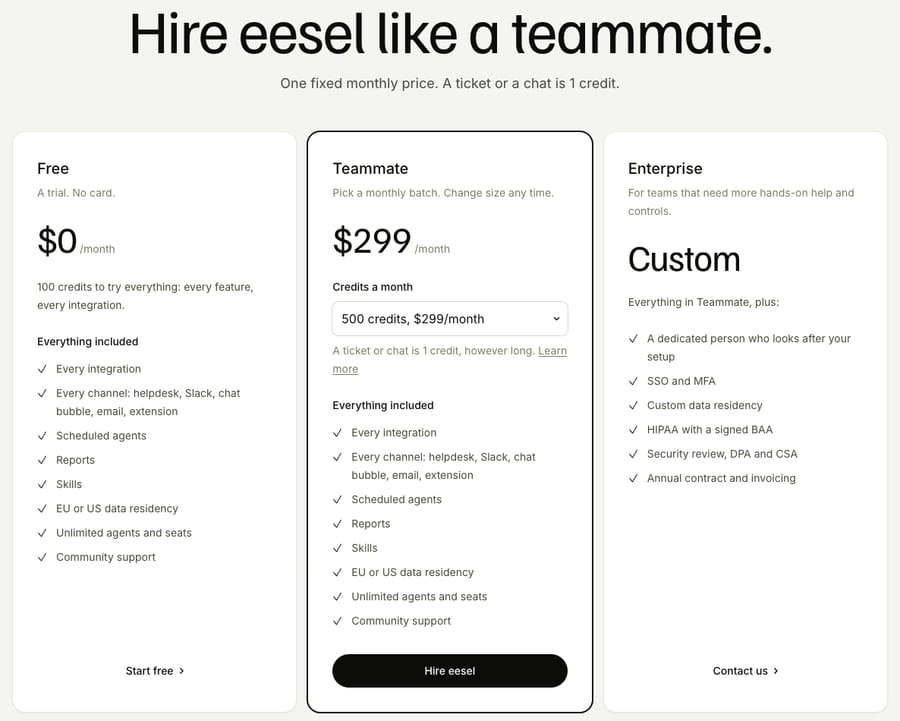
eesel AI is a third-party agent that sells monthly credit batches, from $299 for 500 credits up to $1,749 for 5,000. Its pricing page puts the unit plainly: "A ticket or chat is 1 credit, however long." That works out to about $0.60 a ticket on the smallest batch and about $0.35 on the 5,000 batch. eesel's Front integration page says it reads conversations, drafts and sends replies, adds private comments, updates tags and routes to teammates. We read those pages but haven't run eesel inside Front. Older guides that quote eesel at $0.40 a task describe pricing it no longer shows.
External agents from Claude, Codex, Sierra or Decagon are a waitlist today, as covered above, so they aren't an option you can buy yet.
Where Macha fits
Macha is an AI agent layer on top of the Front you already use. It connects through a built-in Front connector. Its 15 tools read (Get Conversation, Search Conversations, Search Contacts, Read Attachment, plus lists of tags, custom fields, teammates, teams and inboxes) and write (Add Public Reply, Add Internal Comment, Update Status, Update Tags, Update Fields, Assign Conversation). Four triggers start a run: Conversation Created, New Message Added, Conversation Assigned, and a Custom Webhook you call from a Front rule's "Send a webhook" action. For the lookup itself, Macha uses its built-in Shopify and Stripe connectors, or a custom API tool that Macha's team sets up during onboarding for any other REST API. It never replaces Front, your inboxes, your rules or Autopilot.
Split the work: let Copilot assist your agents, let Autopilot handle the Topics it is good at, and put the reads-and-acts work on a layer that can reach your systems. Macha suits teams already running Front whose repetitive queue needs real lookups instead of document answers, and it is the wrong choice if knowledge-base deflection is all you need, because Autopilot already does that. It's also the done-for-you option in this table: the Macha team analyzes your past Front conversations, builds the knowledge base and the agent, and runs it in safe mode, with drafts as internal comments, until the drafts are right.
Macha is one plan priced on monthly ticket volume, from $299 a month for 750 tickets, about $0.40 a ticket at every tier, which includes setup by the Macha team and a dedicated success manager who handles your changes afterwards: new categories, instruction changes, new tools. $299 gets you 750 tickets on Macha and 500 on eesel: $0.40 a ticket against $0.60, with setup done for you included. A ticket is one thread with one person, charged once however many replies it takes, which is deliberate: most of the useful work happens on conversations that never tidily resolve. The trial is $50 of free usage with no credit card. See Macha on Front and pricing.
Frequently asked questions
How much does Front AI cost? Front publishes the add-on prices on its pricing page: Autopilot starts at $0.05 per conversation, Copilot is $20 per seat per month, Smart QA is $20, Smart CSAT is $10, and Smart QA plus Smart CSAT together are $25. All except Autopilot are included in the latest Enterprise plan. Autopilot's "starting at" means the floor, with the real rate set in your contract.
Does Front have a chatbot? Not under that name. Front sells an AI agent called Autopilot, whose chat-facing component is Autopilot Resolve, and it replies in Front's own chat widget. It is grounded on Topics and knowledge sources instead of a decision tree, so you configure what it covers and let it work out the path.
Can Front Autopilot reply to customers without an agent? Yes. On Topics where auto-replies are enabled, Autopilot sends replies directly to customers without a teammate reviewing them and marks them "Generated by AI". It works only in shared inboxes, on email, Autopilot Resolve, Portal, Slack, SMS and WhatsApp, and hands the conversation to a teammate when it can't answer.
What is Front Autopilot? Front Autopilot is Front's AI agent, launched September 9, 2025. It answers conversations on the Topics you enable from connected knowledge sources, runs Playbooks that execute workflows across systems, and hands off to teammates with context. It's an add-on priced from $0.05 per conversation.
Is Front Autopilot an AI agent? Yes, and it is the only piece of Front AI that replies to a customer without a human. Front describes it as "the AI agent for handling more than FAQs", covering email, Autopilot Resolve, Portal, Slack, SMS, WhatsApp and Yalo WhatsApp. It launched on September 9, 2025.
Is Autopilot included in my Front plan? No. Front's own AI page says every Front AI feature except Autopilot is included in the latest Enterprise plan, and Autopilot is a separate purchase on every plan. In the Front AI settings it appears marked "Add-on" with a "Get add-on" button and has to be enabled for your company by an admin.
What happened to Front AI Answers? Front discontinued it. Its legacy help page states "AI Answers is no longer available for purchase" and directs users to Autopilot Resolve. Legacy AI Answers was $0.70 per resolution; the deflection job now sits inside Autopilot at a per-conversation rate.
What are the limits on Autopilot's knowledge sources? Front's setup article caps each source at roughly 3,000 pages, recommends English content, and says only English is officially supported, though other languages may work. You can connect a published Front knowledge base, public websites and third-party sources, and Front says knowledge sources are optional but will improve performance considerably.
Can I use Claude or OpenAI agents inside Front? Not yet, as a shipped feature. Front is running a beta waitlist at agents.front.com for external agents built with Claude or Codex or supplied by vendors such as Sierra and Decagon. We haven't tested it and Front has published no availability date.
Can I add more AI to Front without replacing it? Yes. An agent layer like Macha connects to Front and runs on top of your existing inboxes, rules and Autopilot rather than replacing any of them. The useful split is letting Front AI handle knowledge-grounded replies while the layer above handles work that needs a live lookup in your own systems. With Macha, the Macha team sets that layer up for you on the trial and every plan, at about $0.40 a ticket, including a dedicated success manager who handles your changes.
Sources:
- Front pricing, the FRONT AI ADD-ONS block, captured September 20, 2026 and re-checked September 24, 2026
- Front external AI agents waitlist, checked September 24, 2026
- Front AI product page and Autopilot product page
- Use Autopilot to automatically reply to conversations based on Topics (Front help center)
- AI Answers (legacy) (Front help center)
- Meet Autopilot: The AI agent built for control, not chaos (Front Community, September 9, 2025)
- Front AI (Front Community, August 31, 2026)
- eesel AI pricing, screenshotted October 5, 2026 in a fresh headless browser, and eesel's Front integration page, read October 5, 2026 (vendor descriptions; we did not run eesel in Front)
- Macha's Front connector tools and triggers, from the Front integration page, checked October 5, 2026
Per-ticket figures are our arithmetic: eesel $299 / 500 credits = $0.598, about $0.60, and $1,749 / 5,000 = $0.35; Macha $299 / 750 tickets = $0.399, about $0.40. Seat totals use the 20-seat example above. Front's add-on prices are vendor list prices; Autopilot's real rate is set in a contract.






