





 Shopify
 Stripe
 Slack
Slack Notion
 Google Workspace
 Confluence

How Do You Connect HubSpot to Front for an AI Agent? (2026)


A customer emails your Front inbox, but their lifecycle stage, deal status and account owner live in HubSpot, one tab over. You can bridge the two with Front's native HubSpot integration for your team, or give an AI agent live HubSpot access through Macha's HubSpot connector or a Custom Tool.
Key takeaways
- HubSpot connects to Front three ways: Front's native integration for sidebar context, Macha's HubSpot connector for AI agent lookups, or a Macha Custom Tool for a specific endpoint.
- Front's native HubSpot integration is available on the Starter, Professional and Enterprise plans and shows contact, company and deal context in the sidebar and logs emails through rules.
- Macha's HubSpot connector signs in with OAuth and gives an agent 11 actions, including Search Contacts, Get Deal, Update Deal Stage and Add Note.
- Macha's Custom Tools integration directory lists more than 200 ready-made tools for systems beyond HubSpot, such as billing or a data warehouse.
- Macha is done for you: the Macha team builds the agent and its HubSpot tools on Front and runs it in safe mode, at about $0.40 a ticket including setup and a dedicated success manager.

You can connect HubSpot to Front three ways: Front's own HubSpot integration (available on Front's Starter, Professional and Enterprise plans) for sidebar context and email logging, Macha's built-in HubSpot connector (OAuth, 11 actions such as Search Contacts, Get Deal and Add Note) for an AI agent that reads and updates HubSpot mid-conversation, or a Macha Custom Tool when you need a HubSpot API call the connector doesn't cover.
| Option | Who uses HubSpot data | Setup | Best for |
|---|---|---|---|
| Front's native HubSpot integration | Your team, in the Front sidebar, plus rules | Install from Front's integrations | CRM context on screen, automatic email logging |
| Macha HubSpot connector | An AI agent, during the conversation | OAuth in Macha | Contact, deal and ticket lookups, notes, stage moves |
| Macha Custom Tool | An AI agent, one action you define | Endpoint + HubSpot token or OAuth | A specific HubSpot endpoint the connector doesn't expose |
Framing first. Macha runs on top of the Front shared inbox you already use. It's an AI-agent layer, not a Front or HubSpot replacement. Your team keeps working in Front with its comments, @mentions, and rules; Macha reads the conversation, reasons, and reaches into HubSpot to answer or act.
Prefer the classic step-by-step setup? See our guide on how to integrate HubSpot with Front. This piece focuses on giving your AI agent live access instead.
What does Front's native HubSpot integration do, and where does it stop?
Front does offer a native HubSpot integration, built and supported by Front, and it's worth using where it fits. It surfaces HubSpot contact, company, and deal context in the Front sidebar, lets you create or edit records right from the inbox, syncs HubSpot fields into Front rules and analytics, and can log emails to HubSpot automatically via rules. It even ships pre-built Connectors for HubSpot API actions you can drop into rules, macros, and chatbots (see Front's official HubSpot integration page, which lists it on the Starter, Professional and Enterprise plans). For teams that want CRM context on the screen and rule-driven logging, that's a solid baseline.
Where it stops:
- It's mostly context and rules, not agent reasoning. It shows fields in the sidebar and fires Connectors when a rule tells them to: it doesn't let an AI agent decide to look something up mid-conversation, pass the right parameters, and reason over the result before it replies.
- Actions are wired ahead of time. The Connectors run inside pre-built rules and macros; a Custom Tool is chosen by the agent in context, based on what the customer actually asked.
- It's fixed. You get the objects, fields, and actions the integration exposes, not the specific query or write your workflow needs, and it lives inside Front rather than being portable to another help desk you also run.
For a lot of teams, the sidebar context and rule-driven logging are fine. For anyone who wants their AI agent to actually use HubSpot, there's a lighter, more flexible path.
Why give your AI agent live HubSpot access?
The high-value version of this integration isn't a synced field; it's the agent doing the work. A customer emails a Front inbox; the agent recognizes them, looks up their live HubSpot contact by email, and answers "yes, you're on the Pro plan" or "I can see your deal is in negotiation, let me loop in your account owner", grounded in HubSpot, not a stale sidebar copy.
The quickest route is Macha's built-in HubSpot connector. It connects over OAuth and gives an agent Search Contacts, Get Contact, Update Contact, Search Deals, Get Deal, Update Deal Stage, Search Tickets, Get Ticket, Update Ticket, Add Note and List Pipelines, plus triggers for new tickets, new contacts and ticket property changes. HubSpot is also one of the help desks Macha runs on directly. When you need an endpoint outside that list, a Custom Tool covers it.
How do you connect HubSpot with a Custom Tool?
A Custom Tool is a single action you define once and point at HubSpot's REST API. No App Store listing, no code.
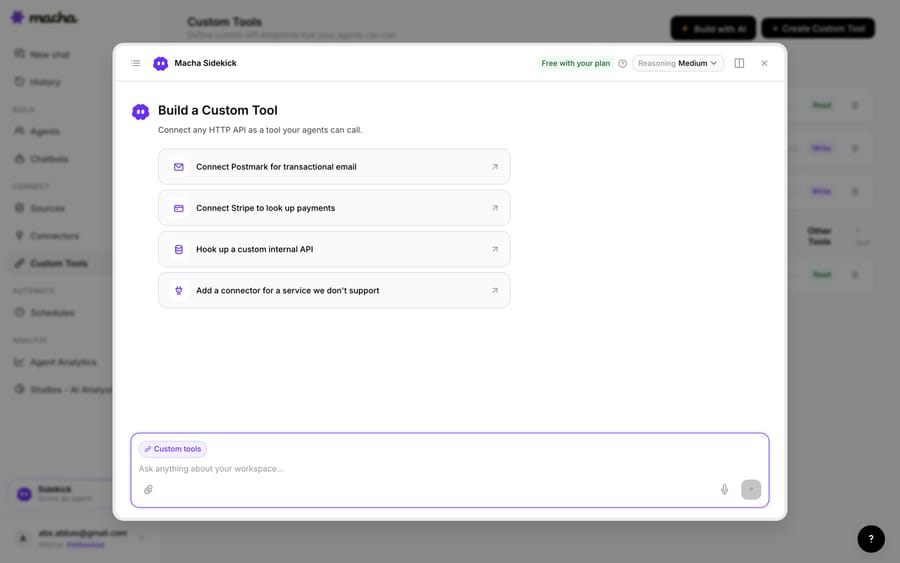
1. Point it at the HubSpot API. HubSpot exposes a REST API (authenticated with a private app access token, which HubSpot now files under "legacy apps", or OAuth 2.0); you give Macha the endpoint and credentials. The built-in Sidekick can scaffold the request from a plain-English description if you'd rather not fill in the form.
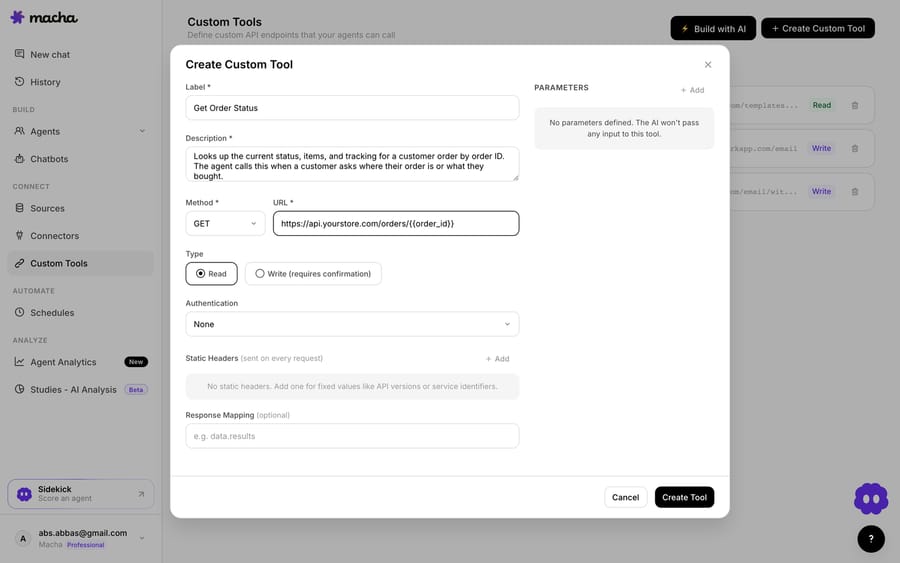
2. Define the action. Give it a label and a description the AI uses to decide when to call it (e.g. "Get the HubSpot contact, lifecycle stage, and open deal for a customer by email"), set the method and URL (a HubSpot contacts search with a {{email}} placeholder), and choose Read or Write. A lookup is a Read; updating a property or logging a note is a Write, which requires user confirmation before it runs in chat.
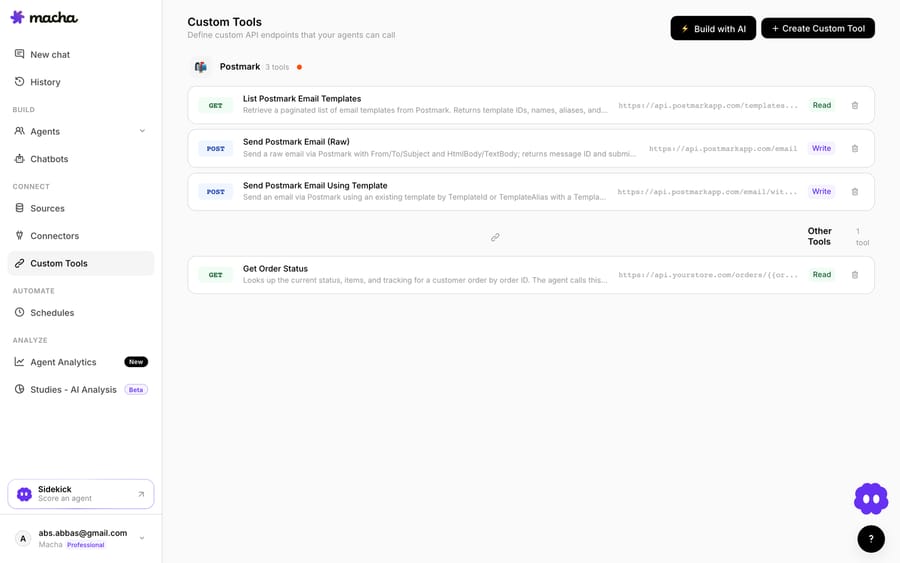
3. The agent uses it live. Once the tool exists, the agent calls it mid-conversation, passes the customer's email, and reasons over the HubSpot record it gets back, answering the question or taking the next step.
How do Read and Write tools keep HubSpot safe?
Because a Custom Tool can reach into HubSpot, the guardrails matter: Read tools (lookups) are free to call; Write tools (update a property, log an activity, create a deal) require user confirmation before they run in chat. Each tool is scoped to one action and only the agents you assign it to can call it. HubSpot's private app token or OAuth handles credentials, so secrets never live in the conversation.
Teams usually build a few HubSpot tools and group them (a contact lookup, a "log this conversation," an "update lifecycle stage") alongside tools for their other systems.
Which should you use: native integration, connector or Custom Tool?
- Use the native HubSpot–Front integration if you want CRM context in the sidebar for your team and rule-driven logging or Connector actions inside Front.
- Use Macha's HubSpot connector when you want your AI agent to look up live contacts, deals or tickets, log a note, or move a stage from the conversation, decided in context rather than wired into a rule ahead of time.
- Use a Custom Tool when you need a specific HubSpot query or write that neither the native integration nor the connector exposes, or you want the same custom action on every help desk you run. All three can coexist.
What else can the agent do once it reaches HubSpot?
Once the agent can reach HubSpot, the same pattern covers more: check a contact's lifecycle stage or plan before answering, read the open deal and owner to route a VIP, log the conversation to the contact timeline, or update a property from a support thread. And because Custom Tools aren't HubSpot-specific, the same approach connects your billing system, data warehouse, or internal API; see the Custom Tools integration directory for more than 200 ready-made tools, or the full pillar on building custom Front integrations.
So which setup should a Front and HubSpot team pick?
Front's native HubSpot integration puts CRM data on the screen and fires Connectors from rules. Macha's HubSpot connector puts HubSpot in your AI agent's hands: live lookups and updates, decided in context, with no code. A Custom Tool fills any gap for a specific endpoint, with the same Read/Write guardrails. You don't have to wire any of it yourself. Macha is done for you: you sign in to Front and HubSpot once, and the Macha team analyzes your past tickets, builds the knowledge base, the agent and any Custom Tools it needs, and runs it in safe mode, with drafts as internal comments in Front, until the drafts are right. Custom tools and every connector are included in Macha's one plan, about $0.40 a ticket from $299 a month for 750 tickets, and that price covers a dedicated success manager who handles your changes after go-live (new categories, instruction edits, new tools).
Ready to try it? See how Custom Tools work, browse the integration directory, or start a free trial and wire up your first HubSpot tool today.
Frequently asked questions
Does Front have a native HubSpot integration? Yes. Front's native HubSpot integration surfaces contact, company, and deal context in the sidebar, lets you create and edit records from the inbox, and ships Connectors for HubSpot actions in rules and macros. It's context- and rule-focused; Macha's HubSpot connector or a Custom Tool adds live, agent-driven lookups and actions decided in context.
Do I need an engineer to connect HubSpot to Front this way? No. Macha's HubSpot connector is an OAuth sign-in. For a Custom Tool, you describe the action in plain English and Macha's Sidekick scaffolds the HubSpot request, auth, and parameters. Technical teams can go deeper with full control over the query, headers, and response mapping. Or leave it to us: on the trial and every plan, the Macha team builds and tests Custom Tools for you.
Can the agent update HubSpot, or only read it? Both. Reads (lookups) run freely; writes such as updating a property, logging a note or moving a deal stage are available too. Custom Tool writes require user confirmation in chat, and you control which agents can use each tool.
Is it secure? Yes. The connector signs in with OAuth; a Custom Tool is scoped to a single action, assigned per agent, and authenticated with a HubSpot private app token or OAuth, so secrets never sit in the conversation.






