





 Shopify
 Stripe
 Slack
Slack Notion
 Google Workspace
 Confluence

How to Route Urgent Tickets to the Right Slack Channel With AI


A calmly worded ticket about a locked account and unrecognized charges can sit at Normal priority for hours, because nothing in its fields says urgent. An AI routing agent reads the words instead and posts the ticket to the Slack channel that owns the problem.
Key takeaways
- Macha's routing agent runs on the Zendesk New Ticket event, reads the ticket text, classifies it as security, billing, outage or other, and posts to the matching Slack channel.
- Native Zendesk-to-Slack triggers fire on ticket fields such as priority, so an urgent ticket still sitting at Normal never reaches Slack until an agent re-rates it.
- A Slack incoming webhook posts to one fixed channel, so topic routing through Zendesk webhooks needs a separate webhook and trigger for every destination channel.
- Zendesk webhook payloads must be under 256 KB and can be retried up to three times with no delivery-order guarantee, so duplicate Slack posts are possible.
- The routing agent can write its verdict back through Update Priority, Update Tags or Assign Ticket, and Macha bills per ticket from $299 a month for 750 tickets, with setup by the Macha team and a dedicated success manager included.

To relay urgent tickets to the right Slack channel, run an AI agent on the Zendesk New Ticket event that reads the ticket, classifies its topic (security, billing, outage or other), and posts through Slack Send Message to the channel mapped to that topic. Zendesk's native Slack triggers can't do this, because they fire on the priority field, not on what the customer wrote, and a new ticket usually sits at Normal until an agent re-rates it.
That gap between what a ticket says and what its priority field claims is where urgent issues get lost. Macha is an AI agent layer that sits on top of the help desk you already use (Zendesk, Freshdesk, Gorgias, Front, HubSpot or Intercom). A Macha agent reads each incoming ticket, judges how urgent it really is, routes it to the right Slack channel, and posts an alert with enough context to act on. Your team keeps the same Slack habit; what changes is the thing deciding what lands there.
| Method | Fires on | Routes by topic? | Cost |
|---|---|---|---|
| Native Zendesk Slack trigger | Ticket fields such as priority = Urgent | One trigger per channel | Included in Zendesk |
| Zendesk webhook to Slack incoming webhook | Ticket fields | One webhook plus one trigger per channel | Included, plus build and upkeep time |
| Macha AI routing agent | The ticket's text and context | Yes, one agent picks the channel | Per ticket, from $299/mo for 750, setup and a dedicated success manager included |
Why do native Zendesk-to-Slack triggers miss urgent tickets?
Connect Zendesk to Slack the native way and you get ticket triggers: in Admin Center → Objects and rules → Business rules → Triggers, you build a rule, give it conditions, and point it at a Slack channel. Add a condition like Priority is Urgent, and new urgent tickets post to, say, #urgent-support.
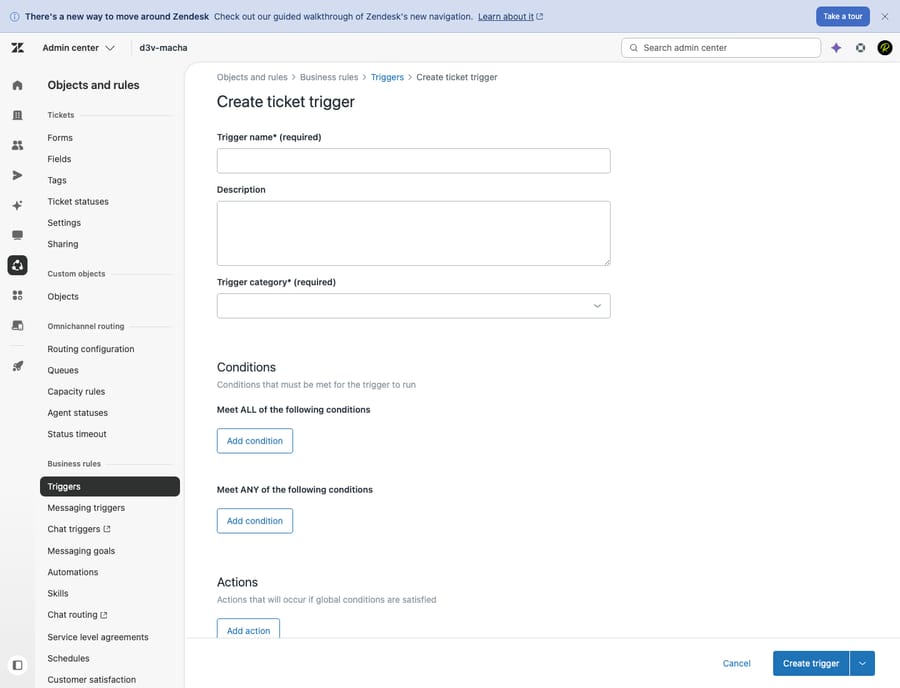
It works, and for some teams it's enough. But it has three structural limits that no amount of trigger-tweaking fixes:
- It only sees fields, not meaning. The rule fires on
priority = Urgent, but priority is an agent-side field. Zendesk's ticket field docs note it isn't even required, and most help center forms don't show it to customers. So a new inbound ticket carries whatever your defaults assign, usually nothing or "Normal", until an agent opens it and re-rates it. A trigger keyed topriority = Urgenttherefore can't fire until a human has already triaged the ticket, which is the moment the alert stops being useful. The calmly worded "I think my account was hacked" that sits at Normal never reaches Slack at all. - One condition, one channel. A trigger relays to a fixed destination. Security incidents, billing disputes and outage reports are all "urgent", but they belong to different teams. To split them you build and maintain a separate trigger per channel, each with brittle keyword conditions.
- It relays raw fields, not context. The native post carries placeholder text: subject, requester, a link. Whoever picks it up still has to open the ticket, read the thread, and work out why it's urgent before doing anything.
There's also a setup tax. Per Zendesk's own docs, you must add the Zendesk app to a Slack channel before it shows up as a trigger destination, only admins can create the triggers, and the channel list only includes private channels the current admin belongs to. Zapier and Power Automate templates do the same one-to-one, field-based relay with the same blind spot. None of them read the ticket.
The hidden ceiling: one webhook, one channel, hand-built JSON
Most teams that hit the limits above move on to Zendesk's custom webhook path: fire a trigger, POST a JSON payload to a Slack incoming webhook URL. It's the standard answer in every "how to send Zendesk alerts to Slack" guide, and it's worth being concrete about what it costs, because this is the ceiling that tools like ClearFeed and eesel exist to paper over.
- A webhook is bound to one channel. A Slack incoming webhook posts to the single channel chosen when it was created. To send security tickets to
#securityand billing tickets to#billing-urgent, you create a separate webhook and a separate trigger for each one. Every new destination is another pair to build, name, scope and keep in sync. Routing isn't a setting; it's N copies of the same plumbing. - Rich cards are hand-authored Block Kit. To get past a line of placeholder text to a formatted card with labeled fields and a "View ticket" button, you write the Block Kit JSON by hand inside the webhook body. There's no preview against a live ticket; you ship the payload and watch the channel to see whether it rendered.
- Placeholders plus special characters break it quietly. Drop a Zendesk placeholder into that JSON and a ticket subject containing a quote, or a requester named O'Brien, produces malformed JSON and the post fails. ClearFeed's Zendesk-to-Slack guide lists the other limits: Zendesk webhook payloads must be under 256 KB, delivery order isn't guaranteed, and Zendesk can retry a webhook up to three times, so you "design for occasional duplicates".
- It's a standing maintenance line, not a one-time setup. Each channel is a trigger plus a webhook plus a slab of JSON. Add a team, rename a channel or add a field, and you're hand-editing payloads across however many you built. ClearFeed budgets a recurring quarterly trigger review just to keep the integration from rotting.
And after all of it, the core problem is untouched: the relay still fires on a field, not on what the ticket says. You can sink engineering hours into per-channel webhooks and still miss the account-compromise ticket sitting at Normal. More JSON doesn't raise that ceiling.
How does an AI agent decide what's urgent?
Macha replaces the static rule with an agent: a configured AI worker that triggers on a ticket event, reads the actual content, and decides. The building blocks come from Macha's Zendesk and Slack connectors, so nothing leaves the tools you already run.
Here's the shape of the agent behind the Relay urgent tickets to Slack use case:
| Piece | What it's set to | Why |
|---|---|---|
| Trigger | Zendesk New Ticket (or Priority Changed) | Fires the moment a ticket lands, with no one watching the queue |
| Read | Zendesk Get Ticket (+ Get Custom Fields) | Pulls the subject, body, thread, tags and fields the AI reasons over |
| Judge | The agent's instructions | "Rate real urgency from the content; classify topic: security / billing / outage / other" |
| Relay | Slack Send Message | Posts a structured alert to the channel that matches the topic |
| Close the loop | Zendesk Update Priority / Update Tags / Assign Ticket | Optionally writes the verdict back so the help desk and Slack agree |
The trigger fires on the event, not on a hard-coded priority value, so a ticket that reads as a security incident gets relayed even if its priority field says "Normal".
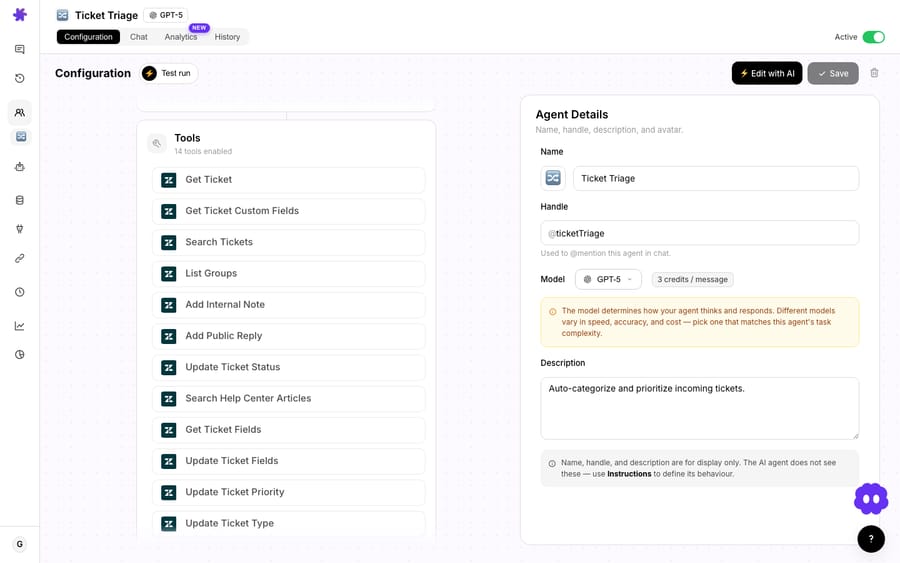
Because the judgment lives in the agent's instructions rather than a fixed condition, "urgent" becomes your definition in plain language, such as "a churn threat, a security or fraud signal, a service outage affecting multiple customers, or an explicitly angry VIP", instead of a checkbox a customer never saw.
Routing to the right channel, not just a channel
This is the part native triggers can't do. The agent classifies the ticket's topic and then chooses the destination:
- Account compromise, fraud, unauthorized charges →
#security - Failed payments, billing disputes, double charges →
#billing-urgent - Multiple reports of the same error →
#outage - Everything else genuinely time-sensitive →
#urgent-support
You give the agent the Slack Send Message tool and the map of channels to topics, and it picks. Macha's Slack connector can also List Channels and Get Channel Info, so the agent works from your real workspace rather than a guess.
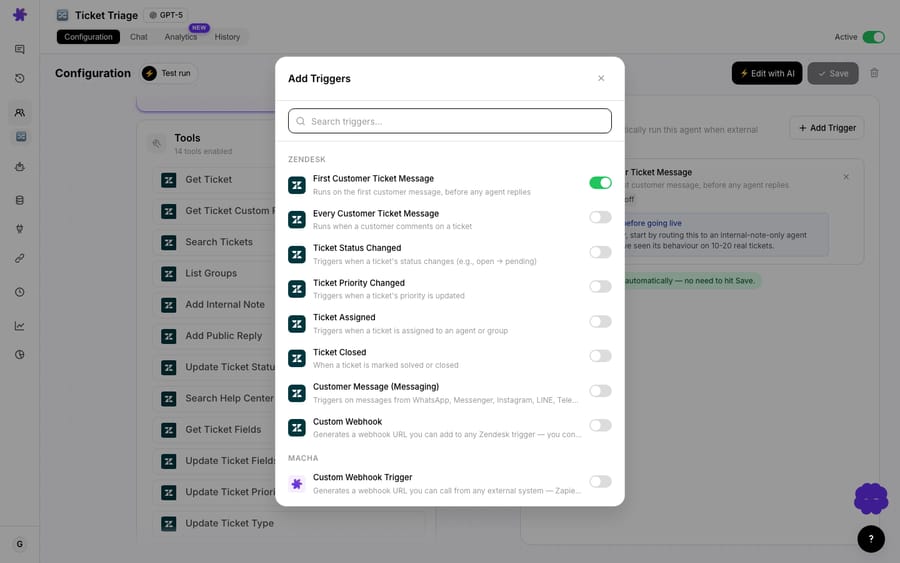
Context, not just a link
Native relays make someone open the ticket to understand it. A Macha agent writes the why into the alert itself. For the worked example in the use case, a compromised-account ticket, the post that lands in Slack reads:
🚨 Urgent Ticket #9102 • Subject: Account compromised: unauthorized access • Customer: [email protected] • Priority: Urgent • Created: 2 minutes ago This requires immediate attention: possible security incident.
That last line is the agent's read, not a placeholder. The person who sees it knows what it is and what to do before they click. You can have the agent include whatever your team needs to triage fast: customer LTV, plan, recent orders, a one-line summary, a direct link to the ticket.
How do you set up the routing agent?
The connectors do the heavy lifting. From the connectors screen you authorize your help desk (Zendesk, Freshdesk, Gorgias, Front, HubSpot or Intercom) and Slack once. If you'd rather not build it yourself, you don't have to: on the trial and every plan, the Macha team builds the routing agent and its channel map for you and tests it on a sample of your past tickets. About $0.40 a ticket also covers a dedicated success manager who handles your changes afterwards, such as new channels, instruction changes or tuning.

Then you build the agent. If you start from the triage template, most of this is pre-filled:
- Pick the trigger. Zendesk New Ticket fires the agent on every inbound ticket; add Priority Changed if you also want it to re-evaluate when someone escalates manually.
- Write the urgency rubric. In the agent's instructions, define what "urgent" means for you and list the topic-to-channel map. This is the brain of the router, so be specific, and add a fallback: "when unsure, post to
#urgent-supportand flag for a human". - Give it the tools. Zendesk Get Ticket to read, Slack Send Message to relay, and optionally Update Priority / Update Tags / Assign Ticket to keep the help desk in sync. These are the same actions behind smart ticket routing in Zendesk if you want the agent to assign as well as alert.
- Choose the model. Model choice doesn't change what you pay, since billing is per ticket either way, so pick on quality and speed. A fast default model is plenty for read-and-route; save the heavier models for agents that draft customer-facing replies.
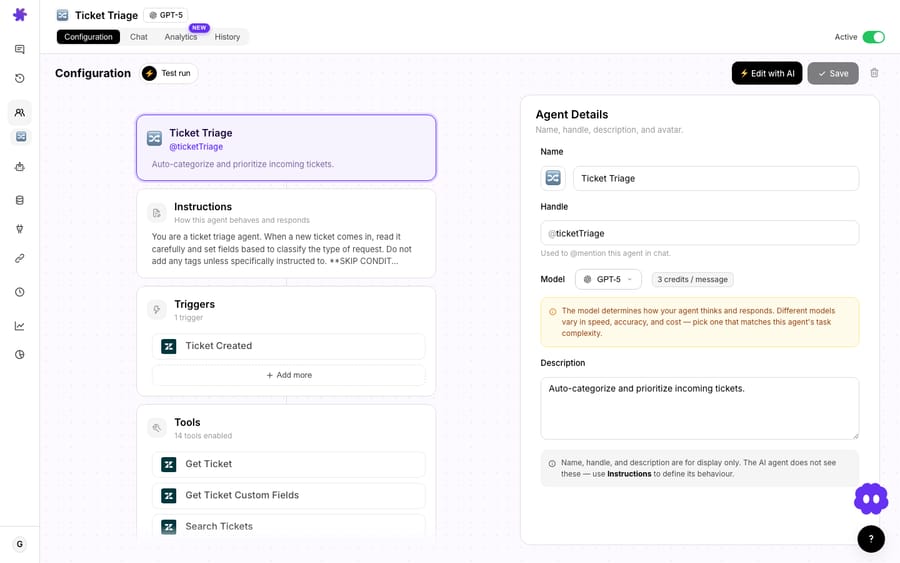
Because it's an agent and not a one-way relay, you can grow it later without rebuilding: have it add an internal note summarizing the issue, @-mention the on-call owner for that channel, or, for the clearest cases, bundle full context and escalate inside Zendesk in the same run. It's the same pattern behind triage and route tickets by topic and the narrower alert your team in Slack when a VIP submits a ticket playbook. Both are variations on this read-classify-relay loop.
When is the native relay the better choice?
Here's the honest comparison.
| Native Zendesk → Slack trigger | Macha AI routing agent | |
|---|---|---|
| Fires on | A static field (priority = Urgent) | The ticket's actual content and context |
| Catches mis-prioritized urgent tickets | No | Yes |
| Routes by topic to different channels | Only via many hand-built triggers | One agent, classifies and picks |
| Alert content | Placeholder fields + link | A written read of why it's urgent |
| Acts back on the ticket | No | Optional: set priority, tag, assign |
| Cost | Included in Zendesk | Per ticket, from $299/mo for 750, setup and a dedicated success manager included (see pricing) |
| Setup | Free, rule-based, instant | Done for you by the Macha team, with a dedicated success manager, included |
Watch-outs: when not to reach for this
- If your priority field is already reliable, a native trigger is free and fine. Use AI routing when the field can't be trusted or when "urgent" needs judgment (sentiment, security signals, VIP, churn risk) the field can't express.
- Tune the rubric before you trust it. A router that cries urgent at everything trains the team to ignore the channel, which is the failure you're trying to fix. Start narrow, watch a week of posts, and widen the definition deliberately.
- It uses your ticket allowance. Macha bills per ticket, one conversation charged once however many steps the agent takes, so a router pointed at the whole inbox spends the allowance on the whole inbox. For high inbound volume, scope the trigger (for example, skip tickets already auto-resolved) so you're not paying to read obvious spam.
- It's a notifier, not a fix. Relaying to Slack gets the right people looking fast; it doesn't resolve anything on its own. Pair it with agents that act if you want resolution, not just visibility.
FAQ
Does this replace Zendesk's native Slack integration? No, and it doesn't replace Zendesk either. Macha is an AI layer on top of your help desk. You can keep native triggers for simple, field-based relays and add a Macha agent for the content-aware routing the native rule can't do.
Can it route to different Slack channels based on the issue? Yes. The agent classifies each ticket's topic and posts to the matching channel, security to one and billing to another, from a single agent instead of one trigger per channel.
What if the customer never marked the ticket urgent? The agent reads the words, not the field, so a calmly worded "I think my account was hacked" still gets caught and relayed. You define what counts as urgent in plain language.
Which help desks and which Slack actions are supported? Macha connects Zendesk, Freshdesk, Gorgias, Front, HubSpot or Intercom on the help desk side. On Slack, agents can Send Message, Reply in Thread, List Channels, Get Channel Info and List Users, and can be summoned by @mention or DM. See the Slack integration page for details.
How much does it cost to run? There's no per-channel fee. Macha bills per ticket, one conversation charged once however many steps the agent takes, so a routing agent's cost scales with ticket volume, not with the model you pick. Pricing starts at $299 a month for 750 tickets, about $0.40 each, and that includes setup by the Macha team and a dedicated success manager who handles your changes afterwards. See the pricing page for the tiers.
How do you try it on your own tickets?
Start a free trial ($50 of usage, no credit card required), connect your help desk and Slack, and build a routing agent from the triage template, or read the docs for the full walkthrough.
Written by Abbas (Customer Support & AI, Macha) · Reviewed by Ankeet Guha (Co-founder & CTO) · Published 2026-06-24 · Last updated 2026-09-24.






