





 Shopify
 Stripe
 Slack
Slack Notion
 Google Workspace
 Confluence

Richpanel AI Explained (2026): What It Costs per Conversation and Where It Stops


Richpanel is an ecommerce helpdesk whose AI Agent handles order-status, return and subscription tickets for $0.20 per conversation, on top of a $99 per seat per month seat. The AI only comes with the Richpanel inbox, so getting it means migrating your support operation.
Key takeaways
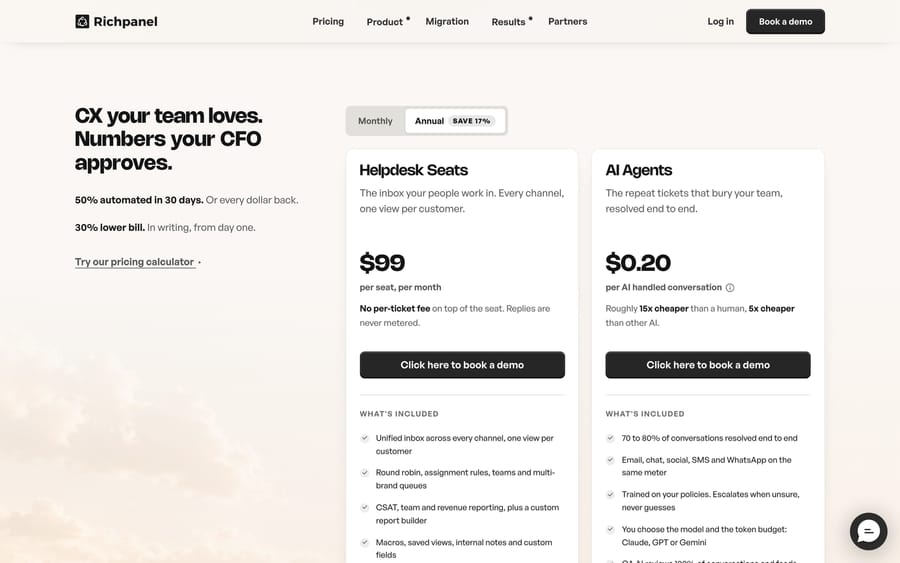
- Richpanel's AI Agent costs $0.20 per AI-handled conversation, billed separately from the $99 per seat per month helpdesk seat that carries no per-ticket fee.
- Richpanel's QA AI checks every reply before it sends and holds replies that touch money, or would close a ticket unfinished, for a human to approve.
- Richpanel guarantees 50% of conversations automated within 30 days and a total bill at least 30% lower, with a full refund if either is missed.
- Annual billing on Richpanel saves 17%, and the Returns & Exchanges feature is a separate paid add-on starting at $99/month.
- On the Shopify App Store, Richpanel holds a 4.9-star rating across 138 reviews, and Richpanel says 3,000-plus brands use its helpdesk.

Richpanel's AI Agent resolves order-status, return, exchange and subscription tickets inside Richpanel's own helpdesk, and it costs $0.20 per AI-handled conversation on top of a $99 per seat per month helpdesk seat (richpanel.com/pricing, checked 24 September 2026). You can't buy the AI without moving your support onto Richpanel.
| Component | Price |
|---|---|
| Helpdesk seat | $99/seat/month, no per-ticket fee on manual replies |
| AI Agent | $0.20 per AI-handled conversation |
| QA AI, Social Media Agent, Self-Service Portal | Included, no add-on fee |
| Returns & Exchanges | Paid add-on, from $99/month |
| Annual billing | Save 17% |
| Guarantees | 50% automated in 30 days, and a total bill at least 30% lower, or a full refund |
What does Richpanel's AI do inside the helpdesk?
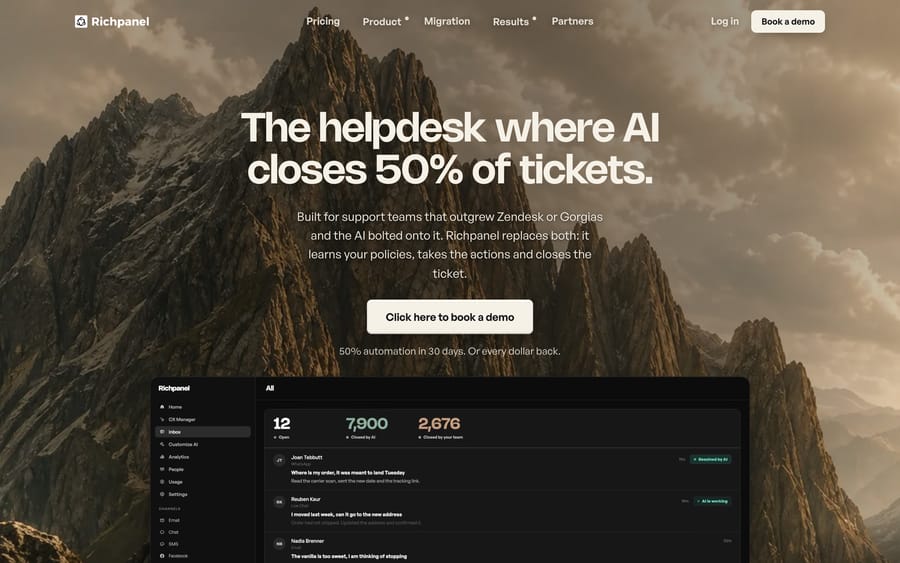
Richpanel calls itself "the helpdesk where AI closes 50% of tickets," which is a specific claim: the AI agent is not an add-on marketplace app sitting next to the inbox, it is the thing the inbox is built around. The AI Agent reads a store's policies and order data, mostly through its Shopify integration, and resolves conversations end to end: answering "where is my order," processing a return, adjusting a subscription, or closing out a simple refund without a human touching the ticket.
Three components sit around that core agent:
- Copilot mode: the same AI drafts a reply, but a human approves it before it sends. Richpanel positions this as the on-ramp; teams run Copilot first, watch what the AI gets right, then flip conversations over to full automation once they trust it.
- QA AI: a second, manager AI checks every reply before it sends and reviews every closed ticket a second time for tone and accuracy.
- Self-service portal: a customer-facing page for order tracking and return initiation that deflects tickets before they reach the inbox at all.
Richpanel also runs a social media agent that answers comments and DMs on the same policies. The pre-send guardrail is the QA AI's job: a reply that touches money, or one that would close a ticket with the work unfinished, gets held for a human to approve instead of sent on a guess. Richpanel's homepage shows an example where the agent drafted a refund promise and the QA AI swapped in human-approved wording.
How do you set up Richpanel's AI?
Richpanel is a full helpdesk migration. Setup starts with connecting your channels (email, chat, WhatsApp, Instagram, Facebook, TikTok, SMS, and phone all land in one inbox) and connecting Shopify, plus commerce tools like Recharge, Loop, Yotpo, Klaviyo, and AfterShip if you use them, so the AI can see orders, shipping status, and subscriptions, not just message text. Phone systems such as Aircall, Dialpad and JustCall connect too.
From there, you train the agent on your policies instead of coding rules by hand: you give it your return window, shipping exceptions, and refund rules, and it applies them to real conversations. Richpanel's own recommended path is to run new automation in Copilot mode first, reviewing AI-drafted replies before they go out, and only flip a topic to full autopilot once a few weeks of drafts have been accurate. That staged rollout is also how the automation guarantee gets measured: Richpanel commits to 50% of conversations automated within 30 days, "or every dollar back."
How much does Richpanel AI cost?
Richpanel prices the helpdesk seat and the AI separately, which matters if you are used to seat-based pricing that includes automation for free. The seat is $99 per seat per month with no per-ticket fee on manual replies; the AI Agent is $0.20 per AI-handled conversation. The QA AI, Social Media Agent and Self-Service Portal carry no add-on fee, while Returns & Exchanges starts at $99/month.
Annual billing takes 17% off the total, per Richpanel's pricing page. The company backs the AI pricing with two guarantees and a full refund if it misses: 50% of conversations automated within 30 days, and a total bill at least 30% lower than your current setup, a commitment Richpanel says it writes into the contract. Richpanel frames $0.20 a conversation as cheap against a human agent's fully loaded cost and against "other AI," though it does not name which competitors it's comparing against; treat that specific multiple as a vendor claim, unaudited.
The per-conversation price is also a business-model choice. Charging by AI-handled conversation instead of by seat means Richpanel earns more only when the AI actually takes a ticket off the queue, which is why the public guarantee is framed as an automation rate instead of a feature list. That's a cleaner incentive than a flat AI add-on fee that gets charged whether the bot resolves anything or not.
Where does Richpanel's AI stop?
The AI Agent is built for the ecommerce questions a Shopify store gets on repeat: order status, shipping delays, returns, exchanges, subscription changes. That's also its ceiling. A brand with complex account-level issues, B2B contracts, or support questions that don't map to order data is asking Richpanel's AI to do something it wasn't trained for. The guardrail response, holding money-related or incomplete replies for a human, means those tickets fall back to a person anyway, just after the AI has already looked at them.
The bigger limit is structural: Richpanel's AI only knows what's inside Richpanel. If your team also runs a knowledge base in Notion, deal data in HubSpot, or engineering tickets in Jira, none of that context reaches the AI agent unless Richpanel builds a direct integration for it. And because the AI is inseparable from the helpdesk it runs in, adopting it means migrating your whole support operation (inbox, macros, reporting, agent seats) off whatever you're on now. That's a bigger commitment than turning on an AI feature inside a helpdesk you already run.
Who is Richpanel a good fit for?
Richpanel suits Shopify-first ecommerce brands that are willing to migrate their whole helpdesk to get AI automation as a first-class feature rather than an app-store add-on, and that mostly deal in order-status, shipping, and returns tickets an AI can resolve against commerce data. It's a strong fit for a team currently paying separately for a helpdesk and a bolted-on AI app, since Richpanel is explicitly built to undercut that combined bill.
It's a weaker fit if your support volume is dominated by account, billing, or technical questions that don't map neatly to an order record, or if switching helpdesks is off the table this year because of existing workflows, integrations, or headcount trained on your current tool. In that case, the more realistic move is adding an AI layer to the helpdesk you already have rather than replacing it.
How do you add AI without leaving your current help desk?
If you're not ready to move off Zendesk, Freshdesk, Gorgias, Front, HubSpot or Intercom to get AI automation, that's the gap Macha is built for. Macha runs as an AI agent layer on top of the help desk you already use, and it never asks you to migrate the inbox, seats, or reporting you've already built. You configure agents in plain English, they act inside your existing tickets with confirmation gates on customer-facing steps, and pricing is one plan set by monthly ticket volume, from $299/month for 750 tickets, about $0.40 a ticket at every tier. See Macha pricing for the full table. Setup and monitoring by the Macha team is included, and the trial is $50 of free usage with no credit card.
To be clear about the comparison: Macha isn't a Richpanel alternative, because it doesn't compete with the helpdesk layer at all. If you like Richpanel's inbox and want its AI, that's a Richpanel decision. If you like the help desk you already run and want AI without switching, a layer like Macha or Macha on your existing help desk fits better than a full migration. If your help desk ships its own AI, as Help Scout does, compare that built-in option too.
FAQ
Is Richpanel's AI agent included in the base price? No. The helpdesk seat ($99/month) and the AI Agent ($0.20 per AI-handled conversation) are billed separately. The QA AI, Social Media Agent, and self-service portal carry no add-on fee, but Returns & Exchanges is a separate paid add-on starting at $99/month.
Does Richpanel's AI work without Shopify? Richpanel connects to several ecommerce platforms and tools (Shopify, Recharge, Loop, Yotpo, Klaviyo, AfterShip), but its AI is built around commerce data: order status, shipping, returns. A store outside that ecosystem gets far less value from the automation.
What happens when Richpanel's AI can't resolve a ticket? Richpanel's QA AI holds replies that touch money or that would close a ticket with incomplete work, routing them to a human for approval instead of sending an uncertain answer.
Do I have to replace my current helpdesk to use Richpanel's AI? Yes. The AI agent isn't sold separately from the Richpanel inbox, so adopting it means moving your support operation onto Richpanel.
Is Richpanel's 50%-automation guarantee real, or marketing? It's a stated, refund-backed commitment on Richpanel's own pricing page: 50% of conversations automated within 30 days, "or every dollar back." It's worth confirming the exact terms with sales before you sign, since guarantees like this typically carry conditions on ticket type and setup.
What do Richpanel users say about the AI in reviews? On the Shopify App Store, Richpanel holds a 4.9-star rating across 138 reviews, with reviewers praising automation and support responsiveness; a smaller number mention occasional AI accuracy issues that support resolved.
What's a good alternative if I don't want to switch helpdesks for AI? An AI agent layer that runs on top of your current help desk, such as Macha on Zendesk, Freshdesk, Gorgias, Front, HubSpot or Intercom, gets you automation without a migration project.
Who are Richpanel's typical customers? Ecommerce brands, mostly on Shopify. Richpanel says 3,000-plus brands use it and names Ridge, Jones Road Beauty, Pique, Aeons, Haus, Paleovalley, Wild Pastures and Ammunition Depot on its homepage.
Sources (checked 24 September 2026): Richpanel homepage, Richpanel pricing, Richpanel on the Shopify App Store.






