






 Shopify
 Stripe
 Slack
 Notion
 Google Workspace
 Confluence


How to Stop Spam Chats Burning HubSpot Credits on the Customer Agent (2026)


HubSpot's customer agent charges 50 HubSpot Credits per resolution, and at $0.010 a credit that's $0.50 each time it resolves a chat. A spam chat counts if the agent answers it with a knowledge base source and the visitor never asks for a person, which is exactly how most bots behave. The fixes are settings you already have: chatflow targeting rules that hide chat from the pages and countries spam comes from, working hours and coverage limits on the agent's deployment, a qualifying step before the agent joins, deny lists for email, and the switch that turns credit usage off. This guide covers what counts as a resolution, the arithmetic, and the six controls in order of impact.
Key takeaways
- HubSpot's credits page lists the customer agent at 50 credits per resolution for messaging, and HubSpot Credits cost $0.010 each, so one resolution costs $0.50.
- HubSpot counts a customer agent conversation as resolved when the agent shares a content source or performs an action and no visitor-initiated handoff follows within 72 hours.
- Assigning a conversation to a person manually or through a workflow doesn't count as a qualifying handoff, so it doesn't stop HubSpot charging for the resolution.
- HubSpot's customer agent deployment settings include working hours and a conversation coverage percentage, and email deployments can include or exclude contact segments.
- HubSpot chatflow targeting rules by country, device type, browser language and referral URL require a Professional or Enterprise subscription.
| Control | Where | What it stops | Plan |
|---|---|---|---|
| Chatflow targeting rules | Service > Chatflows > Target | Chat appearing on pages, countries or referrers where spam starts | URL rules on any plan; country, device, language and behavior rules need Pro or Enterprise |
| Working hours and coverage | Customer Agent > Deploy > Channels | The agent taking every conversation around the clock | Customer agent requires Pro or Enterprise |
| A qualifying step before the agent | Rule-based chatbot or workflow | Bots that never answer a question | Pro or Enterprise for workflows |
| Email segments | Customer Agent > Deploy (email) | The agent answering unknown senders | Pro or Enterprise |
| Allow and deny list | Settings > Inbox & Help Desk > Allow & Deny List | Spam email domains reaching the inbox at all | All plans |
| Credit usage switch | Account & Billing > Usage & Limits | Any further spend while you fix the rest | Any plan using credits |
How does the customer agent use HubSpot Credits?
HubSpot's knowledge base (updated September 16, 2026) says credits are "consumed only when the agent delivers a resolution." A conversation counts as resolved in either of two cases:
- The agent replied at least once with a content source, such as a knowledge base article, or performed an action, such as a password reset, and there was no qualifying handoff to a person within 72 hours of the visitor's last response.
- A lead was marked qualified, partially qualified or not qualified.
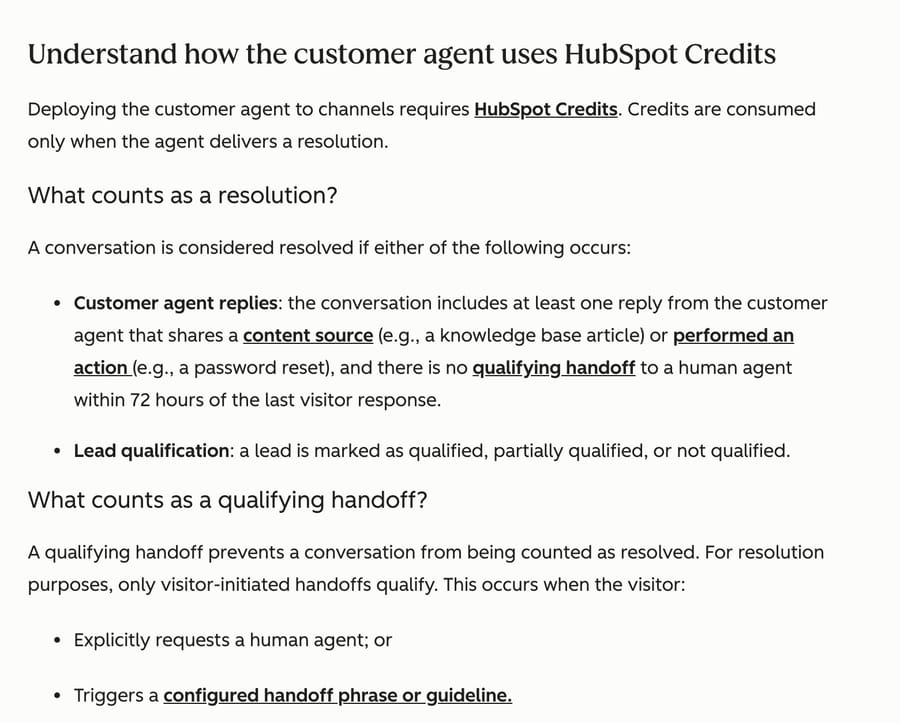
The handoff rule is the one that matters for spam. Only a visitor-initiated handoff prevents a resolution: the visitor asks for a human or triggers a configured handoff phrase. HubSpot says manual assignment, "including assignment through workflows," isn't a qualifying handoff. So if your team sees a junk chat and reassigns it to themselves to close it, the agent's earlier reply may still count.
Follow-up messages in the same open conversation don't add credits, and reply recommendations in help desk (suggested replies a rep sends) don't use credits at all.
Why do spam chats count as resolutions?
Look at it from the bot's side. A form-filling or SEO-pitch bot opens chat, pastes a message, and leaves. The customer agent searches your synced content, finds something loosely related, replies with it, and the conversation goes quiet. No visitor asked for a human, 72 hours pass, and HubSpot records a resolution.
There's an incentive question here, and it's fair to name it. A vendor that bills per resolution earns more when its agent marks more conversations resolved, and "the visitor stopped replying" is the cheapest possible resolution to produce. HubSpot's definition is at least specific, with a content source or action required and a 72-hour window, but nothing in it asks whether the visitor was a person. Filtering that out is your job.
A HubSpot community member asked about exactly this during HubSpot's June 2025 credits AMA: whether the agent could be limited to certain contacts or countries to keep spam chats from eating credits (AMA thread). An r/hubspot post from the same month described a different credit feature, Breeze Intelligence enrichment, after which the poster said it might have cost their company $11k that year, because usage could go past what had been paid for (thread).
How much can spam chats cost?
The math is simple, using HubSpot's published rates.

| Spam chats resolved per month | Credits (50 each) | Cost at $0.010 per credit |
|---|---|---|
| 100 | 5,000 | $50 |
| 300 | 15,000 | $150 |
| 1,000 | 50,000 | $500 |
The table uses the $0.010 list rate, because HubSpot doesn't publish its Pay-as-You-Go rate on the credits page. Those credits come out of the same monthly allowance as your real customers' resolutions and every other Breeze feature; our Service Hub pricing guide covers what each tier includes. HubSpot's page says unused credits expire at the end of the month, usage beyond the monthly limit is charged per credit under Pay-as-You-Go, and accounts that buy credits get a limit of up to 50% beyond their total monthly credits. If the agent runs out, it stops being assigned new conversations on every channel until the reset date or until you buy more, and new conversations follow your handoff process. A spam spike in week one can leave real customers without the agent in week four.
How do you keep spam chats away from the customer agent?
Work from the outside in. Every chat that never opens is one that can't be resolved.
1. Hide the chat where spam comes from
Chatflow targeting decides which pages show the widget and who sees it. Go to Service > Chatflows, hover the chatflow, click Edit, then the Target tab.
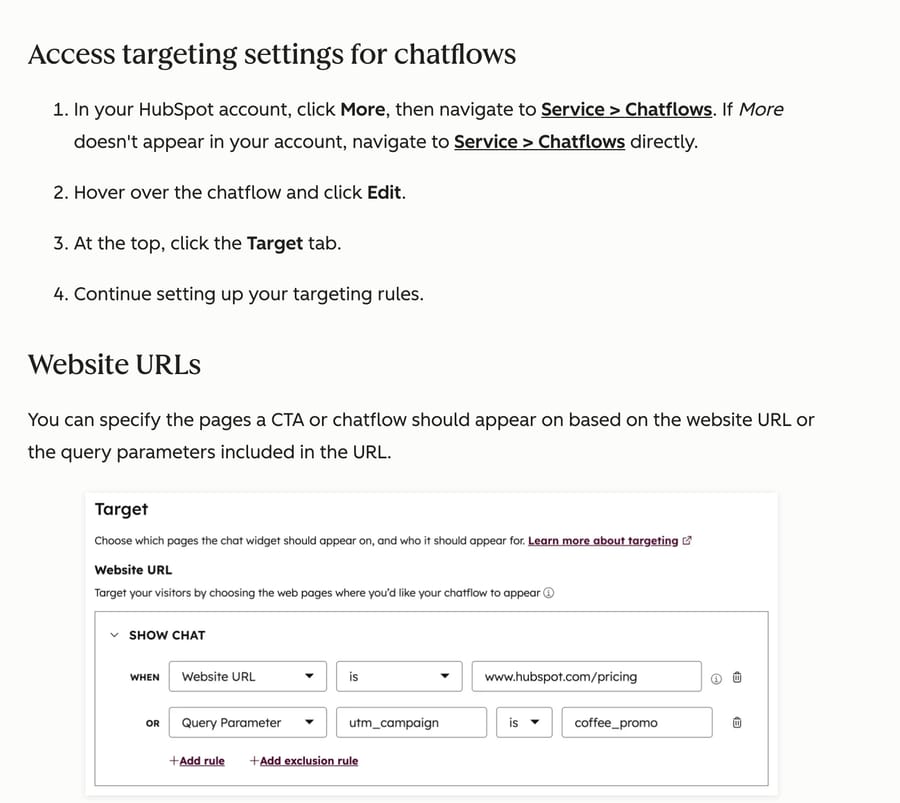
- Website URL rules (is, contains, begins with, matches wildcard) and query parameter rules. Take chat off pages that attract bots and don't need support: the blog, careers, the contact form page if you already have a form.
- Visitor information rules (Professional or Enterprise): country, device type, browser language, referral URL, days since last visit, session count, page visited. If your spam comes from a handful of countries you don't sell to, exclude them.
- Contact rules: segmented lists, known visitor, logged-in visitor. Showing the AI chatflow only to known contacts or logged-in customers is the strongest spam filter available, if your business can live with it.
Rules inside one filter group combine with OR, and rules across groups combine with AND, per HubSpot's targeting article.
2. Limit when and how much the agent covers
Under Service > Customer Agent > Deploy > Channels, each deployment has working hours (all hours, specific hours, or only outside specific hours) and a conversation coverage percentage. HubSpot's deploy article (updated November 13, 2026) also says a direct channel deployment handles every incoming conversation routed there, and points to a workflow or rule-based chatbot when you want to narrow it.
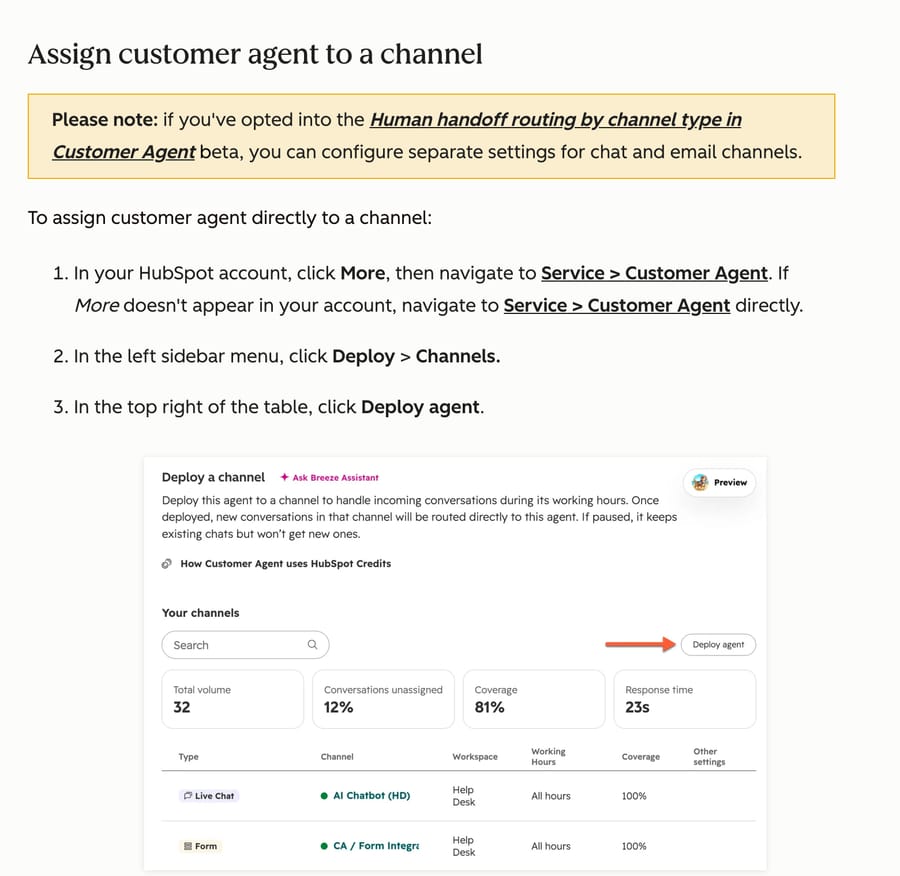
Coverage below 100% is a blunt tool for spam, because it drops real customers in the same proportion. Working hours are more useful if your spam clusters overnight.
3. Put a question in front of the agent
A rule-based chatbot that asks one question first ("What's your order number?" or "Are you an existing customer?") stops most bots, because they paste and leave. Hand the conversation to the customer agent only after an answer. That's the narrowing route HubSpot itself suggests on the deploy page.

4. Scope email deployments to known contacts
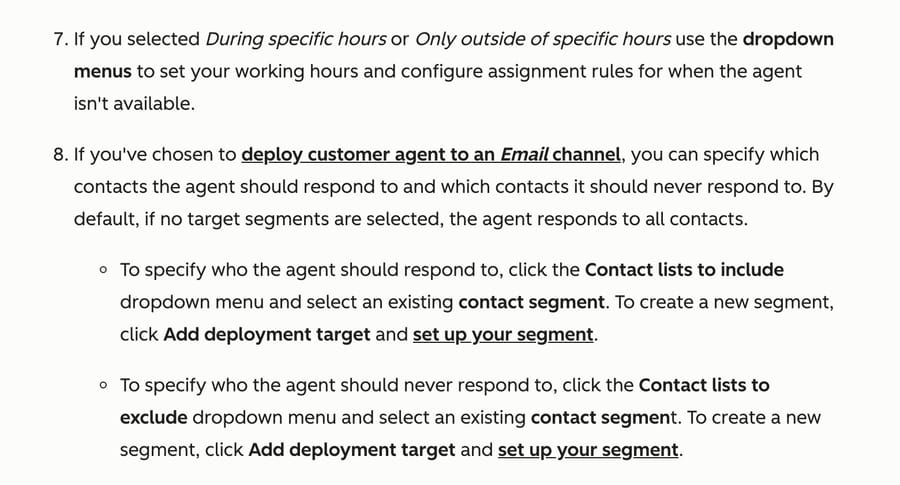
On email, you can include or exclude contact segments. By default the agent answers all contacts. Excluding unknown senders, or including only customers, keeps it off cold pitches.
5. Deny-list spam domains
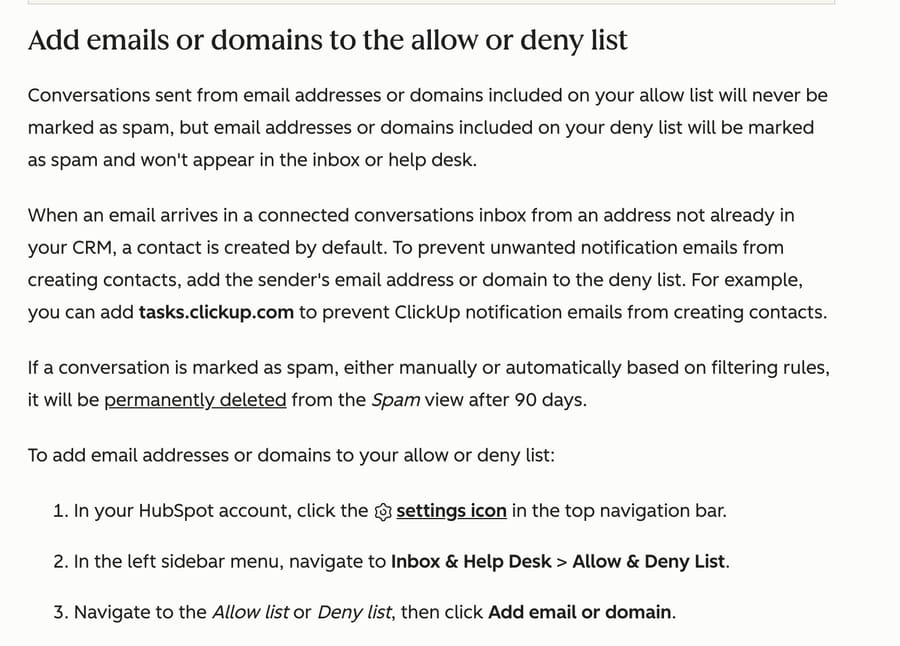
Settings > Inbox & Help Desk > Allow & Deny List works on all plans. Addresses and domains on the deny list are marked as spam and don't appear in the inbox or help desk. HubSpot's article covers email only, so this won't stop chat bots, but it keeps email spam out of the help desk entirely. If an address is on both lists, the allow list wins.
6. Know where the off switch is
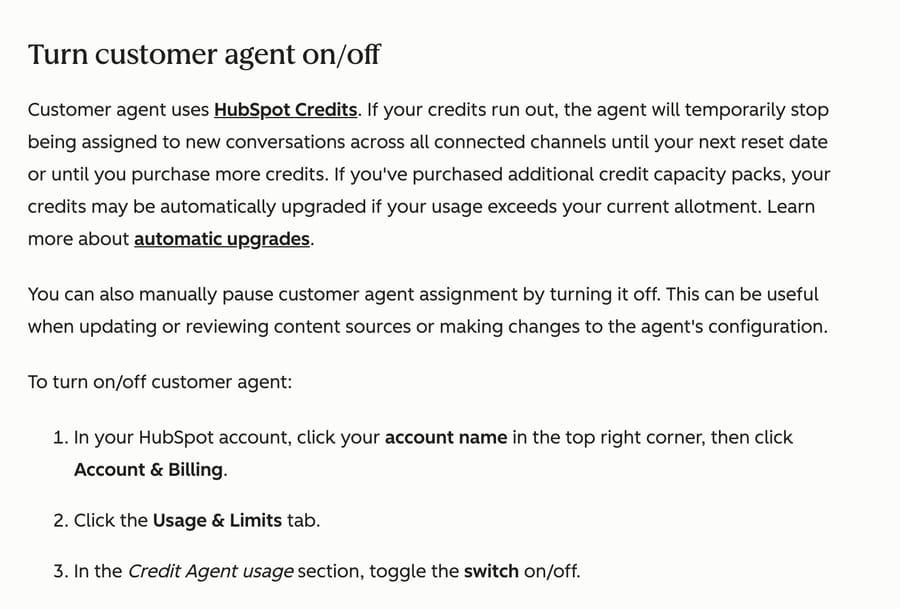
You can turn customer agent credit usage off under Account & Billing > Usage & Limits, and HubSpot says it can take "up to a few hours" to stop. Credits aren't used while the agent is off. Use it during a spam wave while you add targeting rules, not as a long-term setting.
Where Macha fits
Macha is a different shape of agent. It runs inside your HubSpot account on tickets, set up and monitored by the Macha team, and it's priced per ticket at about $0.40 per ticket rather than per resolution. One thread with one person is one charge however many messages it takes, and there are no overages, ever: when the month's tickets are used, agents pause until you choose to add more, so a spam wave can't run up a bill on its own.
Macha also starts only where you tell it to. Its HubSpot triggers are New Ticket Created and Ticket Updated, and Ticket Updated accepts a property filter. The Macha team sets the conditions during onboarding so the agent runs on tickets that have already passed HubSpot's spam handling, your deny list and any qualifying step. A conversation the agent never touches isn't a Macha ticket. When junk does get through, the agent can set a spam category with Update Ticket, close it and log a note in the same run, so it doesn't sit in anyone's queue.
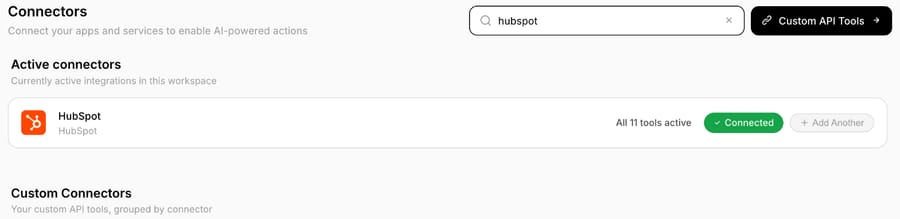
The Macha HubSpot integration page lists every action and trigger, and Macha on HubSpot shows the flow. For the full cost picture of HubSpot's own agent, see our Breeze customer agent guide and HubSpot AI implementation cost breakdown.
Macha fits teams on Zendesk, Freshdesk, Gorgias, Front, Gladly, Crisp, HubSpot or Intercom who want a predictable monthly number for AI support and someone else doing the setup. The trial is $50 of free usage (about 125 tickets), no credit card, no time limit, with the done-for-you setup and a dedicated success manager included; see pricing and how setup works.
How we researched this
We checked HubSpot's credits page and these knowledge base articles on November 21, 2026, and captured the screenshots the same day: Understand the customer agent (updated September 16, 2026), Deploy customer agent to channels (updated November 13, 2026), Use targeting rules in CTAs and chatflows (updated August 5, 2026) and Manage your allow and deny list (updated October 19, 2026). The credits page served US dollar prices from our location. The 50-credits-per-resolution rate appears in the credits page's estimator; an older HubSpot community answer from June 2025 quoted a different rate, so check your own account's rate card. The cost table is our arithmetic on HubSpot's published rates. We didn't run spam through a live customer agent for this post, and HubSpot doesn't publish how often spam chats meet its resolution definition, so the scenario above is an illustration, not a measurement. Reddit and community posts are paraphrased with links.
Common questions
Do spam chats use HubSpot Credits?
They can. If the customer agent replies with a content source or performs an action, and the visitor doesn't ask for a human within 72 hours, HubSpot counts a resolution and charges 50 credits. A bot that pastes a message and leaves fits that pattern.
How much does a HubSpot customer agent resolution cost?
50 credits for messaging, per HubSpot's credits page. At $0.010 per credit that's $0.50. Voice is listed at 50 credits per minute.
Can I stop the customer agent from answering certain countries?
Not in the agent itself, but chatflow targeting rules can hide the chat from visitors by country, device, browser language or referral URL on Professional or Enterprise. If the chat never appears, the agent never answers.
Does reassigning a spam chat to a person stop the credit charge?
HubSpot says manual assignment, including through workflows, isn't a qualifying handoff, so on its own it doesn't prevent a resolution. Only a visitor asking for a human or triggering a handoff phrase does.
How do I turn off HubSpot customer agent credit usage?
Go to Account & Billing, then Usage & Limits, and turn off customer agent credit usage. HubSpot says it can take up to a few hours to stop, and no credits are used while the agent is off.
Do unused HubSpot Credits roll over?
No. HubSpot's credits page says unused credits expire at the end of the month and don't carry over.