Intercom
 Shopify
 Stripe
 Slack
Slack Notion
 Google Workspace
 Confluence

Zendesk App Builder (2026): What It Builds, Which Plans, and Its Limits


Zendesk App Builder is a generative-AI tool in Admin Center that turns a plain-language description into a React app and installs it in your own account. It needs Suite or Support Professional or above, includes about 3,600 prompts a year, and cannot import existing apps or move a build from sandbox to production.
Key takeaways
- Zendesk App Builder turns a text prompt into a React app for one of six agent-facing locations, but it cannot import an existing app or move a sandbox build to production.
- Zendesk App Builder requires Suite Professional, Enterprise or Enterprise Plus, or Support Professional or Enterprise, and reached general availability on October 7, 2025.
- Zendesk App Builder includes approximately 3,600 prompts a year at no extra cost, with a one-time increase to about 7,200 on request before the annual reset on February 1.
- Zendesk App Builder allows up to 10 conversations in progress on Professional plans, 30 on Enterprise and 50 on Enterprise Plus, while published apps have no cap.
- Zendesk App Builder's Preview tab renders mock data, so only Test mode shows how an app behaves against real tickets, and Test mode writes apply to the live account.

Zendesk App Builder turns a plain-language prompt into a React app for one of six agent-facing locations, such as the ticket sidebar, on Suite or Support Professional and above, with about 3,600 prompts a year included. It is very good at read-only agent-facing panels, and it is a one-way door. You cannot import an existing app into it, and you cannot move an app it builds from a sandbox into production.
Which Zendesk plans include App Builder?
| Product | Plans with App Builder |
|---|---|
| Zendesk Suite | Professional, Enterprise, Enterprise Plus |
| Zendesk Support | Professional, Enterprise |
Suite Team, Suite Growth and Support Team are out. You also have to be a Zendesk admin, and App Builder isn't available on accounts still using the legacy Support interface rather than Agent Workspace.
Zendesk announced general availability on October 7, 2025. If you saw it discussed earlier than that, you were looking at the pre-GA rollout.
Where is App Builder, and what does one build look like?
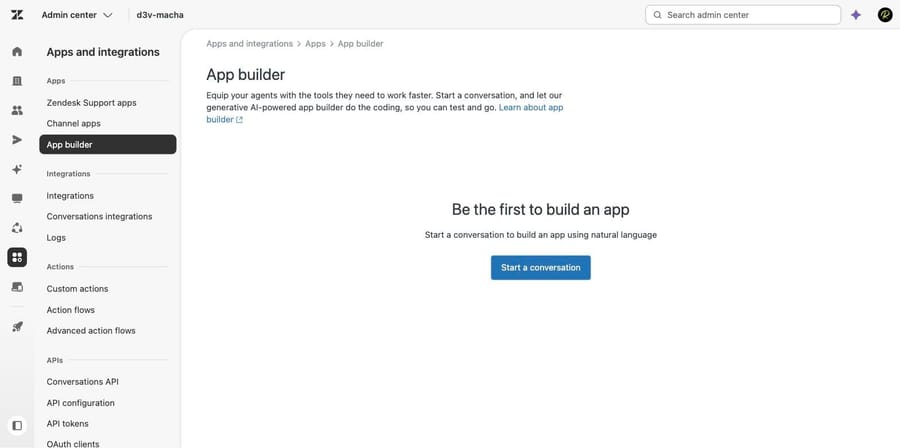
The path is Admin Center, then Apps and integrations in the sidebar, then Apps > App builder. On a fresh account you get an empty state and a single button.
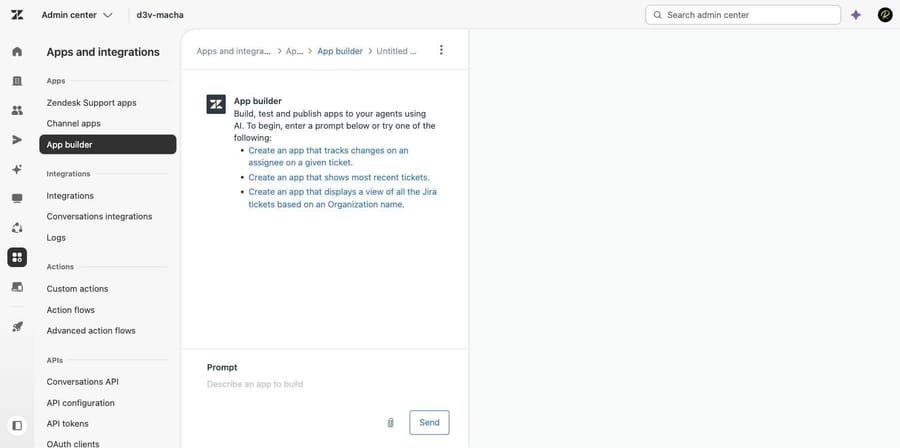
Click through and you land in a conversation pane with three worked example prompts. One of them is a Jira view, which tells you where Zendesk expects this to be used.
We sent one prompt: Create a ticket sidebar app that lists the requester's five most recently solved tickets, showing subject, solved date and a link to each one. What came back was a plan, not code.
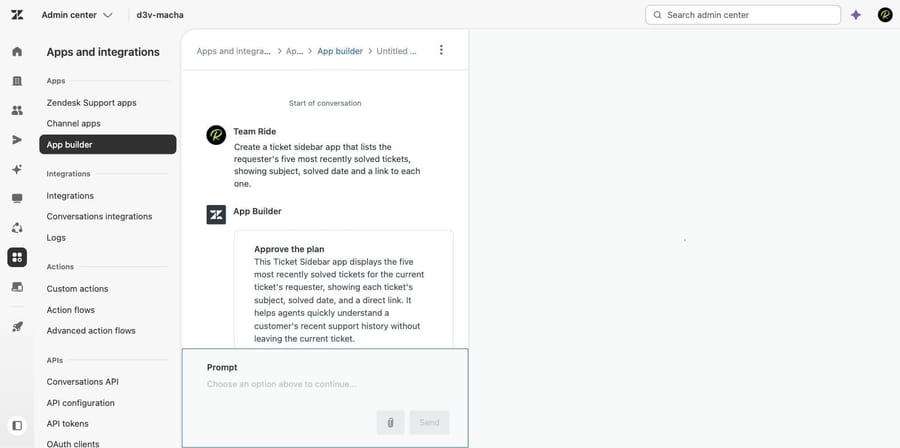
The plan restated the app in a paragraph, listed the two features it had committed to, and then offered three it thought we might also want: a CSAT badge per ticket, a brand or channel filter, and an empty state showing the requester's total ticket count. Below that it had already chosen the app's location, with a written reason.
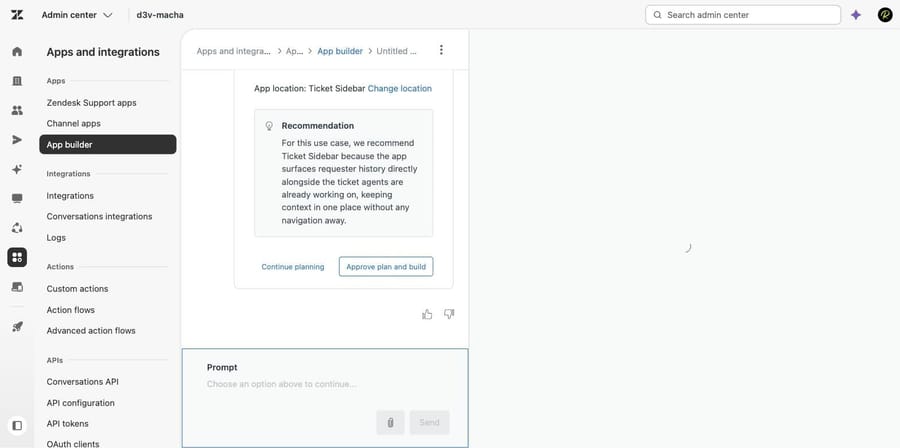
We approved it. App Builder read a set of Zendesk API reference documents and produced a working Version 1 in roughly ninety seconds.
Which of the six locations should an app live in?
An app built here lives in exactly one of six places: Ticket Sidebar, New Ticket Sidebar, User Sidebar, Organization Sidebar, Top Navigation, or Side Navigation. The AI planner picks one from your description and you can override it with Change location before the conversation starts.
After that it is fixed. Each app contains code for a single location, so the same panel in both the ticket sidebar and the user sidebar means two apps, two conversations and two things to maintain. Decide this before you start prompting, not after.
Does the preview show real data?
This is the part worth internalizing, because it changes how much a clean preview is worth.
The Preview tab rendered our app with five invented tickets for a person called Jane Smith, whom we checked against our account and could not find. It looked finished.
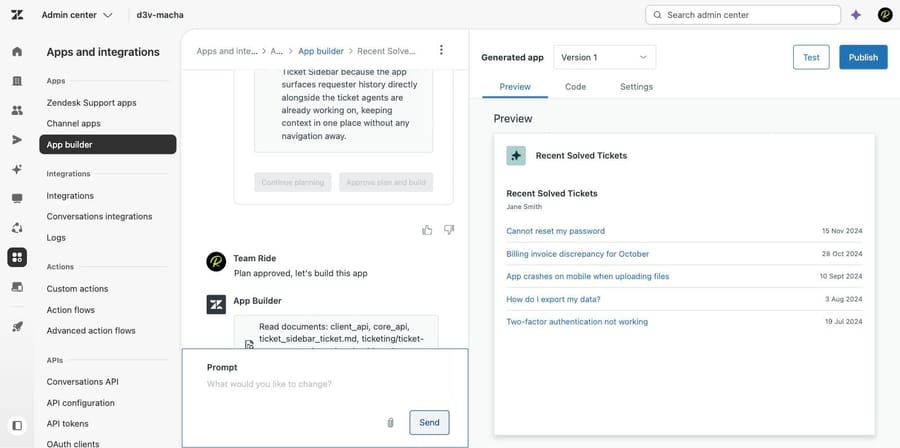
Clicking Test opened a real ticket in a new tab with the app installed in the apps rail, under a banner reading "Test mode. Any changes made to your account will be applied." A Test mode assistant toggle sat beside it, along with Report issue and Exit test. Zendesk says that assistant captures failed actions and raw errors during testing, explains them, and applies fixes to the build.
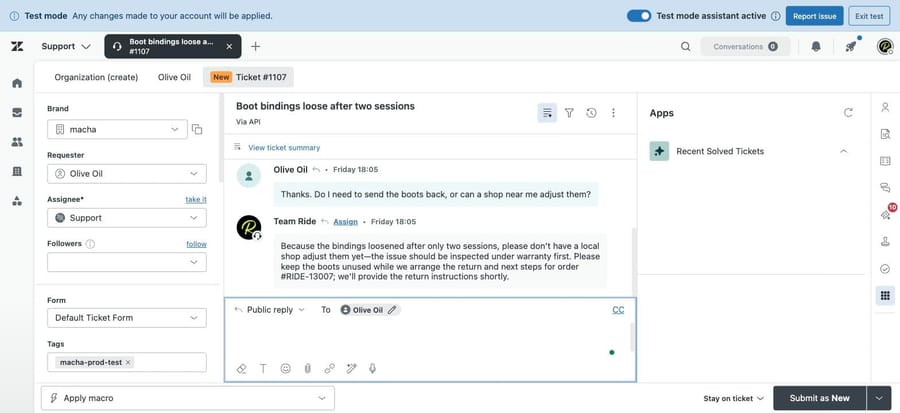
Against real data the same app returned "No solved tickets found for this requester", which for that requester was correct. Two renderings of one app, one of them fiction.
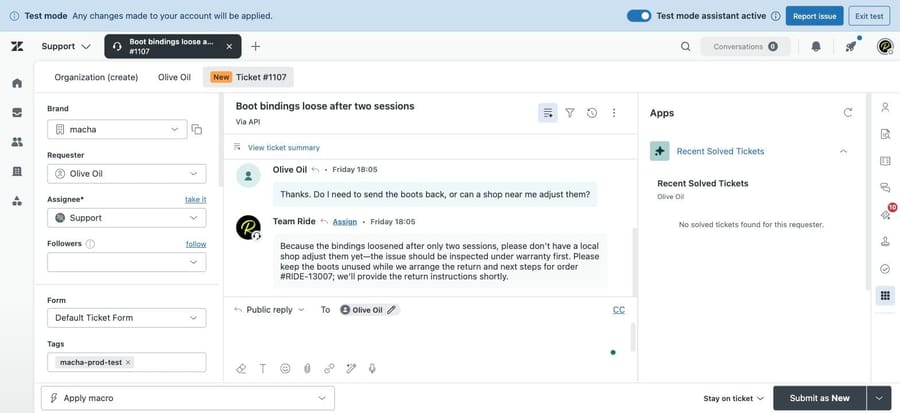
Zendesk's troubleshooting article says the same thing in its own words: most apps appear to work in Preview unless a compilation error stops the preview loading, and errors that only appear against live data surface during testing. Treat Preview as a layout check. Note the wording on that banner too: test mode writes land in your account.
Can you edit the code App Builder generates?
The Code tab is not decorative. Our app came out as a standard React project: index.jsx importing createRoot from react-dom/client, styled-components, and ThemeProvider, DEFAULT_THEME and getColor from @zendeskgarden/react-theming, alongside App.jsx, a components folder, styles, utils, manifest.json, blueprint.json, changelog.json and a memory.md.
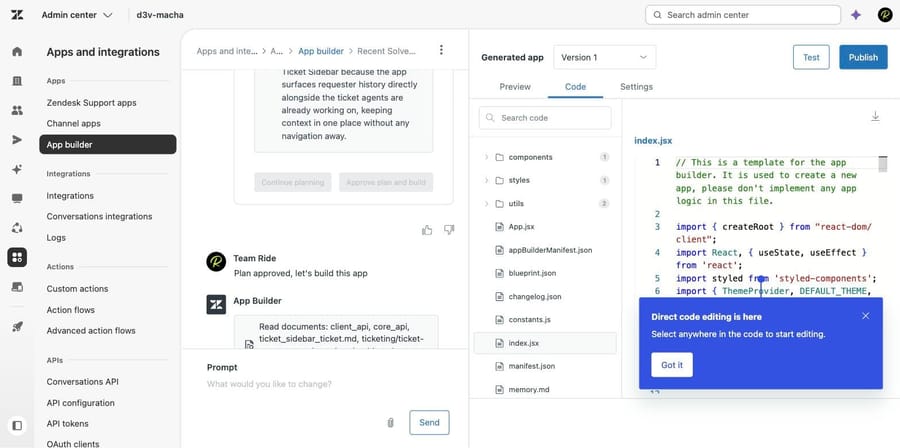
Direct editing in that pane is supported, and Zendesk's own guidance is that editing directly saves prompt budget, which matters more than it sounds like it should. Apps are built on Zendesk Garden components plus the ZAF and REST APIs, so what you get is an ordinary Zendesk app that a model wrote.
What are App Builder's limits?
These are Zendesk's numbers, from the current documentation, not ours. We did not hit any of them in a single build.
Conversations, by plan. Suite Professional and Support Professional get up to 10 conversations, Suite Enterprise and Support Enterprise up to 30, and Suite Enterprise Plus up to 50. Zendesk raised these on September 23, 2026; the article previously said 5, 10 and 20. Published apps are uncapped. The limit applies to builds in progress.
Prompts. Every eligible account gets approximately 3,600 prompts at no extra cost. Hit that and a banner offers a "Submit a request" link; if approved, the ceiling moves once to approximately 7,200. Otherwise you wait for the annual reset on February 1. Longer prompts consume the allowance faster, and App Builder doesn't display your usage anywhere in the interface, so the only way to know where you stand is to have counted.
Per conversation. Prompts cap at 50,000 characters, conversations at 200 messages, and actions are rate-limited to 6 to 12 requests per minute per user.
Things it will not do.
- No import. You cannot bring an existing app into App Builder to extend it. New builds only.
- No promotion between environments. An app built in a sandbox cannot be moved to production. You rebuild it by hand.
- One OAuth provider per app. Two OAuth-secured services in one app is not supported.
- Compiled download only. Downloading the app gives you compiled code, not the source files or full configuration, so maintaining it outside App Builder is off the table today.
- Ten versions of history. The change log tracks the ten most recent versions, and very long files may not be fully tracked.
- Five files per prompt, from PNG, JPG, TXT, DOCX, PDF, CSV and JSON. They inform layout and logic and can't become app images or logos.
- Three third-party libraries. pdfjs-dist, tesseract.js and charting libraries are currently supported.
- Long conversations slow down, because full pagination isn't implemented yet.
And one that catches people after the fact: deleting a conversation does not uninstall the published app, but it does permanently end your ability to edit it. To change that app later you start a new conversation and rebuild it.
How does App Builder connect to systems outside Zendesk?
App Builder supports API keys and OAuth 2.0, and it never writes credentials into the app's code. It also supports standard, visible settings for values such as feature flags, labels or URLs. Each secret becomes a secure setting, stored through Zendesk's application proxy, encrypted, and usable only against the domains you nominate. Agents and end users never see the values, and a compromised agent account can't extract them.
Two practical notes from the documentation. Never put a credential in a prompt, because prompt content may be logged even though the system is built to reject secrets. And you are asked to re-enter credentials every time you test or publish, so keep them somewhere you can reach quickly while iterating.
If your integration is a data sync and not an agent-facing panel, App Builder is the wrong shape. Our guide to building custom Zendesk integrations covers the API-side route, and the Zendesk API explained covers what you're authenticating against.
When should you use the apps framework instead?
Use App Builder when the thing you want is a panel an agent looks at: contextual data from Zendesk itself, a read of an internal system, a small form that writes a field, a dashboard in the side navigation. One admin, one afternoon, no developer. That is a genuinely new capability and it is the reason the feature exists.
Reach for the classic Zendesk apps framework and ZCLI instead when any of these are true: the app has to exist in more than one location, you need it in a sandbox and then in production, it must live in source control alongside the rest of your stack, you want to list it publicly, or you already have an app and want to extend it. Every one of those is a documented App Builder limitation rather than a matter of taste.
There is a middle path Zendesk itself pushes: the App Builder recipe library, where people publish the prompt that produced an app rather than the app. That tells you something about the unit of reuse here. The asset is the description.
What doesn't App Builder change?
App Builder makes the ticket screen better. It does not make the queue shorter. Everything above is about giving an agent more context faster, which is worth doing, and none of it touches how many tickets arrive or how many need a person at all.
Macha on Zendesk works on the other side of that line: it reads the incoming ticket, answers what it can from your own history and knowledge, tags and routes the rest, and hands an agent a thread that already has the context attached. It suits teams already running Zendesk whose agents are drowning in volume rather than in context switching, and it's the wrong fit if your agents handle a manageable number of genuinely complex tickets and simply need better data on screen, which is exactly what App Builder is for.
The incentive is worth naming because it decides the billing unit: a vendor charging per automated resolution earns more when more tickets arrive. Macha bills per ticket, one thread with one person as one charge however many replies it takes, from $299 a month for 750 tickets on published pricing, with setup and monitoring by our team included and $50 of free usage to start.
How we researched this
We built an app. On September 21, 2026 we opened App Builder in d3v-macha, our own Zendesk sandbox on Support Enterprise, from an empty state, started one conversation, sent a single prompt, approved the generated plan, inspected the code, ran Test mode against a live ticket, and stopped short of publishing. Six of the seven screenshots are that session. Everything in the limits section, the plan gate, the credential handling and the October 7, 2025 GA date is quoted from Zendesk's current documentation, read the same day through the help center API: Using App Builder (edited September 23, 2026, re-checked September 24), Creating, publishing and managing apps (September 18, 2026), Troubleshooting App Builder (August 25, 2026), Securing API connections (May 1, 2026), the code structure reference (August 25, 2026) and the GA announcement. We didn't connect an external API, publish an app, or approach any prompt or rate limit, so those numbers are Zendesk's rather than measured by us.
Frequently asked questions
What plan do I need for Zendesk App Builder? Suite Professional, Enterprise or Enterprise Plus, or Support Professional or Enterprise. Suite Team, Suite Growth and Support Team don't include it. You also have to be an admin, and it isn't available on the legacy Support interface.
Is Zendesk App Builder free? It's included with those plans, and each eligible account gets approximately 3,600 prompts a year at no extra cost. If you run out, a banner lets you request a one-time increase to approximately 7,200; otherwise the allowance resets on February 1.
How many apps can I build? There's no cap on published apps. The cap is on conversations in progress: up to 10 on Professional, 30 on Enterprise and 50 on Enterprise Plus. Finish or delete a conversation and the slot frees up.
Where can an App Builder app appear? Six locations: Ticket Sidebar, New Ticket Sidebar, User Sidebar, Organization Sidebar, Top Navigation and Side Navigation. You pick one when the conversation starts and you can't change it afterwards, so the same panel in two locations means two separate apps.
Can I move an App Builder app from sandbox to production? No. Zendesk documents that apps only work within a single environment, so an app built in a sandbox has to be rebuilt by hand in production. Plan which environment you're building in before you start.
Can I import my existing Zendesk app into App Builder? No. App Builder only creates new apps or continues work on apps that started in it. An existing ZAF app stays where it is.
Does App Builder show real data while I'm building? Only in Test mode. The Preview tab uses mock data, which in our test meant five invented tickets for a requester we could not find in our account, while the same app in Test mode returned the correct empty state against live data. Test mode also applies real changes to your account, so it isn't a sandbox.
Can I edit the code App Builder writes? Yes. The Code tab exposes the full React project and supports direct editing, which Zendesk recommends for small changes because it doesn't consume prompts. Downloading gives you compiled code, so editing outside App Builder isn't currently possible.
How does App Builder handle API keys? Credentials are never written into the app's code. Each secret becomes a secure setting stored through Zendesk's application proxy, encrypted and restricted to the domains you specify, and invisible to agents and end users. Never put a credential in a prompt, and expect to re-enter credentials each time you test or publish.
Sources: Using App Builder · Creating, publishing, and managing apps through App Builder · App Builder code structure reference · Troubleshooting App Builder · Securing API connections in App Builder · Announcing the release of App Builder
Add AI agents to your Zendesk
Macha reads the ticket, drafts the reply and takes the action, inside the Zendesk you already run.