Intercom
 Shopify
 Stripe
 Slack
Slack Notion
 Google Workspace
 Confluence

Where Is the Zendesk Email Signature Setting? Brand vs Agent Signatures and Placeholders


Zendesk signatures come in two layers: a brand signature an admin sets on the Brands page and a personal signature each agent sets on their profile. Zendesk's help center still points to an Agent interface field that no longer exists on current instances.
Key takeaways
- Zendesk moved the brand signature setting to Admin Center > Account > Brand management > Brands, while its help center article still describes the old Agent interface page.
- Zendesk personal agent signatures reach customers only through the agent.signature placeholder inside the brand signature, so deleting that placeholder disables personal signatures for the whole brand.
- Zendesk signature placeholders support the agent, current_user, account and dc classes, but the ticket class, such as ticket.assignee.name, never resolves in a signature.
- Branded agent signatures in Zendesk need Suite Growth and above or Support Enterprise, while plain personal signatures work from Suite Team or Support Team upward.
- Zendesk agent signatures never appear on email sent by a trigger or automation, or on replies an agent sends from their own inbox.

A Zendesk email signature has two layers: a brand signature an admin sets under Admin Center > Account > Brand management > Brands, and a personal signature each agent sets on their own profile, which drops into the brand signature through the {{agent.signature}} placeholder. Neither layer ever appears on email sent by a trigger or an automation, and that single rule explains most of the confusion on this subject.
| Signature | Who sets it | Where | Plan needed |
|---|---|---|---|
| Brand signature | Admin | Account > Brand management > Brands > Edit > Branded signature | Suite Growth and above, or Support Enterprise, for branded agent signatures |
| Personal agent signature | Each agent | Avatar > Manage profile > Signature | Suite Team or Support Team and above |
| Side conversation signature | Automatic (personal signature) | Email side conversations | Suite Professional and above |
| Trigger and automation emails | Not supported | Use the brand's email template or the trigger body instead | Any plan |
Where did the Zendesk signature setting go?
Zendesk's current article (rechecked on September 24, 2026) still tells you to go to Admin Center, Workspaces, Agent tools, Agent interface, and type into a Signature text box. We checked that page on our own instance and there is no such box. Instead there's a notice.
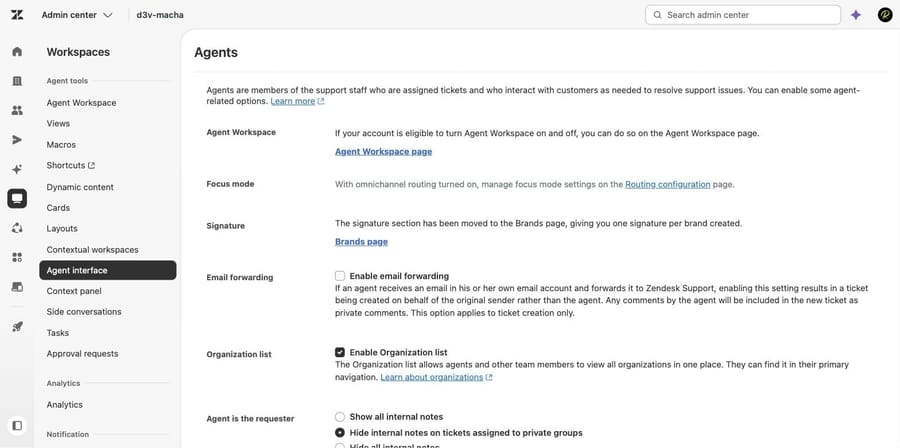
"The signature section has been moved to the Brands page, giving you one signature per brand created."
If you inherited a Zendesk and cannot find where your signature is configured, that is why. Everything that used to be the account-wide signature is now the default brand's signature.
How do you set the brand signature?
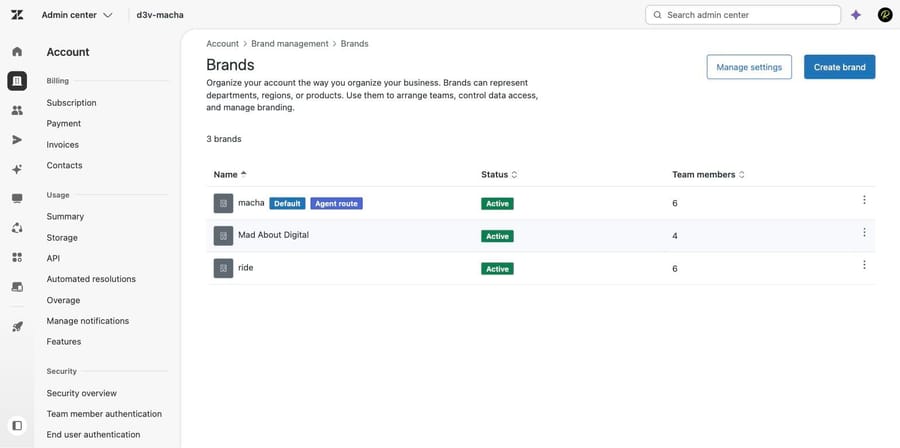
- In Admin Center, click Account in the sidebar, then select Brand management > Brands.
- Find the brand. If you have department spaces turned on, click the options menu on the brand's row and choose Edit. Clicking the brand name opens a "Who has access" page with no signature field on it.
- Scroll to Branded signature.
- Enter your text. The field takes Markdown, so images and links work.
- Click Save, and repeat for each brand.
The field arrives pre-populated with {{agent.signature}}, and that placeholder is load-bearing. It is the slot each agent's personal signature drops into. Delete it and you have taken personal signatures away from every agent on that brand, which is a legitimate choice if you want one uniform sign-off, and a surprise if you did it by accident while pasting in a company footer.
Put your brand text above or below the placeholder depending on whether you want the company line before or after the person.
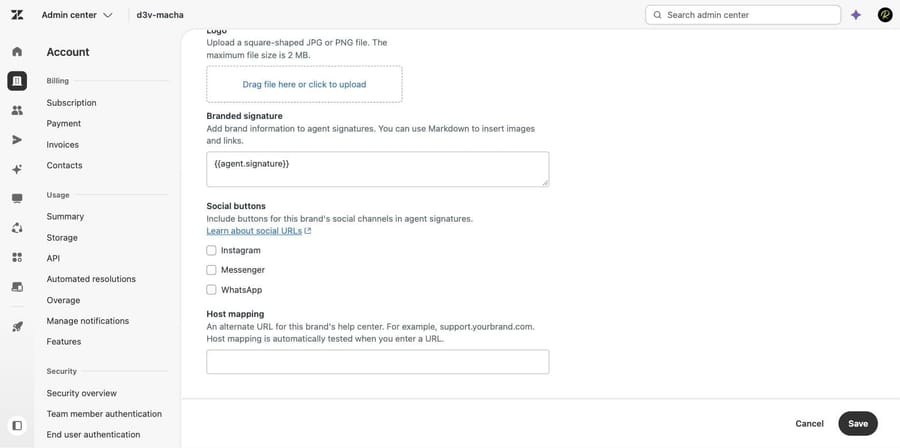
Underneath it sits something the documentation doesn't lead with: Social buttons, a set of checkboxes for Instagram, Messenger and WhatsApp that add that brand's social channels to agent signatures. If you have been building social links by hand in Markdown, this is the supported way.
Branded agent signatures need Suite Growth and above, or Support Enterprise. Plain agent signatures work from Suite Team or Support Team upward.
How does an agent set a personal signature?
Each agent controls their own half, and they do it from their profile rather than from Admin Center.
- In Zendesk Support, click your avatar in the top right and choose Manage profile. Zendesk's documentation still calls this "View profile".
- Find the Signature field in the left sidebar of your profile.
- Enter your text. Markdown works here too.
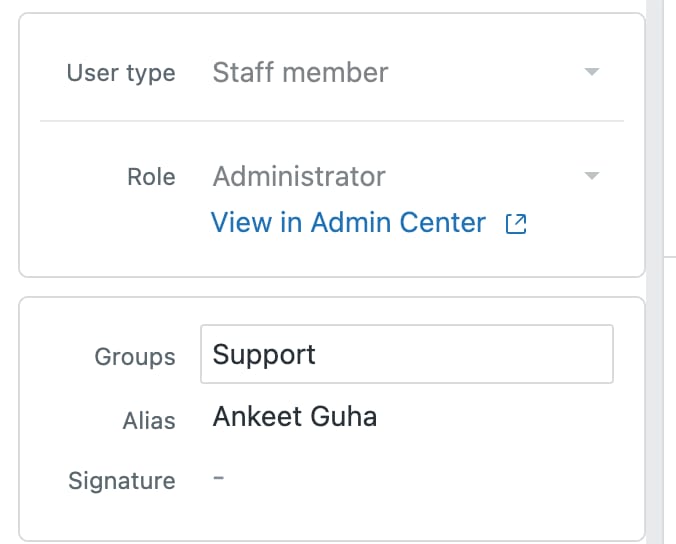
Whatever the admin put in the brand signature wraps around this. If an agent's personal signature isn't appearing at all, check the brand signature for the {{agent.signature}} placeholder before you check anything the agent did.
Which placeholders work in a Zendesk signature?
This is the question behind the recurring placeholders in brand signature thread, and Zendesk's answer is specific.
Supported classes in signatures: agent, current_user, account, and dc (dynamic content) when used as HTML. So {{agent.email}}, {{agent.name}} and {{account.name}} behave.
Not supported: the entire ticket class. {{ticket.assignee.name}} and anything else ticket-shaped will not resolve in a signature.
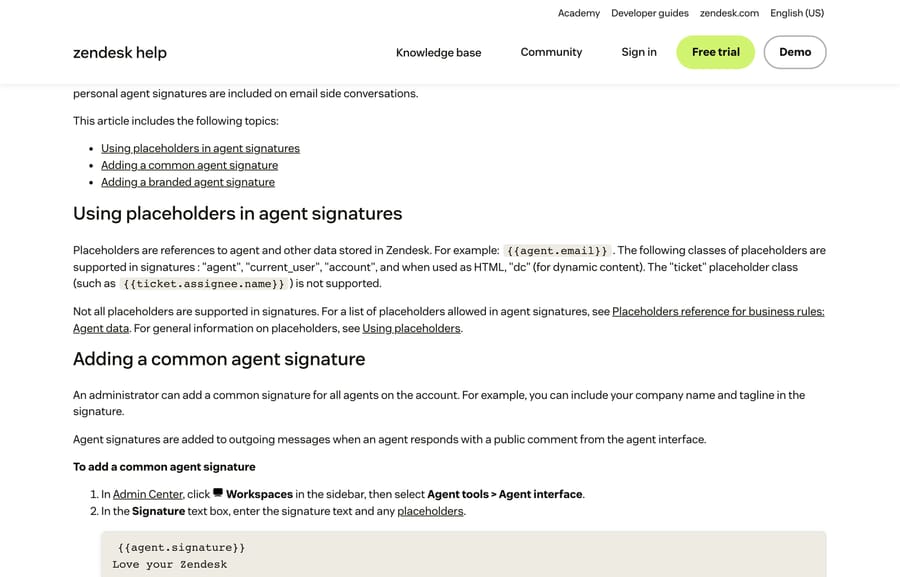
That restriction is the reason so many signature ideas fall over. Anything you want to vary by the ticket, its group, its organization or its requester cannot come from the signature field, because the signature doesn't know which ticket it's on. It has to come from the notification trigger instead, which is the next section.
For the wider placeholder picture, our guide to Zendesk placeholders and dynamic content covers what resolves where.
Where do signatures appear, and where don't they?
Agent signatures are added when an agent posts a public comment from the agent interface. That's it. Three consequences follow, and each one produces its own support thread.
- An agent replying by email doesn't get a signature. If your team answers tickets from their own inbox, Zendesk isn't adding anything.
- Trigger and automation emails don't carry agent signatures. Every automatic notification, including the standard "Notify requester and CCs of comment update", goes out without one, and brand-specific signature text doesn't ride along either.
- Email side conversations do include personal agent signatures, on Suite Professional and above.
If you need brand-specific information on the automatic notifications, the documented route is the email template for that brand, not the signature field.
How do you vary a signature by group, organization or language?
Because the signature can't see the ticket, everything in this category is done in the notification trigger instead. Zendesk's own recipe for per-brand and per-group signatures is worth following precisely.
- Open Notify requester of new proactive ticket and Notify requester and CCs of comment update.
- Clone each one per brand, adding the brand name to the trigger name.
- Deactivate the originals. Don't delete them and don't strip their existing placeholders.
- In each clone, add the condition Ticket > Brand | Is | your brand.
- In the Email body, after the existing content, add a Liquid block keyed on the group:
{% case ticket.group.name %}
{% when 'Group A' %}
Signature text for Group A
{% when 'Group B' %}
Signature text for Group B
{% else %}
Default signature text
{% endcase %}
Two caveats Zendesk attaches to that recipe. It carries an explicit disclaimer that the code is provided for instruction and isn't supported by Zendesk. And the result won't appear on the ticket, only in the email the end user receives, which makes it hard to QA and easy to forget.
The same shape covers organizations, by keying the case on the organization instead of the group. That is the answer to the per-organization signature question: there's a brand-level setting and a trigger-level workaround, with nothing in between.
Can one agent have multiple signatures?
Agents who work in more than one language ask for this constantly. Zendesk states that the {{agent.signature}} placeholder doesn't support variants natively, and lists five workarounds:
| Approach | What it costs you |
|---|---|
| Personal macros, one per signature | The agent has to remember to apply one |
| A browser text expander such as Text Blaze | Per-machine setup, nothing enforced centrally |
| A Marketplace app such as Zignatures | A third-party app in the reply path |
| Brand-specific signatures | Only varies by brand, not by language or person |
| Liquid markup in triggers | Only affects notification emails, invisible on the ticket |
There's no good option in that list, which is worth knowing before you spend an afternoon looking for one. If the requirement is genuinely per-language, macros are the least fragile of the five because they live in Zendesk and survive a laptop change.
Why is my Zendesk signature missing?
- Signature missing entirely? Check the brand signature on the Brands page, not the Agent interface page.
- Agent's personal signature missing but the company line shows? The
{{agent.signature}}placeholder has been removed from the brand signature. - Signature missing on automated emails only? Working as designed. Use the email template or a trigger.
- Placeholder rendering as literal text? It's probably a
ticketplaceholder, which signatures don't support. - Signature missing when an agent replies from their own inbox? Also by design. Signatures attach to public comments made in the agent interface.
How does an AI agent sign its replies?
Worth planning for if you run any automation on the ticket: a machine reply posted through the API follows the notification path rather than the agent-interface path, so the signature field isn't what determines how it signs off. Put the sign-off in the agent's own instructions, and keep it consistent with the human one so a customer reading a thread doesn't see two different companies.
Macha on Zendesk is configured that way: the sign-off is part of the agent's instructions, reviewed alongside the tone rules, rather than inherited from a setting the agent never touches. It suits teams already running Zendesk who want the automated replies to read like the rest of the queue, and it's the wrong fit if you only need a better macro library, which is a cheaper problem to solve.
The incentive is worth naming since we're on the subject of what gets sent: a vendor charging per automated resolution earns more the more replies go out. Macha bills per ticket, one thread with one person as one charge however many replies it takes, from $299 a month for 750 tickets on published pricing, with setup and monitoring by our team included and $50 of free usage to start.
How we researched this
We checked every path in our own Zendesk sandbox on September 21, 2026, and re-read the main signature article on September 24, which is how we found that the account-wide signature box has moved off the Agent interface page and onto Brands while the help center article still documents the old location. Four of the five screenshots come from that instance: the "moved to the Brands page" notice, the Brands list, the Branded signature field with its social buttons, and the agent profile's own Signature field. The fifth is the documentation page covering placeholder classes. The plan gates, the appearance rules, the supported and unsupported placeholder classes, the five workarounds for multiple signatures and the per-brand trigger recipe are all quoted from Zendesk's current articles read the same day: "Adding an agent signature to ticket email notifications" (edited May 1, 2026), "Can I have multiple agent signatures?" (June 11, 2026) and "How can I create different agent signatures based on brand and ticket group?" (April 19, 2026). We didn't save a signature or send a test email, so the rendering rules are documented rather than tested by us, and we couldn't establish when the setting moved, only that it has.
Frequently asked questions
Where is the agent signature setting in Zendesk? On the Brands page: Admin Center > Account > Brand management > Brands, then Edit the brand and use the Branded signature field. The account-wide Signature box that used to sit on Workspaces > Agent tools > Agent interface has moved, although Zendesk's help center article still describes the old path.
What's the difference between a brand signature and an agent signature? The brand signature is set by an admin and applies to everyone working that brand. The agent signature is personal, set by each agent in their own profile. They combine through the {{agent.signature}} placeholder inside the brand signature.
Why isn't my agent's personal signature showing? Almost always because {{agent.signature}} has been removed from the brand signature. That placeholder is the slot the personal signature drops into, so deleting it silently disables personal signatures for that brand.
Which placeholders work in a Zendesk signature? The agent, current_user and account classes, plus dc for dynamic content when used as HTML. The ticket class is not supported, so {{ticket.assignee.name}} and anything else ticket-specific will not resolve.
Why doesn't my signature appear on automated emails? Because agent signatures are only added to public comments posted from the agent interface. Email sent by triggers and automations never carries one, and neither does a reply an agent sends from their own inbox. Use the brand's email template for automatic notifications.
Can I have different signatures per group or per organization? Not from the signature field, which can't see the ticket. Zendesk's documented approach is to clone the notification triggers per brand and use a Liquid case block on the group or organization in the email body, with the caveat that the result appears only in the email and not on the ticket.
Can one agent have more than one signature? Not natively. Zendesk lists five workarounds: personal macros, a browser text expander such as Text Blaze, a Marketplace app such as Zignatures, brand-specific signatures, or Liquid markup in triggers. Macros are the most durable of the five because they live in Zendesk.
Do signatures work in side conversations? Personal agent signatures are included on email side conversations, which need Suite Professional or above.
Can I put images or links in a Zendesk signature? Yes. Both the branded signature and the personal agent signature accept Markdown, so images and links work. There's also a Social buttons setting on the brand that adds Instagram, Messenger and WhatsApp buttons for you.
Sources: Adding an agent signature to ticket email notifications · Can I have multiple agent signatures? · How can I create different agent signatures based on brand and ticket group? · Recipe: Using Liquid markup to set agent signatures · Setting up multiple brands
Add AI agents to your Zendesk
Macha reads the ticket, drafts the reply and takes the action, inside the Zendesk you already run.