





 Shopify
 Stripe
 Slack
Slack Notion
 Google Workspace
 Confluence

How Do You Audit a Zendesk Knowledge Base Before an AI Agent Reads It?


A Zendesk knowledge base audit takes an afternoon: sort articles by age, check labels and votes through the Help Center API, and skip the one field that always lies. An AI agent answering from your Help Center inherits exactly what is in it, so the audit comes before the automation.
Key takeaways
- A Zendesk knowledge base audit sorts articles by Edited date and pulls updated_at, label_names and vote_sum from the Help Center API; on our sandbox 24 of 25 articles were stale.
- Zendesk's article field outdated is deprecated and always returns false, so a filter on it finds nothing; updated_at and outdated_locales are the staleness signals that work.
- Zendesk article verification and its Needs verification counter are limited to Enterprise and Enterprise Plus plans with Knowledge Enterprise, even though AI agents reached all Suite and Support plans on 30 March 2026.
- Labels and votes were both 0 of 25 on the audited Zendesk account, leaving search and retrieval no signal to separate a thorough article from a stub.
- Connecting Macha to the audited Zendesk sandbox indexed 24 of the 25 articles, because the connector skipped the one unpublished draft and changed nothing in the content.

To audit a Zendesk knowledge base, sort the Knowledge admin by Edited (oldest first), pull updated_at, label_names and vote_sum for every article from the Help Center API, and ignore the deprecated outdated field, which always returns false. On the Zendesk sandbox we audited, 24 of 25 articles hadn't been updated in 12 months, and none had labels or votes. The job takes an afternoon, and it's worth doing before an AI agent starts answering from that content, because the agent inherits whatever is in it.
| Signal | Where to find it | On our instance | Plan needed |
|---|---|---|---|
| Needs verification count | Knowledge admin left rail | 25 of 25 | Enterprise or Enterprise Plus |
Age (updated_at, edited_at) | Edited column, Help Center API | 24 stale over 12 months | All |
Labels (label_names) | Article settings, API | 0 of 25 labeled | "Certain plans" |
Votes (vote_sum, vote_count) | API, Explore | 0 of 25 with votes | All |
outdated | API | Always false (deprecated) | Ignore it |
What do the Knowledge admin counters already show you?
Open Knowledge and the left rail carries counters most people scroll past.
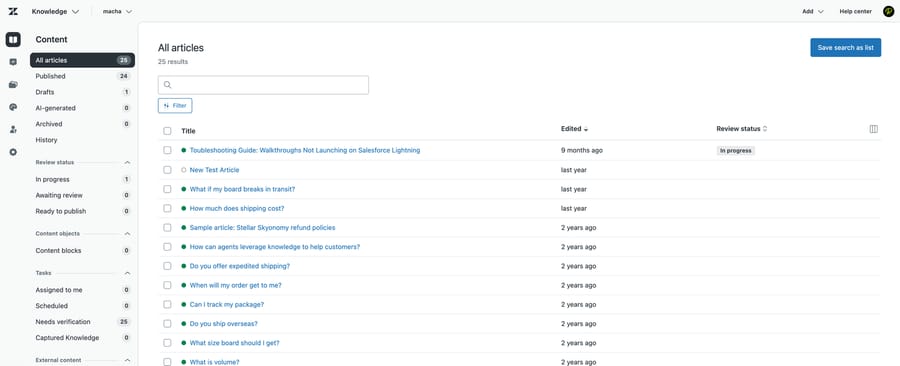
On our instance: 25 articles, 24 published, 1 draft, 0 AI-generated, 0 archived. Review status showed 1 in progress and nothing awaiting review. And Needs verification: 25, which is every article in the account.
The Edited column tells the same story in plainer language. Exactly one article has an edit under a year old. Of the other 24, twenty-one were last touched more than two years ago, and by the API's dates the oldest hasn't been edited since September 2023.
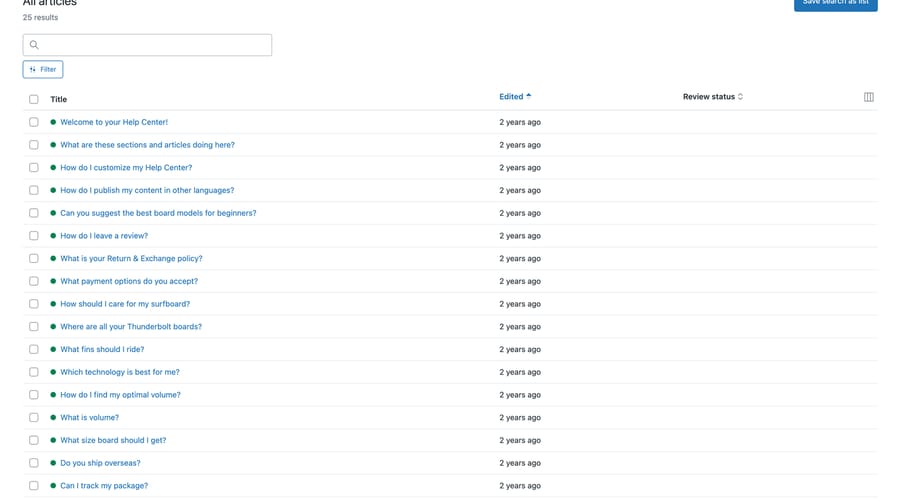
One caution if you script this. Zendesk exposes two timestamps per article, updated_at and edited_at, and on this instance they disagree for 15 of the 25: "Can I track my package?" reports updated_at of 2024-07-20 against edited_at of 2024-03-03. That gap is only visible through the API, since the admin list renders both as "2 years ago". Decide which question you're asking before you pick a field, because they aren't the same question.
Two more reading notes for the screenshots above. The list shows relative ages, and its "last year" bucket sits on both sides of the twelve-month line, which is why four rows look recent while the API counts only one article updated inside 12 months.
A word on the instance before these numbers do any work. This is a Zendesk demo sandbox, and most of what you see is Zendesk's own seed content: "Sample article: Stellar Skyonomy refund policies", "New Test Article" and a set of stock surf-shop articles. That is why every counter reads so uniformly badly. The shape of the audit transfers to a real account. The magnitudes do not.
Zendesk's article verification exists precisely for this, letting you mark articles as verified and set rules for re-verification. The feature isn't missing. It just isn't being used, which is the normal state of a knowledge base that grew article by article without anyone owning it.
Check your plan before building a process on it, though: Zendesk lists article verification for Enterprise and Enterprise Plus plans with Knowledge Enterprise. On Team, Growth and Professional the Needs verification counter and the review workflow aren't available to you at all.
Which article fields signal a stale or unfindable article?
The interface counter is one view. The Help Center API exposes per-article fields that tell you more, and running them across all 25 gave a consistent picture.
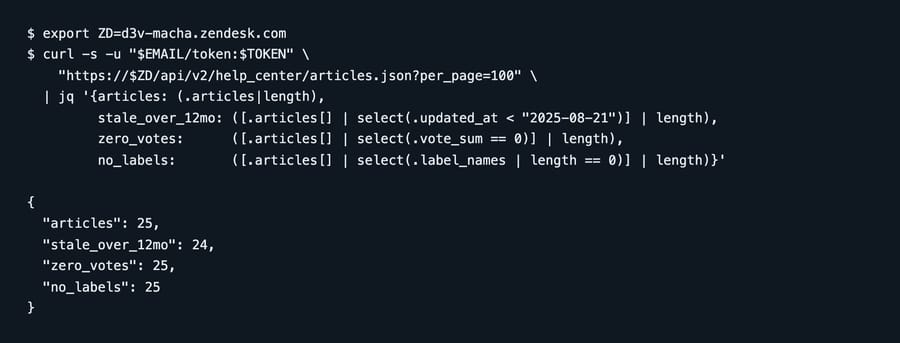
articles          25
stale over 12mo   24
zero votes        25
no labels         25
Two of those affect how findable an article is, and both were empty. A third field looks like it matters and doesn't.
Labels: 0 of 25. Labels are a real search input: Zendesk says they're "indexed for search with a bit less weight than the article title", and advises using them sparingly because several similar labels can outweigh the title. They're how you express that an article covers "refunds" when the article never uses the word. Note that label_names is "only available on certain plans", so check yours before planning around it.
Votes: 0 of 25. The article object carries vote_sum and vote_count, and those two are the whole of its helpfulness signal; Help Center activity reporting in Explore is the other place to look. At zero across the board there's nothing on the article to rank usefulness by, so a comprehensive article and a stub look identical.
The outdated field: a trap, not a finding. We counted 0 of 25 flagged outdated and briefly wrote that up as a result. It isn't one. Zendesk's article reference documents outdated as "Deprecated. Always false because the source translation is always the most up-to-date translation", and marks it read-only. It returns false in every account, on every article, always. A select(.outdated) filter is a select(false).
Leave it out of your audit. The staleness signal you actually have is updated_at, and for translated content, outdated_locales.
Why does a stale knowledge base matter more once an AI agent reads it?
A human agent reading a two-year-old refund article brings context to it. They know the policy changed in March, they know the article's stale, and they answer from memory instead. That correction is invisible and it happens constantly.
Automated retrieval has none of that. It reads what's there, and a confidently written stale article looks exactly like a current one. The failure is quiet. Nothing errors, the answer is fluent, and it's wrong in the specific way the old article is wrong.
That's why the audit comes first. When you rewrite what it flags, our FAQ template has an entry format built for retrieval, with each answer's conditions and escalation rule kept inside the entry.
On 30 March 2026 Zendesk extended its advanced AI agent capabilities to all Suite and Support plans, dropping the separate Advanced add-on, while article verification stays on Enterprise and Enterprise Plus, so the customers most likely to point automation at a decayed knowledge base are the ones without the tool for auditing it. That isn't a trap anyone set deliberately. It's what happens when two features are priced by different teams, and the cost of the mismatch lands on whoever is holding the stale article. It's also why the labels matter more than they look. Retrieval quality depends on whether the right article can be found for a question phrased in the customer's words, not yours, and labels are where that translation lives.
How do you run a Help Center audit in an afternoon?
- Sort by Edited, oldest first. The Knowledge admin does this natively. Everything older than a year is a candidate. Age alone condemns nothing.
- Read the oldest ten. Not all of them, ten. Most knowledge bases have a handful of articles that carry the load and a long tail that never gets served.
- Archive the ones whose answer no longer exists (any Suite with Knowledge Professional or Enterprise, per Zendesk). An article about a product you retired is worse than no article, because retrieval will find it anyway.
- Add labels to the ones you keep, in the words customers use, and sparingly. Zendesk warns that a pile of similar labels can outweigh the title.
- Use the review workflow. Mark what you've verified so the counter means something next quarter.
- Re-run the API count and keep the number. The value of the audit is the diff, not the snapshot.
Which API call checks your own account?
One paginated call gives you the shape of it. See our Zendesk API guide if you have not used these before.
GET /api/v2/help_center/articles.json?per_page=100Group locally on updated_at, label_names and vote_sum. Skip outdated. For a large Help Center, page through rather than assuming 100 covers it.
What can article metadata not tell you?
Everything above is metadata. An article can be fresh, labeled and well-voted and still answer badly, because retrieval works on the shape of the writing and no field records that.
Three structural habits matter more than any counter on the page.
One question per article. An article that answers shipping times, returns and warranty in three sections will be retrieved for all three and will be the best match for none. Retrieval returns a passage, and a passage that is two-thirds irrelevant reads to a customer as an answer that missed the point. When you find a long article covering several topics, splitting it does more for the agent than updating it would.
Headings that state the question. "Shipping" is a filing label. "How long does delivery take?" is the sentence a customer types. Where a retrieval system splits on document structure, a heading in the customer's words gives it a clean unit to return; where it splits on a fixed window, the heading at least puts matching words next to the answer. Either way the phrasing earns its keep. Look at the seeded titles in the screenshot above and you can see the pattern already: "Do you ship overseas?", "Can I track my package?", "What size board should I get?"
Say the thing in the article, not in a link. An article whose real answer sits behind "see the policy page" retrieves as a pointer. The agent will faithfully return the pointer.
Labels help too, with one distinction worth keeping straight: Zendesk's guidance on them describes Help Center search ranking rather than what an AI agent retrieves. They are "indexed for search with a bit less weight than the article title", and several similar ones can outweigh it, so a few precise labels beat a dozen loose ones. Treat that as a search-relevance rule that happens to encourage the same discipline.
None of this shows up in the audit above, which is exactly why it gets skipped. If you're building a knowledge base from scratch rather than auditing one, our guide to building a Zendesk knowledge base covers authoring in full.
Common questions
How do I find stale articles in Zendesk? Sort the Knowledge admin by Edited, oldest first, or pull updated_at from the Help Center API. Zendesk also maintains a Needs verification count in the left rail.
What does the "outdated" field actually do? Nothing useful. Zendesk deprecated it; it's read-only and always returns false, so it can't tell you anything about staleness. Use updated_at instead.
Is article verification available on my plan? Only on Enterprise and Enterprise Plus plans with Knowledge Enterprise. On lower tiers the Needs verification counter and the review workflow aren't there.
Do article labels affect search? Zendesk documents labels as an input to Help Center search ranking, so an unlabeled knowledge base gives search less to work with. Whether your AI agent weighs them the same way depends on the agent, so treat labels as a search-relevance habit that happens to encourage clearer articles.
Should I delete old articles or archive them? Archive. It drops the article out of retrieval while keeping it recoverable, which matters when you find out the "retired" product still has customers.
How often should this be re-run? Quarterly is a reasonable default, and the number only means something as a series.
Where does an AI agent layer fit?
All of that is true whatever you point at the content. It matters more once something automated is answering, because the human correction disappears.
Macha runs on top of the Zendesk you already have. It reads the ticket, including custom field values and attachments, and can classify it, add an internal note, or post a public reply, using your existing triggers and webhooks as the entry point. On knowledge specifically it answers from the sources you connect, which is the honest framing. It inherits your Help Center rather than repairing it.
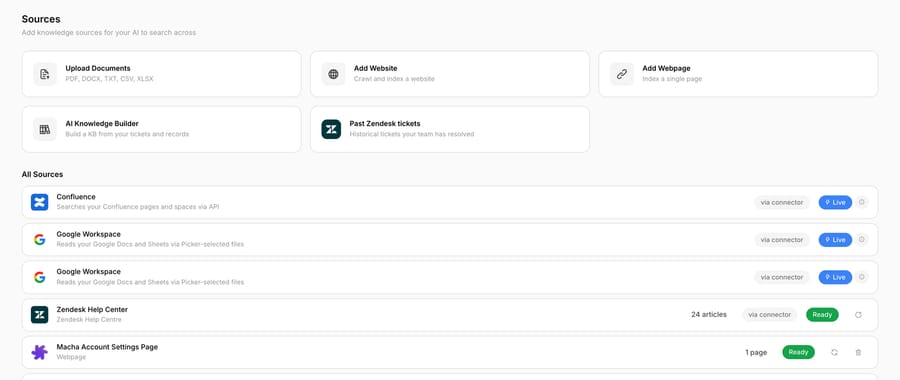
Connecting the sandbox above makes the point. The connector reports 24 articles, not 25. The 25th is the unpublished draft, which is the obvious explanation though not one Macha's docs spell out. Everything else came across exactly as it was: the same 24 articles, unlabeled, unverified, most of them untouched for two years. Nothing in that step improves the content, and nothing in it was ever going to. It suits teams whose Help Center is broadly right and under-maintained. If the content still needs writing, this is the wrong tool for that job. Setup runs through the Zendesk integration, and billing is per ticket (from $299 a month for 750 tickets), so one thread with one person is one charge however many replies it takes. Setup and monitoring by the Macha team are included.
Start your free trial and connect your Zendesk in a few minutes.






