Intercom
 Shopify
 Stripe
 Slack
Slack Notion
 Google Workspace
 Confluence

Zendesk Live Chat vs Messaging (and How to Move Off the Classic Widget)


Zendesk live chat and Zendesk messaging look like the same widget and are two different products: live chat is a real-time session that ends when the visitor leaves, and messaging is a persistent thread that survives across devices, channels and days. The decision is no longer really yours to make. Zendesk announced Chat's removal on August 4, 2026 and will deprecate it on January 31, 2028, so if you are still on live chat the question is when you migrate, not whether. This guide covers the real differences, what the migration tool moves for you, and the checklist to run before you switch.
Key takeaways
- Zendesk announced the removal of Zendesk Chat on August 4, 2026, with full deprecation scheduled for January 31, 2028.
- Zendesk's self-assessment flags accounts for account-team migration if they expect more than 8,000 concurrent conversations, 200,000 conversations a day, or have more than 500 configured integrations.
- When Chat triggers migrate to messaging, only messaging triggers keep their previous activation state; converted Support triggers and proactive messages always arrive deactivated and must be switched on manually.
- Zendesk recommends an active help center with at least 10 articles covering common questions before migrating, and requires one if an AI agent should reference help center content.
- Zendesk shipped a voluntary migration setup wizard on April 16, 2026, rolling out through April 20, that fires automatically when an account turns messaging on for the first time.
Every date, path and requirement below was checked against Zendesk's current documentation on September 20, 2026.
The one-sentence difference
Live chat is a session that ends. Messaging is a thread that waits.
Everything else follows from that.
| Live chat (Zendesk Chat) | Messaging | |
|---|---|---|
| Conversation model | Session-based and synchronous | Persistent and asynchronous |
| When the customer leaves | The session times out and ends | The thread waits and resumes |
| Agent must be online | Effectively yes | No, a later reply is normal |
| History | Tied to the session | Travels with the thread |
| Channels | Website widget, legacy mobile Chat SDK | Web Widget, help center, iOS and Android SDKs, WhatsApp, Messenger, Instagram and more |
| Automation | Chat triggers and shortcuts | Messaging triggers, proactive messages, AI agents |
| Routing | Department and agent routing | Omnichannel routing |
| Status | Deprecated January 31, 2028; maintenance mode since 2020 | The default for every new account |
The part that changed in 2026: Chat is being removed
The live version of this post said Zendesk had not announced a shutoff date. We checked that claim again for this update, and it is out of date.
On August 4, 2026 Zendesk announced the removal of Zendesk Chat, with the product deprecated on January 31, 2028, about 18 months later. In Zendesk's own words, Chat "does not support Zendesk AI and has not received feature enhancements since 2020" and "is currently in maintenance mode". It is closed to new customers.
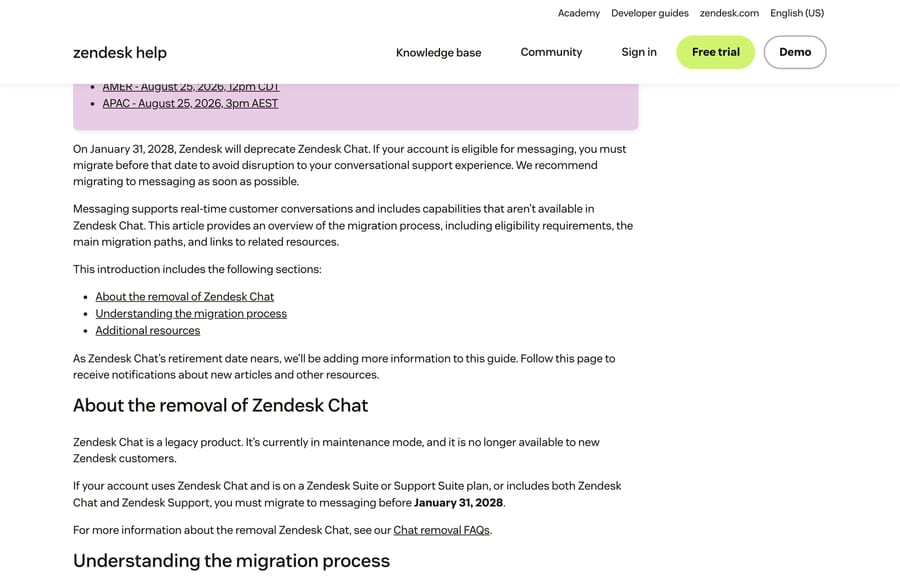
Three consequences worth planning around, from the Chat removal FAQs:
- You can migrate voluntarily at any time, or Zendesk will schedule you. Accounts are batched by complexity. If you have a CSM they drive it; if you do not, you get in-product banners, notifications and a migration tracker, and eventually an assisted migration on Zendesk's timetable rather than yours.
- Chat-only plans are a separate case. If you are on Chat Team, Chat Professional or Chat Enterprise without Support, you are not currently eligible to migrate to messaging and Zendesk says it will contact you later.
- You do not lose real-time. Zendesk's answer to "will I lose live chat functionality" is no: messaging can be configured as synchronous, asynchronous or both.
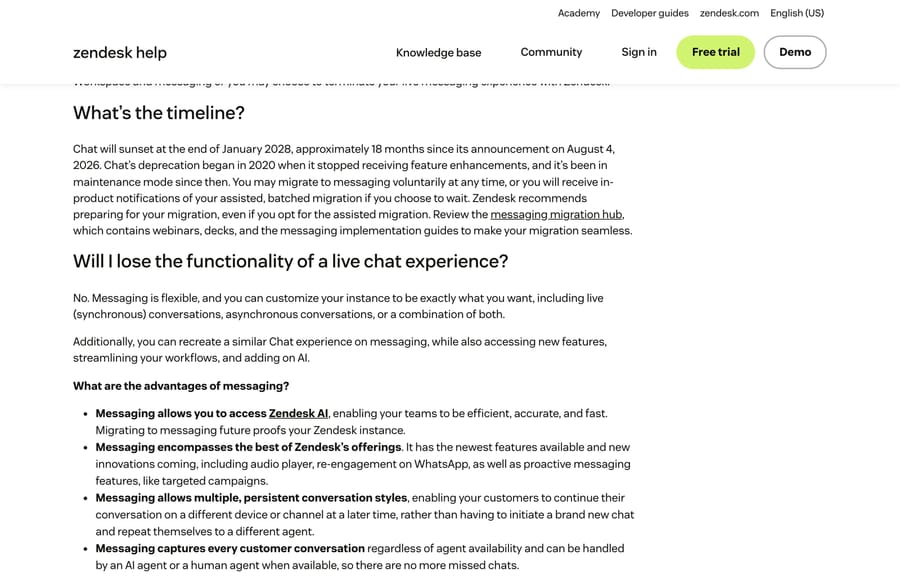
The incentive here is not hidden, and Zendesk states it plainly: messaging is what unlocks Zendesk AI, including AI agents, omnichannel routing, intelligent triage and Copilot. Removing Chat moves every remaining customer onto the surface where the AI products are sold. That is a reasonable business decision and it is also why the migration guidance reads like a sales page in places. The engineering facts underneath it are accurate.
What live chat actually is
The mental model is a phone call rendered as text. A visitor is on your site now, opens the widget, an agent picks up, and the two of them talk.
The session is fragile by design. Per Zendesk's article on when chats time out, in live chat the visitor controls the session and it ends when they close the browser window, minimize the chat, go idle long enough to time out, or explicitly pick End chat from the options menu. When the session dies, the context dies with it. Tomorrow's follow-up is a brand new chat with a new agent and no history.
What messaging actually is
Messaging has no customer-facing session the end user can end. The same article says so directly: messaging is asynchronous and there is nothing for the visitor to close.
In practice that means the thread keeps accumulating. A customer can open it on your website, continue from their phone, and pick it up in Messenger a week later, with both sides seeing the whole history. Agents are not pinned to a live window, because a reply ten minutes later is normal rather than a failure.
Channels, bots and what the agent sees
Channels. Live chat is a website channel with a legacy mobile SDK. Messaging covers the Web Widget, your help center, iOS and Android apps through the messaging SDK, and social channels including WhatsApp, Facebook Messenger and Instagram. Social DMs are a messaging capability; you cannot bolt them onto Chat.
Automation. Chat automates with chat triggers and agent shortcuts. Messaging carries messaging triggers, proactive messages and Zendesk's AI agents, and it is the only side of this comparison where Zendesk's AI products run at all. Our guide to Zendesk AI explained covers what those do.
The agent's screen. Both land in the Agent Workspace as tickets, next to email, so nobody works two consoles. The difference is continuity: a live chat ticket captures one session, while a messaging conversation keeps growing as a single ongoing ticket. If tickets themselves are new to you, start with how the Zendesk ticketing system works.
The migration checklist
This is the section the older version of this post lacked, and it is the part that decides whether your switch is boring or a bad Friday.
1. Check you are eligible
You need a Zendesk Suite or Support Suite plan, or Chat plus Support, and Agent Workspace must be active. If your account qualifies, Zendesk shows an in-product message on the Channels page in Admin Center.
2. Run Zendesk's self-assessment
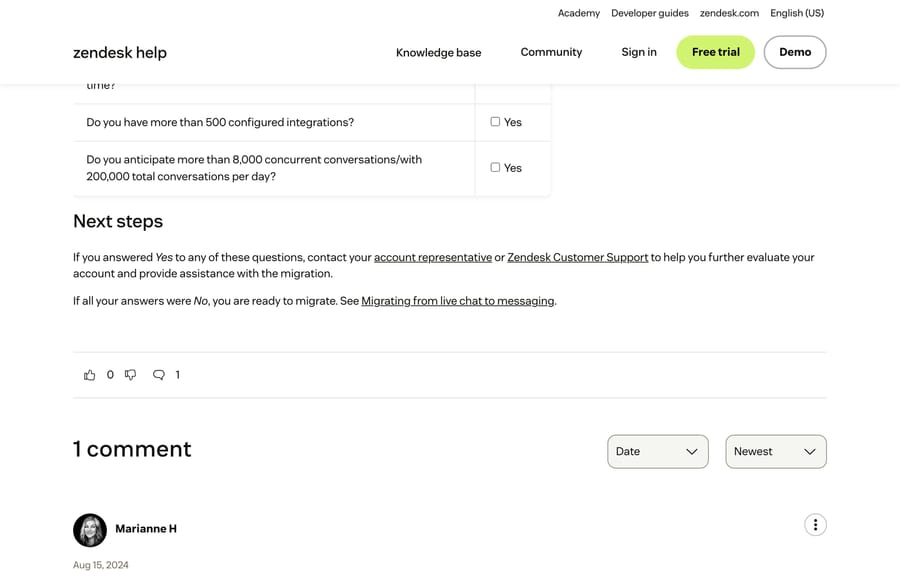
Zendesk publishes seven questions in its migration evaluation article. Answer yes to any of them and you are told to involve your account team rather than self-serve:
- Did you build your own widget on the Chat Web SDK?
- Do you authenticate your customers?
- Do you use conversion tracking?
- Do you use the incremental or real-time APIs?
- Will you have more than 1,000 messaging agents online at once?
- Do you have more than 500 configured integrations?
- Do you expect more than 8,000 concurrent conversations, or 200,000 conversations a day?
3. Get your help center in shape first
Zendesk recommends an active help center with at least 10 articles covering common questions before you migrate, and requires one if you want an AI agent to reference help center content. Migrating first and writing articles later gives you a bot with nothing to say.
4. Let the wizard do the mapping
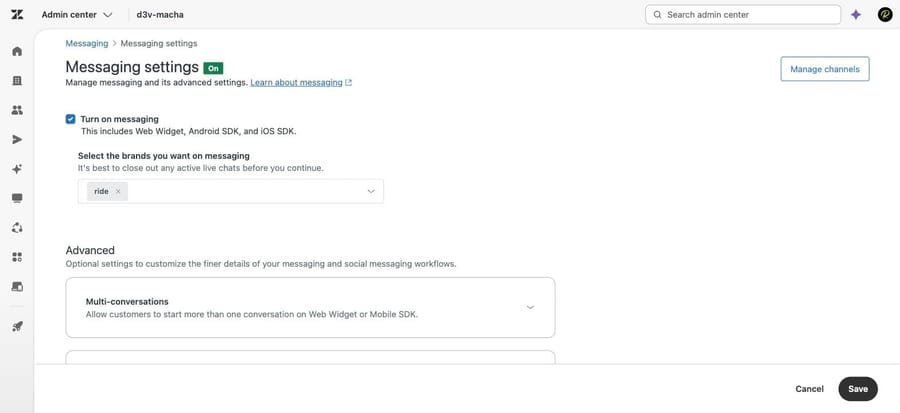
Zendesk shipped a voluntary migration setup wizard on April 16, 2026, rolling out through April 20. It fires when an account turns messaging on for the first time, or turns it back on after a hiatus, and it adapts to whether you have never migrated, or migrated previously and reverted. Zendesk's own description of the old process is worth quoting as a reason to use it: high friction, functional gaps where triggers and operating hours were missed or mismapped, and no clarity on migration status. The in-product entry point is Admin Center, Channels, Messaging, Messaging settings.
5. Review every migrated trigger, because they do not all arrive switched on
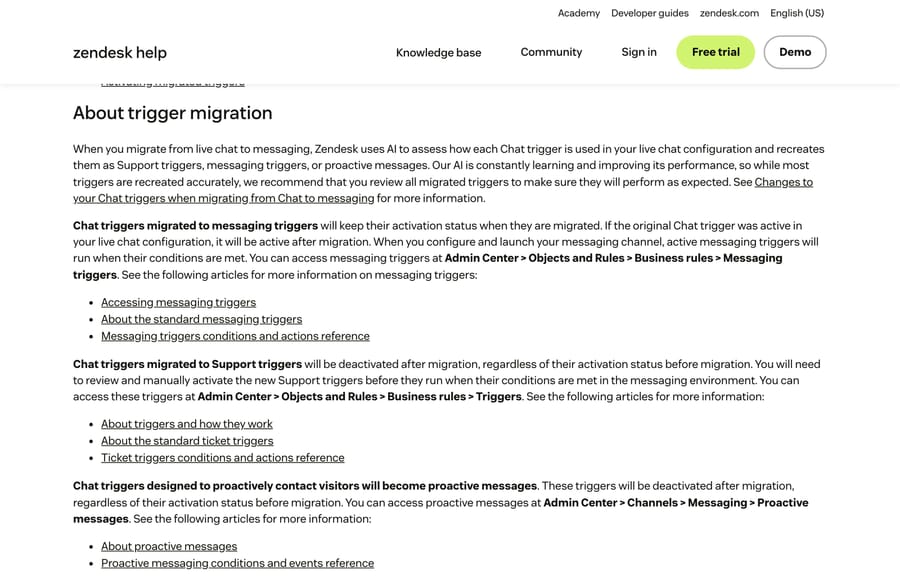
This is the detail that catches people. Zendesk uses AI to work out what each Chat trigger was for and recreates it as one of three things, with three different activation behaviors:
| Chat trigger becomes | Where it lands | Active after migration? |
|---|---|---|
| Messaging trigger | Admin Center › Objects and rules › Business rules › Messaging triggers | Yes, it keeps its previous state |
| Support trigger | Admin Center › Objects and rules › Business rules › Triggers | No, always deactivated |
| Proactive message | Admin Center › Channels › Messaging › Proactive messages | No, always deactivated |
So a proactive chat rule that opened the widget after 30 seconds on your pricing page is migrated and silent until somebody switches it back on. Zendesk also says its AI recreates most triggers accurately and recommends reviewing all of them, which is a polite way of saying check your work.
6. Pick your cutover window
Converting a Web Widget (Classic) to the messaging Web Widget ends any active live chats and leaves in-progress tickets pending. Zendesk's guidance is to close out active chats, take agents offline, and do it off-peak. Our Web Widget explainer covers what the front end looks like either way, and the messaging setup guide covers configuration after the switch.
7. Finish the setup afterwards
Messaging works the moment it is enabled, which is not the same as being configured. The post-migration list is an out-of-office message, an AI agent design, email continuation for customers who want to switch channels, CSAT, and messaging reporting.
Which should you use?
For any new setup: messaging, and you probably cannot choose otherwise, since Chat is closed to new customers.
For an existing Chat account: migrate on your own schedule before January 31, 2028, and go early if your configuration is complex. The accounts that will struggle are the ones with hand-built widgets on the Chat Web SDK, heavy proactive-chat setups and deep API integrations, which is exactly what Zendesk's self-assessment is screening for. Those need a plan and an account team, not a Friday afternoon.
Three things people still get wrong
- "Messaging means losing real-time chat." It does not. Messaging runs synchronously when both people are present; it just refuses to die when one of them leaves.
- "Messaging is only for social apps." Social is one channel among several. The website widget is a messaging channel too.
- "I will set up Chat, it is what I have heard of." Chat is closed to new accounts and retires in January 2028.
Where an AI agent layer fits
Zendesk's own AI agents run on messaging, which is a large part of why Chat is being retired. An independent agent layer is a different shape: it works on the ticket rather than the widget, so it covers email and messaging with the same logic and the same knowledge.
Macha on Zendesk reads the whole ongoing thread, pulls from your help center and connected systems, answers the routine questions, and hands off to a human with the full context attached. Everything it touches stays an ordinary Zendesk ticket. It suits teams already running Zendesk whose repeat questions arrive across more than one channel, and it is the wrong fit if your volume is purely synchronous website chat that a person answers in 30 seconds.
On cost, Macha bills per ticket: one thread with one person is one charge however many replies it takes, from $299 a month for 750 tickets on published pricing, with setup and monitoring by our team included and $50 of free usage to start. That billing unit matters next to a per-resolution model, which pays the vendor more the more conversations you fail to prevent.
How we researched this
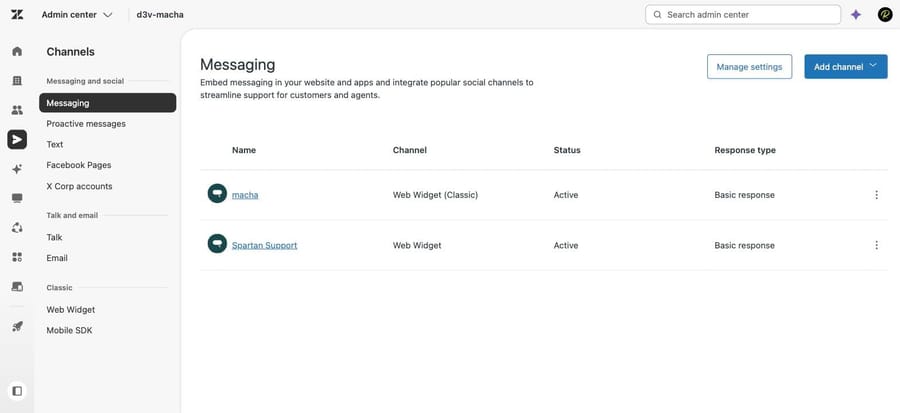
We checked every fact here against Zendesk's current documentation on September 20, 2026: the Chat removal overview and FAQ (both edited August 10, 2026), the migration article (April 29, 2026), the migration evaluation checklist, the migration setup wizard announcement (April 16, 2026), the trigger migration article (July 28, 2026), the widget migration walkthrough (August 29, 2026) and the chat timeout article (July 13, 2026). Four of the six screenshots are of those pages, captured the same day. The other two come from our own Zendesk sandbox, d3v-macha, on September 20, 2026: the messaging settings page and the channel list, which still carries one Web Widget (Classic) alongside one Web Widget. We didn't run a migration ourselves.
Frequently asked questions
Is Zendesk Chat being discontinued? Yes. Zendesk announced Chat's removal on August 4, 2026 and will deprecate it on January 31, 2028. Chat has been in maintenance mode without feature enhancements since 2020 and is no longer sold to new customers. Eligible accounts must migrate to messaging before that date.
What is the difference between Zendesk messaging and live chat? Live chat is a real-time session with a beginning and an end; it closes when the visitor leaves, goes idle or clicks End chat. Messaging is a persistent asynchronous thread with no customer-facing session, so the conversation resumes later on any device or channel with its history intact.
Does Zendesk messaging support real-time chat? Yes. Zendesk's own FAQ says messaging can be configured as live synchronous conversations, asynchronous conversations, or a mix. You keep immediacy and add continuity.
How long does a Zendesk Chat to messaging migration take? It depends on what you have built. A simple account can run the setup wizard and be live the same day, since messaging is functional as soon as it is enabled. Accounts with a custom Chat Web SDK widget, authentication, conversion tracking, more than 500 integrations or very high concurrency are told by Zendesk to involve an account representative first.
Do my Chat triggers survive the migration? They are converted, not preserved. Zendesk uses AI to recreate each one as a messaging trigger, a Support trigger or a proactive message. Only the messaging triggers keep their previous activation status; Support triggers and proactive messages arrive deactivated and need switching on by hand.
What happens to live chats when I switch the widget? Converting a Web Widget (Classic) to the messaging Web Widget ends any active live chats, and in-progress tickets stay pending. Close out active chats, take agents offline and do the swap off-peak.
Can I go back to live chat after migrating? Some accounts have. Zendesk's wizard has specific handling for "legacy reverts", accounts that migrated, turned messaging off and later turned it back on, and it preserves the settings that worked the first time. With deprecation set for January 2028, reverting is a pause rather than a decision.
Do messaging and live chat both create tickets? Yes. Both appear in the Agent Workspace as tickets alongside email. A live chat ticket holds one session; a messaging conversation stays a single ticket that keeps accumulating context across channels and days.
Sources: About the removal of Zendesk Chat and migration to messaging · Frequently asked questions for Chat removal · Migrating from live chat to messaging · Evaluating your account for migration · Announcing enhanced migration setup wizard · Migrating triggers with the live chat-to-messaging migration automation · Migrating your live chat widget to the messaging Web Widget · What is the difference between Chat and messaging? · Am I using live chat or messaging? · When do chats time out?
Add AI agents to your Zendesk
Macha reads the ticket, drafts the reply and takes the action, inside the Zendesk you already run.