





 Shopify
 Stripe
 Slack
Slack Notion
 Google Workspace
 Confluence

How Do You Find Duplicate Webhooks and Dead Triggers in Zendesk? (2026)


Zendesk's trigger list always filters to one status, so an account holding 266 triggers can look like it holds 4, and nothing flags two webhooks sharing a name. Two API calls give you the real totals, and each webhook's Activity log tells you whether a duplicate is live or abandoned.
Key takeaways
- Finding dead Zendesk triggers means counting through the API with active=true and active=false, because the Admin Center trigger list must filter to one status and never shows the total.
- Our Zendesk sandbox held 266 triggers with 4 active, and 255 of the 266 were notification_webhook actions written by our own integration rather than by an admin.
- Zendesk lets webhooks share a name, and our sandbox had three named Macha - Article Updates and two named Macha - New Ticket Trigger, each with its own endpoint.
- Before deleting a duplicate Zendesk webhook, check its Activity view and search trigger actions for its id, since a webhook connected to a trigger carries no event subscriptions.
- Zendesk caps accounts at 7,000 active ticket triggers, a limit that includes all standard and custom ticket triggers that are active.

To find dead triggers and duplicate webhooks in Zendesk, count triggers through the API with ?active=true and ?active=false, list webhooks with GET /api/v2/webhooks and group them by name, then check each duplicate's Activity log before deleting anything. Admin Center can't do this for you, because the trigger list always filters to one status and never shows the total. On our own sandbox that hid 262 inactive triggers behind a list that read 4.
| Check | Where | What it tells you |
|---|---|---|
| Total trigger count | GET /api/v2/triggers.json?per_page=1, read count | The number the Admin Center list never shows |
| Active vs inactive split | Same endpoint with active=true / active=false | How much of the rule set is switched off |
| Duplicate webhooks | GET /api/v2/webhooks, group by name | Names used more than once (Zendesk allows it) |
| Is a webhook in use? | Webhook Activity view (seven days) | Invocations, or none |
| Which trigger calls it? | Trigger actions, searched for the webhook id | Whether deleting it breaks a live rule |
| Is a trigger firing? | Triggered column (Professional and Enterprise) | Fires in the last 1 hour, 24 hours, 7 days or 30 days |
What did the audit find?
Two API calls produced the whole picture:
GET /api/v2/triggers.json?per_page=100     → count: 266
GET /api/v2/webhooks?page[size]=100        → 6 webhooks
266 triggers. 4 active.
Be clear about what that instance is before drawing any lesson from it, because we went and checked. It is our own Zendesk demo sandbox, and the bulk of those 262 inactive triggers are notification_webhook residue from testing our own integration, which is why every webhook in the screenshots below is named Macha - something. So the number demonstrates a counting method. It is no portrait of how a real support desk accumulates rules. We measured the actions before writing any of this: 255 of the 266 are notification_webhook, which is what an integration writes rather than an admin. What transfers is the gap between the two counts and the two API calls that expose it. The 262 itself transfers nothing.
With that said: everything except those four was switched off and left in place. The trigger list in Admin Center defaults to a Status Active filter, so the day-to-day view showed 4 and the other 262 sat one dropdown away, invisible unless you went looking.
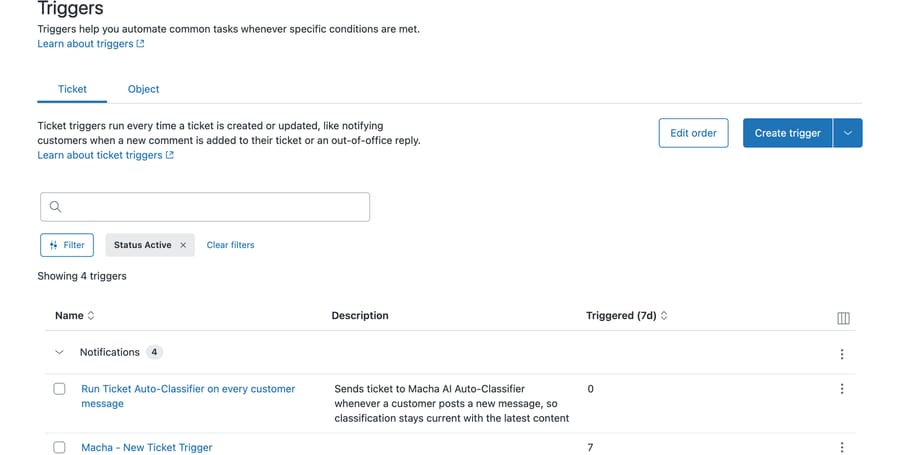
The webhooks were more interesting.
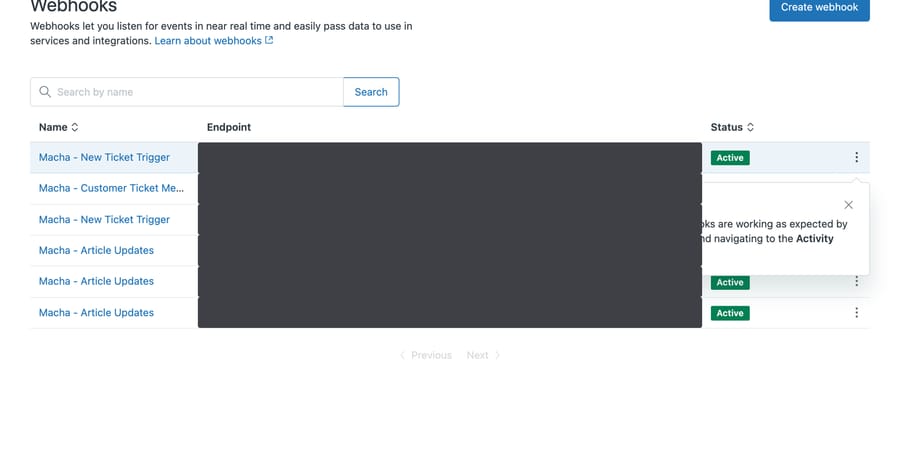
Six webhooks, all Active. Three are named Macha - Article Updates. Two are named Macha - New Ticket Trigger. Each points at its own distinct endpoint id, so these aren't display artifacts. Zendesk's webhook API requires a name, and Zendesk states plainly that "the name doesn't need to be unique", so nothing prevents this.
We then checked whether they were actually doing anything, which is the part most audit advice skips. All three Article Updates webhooks reported zero invocations in the seven-day window the activity log covers, and none of the four active triggers references them. So on this instance they aren't duplicating traffic. They're abandoned: live, enabled, wired to nothing.
That distinction matters for what you do next, and it's only visible if you look.
What does a duplicate webhook cost?
There are two cases and they need different responses.
If duplicates are wired to triggers on the same event, the receiving system gets the payload once per webhook. An endpoint that writes a note writes three. An endpoint that starts a workflow starts three. Zendesk exposes a per-webhook Activity view and a Subscriptions view, so you can confirm this from inside Admin Center, well before someone downstream notices duplicated output.
If they're wired to nothing, which is what we found, they cost no runtime at all. What they cost is comprehension: six rows where two would do, and no way to tell from the list which two matter.
A word on what authentication: none does and does not mean, because it is easy to read as "open endpoint". It describes the credentials Zendesk attaches to the outbound call, and nothing about what your receiver accepts. Zendesk signs every webhook with an HMAC-SHA256 digest in X-Zendesk-Webhook-Signature, so a receiver can verify origin whether or not an auth header is set. Whether yours checks that signature is a question about your code, and it is worth answering.
The same logic covers inactive triggers generally. They don't execute. They make the account harder to reason about, because anyone auditing has to read every rule to find the 4 that matter, and anyone adding a rule has to be confident they aren't rebuilding one of the 262.
Zendesk shows trigger usage, the Triggered column, on Professional and Enterprise plans, so it isn't as though usage data doesn't exist. Read the header before you read the number: the window is switchable between 1 hour, 24 hours, 7 days and 30 days, and on our instance it was showing Triggered (7d). A rule that fires monthly reads 0 in that window and 1 in the widest, so the column answers a narrower question than it appears to. What's missing is anything that totals across filter states, detects a duplicate, or objects to two webhooks sharing a name. The incentive behind that asymmetry is ordinary vendor economics rather than anything sinister. Zendesk optimizes for the thing it can measure, and adoption of a feature is measurable in a way restraint never is. A product team is rewarded for making rule creation frictionless and has no particular reason to build the screen that tells you 262 of your rules do nothing. The effect on your side is that the cheapest action is always to add one more, and the cost only becomes visible when you go looking with the API.
How do you count triggers and webhooks on your own account?
The trigger count comes back in the response envelope, so you don't have to page through everything:
GET /api/v2/triggers.json?per_page=1Read count from the response. For the active/inactive split, ask for each side separately with ?active=true and ?active=false, or page through with next_page. Do not pull a single page and group locally: on this account that reads 100 of 266 and reports a split that is simply wrong.
GET /api/v2/triggers.json?per_page=100Then count active: true against active: false. See our Zendesk API guide if you haven't used these endpoints before.
For webhooks, list them and group by name to surface duplicates:
GET /api/v2/webhooks?page[size]=100Any name appearing more than once is worth opening. Then check whether it's actually doing anything: the webhook API supports filter[status] and sort, and each webhook has an Activity view in Admin Center showing recent invocations. A duplicate with traffic and a duplicate with none are different problems.
Why can't the trigger list show every trigger at once?
Two habits make the interface tell you more.
Switch the Status filter, and know what it will not do. The trigger page applies Active by default, which is why ours read 4. Open Filter, choose Inactive, apply, and the same page reads 262.
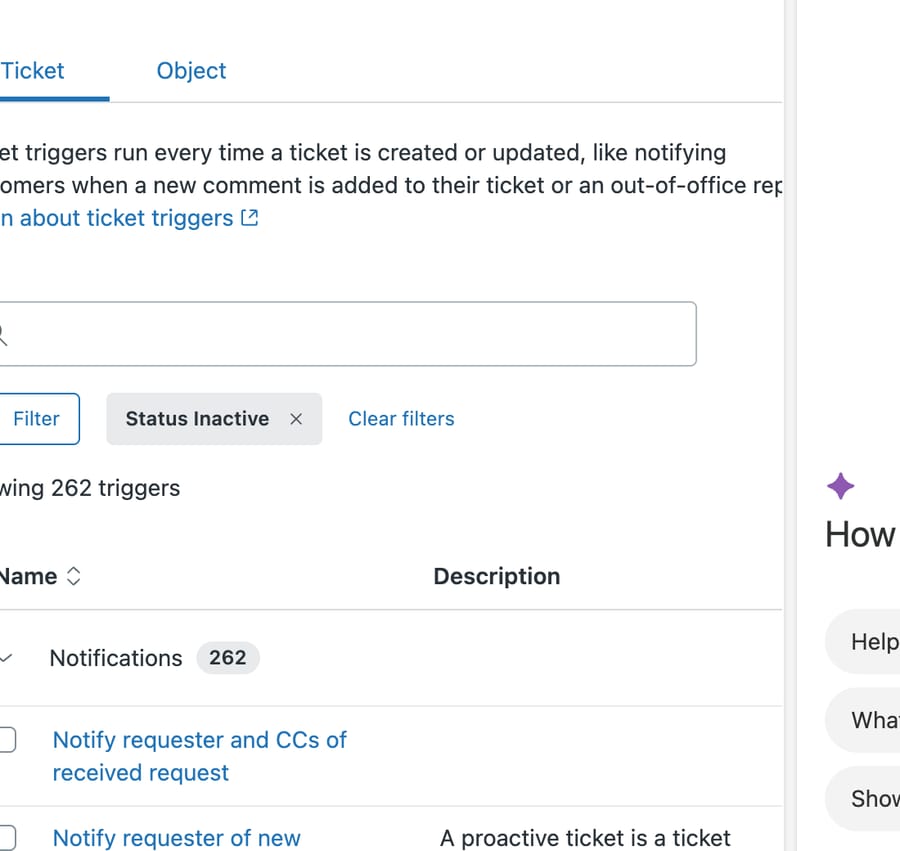
What you cannot do is see all 266 at once. The status filter is mandatory and binary. Zendesk documents it plainly: "You must select either active or inactive. If you clear filters neither will be selected, and no trigger results can returned." The panel takes further condition and action filters on top, but there is no third status option and no "all" view. So the interface will show you either half and never the total. That is the concrete version of the complaint above: you get 4, or you get 262, and the only place the two are added together is a query you write yourself.
Check your views too, since the same default-filter habit applies to them. Check categories. On our sandbox everything sat in one category, Notifications, which is what happens when rules get created programmatically and nobody assigns one. Categories are the only grouping the interface offers, so an account with everything in one bucket has no structure to navigate by.
Neither is a setting to change. They're just the difference between the view the interface hands you and the state of the account.
Should you delete duplicate webhooks and inactive triggers?
Duplicate webhooks: check invocations before you delete. If webhooks are new to you, our webhooks explainer covers what they are before this covers what goes wrong with them. Two webhooks with the same name and different endpoints may both be wired to live triggers. Delete the wrong one and you silently break an integration, while the trigger that referenced it keeps firing against a webhook that's gone. To find out which triggers reference a webhook, read the triggers rather than the webhook. A webhook connected to a trigger carries no event subscriptions, so the Subscriptions view will not tell you. Zendesk is explicit about the exclusivity: "A webhook that's connected to a trigger or automation can't subscribe to Zendesk events." Pull the rules and grep their actions for the webhook id:
# Walk every page: on a 266-trigger account one page gets you 100 of them,
# which undercounts the account.
url="https://$ZD/api/v2/triggers.json?per_page=100"
while [ -n "$url" ] && [ "$url" != "null" ]; do
  page=$(curl -s -u "$EMAIL/token:$TOKEN" "$url")
  echo "$page" | jq -r --arg id "$WEBHOOK_ID" '
    .triggers[]
    | select(any(.actions[]?; .value? | tostring | contains($id)))
    | [.id, (.active|tostring), .title] | @tsv'
  url=$(echo "$page" | jq -r '.next_page')
done
Two details there earn their keep. any(...) wraps the condition because a bare select() over a generator re-emits the trigger once per matching action, so a rule naming the webhook twice prints twice. And the loop follows next_page, because 100 is the per-page ceiling.
Inactive triggers: deactivated is already safe. They aren't running. The reason to delete them is comprehension rather than risk, so there's no urgency and no need to be brave about it. Delete in batches you can describe.
Anything you cannot attribute: leave it and write it down. A rule nobody recognizes is one whose purpose has been forgotten. That is different from having no purpose. The audit's job is to produce a list, not to act on all of it in one sitting.
Re-count quarterly. Both figures only move one direction on their own.
Why does one Zendesk event sometimes arrive twice?
Everything above is about duplicate configuration. There is a second reading of the phrase, and the fix for it is different.
Zendesk delivers webhook actions on a best-effort basis: "Zendesk makes a best effort to deliver actions to webhooks a single time. However, we can't guarantee it. It is possible for a webhook to be invoked by the same action multiple times or, under certain circumstances such as the circuit breaker being triggered, to not deliver an event at all." Retries sit on top of that.
So a receiver seeing the same event twice is not necessarily looking at two webhooks. It may be one webhook delivered twice. Zendesk's guidance is to make the downstream action idempotent and to use the request signature to spot repeats, which is a change in your code and not a cleanup in Admin Center. Deduplicating configuration will not fix it, and neither will the audit above.
One ceiling worth knowing while you count: Zendesk caps you at 7,000 active ticket triggers, "This includes all standard and custom ticket triggers that are active". Sprawl has a hard edge, and it sits a long way past the point where comprehension fails.
Common questions
How do I see all my Zendesk triggers, not just active ones? Filter the trigger list to Inactive and read that count alongside the Active one, or call /api/v2/triggers.json, which returns both in a single response. Zendesk lists active triggers by default.
Can two Zendesk webhooks have the same name? Yes. The API requires a name but documents no uniqueness constraint. We found three sharing one name, each with its own endpoint id.
Do duplicate webhooks send duplicate payloads? If each is attached to a trigger firing on the same event, yes. The receiving system gets the payload once per webhook.
Does an inactive trigger slow Zendesk down? No. Inactive rules don't execute. The cost is that they make the account harder to reason about.
What is the difference between triggers and automations here? Triggers fire on events, automations run on time. Both accumulate the same way. See triggers vs automations for the distinction.
Can an AI agent keep the rule set smaller?
Rule sprawl comes from a real constraint: a trigger can only act on conditions you can express in advance, so covering more situations means writing more rules, and they're cheaper to add than to retire.
Macha runs on top of the Zendesk you already have. It reads the ticket, including custom field values and attachments, and can classify it, write fields back, add an internal note, or post a public reply, using your existing triggers and webhooks as the entry point. The relevance to sprawl is narrow but real: one agent reading a ticket and deciding covers situations that'd otherwise need a rule each, so the standing rule set stays smaller. It suits teams whose rules already work and whose volume is the problem, which is a different complaint from sprawl. Setup runs through the Zendesk integration, and billing is per ticket, so one thread with one person is one charge however many replies it takes.
Start your free trial and connect your Zendesk in a few minutes.






