Intercom
 Shopify
 Stripe
 Slack
Slack Notion
 Google Workspace
 Confluence

Automations vs. Triggers in Zendesk: What's the Difference


Triggers and automations are the two workhorses of Zendesk's business rules, and they look almost identical when you open them in admin — same conditions-and-actions builder, same kinds of fields, often the same actions. So it's no surprise that "what's the difference between Zendesk automations and triggers" is one of the most-Googled questions new admins have. The short version is one sentence: triggers run on events; automations run on time. Get that distinction wrong and you'll either build a rule that never fires, or one that hammers your tickets every hour. Get it right and the two cover almost every "when X happens, do Y" workflow you'll ever need.

This guide breaks down the real difference, with the exact mechanics verified against Zendesk's own documentation. We'll put the core distinction in a table up front, walk through when to reach for each (with concrete examples), show how they work together on a single ticket, and flag the gotchas — especially the hourly-cadence trap that catches everyone the first time. Both of these are types of Zendesk business rules, so if you want the bird's-eye view of macros, views, triggers, automations, and SLAs together, start there; this post zooms in on the two that get confused most.
The core difference, in one table
Here's the whole thing at a glance. Everything else in this post is detail underneath these two rows.
| Triggers | Automations | |
|---|---|---|
| Fires on | An event — a ticket being created or updated | The passage of time — a time-based condition coming true |
| When it runs | Immediately, the instant the ticket changes | On a schedule — Zendesk checks roughly every hour |
| Needs a time condition? | No | Yes — it must reference time elapsed (e.g. "hours since solved is 24") |
| Runs on closed tickets? | n/a (closed tickets aren't being updated by agents) | No — automations skip closed tickets entirely |
| Typical job | Instant reactions: auto-reply, route, set priority, notify | Delayed/follow-up actions: reminders, escalations, auto-close |
| Canonical example | "When priority is Urgent, notify the on-call group" | "Close ticket 4 days after status is set to solved" |
In Zendesk's own words, a trigger "runs every time a ticket is created or updated and takes action if the changes in the ticket match the conditions," while automations "run every hour on all your tickets that are not closed." That single difference — event vs. clock — is the thing to internalize.
What a trigger is (event-based)
A trigger watches for something happening to a ticket and reacts on the spot. The moment a ticket is created or updated — a new email arrives, an agent changes the status, a field is set, a tag is added — Zendesk runs your triggers in order and any whose conditions match fire immediately. There's no waiting and no schedule; the action is effectively instant.
Because they're event-based, triggers are how you handle anything that should happen right now:
- Auto-acknowledge new tickets — send the "we got your request" email the second a ticket is created.
- Route on arrival — if the subject contains "refund," assign to the Billing group and add a
refundtag. - Set priority from signal — if the requester is on a VIP organization, set priority to High immediately.
- Notify on escalation — when priority changes to Urgent, ping the on-call group in Slack/email.
If you want the full builder walkthrough — conditions, actions, ordering, and the "any vs. all" logic — see Zendesk triggers explained. The one thing to remember here: a trigger only ever runs because the ticket changed. If nothing happens to a ticket, no trigger touches it.
What an automation is (time-based)
An automation is the time-based cousin. Instead of reacting to a change, it acts when time has passed. Zendesk runs all your automations, first to last, on a recurring cycle — roughly once an hour — checking every non-closed ticket to see whether any now meet a time-based condition. When one does, the automation fires its actions.
That's why every automation must include a time-based condition — something that measures elapsed time, like "Hours since solved (calendar) is 24" or "Hours since created is greater than 8." Without a measure of time, there's nothing for the hourly check to evaluate, and the rule isn't a valid automation. This is the single biggest conceptual difference from triggers: a trigger is started by an event; an automation is started by the clock catching up to a condition you set.
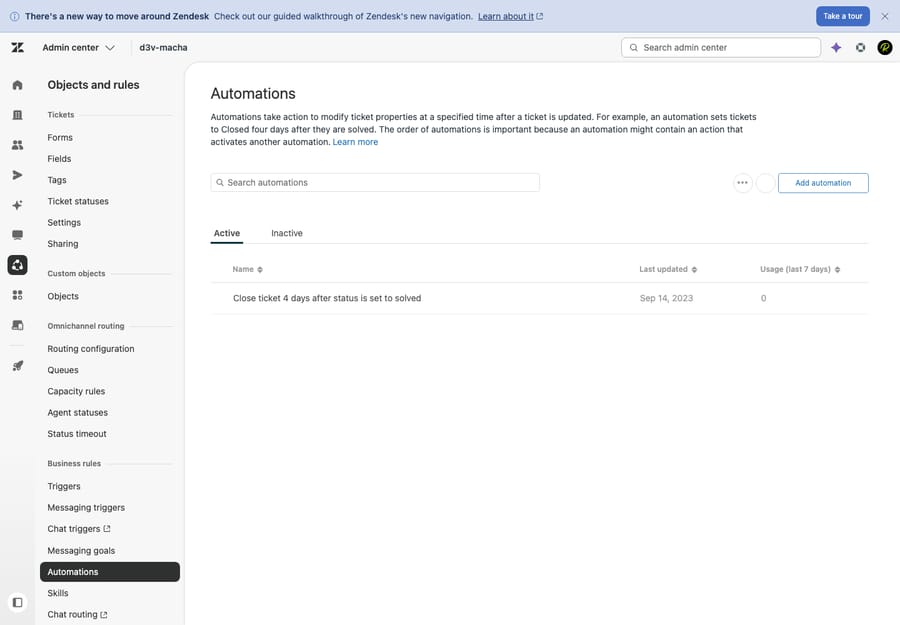
The cleanest example is the one Zendesk ships by default: "Close ticket 4 days after status is set to solved." Its time condition is "Hours since solved is 96" (four days). Every hour, Zendesk looks at solved tickets, finds the ones that have been solved for at least 96 hours, and closes them. Nobody clicks anything; time does the work.
Typical jobs for automations:
- Auto-close solved tickets — the default 4-day close, so resolved work doesn't linger forever.
- Pending reminders — if a ticket has been Pending (waiting on the customer) for 24 hours, send a gentle nudge; after 72 hours with no reply, solve it.
- SLA-style escalation — if a ticket has been Open and unassigned for 8 business hours, bump priority and notify a lead.
- Inactivity follow-ups — if no agent has touched a High-priority ticket in 4 hours, flag it.
Two of those actions — Pending and Solved — depend on ticket statuses, which is why automations and statuses are so tightly linked: most time-based rules key off "how long has this ticket been in this status."
When to use which
The decision rule is short:
- Does it need to happen the instant something changes? → Trigger. New ticket created, status flipped, field set, tag added — anything where "now" matters.
- Does it need to happen after a delay, or only once time has elapsed? → Automation. Follow-ups, reminders, escalations, and auto-close all live here.
A useful gut check: if your sentence contains the word "when" ("when a ticket is created…"), you probably want a trigger. If it contains "after" or "if it's been X hours/days" ("after 3 days with no reply…"), you want an automation.
| You want to… | Use a… | Because |
|---|---|---|
| Email a confirmation the moment a ticket arrives | Trigger | It's tied to the create event |
| Assign Urgent tickets to on-call instantly | Trigger | Reaction must be immediate |
| Nudge a customer 24h after going Pending | Automation | It depends on elapsed time |
| Auto-close tickets 4 days after Solved | Automation | Pure time-based action |
| Escalate a ticket untouched for 8 hours | Automation | "Untouched for X hours" = time |
How they work together
In practice you rarely choose one; triggers and automations tag-team across a ticket's life. A single Pending-reminder workflow is the classic pattern:
- Trigger (event): an agent sets the ticket to Pending and replies asking for more info. The instant they hit submit, a trigger could tag the ticket
awaiting-customer. - Automation (time): 24 hours later, with the ticket still Pending and no customer reply, an automation sends a polite reminder and adds a
reminder-senttag. - Automation (time): 72 hours after that with still no reply, a second automation sets the ticket to Solved.
- Automation (time): four days after Solved, the default close automation closes it for good.
- Trigger (event): if the customer does reply at any point, that update is an event — a trigger (or Zendesk's built-in behavior) flips Pending back to Open and the agent picks it up again.
Notice the rhythm: triggers handle the moments of change, automations handle the gaps in between. Together they let a ticket move itself through its lifecycle with no one babysitting it.
The hourly-cadence caveat (read this before you build one)
This is where new admins get burned, so it's worth being precise.
Automations are not real-time. Because the cycle runs roughly hourly, an automation can fire up to about an hour after its condition technically becomes true. "Close 4 days after solved" might actually close a ticket 4 days and 40 minutes after it was solved. That's fine for reminders and closes; it's not fine if you need split-second precision. For anything that must happen the instant a ticket changes, use a trigger.
An automation must change something to stop re-running. Since the automation re-checks every non-closed ticket every hour, a rule whose condition stays true would fire over and over — sending the same reminder email hour after hour. Zendesk prevents this by requiring every automation to include at least one action that nullifies one of its own conditions (so the ticket no longer matches next cycle), or a condition that can only ever be true once. The standard pattern is a tag: the reminder automation requires reminder-sent to be absent in its conditions and adds reminder-sent as an action — so after it fires once, the ticket fails the condition and is skipped on every future pass. If you forget this, you'll get a runaway automation that spams customers; if you build it right, it fires exactly once.
Automations ignore closed tickets. The hourly pass only looks at tickets that aren't closed, so don't expect an automation to act on a finalized ticket.
Common mistakes
- Building a "trigger" that needs to wait. If your rule is really "after 2 days, do X," a trigger can't do it — there's no event two days from now. It has to be an automation.
- Forgetting the time condition. An automation with no elapsed-time condition won't validate (or won't behave). Every automation needs something like "Hours since…".
- Forgetting the off-switch. No condition-nullifying action (or once-only condition) = the automation re-fires every hour. Add the
reminder-sent-style tag. - Expecting instant results from an automation. It can lag up to ~an hour. Don't use one where timing must be exact.
- Confusing automations with macros. A macro is a manual, one-click bundle an agent applies on demand — it's not automatic at all, despite the name. Automations and triggers run on their own; macros wait for a human.
- Stacking too many overlapping rules. With triggers running on every update and automations sweeping hourly, conflicting rules can fight each other. Keep them few, named clearly, and ordered deliberately.
Where AI fits alongside the rules
Triggers and automations are brilliant at the predictable — "if this exact condition, do this exact thing." What they can't do is read a messy customer email, figure out what the person actually wants, and write a useful answer. A trigger can route a ticket containing the word "refund," but it can't tell an angry refund request from a routine one, or draft the reply.
That's the gap an AI agent layer like Macha fills. It sits on top of your existing Zendesk — it's not a help desk and not a replacement for it — and handles the judgment calls your rules can't: reading intent, classifying and triaging nuanced tickets, drafting replies for an agent to approve, and resolving routine requests end to end, while anything ambiguous stays a normal ticket for a human. The honest framing: keep your triggers and automations doing the deterministic plumbing they're great at, and let the AI handle the parts that need understanding rather than a hard-coded condition.
Worth knowing on cost, since it differs from rules (which are free): Macha bills per ticket — one conversation, charged once, whether the agent summarizes, tags, routes, drafts or resolves, and whichever model you pick — not per resolution, so the bill never hangs on an outcome definition you don't control. If you want to see where rules end and AI begins, we walk through it in how to automate Zendesk with AI. You can also try it free — $50 of free usage, no credit card required.
Frequently asked questions
What's the difference between automations and triggers in Zendesk? Triggers are event-based: they run the instant a ticket is created or updated and act if the change matches their conditions. Automations are time-based: they run on a schedule (Zendesk checks roughly every hour) and act once a time-based condition is met, such as "24 hours since the ticket was solved." Triggers handle instant reactions; automations handle anything that should happen after a delay.
What is a Zendesk automation? A Zendesk automation is a time-based business rule that runs automatically on a recurring cycle — about once an hour — checking your non-closed tickets and performing actions when a time condition comes true. The default example is "Close ticket 4 days after status is set to solved." Every automation must include a condition that measures elapsed time.
How often do Zendesk automations run? Zendesk runs all automations, first to last, roughly once per hour on every ticket that isn't closed. This means automations aren't real-time — an action can fire up to about an hour after its condition technically becomes true.
Why does my Zendesk automation keep firing repeatedly? Because its condition stays true on every hourly pass. Every automation needs at least one action that cancels one of its own conditions (or a condition that can only be true once) so the ticket stops matching after it fires. The common fix is to add a tag like reminder-sent as an action and require that tag to be absent in the conditions.
Can a trigger do something after a time delay? No. Triggers only run in response to a ticket event (create or update), so they can't "wait." Anything that must happen after time has passed — a follow-up, an escalation, an auto-close — needs an automation.
Do automations run on closed tickets? No. The hourly automation pass only evaluates tickets that aren't closed, so a closed ticket is never acted on by an automation.
The bottom line
Triggers and automations look the same in the builder, but they answer different questions. Triggers fire on events — the instant a ticket is created or updated — and are your tool for immediate reactions: auto-replies, routing, priority, notifications. Automations fire on time — Zendesk sweeps your non-closed tickets about once an hour — and are your tool for anything that happens after a delay: reminders, escalations, and the classic "close 4 days after solved." Remember the two rules that trip everyone up — every automation needs a time condition, and it must change something to avoid re-firing — and you'll build rules that do exactly what you intend. From here, go deeper on triggers, macros, and ticket statuses, or step back to the business rules overview to see how the whole system fits together.
Mechanics verified against Zendesk's official documentation, June 2026. Zendesk updates its product periodically — confirm specifics in your own account before relying on them.
Add AI agents to your Zendesk
Macha reads the ticket, drafts the reply and takes the action, inside the Zendesk you already run.