





 Shopify
 Stripe
 Slack
Slack Notion
 Google Workspace
 Confluence

How Do You Auto-Tag and Categorize Freshdesk Tickets with AI in 2026?


Freshdesk tickets can be tagged automatically with free keyword rules, with Freddy Auto Triage on Pro or Enterprise plus the Copilot add-on, or with an AI agent layer that tags by intent. Each method fits a different gap, and the wrong tag breaks both routing and reporting.
Key takeaways
- Freshdesk can auto-tag tickets three ways: free keyword automation rules, Freddy Auto Triage, and an AI agent layer that tags on any concept described in plain language.
- Freddy Auto Triage needs Freshdesk Pro or Enterprise plus the Freddy AI Copilot add-on at $29 per agent a month, and Freshworks recommends 2,000 tickets of history.
- Freddy Auto Triage predicts Priority, Group, Type and custom or nested dropdown fields, and Freshdesk automation rules always override its suggestions on the same field.
- Freshdesk keyword rules under Admin, Workflows, Automations tag tickets for free but miss paraphrases such as money back when the rule is built around refund.
- Macha tags Freshdesk tickets through its Update Tags and Update Priority actions at about $0.40 a ticket from $299 a month, with setup by the Macha team and a dedicated success manager included.

Freshdesk can auto-tag and categorize tickets three ways: free keyword rules in Admin → Workflows → Automations, Freddy Auto Triage, which predicts Priority, Group, Type and dropdown fields once you have about 2,000 tickets of history and pay for the $29 per agent Copilot add-on on Pro or Enterprise, and an AI agent layer that tags on any concept you describe in plain language. Most desks end up combining the first two with the third for anything their field schema doesn't cover.
| Native keyword rules | Freddy Auto Triage | AI agent layer (Macha) | |
|---|---|---|---|
| How it decides | Exact keyword match | ML on your historical tickets | Reasoning over intent, in plain language |
| Handles new phrasing | No | Yes | Yes |
| What it can tag | Any tag/field, but only on keywords | Priority, Group, Type, dropdowns, nested fields | Any concept you can describe |
| Setup | Rules per keyword | Enable + ~2,000-ticket history | Done for you by the Macha team, with a dedicated success manager, included |
| Plan/cost | Included | Pro ($55) or Enterprise ($89) + Copilot at $29/agent/mo | Per ticket, about $0.40, from $299/mo for 750 (pricing) |
| Best for | Obvious, high-frequency keywords | Structured field classification at scale | Open-ended, intent-based tagging + follow-on actions |
Why is auto-tagging really a data-quality problem?
Before touching a single setting, it helps to be clear about what you're actually optimizing. Auto-tagging isn't busywork you're trying to eliminate. It's the input to two systems that matter a lot: routing (getting the ticket to the right group fast) and reporting (knowing what your customers are actually contacting you about). If the tag is wrong, both break downstream. A misfiled ticket sits in the wrong queue and blows its SLA; a mislabeled category quietly inflates one report and starves another.
So the real question isn't "how do I add tags automatically"; it's "how do I add tags that are accurate enough to trust for routing and reporting." That framing is what separates the three approaches below.
How do you auto-tag Freshdesk tickets with native keyword rules?
Freshdesk has always been able to tag tickets automatically without any AI, using its automation engine. The classic tool is the ticket-creation automation (historically "Dispatch'r"), which runs the moment a ticket is created and applies actions when conditions are met.
To set up a basic rule:
- Go to Admin → Workflows → Automations.
- Under Ticket creation, create a new rule.
- Set a condition, for example, Subject contains "refund" or Description contains "cancel my subscription."
- Add the action Add tag (e.g.
refund) and, if you like, Set Group or Set Type. - Order your rules so the most specific ones run first, and save.
This is genuinely useful and costs nothing extra. It's deterministic, transparent, and instant: a ticket that says "refund" gets the refund tag every single time. But keyword rules are brittle by design. They only fire on the exact vocabulary you anticipated, so a customer who writes "money back" or "you charged me twice" sails straight past a rule built around the word "refund." As eesel's practical guide to Freshdesk workflows notes, rules "work best with clear lists of terms customers use," and as your business grows "your library of rules will grow as well," creating real maintenance overhead. Keyword tagging is a fine floor. It is not a system you can trust for reporting.
What does Freddy Auto Triage categorize, and what does it cost?
This is where Freshdesk's native AI earns genuine credit. Freddy's Auto Triage analyzes incoming tickets and predicts field values based on your historical ticket data, rather than matching hard-coded keywords. Per the Freshworks Auto Triage documentation, it can prepopulate the three default fields (Priority, Group, and Type) plus custom dropdown fields and dependent (nested) fields like Category → Sub-category. Because it reads context rather than exact words, it can recognize "you charged me twice" as a billing issue even though no keyword rule would have caught it. It also learns: when an agent overrides a suggestion, Freddy adjusts future predictions.
You get two modes of control, which is a thoughtful design:
- Manual (Standard Control): Freddy suggests a value, but the agent must click Apply. Good for sensitive fields where you want a human in the loop.
- Automatic (High Efficiency): Freddy applies the value in the backend immediately upon ticket creation, so the field is pre-filled when the agent opens the ticket.
The honest limits are about availability and scope, not quality. Auto Triage requires Freshdesk Pro ($55) or Enterprise ($89 per agent a month billed annually), or Omni Pro/Enterprise, and Freshworks lists it as a feature of the Freddy AI Copilot add-on, which costs $29 per agent a month and is sold only on Pro and Enterprise (Freshworks pricing page; eesel's Freddy Copilot pricing guide has the history). You switch it on under Admin → Freddy → AI Copilot → Auto triage. On Growth ($19), there's no Auto Triage at all. It also needs history to be accurate: Freshworks recommends a minimum of roughly 2,000 tickets before predictions are reliable, so a young or low-volume desk won't get much from it out of the gate. And critically, Freddy predicts your standard, structured fields: Priority, Group, Type, dropdowns. It's a classifier attached to your ticket schema. It doesn't run open-ended, custom tagging logic ("tag anything mentioning a competitor's name," "tag tickets where the customer sounds like they're about to churn") unless that maps neatly onto a field you've already built. One useful gotcha to remember from the docs: Automation Rules always take precedence over AI suggestions, so a keyword rule from Option 1 will override Freddy, so layer them deliberately, not accidentally.
If you want a deeper tour of the whole Freddy suite (Copilot, the AI Agent, and Insights), we cover it in Freshdesk Freddy AI explained.
How does an AI agent layer tag Freshdesk tickets by intent?
The third approach is a dedicated AI agent layer that sits on top of Freshdesk and treats tagging as one action among many. This is the category of AI agents for customer service: systems that read a ticket, reason about intent, and then take actions through your help desk, including writing tags and setting fields. The difference from Freddy isn't "smarter classification" in the abstract; it's openness. An agent isn't limited to predicting the fields Freshdesk ships with. You write the tagging logic in plain language, and it can tag on any concept you can describe: sentiment, churn risk, product area, competitor mentions, "needs a human," "safe to auto-close," and combine that with other steps in a single pass.
Macha is one such layer, and the important thing to be clear about is what it is not: it is not a Freshdesk replacement. It connects to the Freshdesk you already use as a native connector (via your subdomain and API key) and reads and writes the same tickets, tags, and fields your agents and reports rely on. You keep Freshdesk as your system of record; Macha adds the reasoning layer on top. (The connector is for Freshdesk specifically, not Freshchat, Freshservice, or Freshcaller.)
In practice you build a Ticket Triage agent: you give it instructions ("categorize and prioritize each incoming ticket"), and you grant it the tools it needs, including the Freshdesk connector's Update Tags action (add, remove or replace tags) and its Update Priority action, plus Update Fields if you want it to set custom fields. When a ticket arrives, the agent reads the full message, decides on the tags and priority by intent, and writes them straight back to the ticket in Freshdesk, ready for your existing routing rules and reports to consume.
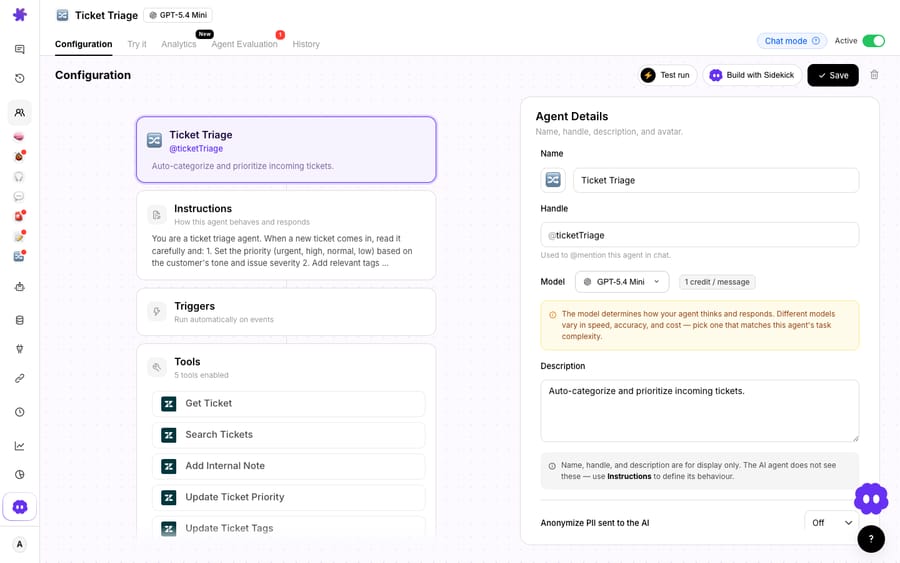
Because it's an agent, tagging can also chain into other actions: it can call a custom tool to look up an order or account status and tag based on what it finds ("tag vip if the account is on the enterprise plan"), or draft a reply in the same run. On cost, be clear about the model: Macha charges per ticket, not per resolution or per deflection. One conversation is charged once, whether the agent only tags it or tags it, looks up the account and drafts the reply too, which keeps the bill legible when a single ticket triggers several steps. Pricing starts at $299 a month for 750 tickets, about $0.40 each, and that includes setup: the Macha team builds the tagging agent on your Freshdesk and tests it on a sample of your past tickets before it touches live ones, and a dedicated success manager handles your changes after go-live, such as new tags or instruction edits. The pricing page has the current breakdown. We go deeper on the mechanics in how to automate Freshdesk with AI and on the specific case for adding an agent in add an AI agent to Freshdesk beyond Freddy.
Is auto-tagging deflection, resolution or automation?
It's worth separating three ideas that get muddled in AI-support marketing, because auto-tagging sits squarely in the third one:
- Deflection means the customer's question is answered before it ever becomes an agent's problem (a help-center article, a chat answer). It's measured on volume avoided.
- Resolution means a ticket is fully closed end-to-end. Outcomes vary hugely by how messy the ticket is, so nobody should promise a fixed resolution rate.
- Automation means a specific step in the workflow happens without a human, like tagging, categorizing, prioritizing, or routing.
Auto-tagging is automation, plain and simple. It doesn't deflect the ticket or resolve it; it makes the ticket legible so everything downstream (routing, SLA, reporting) works better. That's exactly why it's a great first place to put an AI agent to work: it's high-value, low-risk, and it improves your data even on the tickets a human still handles.
Which Freshdesk auto-tagging approach should you use?
Most mature desks end up using more than one; the table at the top compares all three side by side.
A sensible stack: keep a handful of native rules for the dead-obvious cases, use Freddy Auto Triage if you're already on Pro/Enterprise with enough history and mostly need your standard fields filled, and reach for an agent layer when you want to tag on concepts your ticket schema doesn't have, or when tagging is step one of a longer automation. If nobody on your team has time to write and tune that agent, the Macha team does it for you on every plan. If you're weighing whether to build that layer yourself or adopt a platform, the build-versus-buy tradeoff is worth reading first, and Macha for Freshdesk walks through the connector specifically.
FAQ
Can Freshdesk tag tickets automatically without any AI? Yes. Freshdesk's native ticket-creation automations (under Admin → Workflows → Automations) can add tags and set fields based on conditions like keywords in the subject or description. It's free and deterministic, but it only fires on the exact terms you anticipate, so it misses paraphrased requests.
What does Freddy Auto Triage tag, and what does it cost? Auto Triage predicts Priority, Group and Type, plus custom dropdown and dependent (nested) fields, using machine learning on your historical tickets. It needs Freshdesk Pro ($55) or Enterprise ($89 per agent a month billed annually), or Omni Pro/Enterprise, plus the Freddy AI Copilot add-on at $29 per agent a month, and Freshworks recommends at least 2,000 tickets of history.
How is an AI agent layer different from Freddy for tagging? Freddy classifies into the structured fields Freshdesk already has (Priority, Group, Type, dropdowns). An AI agent layer like Macha lets you write tagging logic in plain language, so it can tag on concepts your schema doesn't include (sentiment, churn risk, competitor mentions) and chain tagging into other actions like lookups and replies in the same run.
Does adding an AI agent mean replacing Freshdesk? No. Macha is an AI agent layer that runs on top of the Freshdesk you already use, connecting as a native connector via your subdomain and API key. Freshdesk stays your system of record; the agent reads and writes the same tickets, tags, and fields. The connector is for Freshdesk specifically, not Freshchat, Freshservice, or Freshcaller.
Will auto-tagging conflict with my existing automations? It can, so layer deliberately. In Freshdesk, Automation Rules take precedence over Freddy's AI suggestions, so a keyword rule will override an Auto Triage prediction on the same field. Decide which cases you want handled by fixed rules versus AI, rather than letting them collide by accident.
Want your Freshdesk tickets to tag and categorize themselves by intent, feeding cleaner routing and reports? Start with $50 of free Macha usage, no credit card required, and connect it to your Freshdesk with your subdomain and API key.






