Shopify
 Stripe
 Slack
 Notion
 Google Workspace
 Confluence


How Does the Crisp API Work? Tokens, Rate Limits, Webhooks and RTM (2026)


The Crisp API is a REST API (v1) at https://api.crisp.chat/v1/, authenticated with HTTP Basic auth using a token keypair plus an X-Crisp-Tier header that says which kind of token you're sending. A website token, generated in your workspace settings, allows 10,000 requests a day for one workspace. A plugin token from the Crisp Marketplace starts at 5,000 requests a day, can be raised, and works across every workspace that installs your plugin. Events come out of Crisp through Web Hooks or the real-time (RTM) API.
Key takeaways
- The Crisp REST API authenticates with HTTP Basic auth using a token identifier and key, plus an X-Crisp-Tier header set to website or plugin depending on the token type.
- A Crisp website token is generated under Settings, Workspace Settings, Advanced configuration, covers one workspace, and is limited to 10,000 requests per day.
- Crisp plugin tokens come from the Crisp Marketplace with a 5,000-request daily quota that can be raised, and they skip the per-route rate limits that website tokens face.
- Crisp website Web Hooks work on every plan including Free, but they're unsigned and not retried, while plugin hooks are signed with HMAC-SHA256 and retried.
- Crisp's Web Hooks reference lists 72 event namespaces, and website hooks can subscribe to 38 of them, including message:send and session:set_state.

| Item | Value |
|---|---|
| Base URL | https://api.crisp.chat/v1/ |
| Auth | HTTP Basic with identifier:key, plus X-Crisp-Tier: website or X-Crisp-Tier: plugin |
| Website token | One workspace, 10,000 requests a day, only workspace owners can create it |
| Plugin token | Crisp Marketplace, 5,000 requests a day by default, raisable, multi-workspace |
| Rate-limit errors | 429 Too Many Requests or 420 Enhance Your Calm |
| Events out | Web Hooks (HTTP POST) or RTM API (Socket.IO over WSS) |
| Official libraries | Node, Go, PHP, Python, Ruby (RTM in Node and Go only) |
| MCP server | Crisp's own MCP server exposes a subset of the REST API to an AI agent |
What can the Crisp API do, and what can't it?
The REST API covers what an operator does in the Crisp inbox. You can list conversations, read a conversation's messages, send a message or a private note, change a conversation's state to pending, unresolved or resolved, update its segments and custom data, and assign it to an operator. You can read and search people profiles, and Crisp's REST API reference stars "List People Profiles" and "Get People Profile" as key routes.
It doesn't decide anything. The API will return a conversation's messages and accept a reply, but it has no view on what the customer asked, whether the order has shipped or which teammate should own it. That judgement sits in whatever calls the API, which is the part teams underestimate when they plan a Crisp integration. If a ready-made plugin already does what you need, our roundup of the best Crisp integrations is worth checking before you write code.
How do you authenticate with the Crisp API?
Every request carries an Authorization: Basic header containing the Base64 of identifier:key, and an X-Crisp-Tier header. Crisp offers two token types, and the tier header has to match the one you're using.
Website token. Crisp's website token guide says to open Settings, Workspace Settings, Advanced configuration, and click Generate Token in the API Token section. The keypair is shown once, so copy it then. Only workspace owners can generate, regenerate or revoke it, it covers the one workspace it was created in, and it's "limited to 10,000 requests per day." No Marketplace account is needed. This is the right token for an in-house script or integration that touches only your own workspace.
Plugin token. Crisp's plugin token guide covers the other route: sign in to the Crisp Marketplace (a separate account from your Crisp login), create a Private plugin, request a production token on its Tokens page and pick scopes, each as read, write or both. Some scopes need approval, which Crisp says can take a few minutes. You then install the plugin on each workspace through its private install link. A development token works while the production request is pending, with a low daily quota you can reset from the Marketplace dashboard. Each token type has its own IP allowlist of up to 20 entries; requests from other IPs get a 403 with the reason ip_not_whitelisted.
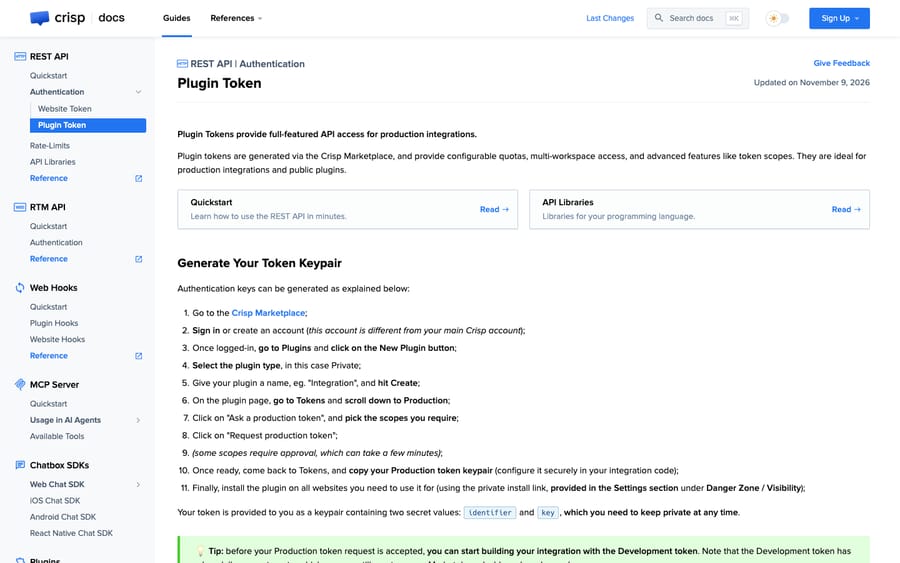
The smallest useful call reads your workspace back:
curl https://api.crisp.chat/v1/website/{website_id} \
  --get \
  --user "{identifier}:{key}" \
  --header "X-Crisp-Tier: website"
We ran the same request against api.crisp.chat with no credentials, and then with a made-up keypair, to show what failure looks like. Both came back as HTTP 401 with a JSON body:
{"error":true,"reason":"authenticated_route","data":{"message":"you must provide authentication tokens to access this route"}}

{"error":true,"reason":"invalid_session","data":{"message":"your authentication token is set but it could not be verified, is it still valid?"}}
The reason field is the one to log. authenticated_route means no token reached Crisp, which usually points to a missing header in your HTTP client; invalid_session means the token arrived and was rejected, which usually means it was rolled or belongs to another tier.
If a token leaks, roll it immediately: website tokens under Settings, Workspace Settings, Advanced configuration, and plugin tokens from the Marketplace dashboard. Crisp's authentication overview says the old token is revoked immediately.
What are the Crisp API rate limits?
Crisp's rate limits page describes four limiters, and which ones apply depends on the token tier:
| Limiter | Scope | Applies to |
|---|---|---|
| Load balancers | Client IP | All tiers; Crisp calls it "very permissive" |
| API global | IP address and user identifier | Website and user tokens |
| API route | Per route | Website and user tokens; "more restrictive" |
| Plugin quota | Plugin ID, daily | Plugin tokens (permanent tokens only) |
Crisp doesn't publish per-minute numbers for the global and route limiters. The published numbers are daily, on Crisp's authentication overview: 10,000 requests for a website token and 5,000 by default for a plugin token. Over a limit you get 429 Too Many Requests or 420 Enhance Your Calm.
The design tells you who Crisp is optimizing for. Plugin tokens skip the per-route limiters so a Marketplace integration can burst, but they live under a daily quota Crisp sets and raises on request. That keeps Crisp in control of the heaviest API consumers, which are third-party apps serving many workspaces, while a single team's script gets a fixed 10,000 a day it can't negotiate. If the trouble is on the inbox side rather than the API (an orange connection banner, messages that need a refresh), our list of common Crisp problems and fixes covers those.
Two practical consequences. First, GET and HEAD responses are cached, and a cached response doesn't count against the API limiter; the Bloom-Status response header (MISS, HIT, DIRECT or OFFLINE) tells you which you got. Our test calls returned bloom-status: MISS. Second, 10,000 requests a day is about seven a minute averaged over 24 hours. A sync job that reads every conversation's messages, plus its profile, plus writes a segment, spends three or four requests per conversation, so polling is the fastest way to run out. Use events instead.
Which Crisp API routes will you use first?
Most integrations use a handful of routes from the REST API reference. Every path starts with /v1/website/{website_id}:
# List conversations (page number in the path; per_page 20 to 50, default 20)
GET   /conversations/{page_number}

# Read the messages in one conversation (page with timestamp_before / timestamp_after)
GET   /conversation/{session_id}/messages

# Send a reply, or a private note with "type": "note"
POST  /conversation/{session_id}/message

# Change state: pending, unresolved or resolved
PATCH /conversation/{session_id}/state

# Update subject, segments (tags) or custom data
PATCH /conversation/{session_id}/meta

# Assign to an operator: {"assigned": {"user_id": "..."}}
PATCH /conversation/{session_id}/routing
A message body needs four fields: type, from, origin and content. For a reply an operator would send, that's "type": "text" and "from": "operator". Switching type to note posts the same content as a teammate-only note the customer never sees, which is how you build a review step into an integration. Each route needs a matching scope on a plugin token: website:conversation:messages for messages, website:conversation:states for state, website:conversation:routing for assignment.
Pagination differs by route. Conversation lists use a page number in the path. Message history doesn't: it returns the most recent batch and you walk back with timestamp_before. Write those two loops differently or you'll miss older messages in long chats.
How do you get events out of Crisp: Web Hooks or RTM?
Crisp gives you two ways to hear about new messages, and its own Web Hooks overview recommends Web Hooks over the RTM API "for most use cases."
Website hooks (Crisp's guide) are set up in the Crisp dashboard under Advanced configuration, Web Hooks, Add a Web Hook, and Crisp says they're "available from any Crisp plan, including the Free plan." Crisp POSTs raw JSON with four fields: website_id, event (such as message:send), data and timestamp in milliseconds. Your server has to answer with a 2xx; redirects count as failures, and Crisp's troubleshooting list asks whether you reply in under 2 seconds. Two limits matter. Website hooks aren't signed, so Crisp's advice is to add a secret as a URL parameter (?key=...) and check it on your side. And they aren't retried: if your endpoint is down when a message arrives, that event is gone.
Plugin hooks are configured in the Marketplace under your plugin's Settings, Events, and they're the sturdier option. Each request carries an X-Crisp-Signature header, an HMAC-SHA256 of the string [timestamp;body] (brackets and semicolon included) using your signing secret, plus X-Crisp-Request-Timestamp. Crisp retries failed deliveries several times, reports the attempt count in X-Delivery-Attempt-Count and X-Delivery-Attempt-Limit, and pauses deliveries to your endpoint for about a minute if every attempt fails. Production plugin hooks may need manual approval.
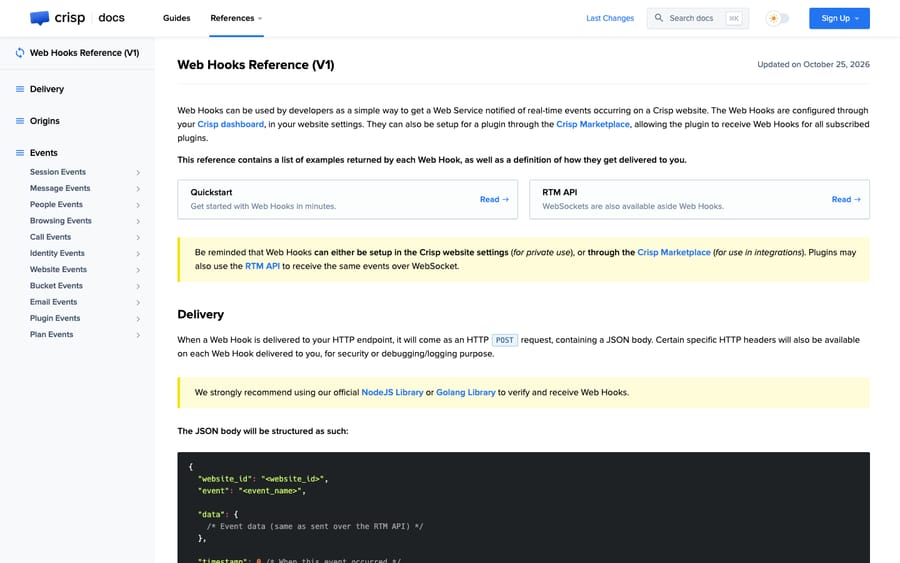
Crisp's Web Hooks reference lists 72 event namespaces; it's also where the signature string and the no-retry rule for website hooks are documented. Plugin hooks can subscribe to all of them and website hooks to 38. The ones most integrations need are available on both: message:send (a customer sent a message), message:received (an operator sent a message), session:set_state and session:set_segments. Plugin-only events include session:set_opened, session:set_closed and the website availability events.
The RTM API is a Socket.IO connection over WSS (plain WS and HTTP long-polling aren't supported). You fetch the endpoint from the REST API, connect, and send an authentication payload with your tier, the same token credentials you use for REST, the events you want and the website IDs (rooms) to listen to. Crisp answers with authenticated or with unauthorized and a closed socket. You own reconnection: Crisp's RTM quickstart says to retry immediately once, then back off. RTM suits an app that's always running and wants every event across many workspaces on one connection. For a team automating its own workspace, a website hook is less to operate.
Which Crisp API libraries are official?
Crisp's API libraries page lists five. Pick by language, but note that RTM support is only in two of them:
| Language | Package | RTM support |
|---|---|---|
| JavaScript (Node) | crisp-api on npm | Yes, and it handles reconnection |
| Go | github.com/crisp-im/go-crisp-api | Yes |
| Python | crisp-api on PyPI | No |
| PHP | crispchat/php-crisp-api | No |
| Ruby | crisp-api on RubyGems | No |
Where does the raw Crisp API stop being enough?
Crisp's API is clean, well documented and generous on the Free plan, which gets website hooks. For syncing contacts to a CRM, logging conversations to a warehouse or posting a Slack alert on a new chat, it's all you need.
The hard part of support automation sits above it. To answer "where's my order?" from the API, you'd catch message:send, read the thread, work out that the customer asked about an order, find the order number or email, call Shopify, write a reply in your brand's voice, decide whether to send it or leave it as a note, set the state and handle the follow-up question. The API gives you the first and last steps. Everything in between is an application you'd build, host and keep correct as your policies change. Our walkthrough of automating order status in Crisp compares that build against the ready-made routes.
Crisp offers two pieces of that middle itself. Hugo, Crisp's built-in AI agent, answers inside the inbox from your trained content and connected tools, billed from a monthly credit pool (we cover it in our Crisp AI explainer). And Crisp's MCP server (updated 7 October 2026) lets an AI agent you already use retrieve information from your Crisp workspace and perform some actions, through "a subset of the resources available from the Crisp REST API." Neither removes the work of deciding what your agent should say, which tools it may call and when a person should check it first.
And because website hooks aren't retried, that application also needs a way to catch the conversations it missed while it was down.
Where Macha fits
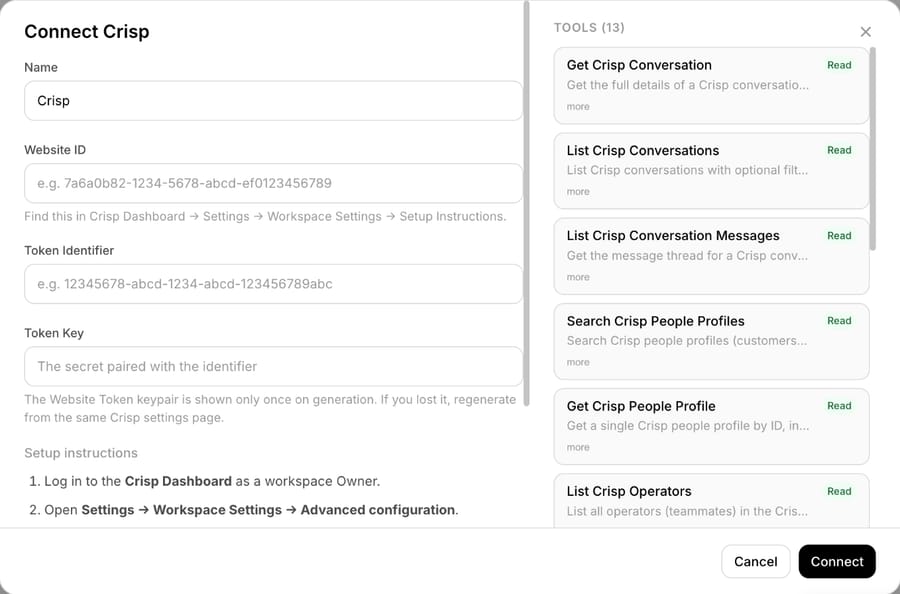
Macha is one way to get that middle layer without building it, already connected to Crisp. Macha's Crisp connector uses Crisp's conversation, message, people and routing routes as 13 tools and listens on three triggers: New Conversation, New Customer Message and a Custom Webhook you can point at other Crisp events.
When a customer writes, the agent reads the thread and the person's profile, checks your knowledge base and your other systems (Shopify orders, Stripe charges), and either replies as an operator or posts the draft as a private note for a teammate to approve. It can set segments, change state and assign the conversation to the right operator or team. You don't write the webhook handler, store the signing secret or manage the daily request budget.
Macha fits teams on Crisp that want that workflow without an engineer maintaining it. If your goal is a data sync or a reporting export, the API on its own is the better tool, and you don't need us. If you want agents answering customers, Macha costs about $0.40 per ticket, one charge per conversation however many messages it takes, and that includes setup by the Macha team and a dedicated success manager who handles your changes. The Macha team analyzes your past Crisp conversations, builds the agent and runs it in safe mode, drafting replies as internal notes, until you're happy with them. See how Macha works on Crisp; the trial is $50 of free usage (about 125 tickets), no credit card, no time limit, with the done-for-you setup included.
Common questions
Does Crisp have a public API?
Yes. Crisp's REST API v1 lives at https://api.crisp.chat/v1/ and is documented at docs.crisp.chat, alongside Web Hooks and an RTM (real-time) API. You authenticate with a website token or a plugin token.
Where do I find my Crisp API key?
Crisp calls it an API token. A workspace owner generates it under Settings, Workspace Settings, Advanced configuration, API Token, Generate Token. It's shown once, so store it when you create it.
What is the Crisp API rate limit?
Website tokens are limited to 10,000 requests a day. Plugin tokens start at a 5,000-request daily quota that you can ask to raise. Crisp also applies global and per-route limiters to website tokens without publishing their numbers, and answers with 429 or 420 when you exceed them.
Are Crisp webhooks available on the Free plan?
Yes. Crisp says website hooks are available on every plan, including Free. They're unsigned and not retried, so protect the endpoint with a secret URL parameter and keep it fast.
How do I verify a Crisp webhook signature?
Signatures exist only on plugin hooks. Compute HMAC-SHA256 over [timestamp;body], using the X-Crisp-Request-Timestamp header value and the raw JSON body, with your hook's signing secret, and compare it with the X-Crisp-Signature header.
Can the Crisp API post a private note?
Yes. Send a message with "type": "note" to the conversation's message route. Notes are visible to your team and hidden from the customer.
How we researched this
- Crisp's developer documentation, fetched 21 November 2026: the authentication overview, website token and plugin token guides, rate limits, API libraries, the Web Hooks overview, website hooks and plugin hooks guides, the Web Hooks reference v1 (event counts), the RTM API overview, authentication and quickstart, and the REST API reference v1 for route paths, body fields and scopes. Each figure on this page is quoted from those pages.
- Our own calls: we sent two unauthenticated requests to api.crisp.chat on 21 November 2026, one with no token and one with a made-up keypair, and copied the 401 responses and the
bloom-statusheader above. We also opened Crisp's relay test endpoint, which returned{"code":0,"message":"No Operation"}. We used no Crisp credentials and touched no customer data. - Arithmetic: 10,000 requests over 1,440 minutes is about 6.9 a minute.
- Macha's capabilities come from Macha's own Crisp connector (13 tools and 3 triggers), shown in the screenshot above. Everything else is from Crisp's public documentation.