Shopify
 Stripe
 Slack
 Notion
 Google Workspace
 Confluence


What Are the Most Common Crisp Problems and How Do You Fix Them? (2026)


When Crisp chat is not working, the problem is usually one of five: a chat widget that stops sending after a visitor sits idle for about 10 minutes, a chatbox that doesn't appear on the site, notifications operators never receive, messages that only show up after a refresh, and Hugo, Crisp's AI agent, going silent when the month's AI credits run out. Almost all of them trace back to a setting, a browser permission or a network that blocks Crisp's real-time connection, and the table below maps each symptom to the first place to look.
Key takeaways
- The most common Crisp problems are a chatbox that won't load, missed operator notifications, messages that need a refresh, the 10-minute idle chat failure, and Hugo stopping when AI credits run out.
- When Crisp's included AI credits run out and Pay-As-You-Go is off, Hugo stops answering and new conversations go to human operators until credits reset on the 4th of the month.
- Crisp sends no notification for a pending message once any operator has read it, and an operator gets nothing for a conversation assigned to someone else.
- If the Crisp chatbox doesn't appear, check Settings, Chatbox Settings, Chatbox Restrictions first: blocking your own device or IP is a common reason it disappears during testing.
- A visitor who sits idle for about 10 minutes can find the Crisp chatbox refusing to send, according to a 2025 user report, and reloading the page is the only fix that poster found.

| Symptom | First place to check | Where the fix lives |
|---|---|---|
| Chat won't send after the visitor sits idle ~10 minutes | Reload the page; test the relay from that network | User report; no Crisp article |
| Chatbox doesn't appear on the site | Page source for the script; Chatbox Restrictions; offline visibility | Settings, Chatbox Settings |
| "Invalid website" error in the chatbox | Install code; domain lock under Chatbox Security | Settings, Chatbox Settings, Chatbox Security |
| Operators miss new-message notifications | "Disable all notifications"; assignment; browser and phone permissions | Settings, Account, Notifications |
| Orange banner; messages only appear after refresh | Firewall or SSL inspection; status page | Network allowlist |
| Hugo stops replying | Credits balance; Pay-As-You-Go; activation | AI Agent, Billing |
| Chatbox missing on a Shopify store | Theme app embed not saved | Shopify theme editor |
Crisp chat not working? What should you check first?
Crisp is a real-time product. The chatbox on your site and the inbox your operators use both hold a WebSocket connection open to Crisp's servers; Crisp's own operator connectivity article says it "uses WebSockets to deliver new messages and live updates to your dashboard." That single fact explains most of the problems on this page. If the socket can't open, or drops and doesn't come back, the chatbox shows a spinner, a message fails to send, or an operator stares at an inbox that looks quiet. (Developers meet the same layer as Crisp's RTM API, which our Crisp API guide covers alongside webhooks.)
So before you touch a setting, run three checks that take a minute between them:
- Open Crisp's relay test page from the affected network. Crisp's chatbox visibility guide says
https://client.relay.crisp.chat/should return{"code":0,"message":"No Operation"}. A security warning or SSL error means a firewall, proxy or antivirus is inspecting the traffic, and no Crisp setting will fix that. - Check status.crisp.chat. If "Operator realtime sockets" shows an incident, wait it out.
- Try a private window on a different connection. If Crisp works on your phone's hotspot and not on the office Wi-Fi, the problem is the office network.
Why does the Crisp chat stop working after about 10 minutes idle?
This is the complaint that stands out in our Reddit research. In an April 2025 r/SaaS thread, a SaaS owner reported that once a visitor had been inactive on the site for more than 10 minutes, the Crisp chatbox showed an error and wouldn't send. The option to resend the message failed too. The poster said Crisp's support team described the behavior as normal, and that the only way for the visitor to get through was to reload the page.
We couldn't find a Crisp help article that documents an idle timeout, so treat the 10-minute figure as one team's report, not a published limit. It fits the mechanism above, though: a chat that has to reconnect a dropped socket before it can send will fail in exactly this way if the reconnect doesn't happen. SaaS products are where it hurts most, because a logged-in user can leave a dashboard tab open for an hour and come back with a question.
What you can do about it:
- Reproduce it before you blame Crisp. Open your site, leave the tab alone for 15 minutes, then send a message with the browser console open. Look for WebSocket or relay errors. If the message goes through, your setup isn't affected.
- Rule out the network. Run the relay test above from the same machine. Corporate proxies that drop long-lived connections cause the same symptom.
- Check whether safety mode is on. On busy sites Crisp switches to a mode where visitors don't open a WebSocket until they click the chatbox (more on that below). Visitors then see a short loading state while the connection is made.
- Give visitors a second channel. Show your support email in the chatbox or on the page, so a visitor whose message fails has somewhere to go that doesn't depend on the socket.
- Send Crisp the evidence. Crisp's notifications article asks for a recent conversation example and device details; for a chatbox fault, include the browser, the time idle and the console error.
Why isn't the Crisp chatbox showing on my website?
Crisp's chatbox visibility guide (updated 1 November 2026) groups the causes into six areas. We've ordered the checks below from quickest to slowest:
- The script isn't on the page. Right-click, View Page Source, search for
crisp. If it's missing, the script isn't installed on that page, a cache is serving an old copy, or Google Tag Manager isn't publishing it. Reinstall from Settings, Workspace Settings, Setup & Integrations, HTML. - You blocked yourself. Under Settings, Chatbox Settings, Chatbox Restrictions, remove any rule that blocks your device, IP, country or domain. If you once clicked Block user on a test conversation, clear that visitor too.
- The chatbox hides when you're offline. Review the offline visibility option in Settings, Chatbox Settings. Testing outside your availability hours makes the chatbox look broken.
- Code is hiding it. Search your codebase for
$crispcalls and look for an unexpectedchat:hide. - Caches. Clear browser, server, WordPress plugin and CDN caches. In Chrome, Inspect, then right-click refresh and choose Empty Cache and Hard Reload.
- Extensions. Ad blockers and privacy tools such as Ghostery, DuckDuckGo Privacy and Brave Shields can block it. Brave also blocks Google Tag Manager, so a GTM install fails there while a direct install works.
- Old browsers and script conflicts. Crisp lists full support for Chrome 118 and later. Old polyfill libraries such as PrototypeJS can conflict.
- HTTP 420 errors. Crisp may return a 420 when many users connect from one IP, which is more likely on shared corporate networks and public Wi-Fi.
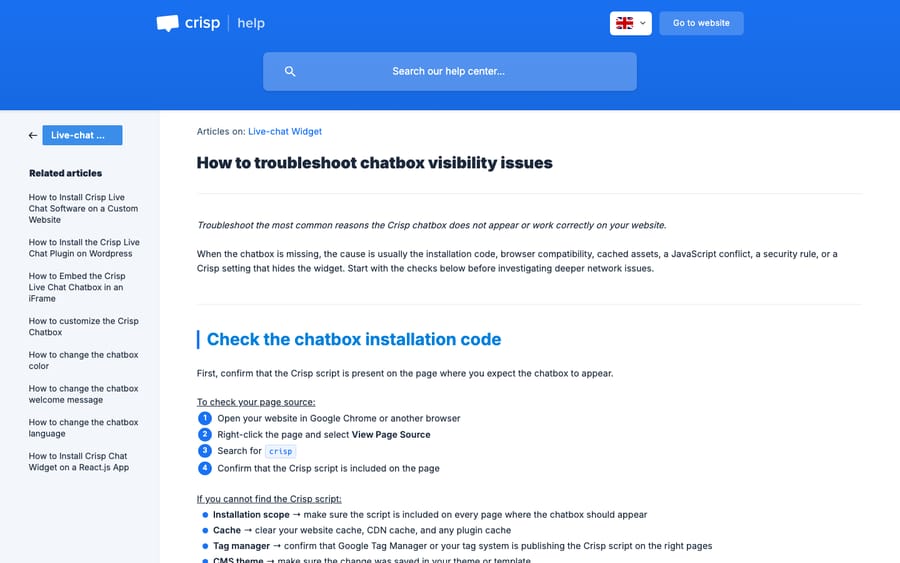
If the chatbox loads but shows an "Invalid website" error, Crisp's separate article on that error points to three causes: a copy-paste mistake in the install code, a domain lock that blocks the domain you're testing on (Settings, Chatbox Settings, Chatbox Security), or a deleted workspace.
Why does the Crisp chatbox change behavior when the site gets busy?
Crisp caps real-time connections by plan. Its high-traffic article (updated 1 November 2026) sets two thresholds, both counted over rolling 5-minute windows:
| Plan | High-traffic threshold | Safety mode threshold |
|---|---|---|
| Free | 50 chatbox displays | 100 chatbox displays |
| Mini, and Essentials or Plus trials | 250 chatbox displays | 500 (Mini) |
| Essentials and Plus (paid) | 1,000 chatbox displays | 2,000 chatbox displays |
Reaching the high-traffic threshold doesn't disable the chatbox. Safety mode is the one to watch: visitors don't open a WebSocket until they click to start a chat, and triggers and other automated messages can be switched off until traffic drops. If your proactive "Need help with your order?" message vanishes during a sale, this is the likely reason.
The incentive is easy to read. Every open chatbox is a live connection Crisp pays to hold, and the Free plan's 100-display cap keeps free sites from costing more than they bring in. A Free-plan store running a promotion can hit 100 displays in five minutes with very modest traffic, so a store that depends on chat during launches is effectively on a paid plan whether it upgrades or not.
Why aren't Crisp notifications reaching operators?
Crisp's notifications article (updated 26 October 2026) explains that several "missing" notifications are Crisp working as designed:
- Someone already read it. "Crisp does not send a notification for a pending message once at least one operator has read it." When you test with a team, make sure nobody opens the conversation first.
- It's assigned to someone else. Agent A gets no notification for a conversation routed to Agent B. Check your routing rules.
- Progressive notifications. Crisp notifies one operator first and moves on if nobody acts, so an online but idle operator delays everyone else.
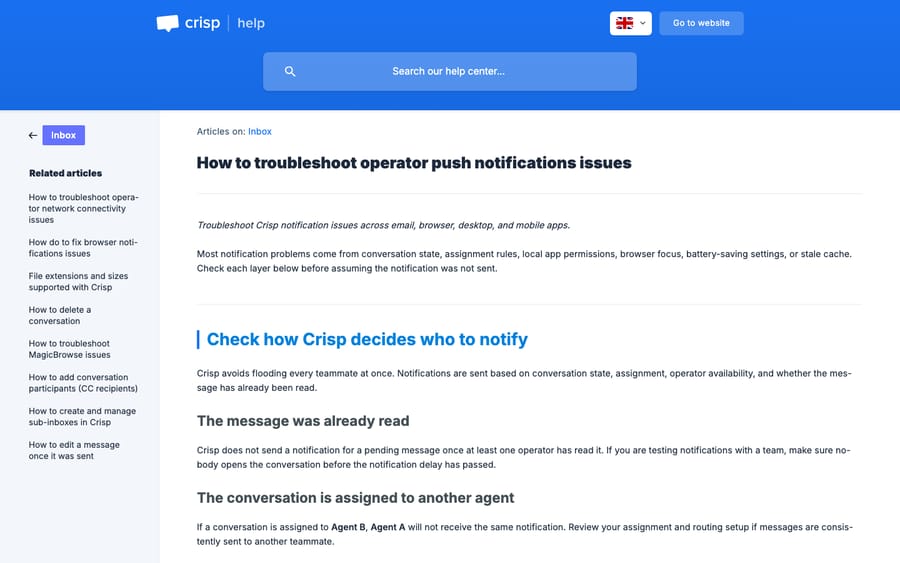
The rest are settings and devices. If "Disable all notifications" is on under Settings, Account, Notifications, nothing else you change will help until it's off. After that, check browser permissions for app.crisp.chat, phone push permissions, Do Not Disturb and low-battery mode. On Android, Crisp's fix for a stale notification state is to remove the app, reinstall it and allow notifications again. Crisp also says to keep the Inbox tab focused in the browser or desktop app: "If another Crisp section such as Contacts or Visitors is focused, notification behavior may differ."
Why do Crisp messages only appear after a refresh?
An orange real-time connection warning banner in the Crisp inbox, or messages that appear only when you reload, mean the operator's WebSocket is being blocked. Crisp's operator connectivity article names firewalls and antivirus tools that install their own SSL certificate, with Fortinet, Fortigate and Avast as examples. The fix is to ask your network administrator to allowlist the domains on Crisp's published domain list. If it's not the network, Crisp suggests switching DNS to 8.8.8.8 or 1.1.1.1, testing on a hotspot, and checking the status page.
Why did Hugo stop answering in Crisp?
Usually because the credits ran out. Crisp's Hugo pricing and billing article (updated 1 November 2026) says that when the included AI credits are used up and Pay-As-You-Go is disabled, "Hugo stops answering automatically and incoming conversations are escalated to human operators." Credits reset every billing cycle, currently on the 4th of the month, and Crisp's Hugo troubleshooting article confirms unused credits don't roll over.
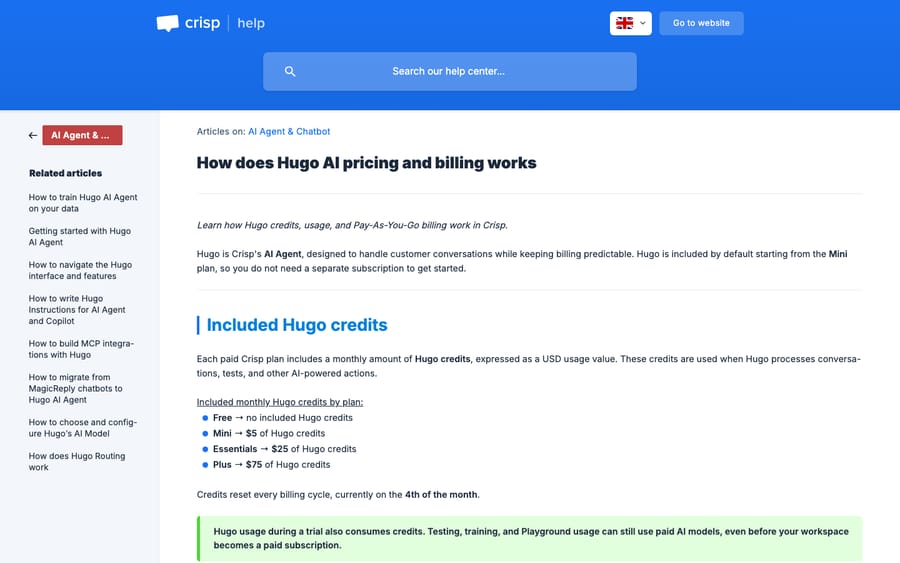
The arithmetic explains why teams hit the wall mid-month. Crisp says Hugo credits are "token-based" and that a conversation "is not billed per message," and it estimates $0.05 to $0.10 for a conversation Hugo handles fully. The Essentials plan's $25 of credit therefore covers roughly 250 to 500 conversations; Crisp's pricing page quotes about 450. A store with 30 Hugo-handled chats a day uses 450 in about two weeks (450 divided by 30 is 15 days). Playground tests draw from the same pool, so a team tuning Hugo heavily in the first week spends real credit doing it.
To keep Hugo running, turn on Pay-As-You-Go under AI Agent, Billing, Pay As You Go, and set a billing limit there. Two catches: Pay-As-You-Go "may remain unavailable until the trial ends," and Crisp doesn't publish the overage rate on its pricing page. Crisp's default of halting rather than charging protects your card, and it also means the first sign of an empty credit pool is often a customer waiting for a human. Our guide to Hugo credits shows how to estimate the day your allowance will run out.
If credits aren't the problem, Crisp's Hugo troubleshooting article lists the other checks: activation under AI Agent, Agent, Activation, a routing rule with an Inbox action that sends conversations to people, a channel that isn't enabled for Hugo, and the model. Replay the customer's exact message in AI Agent, Evaluate, Playground and open Guardrails to see which sources Hugo searched. "Most of the time, Hugo does not answer because it cannot find a reliable enough source," Crisp writes, so a missing Q&A snippet is the usual fix. We cover how Hugo's credits and plans work in more depth in our Crisp AI explainer.
Why isn't the Crisp chatbox showing on my Shopify store?
Crisp's Shopify troubleshooting article gives one main cause: the theme change was enabled but not saved. "If the Save button is still green or active, the live chat change has not been saved yet." Open the theme's App embeds, confirm the Crisp embed is on, save, and reload the storefront in a private window. Crisp's Shopify and Hugo setup article adds that a newly published theme may need the app embed enabled again. If new Crisp features don't appear in the Shopify plugin, re-authenticate it under Plugins, Shopify and accept the updated permissions. Our roundup of the best Crisp integrations covers what the Shopify plugin and the others actually give you.
What can't Crisp's settings fix, and where does an AI layer help?
Look at the problems above as a set. Most are configuration, and Crisp's help center documents each fix well. Two aren't configuration at all. A visitor whose chat failed after 10 idle minutes and who then emails you is a ticket someone has to pick up. And when Hugo goes quiet because credits ran out, every conversation it would have answered lands on a person, usually during your busiest week.
That second problem is about how the AI is billed and run, not about the widget. Hugo's cost moves with tokens, model and conversation length, so the monthly pool empties faster in exactly the weeks you most need it.
Where Macha fits
Macha runs AI agents inside the Crisp workspace you already use; it doesn't replace the chatbox or fix a blocked WebSocket. Through Macha's Crisp connector, an agent starts automatically on a New Conversation or New Customer Message, reads the full message thread and the person's profile, and either replies as an operator or drafts the answer as an internal note for a teammate to approve. It can also tag the conversation with segments, change its state to pending, unresolved or resolved, and assign it to an operator or team.
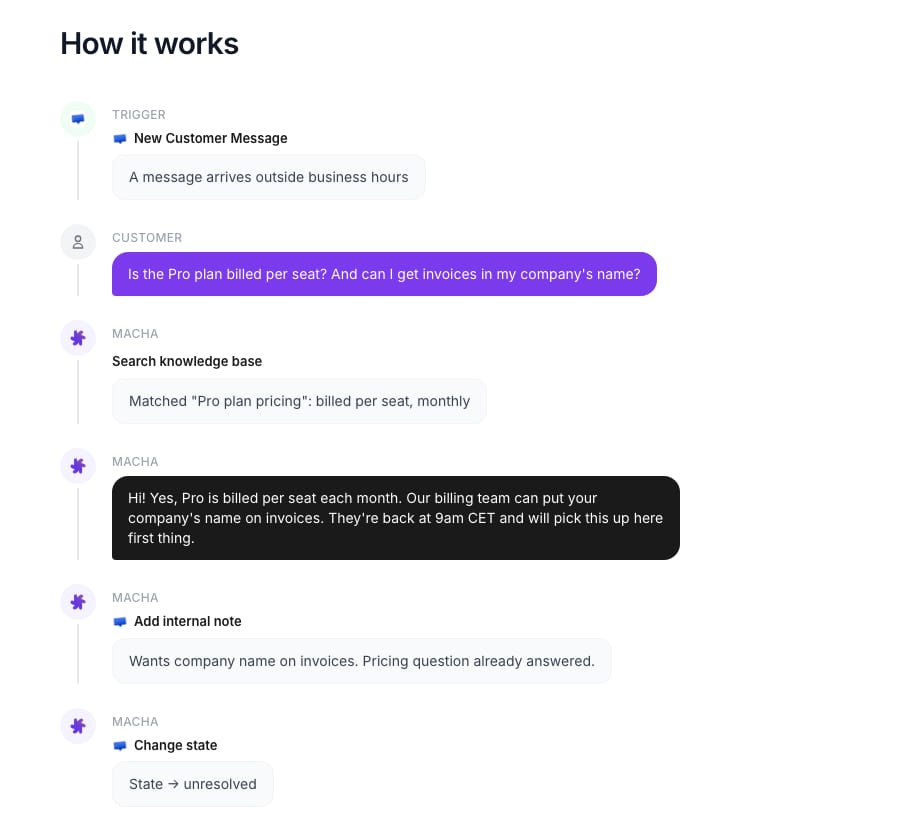
Macha also analyzes your past Crisp conversations, so the problems your customers raise most can be answered with live data: a Shopify order lookup for "where's my order" or a Stripe charge lookup for billing questions, through Macha's other connectors. Macha charges about $0.40 per ticket: one conversation with one person counts once however many messages it takes, and the model doesn't change the charge.
Macha fits teams on Crisp that want agents answering with order and account data, without spending their own weeks tuning instructions. It's the wrong fit if you only need the chatbox itself fixed: that's a Crisp setting or a network allowlist. If you're weighing a move away from Crisp altogether, our Crisp alternatives comparison covers the other help desks. The Macha team does the setup: it analyzes your past conversations, builds the knowledge base and the agent, and runs it in safe mode until the drafts are right, with a dedicated success manager on the trial and every plan. See how Macha works on Crisp, or start with after-hours Crisp replies or drafted replies as internal notes. The trial is $50 of free usage (about 125 tickets), no credit card, no time limit, and the done-for-you setup is included on it.
Common questions
Why does Crisp chat say my message failed to send?
Usually the chatbox's real-time connection dropped. Reload the page and resend. If it happens on one network only, run Crisp's relay test from that network and ask IT to allowlist Crisp's domains. One 2025 user report puts the trigger at about 10 minutes of visitor inactivity.
How do I unblock myself in Crisp?
Go to Settings, Chatbox Settings, Chatbox Restrictions and remove the rule that matches your device, IP, country or domain. If you clicked Block user in a conversation, clear that blocked visitor, then reload your site in a private window.
Do Crisp AI credits roll over?
No. Crisp's Hugo troubleshooting article says unused credits don't roll over, and each month starts with the plan's included amount. The billing article says credits reset on the 4th of the month.
Can I keep Hugo answering after the credits run out?
Yes, by turning on Pay-As-You-Go under AI Agent, Billing, Pay As You Go, where you can also set a billing limit. It may not be available during a trial, and Crisp doesn't publish the rate on its pricing page.
Why didn't I get a notification for a new Crisp message?
The three most common reasons are that another operator already read it, the conversation is assigned to someone else, or "Disable all notifications" is on under Settings, Account, Notifications. After those, check browser and phone permissions.
Is there a status page for Crisp?
Yes, status.crisp.chat. Check it whenever operators see the orange real-time warning banner or messages stop arriving without a refresh.
How we researched this
- Crisp's own documentation, fetched 21 November 2026: the chatbox visibility guide, the "Invalid website" article, the high-traffic article, the notifications article, the operator connectivity article, the Hugo pricing and billing article, the Hugo troubleshooting article and the Shopify troubleshooting article, all on help.crisp.chat. We checked every menu path on this page against those articles and quote them as Crisp writes them, with each article's last-updated date given where we cite it.
- Crisp's pricing page (crisp.chat/en/pricing), fetched 21 November 2026, for the Essentials plan's $25 of AI credit and the roughly 450 conversations it quotes.
- User reports: the 10-minute idle problem comes from one r/SaaS thread from April 2025, read through a Reddit archive and paraphrased. We didn't reproduce it ourselves, and Crisp documents no idle timeout that we could find.
- Arithmetic: $25 of credit divided by Crisp's $0.05 to $0.10 per conversation gives 250 to 500 conversations; 450 at 30 chats a day lasts 15 days.
- Macha's capabilities come from Macha's own Crisp connector (13 tools and 3 triggers) and the connector screen shown above. Everything else on this page is from public documentation.