Shopify
 Stripe
 Slack
 Notion
 Google Workspace
 Confluence


How Do You Automate Order Status Questions in Crisp with Shopify? (2026)


You can automate "where's my order?" chats in Crisp four ways: connect Crisp's Shopify plugin so operators see order status and tracking beside the chat, turn on Hugo's Shopify tools so Crisp's AI agent looks the order up and replies, build your own handler on Crisp's webhooks and Shopify's Admin API, or add an AI agent layer such as Macha that reads the chat, finds the order in Shopify and answers inside Crisp. This guide sets up each one, shows what it costs, and covers the identity check every option needs before it shares an order's details.
Key takeaways
- Crisp's Shopify plugin shows previous orders, order status and shipping and tracking details in the Crisp inbox, and Crisp's pricing page lists Shopify among the integrations on the Free plan.
- Hugo, Crisp's AI agent, gets three Shopify tools: Get Order Details, Get Customer Address and Update Order Shipping Address, switched on under AI Agent, Automate, Integrations & MCP.
- Crisp estimates $0.05 to $0.10 of Hugo credit per full Hugo-handled conversation, and its pricing page says the $25 included on the Essentials plan covers around 450 automated conversations a month.
- Crisp recommends turning on Require user identity verification before Hugo retrieves detailed order data, because an order number alone shouldn't unlock a customer's address and tracking.
- Macha answers Crisp order-status chats by finding the order in Shopify, replying as an operator with tracking details and marking the conversation resolved, set up by the Macha team.

| Option | Who answers | What it costs | Effort | Best for |
|---|---|---|---|---|
| Shopify plugin in the inbox | Your operators, faster | Included; Shopify is listed on the Free plan | Minutes | Teams happy answering by hand |
| Hugo with Shopify tools | Crisp's AI agent | Hugo credits, about $0.05 to $0.10 a conversation | An afternoon plus tuning | Order lookups inside Crisp's own AI |
| Your own webhook + Shopify API | Code you write | Hosting and developer time | Days, then upkeep | Teams with an engineer and unusual rules |
| AI agent layer (Macha) | An agent that replies or drafts notes | about $0.40 per ticket | Done by the Macha team | Teams that want it built and run for them |
Why automate order status in Crisp at all?
Because the answer already exists in Shopify, and a person copying it into a chat adds nothing. An operator handling "where's my order?" opens the chat, asks for an order number, switches to Shopify, searches, copies the carrier and tracking number, pastes them back and resolves the chat. That's seven steps across two tools for a reply that Shopify already holds word for word.
The incentive on Shopify's side is worth knowing. Shopify already gives every store an order status page, where customers "can track their orders and view shipping updates," according to Shopify's help center. Customers without an account may need to verify their email address or phone number along with the order number. Shopify wants that page to deflect the question. Customers ask in chat anyway, because the chat window is open and the confirmation email is buried.
How do you set up Crisp's Shopify plugin?
Start here whatever else you choose, because every later option builds on the same connection. Per Crisp's Shopify and Hugo setup article (updated 1 November 2026):
- Install the plugin. In Crisp, open Settings, Workspace Settings, Setup & Integrations, Shopify, then Get the plugin and Install. You can also search for Shopify under Plugins.
- Show the chatbox on the store. Go to Plugins, Shopify, Crisp App Block, View Crisp App Block. In Shopify's theme editor, open App embeds, enable the Crisp embed and save. Crisp's troubleshooting article says the chatbox won't appear if the change was enabled without saving.
- Choose what syncs. Under Plugins, Shopify, Shopify Preferences, decide whether to sync contacts, create contacts on order events and sync order events to existing contacts.
Once connected, operators see the customer's identity, previous orders, order status, shipping and tracking information and Shopify events linked to the profile, "depending on available data and configuration," as Crisp puts it. Order events attach only to a Crisp contact that already matches, so a first-time visitor who hasn't given an email shows nothing until they do.
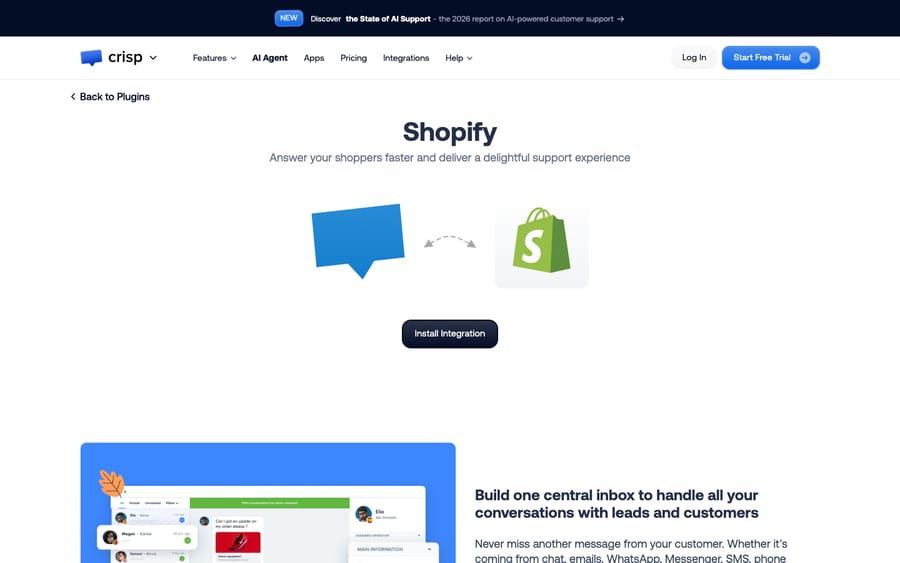
This doesn't automate the reply. It removes two of the seven steps above: switching to Shopify and searching for the order.
How do you let Hugo answer order status questions?
Hugo is Crisp's built-in AI agent, and it gets three Shopify tools:
| Hugo tool | What it does |
|---|---|
| Get Order Details | Retrieves an order's status, shipping details and tracking information |
| Get Customer Address | Retrieves the default address on the Shopify customer account |
| Update Order Shipping Address | Changes selected shipping address fields while the order can still be modified |
To turn them on, open AI Agent, Automate, Integrations & MCP, Shopify. Switch the integration on, choose whether the tools are available to Customers (Hugo uses them in conversations), Copilot (operators use them through Hugo Copilot) or both, and enable each tool you want.
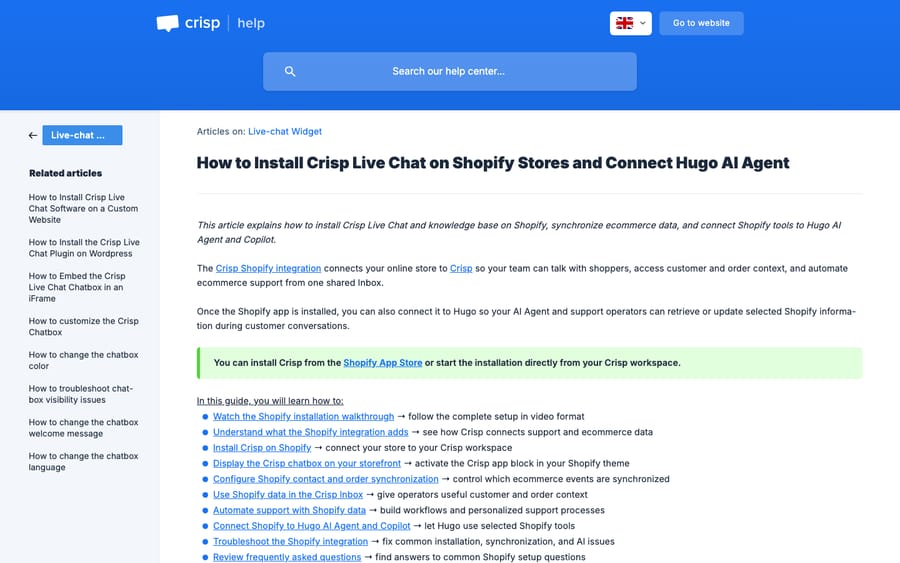
Then turn on Require user identity verification. Crisp's article says the Shopify tools "may access personal information or modify an order," and recommends verification before Hugo retrieves detailed order data or a saved address. It can be set for the whole integration or per tool. Without it, anyone who knows or guesses an order number could ask a chatbot where someone else's parcel is going. Crisp's article doesn't describe the verification method itself, so set your own rule and test it: share tracking or an address only when the customer gives the order number plus the email on the order, or the order's postal code, and ask for it again if either doesn't match.
Leave Update Order Shipping Address off until lookups have run cleanly for a while. A bad lookup can leak one order's details; a bad address change sends the parcel somewhere else.
What it costs. Crisp's Hugo billing article estimates $0.05 to $0.10 for "a full Hugo-handled conversation," billed from a monthly credit pool: $5 on Mini, $25 on Essentials and $75 on Plus. Crisp's pricing page puts that at around 90, 450 and 1,350 automated conversations; our arithmetic on the per-conversation estimate gives 250 to 500 for Essentials. If order chats are 300 a month and Hugo also answers your other questions, the pool can run out before month-end, and with Pay-As-You-Go off, Hugo stops and conversations go to your operators. Crisp's pricing page also lists "Unlimited Task automations" (connecting the AI agent to third-party tools) as a Plus feature, and the setup article doesn't name a plan, so confirm with Crisp which plan your tool usage needs before you budget.
We cover Hugo's plans and credits in more depth in our Crisp AI explainer.
How do you build it yourself with Crisp webhooks and the Shopify API?
If you have an engineer and rules Hugo can't express, the parts are all public (our Crisp API guide covers the tokens, rate limits and webhooks in detail):
- Catch the message. Add a website hook in Crisp (Advanced configuration, Web Hooks) subscribed to
message:send, which fires when a customer sends a message. Crisp's website hooks guide says these work on every plan, including Free, and that they're unsigned, so protect the URL with a secret parameter. Crisp's Web Hooks reference adds that website hooks aren't retried after a failed delivery. - Read the thread and profile. Call
GET /v1/website/{website_id}/conversation/{session_id}/messagesand the people profile route for the customer's email. - Decide whether it's an order question, and pull out an order number or email. This is the step a regex gets wrong ("I ordered the wrong size" isn't a status question).
- Look up the order through Shopify's Admin GraphQL orders query, and only answer if the order's email matches the Crisp profile.
- Reply and resolve.
POSTto the conversation's message route with"type": "text", or"type": "note"if a person should check it first, thenPATCHthe state toresolved.
That's a working prototype in a few days. The upkeep is the real cost: handling partial shipments, split fulfillments, missing tracking, customers who ask a second question, and every Crisp webhook missed while your server was down, since website hooks don't retry.
How does Macha automate order status in Crisp?
Macha is the fourth option: an AI agent that runs inside your Crisp workspace and does steps 1 to 5 above without you writing them, through Macha's Crisp connector and its Shopify connector. The Crisp order-status use case runs like this:
- Trigger. Crisp's New Customer Message trigger fires when a shopper writes, for example "hey, where's my order? it's #2209."
- Read. The agent reads the conversation messages and the shopper's Crisp profile (name, email, segments).
- Look up. It searches Shopify for the order by number or email and gets the fulfillment and tracking details.
- Reply. It replies as an operator: "Order #2209 left our warehouse on Monday with Royal Mail. The tracking number is RM5531 and it should be with you by Thursday." (The order and shopper here are a synthetic example.)
- Resolve. It changes the conversation state to resolved.
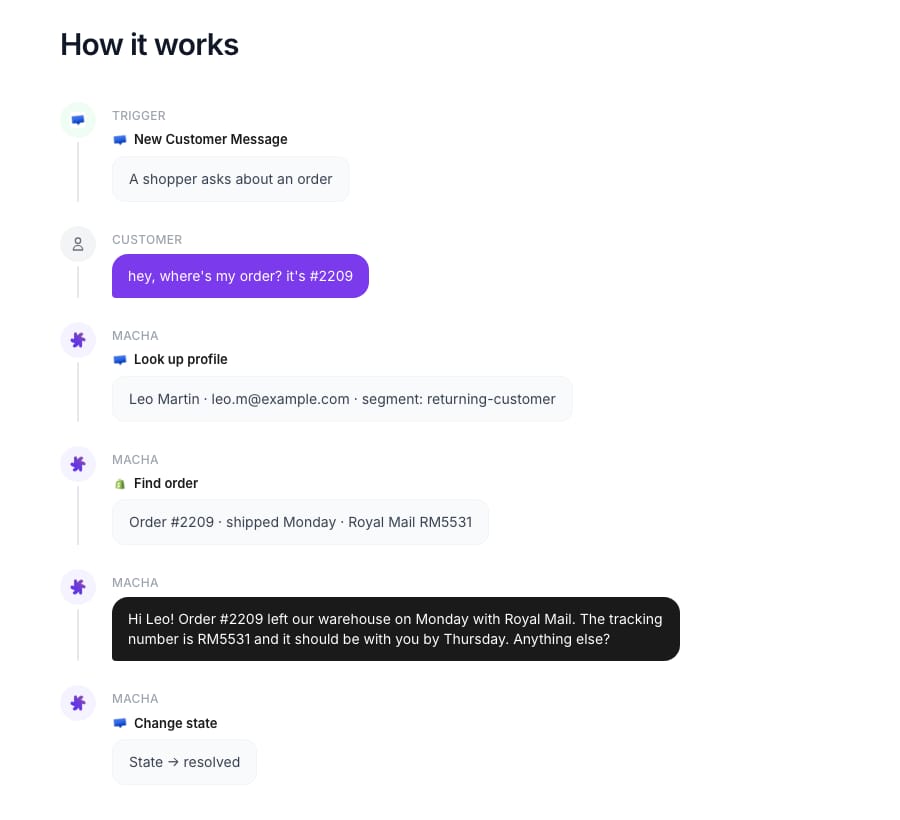
That's the order-status workflow as Macha's use case page lays it out: Shopify's order lookup paired with the Crisp connector's Send Message and Change State, with Add Internal Note for anything a person should check.
Three things differ from Hugo (our comparison of Hugo and an AI agent layer covers the wider trade-off). First, safe mode: until you trust it, the agent posts each answer as a Crisp internal note for an operator to send, which is how every Macha rollout starts (drafting Crisp replies as internal notes). Second, the agent's instruction carries the identity rule in plain words: share tracking only when the order's email matches the Crisp profile, otherwise ask the shopper to confirm it. Third, order status is rarely the only question. The same agent can tag the chat with a segment, hand a damaged-item complaint to the right team, check a refund in Stripe, or answer after hours when nobody's online. For the other tools that can do this job on Crisp, see our roundup of AI agents for Crisp.
What should the reply say for each order state?
Whichever option you pick, write down the answer for each state an order can be in before you automate anything. These four cover most order-status chats:
| Order state in Shopify | What the reply should say | Hand off to a person? |
|---|---|---|
| Unfulfilled | The order is confirmed and hasn't shipped yet, with your stated dispatch time | Only if it's past that time |
| Split shipment | Each package's carrier and tracking number, and which items are in it | No |
| Shipped, no tracking number | That it has shipped and tracking isn't available yet | Yes, if no tracking appears within your normal window |
| Delivered, but the customer says it didn't arrive | Acknowledge it and say a teammate will follow up | Always |
The last row is where automation should stop. A missing parcel is a claim, and it needs a person who can check with the carrier or send a replacement.
Which option should you choose?
Pick by who you want doing the work:
- Your operators answer every chat and volume is low: the Shopify plugin alone. It's included and takes minutes.
- You're on a Crisp plan with Hugo and order lookups are most of your AI traffic: Hugo's Shopify tools, with identity verification on. On cost per conversation it's the cheapest automated option here.
- You have an engineer and unusual rules: build on the webhook and the Shopify API, and plan for the upkeep.
- You want it built, tested and run for you, across more than order status: Macha.
Macha fits teams running Shopify stores on Crisp that want agents answering with live order data without anyone on the team tuning prompts or maintaining code. The Macha team analyzes your past Crisp conversations, builds the knowledge base and the agent, connects Shopify, tests it on real past chats and runs it in safe mode until the drafts are right. It's about $0.40 per ticket, one charge per conversation however many messages it takes, and that includes setup and a dedicated success manager who handles your changes. See how Macha works on Crisp or our wider guide to auto-resolving order status inquiries. The trial is $50 of free usage (about 125 tickets), no credit card, no time limit, with the done-for-you setup included.
Common questions
Does Crisp integrate with Shopify?
Yes. Crisp's Shopify plugin adds the chatbox to your store and shows customers' orders, order status and tracking in the Crisp inbox. Install it under Settings, Workspace Settings, Setup & Integrations, Shopify.
Can Crisp's Hugo track Shopify orders?
Yes. Hugo's Get Order Details tool retrieves an order's status, shipping details and tracking. Turn it on under AI Agent, Automate, Integrations & MCP, Shopify, and enable identity verification before customers can use it.
Why isn't the Crisp chatbox showing on my Shopify store?
Usually the Crisp app embed was enabled in the theme editor but not saved. Open App embeds, confirm the Crisp embed is on, click Save and reload the store in a private window.
Is it safe to let an AI agent share order details?
Only with an identity check. Match the order's email to the customer's verified email or profile before sharing an address or tracking details. Crisp offers a Require user identity verification setting for Hugo's Shopify tools, and Macha agents carry the same rule in their instructions.
What does it cost to automate order status in Crisp?
The Shopify plugin is included. Hugo uses AI credits, which Crisp estimates at $0.05 to $0.10 per full Hugo-handled conversation. A custom build costs developer time and hosting. Macha is about $0.40 per ticket, with setup by the Macha team included.
How we researched this
- Crisp's documentation, fetched 21 November 2026: the help article on installing Crisp on Shopify and connecting Hugo (updated 1 November 2026), the Shopify troubleshooting article, the Hugo pricing and billing article, Crisp's Shopify integration page and its pricing page; plus the website hooks guide and REST API reference on docs.crisp.chat. Setup paths and tool names are quoted from those pages.
- Shopify's documentation: the order status page article on help.shopify.com and the Admin GraphQL orders query on shopify.dev. We checked both on 21 November 2026, and we checked every Crisp menu path above against the article it's quoted from.
- Arithmetic: $25 of Hugo credit divided by $0.05 to $0.10 per conversation gives 250 to 500 conversations.
- Macha's workflow comes from Macha's Crisp connector (New Customer Message trigger; List Conversation Messages, Get People Profile, Send Message, Add Internal Note and Change State tools), Macha's Shopify connector, and the live use-case page captured above. The order, shopper and tracking number in the example are synthetic. Everything about Crisp, Hugo and Shopify is from their public documentation; we didn't run Hugo ourselves.