Intercom
 Shopify
 Stripe
 Slack
Slack Notion
 Google Workspace
 Confluence

What Is the Freshchat AI Chatbot (Freddy AI Agent), and What Does It Cost in 2026?


Freshchat's AI chatbot is Freddy AI Agent, which Freshworks' pricing page lists on Freshchat Growth ($19 an agent a month, billed annually), Pro ($49) and Enterprise ($79) and bills by the session: the first 500 sessions are free once per account, then it's $49 per 100, and a chat session is everything one customer says to the agent within 24 hours. A team whose bot handles 2,000 chats a month pays $980 in sessions before a single seat. This guide covers what Freddy answers from and what it can do, the session rules that catch teams out (previews count, freebies vanish when you buy a pack), what it costs at four volumes, and the alternatives if you'd rather not meter your chatbot by the conversation.
Key takeaways
- Freshchat's AI chatbot is Freddy AI Agent, sold on Freshchat Growth, Pro and Enterprise with 500 one-time free sessions, then $49 per 100 sessions billed whether or not it resolves anything.
- Freshworks counts a Freddy AI Agent chat session as every interaction with one customer inside a 24-hour window, and previewing an agent while you build it consumes sessions too.
- Buying a paid Freddy session pack ends any complimentary sessions still left on the account, and unused sessions expire with the billing cycle instead of rolling over.
- At 30% resolution, Freddy's $0.49 session price works out to about $1.63 per resolved chat, more than Intercom Fin's $0.99 per outcome.
- Macha has no Freshchat connector; it works on the Freshdesk side through a built-in connector with 15 actions and 3 triggers, or replaces the bot layer with its own website chatbot.

What is the Freshchat AI chatbot?
Freshchat has two kinds of bot, and they share one meter. Freddy AI Agent is the generative one: it reads your help articles, files, URLs and Q&As and writes an answer in its own words, over several turns. Chatbots are the older flow bots, where you draw dialogs and conditions and the bot walks the customer through them. Freshworks' build guide puts both behind the same "Create new" button. Both are built in AI Agent Studio, which Freshworks describes as "the centralized workspace to create, configure, deploy, and optimize AI agents across chat and email channels."
Every figure in this table comes from a Freshworks page we read on 5 October 2026.
| Question | Freddy AI Agent in Freshchat |
|---|---|
| Plans that list it | Growth $19, Pro $49, Enterprise $79 per agent a month, billed annually. Not on the Free plan |
| Billing unit | Session: all of one customer's interactions with the bot in a 24-hour window (72 hours on email in Freshdesk Omni) |
| Included | 500 sessions once per account on Growth, Pro and Enterprise; none on Free |
| Price after that | $49 per pack of 100 sessions, about $0.49 a session |
| Knowledge it answers from | Solution articles, files (.PDF, .DOCX, .TXT), Q&As and public URLs |
| Knowledge limits | 100 files per agent; 50 parent URLs with up to 3,000 child links each |
| Channels | Web and mobile widget, WhatsApp, Facebook Messenger, Instagram and other chat channels; email agents sit in Freshdesk Omni |
| Actions | Workflows and API actions built in AI Agent Studio |
| When it can't answer | Hands the chat to a human agent in Freshchat |
| Agent-side AI | Freddy AI Copilot, $29 an agent a month billed annually ($35 monthly), Pro and Enterprise only |
| Trial | 14 days on the Enterprise plan |
Both kinds of bot run on one meter. Freshworks' session FAQ says session packs "are shared between both Freddy AI Agents and Chatbots configured in your Freshworks account," so the old flow bot and the generative agent draw down the same balance. Moving from a flow bot to Freddy doesn't add a new bill. It changes how fast the existing one empties.
If you're still deciding between the two Freshworks products, our Freshchat vs Freshdesk comparison covers which one owns the conversation, and our Freshchat pricing guide covers the seat side of the bill in full.
What does Freddy AI Agent answer from, and what can it do?
Freddy answers from four kinds of knowledge: Freshdesk or Freshchat solution articles, uploaded files, structured Q&As and public web pages. Freshworks' AI agents page lists the file types as .PDF, .DOCX and .TXT, and the Studio documentation caps them at 100 files per agent and 50 parent URLs with up to 3,000 child links under each. For most small teams, a help center plus a pricing page fits comfortably inside that. A team with a 5,000-page docs site may need to pick which sections the agent crawls.
Freshworks says the agent answers in "60+ global languages." One wrinkle: Freshchat's own pricing page lists "Multilingual conversations" as a Pro feature rather than a Growth one. We couldn't find a Freshworks page saying whether that gate applies to Freddy's replies, so test a non-English chat during the 14-day trial before you buy Growth for a multilingual audience.
The AI agents page lists refunds, returns, order tracking, pickups, inventory checks, loyalty points, appointment changes, subscription changes and CRM updates, and each of those is a workflow someone builds in AI Agent Studio, either from a template or as an API action that calls the other system. Our Freshdesk ecommerce guide read the full workflow library and found its three Shopify templates only read orders, so a Shopify refund is an API action your team configures. The older Freshchat flow bots work the same way: Freshworks' bot integration guide has you enter the Freshdesk endpoint, method, JSON payload and auth header by hand to create a ticket from a bot.
When Freddy can't help, Freshworks says it routes the chat "to the right human agent with full context carried over." That handoff lands in the Freshchat inbox, which is where Freddy has the edge over any third-party bot: the human picks up in the same thread, with the same customer record, without a second tool.
Reviewers who've set it up say the configuration takes work. A G2 reviewer in logistics at a mid-market company wrote on 11 August 2026 that "some of the automation and bot configuration features have a learning curve to set up effectively," a quote we collected for our Freshchat guide. That matches what the build guide describes: knowledge sources, flows, bot mappings to topics, then deployment per channel.
How much does the Freshchat AI chatbot cost?
Freshchat sells seats and sessions separately, and the bot is the session side. Here's the plan row as Freshworks showed it to a US visitor on 5 October 2026.
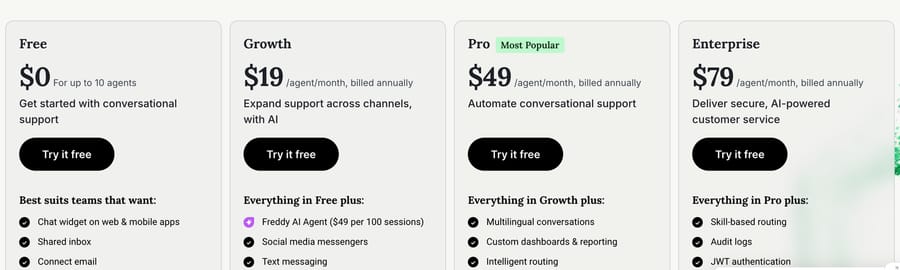
Freddy AI Agent appears first under Growth, at "$49 per 100 sessions." The Free plan gets the chat widget, shared inbox and email but no AI agent, and the session FAQ confirms Free accounts get no complimentary sessions. If you're on Freshdesk Omni instead (Growth $29, Pro $79, Enterprise $119 per agent a month, billed annually), the session price and the 500 free sessions are the same; Omni adds email AI agents with a 72-hour session window.
Here's what the sessions cost at four monthly volumes, once the 500 free sessions are used up:
| Bot chats a month | Packs of 100 | Freddy session cost | Per session |
|---|---|---|---|
| 500 | 5 | $245 | $0.49 |
| 1,000 | 10 | $490 | $0.49 |
| 2,000 | 20 | $980 | $0.49 |
| 3,000 | 30 | $1,470 | $0.49 |
Seats sit on top. A four-agent team on Growth adds $76 a month, so 2,000 bot chats come to $1,056. The same team on Pro with Copilot for everyone pays $196 in seats, $116 in Copilot and $980 in sessions, which is $1,292.
Why the price per resolved chat matters more than the price per session
A session is billed whether the bot resolves the chat or hands it to a person, and Freshworks' FAQ says nothing about refunds for failed sessions. So the useful number is cost per resolution, which depends on how good the bot is on your traffic. At Freddy's list price of $0.49 a session:
| Resolution rate | Resolved chats out of 2,000 | Freddy cost per resolved chat |
|---|---|---|
| 20% | 400 | $2.45 |
| 30% | 600 | $1.63 |
| 50% | 1,000 | $0.98 |
At 30%, Freddy costs more per resolved chat than Intercom Fin's $0.99 per outcome, and it only matches Fin at about 50%. The two pricing models give the vendor different incentives. A per-session price earns the vendor the same whether the bot helps or not, so it's cheapest for a buyer whose bot resolves most chats. A per-resolution price earns the vendor more as the bot gets better, so it's cheapest for a buyer whose bot resolves few.
Freshworks runs the same comparison on its own site with a different price. Its AI agents page puts Freddy at "$100/1000 sessions," a tenth of a dollar each.
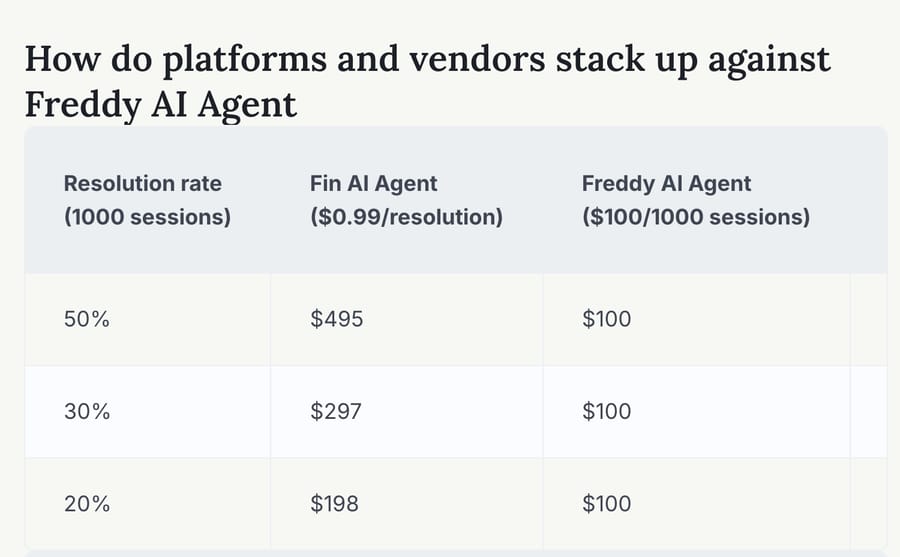
That's about a fifth of the $490 that 1,000 sessions cost at $49 per 100 on the pricing page. The session FAQ labels $49 per 100 as the price for a "first-time purchase of a Freddy AI Agent session add-on (starting November 13th, 2025)," which suggests $100 per 1,000 is an older or contract rate. Freshworks doesn't say which, so we've used the published $49 throughout. If a sales rep quotes you the $100 rate, get it in the order form.
What happens when Freddy's sessions run out?
Six session rules decide how far the 500 free sessions go and what a month really costs. All of them come from the session FAQ, last updated 12 August 2026.
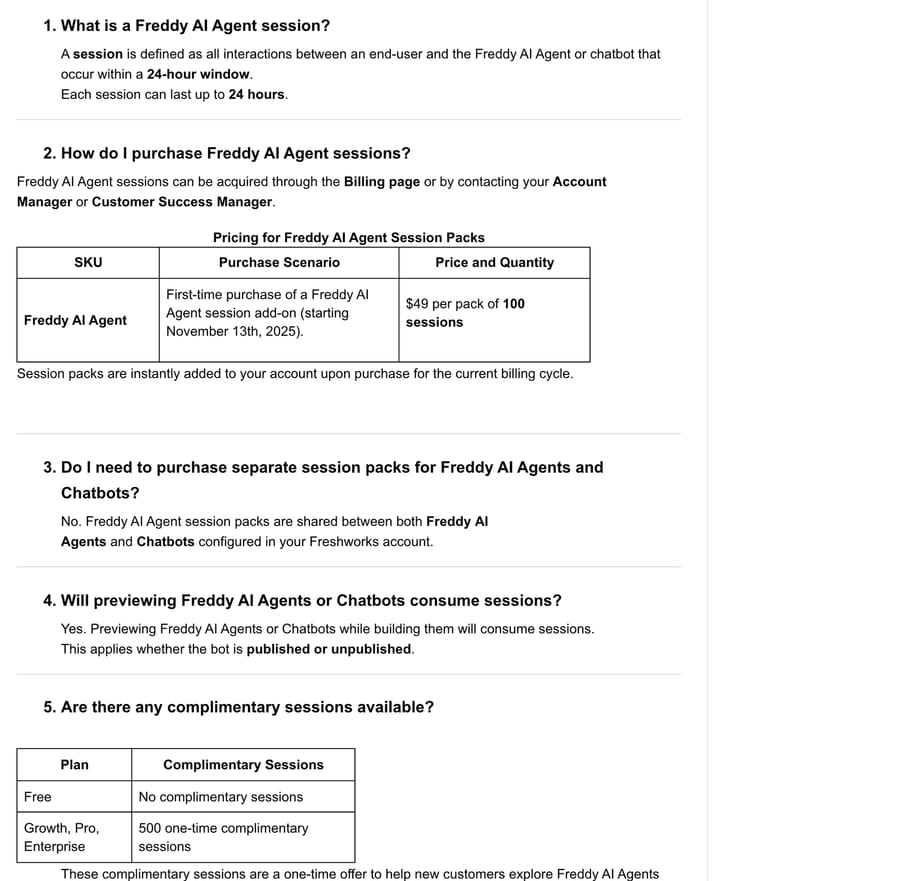
- Testing costs sessions. "Previewing Freddy AI Agents or Chatbots while building them will consume sessions. This applies whether the bot is published or unpublished." Someone tuning an agent for an afternoon can spend a few dozen of your 500 free sessions before a customer sees it.
- The 500 free sessions are a one-time offer. They don't renew monthly. Freshworks calls them "a one-time offer to help new customers explore Freddy AI Agents."
- A paid pack ends the freebies. "If complimentary sessions were previously available, they will no longer apply once a paid session pack is purchased." Buy your first pack when the free ones are nearly gone, not while 300 are left.
- Nothing rolls over. Packs expire at the end of the billing cycle, so a quarterly plan's sessions expire quarterly.
- The 24-hour window cuts both ways. A customer who chats at 11:59 PM is one session until 11:58 PM the next day. A customer who comes back after 25 hours is two.
- Auto-recharge buys in single packs. On online billing, it adds one pack of 100 when the balance drops below 50 sessions.
When the balance hits zero, what the customer sees depends on where the bot lives.
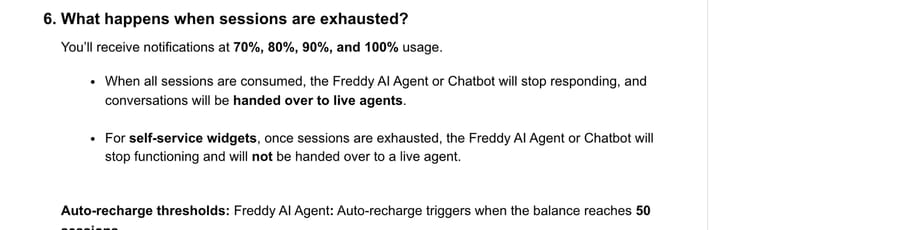
On a normal chat widget, the agent goes quiet and chats fall through to your human team, which is fine if someone's online and a queue spike if not. On a self-service widget the bot simply stops, with no handover. If you run Freddy after hours with nobody staffing chat, turn on auto-recharge or watch the 90% alert.
How do you set up Freddy AI Agent in Freshchat?
The setup in Freshworks' guides runs in five steps:
- Create the agent. Open AI Agents and Chatbots, choose Create new, pick Freddy AI Agent, a primary language and a channel.
- Add knowledge. Connect solution articles, upload files, add Q&As and point it at your help-center URLs, inside the 100-file and 50-URL limits.
- Write the behavior. AI Agent Studio has behavioral instructions for tone, formatting and what the agent must not answer. Put your refund and escalation rules here, not in a knowledge article.
- Add workflows. Templates or API actions for anything that reads or changes another system, plus the handoff rule.
- Map and deploy. Map the agent to topics for the web widget, or connect it under Admin Settings, Chat Channels for WhatsApp, Messenger or Instagram.
Two habits save sessions. Test with a short script of real questions instead of chatting freely, because every preview is a session. And mind the channel: a WhatsApp customer who replies a day later opens a second session.
If you plan to connect anything outside Freshworks to Freshchat, including another AI layer, the Freshchat API is the route. It lives at https://<account-name>.freshchat.com/v2/, authenticates with Authorization: Bearer <token> (generated under Admin, Configure, API Tokens), and has endpoints to read a conversation, list its messages and post a message. We sent a request to the list-messages endpoint on a made-up account subdomain on 5 October 2026. With no token Freshchat returned 401. With a dummy token it returned:
HTTP/2 400
{"success":false,"error_code":0,"error_message":"Signed JWSs are not supported."}
That error tells you Freshchat parses the bearer token as a JWT before checking it, so a malformed or truncated token fails with a 400, not a 401. If an integration you're building gets that message, the token was pasted wrong. It doesn't mean your account lacks API access.
What are the alternatives to Freddy AI Agent for Freshchat?
The alternatives split by where the bot runs. Fin runs on your Freshchat. The rest bring their own chat widget, so the bot conversation leaves Freshchat and only the handoff comes back. Prices below were read on the vendors' pages on 5 October 2026.
| Option | Where it runs | Billing unit | Entry price | Fits | Watch-out |
|---|---|---|---|---|---|
| Freddy AI Agent | Inside Freshchat | Session (24 hours of one customer's chat) | 500 free once, then $49 per 100 | Teams already on Freshchat that resolve a high share of chats | Billed on every session; previews count |
| Intercom Fin | On Freshchat and Freshdesk via API | Outcome | $0.99 per outcome, minimum commitment off Intercom | Teams whose bot resolves under half of chats | An outcome includes some handoffs after a workflow |
| eesel AI | Its own widget beside your desk | Credit (one chat however long) | $299 a month for 500 credits | Teams wanting a flat monthly bill and no seat fees | Not inside the Freshchat widget |
| Tidio Lyro | Tidio's widget | Lyro conversation (one with at least one AI reply) | From $32.50 a month for 50 conversations | Small stores moving off Freshchat entirely | Above 1,000 a month goes to sales |
| Macha | Freshdesk tickets, or Macha's own website chatbot | Ticket (one thread with one person) | $299/month for 750 tickets | Teams on Freshdesk that want agents acting inside tickets | No Freshchat connector |
Intercom Fin is the only one here that documents running on Freshchat itself. Its Freshdesk integration page covers "Freshdesk tickets and Freshchat," including live chat and WhatsApp through Freshchat, at $0.99 per outcome with no seat fee, and it notes that "minimum commitments apply." Intercom's pricing sets that at 50 outcomes a month when Fin runs on another help desk, and Salesforce, which completed its purchase of Fin on 10 September 2026, cites a 76% average resolution rate. At 2,000 chats and 30% resolution, Fin's bill would be about $594 against Freddy's $980. Our Fin explainer covers what counts as an outcome.
eesel AI prices by credit: one chat or ticket is one credit "however long," from $299 a month for 500 credits up to $1,899 for 5,000, with no seat fees. Its own Freshchat guide is candid that it doesn't plug into the Freshchat widget: the pattern is to "run eesel's own chat widget on your site." You'd run two widgets or retire Freshchat's.
Tidio Lyro is the move-everything option. Lyro starts at $32.50 a month for 50 conversations and counts a conversation once it has at least one AI reply, but it runs in Tidio's widget, so your human chat moves to Tidio too. Our Freshchat alternatives roundup compares Tidio and seven other platforms on that basis.
Staying on Freddy makes sense when your chats are repetitive enough that the bot resolves most of them, because then $0.49 a session is cheap. It also keeps the bot and the humans in one inbox, which none of the widget-based options can match.
Where Macha fits
Macha doesn't connect to Freshchat. There's no Freshchat connector and no Freshchat trigger, so a Macha agent can't reply inside the Freshchat widget or the Freshchat inbox, and if the chat bot is the job you're hiring for, Freddy or Fin is the direct answer. Macha fits Freshchat teams on the Freshdesk side: when chats become Freshdesk tickets through Freshworks' native integration, Macha's built-in Freshdesk connector works them with 15 actions (read, search, public reply, internal note, priority, status, tags, fields, assignment) and fires on 3 triggers, including Ticket Created.
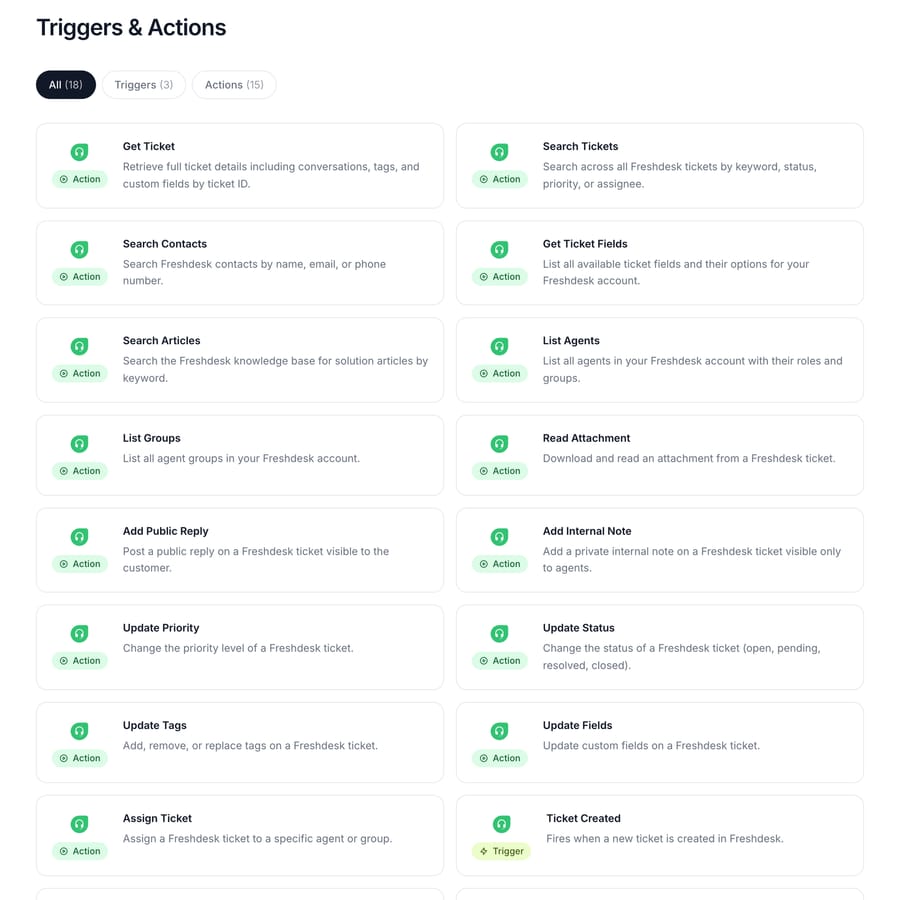
For the website itself, Macha's website chatbot embeds a Macha agent with its tools and knowledge, so it can replace Freddy as the bot layer, with the trade that the bot conversation lives in Macha rather than in Freshchat's inbox. Reading a Freshchat conversation by ID needs a custom API tool against the Freshchat API with a Bearer token, which Macha's team sets up during onboarding. Macha bills per ticket, one thread between Macha and one person, charged once no matter how many messages it takes: $299 a month for 750 tickets, $599 for 1,500, $1,199 for 3,000, $1,999 for 5,000, $2,999 for 7,500 and $3,999 for 10,000, with custom pricing above that. At this page's 2,000 chats a month that's the 3,000-ticket tier, with setup and monitoring by the Macha team, included on every plan. It suits teams already running Zendesk, Freshdesk, Gorgias, Front, HubSpot or Intercom who want agents acting inside the ticket. The trial is $50 of free usage (about 125 tickets), no credit card, no time limit.
Frequently asked questions
Does Freshchat have an AI chatbot?
Yes. Freshchat's AI chatbot is Freddy AI Agent, built in AI Agent Studio and listed on the Growth, Pro and Enterprise plans. It answers from your solution articles, files, Q&As and web pages, and hands chats it can't solve to a human agent in the Freshchat inbox. Freshchat also has flow-based chatbots that share the same session balance.
How much does Freddy AI Agent cost in Freshchat?
Freddy AI Agent costs $49 per 100 sessions after 500 one-time free sessions on Growth, Pro or Enterprise, according to Freshworks' pricing page on 5 October 2026. A session is all of one customer's chat with the bot inside 24 hours, billed whether or not the bot resolves it. Seats are separate: $19, $49 or $79 per agent a month, billed annually.
Is Freddy AI Agent free on the Freshchat Free plan?
No. Freshchat's Free plan covers up to 10 agents with the chat widget, shared inbox and email, but Freddy AI Agent is listed from Growth, and Freshworks' session FAQ says Free accounts get no complimentary sessions. Growth, Pro and Enterprise accounts get 500 free sessions once.
Do Freddy AI Agent sessions roll over?
No. Freddy sessions expire with your billing cycle, so a quarterly plan's sessions expire quarterly. Buying a paid pack also ends any of the 500 complimentary sessions still unused, and previewing an agent while you build it consumes sessions.
Can I use a different AI chatbot with Freshchat?
Yes. Intercom Fin documents a Freshchat setup and bills $0.99 per outcome. Tools such as eesel AI and Tidio Lyro run their own chat widget instead of Freshchat's, and Macha works Freshdesk tickets through its Freshdesk connector or runs its own website chatbot. Macha has no Freshchat connector.
How we researched this
We read every source below on 5 October 2026 unless a date says otherwise.
- Freshchat pricing: freshworks.com/live-chat-software/pricing, captured on 5 October 2026. The page shows local currency by location; our first capture came back in rupees, so we recaptured with a US location to show dollar prices. The Copilot monthly price ($35) is from the price data embedded in the same page.
- Freshdesk Omni pricing and the 72-hour email window: freshworks.com/freshdesk/omni/pricing.
- Session rules: Freshworks article 50000004664, last updated 12 August 2026, captured on 5 October 2026.
- Knowledge limits and Studio: Freshworks article 50000011711, last updated 20 August 2026. Channels from article 50000004658; flow bots from 50000004626; bot-to-Freshdesk API setup from 50000004657.
- Freddy capabilities, the 60+ languages figure and the $100 per 1,000 sessions table: Freshworks' AI agents page, captured on 5 October 2026. We cropped out the page's Zendesk table (which is clipped on the page itself) and kept its heading and the Fin table. These are vendor claims.
- Alternatives: fin.ai/integrations/freshdesk; Intercom's 50-outcome minimum and the 76% resolution rate are as cited by Intercom and Salesforce (vendor self-report). eesel.ai/pricing and eesel's Freshchat post; tidio.com/pricing.
- Review quote: G2, as collected for our Freshchat guide on 22 September 2026.
- Macha: the Freshdesk connector's actions and triggers from our public integration page (captured 5 October 2026) and
integrations.json; prices from getmacha.com/pricing.
What we ran ourselves. The Freshchat API test was live: two requests to the list-messages endpoint on a made-up account subdomain at 07:52 UTC on 5 October 2026, one with no token (401) and one with a dummy token (the 400 shown above). We didn't run Freddy AI Agent on a Freshchat account and we didn't run a Macha agent for this page; the Macha Demo dashboard session was signed out when we tried. Everything about Freddy's behavior is documented, not tested.
Arithmetic. Session costs: chats ÷ 100 × $49 (500 → $245, 1,000 → $490, 2,000 → $980, 3,000 → $1,470). Per session: $49 ÷ 100 = $0.49. Growth seats: 4 × $19 = $76, plus $980 = $1,056. Pro with Copilot: 4 × $49 = $196, 4 × $29 = $116, plus $980 = $1,292. Cost per resolved chat: $980 ÷ 400 = $2.45; $980 ÷ 600 = $1.63; $980 ÷ 1,000 = $0.98. Fin at 30%: 600 × $0.99 = $594. Freshworks' marketing rate: $100 ÷ 1,000 = $0.10 a session, against $490 ÷ 1,000 = $0.49, a ratio of 4.9. The 2,000-chat team and the resolution rates are illustrative; examples are synthetic.
Simple per-ticket AI pricing
One thread with one person is one charge, however many replies it takes.