Intercom
 Shopify
 Stripe
 Slack
Slack Notion
 Google Workspace
 Confluence

How Should an Ecommerce Brand Add AI to Freshdesk? Order Status, Returns, Refunds and Cost (2026)


Freshdesk's own Freddy AI Agent is on every Freshdesk plan from Growth ($19 an agent a month, billed annually) and costs $49 per 100 sessions after a one-time allowance of 500, and its prebuilt Shopify workflows look up order status, past orders and refund status but don't change an order. For a store at the median of 25 support tickets per 100 orders, 4,000 orders a month means about 1,000 tickets, which is $490 a month in Freddy sessions or $599 on a per-ticket agent layer such as Macha. This page sets out which ecommerce jobs Freddy handles natively, which need an API action someone builds, what each option costs at 1,000 and 3,000 tickets, and what happened when we ran a returns ticket with a skin-reaction complaint through an agent.
Key takeaways
- Freddy AI Agent's workflow library lists 52 templates, and its three Shopify templates (Order Status, View Past Orders and Refund Status) only read orders, so a Shopify refund needs an API action.
- Freddy AI Agent is included on Freshdesk Growth, Pro and Enterprise, with 500 free sessions once per account and then $49 per 100 sessions. Freshworks defines a session without reference to the outcome, so we read it as billed whether or not the AI resolves the ticket.
- At 1,000 email tickets a month, Freddy sessions cost $490 against $599 for Macha's 1,500-ticket tier; at 3,000 tickets, Freddy costs $1,470 against Macha's $1,199.
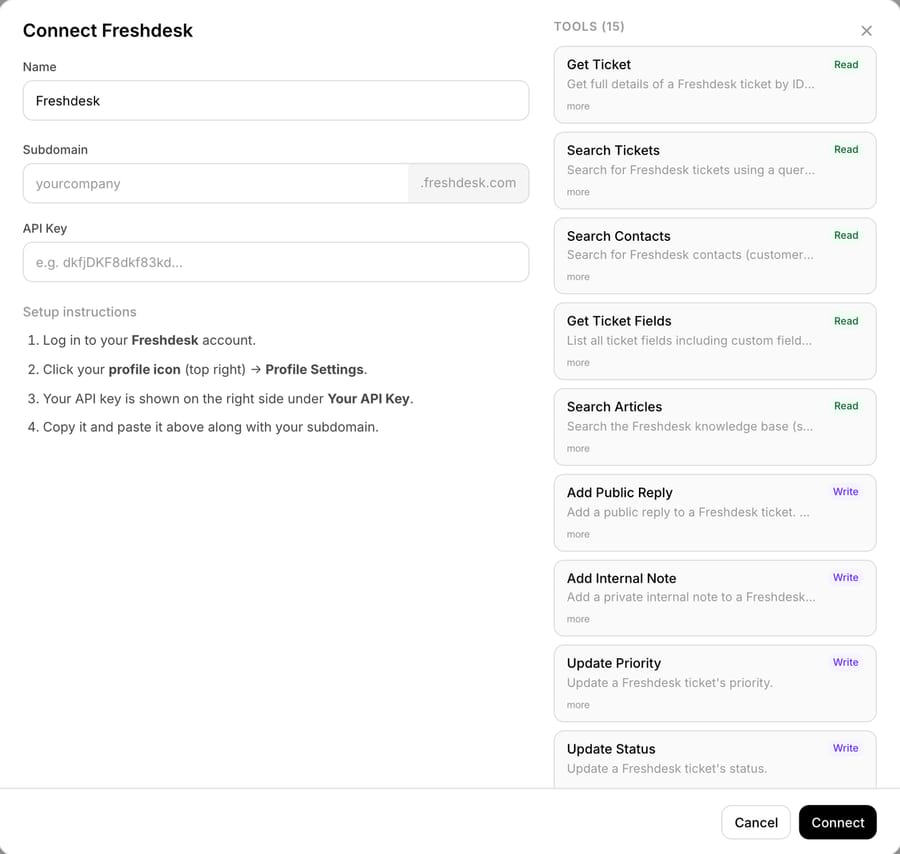
- Macha's built-in Freshdesk connector has 15 tools, 7 of them Write tools, and its Update Tags tool can "add, remove, or replace tags", so the agent's instructions should say to keep existing tags.
- In our 28 September 2026 test run, an agent read Shopify order #1097, set a skin-reaction ticket to High priority and noted the order was unfulfilled although the customer said she'd used the product.

What can AI do for an ecommerce queue on Freshdesk?
Ecommerce tickets on Freshdesk sort into a handful of order jobs, and each one has up to three ways to get done: Freddy's native templates, the Freshworks Shopify app that a human agent uses in the ticket sidebar, and a third-party agent layer. "Custom" below means someone builds the API call.
| Ecommerce job | Freddy AI Agent (native) | Human in Freshdesk / other apps | Macha tool |
|---|---|---|---|
| Where is my order | Order Status – Shopify template (read) | Freshworks Shopify app shows status, carrier and tracking in the sidebar | Built-in Shopify Get Order, Search Orders, Customer Orders |
| Order history | View Past Orders templates for Shopify, Magento and BigCommerce | Same sidebar app, "Show past orders" | Shopify Customer Orders, Lookup Customer |
| Where is my refund | Refund Status – Shopify template (read) | Sidebar app shows the order and its payment status | Shopify Get Order (refund lines) |
| Cancel before it ships | Generic Cancel Order and Refund Payment template, or Cancel Order – Shiprocket; Shopify is custom | Sidebar app cancels unshipped orders | Shopify Cancel Order (Write; refunds and restocks by default) |
| Refund | Custom API action for Shopify; Refund Payment – PayPal template | Sidebar app refunds in full or in part | Shopify Create Refund (Write; everything left on the order, no partial amount) |
| Return label or pickup | Create Return Pickup – AWB template; otherwise custom | Returns app | Custom API tool to the returns app |
| Carrier tracking detail | View Shipment Tracking – AWB template; otherwise custom | Tracking app | Custom API tool to the tracking app |
| Health or safety complaint | Routing through Freshdesk rules | A person, always | Freshdesk Update Priority, Add Internal Note, Assign Ticket |
Reading an order is prebuilt in every column. Changing one depends on who does it. A human in the Shopify sidebar app can cancel and refund, an AI agent needs a Write tool, and Freddy doesn't ship one for Shopify.
What does Freddy AI Agent do with Shopify orders, and where does it stop?
Freddy AI Agents are built in AI Agent Studio, which Freshworks' pricing page describes as the hub to "build, test, deploy, and monitor AI Agents" and lists on all three plans. For a small store that counts in Freddy's favor. There's no second vendor and no connector to authorize, and it runs inside the Freshdesk admin your team already knows.
Its prebuilt actions come from a workflow library of 52 templates (article updated 29 June 2026). We read the whole list and pulled out the ecommerce ones.
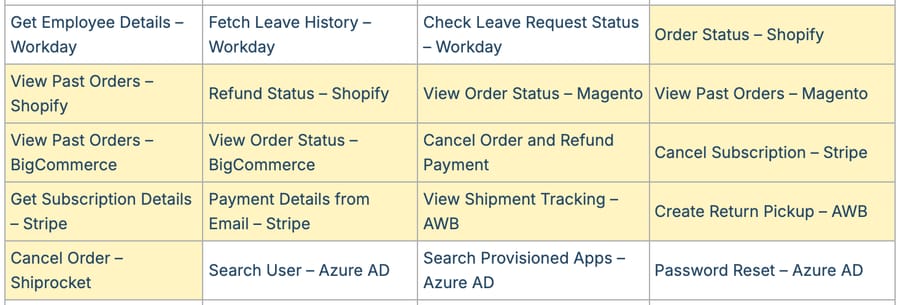
The Shopify, Magento and BigCommerce entries all read: order status, past orders and, for Shopify, refund status. The templates that change something belong to other systems: Cancel Order on Shiprocket, Create Return Pickup on AWB, Refund Payment on PayPal and Cancel Subscription on Stripe. The one generic money-moving template, Cancel Order and Refund Payment, isn't tied to a named store platform, so on Shopify you'd point it at Shopify's API yourself.
That's done with an API action, which accepts GET, POST, PUT, PATCH or DELETE and authenticates with an API key, Bearer token, Basic auth or OAuth 2.0. Freshdesk's own article adds two warnings that matter more to a store than to a SaaS company:
- Email agents skip confirmation. "Confirmation blocks are skipped for email agents," because there's no live conversation. A refund workflow that asks "Shall I refund this?" in chat runs without asking on email, and ecommerce support is mostly email. Freshdesk tells you to put safeguards "at the API layer", which in practice means a refund limit enforced by whatever service the action calls.
- Tests hit live data. "Test requests use real values and may affect your external system." Freshdesk recommends a staging environment for order cancellations and refunds, which for a Shopify store means a development store.
The pricing has its own incentive. Freddy bills per session, and Freshworks' pricing FAQ defines an email session as a 72-hour window "regardless of the number of replies". The definition doesn't depend on the outcome, so our reading is that a session is billed whether or not the AI resolves it, and Freshworks' revenue follows the number of conversations Freddy touches, not how many it closes. For ecommerce, the session window matters too: our Freddy pricing breakdown covers the 72-hour email window, and a shopper who writes "still nothing?" on day four opens a second billable session. Order-status tickets are exactly the kind that come back.
If you want Freddy to do the Shopify writes, budget for building and testing the API action, and for the refund cap that has to live outside Freddy. The full vendor-by-vendor comparison of which help desk AI can cancel, refund or edit orders natively is in our actions matrix.
Which ecommerce tickets should you automate first on Freshdesk?
Start where the AI only reads and the answer is a fact in Shopify. Zendesk's CX Trends 2025 found 67% of consumers ready to hand tasks like tracking orders to AI, so order status is where shoppers already expect a machine.
- Order status. The order is paid, unfulfilled or shipped, and the reply says so. Freddy has a template for it; an agent layer does it with a Get Order call. The one rule both need is an identity check: if the email on the ticket doesn't match the email on the order, don't share order details.
- Refund status. "Where's my refund?" is a read of the order's refund lines plus the payment method's timing. Freddy has a Refund Status template for Shopify.
- Return eligibility with a handoff. The AI reads the order date and fulfillment status, checks your return window and writes an internal note that tells a teammate exactly what's left to do. The refund itself stays with a person using the Shopify sidebar app, which can refund in part, something neither Freddy's templates nor Macha's Create Refund do.
- Cancel before it ships. Worth automating once the first three run cleanly, because it's time-sensitive: once Shopify marks the order fulfilled, cancellation is off the table.
Keep two kinds of ticket away from autonomous replies: anything describing a health reaction to a product, and chargeback threats. Both need a person, and the AI's job is to route them fast with the order facts attached. Our WISMO automation guide for Freshdesk and Shopify goes deeper on step 1.
What does AI on Freshdesk cost an ecommerce brand at 1,000 and 3,000 tickets?
Ticket volume follows orders. Gorgias Ecom Lab data puts the median ecommerce vertical at 25 support tickets per 100 orders (see our tickets-per-order benchmarks), so 1,000 tickets is about 4,000 orders a month and 3,000 tickets about 12,000. We priced both with five agents on Growth, every ticket one email session, and the 500 free sessions already used.
| Monthly line | 1,000 tickets (about 4,000 orders) | 3,000 tickets (about 12,000 orders) |
|---|---|---|
| Freddy AI Agent sessions at $49 per 100 | $490 | $1,470 |
| Freddy, if 10% of threads come back after the 72-hour window | $539 | $1,617 |
| Five Growth seats at $19 | $95 | $95 |
| Freddy AI Copilot for five agents | Not sold on Growth; $145 on Pro | Not sold on Growth; $145 on Pro |
| Macha tier (per ticket, resolved or not) | $599 (1,500-ticket tier) | $1,199 (3,000-ticket tier) |
| Freddy cost per ticket AI-deflected at Freshworks' 53% retail rate | $0.92 | $0.92 |
| Macha cost per ticket AI-deflected at the same 53% | $1.13 | $0.75 |
At 1,000 tickets Freddy costs $109 less, mostly because Macha's tiers step from 750 to 1,500 tickets and a 1,000-ticket store pays for the larger one. At 3,000 the order flips and Macha costs $271 less, because Macha's tier works out to about $0.40 a ticket against Freddy's $0.49 a session. The 53% is Freshworks' own figure for Freddy's deflection in retail, from its Customer Service Benchmark Report 2025, a vendor self-report; both bills stay the same whatever the real rate turns out to be, because neither charges per resolution.
The table leaves out what the two bills don't share. Freddy's Shopify writes need an API action built and tested by your team. Macha's Shopify writes are built in, and its tracking, returns and loyalty lookups are custom API tools that Macha's team sets up during onboarding, with setup and monitoring by the Macha team, included on every plan. The per-vertical version of this arithmetic, for 14 ecommerce categories, is in AI support cost per 1,000 orders.
What happened when we ran a returns ticket through an agent?
Our Macha Demo workspace has no Freshdesk account connected, so we couldn't run a Freshdesk ticket end to end. What we could show is the Freshdesk connector's setup screen, which we opened without connecting anything. It asks for a subdomain and an API key from the Freshdesk profile page, and lists the 15 tools: 8 Read and 7 Write.
For the Shopify half, we built an agent called "T4-018-Returns and safety desk" and ran it on our Zendesk sandbox, which stands in for Freshdesk here. The instructions are the part that would move to Freshdesk unchanged, because they only name the jobs, not the help desk:
You handle return and refund tickets for a Shopify skincare store. You never refund, cancel or promise money back. (1) Find the order number, or search orders and look up the customer by the requester's email. (2) Call Get Order and note the order date, payment and fulfillment status, line items and whether the emails match. (3) If the emails don't match, share no order details. (4) If the customer describes a skin reaction, rash, burn, swelling or any health problem, set priority to High, tell them to stop using the product and that a teammate will reply within one business day, and give no medical advice. (5) If they say they used the product but the order is unfulfilled, say so in the note. (6) Returns run 30 days from delivery. (7) Add an internal note starting "Safety:", "Refund-ready:" or "Needs review:" with the order facts, without copying the order's email. (8) Tag returns_ai, plus returns_safety for step 4, keeping any tags already on the ticket.
We attached eight tools: Shopify Get Order, Search Orders and Lookup Customer, and on the help desk side Get Ticket, Add Public Reply, Add Internal Note, Update Priority and Update Tags. No Shopify Write tool was attached, so the agent couldn't cancel or refund anything. Then we used the agent's Test run, which simulates a "ticket created" event and creates a real ticket on the sandbox. The customer, "Priya", and her email ([email protected]) are made up. Order #1097 is a real order on our Shopify test store: placed 14 September 2026, paid, unfulfilled, one Surfing Sunscreen, belonging to a teammate, so the emails don't match.
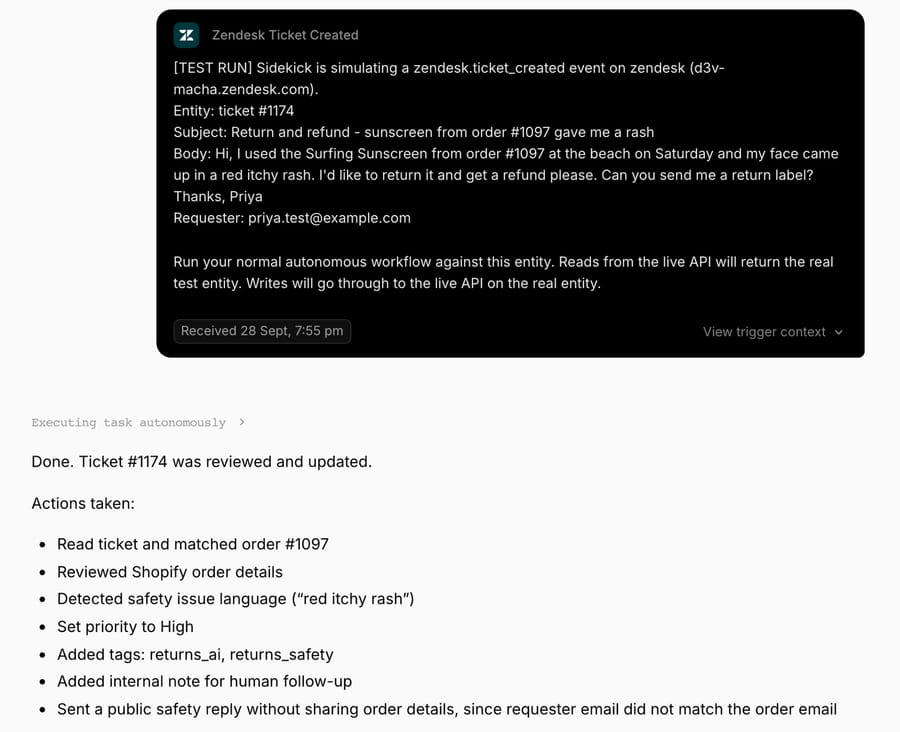
The agent read the ticket and the order in parallel, then set the priority to High, added returns_ai and returns_safety, posted the internal note and sent the public reply, six tool calls in about 13 seconds. It didn't call Search Orders or Lookup Customer, because the ticket gave an order number.
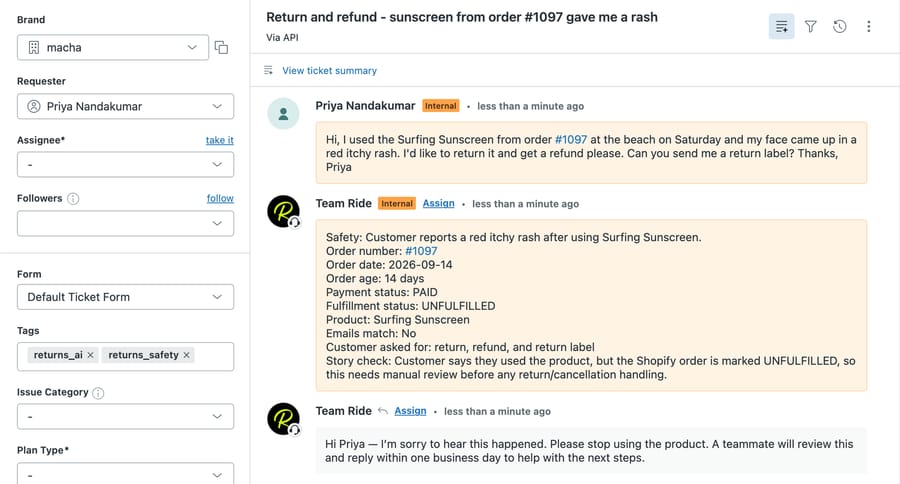
The run turned up three things to copy or avoid. First, the story check worked: the note says the customer claims to have used the product while Shopify shows the order unfulfilled, which is either a wrong order number or a claim a teammate should question. Second, the public reply shared nothing from the order, because the emails didn't match. Third, the sandbox lists the requester as "Priya Nandakumar", a test user that already existed on that address, because the help desk matches contacts by email. The reply used only the first name, Priya, which the signature and the contact record share.
On Freshdesk, two things would behave differently. Macha's tool catalog describes the Freshdesk Update Tags tool as "Add, remove, or replace tags on a Freshdesk ticket." The replace mode can drop tags already on the ticket, which is why step 8 says to keep them. Of the connector's 15 tools, 7 are Write tools. And Freshdesk's Add Public Reply appends the connecting agent's Freshdesk signature automatically, so the account you connect with should carry the signature you want customers to see.
How do you set up an AI agent on Freshdesk and Shopify without loops or surprise writes?
- Connect with a named support account. Macha connects to Freshdesk with that account's API key and your subdomain, and replies go out as that agent, with its signature.
- Trigger from a Freshdesk automation rule. Macha's Freshdesk triggers use a custom webhook: you create the trigger in Macha, get a webhook URL, and set up a Freshdesk automation rule that sends ticket events to it (trigger docs). The rule decides which tickets reach the agent, so filter out shipping notifications and marketplace mail there.
- Tag and exclude. Have the agent tag every ticket it touches, and add a Tags "does not contain" condition to the automation rule so it skips tickets carrying that tag (Freshdesk documents the condition in its overview of automation rules). This is a precaution for rules that run on ticket updates: Freshdesk treats API and webhook updates as "an agent performing an update" (Using webhooks in automation rules), so the agent's own update could fire such a rule again. Rules that run only on ticket creation aren't affected.
- Attach Write tools only when the job needs them. Shopify Cancel Order and Create Refund are Write tools; on triggered runs, Write tools execute directly when the instructions say to. Our test agent had none, which is where a returns agent should start.
- Test against a development store. Freshdesk gives the same advice for Freddy's API actions, and it applies to any agent that can reach Shopify.
Where Macha fits
Macha runs as the agent layer on top of Zendesk, Freshdesk, Gorgias, Front, HubSpot or Intercom, acting inside the ticket rather than in a separate chat widget. On Freshdesk, the built-in Freshdesk connector reads tickets, contacts, ticket fields and knowledge base articles, and writes public replies, internal notes, priority, status, tags, custom fields and assignments. The built-in Shopify connector has eight tools: Search Products, Get Discounts, Get Order, Search Orders, Create Refund, Cancel Order, Lookup Customer and Customer Orders. Create Refund refunds everything left on the order, so partial refunds stay with a person in the Shopify sidebar app. Returns, tracking and subscription apps connect through a custom API tool that Macha's team sets up during onboarding. Pricing is one plan by ticket volume: $299 a month for 750 tickets, $599 for 1,500, $1,199 for 3,000, $1,999 for 5,000, $2,999 for 7,500 and $3,999 for 10,000, with custom pricing above that, with no overages, ever. Macha fits teams on Freshdesk past roughly 1,500 tickets a month that want Shopify cancels built in and a returns or safety workflow they can test on real tickets first. It's the wrong fit if you only need order-status answers under about 1,000 tickets a month, where Freddy's templates cost less and need no second vendor. You can start with $50 of free usage (about 125 tickets), no credit card, no time limit.
Frequently asked questions
Can Freddy AI Agent refund a Shopify order?
Not with a prebuilt template. Freddy's three Shopify templates (Order Status, View Past Orders and Refund Status) only read. A Shopify refund needs an API action you build, or the generic Cancel Order and Refund Payment template pointed at Shopify's API. On email, Freshdesk skips confirmation blocks, so the refund limit has to be enforced by the API you call.
Does Freshdesk need a Shopify app for AI to see orders?
No, they're separate. Freddy's Shopify templates live in AI Agent Studio, while the free Freshworks Shopify app is for human agents: it shows orders in the ticket sidebar and lets them cancel unshipped orders and refund in full or in part. Our Freshdesk and Shopify setup guide walks through the scopes it needs.
Is Freddy or a per-ticket agent cheaper for an ecommerce store?
It depends on volume. At 1,000 email tickets a month, Freddy's sessions cost $490 and Macha's 1,500-ticket tier $599. At 3,000 tickets, Freddy costs $1,470 and Macha $1,199. Repeat contacts after Freddy's 72-hour email window add sessions; Macha counts one thread as one ticket.
Can an AI agent on Freshdesk handle returns?
It can check eligibility and prepare the handoff: read the order date and fulfillment status, apply your return window and leave an internal note with the facts. Creating the return label needs your returns app's API, through a Freddy API action, the AWB template, or a Macha custom API tool.
Which Freshdesk plan do I need for AI with Shopify?
Freddy AI Agent and AI Agent Studio are on Growth, Pro and Enterprise. Freddy AI Copilot, for human agents, is $29 an agent a month on Pro and Enterprise only. Macha connects with a Freshdesk API key and subdomain rather than a Freddy add-on. Other Freshdesk apps worth pairing with either are in our best Freshdesk integrations roundup.
How we researched this
Sources, read 28 September 2026:
- Freshdesk seat prices, Freddy AI Agent availability, the 500 one-time sessions, $49 per 100 sessions and Copilot pricing: freshworks.com/freshdesk/pricing.
- The 52-template workflow library and its ecommerce entries: Workflow library in AI Agent Studio (updated 29 June 2026). The screenshot is our capture of that page; the yellow highlighting is ours.
- API action methods, auth types, prerequisites, the email confirmation skip and the live-data warning: Connect to external systems using API actions (modified 29 June 2026).
- The 72-hour email session window: Freshworks' session FAQ, as summarized in our Freddy pricing post. The Freshworks Shopify app's sidebar actions: our setup guide, checked 24 September 2026.
- 53% retail deflection: Freshworks, Customer Service Benchmark Report 2025, a vendor self-report. 25 tickets per 100 orders: Gorgias Ecom Lab, via our benchmark page. 67% of consumers: Zendesk CX Trends 2025.
- Macha's Freshdesk tools: the live Connect Freshdesk dialog and tool catalog on Macha Demo. Macha's Shopify tools: the live Macha Demo tool picker. Macha prices: getmacha.com/pricing.
Arithmetic. Orders: 1,000 ÷ 0.25 = 4,000; 3,000 ÷ 0.25 = 12,000. Sessions: 1,000 ÷ 100 = 10 packs × $49 = $490; 30 packs × $49 = $1,470. Reopens: 10% of 1,000 = 100 sessions, 1 pack, $490 + $49 = $539; 10% of 3,000 = 300, 3 packs, $1,470 + $147 = $1,617. Seats: 5 × $19 = $95. Copilot on Pro: 5 × $29 = $145. Deflected tickets at 53%: 530 and 1,590. Cost per deflected ticket: $490 ÷ 530 = $0.92; $599 ÷ 530 = $1.13; $1,470 ÷ 1,590 = $0.92; $1,199 ÷ 1,590 = $0.75. Differences: $599 − $490 = $109; $1,470 − $1,199 = $271. Unit prices: $49 ÷ 100 = $0.49 a session; $1,199 ÷ 3,000 = $0.40 a ticket. Order #1097's age: 14 to 28 September 2026 is 14 days. Taxes and Freshdesk monthly-billing prices aren't modeled.
What we ran and what we didn't. The worked example ran live on 28 September 2026 as one Test run of an inactive agent with no triggers, on made-up ticket #1174 in our d3v-macha Zendesk sandbox, against a real order on our Shopify test store. The customer name and email are synthetic, and the example is synthetic. Macha Demo has no Freshdesk account connected, so the Freshdesk side wasn't run: we opened the Connect Freshdesk dialog without connecting, and the Freshdesk tool behavior described (the Update Tags replace mode, signature) comes from Macha's tool catalog and docs. Freddy AI Agent is described from Freshworks' documentation; we didn't run it.
Add AI agents to your Freshdesk
Macha reads the ticket, drafts the reply and takes the action, inside the Freshdesk you already run.