Shopify
 Stripe
 Slack
Slack Notion
 Google Workspace
 Confluence

Freshdesk Chatbot: Native Options vs an AI Agent


If you want a chatbot on Freshdesk, you have two very different roads in front of you. One is the native path: Freshworks now ships Freddy AI Agent, built in a no-code studio, tied into your solution articles, and deployable to web chat and messaging channels in an afternoon. The other is to layer a dedicated AI agent on top of the Freshdesk you already run — one built for retrieval, reasoning, and taking action across your systems. This guide walks through how the native Freshdesk chatbot is set up and what it genuinely does well, then draws an honest line at where it stops and where a purpose-built agent layer picks up the harder work.
What "Freshdesk chatbot" means in 2026
The vocabulary here has shifted, and it matters. The old Freshchat "bots" and Freddy self-service widgets have given way to Freddy AI Agent, configured inside AI Agent Studio. When people search for a "Freshdesk chatbot" today, this is usually what they land on: a people-first, GPT-backed agent that handles Level 1 and how-to queries automatically, learning from your knowledge base rather than from hand-drawn decision trees.
Freddy actually comes in three surfaces, and it helps to keep them straight:
- Freddy Self-Service — the customer-facing chatbot that answers questions on web chat and messaging channels. This is the "chatbot" most teams mean.
- Freddy Copilot — an agent-assist sidekick inside the ticket that suggests replies, summarizes, and rephrases. It's a companion for humans, not a bot for customers.
- Freddy Insights — the analytics layer that reports on what the other two are doing.
We break the trio down in full in Freshdesk Freddy AI explained. For a chatbot specifically, you're working with Self-Service, built in AI Agent Studio.
How the native Freshdesk chatbot is set up
Setup is genuinely approachable, which is one of Freddy's real strengths. Per Freshworks' AI Agent setup documentation, the flow looks like this:
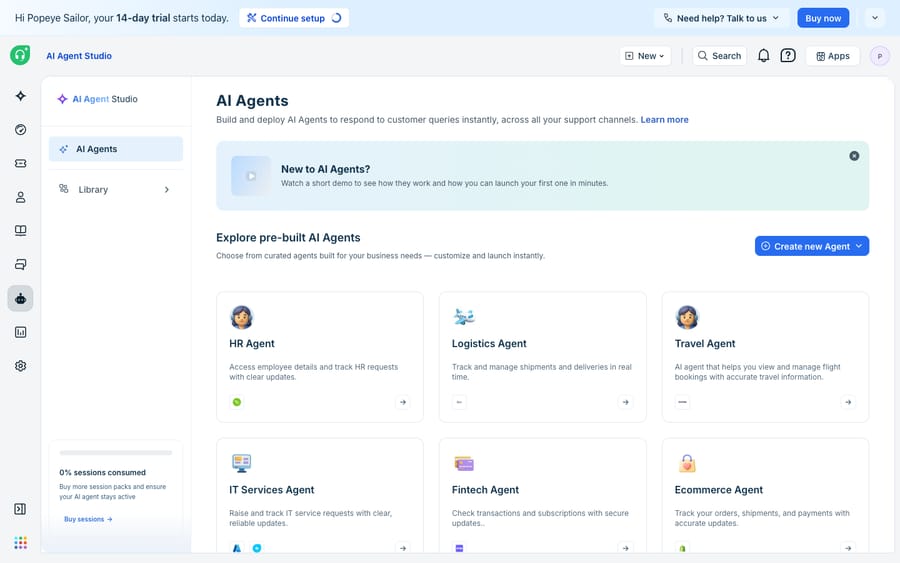
- Open AI Agent Studio from the left navigation bar and click Create AI Agent. Give it a name, an avatar, and a primary language.
- In the Knowledge section's Build tab, add sources: solution articles from your knowledge base, files (.txt, .docx, .pdf — up to 35MB each, 200 files per agent), URLs (public pages only, max 10 URLs and up to 3,000 learnable pages), and custom Q&As.
- Configure workflows, custom instructions, multilingual behavior, and — importantly — handover settings that decide when the bot passes a conversation to a human with context.
- Click Deploy and pick your channels: Web Chat, WhatsApp, Facebook, Instagram, and more. For Web Chat you set a topic and enable "Start with AI Agent," then publish.
You can also skip the blank canvas and start from a pre-built agent in the library — Freshworks ships templates for common domains, which is a fast on-ramp for teams that don't want to design from zero.
Where native Freddy is genuinely good
Let's give credit where it's earned, because Freddy is a real product, not a checkbox feature.
It's tightly integrated. Freddy lives inside Freshdesk. There's no connector to wire up, no separate console, no sync to worry about. Your solution articles are already there; deploying to the native web widget is a couple of clicks.
The handover is smooth. Freshworks designed Freddy to "escalate smartly, hand off smoothly," transferring to a human with full conversation context so the customer doesn't repeat themselves. That's the failure mode most first-generation bots got wrong, and Freddy handles it well.
It's fast to stand up. A team on the Growth, Pro, or Enterprise plan can go from nothing to a live, knowledge-grounded chatbot in an afternoon. For a straightforward FAQ deflection use case, that speed is hard to beat.
If your goal is to deflect a chunk of repetitive how-to questions on your website and messaging channels, and your knowledge base is in decent shape, native Freddy may be all you need. Be honest with yourself about that before you shop for anything heavier.
The honest limits of the native chatbot
Now the other half of the picture — the places where teams hit a wall.
The pricing model scales with volume you don't control. Per the Freshdesk pricing page, AI Agent Studio is available on Growth, Pro, and Enterprise, with the first 500 sessions included on Pro and Enterprise (once per account) and $49 per 100 sessions after that. Freshworks defines a session as a unique user's interaction within a 24-hour window (72 hours for the email agent). That's clean for steady traffic, but a company-wide outage, a product launch, or a seasonal spike pushes session counts up fast — and unlike a per-seat line, there's no natural ceiling unless you negotiate one. The eesel AI team documents the same session mechanics and the "ask sales" gap on overage packs in their Freshdesk Freddy pricing breakdown.
Knowledge sources are capped. Ten URLs and 200 files per agent is fine for a tidy help center. It's tight if your real answers live across a sprawling docs site, PDFs, internal wikis, and past ticket history.
It answers; it doesn't always act. Freddy is strong at retrieving from knowledge and phrasing a reply. It's weaker when the answer isn't in an article at all — when "where's my order?" requires a live call to your OMS, or "cancel my subscription" requires writing to your billing system. Deflection is not the same as resolution, and resolution is not the same as automation. A chatbot that reads articles can deflect; resolving and automating the long tail needs the agent to reach into your other systems and take real action.
That last distinction — deflection vs resolution vs automation — is the crux of the whole choice, and it's exactly where a dedicated AI agent layer earns its place.
Where a dedicated AI agent layer picks up
This is the seam. A native chatbot is bounded by what it can read and how it's priced; a purpose-built agent layer is built to reason, retrieve widely, and act. The broader category of AI agents for customer service exists precisely to do the work a knowledge-base bot can't — and it's worth thinking through the build-versus-buy tradeoff before you commit either way.
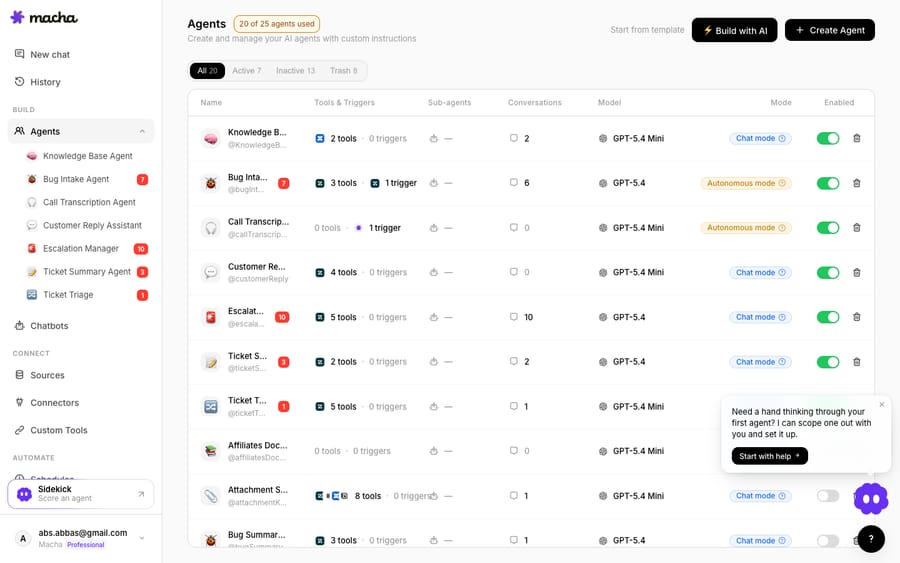
Macha is one such layer, and the positioning is deliberate: it runs on top of the Freshdesk you already use as a native connector — it does not replace your help desk, your tickets, or Freddy Copilot for your agents. You connect Macha to Freshdesk with your subdomain and API key, and it works the same tickets and conversations Freshdesk already manages.
What that agent layer adds beyond a knowledge-base chatbot:
- Broader retrieval. Multiple data sources — help center, docs, uploaded files, past tickets — without a 10-URL cap deciding what your bot is allowed to know.
- Action, not just answers. Through a custom tool, an agent can call a REST API to fetch an order status, check a subscription, or trigger a workflow — so "where's my order?" gets an answer from your system, not a link to an article that doesn't have it. That's the move from deflection to resolution to automation, covered in depth in how to automate Freshdesk with AI.
- Multiple specialized agents. Rather than one bot doing everything, you can run a roster of agents — each with its own tools, triggers, and scope — so chat, triage, and ticket workflows are handled by the right specialist.
- A different cost shape. Macha's credits are consumed per AI action, not per session or per resolution — you pay for work the agents do, and outcomes (deflected, resolved, automated) vary by workflow. See the pricing page for the model rather than a headline number here.
None of this is an argument to rip out Freddy. Many teams run both: Freddy Copilot assisting human agents inside the ticket, and an agent layer handling the resolve-and-act workload on top. If you want the fuller comparison, we lay out the options in adding an AI agent to Freshdesk beyond Freddy.
Native chatbot vs AI agent layer, side by side
| Dimension | Native Freddy AI Agent | Dedicated AI agent layer (e.g. Macha) |
|---|---|---|
| Setup | No-code studio, minutes; zero integration | Connect via subdomain + API key |
| Lives where | Inside Freshdesk | On top of Freshdesk (native connector) |
| Knowledge | Articles, files (200), URLs (10, 3,000 pages), Q&As | Broad multi-source retrieval, incl. past tickets |
| Takes action in other systems | Limited | Yes — custom tools call your APIs |
| Pricing shape | Per session ($49 / 100 after 500) | Per AI action (see /pricing) |
| Best at | Fast FAQ deflection on native channels | Resolution + automation across the long tail |
The honest read: native Freddy is the right first move for FAQ deflection, and it's well built. When your questions increasingly need data and actions your knowledge base doesn't contain, an agent layer on top is what moves you from deflecting to actually resolving.
FAQ
Is the Freshdesk chatbot free? No. The native chatbot — Freddy AI Agent, built in AI Agent Studio — is available on the Growth, Pro, and Enterprise plans. Pro and Enterprise include the first 500 sessions (once per account), and additional usage is billed at $49 per 100 sessions. Confirm the current numbers on the Freshworks pricing page for your plan.
What's the difference between Freddy Copilot and Freddy AI Agent? Freddy AI Agent (Self-Service) is the customer-facing chatbot that answers questions on web chat and messaging channels. Freddy Copilot is an agent-assist tool inside the ticket that suggests replies and summaries for your human agents. One serves customers; the other assists staff.
What is a Freddy session? Freshworks defines a session as any interaction a unique user has with an AI Agent within a 24-hour period (a 72-hour window from the first email for the email agent). Multiple messages from the same user inside that window count as one session; the same user returning the next day is a new session.
Can I add an AI chatbot to Freshdesk without replacing Freshdesk? Yes. A dedicated AI agent layer like Macha connects to Freshdesk as a native connector and runs on top of your existing help desk — it doesn't replace Freshdesk, your tickets, or Freddy Copilot. It handles resolution and automation by retrieving from broad knowledge and calling your systems through custom tools.
Deflection, resolution, automation — what's the difference? Deflection is answering a question so a ticket never reaches a human. Resolution is closing the actual request, which often needs data or an action from another system. Automation is a workflow running end to end without a person. A knowledge-base chatbot mostly deflects; an agent with tools can resolve and automate the harder cases.
Want a chatbot that resolves instead of just answering? Start a free trial of Macha and connect it to your Freshdesk in minutes.
Add AI agents to your Freshdesk
Macha reads the ticket, drafts the reply and takes the action, inside the Freshdesk you already run.