





 Shopify
 Stripe
 Slack
Slack Notion
 Google Workspace
 Confluence

How Do You Add an Email AI Agent to Freshdesk?


Freshdesk's Email AI Agent reads incoming support emails and answers them from your knowledge base, with 500 free sessions per account and $49 per 100 sessions after that. Answering the email and completing the action the customer needs are different jobs, and the second is where an AI agent layer on top of Freshdesk fits.
Key takeaways
- Freshdesk accounts created from December 2025 build the Email AI Agent in AI Agent Studio, while older accounts configure it at Admin, Freddy, Self Service, Email AI Agent.
- Freshdesk's Growth, Pro and Enterprise plans include the Freddy AI Agent with 500 free sessions once per account, then $49 per 100 sessions.
- Freddy counts an Email AI Agent session as a 72-hour window from the customer's first email, so every AI reply inside that window is billed once.
- The classic Email AI Agent returns a summarised reply with up to three solution articles and auto-closes the ticket when the customer confirms the reply helped.
- Macha bills per ticket rather than per session, starting at $299 a month for up to 750 tickets, and runs on Freshdesk without turning off Freddy.

To add an email AI agent to Freshdesk, build Freddy's Email AI Agent in AI Agent Studio → Create new → Email AI Agent (accounts created from December 2025), or switch it on under Admin → Freddy → Self Service → Email AI Agent on older accounts. It comes with Growth, Pro and Enterprise, each account gets 500 free sessions once, and after that sessions cost $49 per 100, where one session is a 72-hour window from the customer's first email.
| Question | Current Email AI Agent (AI Agent Studio) | Classic Email AI Agent (pre-December 2025 accounts) |
|---|---|---|
| Where you set it up | AI Agent Studio → Create new → Email AI Agent | Admin → Freddy → Self Service → Email AI Agent |
| Plans | Growth, Pro, Enterprise | Pro and Enterprise tiers |
| Knowledge | Solution articles, files, URLs, Q&A pairs | Public solution articles |
| Conversation | Multi-turn, reads the full thread | One summarised reply with up to three articles |
| Price | 500 free sessions once per account, then $49 per 100 sessions | |
What does an email AI agent do on the ticket channel?
An email AI agent works on the ticket that lands in your Freshdesk queue when a customer emails your support address. When a new email ticket is created, the agent reads it, classifies the intent, and decides whether it can answer. If it can, it drafts and sends a reply grounded in your knowledge base with no human touch. If it can't, it hands off to a person.
The distinction worth holding onto is between three levels of automation. Deflection means preventing a ticket from reaching an agent, usually by surfacing a help article. Resolution means the customer's problem is solved and the ticket closes. Automation means the agent takes an action on the customer's behalf (checking an order, issuing a refund, updating an address), not just returning text. Most native email AI, Freshdesk's included, is strong on the first, decent on the second for simple questions, and thinner on the third. Keep that ladder in mind.
How do you set up Freshdesk's native Email AI Agent?
Freshdesk's built-in option is the Email AI Agent, part of the Freddy suite. Which setup screen you see depends on when your account was created.
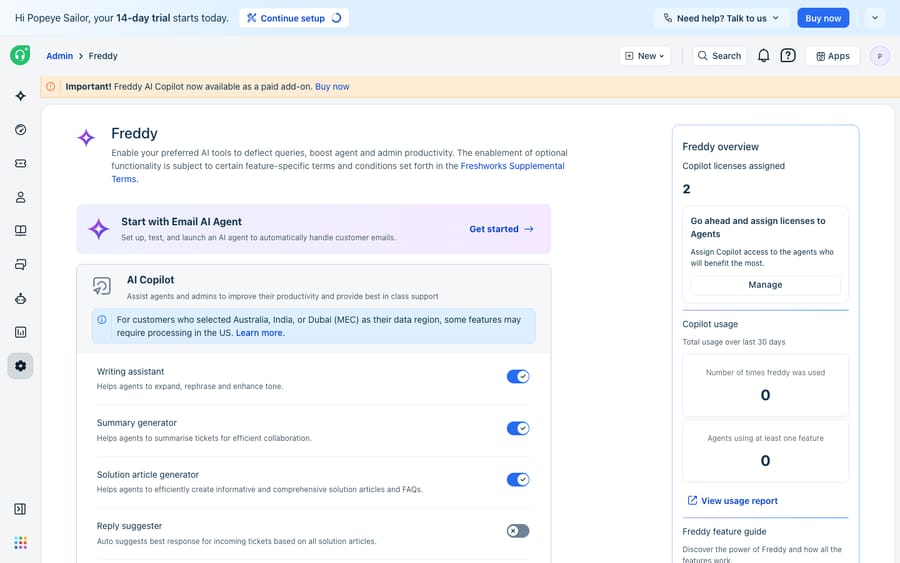
Accounts created from December 2025. Per Freshworks' Email AI Agent setup article, you build the agent in AI Agent Studio → Create new → Email AI Agent, then work through Build (Knowledge, Instructions, Configurations), Test and Deploy. Knowledge can come from solution articles, uploaded files, URLs and Q&A pairs. The agent keeps context across turns in the same ticket thread and reads the full thread history each time the customer replies. Configuration covers language detection, signatures, legal footers, a daily cap on AI replies, handover conditions, and deployment rules with nested AND/OR logic on ticket type, priority, source or requester segment.
Older accounts (the classic Email AI Agent). Per Freshworks' classic configuration guide:
- Go to Admin → Freddy → Self Service → Email AI Agent, toggle it on, and click Configure.
- Set trigger conditions that decide which tickets the agent responds to. The first rule auto-populates as ticket status is Open, and you can add more with AND/OR logic.
- Manage languages: your account's primary language is the default, and you add others under Manage Languages. A customer writing in a language you haven't enabled gets no auto-response.
- Customise the response template using placeholders such as
{{freddy_articles}}(the relevant solution articles it found) and{{freddy_answers}}(a tailored summarised answer), plus standard ticket and contact fields. - Set a daily response limit, a safety valve with a minimum of 10 that caps how many auto-replies go out per day.
- Choose the applicable sources (Email, Support Portal, Feedback Widget and Form, or Web Forms), then Save & Enable.
Under the hood, per Freshworks' classic deflection guide, the agent works out the ticket's intent, searches your portal's public solution articles, and returns a summarised reply with up to three relevant articles. It embeds an in-email feedback widget so the customer can say whether it helped, and it auto-closes the ticket on positive feedback. For a question your knowledge base already answers, that is a clean deflection with no agent involved. It's fast to switch on and grounded in your own articles, so it doesn't invent a policy.
How are sessions priced, and when does the agent hand off?
Two mechanics govern the native agent day to day: how it's metered, and when it calls a human.
Sessions. Freshworks documents that every time the Email AI Agent responds, one bot session is consumed, and its pricing page defines an Email AI Agent session as a 72-hour window starting from the customer's first email: all AI responses inside that window count as one session, however many back-and-forths happen. Growth ($19 per agent per month, billed annually), Pro ($55) and Enterprise ($89) all include the Freddy AI Agent with 500 free sessions, limited to once per account. After that, additional sessions cost $49 per 100, about $0.49 each. If you later connect the agent to other systems, Freshworks meters those separately too: connector app tasks at $80 per 5,000 and MCP actions at $15 per 1,000.
Handoff. The classic agent escalates to a human in three situations, per the deflection guide:
- The customer taps the feedback widget to say the answer wasn't helpful, so the ticket stays open for an agent.
- The incoming email is non-actionable (a newsletter, an out-of-office bounce), so the agent doesn't reply at all.
- You've built a ticket update automation on the "Email AI Agent did not reply" event to assign or escalate those tickets.
The AI Agent Studio version adds more handover conditions: customer frustration detected, workflow failure, the customer asking for a person, a confidence threshold you set (high or medium cautiousness), a maximum number of turns before automatic handover, and operation outside business hours. That's a conservative model: when in doubt, a person takes over. It also shows the ceiling. The agent hands off when the question stops being answerable from your knowledge, which is often the moment a customer wants something done.
Where does the native agent stop?
The classic Email AI Agent is a knowledge-base responder: it reads the email, matches it to public solution articles, and summarises. The Studio version is more capable on conversation, since it holds a multi-turn thread and draws on files, URLs and Q&A as well as articles. Freshworks' AI Agent Studio also offers Workflows that let an AI agent act, with order cancellations and subscription updates as its examples. The email setup article itself, though, describes the job as reading each ticket, generating a response grounded in your knowledge base, and resolving or escalating, and it mentions workflows only as a handover trigger when one fails. Each action you want also has to be built as a workflow inside Freshworks, and calls out to other systems are metered. There's more on the boundary in our Freddy AI explained breakdown.
So when a customer emails "where is my order #4471 and can you change the delivery address," the classic agent can find your shipping-policy article but cannot look up order #4471, read the live status and update the address. The Studio agent can only do that if someone has built and tested that workflow against your commerce backend. Everything that needs an action you haven't wired up, or multi-step reasoning across your tools, ends up back in a human's queue.
How do you add an AI agent layer on top?
This is the seam where an AI agent layer fits, and it's worth understanding the build-versus-buy tradeoff before you reach for one. The broader category of AI agents for customer service exists to do the reasoning-and-action work a knowledge-base responder can't.
Macha is one such layer. It runs on top of the Freshdesk you already use as a native connector. It does not replace your help desk, and it doesn't turn off Freddy. You connect Macha to Freshdesk with your subdomain and API key, and it reads and writes the same email tickets your team already works. The difference is what happens after the agent understands the email: instead of stopping at an article, a Macha agent can call a custom tool that turns a REST API (your order system, your billing platform, a Postmark send-email endpoint) into an action the agent can take, then reply on the ticket with the real answer.

The screenshot above is the Custom Tools screen from the Macha demo org, not a dedicated email-channel view, but it shows the mechanism: an email AI agent is only as capable as the tools it can call. A send-email tool and an order-shipping-lookup tool are the plumbing that lets an agent resolve "where is my order and change the address" as one action rather than a handoff.
Handoff rules on the layer are where you keep control. A well-configured agent should escalate to a human when confidence is low, when the intent touches a category you've fenced off (billing disputes, cancellations, anything legal), when a required tool call fails, or when the customer asks for a person. You set those rules deliberately. The point isn't to remove humans; it's to hand them only the tickets that need judgement. For the fuller picture of wiring automation across the whole desk, see how to automate Freshdesk with AI and our guide to adding an AI agent beyond Freddy.
One note on cost, because the units are easy to conflate. Native Freddy meters by session on the email channel, a 72-hour window. Macha bills per ticket: one email thread with one person, charged once however many replies, lookups and drafts it takes, never per resolution or per deflection. Plans start at $299 a month for up to 750 tickets, with setup and monitoring by the Macha team included. That's a different unit, so compare it against your own ticket mix rather than assume parity; the pricing page has the breakdown. Macha's connector is for Freshdesk specifically, not Freshchat, Freshservice or Freshcaller.
How should Freddy and an agent layer split the work?
Keep Freshdesk's Email AI Agent doing what it's good at: fast, grounded answers to email tickets your knowledge base already covers, closed out on positive feedback, inside the 500 free sessions and then at $49 per 100. Layer a dedicated agent on top for the tickets the native one hands off, the ones that need a lookup, an action, or reasoning across your tools, with handoff rules that route only the ambiguous cases to a person. Freddy handles the FAQ, the layer handles the work, and humans handle judgement. Nothing here replaces the help desk you already run.
FAQ
Where do I set up the Email AI Agent in Freshdesk? On accounts created from December 2025, go to AI Agent Studio → Create new → Email AI Agent and work through Build, Test and Deploy. On older accounts, go to Admin → Freddy → Self Service → Email AI Agent, toggle it on, click Configure, and set trigger conditions, languages, the response template, a daily response limit and the applicable sources before you Save & Enable.
How does the native Email AI Agent decide to hand off to a human? The classic agent escalates when the customer marks the AI reply as unhelpful, when the email is non-actionable, or when you've built an automation on the "Email AI Agent did not reply" event. The AI Agent Studio version adds frustration detection, workflow failure, customer requests, a confidence threshold, a turn limit and business hours.
How is the Email AI Agent priced, and what's a session? Every time the Email AI Agent responds, one bot session is consumed, and an email session is a 72-hour window from the customer's first email, so all AI replies inside it count once. Growth, Pro and Enterprise include 500 free sessions once per account; after that, sessions cost $49 per 100.
What can't Freshdesk's native email AI do? The classic agent answers from public solution articles and can't take actions. The AI Agent Studio version holds multi-turn conversations and can use Workflows, but each action has to be built inside Freshworks first. Without that, it can explain your refund policy but can't look up a specific order or change a delivery address.
Can I add an autonomous email AI agent without replacing Freshdesk? Yes. An AI agent layer like Macha connects to Freshdesk as a native connector and runs on top of your existing help desk and Freddy. It reads and writes the same email tickets, and through custom tools it can call your own systems to take an action and reply on the ticket, while Freshdesk stays the system of record. Macha bills per ticket, one conversation charged once, not per resolution.
Ready to give your email tickets an agent that acts, not just answers? Start a free trial of Macha and connect it to your Freshdesk in minutes.






