





 Shopify
 Stripe
 Slack
Slack Notion
 Google Workspace
 Confluence

Why Is Freshdesk Round-Robin Not Assigning Tickets? Causes and Fixes (2026)


Freshdesk round-robin leaves tickets unassigned when no agent in the group is online, under capacity and a group member, and it skips each ineligible agent without any error. Automatic assignment also runs only on the Pro and Enterprise plans, so check the plan before anything else.
Key takeaways
- Freshdesk round-robin skips an agent silently, with no error or note on the ticket, when the agent is offline, at ticket capacity, or not a member of the group.
- Round-robin and load-based assignment run only on the Freshdesk Pro plan, $55 per agent a month billed annually, and on Enterprise; the Growth plan does not include them.
- Freshdesk load-based assignment lets admins set a maximum of 1 to 100 concurrent tickets per agent, and only tickets with an active SLA timer count toward that cap.
- Manually assigned tickets can push a Freshdesk agent over the load cap, which blocks automatic assignment to that agent until the SLA-on count drops back below the limit.
- When no other cause applies, toggling Automatic Ticket Assignment off and back on is the documented way to reset a stuck Freshdesk router.

Freshdesk round-robin stops assigning tickets when no agent in the receiving group passes its three checks: the agent is online and Available, is under their ticket capacity, and is a member of that group. An agent who fails any check is skipped with no error or note on the ticket, and if every agent fails, the ticket stays unassigned. Automatic assignment also exists only on the Pro ($55 per agent a month billed annually) and Enterprise plans, so on Growth the option isn't there at all (Freshdesk pricing, checked 24 September 2026).
| Check | Why an agent gets skipped | First fix |
|---|---|---|
| Plan | Round-robin and load-based assignment need Pro or Enterprise | Confirm the plan before debugging anything else |
| Availability | Agent is offline or set to unavailable | Set the agent to Available |
| Capacity | SLA-on ticket count is at the cap (1 to 100 in load-based mode) | Raise the cap or clear manual overflow |
| Membership | Group has zero active agents | Add agents or turn off automatic routing for that group |
| Stuck router | None of the above applies | Toggle Automatic Ticket Assignment off and on |
How does Freshdesk decide who gets the next ticket?
Before you can fix a skip, it helps to know what round-robin actually checks. Freshdesk's automatic ticket assignment is configured per group, and when a ticket enters that group the system runs through a short sequence: it checks which agents are online and available, evaluates each available agent's current ticket load against their capacity, and then hands the ticket to whoever has gone the longest without receiving one. Per Freshworks' round-robin configuration docs, an agent who fails any of those checks is simply skipped, with no error, no warning and no note on the ticket.
That silence is the whole problem. Round-robin doesn't fail loudly; it fails invisibly. Three conditions cause almost every "not assigning" complaint, and they're all invisible from the ticket list.
Why does round-robin silently skip agents?
1. The agent isn't online and available. Freshdesk only routes to agents whose availability status is set to Available (online). An agent who is set to unavailable, or who simply hasn't toggled themselves online, is invisible to the router. If a whole group's worth of agents is offline, new tickets have nowhere to go and sit unassigned. There's a configuration catch worth knowing: per the docs, "configuring agent availability status is only feasible when automatic ticket assignment is not enabled." Change availability settings with the toggle off, then switch automatic assignment back on for the group before expecting availability-based routing to behave.
2. The agent is at maximum ticket capacity. Freshdesk counts an agent's workload, and critically, only tickets with an active SLA timer count toward that load. Once an agent hits the ceiling, "if an agent is already at maximum ticket capacity, they will be skipped from ticket assignment." In load-balanced mode you set that ceiling explicitly (more below); in plain round-robin the SLA-on count still governs whether an agent is considered eligible.
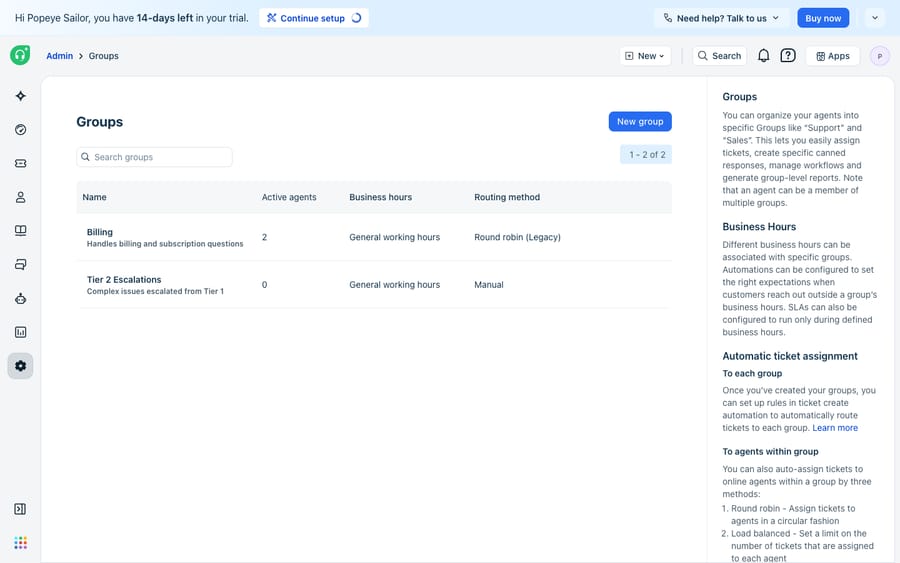
3. The agent isn't a member of the group. This sounds obvious, but it's the one people overlook. Round-robin distributes within a group. If a ticket is routed to a group whose active-agent count is zero (a common state for escalation or overflow groups), there is literally no one in the rotation, and the ticket stays unassigned by design.
How does the load-balanced max-ticket limit block assignment?
Freshdesk offers two kinds of automatic distribution, and the difference matters when tickets stop flowing. Plain Round-robin hands tickets out in strict sequence. Load-balanced (Freshworks labels the routing option Load-based) is smarter: it defines a maximum number of concurrent tickets per agent and always routes the next ticket to the least-loaded agent, breaking ties in favor of whoever received their last ticket earliest.
Per the load-balanced assignment docs, you set the ceiling anywhere from 1 to 100 tickets per agent (Freshworks suggests a low concurrent limit, around 5, for faster response times). That ceiling is exactly where load-balanced routing "breaks." Two failure modes:
- Everyone is at the cap. "If all available agents are at capacity or unavailable, the ticket will remain unassigned, unless one of the agents is available." Set the limit too low for your volume and the queue stalls even though agents are online.
- Manual assignments poison the math. If you manually assign tickets to an agent, those count toward their load and can push them over the configured threshold, which then blocks automatic assignment to that agent until their load drops back below the limit. Heavy manual triage on top of load-balanced routing quietly starves the auto-router.
What should you check first when tickets stay unassigned?
Work this list top to bottom. It's ordered by how often each one is the actual culprit.
| # | Symptom / cause | Where to check | Fix |
|---|---|---|---|
| 1 | Tickets sit unassigned in a group | Group's active-agent count | Confirm the group has members and at least one is Available/online |
| 2 | Some agents get nothing | Agent availability status | Set skipped agents to Available; ensure automatic assignment is toggled on for the group |
| 3 | Assignment stalls under load | Load-balanced max-ticket limit (1–100) | Raise the per-agent cap or add agents; a cap of 5 starves a high-volume group |
| 4 | One agent stuck, never gets tickets | Manual assignments pushing them over the cap | Clear or reassign the manual overflow so their SLA-on load drops below the limit |
| 5 | Escalation/overflow group never assigns | Routing method + membership on that group | Add agents, or switch a 0-agent group off automatic routing |
| 6 | Distribution looks uneven | Which tickets have an active SLA timer | Only SLA-on tickets count toward load; resolved or paused ones don't rebalance the rotation |
| 7 | Nothing above applies | Automatic Ticket Assignment toggle | Toggle Automatic Ticket Assignment off, wait a few seconds, toggle it back on to reset the router |
That last row is Freshworks' own documented quick fix: disabling and re-enabling automatic assignment clears a stuck router more often than it should need to.
Where do you configure round-robin in Freshdesk?
To review or change routing for a group, go to Admin → Groups, click the edit icon next to the group, open the Group Properties tab, choose Advanced Automatic Routing, and pick Round-robin or Load-based, then Save. Note that automatic assignment (both round-robin and load-balanced) is gated to the Pro and Enterprise plans on both Freshdesk and Freshdesk Omni; it is not available on Growth, and Freshdesk's pricing page no longer lists a Free plan (new accounts start on a 14-day trial of Enterprise). If the routing options are grayed out or missing, plan tier is the reason, not a bug. Configuring the group's business hours here also matters, because they're the window in which the load-balanced cap is measured.
What can't Freshdesk round-robin do?
Freshdesk's native routing is deterministic and dependable. It does one job, distributing ownership of a ticket across available humans, and it does it transparently once you understand the skip rules. Credit where it's due: for evenly spreading a known volume across a staffed group, it's hard to beat, and you shouldn't rip it out.
But notice what it doesn't do. Round-robin decides who owns a ticket; it does nothing about what the ticket needs. It can't read the message, understand intent, or move the conversation forward. When every agent in a group is offline or at capacity, its only move is to leave the ticket unassigned and wait, and the customer keeps waiting too. And it routes on the fields a ticket arrives with, so a mis-tagged ticket lands in the wrong group's rotation and the router faithfully distributes it to the wrong team. If you lean on automation elsewhere in Freshdesk, our guides to Freshdesk automations and Freshdesk ticket statuses show how those rules can pre-set the fields routing depends on, but they still can't answer the ticket.
This is the seam where an AI agent layer fits, and it's worth weighing the build-versus-buy tradeoff honestly before adopting one. The broader category of AI agents for customer service exists to do the reasoning-heavy work a routing rule can't. Macha is one such layer: it runs on top of the Freshdesk you already use as a native connector; it does not replace your help desk or its round-robin rules. You connect Macha to Freshdesk with your subdomain and API key, and it works the same tickets your groups already route: reading and triaging incoming messages by intent so they reach the right group before round-robin distributes them, drafting or posting grounded replies so tickets keep moving even when the rotation has no available agent, and looking up order or account status through a custom tool so the answer is real, not a placeholder. If you want the mechanics, how to automate Freshdesk with AI walks through the setup. (Macha's connector is for Freshdesk specifically, not Freshchat, Freshservice, or Freshcaller. And Macha bills per ticket: one conversation, charged once however many messages it takes, never per resolution. Plans start at $299 a month for 750 tickets, with setup and monitoring by the Macha team included.)
The clean division of labour: keep Freshdesk's round-robin as the system of record for who owns what, and layer an agent on top for the part the router can't do: actually understanding and progressing the ticket, so an unassigned queue doesn't mean a stalled customer.
FAQ
Why is Freshdesk round-robin not assigning tickets to any agent? Almost always because no agent in the receiving group is eligible: they're offline/unavailable, they've hit their maximum SLA-on ticket capacity, or the group has no members. Round-robin skips ineligible agents silently and leaves the ticket unassigned until someone becomes available.
Where do I configure round-robin in Freshdesk? Go to Admin → Groups, click the edit icon next to the group, open the Group Properties tab, select Advanced Automatic Routing, choose Round-robin (or Load-based for load-balanced), and Save. It requires admin access.
Is automatic ticket assignment available on every Freshdesk plan? No. Round-robin and load-balanced assignment are gated to the Pro and Enterprise plans on both Freshdesk and Freshdesk Omni, so they're not available on Growth ($19 per agent a month billed annually). If the routing options are missing or grayed out, that's plan tier, not a fault.
What is the max-ticket limit in load-balanced assignment? You set a maximum of 1 to 100 concurrent tickets per agent; Freshworks suggests a low number (around 5) for responsiveness. Only tickets with an active SLA timer count toward that limit, and if every available agent is at the cap, new tickets stay unassigned until a slot frees up.
Can I add AI to Freshdesk routing without replacing Freshdesk? Yes. An AI agent layer like Macha connects to Freshdesk as a native connector and runs on top of your existing groups and round-robin rules and doesn't replace them. It triages tickets by intent so they reach the right group, and drafts grounded replies so work progresses even when the rotation has no available agent.
Tired of watching a queue stall because the rotation had no one to route to? Start a free trial of Macha and connect it to your Freshdesk in minutes.






