





 Shopify
 Stripe
 Slack
Slack Notion
 Google Workspace
 Confluence

How Do You Migrate from Freshdesk to Gorgias? (2026)


Gorgias has a native importer for Zendesk but not for Freshdesk, so a Freshdesk move runs through the email import, a paid Help Desk Migration run, or Gorgias' sales team above 500 tickets a month. The Freshdesk CSV export also leaves conversation threads behind, which usually decides the route.
Key takeaways
- A Freshdesk to Gorgias migration runs through Gorgias' email import, a paid Help Desk Migration run, or Gorgias' sales team for accounts above 500 tickets a month.
- Gorgias' native email import pulls conversations only from a connected Gmail or Outlook account, going back a maximum of two years, and lands them as closed tickets.
- A standard Freshdesk CSV ticket export leaves out the full conversation and archived tickets; full content needs the XML account export under Admin, Account, Account Details.
- Help Desk Migration publishes no price for a Freshdesk to Gorgias move, and its free Demo lets you pick 20 entities to migrate before paying.
- Help Desk Migration's Freshdesk to Gorgias page puts the whole engagement, from preparation through go-live, at one to two weeks.

You migrate from Freshdesk to Gorgias one of three ways, because Gorgias has a native importer for Zendesk only: the built-in email import (Gmail or Outlook history, up to two years, as closed tickets), a paid Help Desk Migration run for history that lives inside Freshdesk, or Gorgias' sales-assisted migration above 500 tickets a month. We rechecked every path and limit below against Gorgias' and Freshworks' documentation on 24 September 2026. We have no tenant on either platform, so nothing here was run by us, and we say where each claim comes from.
Which migration route should you pick?
The three routes aren't equivalent, and the choice is mostly made for you by where your history actually sits.
| Route | Cost | What it moves | Choose it when |
|---|---|---|---|
| Gorgias email import | Included on Basic and up | Email conversations from Gmail or Outlook, as closed tickets, up to two years | Your Freshdesk mailbox is a connected Gmail or Outlook account and you mainly want searchable history |
| Help Desk Migration | Quoted per migration | Agents, Contacts, Tickets, Business rules, Macros, with relationships preserved | You have real ticket history inside Freshdesk and you need it to arrive intact |
| Gorgias sales-assisted | Talk to sales | Handled by Gorgias | Gorgias' own docs put the threshold at more than 500 tickets a month |
Gorgias states the constraint plainly: "If you need to migrate tickets from non-Zendesk customer support platforms and you're unable to do so through email import in Gorgias, then you can use a platform like help-desk-migration.com", with a note that reads "Have more than 500 tickets/month? Talk to the Gorgias sales team, we can help you migrate" (Migrate from non-Zendesk providers).
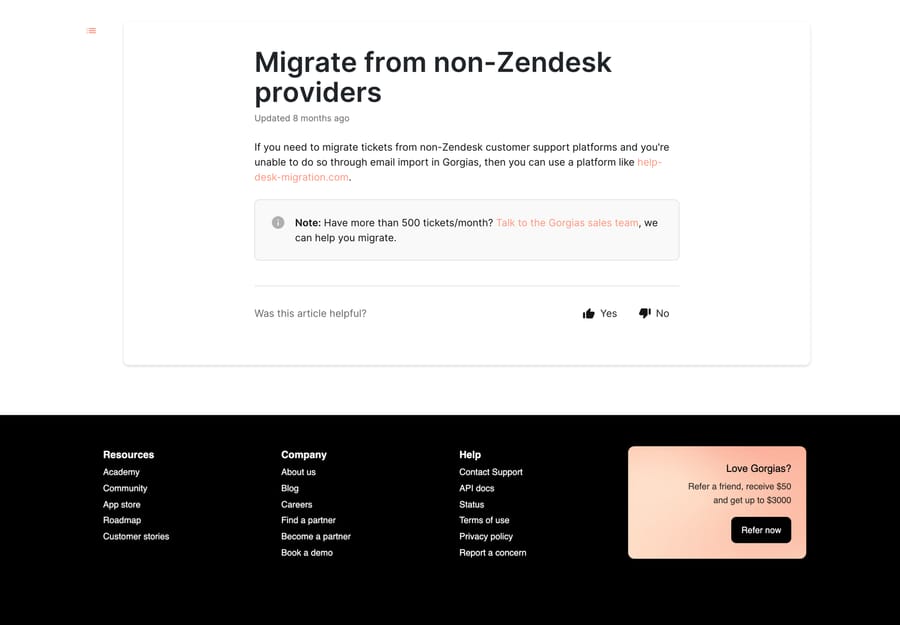
It's worth knowing why the asymmetry exists. Gorgias built a Zendesk importer because Zendesk is the desk it takes most accounts from, and that importer sits at Settings › Advanced › Historical Imports › Zendesk Import. Coming from Freshdesk, that tab isn't for you, and our Zendesk to Gorgias guide covers what the native path does when it is.
What are the limits of the Gorgias email import?
Route 1 is the native email import. Gorgias' email import is at Settings › Account › Imports › Email Import tab › Import, and it's more capable than most write-ups suggest (Import email into Gorgias). It pulls historical conversations from an external mail provider, creates customer profiles from the addresses it finds, and merges them into existing customers where they match.
The five limits decide whether it's enough:
- Gmail and Outlook only. Another provider means another route.
- Two years maximum, chosen from preset ranges or a custom date picker.
- Imported conversations land as closed tickets. They're history, not a live queue.
- "Rule automations will not be applied to imported emails." A relief, and one to say out loud before someone panics about 40,000 auto-replies.
- Basic, Pro, Advanced and Enterprise. Starter's out. Owner and admins only, and the address has to be set up for forwarding or connected as a direct email integration first.
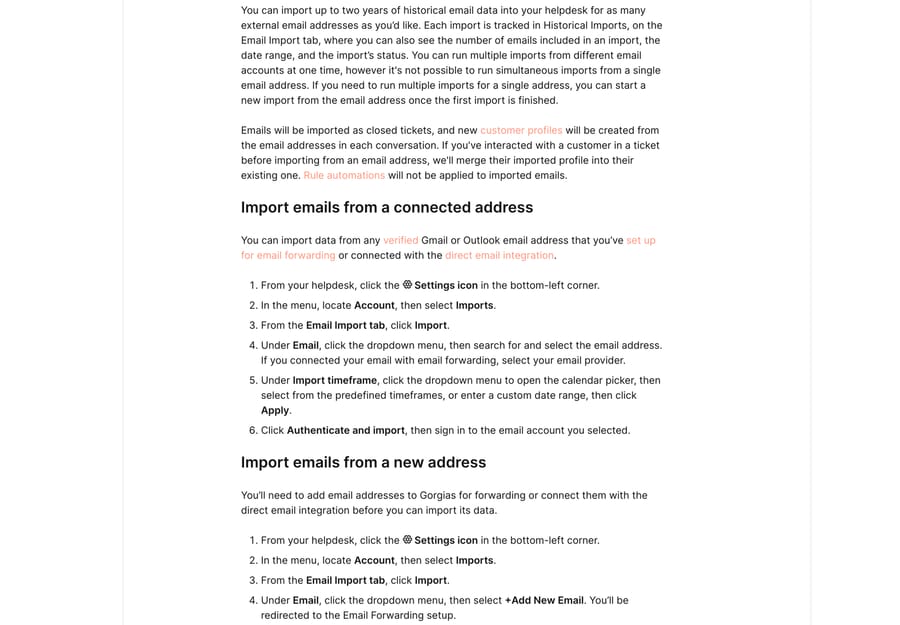
One more constraint is structural rather than documented as a limit: this route imports mail, so anything that's only ever existed inside Freshdesk (a chat transcript, a portal ticket, internal notes, tags, custom fields) never appears. If that history is what you are protecting, go to route 2.
What does Help Desk Migration move, and what does it cost?
Route 2 is a paid tool. Gorgias points at Help Desk Migration by Relokia, and its Freshdesk-to-Gorgias page names the mapping: Agents to Agents, Contacts to Customers, Tickets to Tickets, and Business rules to Scenario Automations, with Macros carried across (Freshdesk to Gorgias migration). The stated timeline is one to two weeks across preparation, migration and go-live, and the free Demo lets you pick 20 entities to move so you can see the shape of the result before paying.
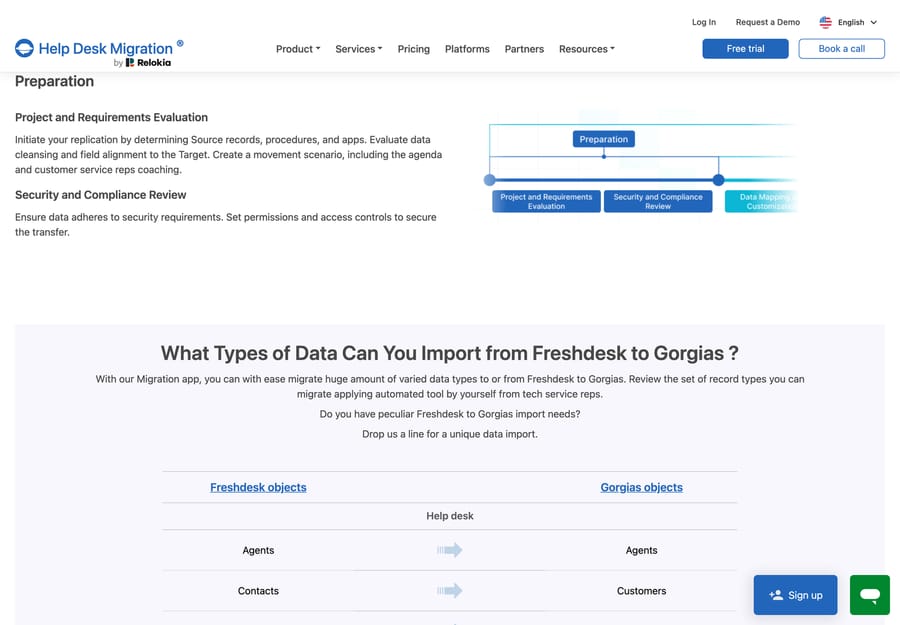
There isn't a published price. The page says the cost "will mostly depend on the data volume you want to move, the complexity of your demands, and the features you'll choose", and the route to a number is to run the Demo. That pricing model is worth reading for what it optimizes: a per-record quote earns the vendor more from the customers with the most history, who are also the customers for whom a botched CSV would be most expensive, so the incentive's at least pointed the same way as yours. Budget the quote as a real line item rather than an afterthought, and get it before you commit to a cutover date.
Two mapping decisions deserve attention in the wizard rather than after it. Statuses do not line up one to one between the platforms, and custom fields need matching field by field. Both are cheap to fix in the Demo and expensive after a full run.
What does the Freshdesk export leave out?
Export your Freshdesk data first. Do this even if you are paying someone else to move the data, because it's your fallback if the migration stalls.
The ticket export is at Tickets › All tickets › Export, top right, offering CSV or Excel plus a field picker, and you expand Show multiline text fields to include Description (How do I export my tickets from Freshdesk?). Freshworks also warns that the time frame on the ticket list page has to be wider than the one in the Export window, and recommends setting Created time to Any time on the list page.
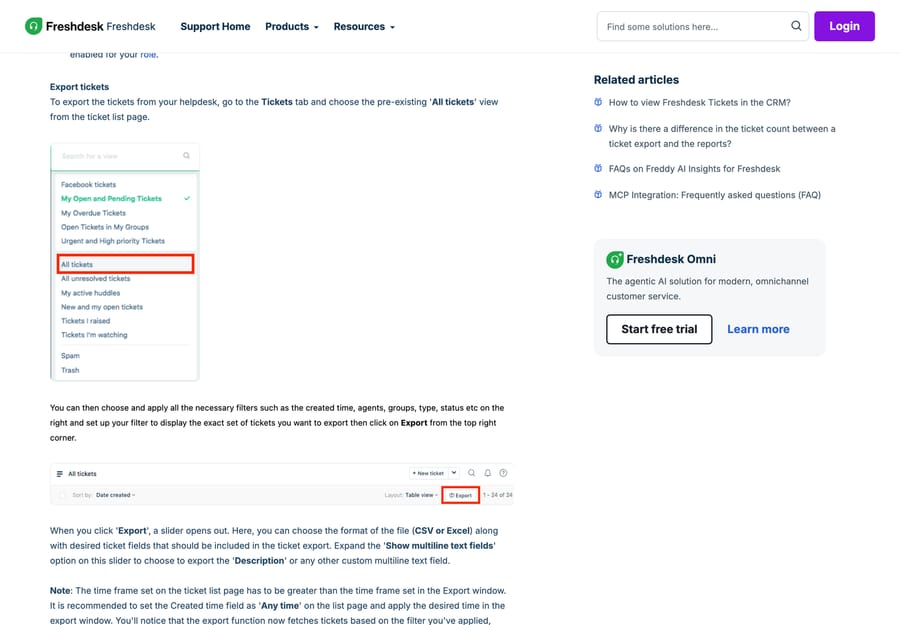
Then there's the sentence that decides your route. Freshworks' own article says this export "will NOT give you the entire conversation from the ticket or historical data (archived tickets)—for that, you will have to perform an account export." The account export lives at Admin › Account › Account Details › Export and produces XML (How can I export tickets including the content of the ticket?).
So the "free CSV" plan people reach for first hands you ticket metadata and a description field, and leaves the replies behind, which isn't what anyone assumes. That one fact is usually what settles the choice between route 1 and route 2.
What moves automatically and what do you rebuild?
Treat the right-hand column as your post-cutover to-do list.
| Object in Freshdesk | Moves automatically? | What you do in Gorgias |
|---|---|---|
| Tickets and conversation threads | Yes, via Help Desk Migration | Arrive as Gorgias tickets with threads preserved |
| Contacts | Yes, via Help Desk Migration | Land as Gorgias customers |
| Agents | Yes, via Help Desk Migration | Matched to Gorgias agents you create first |
| Tags and custom fields | Mapped in the wizard | Match field by field, then verify on the Demo |
| Attachments and inline images | Usually | Spot-check a sample after the Demo |
| Canned responses | As Macros | Open each one and test the variables |
| Business rules and automations | Partly, as Scenario Automations | Expect to rewrite logic as Gorgias Rules |
| SLA policies | No | Rebuild |
| Freshdesk portal and knowledge base | No | Rebuild in the Gorgias Help Center |
| Integrations and apps | No | Reinstall from the Gorgias App Store |
The rebuild column is where migrations run late, because it's work nobody scoped. Before you start, inventory every active automation, every SLA policy, every macro, your business hours and each third-party integration in Freshdesk. That list is the project, and it's longer than it looks.
How do Freshdesk automations map to Gorgias?
The vocabulary changes under you, which makes the rebuild feel larger than it really is:
- Freshdesk automations and scenario automations become Gorgias Rules, which fire on triggers with conditions and actions. Our walkthrough is Gorgias rules explained.
- Freshdesk canned responses become Gorgias Macros, including the variables inside them.
- Freshdesk ticket lists and filters become Gorgias Views.
- Freshdesk SLA policies have no direct equivalent, so the promise has to be rebuilt out of Rules, priorities and Views.
Rebuild in that order. Rules first, because Views and reporting both lean on the tags and fields that Rules set.
What breaks at cutover?
Run the Demo, check it, then run the full migration, then a Delta pass to pick up everything that arrived while the full run was going. The failures that show up in real cutovers are boring and predictable, and they're all mapping mistakes: a status mapping that silently closes open tickets, custom fields that land as text when the receiving field expects a list, attachments that arrive unlinked, and forwarding that gets switched to Gorgias before the team has Views to work from.
Point your email forwarding at Gorgias only once agents have somewhere to work. If you are reading this because you have gone the other way before, the reverse trip is written up at how to migrate from Gorgias to Freshdesk, and the straight product comparison is Freshdesk vs Gorgias. For getting data back out of Gorgias later, see how to export data from Gorgias.
Where does an AI agent layer fit after the move?
A migration is the cheapest moment to decide what you want automated, because you are already opening every macro and every rule. The history you just moved is also the training material: two years of resolved threads is a better description of your policies than any document you will write afterwards.
Macha is an AI agent layer that runs on top of the help desk a team already uses (Zendesk, Freshdesk, Gorgias, Front, HubSpot or Intercom), and it never replaces the help desk. It suits teams whose post-migration queue is repetitive but not templated, where the answer sits in imported threads and product docs rather than in an order lookup. It's the wrong fit if your queue is almost entirely order status, which Gorgias' own Order Management already deflects. One plan, priced on monthly ticket volume from $299 a month for 750 tickets, about $0.40 a ticket at every tier, setup and monitoring by the Macha team included, and a $50 free-usage trial with no credit card. See Macha on Gorgias or the tiers at /pricing.
Frequently asked questions
Can you migrate from Freshdesk to Gorgias natively? Only through the email import, and only if your history's in Gmail or Outlook. Gorgias' native Historical Imports tab covers Zendesk. For Freshdesk ticket data, Gorgias' own documentation points at help-desk-migration.com, or at its sales team if you handle more than 500 tickets a month.
What does the Gorgias email import actually bring across? Historical email conversations from a connected Gmail or Outlook account, up to two years back, arriving as closed tickets, with customer profiles created from the addresses and merged into existing customers. It's available on Basic, Pro, Advanced and Enterprise, and rule automations are not applied to imported emails.
Will a Freshdesk CSV export give me my ticket conversations? No. Freshworks' own article says the ticket export "will NOT give you the entire conversation from the ticket or historical data (archived tickets)". The CSV or Excel export gives you selected ticket fields plus Description if you expand Show multiline text fields. For full content you run an account export at Admin › Account › Account Details, which produces XML.
How much does a Freshdesk to Gorgias migration cost? Help Desk Migration doesn't publish a price. Its Freshdesk-to-Gorgias page says the cost depends on data volume, complexity and the features you pick, and the way to a number's its free Demo, which moves up to 20 entities you choose. Budget for it as a real line item before you set a cutover date.
What doesn't move from Freshdesk to Gorgias? SLA policies, the Freshdesk portal and knowledge base, and installed apps and integrations all get rebuilt. Business rules come across as Scenario Automations but usually need rewriting as Gorgias Rules, and macros come across but need their variables tested.
How long does a Freshdesk to Gorgias migration take? Help Desk Migration's page puts the whole engagement at one to two weeks across preparation, migration and go-live. The data transfer's rarely the long part. The rebuild of automations, SLAs and Views is what sets the real date.
What happens to my Freshdesk automations in Gorgias? They become Gorgias Rules, which use triggers, conditions and actions. Plan to rewrite the logic rather than translate it line by line, and rebuild Rules before Views, because Views depend on the tags and fields Rules set.
Sources:
- Migrate from non-Zendesk providers: Gorgias' own guidance and the 500-tickets threshold
- Import email into Gorgias: admin path, provider and two-year limits, closed-ticket behavior, plan gate
- Import Zendesk data into Gorgias: the native importer that exists for Zendesk and not for Freshdesk
- Freshdesk to Gorgias migration: object mapping, stages, timeline, free Demo
- How do I export my tickets from Freshdesk?: export path, formats, field picker, time-frame warning
- How can I export tickets including the content of the ticket?: the account export and XML output






