





 Shopify
 Stripe
 Slack
Slack Notion
 Google Workspace
 Confluence

How Do You Migrate From Zendesk to Gorgias? Tickets, Macros, Automations and AI (2026)


Gorgias ships a native Zendesk importer that moves up to two years of tickets, macros, users, tags and ticket fields with just an API token. Triggers, automations, views, SLAs, CSAT surveys, ticket attachments and your Zendesk AI setup stay behind, and imported macros keep only their reply text and status change actions.
Key takeaways
- Gorgias' native Zendesk importer moves tickets, macros, users, tags and ticket fields, while ticket attachments and CSAT ratings stay behind and triggers, views and SLAs must be rebuilt.
- Imported Zendesk macros keep only their reply text and status change actions, so a macro that also tagged, assigned or fired a webhook arrives without those actions.
- Zendesk AI agents, Copilot and their settings don't transfer, so AI is rebuilt on Gorgias AI Agent or kept in an agent layer that runs on both help desks, such as Macha, which the Macha team sets up for you at about $0.40 a ticket with a dedicated success manager included.
- Zendesk stops new API token creation on October 27, 2026 and switches off all tokens on April 30, 2027, and the Gorgias importer still asks for one.
- For 5 agents, 3,000 tickets and 900 AI resolutions a month, Zendesk Suite Team costs about $1,588 against about $1,975 for Gorgias Pro with AI Agent.

Gorgias has a native Zendesk importer that moves tickets, macros, users, tags and ticket fields, up to two years of your most recent data, in seven steps with a Zendesk API token. Triggers, automations, views, SLAs and CSAT surveys don't transfer, so you rebuild them as Gorgias Rules and Views, and imported macros keep only their reply text and status change actions.
| Item | Zendesk to Gorgias |
|---|---|
| Tickets, users, tags, ticket fields | Imported natively, up to two years |
| Macros | Imported; only reply text and status change actions survive |
| Ticket attachments, CSAT ratings | Not imported, per Gorgias's Zendesk migration guide |
| Triggers and automations | Rebuilt as Rules |
| Views, SLAs, CSAT surveys | Rebuilt by hand |
| Help Center articles | Direct import or CSV |
| Zendesk AI agents, Copilot, AI settings | Nothing transfers; set up Gorgias AI Agent or an agent layer that runs on both desks |
| Return trip to Zendesk | No native importer; paid tool or export and rebuild |
We checked every path, limit and field list below against Gorgias' documentation on 20 September 2026 and re-checked the importer and migration guides on 28 September 2026. We haven't run a migration ourselves, so treat this as a map of the documented behavior, and verify counts in your own account before you cut over.
How do you import Zendesk data into Gorgias?
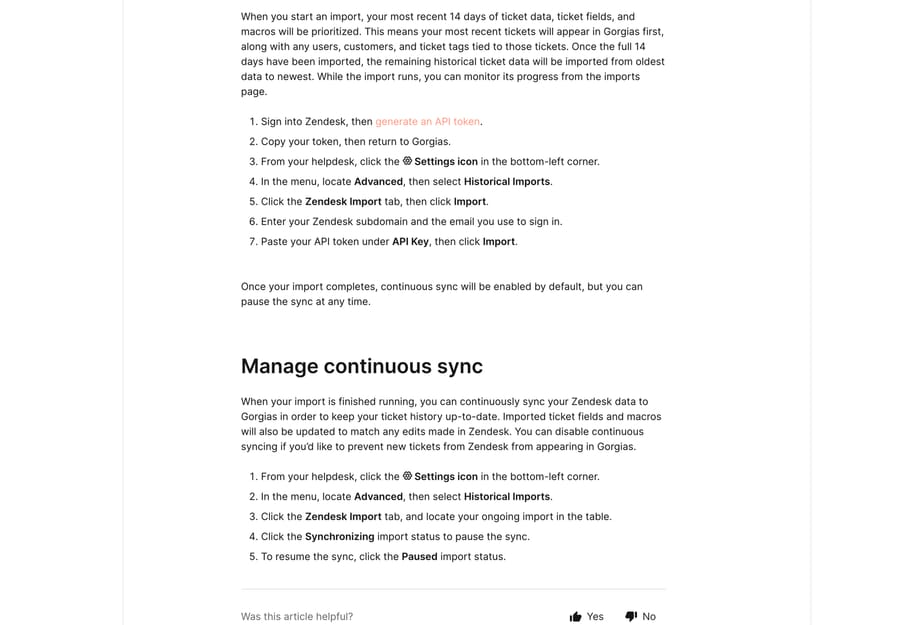
The path is Settings icon (bottom-left) › Advanced › Historical Imports › Zendesk Import › Import, after you generate an API token in Zendesk. Gorgias then asks for your Zendesk subdomain, the email you sign in with, and the token under API Key (Import Zendesk data into Gorgias). You need an Admin role on both sides, and every Helpdesk plan supports it.
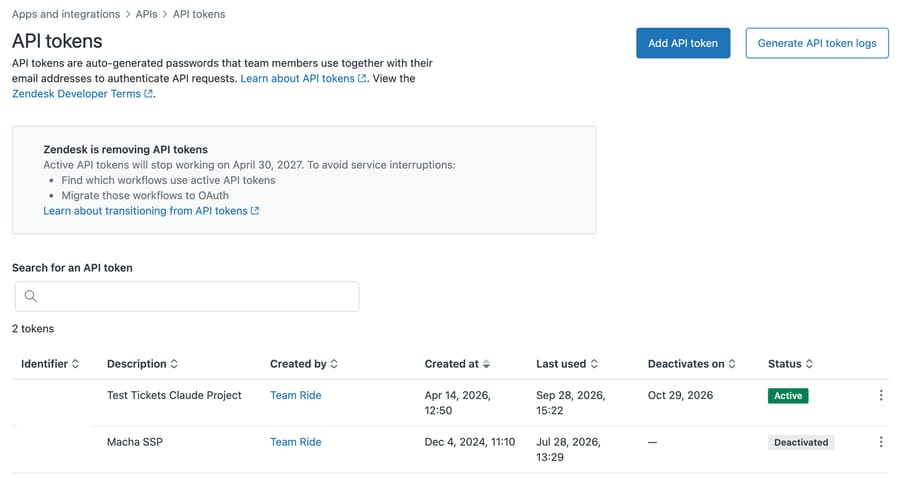
Check the token's timeline before you plan dates. When we opened the API tokens page in our own Zendesk sandbox on 28 September 2026, a banner said Zendesk is removing API tokens. Zendesk's developer docs give three dates: since July 28, 2026 a token unused for 30 days is deactivated, from October 27, 2026 existing accounts can't create new tokens, and on April 30, 2027 every remaining token stops working. Gorgias's import doc still asks for a token, and continuous sync depends on it. If your migration starts after 27 October, create the token before then, and ask Gorgias how the sync authenticates after April 2027.
The import order decides what your team can work on during the run. Gorgias prioritizes your most recent 14 days of ticket data, ticket fields and macros, along with the users, customers and tags tied to those tickets. Once that window is in, the rest backfills from oldest to newest, and you watch progress from the imports page.
When the import finishes, continuous sync is on by default. It keeps pulling new Zendesk tickets into Gorgias, and it updates imported ticket fields and macros to match edits made in Zendesk. You pause it from the same Zendesk Import tab by clicking the Synchronizing status, and resume by clicking Paused.
What does the importer move, and what are its limits?
It moves tickets, macros, users, tags and ticket fields. The limits are all documented, and each one has a consequence:
| Limit | What it means on the day |
|---|---|
| Up to two years of your most recent data | Older history needs a paid tool or stays in Zendesk |
| Tickets with more than 250 comments are split into multiple closed tickets | Long escalations arrive as fragments, so warn the team before they find one |
| Only open or closed statuses are retained; pending and solved arrive as closed | Any Zendesk view built on pending is meaningless after the import |
| With more than 500 ticket fields in Zendesk, no ticket fields import | Count your fields first, because a long-lived Zendesk instance can exceed this |
| Ticket attachments and rating (CSAT survey) data aren't imported | Screenshots and photos customers sent stay in Zendesk; export them, or use a paid tool that moves attachments |
| At about 720 tickets an hour, a large import takes days | Two years at 3,000 tickets a month is 72,000 tickets, about 100 hours of importing |
| Deleted and blank tickets, users with no ticket activity, and tags never applied to a ticket are skipped | Your record counts will not match Zendesk's, and that is expected |
The attachment and rating rows come from Gorgias's Zendesk migration 101 guide, which says "We don't import attachments on tickets nor rating information"; the import doc itself doesn't mention either. The same guide puts the average import rate at about 720 tickets an hour. The status collapse is the one that surprises people. Pending and solved both land as closed, so anything your team judged by "how many are pending" needs rebuilding as a tag or a field before the import, not after.
Do Zendesk macros keep their actions in Gorgias?
Macros import. Their actions mostly don't. Gorgias' documentation is specific: only "reply text" and "status change" actions are supported, and a macro with unsupported actions will not import those actions.
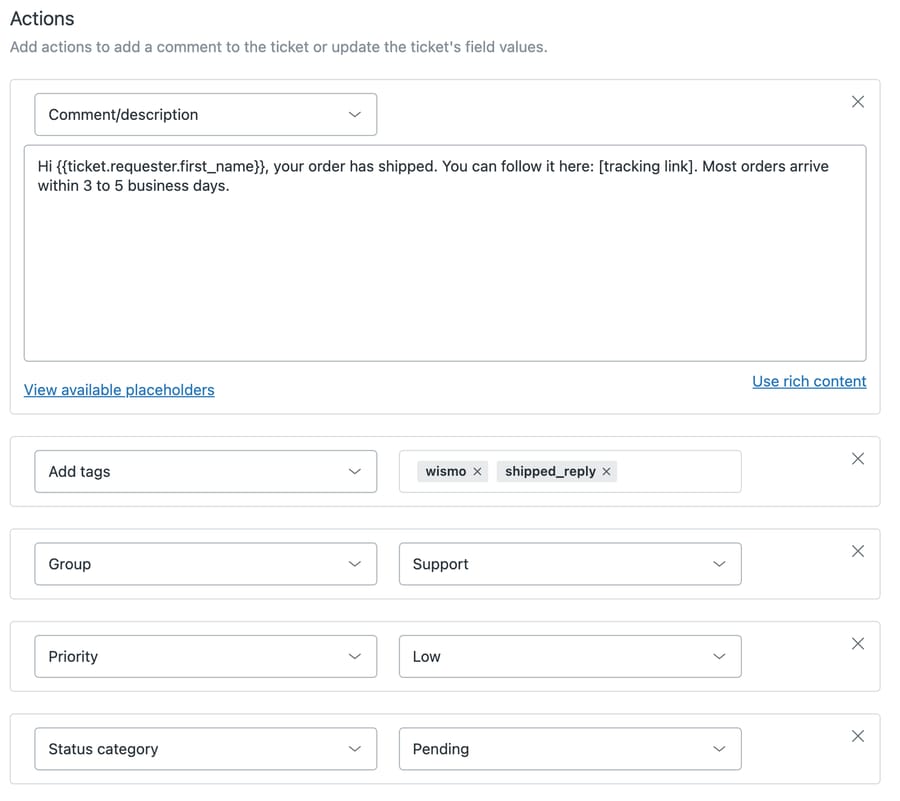
So a Zendesk macro that replies, sets a tag, assigns a group and fires a webhook arrives in Gorgias as the reply text and nothing else. Nobody notices on import day. They notice weeks later when tagging stops and the reports go quiet. Before you import, export your macro list and mark every one that does more than reply, because that list is a rebuild queue.
One more macro trap from the migration guide: while continuous sync is on, you can't edit an imported macro in Gorgias, because the Zendesk original overwrites your edits. Pause the sync before you start rebuilding macro actions, or do the rebuild in Zendesk first.
How do you turn Zendesk triggers into Gorgias Rules?
Triggers, automations, views, SLAs and CSAT surveys are configuration rather than records, so none of them transfers. In Gorgias the equivalents are Rules for triggers and automations, Views for views, and a rebuild for SLAs, which Gorgias handles through Rules, priorities and Views rather than as a first-class object.
Rebuild in this order:
- Ticket fields and tags, because everything downstream depends on them.
- Rules, starting with routing and tagging, ending with auto-replies. Our walkthrough is Gorgias rules explained.
- Views, which need the tags and fields the Rules set.
- Macros' missing actions, from the list you made above.
- SLA promises, expressed as Rules and priorities.
Don't attempt a line-by-line translation of a Zendesk trigger. Zendesk fires on events with conditions evaluated against a ticket's before and after state, and a mechanical port produces Rules that fire more often than you'd expect. Write down what each trigger is for, then build that. Gorgias's migration guide adds a limit on history: if your Zendesk account had no email integration, Rules with conditions on message body, sender, intents or sentiments won't work on the imported tickets.
Can you move Help Center articles, and get them back out?
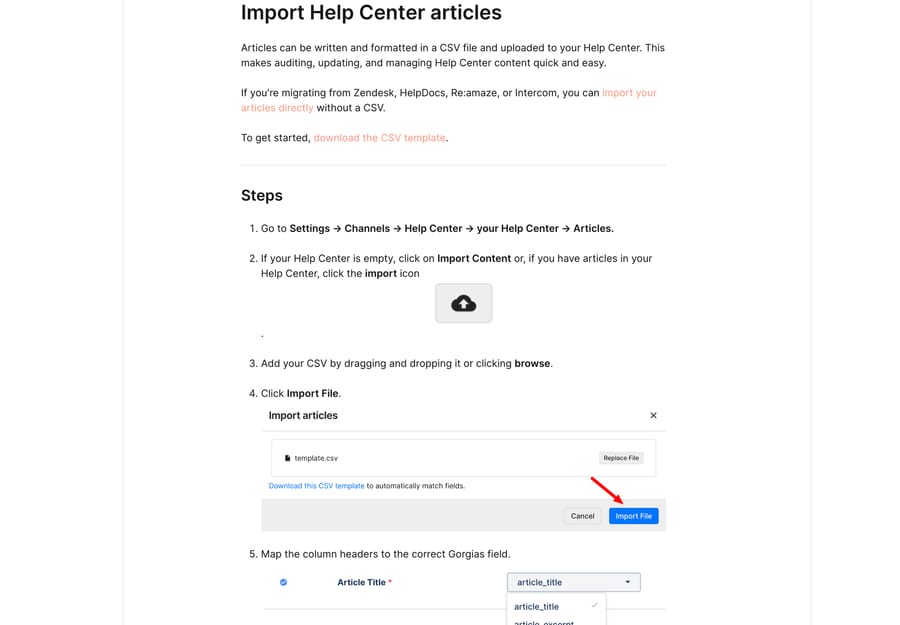
Gorgias can import Help Center articles from a CSV, and it can import directly from Zendesk, HelpDocs, Re:amaze and Intercom without the CSV step, at Settings › Channels › Help Center › [your Help Center] › Articles (Import and export Help Center articles). Mapped columns can't contain blank cells, and article and category slugs can't include characters like $#%&^*.
Going the other way is where it's asymmetric: in Gorgias' own words, "Help Center articles can't be exported directly from Gorgias", and the documented route is to ask support for a data export. Keep your articles in a source you control, and treat the Gorgias Help Center as a published copy rather than the master. An importer that's easy to walk into and an export you have to request is the incentive a help desk has, and it's worth pricing into the decision rather than discovering later.
What's the best tool to migrate from Zendesk to Gorgias?
For most Shopify brands, the native importer: it's free on every Helpdesk plan and keeps syncing until you cut over. Pay for a migration service when you need what it drops, above all ticket attachments and more than two years of history. We haven't run either paid tool, so the table is what each vendor publishes (checked 28 September 2026).
| Tool | Pricing model | What it keeps that the native importer drops |
|---|---|---|
| Gorgias native importer | Included on every Helpdesk plan | Baseline: two years, no ticket attachments, no CSAT ratings, 250-comment split |
| Help Desk Migration | One-time, per record (tickets, contacts, agents, articles; attachments and comments aren't counted). Its examples: $100 for 1,000 records, $514 for 10,000. Free demo of 20 tickets and 20 articles | Its Gorgias page lists ticket attachments, inline images and knowledge base articles; no two-year limit stated |
| ClonePartner | Fixed-price quote after a call with an engineer; no public prices | Lists full conversation history, macros and knowledge base content; notes Zendesk organizations can't move because Gorgias has no organization object |
Run the free demo or ask for a sample on your own long tickets (over 250 comments) and a few with attachments, and check how each tool maps pending and solved statuses, since Gorgias only has open and closed.
How do you migrate from Gorgias back to Zendesk?
If the move doesn't stick, the return trip is a different shape, because Zendesk hasn't built a Gorgias importer to mirror the one you used coming in. That leaves the same two options Freshdesk teams face in the other direction: a paid migration tool, or an export plus a rebuild. Our step-by-step for that direction is how to migrate from Gorgias to Zendesk.
Before you plan it, know what the Gorgias export actually contains.
What does the Gorgias export include, and what does it leave out?
Ticket export lives in the Inbox: dropdown menu › Inbox, pick a view, then the three-dots icon and Export tickets. The CSV arrives by email, on every Helpdesk plan, and the owner, admins and leads can run it (Export tickets from Gorgias).
The field list is generous on metadata: IDs and links, tags, channel, priority, subject, created and closed dates, survey score, assignee and customer, first response and resolution times, message counts, and ticket and customer fields.
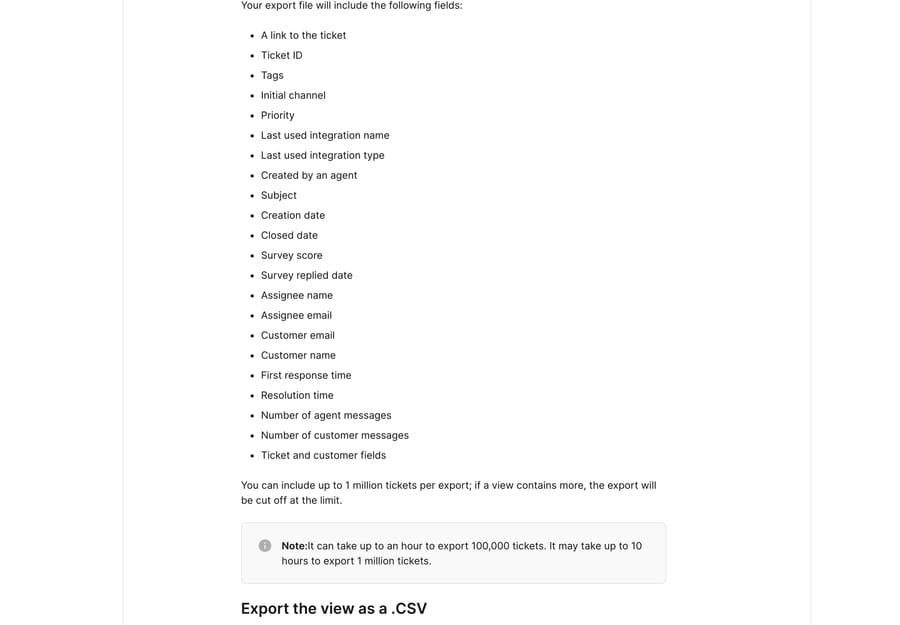
What's absent from that list is the conversation. Message bodies aren't in a view export. Gorgias' analytics drill-down export does include Message text, and that one is capped at 30 days and 100,000 tickets, so it's a sampling tool rather than an archive. Volume limits on the view export are 1 million tickets, cut off at the limit if the view holds more, and Gorgias warns it can take an hour to export 100,000 tickets and up to 10 hours for a million.
Read those two facts together and the practical rule is simple: if you might ever leave, don't let the only copy of your conversation history live in one help desk. Our fuller version is how to export data from Gorgias, and if you are still deciding between the platforms, Zendesk vs Gorgias is the comparison. Coming from Freshdesk instead, the path is different again: how to migrate from Freshdesk to Gorgias.
How hard is it to switch from Zendesk to Gorgias?
The data move is mostly waiting; the rebuild is the work. The table below is our estimate for a mid-sized Shopify brand (5 agents, 40 active triggers, 60 macros of which 20 do more than reply, 10 views, one SLA policy). We haven't timed a real migration, so treat the hours as a planning starting point and replace the counts with your own.
| Rebuild item | Count in the example | Our estimate |
|---|---|---|
| Ticket fields and tags, checked after import | 1 pass | 2 to 4 hours |
| Triggers and automations rewritten as Rules | 40 | about 30 minutes each, 20 hours |
| Macro actions added back (tags, assignee, priority) | 20 | about 10 minutes each, 3 to 4 hours |
| Views | 10 | about 15 minutes each, 2 to 3 hours |
| SLA promises as Rules and priorities | 1 policy | 2 to 4 hours |
| AI guidance rewritten for Gorgias objects | 1 agent | 1 to 2 days |
| Cutover: Rules on one at a time, email forwarding, checks | 1 day | 1 day |
That adds up to roughly one working week of admin time, run alongside an import that, at 720 tickets an hour, takes about four days for two years of a 3,000-ticket-a-month queue. Rules dominate, which is why the trigger inventory is the first thing to count.
How do you cut over without Rules misfiring?
The importer reads Zendesk's API while Zendesk keeps serving customers, so the data move itself doesn't require downtime. The risk is in the other direction: new Gorgias Rules firing against freshly imported historical tickets and auto-replying to a shopper about a 2024 order.
Import with Rules paused, check a sample of imported tickets across each status and channel, then switch Rules on one at a time and watch the first hour of each. Only then move email forwarding.
What happens to your Zendesk AI setup when you move to Gorgias?
None of it moves. The importer copies records, and Zendesk's AI isn't a record: AI agents, Copilot, intent and sentiment settings, and anything Zendesk learned from your tickets are Zendesk products that stay with the Zendesk account. What does come across is the raw material an AI needs, the tickets, the macros' reply text and (by direct import) the Help Center articles.
On Gorgias, the native route is Gorgias AI Agent. You point it at knowledge (the Help Center you just imported, your website, Shopify product data), write guidance, and switch on Actions such as the six Shopify order Actions, which cancel an unfulfilled order or edit its address without a person (the Shopify app map covers what AI can do in the rest of your stack). Budget time for it: guidance written for Zendesk's AI refers to Zendesk fields, groups and macros that no longer exist, so plan to rewrite it.
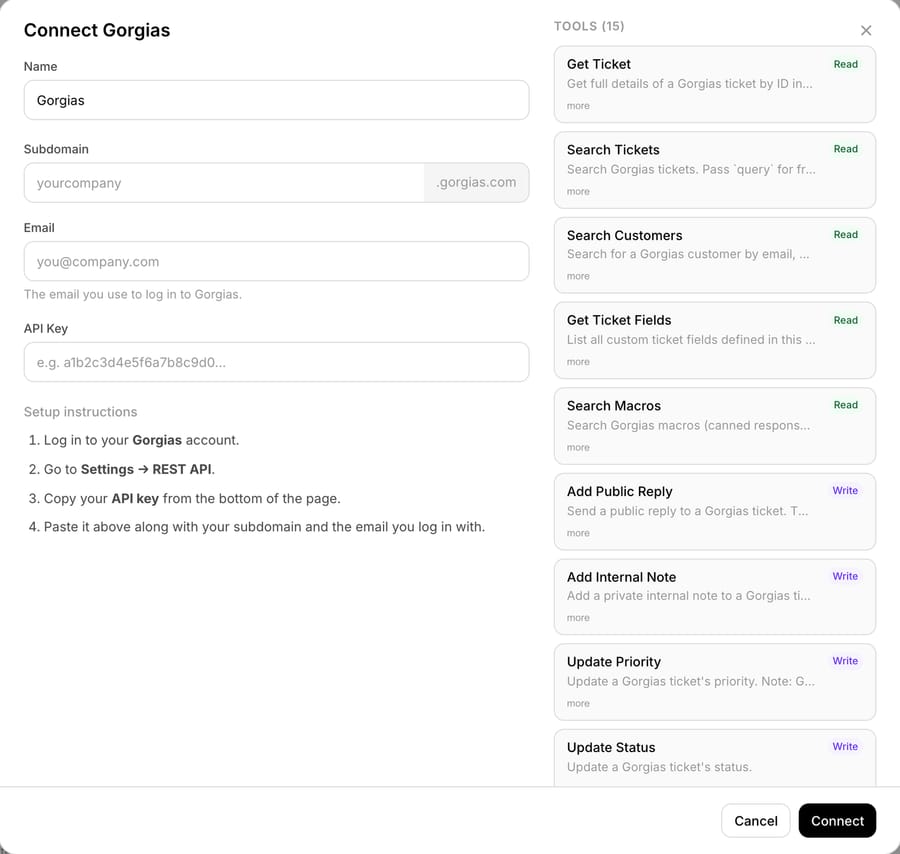
The third option is an AI agent layer that isn't tied to either desk. With Macha, the agents, their instructions, knowledge sources such as Confluence, Notion, Google Docs or uploaded files, and custom API tools all live in Macha. Moving desks means connecting the Gorgias connector in place of the Zendesk one and pointing the agent's trigger at Gorgias. Two things still need work: a Zendesk Help Center sync source has to be replaced (Gorgias's public REST API reference lists no Help Center article endpoints when we checked on 28 September 2026, so the practical route is adding the published Help Center as a website source, which Macha crawls), and instructions that name Zendesk-only objects, such as a custom field or a group, need rewording for Gorgias's tags, teams and fields. That makes the AI setup the one part of a migration you don't rebuild from zero. If you decide to stay on Zendesk instead, see which AI agent a Shopify brand on Zendesk should use.
What does support cost before and after the move?
Take a Shopify brand with 5 agents and 3,000 tickets a month that wants AI to resolve 900 of them, 30%. On Zendesk Suite Team at $55 per agent per month billed annually, the seats cost $275. Zendesk's AI agents include 5 automated resolutions per agent a month on Suite Team, 25 here, and the other 875 cost $1.50 each on a committed plan, $1,312.50, or $2.00 pay-as-you-go. That's about $1,588 a month on committed pricing.
Gorgias prices by tickets, not seats. Pro covers 2,000 tickets for $360 a month and charges $36 per 100 after that, so 3,000 tickets cost $720. AI Agent on Pro includes 190 resolved conversations for $190, and the other 710 cost $1.50 each, $1,065, for about $1,975 a month on monthly prices. On these assumptions Gorgias costs more than Zendesk, and the gap is almost all AI, because Gorgias bills each resolved conversation on top of the ticket fee the same conversation already paid.
| 5 agents, 3,000 tickets, 900 resolved by AI | Help desk | AI | Monthly total |
|---|---|---|---|
| Zendesk Suite Team + AI agents (committed) | $275 | $1,312.50 | about $1,588 |
| Gorgias Pro + AI Agent | $720 | $1,255 | about $1,975 |
| Zendesk Suite Team + Macha, 1,500-ticket tier (no migration) | $275 | $599 | $874 |
| Gorgias Pro + Macha, 1,500-ticket tier | $720 | $599 | $1,319 |
| Gorgias Pro + Macha working all 3,000 tickets | $720 | $1,199 | $1,919 |
If AI cost is what's pushing the move, price the no-migration row first: staying on Zendesk Suite Team and adding Macha's 1,500-ticket tier comes to $874 a month in this scenario.
The last two rows show the difference in unit. Macha charges per ticket it works, resolved or not, so a 900-ticket AI scope fits the 1,500-ticket tier (resolving 900 usually means the agent works more than 900 tickets, which is why we priced the next tier up rather than 1,000), and an agent that triages or drafts on every ticket needs the 3,000 tier. Per-resolution pricing does the opposite: its incentive is to bill more as your automation rate rises, so the Gorgias and Zendesk AI lines grow with success while the Macha line doesn't. Seat counts matter too. At 15 agents, Zendesk's seats rise to $825 and, with 75 included resolutions, its total to about $2,063, while Gorgias's ticket-priced help desk doesn't move, so Gorgias becomes the cheaper of the two. Prices were checked on 24 to 28 September 2026; Gorgias pricing explained and Zendesk pricing explained have the full plan tables.
Where does an AI agent layer fit after the migration?
The Rules rebuild forces a decision about what should be deterministic and what should reason. Some of what your Zendesk triggers did genuinely needs to be a Rule: SLA escalation, routing by channel, business-hours auto-replies. The rest of it was pattern-matching on words in a ticket, and that's what it was always badly suited for.
Macha is an AI agent layer that runs on top of the help desk a team already uses (Zendesk, Freshdesk, Gorgias, Front, HubSpot or Intercom), and it never replaces the help desk. It fits teams whose imported history is full of repeat questions that a keyword rule keeps getting half-right, and it's the wrong fit if what you need is strict, auditable routing. Macha has one plan, priced on monthly ticket volume: from $299 a month for 750 tickets, about $0.40 a ticket at every tier, one thread with one person counting as one ticket however many replies it takes, and a $50 free-usage trial with no credit card. Setup is done for you on the trial and every plan: the Macha team analyzes your past tickets, builds the knowledge base and the agent on Gorgias, and runs it in safe mode, with drafts as internal notes, until the drafts are right. The price also covers a dedicated success manager who handles your changes afterwards, including the instruction rewording a desk move needs. See Macha on Gorgias or the tiers at /pricing.
Frequently asked questions
Does the Zendesk to Gorgias importer move my triggers and automations? No. Triggers, automations, views, SLAs and CSAT surveys are configuration rather than records, so they stay behind. The native importer moves tickets, macros, users, tags and ticket fields, and you rebuild your triggers as Gorgias Rules after the data lands.
How much Zendesk history does the native importer bring across? Up to two years of your most recent data. It prioritizes the most recent 14 days first, then backfills from oldest to newest. Older history than two years needs a paid migration tool or stays in Zendesk.
Do my Zendesk macros work the same in Gorgias? Partly. The macros import, but Gorgias supports only reply text and status change actions, so a macro that also tagged, assigned or fired a webhook arrives without those actions. Make a list of every macro that does more than reply before you import.
What happens to pending and solved Zendesk tickets? They arrive as closed. Gorgias retains only open or closed statuses, so any view or report built on pending needs rebuilding as a tag or field before you migrate.
Where is the Zendesk import in Gorgias? Settings icon at the bottom left, then Advanced › Historical Imports › Zendesk Import › Import. You will need a Zendesk API token, your subdomain and your sign-in email, plus an Admin role on both platforms.
Will migrating to Gorgias cause downtime? It doesn't have to. The importer reads Zendesk's API while Zendesk keeps serving customers, and continuous sync catches records created during the run. The real risk is new Gorgias Rules firing on imported historical tickets, so import with Rules paused and enable them one at a time.
Can I migrate from Gorgias back to Zendesk? Yes, but it isn't symmetrical. Zendesk has no native Gorgias importer, so it's a paid migration tool or an export and a rebuild. Plan for the export gap: the Gorgias view export gives ticket metadata without message bodies, and the analytics drill-down export that does include message text is capped at 30 days and 100,000 tickets.
Does my Zendesk AI agent come across to Gorgias? No. Zendesk AI agents, Copilot and their settings stay with the Zendesk account. You rebuild the AI on Gorgias AI Agent, or connect an agent layer such as Macha whose agents, instructions and knowledge sit outside the help desk, so switching desks means reconnecting rather than rebuilding.
Is Gorgias cheaper than Zendesk for a Shopify brand? It depends on seats and AI volume. For 5 agents, 3,000 tickets and 900 AI resolutions a month, our worked example puts Zendesk Suite Team at about $1,588 and Gorgias Pro at about $1,975, because Gorgias charges per resolved conversation on top of each ticket. At 15 agents Zendesk's seats rise to $825 and its total to about $2,063, so Gorgias becomes the cheaper of the two.
Can I add AI to Gorgias after migrating without replacing it? Yes. An agent layer such as Macha connects to Gorgias and works on the tickets you just imported, drafting or posting grounded replies and triaging by intent, while Gorgias stays the system of record and keeps the Shopify context on the ticket. The Macha team sets the agent up for you, included at about $0.40 a ticket.
Sources:
- Import Zendesk data into Gorgias: the seven steps, the 14-day prioritization, continuous sync, and every documented limit (checked 28 September 2026)
- Zendesk migration 101: attachments and ratings not imported, about 720 tickets an hour, macro edits during sync, Rules limits on imported tickets (checked 28 September 2026)
- Zendesk API token deprecation: July 28 and October 27, 2026 and April 30, 2027 dates (checked 28 September 2026)
- Export tickets from Gorgias: export path, field list, 1 million ticket cap, timing, drill-down export and its 30-day limit
- Import and export Help Center articles: CSV and direct imports, slug rules, and the export limitation
- Migrate from non-Zendesk providers: what Gorgias recommends when there is no native importer
- Gorgias pricing: plan and AI Agent figures in the page's structured data, checked 28 September 2026






